
MP20 - Mp3 player Natec - Free user manual and instructions
Find the device manual for free MP20 Natec in PDF.


| Product Type | MP3 Player |
| Brand | Natec |
| Model | MP20 |
| Display | OLED 128x64 pixels |
| Built-in Memory | 4 GB |
| Supported Audio Formats | MP3, WMA |
| Recording Format | WAV |
| Text Format | TXT |
| Equalizer Presets | Natural, Rock, Pop, Classic, Soft, Jazz, DBB |
| Interface | USB 2.0 |
| Audio Output | 3.5 mm stereo Mini-Jack |
| Power Supply | 3.7 V, 240 mAh Li-polymer battery |
| Operating Temperature | −5°C to 40°C |
| Dimensions | 84 x 26 x 11 mm |
| System Requirements | Windows 2000/ME/XP/Vista/7/8, Mac OS 10, Linux 2.4.2 |
| Package Contents | MP3 Player MP20, Earphones, User Manual |
| Warranty | 24 months |
| Certifications | CE, RoHS, WEEE |
| Operation Languages | English, German, French, Italian, Dutch, Portuguese, Spanish, Swedish, Czech, Polish, Romanian, Greek, Russian, etc. |
| Battery Charging | Via USB; first two charges approx. 8 hours |
| Maintenance | Clean with a dry cloth; do not use alcohol, benzene, or thinners |
| Safety Precautions | Avoid extreme temperatures, humidity, and dirt; do not use while driving; keep volume moderate to prevent hearing damage |
| Repairability | No user-serviceable parts; unauthorized repairs void warranty |
Frequently Asked Questions - MP20 Natec
User questions about MP20 Natec
0 question about this device. Answer the ones you know or ask your own.
Ask a new question about this device
Download the instructions for your Mp3 player in PDF format for free! Find your manual MP20 - Natec and take your electronic device back in hand. On this page are published all the documents necessary for the use of your device. MP20 by Natec.
USER MANUAL MP20 Natec
The manual contains important safety instructions and information about the device's proper usage. Read it carefully to avoid accidents.
- Please do not expose the device in the low or high temperature (above 40°C), especially in cars with window closed during summer.
- Please do not store it in the humid or dirty area.
- Avoid to hit or friction with a hard object, otherwise it will lead to grind surface or other hardware damage.
- Please do not turn up the volume of the earphones too high while using it. If you feel ringing in your ears stop using the device or turn the volume down.
- Please do not wipe the surface of device with alcohol or benzene or thinners.
- Please do not use the device in areas where electronic devices are prohibited.
- It is not suggested to use the device when you are driving or walking in the street.
2. FUNCTION OVERVIEW
- USB plug
- Button for direct recording
- Mode button
- Volume
- Next
- Previous
- Play / Pause
- Reset button
- Hold button
- Microphone
- Power ON/OFF button
- Earphone jack
- Earphone jack
- Strap hole
- OLED display
- USB plug cover
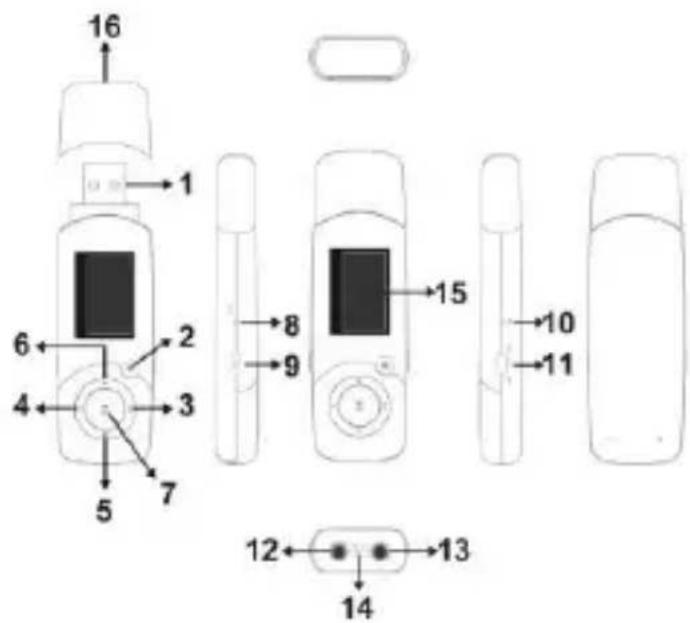
3. BASIC OPERATION
Power ON/OFF
Push the button to "ON/OFF" position to turn on/off the device.
Note: When battery power is low, system will automatically power OFF the device.
Standby Mode
Hold play/pause button for 3 seconds to enter/exit into/from standby mode.
Volume adjusting
Press “V” button to enter into volume adjustment interface, then press “next/previous” button to increase/decrease the volume. Long press “next/previous” button will increase/decrease the volume continuously.
Note: Do not turn up the volume too high when using the earphones, otherwise you can injure your hearing.
4. BATTERY
Battery power indicator is located on the screen, when battery power is low, recharge your battery by connecting to PC via USB. The battery indicator will indicate charging of battery. Indicator will also indicate when battery is fully charged.
Note: For the first two times charge the battery for about 8hrs. The running time of battery depends on the volume, playing files format, button operation, etc. The user can set [power off setting] to save power.
5. MAIN MENU
Press “M” button to enter into sub menu, then press “next/previous” button to select. To save settings and exit from menu hold “M” button.
Music mode
Short press play/pause button to start/pause of playing. Press “next” button to move on the next song. Press “previous” button briefly to move to the previous songs.
Press “M” button to enter into sub-menu, then press “next/previous” button to select the mode. You can confirm selection by pressing “M” button (Repeat, Equalizer, Replay, Replay times, Replay gap, Exit).
Replay settings: when “A” in the icon blinks, select song and press “M” to confirm start point, then select song which you want to play as last and press “M” to confirm. The player will replay from A to B according to the setting in the replay times.
Record mode
Press play/pause button to start/stop recording. Hold "M" button to save and exit.
Text mode
Press “M” button to enter into TEXT menu. To read the text, press “play/pause” button. To set up, delete or bookmark text file, press “M” button and select required action.
Settings
Press “next/previous” button to select required setting, then press “M” button briefly to edit. In this mode you can set: System Time, Backlight, Language, Power OFF time, Contrast and also you can get information’s about Used memory, Firmware version, Firmware upgrade.
6. USB DISK FUNCTION
The player can be also used as a mobile storage device, just plug and play to the computer. The player also supports charging via USB when connecting to PC.
GENERAL INFORMATION
- The product is covered by a 24 months manufacturer's warranty.
- Non-authorized repairs or taking the device to pieces make the warranty void and may cause the product damage.
- The safe product, conforming to the EU requirements.
- The product is made in accordance with RoHS European standard. The standard was issued in order to decrease the amount of the electronic and electrical waste emitted into the atmosphere.
- The WEEE symbol (the crossed-out wheeled bin) using indicates that this product in not home waste. You protect the environment when you recycle hazardous waste appropriately. In order to get detailed information about recycling this product please contacts your retailer or a local authority.
Visit our web site to get more information: www.natec-zone.com

PL - MP3 PLAYER NATEC MP20 - INSTRUKCJA OBSŁUGI
1. INSTRUKCJA BEZPIECZEŃSTWA
| PRODUCT SPECIFICATION | |
| OLED screen | 128x64 pixels |
| Operating languages | English, German, French, Italian, Dutch, Portuguese, Spanish, Swedish, Czech, Polish, Romanian, Greek, Russian etc. |
| USB Interface | USB2.0 |
| File formats supported | Music: MP3, WMA, Record: WAVText: TXT |
| Equalizer | Natural, Rock, Pop, Classic, Soft, Jazz, DBB |
| Built-in memory | 4GB |
| Audio socket | 3.5mm stereo Mini-Jack |
| Power supply | 3.7V 240mAh Li-polymer battery |
| Operating temperature | -5°C~40°C |
| Dimension | 84x26x11mm |
| System requirements | Windows 2000/ME/XP/Vista,7/8, Mac OS 10, Linux 2.4.2 |
| Package contents | MP3 Player MP20, Earphones, User Manual |


Brand : Natec
Model : MP20
Category : Mp3 player