
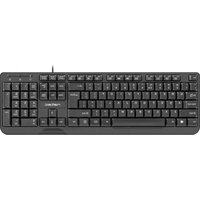
RX55 - Keyboard Natec - Free user manual and instructions
Find the device manual for free RX55 Natec in PDF.


| Product Type | Keyboard |
| Brand | Natec |
| Model | RX55 |
| Dimensions (W x D x H) | 440 x 130 x 30 mm |
| Weight | 500 g |
| Connection | USB wired |
| Power Supply | USB bus-powered |
| Key Switch Type | Membrane |
| Number of Keys | 104 (US layout) or 105 (EU layout) |
| Multimedia Keys | Yes (via Fn combos) |
| Backlighting | No |
| Wrist Rest | No |
| Cable Length | 1.5 m |
| Operating System Support | Windows, macOS, Linux |
| Maintenance | Clean with a soft, dry cloth. Avoid liquids. |
| Safety Precautions | Do not expose to water or excessive heat. |
| Spare Parts Availability | Not available |
| Repairability | Not designed for user repair |
| General Information | Standard wired keyboard for office and home use. |
Frequently Asked Questions - RX55 Natec
User questions about RX55 Natec
0 question about this device. Answer the ones you know or ask your own.
Ask a new question about this device
Download the instructions for your Keyboard in PDF format for free! Find your manual RX55 - Natec and take your electronic device back in hand. On this page are published all the documents necessary for the use of your device. RX55 by Natec.
USER MANUAL RX55 Natec
PL – NATEC GENESIS RX 55 – INSTRUKCJA OBSŁUGI
Wstep
Genesis RX55 is a programmable gaming keyboard with built-in memory, driver and keys backlight.
Characteristics
- Compatible with Windows XP/Vista/7 operation system;
- 3 groups (21 buttons) of function defined keys;
- 3 levels of backlight, as well as backlight sleep mode;
- lock Windows key setting;
- 4 status indicator lights;
- standard 104 keys and 10 gaming function keys;
- built-in memory for storing the settings.
Driver description
System
- Compatible with Windows XP/Vista/7 operation system;
- USB (1.1/2.0) port;
- CD-ROM drive;
- 50 MB of hard disk space.
Windows XP/Vista/7 installation guide
- Insert the Genesis RX55 gaming keyboard USB plug into the computer USB port.
- Insert the Genesis RX55 driver CD into the CD-ROM drive.
- When the screen shows "install the program", click "next".
- Select the install path, then click "next".
- Installing.
- When the screen shows "installation finished", click "finish".
- Restart the computer.
Keyboard settings
1. Default settings
a. Reset function of one key to defaults – click the key, and a window will appear. Click “Restore default”.
b. Reset functions of all keys to defaults – click "Restore" on the left top corner of the driver window, then click "Confirm"

2. Multimedia functions
a. Click the programmable key and then click "Multimedia" button
b. Select the function, click "Apply"

3. Basic functions
a. Click the programmable key, and then click "Basic function" button
b. Select the needed function and click "Apply"

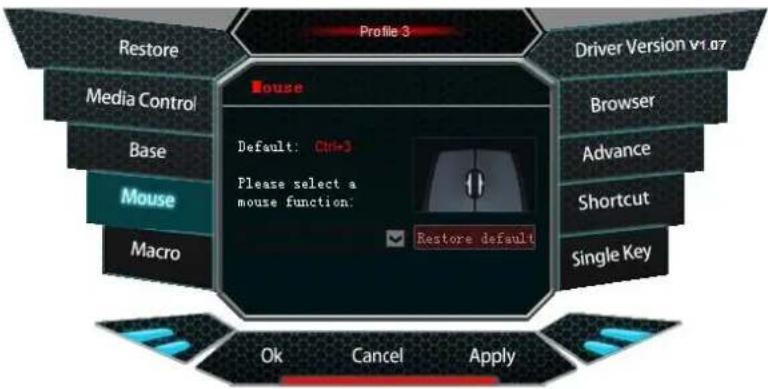
4. Mouse functions
a. Click the programmable key, and click "Mouse function" button
b. Select the needed function and click "Apply"
5. Macro definition
What is Macro?
In brief speaking, it is a series of actions that you can bind to the keyboard. More precisely, macro is a recorded sequence of key presses, releases and time delays between them. Output delays can be recorded or predefined by user.
Hot to define a Macro?
a. Click the programmable key, click "Macro"
b. Click "Set up a new macro"
c. Input the name into the text box
d. Select a new macro, decide cycle time and auto delay, click "Start recording", enter the key sequence, click "Stop recording".
e. "Apply"

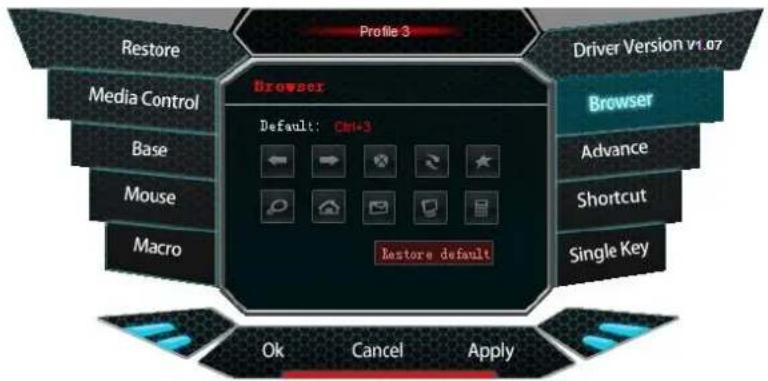
6. Browser functions
a. Click the programmable key, click "Browser"
b. Select the function, click "Apply"
7. Advanced functions
The gaming keyboard has one-key-response function to the common computer operations.
a. Click the programmable key, click "Advanced"
b. Select the funtion, click "Apply"

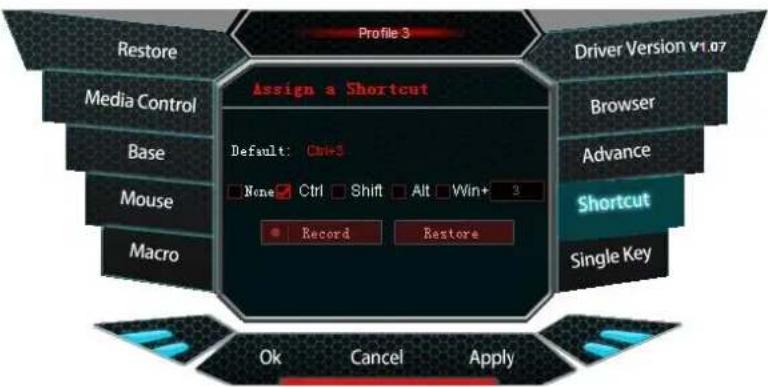
8. Combined keys
a. Click the programmable key, click "Shortcut"
b. Select the combination of keys
c. "Apply"
9. Single key
There are 7 multimedia function keys and 104 standard keys
a. Click the programmable key, click "Single key"
b. Press the single key;
c. "Apply"

How to create and save the profile?
Each profile is based on single working mode; therefore gamer can set targeted profile to provide strong game support.
In the driver, we can choose the current profile to be used in one game and save it afterwards; there is possible maximum of 3 profiles.

The gaming keyboard provides profile creating, loading, saving and editing.
You can save the profiles which are not used at the time to your computer and load them into the driver when you need them.
When you switch to another computer, you can still use the previously loaded profile.
Creating a profile:
- Select the game or application
- Click "Confirm"
- Click "Apply"

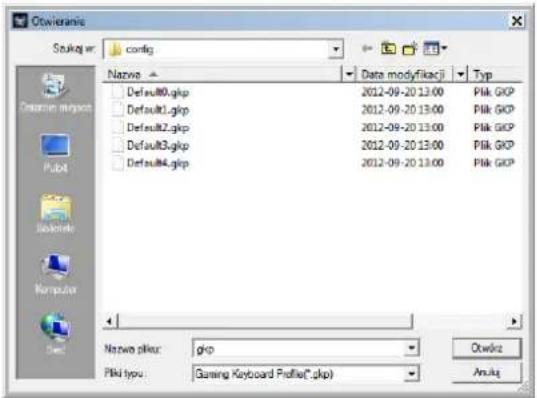
Loading the settings:
- Open the driver interface, click "Import"
- Browse to open the needed profile file
- Click "Open"
- Select the profile which you need to save, click "Export"
- Type the profile name and click "Save"

| Marking | Key name | Function description |
| 1 ~7 | User defined keys | Function can be defined in driver software |
| 8 | Profile switch | Profile 1-3 switching |
| 9 | Backlight brightness | Backlight brightness level:100%/Off/50% |
| 10 | Lock Win key | Lock Win key, lightning indicator on and Windows key: lock and unlock bubbling hints |
| central | 104 keys | 104 standard keys, function can be defined in driver software |
General
- Non-authorized repairs or taking the device to pieces make the warranty void and may cause the product damage.
- Do not use the product in low and high temperatures and in the dusty atmosphere.
- Do not connect / disconnect the product to / from a computer when it is on.
- The safe product, conforming to the EU requirements.
- The product is made in accordance with RoHS European standard. The standard was issued in order to decrease the amount of the electronic and electrical waste emitted into the atmosphere.
- The WEEE symbol (the crossed-out wheeled bin) using indicates that this product in not home waste. You protect the environment when you recycle hazardous waste appropriately. In order to get detailed information about recycling this product please contact your retailer or a local authority.



- PL – NATEC GENESIS RX 55 – INSTRUKCJA OBSŁUGI
- Wstep
- Characteristics
- Driver description
- System
- Windows XP/Vista/7 installation guide
- Keyboard settings
- Default settings
- Multimedia functions
- Basic functions
- Mouse functions
- Macro definition
- What is Macro?
- Browser functions
- Advanced functions
- Combined keys
- Single key
- How to create and save the profile?
- Creating a profile:
- Loading the settings:
- General
Brand : Natec
Model : RX55
Category : Keyboard