Ally Pad - Car seat Inglesina - Free user manual and instructions
Find the device manual for free Ally Pad Inglesina in PDF.


User questions about Ally Pad Inglesina
0 question about this device. Answer the ones you know or ask your own.
Ask a new question about this device
Download the instructions for your Car seat in PDF format for free! Find your manual Ally Pad - Inglesina and take your electronic device back in hand. On this page are published all the documents necessary for the use of your device. Ally Pad by Inglesina.
USER MANUAL Ally Pad Inglesina
natural_image
Icon of a person reading into a circle with sound waves (no text or symbols)Inglesina
Ally Pad
Dispositivo anti abbandono • Car seat baby alert
IMPORTANT - KEEP THESE INSTRUCTIONS FOR FUTURE REFERENCE.
text_image
1 A Inglesina Btext_image
6 A A OK!N• GRUPPO 0+ (0-13 KG) - ECE 44/04 • GRUPPO 1 (9-18 KG) - ECE 44/04 SEGGIOLINI AUTO i-Size - ECE R129 / CON CINTURE DI SICUREZZA INTEGRATE
• GROUP 0+ (0-13 KG) - ECE 44/04 • GROUP 1 (9-18 KG) - ECE 44/04
i-Size CAR SEATS - ECE R129 / WITH INTEGRATED SAFETY BELTS
text_image
7 A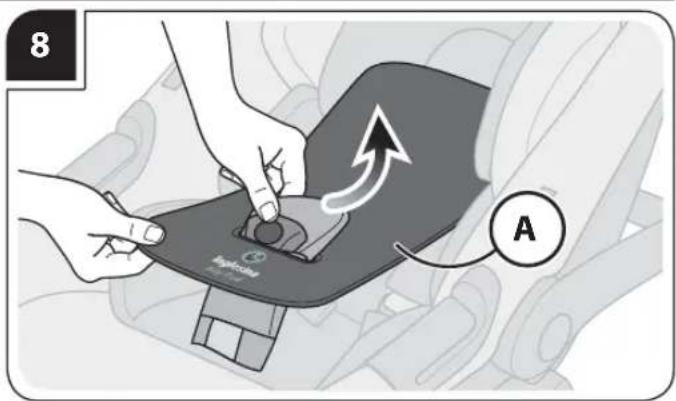
text_image
8 A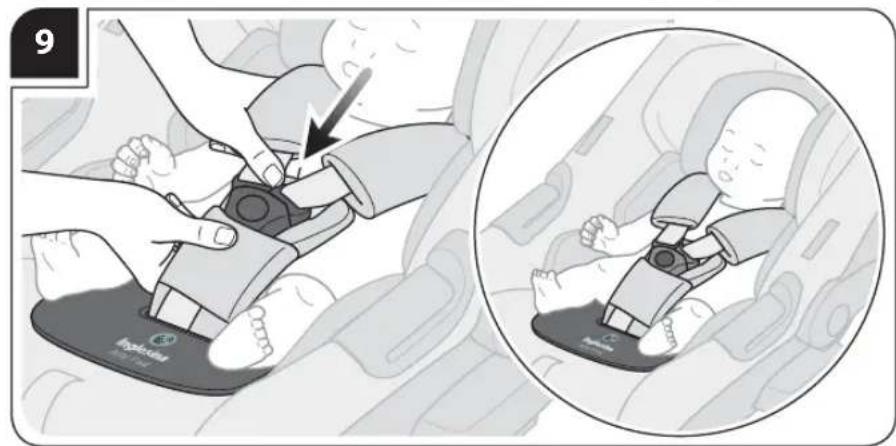
text_image
9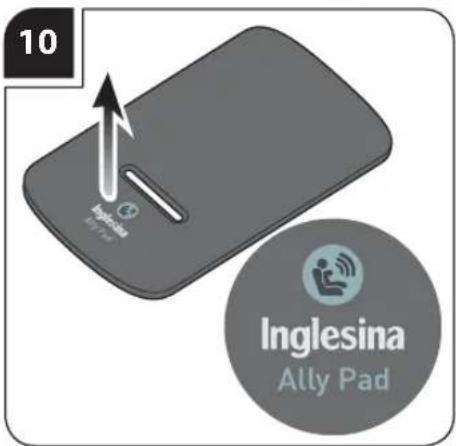
text_image
10 Inglesina Ally Pad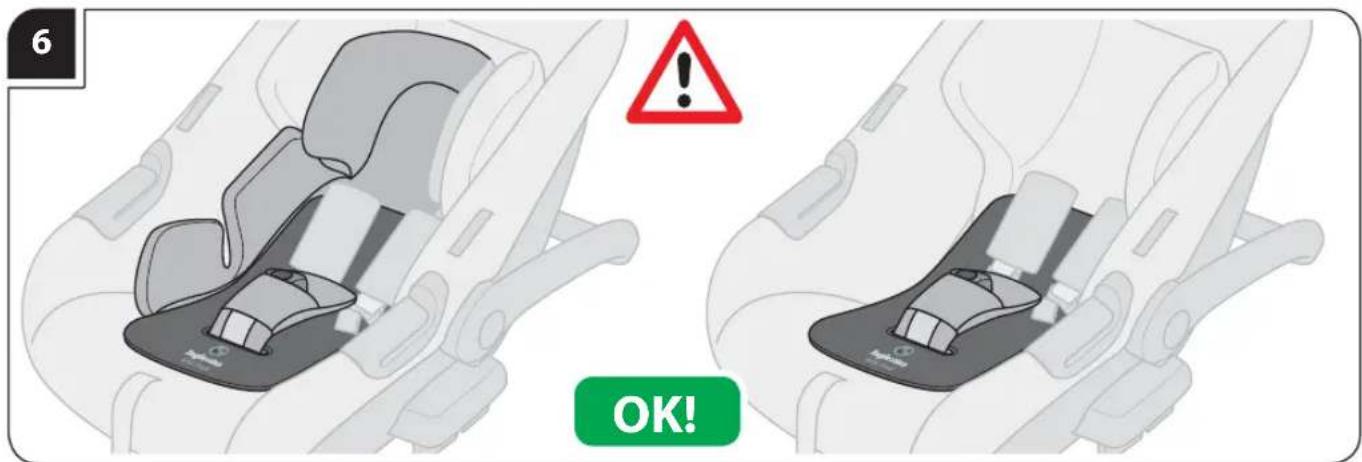
text_image
6 OK!• GRUPPO 2 (15-25 KG) - ECE 44/04 • GRUPPO 3 (22-36 KG) - ECE 44/04
• GROUP 2 (15-25 KG) - ECE 44/04 • GROUP 3 (22-36 KG) - ECE 44/04
text_image
12 B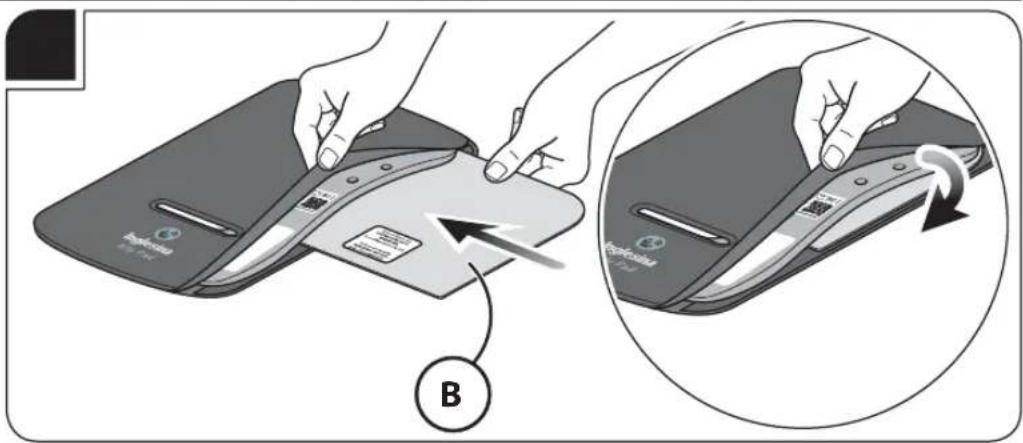
text_image
B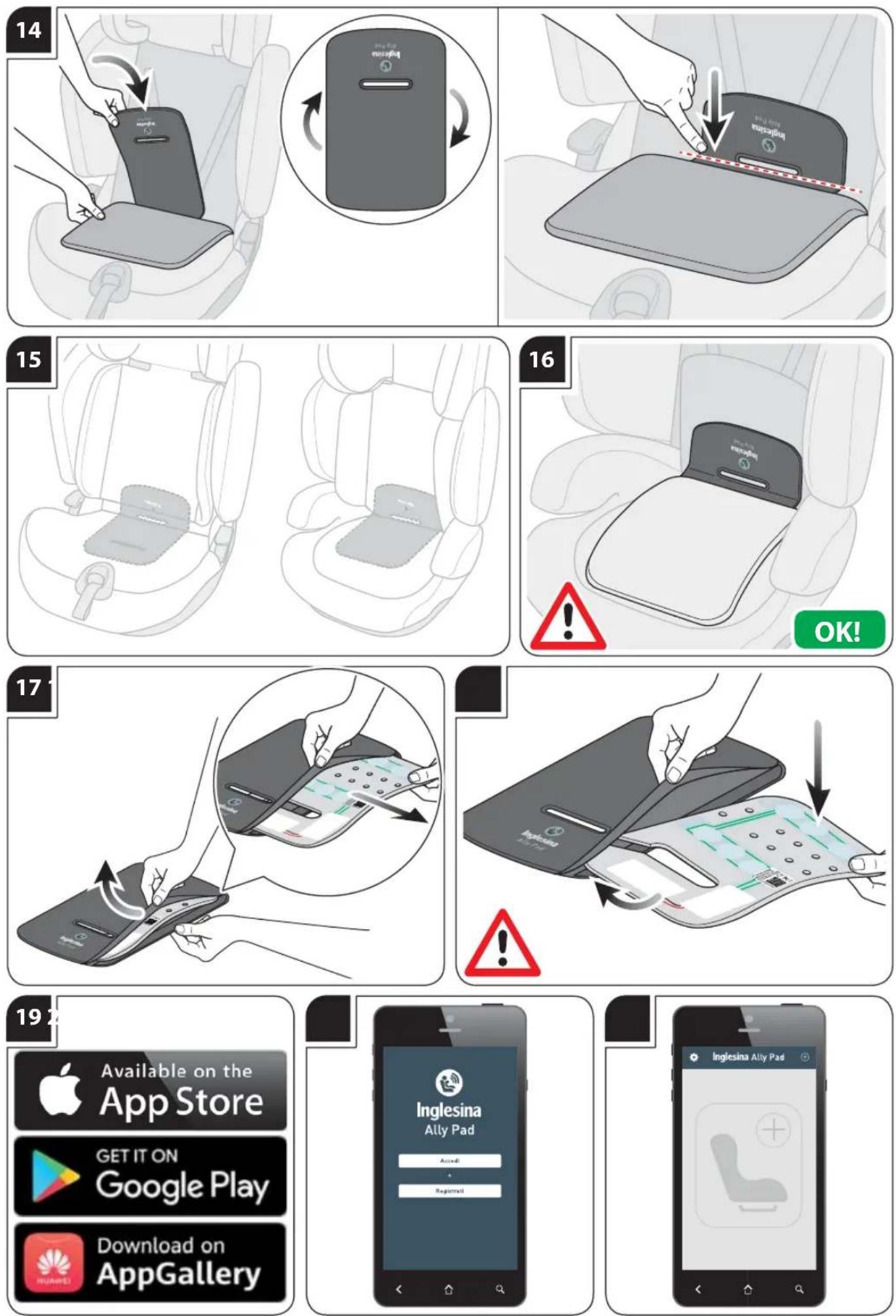

• LEGGERE ATTENTAMENTE LE ISTRUZIONI PRIMA DELL'USO E CONSERVARLE
PER RIFERIMENTI FUTURI.
• SI RACCOMANDA DI INSTALLARE ED UTILIZZARE ALLY PAD SECONDO LE ISTRUZIONI FORNITE IN QUESTO MANUALE.
text_image
Internal Flash Internal FlashASSOCIAZIONE DI ALLY PAD ALLO SMARTPHONE
- READ THE INSTRUCTIONS CAREFULLY BEFORE USE AND KEEP THEM FOR
FUTURE REFERENCE.
- IT IS RECOMMENDED TO INSTALL AND USE ALLY PAD ACCORDING TO THE INSTRUCTIONS PROVIDED IN THIS MANUAL.
- It is recommended that you make yourself familiar with the device by checking its functionality and performing usage tests.
-
It is recommended that you read the instructions of your smartphone carefully and make yourself familiar with its features.
-
It is recommended that you read carefully the instructions of the restraint system on which Ally Pad will be installed.
- Ally Pad is an alarm device designed to reduce the risk of leaving children unattended when they are on the car restraint system.
- Ally Pad device consists of a cushion with sensors to be used in combination with Inglesina's car restraint system and an App installed on the smartphone.
- The use of the device does not replace in any case the responsibility and/or the supervision of the driver of the car (and/or of the other occupants of the car). Ally Pad is only a support tool and does not eliminate the risk of serious injury or death due to leaving the child unattended in the car.
Never leave the child unattended in the car. - L'Inglesina Baby S.p.A. cannot in any way be held responsible in case of events and/or prejudicial consequences (also linked to the incorrect operation of the electronic device) of any kind, as Ally Pad is only an aid and alarm tool for the prevention of events and/or consequences caused by carelessness.
- The Ally Pad device is designed for use only with children
between 0 and 4 years of age provided that they are placed on approved restraint systems in compliance with the regulations in force.
- We recommend that you consult your doctor before employing Ally Pad with children using medical devices, as Ally Pad is equipped with a Bluetooth® Low Energy device that emits electromagnetic waves.
- This device is designed exclusively for use in cars with the Inglesina Restraint Systems listed on inglesina.com.
- If the product is used outside Italy, it is recommended to check the provisions of the laws in force in the countries of destination and/or transit.
- Ally Pad is installed on the car's restraint system as shown in the sequences and is able to detect the weight and therefore the presence of the child on it.
Thanks to the app available on the digital App stores (eg Apple Store®, Google Play®, Huawei AppGallery®, ...) the parent/adult is alerted by an alarm notification (1st level alarm) if they move away from the car leaving the child unattended on the Restraint System.
In addition, if the parent/adult does not intervene, an alarm text message (2nd level alarm) containing the approximate position of the car is forwarded to a predefined list of contacts, as long as the geolocation function is active on the smartphone.
- IMPORTANT: emergency numbers must be mobile phone numbers, not landline numbers or national emergency numbers.
- IMPORTANT: always check the correctness and operation of the emergency numbers after completing their entry.
- System requirements for original Android operating systems: compatibility with operating system 5.0 and higher.
- System requirements for original iOS operating systems: compatibility with operating system 10.0 and higher.
• However, it is advisable to previously check the compatibility of the smartphone used with the version of the App available. - Communication Technology: Bluetooth® Low Energy.
• Frequency band: 2.4 - 2.485 GHz.
• Transmission power: 2.51 mW.
• Power supply: battery, that cannot be replaced. - The level of the battery inside the Ally Pad device can be monitored through the App.
- Operating temperature: -20^ + 60^ .
- The correct preservation of the device (outside the daily use in the car) is important to keep its operation unaltered and must respect the temperature limits (from -20^ to +60^ ).
-
Checks to be carried out each time you use Ally Pad:
-
verify the actual connection between cushion and smartphone with the child on the restraint system, as described in the sequences.
- the smartphone must be switched on and have sufficient battery charge for the time of use in combination with Ally Pad.
- the Bluetooth ^® must be active.
- the "airplane" mode must be deactivated.
- the smartphone's SIM card must have enough phone and data credit.
- the GPS must always be active.
- check that the App is always active in the background:
- After restarting the smartphone, as some operating systems require a manual restart of the App to have full functionality.
- As a result of cleaning the cache and data of the App, through specific applications of the operating system and / or through other third-party applications.
- verify that the data network is active and that network and data connection is sufficient.
- when leaving the vehicle, make sure you always carry with you your smartphone connected to the cushion.
- if you use two or more smartphones at the same time on which the App is installed, you must identify the
one actually connected to the cushion mounted on the retention system.
- IMPORTANT: if there are two smartphones previously paired with the cushion in the same car and the Ally Pad App is active, the device will only connect to one of them, depending on the responsiveness of the Bluetooth® system of the individual smartphone. This condition cannot be changed until the Bluetooth® signal is lost.
- Ally Pad only works with smartphones with the Ally Pad App installed and regularly connected to the cushion.
- If you switch off your smartphone, the Ally Pad device will not work.
- If you damage the Bluetooth®, the Ally Pad device will not work.
- The Ally Pad device does not work with the "airplane" mode active.
- If there is no data network connection available and active, the Ally Pad App sends the first level alarm but it is not able to send text messages to emergency numbers (second level alarm).
- The Ally Pad App should only be downloaded from official stores.
-
Check that the Ally Pad App is up to date.
-
Check that your smartphone's operating system is up to date.
- Periodically check the contract conditions with your phone provider.
- It is recommended to use different accounts for each member of the family using the same Ally Pad.
- If you clone your smartphone or install new applications, make sure the Ally Pad App is working correctly.
- Ally Pad does not interfere with the normal operation of the Bluetooth® system that may be present in the vehicle.
- The smartphone with the Ally Pad App paired and active is an integral part of the device, therefore it is recommended to supervise the possible use by third parties (example: the child can stop the alarm by playing, etc.).
- When the pad is not used, it must be stored out of reach of children. The pad shall not be used as a toy! Do not let the child play with it.
• After any period of inactivity, check that the device is working correctly before use. - If the child is not seated on the restraint system equipped with active device, the Ally Pad device does not work.
- If your child is not seated on the restraint system according to the user manual, the Ally Pad device may not work.
- Do not use the Ally Pad device if it is damaged, has no operating instructions or lacks some components.
- It is recommended to verify the correct operation of Ally Pad, if the vehicle on which it is present is involved in an accident.
• In case of doubt, please contact the Retailer or the Inglesina Customer Care service.
• L'Inglesina Baby S.p.A. advises that Ally Pad should not be bought second-hand. It may have invisible damages that affect its performances. - For the safety of your child, remove and eliminate all plastic bags and elements belonging to the packaging before use and, in any case, keep them out of reach of newborns and children.
- Assembly, disassembly and adjustments must be carried out only by adults. Make sure that the person using the product (baby-sitter, grandparents, etc.) are aware of its correct operation.
- To avoid the risk of overheating, keep Ally Pad away from heat sources such as radiators, stoves, cookers, etc.
- Do not drop, hit, shake or fold the cushion, as its circuits and internal mechanisms may be damaged.
- Avoid Ally Pad contact with any kind of liquid. If a liquid comes into contact with the cushion, remove the textile lining and allow it to dry. Meanwhile, gently wipe the surface of the sensor with a dry cloth. Wait and verify that Ally Pad
is working correctly. In case of operation failure or doubt, please contact the Inglesina Customer Care service.
- It is recommended not to use and/or add to the restraint system reducers and/or accessories other than those supplied or approved by L'Inglesina Baby S.p.A.
- Do not make any alterations or additions to the device without the approval of the relevant Authority. Unauthorized technical changes may cause the function of Ally Pad to be reduced or completely eliminated.
- The conformity check will be invalidated if any changes are made to the device.
- Do not remove the adhesive and sewn labels. The removal of these labels could result in the product not complying with the law.
- Never use the pad without the lining as it is an integral part of the device and is essential for safety purposes.
- When using the device on car seats in Group 2/3 configuration (15-36 kg), always place the specific insert supplied in the package.
- Never remove the child from the child car seat when the vehicle is moving; in case of need, stop as soon as possible in a safe place.
- Do not interact with the Ally Pad App and your smartphone in general while driving. If necessary, stop in a safe place as soon as possible.
- When travelling, never hold your child in your arms or allow him to sit outside the child car seat.
- The driver should avoid any adjustment of the device while travelling. In case of need, stop as soon as possible in a safe place.
- When getting out of the car, even for a short time, ensure that you always take your child with you.
Directive 2012/19/EU
• European directive 2012/19/EU on waste electrical and electronic equipment (WEEE) prohibits the disposal of this equipment in the normal flow for solid urban waste, instead ordering it to be collected separately to optimise the flow of recovery and recycling of the materials it is made up of and prevent potential harm to health and the environment due to the presence of potentially hazardous substances. The crossed-out bin symbol is shown on all products as a reminder. The waste can be presented at the dedicated collection centres or can be handed over to the distributor upon purchasing equivalent new equipment or without an obligation to purchase for equipment of dimensions less than 25 cm. For further information on the correct disposal of this equipment, you may contact the appointed public service.
Directive 2006/66/CE
- The crossed-out bin symbol on the batteries or on the product packaging indicates that at the end of their useful life they must not be disposed of as urban waste but must be treated separately from household waste and taken to a separate collection centre or returned to the retailer when purchasing equivalent new rechargeable and non-rechargeable batteries.
If present, the chemical symbol Hg, Cd, Pb placed under the crossed-out bin indicates the type of substance contained in the battery:
Hg = Mercury, Cd = Cadmium, Pb = Lead.
The user is responsible for taking the batteries to the appropriate collection facilities at the end of their life, in order to facilitate their treatment and recycling.
Appropriate separate collection for subsequent recycling, treatment and environment-friendly disposal of spent batteries helps avoiding possible negative effects on the environment and human health and promotes the recycling of the substances of which the batteries are composed.
Unauthorized disposal of the product by the user will result in damage to the environment and human health.
For more detailed information about the collection systems available, please contact your local waste disposal service or the shop where you purchased the product.
- Hereby Inglesina declares that Ally Pad is compliant with the essential requirements and other relevant provisions of Directive 2014/53/EU.
A copy of the complete declaration of conformity can be found at the address: inglesina.com and is supplied with the device.
In accordance with European Commission Decision no. 2000/299/EC of 06/04/2000 the frequency band used by this product is harmonised in all EU countries, therefore this is a class 1 product.
WARRANTY CONDITIONS
- L'Inglesina Baby S.p.A. guarantees that every article has been designed and manufactured in compliance with the general product quality and safety standards/regulations in force in the European Union and the countries it is marketed in.
- L'Inglesina Baby S.p.A. guarantees that during and after the manufacturing process, every product has undergone various quality controls. L'Inglesina Baby S.p.A. guarantees that, at the time of purchase from the Authorised retailer, every product had no installation or manufacturing defects.
- This warranty does not invalidate the rights acknowledged to the consumer by the applicable national legislation, which may vary depending on the country in which the product was purchased and the provisions of which, in the event of a contrast, prevail over the contents of the warranty herein.
- In the event of material or manufacturing defects detected at the time of purchase or during normal use, as described in the relevant instruction manual, L'Inglesina Baby S.p.A. grants a consecutive 24-month warranty from the date of purchase.
- The warranty is only valid in the country where the product was purchased and if it was purchased from an Authorised Retailer.
- The warranty acknowledged is valid for the first owner of the product purchased.
- The warranty covers the replacement or repair free of charge of parts with factory defects. L'Inglesina Baby S.p.A. reserves the right to decide at its sole discretion whether to apply the warranty via the repair or the replacement of the product.
- To apply the warranty, the product serial number needs to be presented, along with a copy of the receipt issued at the time of purchase of the product, making sure that the date of purchase is indicated in a clearly legible form.
-
This warranty will be automatically made null and void in the event that:
-
the product is used for purposes that are not expressly indicated in the relevant instruction manual.
- the product is not used in compliance with the relevant instruction manual.
- the product has been repaired by unauthorised and unaffiliated Customer Care centres.
- the structural or textile part of the product has been modified and/or tampered with, without prior expressed authorisation by the manufacturer. Any modifications made to the products relieve L'Inglesina Baby S.p.A. from any liability.
- the defect is due to negligent or careless use (e.g., violent shocks to the structural parts, exposure to aggressive chemical substances, etc.).
- the product presents normal wear (e.g., wheels, moving parts, fabrics) due to prolonged and continuous use.
- the product has been damaged, even accidentally, by the owner himself/herself or by third parties (for
instance when it has been sent as luggage in air freight or using other means).
- the product is sent to the retailer for assistance without the original receipt and/or without the serial number or when the date of purchase on the receipt and/or the serial number are not clearly legible.
- Any damage caused by the use of accessories not supplied and/or not approved by L'Inglesina Baby S.p.A., shall not be covered by the warranty.
- L'Inglesina Baby S.p.A. shall not be held liable for any damage to property or injuries to persons resulting from the improper and/or misuse of the product.
• After the warranty period has expired, the Company guarantees customer care service for consideration for its products for a maximum period of four (4) years from the date said products were placed on the market; after this period, assistance interventions will be assessed case by case.
SPARE PARTS / AFTER SALES SERVICES
- Regularly inspect the safety devices to ensure the product's functionality over time. Do not use the product in the event of any malfunction and/or anomaly. Promptly contact your Authorised Retailer or the Inglesina Customer Care service.
- Do not use spare parts or accessories not supplied and/or not approved by L'Inglesina Baby S.p.A.
WHAT TO DO IF YOU REQUIRE ASSISTANCE
- If you require assistance for your product, immediately contact the Inglesina Retailer that sold it to you, with the "Serial Number" relative to said object ready on hand.
- It is the Retailer's duty to contact Inglesina to assess the best suited intervention case by case and then provide the
subsequent indications.
- The Inglesina Customer Care Service can provide any information, following written request by filling out the form provided on the website: inglesina.com - Warranty and Assistance section.
HINTS FOR CLEANING THE TEXTILE LINING
- The external lining is removable and washable according to the instructions indicated on the internal label. Follow the instructions carefully to avoid damage.
- It is recommended to wash the lining separately from other items.

Handwash in cold water

Do not bleach

Do not tumble dry

Dry flat in shade

Do not iron

Do not dry clean
Do not spin-dry
• After cleaning the textile lining, check that Ally Pad is working correctly.
- Do not tamper with or disassemble the interior and do not remove the electronic components, the weight sensor and the battery.
INSTRUCTIONS
LIST OF COMPONENTS
fig. 1
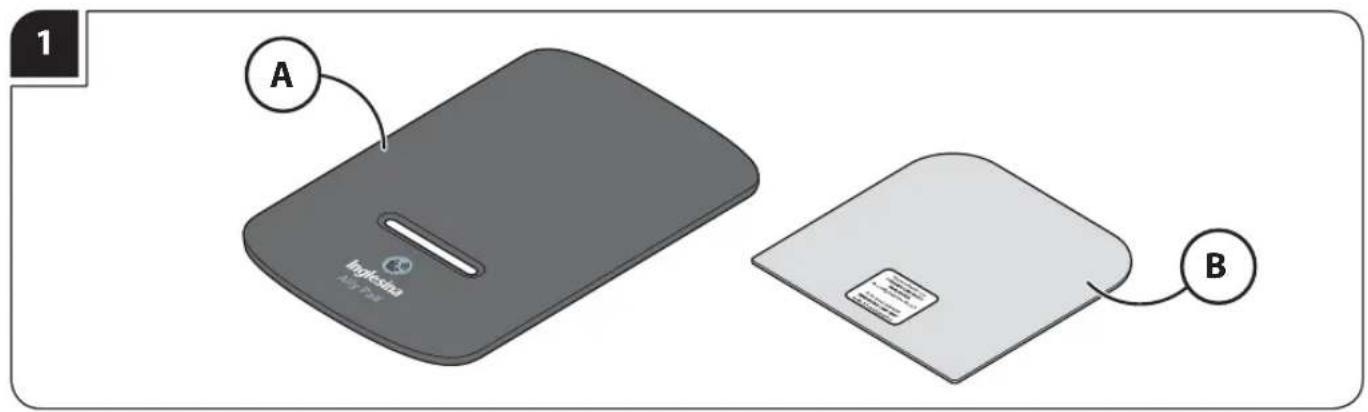
A Complete Inglesina Ally Pad Device
D Rigid Insert (only for car seats in Gr. 2/3 configuration)
INSTALLATION OF ALLY PAD IN INGLESINA CARRYCOTS
Installation in the carrycots prepared for cars, equipped with Inglesina 3-point Auto Kit
For the list of compatible carrycots vist inglesina.com
fig. 2 Install Ally Pad (A) always under the mattress and the Welcome Pad if the carrycot is equipped with it.
fig. 3 Position Ally Pad (A) at the bottom of the carrycot, passing the crotch strap of the Auto Kit harness system through the horizontal slot on the cushion.
fig. 4 Insert the mattress and the Welcome Pad (if available) into the carrycot, then fasten the Auto Kit safety belts, adjusting them correctly around the child.
fig. 5 Make sure Ally Pad (A) is correctly positioned; the side with the "Inglesina Ally Pad" logo should always be facing upwards.
fig. 6 During normal use of the product, Ally Pad (A) may move, affecting the correct functionality of the device. Therefore, make sure it is always correctly installed before placing the child in the carrycot.
Caution: always make sure that the App correctly detects the presence of the child before using the product.
INSTALLATION OF ALLY PAD IN THE INGLESINA CAR SEATS
GROUP 0+ (0-13 KG) - ECE 44/04
GROUP 1 (9-18 KG) - ECE 44/04
i-Size CAR SEATS - ECE R129
WITH INTEGRATED SAFETY BELTS
Installation in car seats equipped with integrated safety belts
For the list of compatible car seats vist inglesina.com
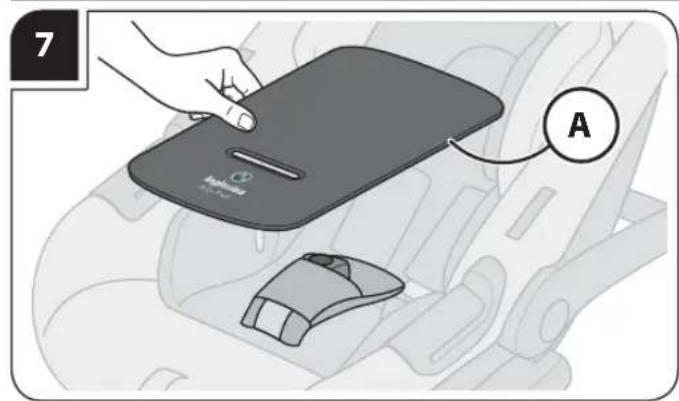
fig. 7 Install Ally Pad (A) always on the head hugger if the child car seat is equipped with it.
If the child car seat is also used with the Summercover, always install Ally Pad on top of it.
fig. 8 Position Ally Pad (A) on the child car seat, passing the crotch strap of the integrated harness system through the horizontal slot on the cushion.
fig. 9 Then complete the fastening of the safety belts, adjusting them correctly around the child.
fig. 10 Make sure Ally Pad (A) is correctly positioned; the side with the "Inglesina Ally Pad" logo should always be in contact with the child.
fig. 11 During normal use of the product, Ally Pad (A) may move, affecting the correct functionality of the device. Therefore, make sure it is always correctly installed before placing the child in the car seat.
Caution: always make sure that the App correctly detects the presence of the child before using the product.
RIGID INSERT
Use only with car seats in Gr. 2/3 configuration - ECE 44/04
For the list of compatible car seats vist inglesina.com
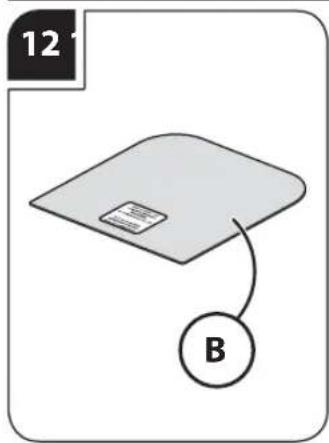
fig. 12 Inglesina Ally Pad is supplied complete with a rigid insert (B) to be used exclusively on Inglesina car seats in Gr. 2/3 configuration, without crotch strap.
fig. 13 Open the textile lining and place the insert (B) in contact with the internal sponge cushion, then close the lining.
GROUP 2 (15-25 KG) - ECE 44/04
GROUP 3 (22-36 KG) - ECE 44/04
Installation in car seats after removal of integrated safety belts or without integrated safety belts For the list of compatible car seats vist inglesina.com
text_image
Insgesia 3This category of products includes car seats that can be converted from Group 1 to Group 2 by removing the integrated belt system, or Group 3 car seats that originally do not have integrated safety belts.
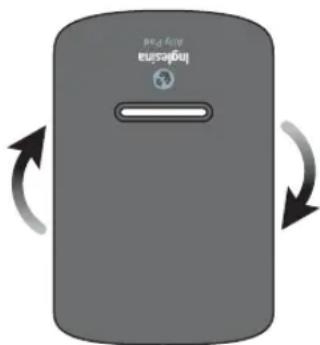
The presence of the anchor point or the complete absence of the crotch strap may make it difficult to correctly position Ally Pad,
therefore it must always be inserted under the textile lining of the seat, in an inverted position from the standard, i.e. with the slot facing upwards. Make sure that the "Inglesina Ally Pad" logo is always facing outwards.
fig. 14 Equip Ally Pad with insert (B), then place it under the textile lining of the seat.
Ally Pad is correctly installed when it bends naturally at the slot.
fig. 15 Restore the seat's lining by repositioning it correctly on the seat.
fig. 16 During normal use of the product, Ally Pad (A) may move, affecting the correct functionality of the device. Therefore, make sure it is always correctly installed before placing the child in the car seat.
Caution: always make sure that the App correctly detects the presence of the child before using the product.
PRODUCT MAINTENANCE
Inglesina Ally Pad's lining is removable and washable according to the instructions indicated on the internal label. Follow the instructions carefully to avoid damage.
fig. 17 For correct maintenance of the textile lining, open the velcro on the side and pull out the inner sponge cushion taking care to store it separately in a dry and clean place.
fig. 18 In order to restore the correct operation of Inglesina Ally Pad, once the sponge cushion is reinserted inside the textile lining, make sure that the weight sensors are always facing upwards in the direction of the Inglesina Ally Pad logo.
Caution: Do not tamper with or detach the internal electronic parts on the sponge cushion and do not remove the weight sensors.
MOBILE APP
ANDROID / iOS APPLICATION DOWNLOAD
fig. 19 Download on your smartphone, the Inglesina Ally Pad App from the digital App stores (e.g. Apple App Store®, Google Play®, Huawei AppGallery®, ...).
The Inglesina Ally Pad App is available for Android 5.0 and iOS 10.0 versions and above.
REGISTRATION PROCEDURE
fig. 20 Register for the service by clicking on "Register" or by logging in via a social account, if available in the App.
ALLY PAD PAIRING TO THE SMARTPHONE
For the correct operation of the application, activate the Bluetooth of the phone and make sure the battery charge is sufficient. Also make sure the SIM card you are using has enough credit.
fig. 21 To pair Ally Pad to your smartphone, click on the icon ⊕.
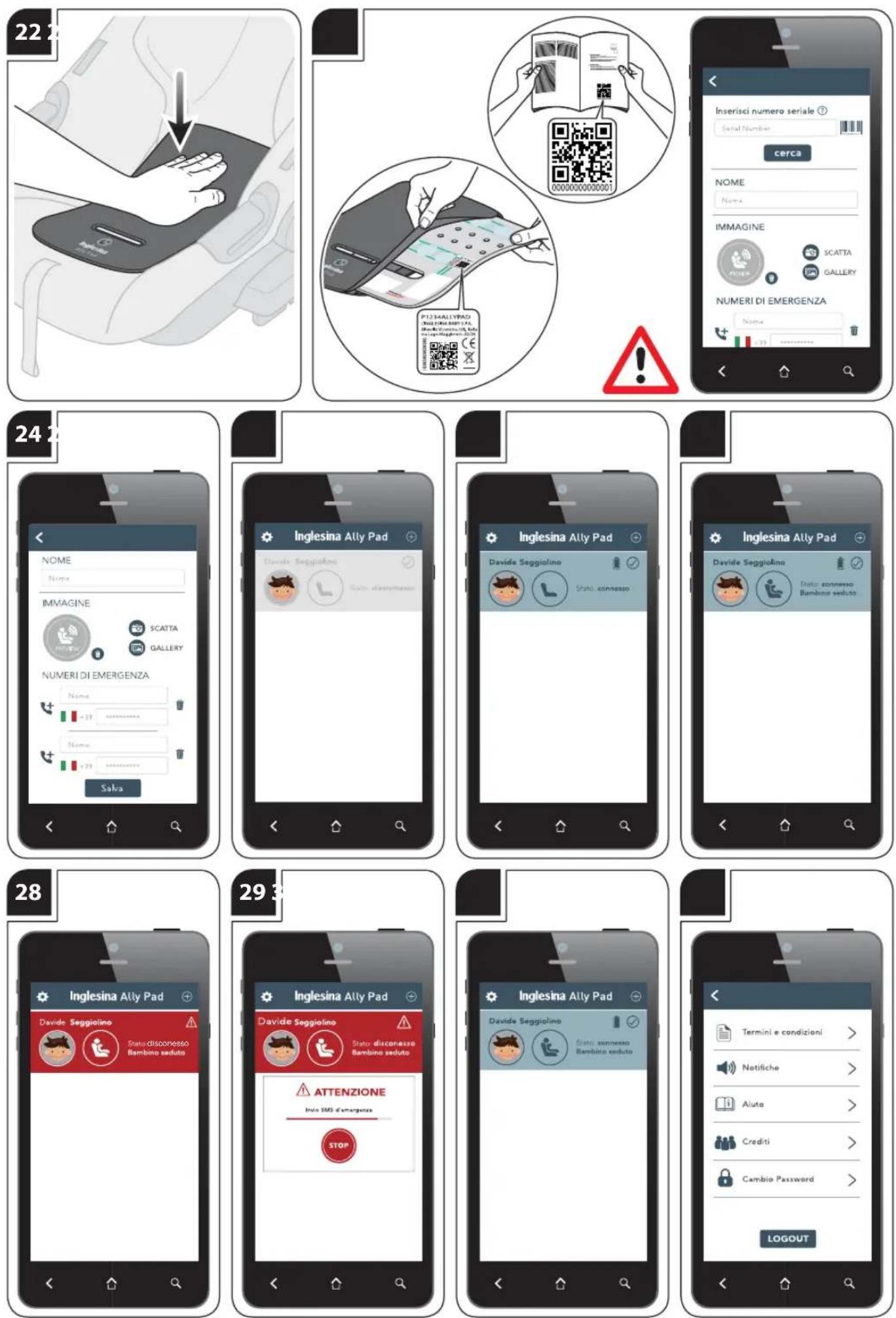
fig. 22 After correctly installing Ally Pad on the car seat or in the carrycot, squeeze the cushion as shown in the figure and bring your smartphone closer.
fig. 23 Then enter the Serial Number of Ally Pad by typing or scanning it and connect it by clicking on "Search".
The Serial number can be found on the last page of this manual or on the inner foam cuschion.
ENTERING EMERGENCY NUMBERS
fig. 24 Enter a name and an identification image for the paired Ally Pad and the telephone numbers to which the emergency text message will be forwarded.
Be sure to enter phone numbers that can send text messages. The text message will contain the approximate geographical coordinates to track the car in which Inglesina Ally Pad is located.
A maximum of 4 Ally Pads can be paired to each account.
CONNECTION STATUSES
Ally Pad can have 4 different connection statuses:
fig. 25 1) "Disconnected": the parent moves away from Ally Pad; the child is not in contact with it.
fig. 26 2) "Connected": the parent gets closer to Ally Pad that was previously pressed and activated and the child is not in contact with it.
(example: the parent is in the car next to the car seat equipped with Ally Pad, which is not occupied by the child).
fig. 27 3). "Connected with child seated": the parent is near Ally Pad; the child is in contact with it.
(example: the parent is in the car near the car seat equipped with Ally Pad occupied by the child).
fig. 28 4) "Disconnected with child seated": the parent moves away from Ally Pad; the child is still in contact with it. (example: the parent has moved away from the car, leaving the child in the car seat equipped with Ally Pad).
fig. 29 Once Inglesina Ally Pad goes to status: "Disconnected with child seated", it emits an alarm and starts a 40-seconds countdown.
During this time, the user can silence the alarm and inhibit the sending of the text message.
The generation of the alarm message and the subsequent sending of the emergency text message remain active even when the application is in background state.
SETTINGS
fig. 30 Click the 📄 on the home screen to access the application settings.
fig. 31 In this section you can:
Notifications - Change the sound of the notifications.
Terms and Conditions of Use - Read the terms and conditions of use.
Help - View an interactive guide to using Inglesina Ally Pad. To exit the application, click on "Logout".
When you click on "Logout", the application will stop working and you will no longer be able to detect the presence of the child on the car seat or in the carrycot.
Log back in the application for the correct use of Inglesina Ally Pad.
IT REGISTRA IL TUO PRODOTTO
Do it now, for your baby's safety.
It is an easy and fast operation, just visit the website inglesina.com to do it.
To register the product is IMPORTANT because it provides us with the possibility to contact you for important information about safety and functionality of your product.
natural_image
Icon of a person reading into a circle with wireless signals (no text or symbols)
Available on the
App Store

GET IT ON
Google Play

Download on
AppGallery
The Ally Pad Inglesina App is available for Android 5.0 and
iOS 10.0 versions and above.
text_image
QR code image containing encoded data, no visible human-readable textScan the QR Code to download the App.
Do not use this QR Code to register your Inglesina Ally Pad.
Inglesina