IOPEXTHUB280G - USB Hub IOPLEE - Free user manual and instructions
Find the device manual for free IOPEXTHUB280G IOPLEE in PDF.


| Product Type | USB 3.0 Hub |
| Model | IOPEXTHUB280G |
| Brand | IOPLEE |
| Number of USB Ports | 7 (including 1 upstream) |
| USB Standard | USB 3.0 (5 Gbps) |
| Power Supply | External power adapter (12V/2A) |
| Compatible Systems | Windows, macOS, Linux, Chrome OS |
| Dimensions (L x W x H) | 120 x 60 x 25 mm |
| Weight | Approx. 150 g (without cables) |
| LED Indicators | Power and port activity LEDs |
| Material | Aluminum alloy casing |
| Data Transfer Rate | Up to 5 Gbps (USB 3.0) |
| Cable Length | 1 meter USB-A to USB-B cable |
| Overcurrent Protection | Yes |
| Operating Temperature | 0°C to 40°C |
| Storage Temperature | -20°C to 70°C |
| Cleaning Instructions | Wipe with a dry, soft cloth; avoid liquids |
| Repairability | Not user-serviceable; contact support |
| Certifications | CE, FCC, RoHS |
Frequently Asked Questions - IOPEXTHUB280G IOPLEE
User questions about IOPEXTHUB280G IOPLEE
0 question about this device. Answer the ones you know or ask your own.
Ask a new question about this device
Download the instructions for your USB Hub in PDF format for free! Find your manual IOPEXTHUB280G - IOPLEE and take your electronic device back in hand. On this page are published all the documents necessary for the use of your device. IOPEXTHUB280G by IOPLEE.
USER MANUAL IOPEXTHUB280G IOPLEE
Dear Customer, thank you very much for purchasing one of our products. We kindly ask you to read this instruction manual carefully and to keep it, as it provides important information regarding the safe use and maintenance.
- Safety Warnings
- Description of the Appliance
- Before first use
- Operation
- Technical Specification
- Disposal
- Warranty and Compliance
1. Safety Warnings
- Do not tamper with this product or expose it to excessive heat, humidity, or direct sunlight.
- The USB 3.2 Gen1 ports transfer data at a rate up to 5Gbps, but the actual rate is limited by the USB transfer rate of the connected devices.
- The performance of 2.4GHz wireless devices (wireless keyboards, mice, etc.) may be affected when they are working too close to USB 3.0 devices.
- To achieve optimum performance of all ports, power connection is recommended. If no power connection exists, connectivity may be restricted.
If you have issues with your product please contact our support team with your product model number and order number of the relevant sales channel.
2. Description of the Appliance
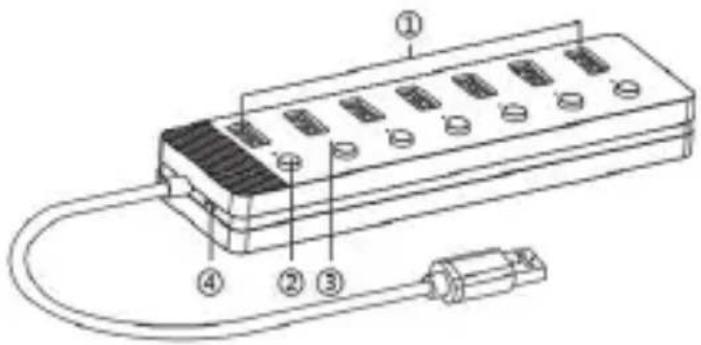
- USB 3.2 Gen 1 ports
- On/off Switch
- Power indicator
- Power input (DC 5V/2A)
3. Before first use
Check that all the appliance components are complete before first use. Ensure that the power outlet is switched off.
4. Operation
- Connect the hub to the USB-A port on your device.
- Connect the external devices to the appropriate ports in the hub.
- Turn On/Off individual switch buttons allowing you easily manage every device without repeatedly plugging and unplugging.
- Blue LED indicator to display working status of each port.
-
Connect the standard 5V 2A power adapter can connect high power-consumption devices, such as external hard drives and guarantees steady operation.
-
Technical Specification
| Model No. | IOPEXTHUB280G |
| Chipset | GL3510*2 |
| Size | (L) 162x(W) 46x(H) 20 mm |
| Materials | ABS Plastic |
| Cable Length | 240mm |
| Weight | 96g |
| Interface | Input: USB-A 3.2 Gen 1Output: 7xUSB-A 3.2 Gen 1 |
| Transmission Rate | USB3.2 Gen 1 with data trans fer up to 5Gbps, and backwards compatible with USB2.0/1.1 |
| System compatible | MacOS,Chrome, Windows |
6. Disposal
Please carefully follow the instructions for its use and maintenance and, once this item has run its life span, we kindly ask you to dispose of it in an environmentally friendly way, by putting it in the separate bins for electrical/electronic waste, or to bring it back to your retailer who will collect it for free.
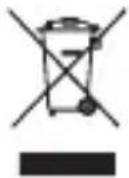
In accordance with Legislative Decree of March 14, 2014, No. 49, "Implementation of Directive 2012/19/EU on Waste Electrical and Electronic Equipment (WEEE)" the crossed-out wheeled bin symbol on the appliance or its packaging indicates that the product must be collected separately from other waste at the end of its life. Therefore, the user should dispose of the end-of-life appliance at the appropriate collection points for electronic and electrical waste or return it to the retailer when purchasing a new equivalent appliance, on a one-to-one basis. Proper separate collection for the subsequent disposal, treatment, and environmentally friendly disposal of the discarded appliance helps to prevent potential
negative effects on the environment and health and promotes the recycling of the materials the appliance is composed of. Unauthorized disposal of the product by the user may result in the application of administrative sanctions provided by current regulations.
7. Warranty and Compliance
This ioplee Warranty applies only to ioplee products purchased for personal use and not those intended for resale.
Your ioplee product is warranted in accordance with the terms and conditions of this warranty against defects in workmanship and conformity for a period of a 2 years, and that period begins upon delivery of the item, if purchased from an official dealer.
The warranty will not be valid if the product has been opened, in the presence of physical damage, damage resulting from incorrect use, modifications, repairs by unauthorized persons, negligence and in the event that the product has been used for purposes other than those for which it was intended; furthermore, the legal guarantee will not apply if the purchase methods or other circumstances demonstrate, with reasonable certainty, that the purchase itself is not exclusively aimed at private consumption.
In the event that the product is defective, it can be returned to the retailer along with a description of the type of malfunction, proof of purchase, and any accessories.
If the product is still under warranty, you will receive a replacement product (if available) from the dealer.
These are not covered by the warranty:
- Accidental damage or damage resulting from incorrect or improper use, contact with liquids; damage caused by accidents or force majeure events such as fire, earthquake, flood, vandalism, theft or other external cause.
• Cosmetic damage such as scratches, dents, or other breakage of plastic parts.
• Defects resulting from normal product wear and tear (product aging). - Incompatibility with other hardware/software products not listed in the minimum system requirements.
- Consumable accessories such as batteries, protective covers, and fuses, which normally wear out over time. Problems due to noncompliance related to labor or materials are excluded.
In no event shall the manufacturer be liable for incidental or consequential damages, including any loss of business profits or other commercial damages resulting from the use of the product.
The benefits conferred by this manufacturer's warranty are in addition to the rights provided by consumer protection legislation.
Due to the ongoing technological evolution of products, the data contained in this manual may undergo slight changes without prior notice from the manufacturer.
CE
Made in China
ioplee
Manufactured and imported by Exertis Supply Chain Services Limited, Unit 21 Fonthill Business Park, Clondalkin, Dublin 22, D22 FR82, Dublin, Ireland, V94 N72W "Ioplee" used under license from Unieuro S.p.A., Via Piero Maroncelli 10, 47121 Forli (FC).