VB-1000 - Tripod Vello - Free user manual and instructions
Find the device manual for free VB-1000 Vello in PDF.


| Product Type | Tripod |
| Brand | Vello |
| Model | VB-1000 |
| Maximum Height | 160 cm (63 in) |
| Minimum Height | 40 cm (15.7 in) |
| Folded Length | 50 cm (19.7 in) |
| Weight | 1.5 kg (3.3 lbs) |
| Maximum Load Capacity | 5 kg (11 lbs) |
| Head Type | 3-Way Pan/Tilt Head |
| Quick Release Plate | Yes, standard Arca-Swiss compatible |
| Leg Sections | 3 |
| Leg Material | Aluminum alloy |
| Locking Mechanism | Flip locks |
| Center Column | Yes, geared |
| Spreader | Yes, mid-level |
| Bubble Level | Yes, on base |
| Feet | Rubber with retractable spikes |
| Mounting Thread | 3/8"-16 (adaptable to 1/4") |
| Maintenance | Clean with dry cloth; avoid lubricants on locks |
| Safety | Do not exceed load capacity; secure plate tightly |
| Spare Parts | Quick release plates and rubber feet available |
| Repairability | Designed for easy replacement of worn parts |
Frequently Asked Questions - VB-1000 Vello
User questions about VB-1000 Vello
0 question about this device. Answer the ones you know or ask your own.
Ask a new question about this device
Download the instructions for your Tripod in PDF format for free! Find your manual VB-1000 - Vello and take your electronic device back in hand. On this page are published all the documents necessary for the use of your device. VB-1000 by Vello.
USER MANUAL VB-1000 Vello
natural_image
Close-up of a VELLO cable connector with multiple slots and a metallic housing (no visible text or symbols)VB-1000
ACTIONPAN
PROFESSIONAL GRADE
STABILIZING ACTION GRIP
USER MANUAL

VELLO
INTRODUCTION MOUNTING YOUR CAMERA OR CAMCORDER
Thank you for choosing a Vello ActionPan Professional Grade Stabilizing Action Grip.
The ActionPan gives you a comfortable grip on your shooting equipment, allowing you to shoot extreme action sports steadily. You can use the ActionPan to capture the action from any angle – even low angles – smoothly and with incredible stability and control.
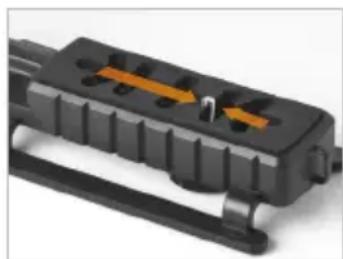
- With one hand holding the ActionPan and the other hand on your camera or camcorder, align the camera's 1/4"-20 tripod mount to any position along the mounting platform.
- Raise the camera away from the mounting platform and slide the mounting screw located on the ActionPan's underside to the desired position.
natural_image
Close-up of a black plastic electrical connector with orange and white arrows indicating internal components (no text or symbols visible)- Place your camera back on the platform with its tripod mounting socket positioned directly above the ActionPan's mounting screw. Insert the mounting screw into your camera's tripod mounting socket, and turn the knob of the mounting screw until your camera is securely attached to the ActionPan's mounting platform. The mounting screw can be loosened or tightened as required for further adjustments.
ATTACHING ACCESSORIES
The accessory shoe located on the top of the ActionPan can be used to attach any accessory such as a microphone, LED light, or flash with a hot shoe or cold shoe type connection.
- Insert your accessory's hot shoe foot into the accessory shoe mount.
- Use your accessory's locking mechanism to lock the accessory in place and ensure that it is securely attached to the ActionPan.
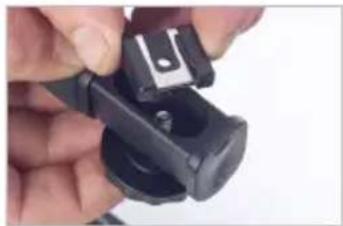
To change the direction of the shoe mount, for added control over your accessory's angle or direction:
- Loosen or remove the mounting screw connecting the accessory shoe to the ActionPan's handle via the large knob located at the underside of the handle's tip
natural_image
Close-up of hands holding a black mechanical component with a small metallic clip (no visible text or symbols)- Reposition the accessory shoe mount as desired

natural_image
Close-up of a mechanical component with a cylindrical shaft and mounting bracket (no visible text or symbols)- Tightly screw the mounting screw back into the threaded socket of the accessory shoe mount.
The accessory shoe can also be removed if not needed by unscrewing its mounting screw and removing the shoe mount.
Limited One-Year Warranty
This VELLO product is warranted to the original purchaser to be free from defects in materials and workmanship under normal consumer use for a period of one (1) year from the original purchase date or thirty (30) days after replacement, whichever occurs later. The warranty provider's responsibility with respect to this limited warranty shall be limited solely to repair or replacement, at the provider's discretion, of any product that fails during normal use of this product in its intended manner and in its intended environment. Inoperability of the product or part(s) shall be determined by the warranty provider. If the product has been discontinued, the warranty provider reserves the right to replace it with a model of equivalent quality and function.
This warranty does not cover damage or defect caused by misuse, neglect, accident, alteration, abuse, improper installation or maintenance. EXCEPT AS PROVIDED HEREIN, THE WARRANTY PROVIDER MAKES NEITHER ANY EXPRESS WARRANTIES NOR ANY IMPLIED WARRANTIES, INCLUDING BUT NOT LIMITED TO ANY IMPLIED WARRANTY OF MERCHANTABILITY OR FITNESS FOR A PARTICULAR PURPOSE. This warranty provides you with specific legal rights, and you may also have additional rights that vary from state to state.
To obtain warranty coverage, contact the Vello Customer Service Department to obtain a return merchandise authorization ("RMA") number, and return the defective product to Vello along with the RMA number and proof of purchase. Shipment of the defective product is at the purchaser's own risk and expense.
For more information or to arrange service, visit www.vellogear.com or call Customer Service at 212-594-2353.
Product warranty provided by the Gradus Group.
www.gradusgroup.com
VELLO is a registered trademark of the Gradus Group. © 2014 Gradus Group LLC. All Rights Reserved.

VELLO™
A Gradus Group Brand

VELLO™
www.vellogear.com
© Copyright 2014 Gradus Group
GG2