
GW10793 - Thermostat Gewiss - Free user manual and instructions
Find the device manual for free GW10793 Gewiss in PDF.


| Product Type | KNX wall thermostat for HVAC management |
| Model | GW10793 (also GW14793) |
| Dimensions | Approx. 80 x 80 x 20 mm (typical wall thermostat) |
| Weight | Approx. 100 g |
| Power Supply | Via KNX bus (24 V DC, typical bus current < 10 mA) |
| Mounting | Wall mounting (flush or surface) |
| Display | Local display for temperature and mode indication |
| Temperature Measurement | Internal sensor + optional external sensor (weighted average) |
| Operating Modes | Heating and Air Conditioning, each with Economy, Precomfort, Comfort, Off |
| Control Algorithms | Two-point (ON/OFF) or proportional (PWM or continuous) for heating/cooling |
| Fan Coil Control | Up to 3 speeds, automatic or manual mode, 2- or 4-pipe valve management |
| Number of Communication Objects | Up to 110 logical associations / group addresses |
| Scene Control | Up to 8 scenes (execute/store operating mode, type, setpoint) |
| Setpoint Range | Heating: 2 °C to 40 °C; Cooling: 5 °C to 40 °C (configurable) |
| External Sensor Input | Yes, via KNX object, with configurable weighting and monitoring time |
| Maintenance | Clean with a soft, dry cloth; no harsh chemicals |
| Safety | KNX certified, overvoltage protection via bus; setpoint limits enforced |
| Spare Parts / Repairability | Not user-serviceable; contact authorized Gewiss service |
| General Information | ETS configurable; supports slave/standalone operation |
Frequently Asked Questions - GW10793 Gewiss
User questions about GW10793 Gewiss
0 question about this device. Answer the ones you know or ask your own.
Ask a new question about this device
Download the instructions for your Thermostat in PDF format for free! Find your manual GW10793 - Gewiss and take your electronic device back in hand. On this page are published all the documents necessary for the use of your device. GW10793 by Gewiss.
USER MANUAL GW10793 Gewiss
KNX thermostat - wall mounting
CE
KNX®
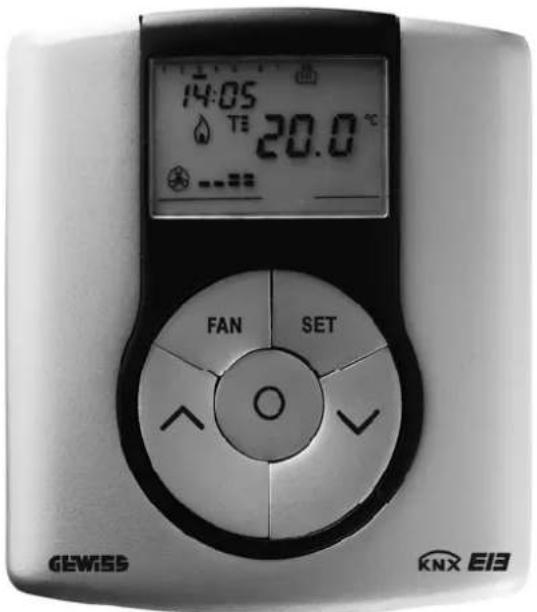
GW 10 793 - GW 14 793
Technical Manual
Summary
1 Introduction....3
2 Application 3
2.1 Limits to the associations....3
3 "Main" menu....4
3.1 Parameters 4
3.2 Communication objects 9
4 "Load control" menu (fan coil disabled) 12
4.1 Parameters 12
4.2 Communication objects 13
5 "Load control" menu (fan coil enabled)...... 15
5.1 Parameters 15
5.2 Communication objects 17
6 "Control algorithm (1 bit)" menu.... 19
6.1 Parameters 19
6.2 Communication objects 21
7 "Control algorithm (1 byte)" menu....22
7.1 Parameters 22
7.2 Communication objects 24
8 "Fan coil management" menu 25
8.1 Parameters 27
8.2 Communication objects 31
9 "Reports" menu.... 33
9.1 Parameters 33
9.2 Communication objects 35
10 "Scene" menu 38
10.1 Parameters 38
10.2 Communication objects 39
11 "Temperature setpoint" menu 40
11.1 Parameters 40
11.2 Communication objects 41
12 "External sensor" menu 42
12.1 Parameters 42
12.2 Communication objects 43
1 Introduction
This manual describes the functions of the device named GW1x793 and how to use the ETS configuration software to change the settings and configurations.
2 Application
The KNX wall thermostat is a device that manages the HVAC system. It is able to regulate the temperature in the environment in which it is installed, using the KNX system to manage the actuators that control the solenoid valves, boilers, fan coils etc that comprise the heating and air-conditioning systems. This device, combined with the KNX wall timed thermostat, can regulate the temperatures per zone and act as a slave device when a master-slave system is setup.
The device manages two operating modes, HEATING and AIR CONDITIONING, and controls both systems whilst providing 4 different operating modes for each operating mode (ECONOMY/PRECOMFORT/COMFORT/OFF), each with its own customisable setpoint.
The device is always able to autonomously manage the temperature in the environment it is installed in, using control algorithms (two points or proportional) or the use of fan coils, depending on the type of system built.
If the use of fan coils is not foreseen, the thermostat is only able to manage the heating and air conditioning system if it is a 4-way configuration as it is designed to manage one actuator for the heating system and another for the air-conditioning system; however, if there is the need to control the fan coils, the thermostat is able to manage 2/4 way systems to control the zone valves.
This manual refers solely to the configuration using the ETS software. Please refer to the INSTALLATION AND USER MANUAL supplied with the product for instructions on how to use the internal menu and the various local key functions.
2.1 Limits to the associations
The maximum number of logical associations that the device is able to memorize is 110; this means that the maximum number of logical connections between communication objects and group addresses is 110. The maximum number of group addresses that the device is able to memorize is 110; this means that it is possible to associate the communication objects to a maximum of 110 group addresses.
3 "Main" menu
The Main menu lists all the parameters needed to configure the behaviour of the device in HVAC system (see Fig. 3.1); the structure and the options displayed in the Main menu change according to the settings for the various options.
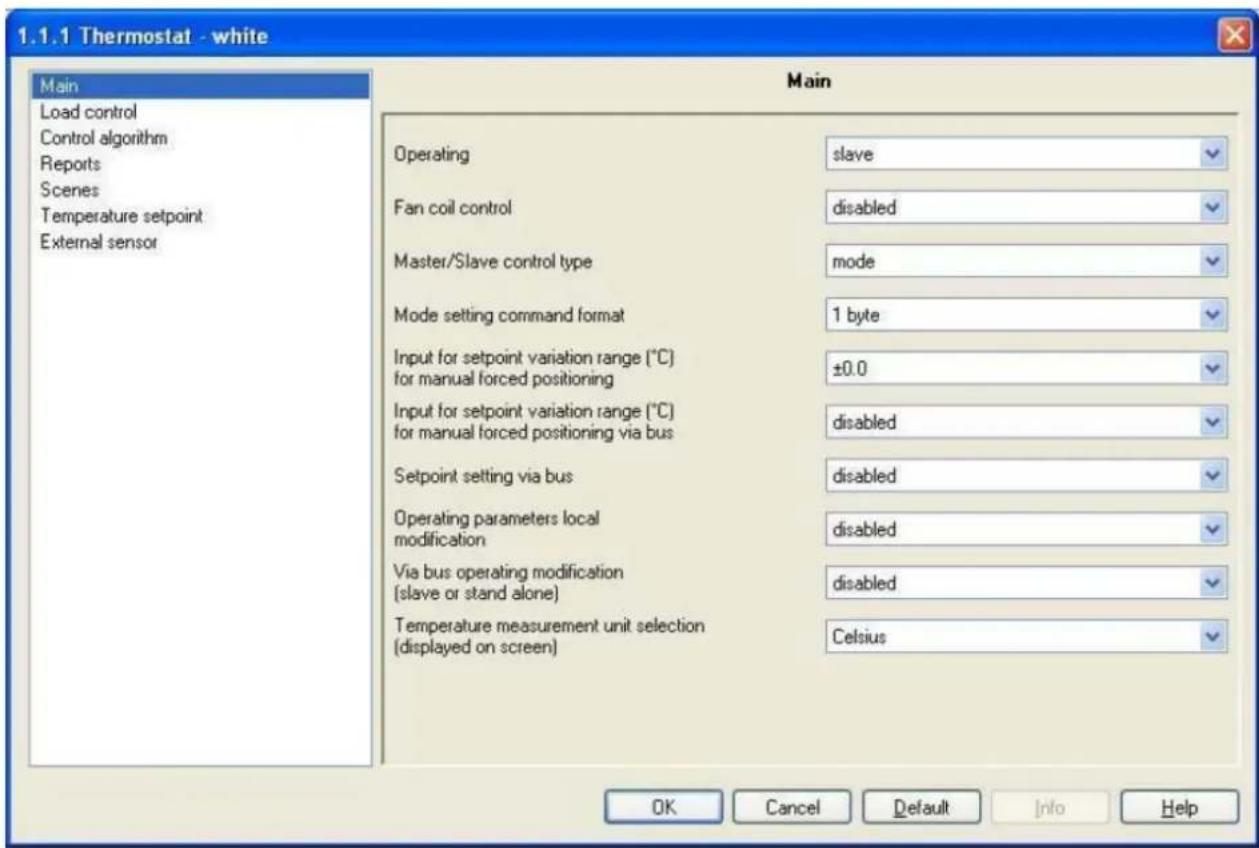
Fig. 3.1
3.1 Parameters
3.1.1 Operating
This allows you to configure how the device is used; the settings are:
- slave
The device is configured to manage the HVAC system using the master device as a timer-thermostat. With this configuration the device does not control the entire system, but only a part of it, called a zone, whilst a master device is installed which controls the operating and operating modes; in this case the thermostat controls the ambient temperature where it is installed, whilst the master device manages the operating functions according to the settings configured by the operator. It is not possible to locally modify the operating mode of the device.
Once the slave mode functions have been set, you will see that it is possible to set the control type that the master device has over the thermostat.
- stand alone
The device is configured to autonomously manage the HVAC system, without the use of timer-thermostats that control the device functions; with this configuration you create a single ambient temperature control centre.
With this setting, the Main menu changes considerably as the Master/Slave control type, Input for setpoint variation range (°C) for manual forced positioning, Input for setpoint variation range (°C) for manual forced positioning via bus and Via bus operating modification (slave or stand alone)
indicated in Diag. 3.1 are not visible, whilst a new option, Mode and type remote setting appears which will be analysed in paragraph 3.1.4.
Fig. 3.2 shows the Main menu for the device in stand alone mode.
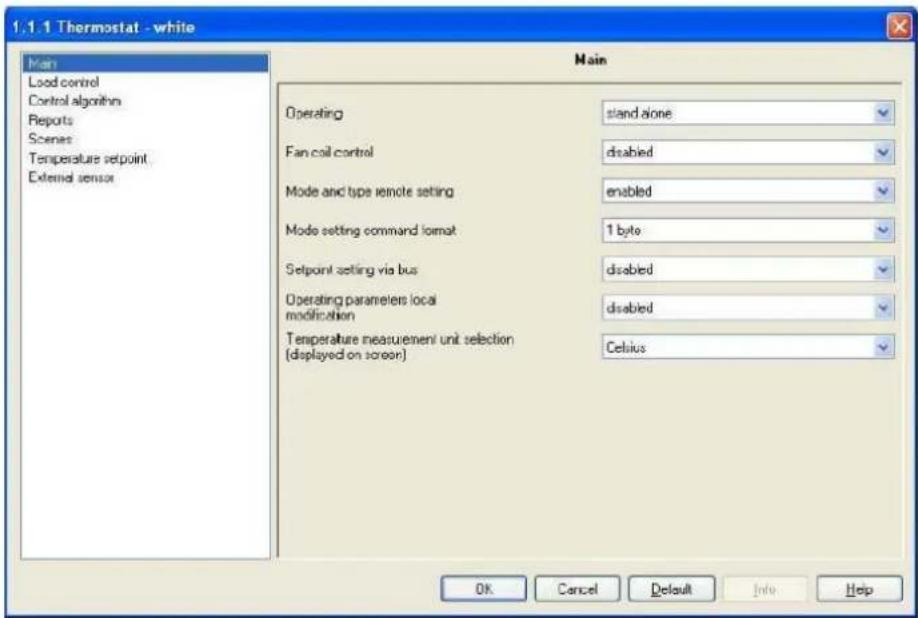
Fig. 3.2
3.1.2 Fan coil control
This allows you to enable the device to control the fan coils; the settings are:
- disabled
The device is not able to control the fan coils; it can manage the air-conditioning/heating systems using control algorithms (two points or proportional) as the timer-thermostat does.
- enabled
The device is able to control the fan coils; the Control algorithm menu is no longer visible and is replaced by the Fan coil management menu (see Chapter 8) and the options in the Load control menu also change.
3.1.3 Master/slave control type
This allows you to configure the control type that the master device has over the thermostat; the settings are:
- mode
The master device controls the thermostat using the bus to set the operating modes (ECONOMY, PRECOMFORT, COMFORT, OFF).
- setpoint
The master device controls the thermostat using the bus and sets the setpoint value to use when applying the control algorithms or to control the fan coils. With these settings the Mode setting command format and Via bus operating modification (slave or stand alone) options are not visible, whilst the Behaviour on receiving new setpoint option appears (see paragraph 3.1.7 for further details).
3.1.4 Mode and type remote setting
This enables the device to receive the HVAC mode and operating mode setting commands from the bus; the settings are:
- disabled
It is not possible to modify the HVAC mode or operating mode on the device by bus command; both parameters can only be set using the local keyboard.
The Mode setting command format option is not visible.
- enabled
It is also possible to modify the HVAC mode or operating mode on the device by bus command; both parameters can however be set using the local keyboard.
The Mode setting command format option is now visible.
3.1.5 Mode setting command format
Here you can configure the command format used to remotely control the device operating mode; the settings are:
- 1 byte
Here you can configure the remote control of the operating mode of the device by bus telegrams sent to a single communication object with a 1 byte format. With this setting enabled, the HVAC mode input communication object becomes visible.
• 1 bit
Here you can configure the remote control of the operating mode of the device by bus telegrams sent to a series of communication objects with a 1 bit format; to be precise, one per mode. With this setting enabled, the Off mode input, Economy mode input, Precomfort mode input, and Comfort mode input communication objects become visible. There is priority when using these communication objects, that will be illustrated at the end of the paragraph. In this case, to enable an operating mode with a lower priority compared to the current mode, it is necessary to enable the new mode and disable the one with higher priority; the device will not perform this operation automatically.
- both
It is possible to configure the remote control of the operating mode of the device by bus telegrams sent to a single communication object with a 1 byte format or to a series of communication objects with a 1 bit format; to be precise, one per mode. With this setting enabled, the HVAC mode input, Off mode input, Economy mode input, Precomfort mode input, and Comfort mode input communication objects become visible. There is priority when using these communication objects that is illustrated below.
There is a priority among the communication objects which set the operating modes for the device by remote bus commands, that prevents the problem of more than one object being enabled at the same time; this can be seen more clearly in the layout drawing below:
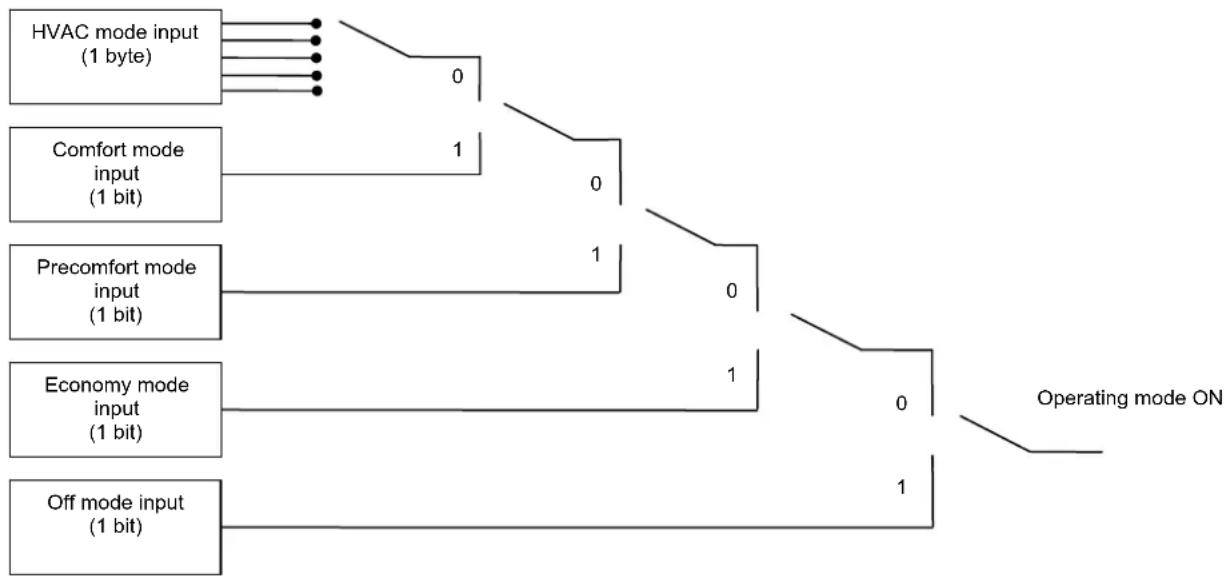
flowchart
graph TD
    A["HVAC mode input (1 byte)"] --> B["0"]
    C["Comfort mode input (1 bit)"] --> D["1"]
    E["Precomfort mode input (1 bit)"] --> F["1"]
    G["Economy mode input (1 bit)"] --> H["1"]
    I["Off mode input (1 bit)"] --> J["1"]
    K["Operating mode ON"] --> L["0"]
    L --> M["1"]
The above graph can be summarized as follows
| Priority Object Size | ||
| Maximum | Off mode input object | 1 bit |
| Economy mode input object | 1 bit | |
| Precomfort mode input object | 1 bit | |
| Comfort mode input object | 1 bit | |
| Minimum | HVAC mode input object | 1 byte |
The 1 bit set mode objects all have a higher priority compared to the 1 byte set mode objects; this is due to the fact that, when enabling both the set mode options, the 1 bit objects can be used to set the mode when specific events occur, such as for instance the window contact function, that is when a window is opened the device contact that controls this condition generates the bus command that forces the thermostat into OFF mode; when the window is closed again, this will generate a disable OFF mode command and the thermostat will return to its previous condition.
There is naturally a run command priority among the 1 bit set mode objects too, especially as if only 1 bit format is used to set the operating modes, if more than one object was enabled at any time, it would be necessary to determine which of these has priority to determine the operating mode enabled on the device; to therefore enable an operating mode with a lower priority than the current mode, it is necessary to enable the new mode and disable the current mode with the higher priority.
3.1.6 Input for setpoint variation range (°C) for manual forced positioning
Here you can set the maximum variation in the setpoint value used by the device for temporary forced positioning of the same setpoint using the local keyboard; the settings are provided in the drop-down menu and range from “±0.0” (no variation) to “±5.0” °C.
It is possible to modify this value also from the local navigation menu if the Operating parameters local modification option has been enabled.
3.1.7 Behaviour on receiving a new setpoint
Here you can define how the device should behave when the enabled setpoint is temporarily forced and a new setpoint value is received by the master device; the settings are:
- cancel temperature forced positioning
If the setpoint enabled on the device is temporarily forced, when it receives a new setpoint through a bus telegram the forced positioning is cancelled and the new setpoint value is not applied.
- maintain temperature forced positioning
If the setpoint enabled on the device is temporarily forced, when it receives a new setpoint through a bus telegram the forced positioning is applied to the new setpoint value.
3.1.8 Input for setpoint variation range (°C) for manual forced positioning via bus
This is used to enable a communication object through which it will be possible to use a bus telegram to configure the setpoint variation interval value for temporary forced positioning; the settings are:
- disabled
The communication object is not visible and therefore it is not possible to configure the setpoint variation interval for temporary forced positioning by bus command.
- enabled
The Setpoint regulation range setting communication object is now visible through which it is possible to configure the setpoint variation interval for temporary forced positioning by bus command.
3.1.9 Setpoint setting via bus
This allows you to enable the communication objects required to configure the setpoints for each device operating mode by bus telegram; the settings are:
- disabled
It is not possible for the bus telegrams to change the HVAC mode setpoints; no communication object is therefore visible for the setpoint configuration.
- enabled
It is possible to change the HVAC mode setpoints by bus telegrams; with this setting the Heating antifreeze setpoint, Heating economy setpoint, Heating precomfort setpoint, Heating comfort setpoint, Air cooling high temp. protect. setpoint, Air cooling economy setpoint, Air cooling precomfort setpoint and Air cooling comfort setpoint are all visible; these can be used to set the setpoints for each device operating mode by bus command.
Please remember that among the various setpoints belonging to the same function type, there is a setting value threshold determined from what seen below:
$$ \begin{array}{l} - T _ {\text { antifreeze }} \leq T _ {\text { economy }} \leq T _ {\text { precomfort }} \leq T _ {\text { comfort }} \text { in heating } (" T" \text { indicates the standard mode setpoint value }) \ - T _ {\text { comfort }} \leq T _ {\text { precomfort }} \leq T _ {\text { economy }} \leq T _ {\text { high temp. protect. }} \text { in air conditioning ("T" indicates the standard mode setpoint value) } \ \end{array} $$
Whilst a control is made over the modifications to setpoints from the local menu to make sure the threshold is not exceeded, the settings triggered by the bus do not undergo the same control to prevent that, if a supervisor updates a series of parameters, there will be no need to establish an order in which to make the updates to the various setpoints; however, the operator is requested to avoid setting setpoints for bus commands that do not comply with the above threshold as this could cause the device to malfunction.
3.1.10 Operating parameters local modification
This allows you to enable the viewing of the device operating parameters in the local navigation menu; the settings are:
- disabled
When you access the local navigation menu the parameters that allow you to modify the operating modes on the device are not visible (for further information on these parameters, please consult the INSTALLATION AND USER MANUAL).
- enabled
When you access the local navigation menu the parameters that allow you to modify the operating modes on the device are visible (for further information on these parameters, please consult the INSTALLATION AND USER MANUAL).
3.1.11 Via bus operating modification (slave or stand alone)
This is used to enable a communication object through which it will be possible to use a bus telegram to configure the operating settings for the device (slave or stand alone); the settings are:
- disabled
The communication object is not visible and therefore it is not possible to configure the device operating settings (slave or stand alone) by bus command.
- enabled
The Enabling slave function communication object is now visible and therefore it is possible to configure the device operating settings (slave or stand alone) by bus command.
3.1.12 Temperature measurement unit selection (display on screen)
This allows you to set the unit of measure used to express the temperature value displayed on the screen; the settings are:
- Fahrenheit
The unit of measure used to display the temperature value on the screen is Fahrenheit. Remember that it is always possible to change the unit of measure used to display the temperature using the local navigation menu.
- Celsius
The unit of measure used to display the temperature value on the screen is Celsius. Remember that it is always possible to change the unit of measure used to display the temperature using the local navigation menu.
3.2 Communication objects
The communication objects, whose visibility depends on the settings in the items of the Main menu, are those indicated in Fig. 3.3.
| Number | Name | Object Function | Length | C | R | W | T | U | Data Type | Priority |
| 0 | Day/Hour input | Update day/hour | 3 Byte | C | - | W | - | - | Time DPT_TimeOfDay | Low |
| 1 | Operating type input | Heating/Air conditioning | 1 bit | C | - | W | - | - | Low | |
| 2 | Setpoint input | Setpoint value | 2 Byte | C | - | W | - | - | 2 byte float value DPT_Value_Temp | Low |
| 3 | HVAC mode input | Auto/Eco/Precom/Comf/Off | 1 Byte | C | - | W | - | - | Low | |
| 13 | Heating antifreeze setpoint | Setpoint value | 2 Byte | C | - | W | - | - | 2 byte float value DPT_Value_Temp | Low |
| 14 | Heating economy setpoint | Setpoint value | 2 Byte | C | - | W | - | - | 2 byte float value DPT_Value_Temp | Low |
| 15 | Heating precomfort setpoint | Setpoint value | 2 Byte | C | - | W | - | - | 2 byte float value DPT_Value_Temp | Low |
| 16 | Heating comfort setpoint | Setpoint value | 2 Byte | C | - | W | - | - | 2 byte float value DPT_Value_Temp | Low |
| 17 | Air cooling high temp. protect. setpoint | Setpoint value | 2 Byte | C | - | W | - | - | 2 byte float value DPT_Value_Temp | Low |
| 18 | Air cooling economy setpoint | Setpoint value | 2 Byte | C | - | W | - | - | 2 byte float value DPT_Value_Temp | Low |
| 19 | Air cooling precomfort setpoint | Setpoint value | 2 Byte | C | - | W | - | - | 2 byte float value DPT_Value_Temp | Low |
| 20 | Air cooling comfort setpoint | Setpoint value | 2 Byte | C | - | W | - | - | 2 byte float value DPT_Value_Temp | Low |
| 21 | Setpoint regulation range setting | Value °C | 2 Byte | C | - | W | - | - | 2 byte float value DPT_Value_Temp | Low |
| 22 | Enabling slave function | Enable/Disable | 1 bit | C | - | W | - | - | 1 bit DPT_Enable | Low |
| 23 | Off mode input | Enable/Disable | 1 bit | C | - | W | - | - | 1 bit DPT_Enable | Low |
| 24 | Economy mode input | Enable/Disable | 1 bit | C | - | W | - | - | 1 bit DPT_Enable | Low |
| 25 | Precomfort mode input | Enable/Disable | 1 bit | C | - | W | - | - | 1 bit DPT_Enable | Low |
| 26 | Comfort mode input | Enable/Disable | 1 bit | C | - | W | - | - | 1 bit DPT_Enable | Low |
Fig. 3.3
3.2.1 Day/hour input
Using this communication object the device is able to update the date and time on its internal clock when it receives a bus telegram; it is always possible to modify the day and time using the local navigation menu on the device.
The enabled flags are C (communication) and W (written by bus).
The standard format of the object is 10.001 DPT_TimeOfDay, so the size of the object is 3 byte and the information it receives is update day and time.
3.2.2 Operating type input
Here you can configure the remote control of the device function type by bus command. When this object receives a telegram with a "1" logic value, the device sets the operating type to HEATING, indicated by a pilot light on the display, maintaining the same operating mode as before; vice versa, when this object receives a telegram with a "0" logic value, the device sets the operating type to AIR CONDITIONING, indicated by a pilot light on the display, maintaining the same operating mode as before.
In any case, it is however possible to modify the operating type using the local navigation menu on the device.
The enabled flags are C (communication), W (written by bus).
The standard format of the object is 1.100 DPT_Heat/Cool, so the size of the object is 1 bit and the commands it receives are operating type commands. Heating/Air conditioning.
3.2.3 Setpoint input
This allows the thermostat to receive from the master device the setpoint value to use when applying the set control algorithm or to control the fan coils.
The enabled flags are C (communication), W (written by bus).
The standard format of the object is 9.001 DPT_Value_Temp, so the size of the object is 2 byte and the commands it receives are setpoint values expressed in degrees centigrade (rounded off to a tenth of a degree).
3.2.4 HVAC mode input
Here you can configure the remote control of the device operating mode (HVAC mode) by bus command. When this communication object receives a telegram with the operating mode information that is to be set, the device sets the operating mode according to the command received, indicated by a pilot light on the display, only if there are no 1 bit operating mode objects enabled.
If the device has been configured in stand alone mode, it is still possible to modify the operating mode using the local navigation menu on the device, which does nothing more than replicate the command
reception event on the communication object in question to modify, with each pressing, the operating mode.
The enabled flags are C (communication), W (written by bus).
The standard format of the object is 20.102 DPT_HVACMode, so the size of the object is 1 byte and the commands it receives are Operating mode commands. Economy/Precomfort/Comfort/Off.
3.2.5 Heating antifreeze setpoint
Here you can configure the remote control by bus command of the OFF mode setpoint for the HEATING operating mode; it this communication object receives an enable setpoint telegram with a value of less than 2^ C and more than 40^ C, the command will be ignored for safety reasons. However, the setpoint for this mode must be between 2^ C and 7^ C and also lower than the setpoint value set for the ECONOMY mode and, if a value is received that does not respect the thresholds indicated in 3.1.9, the value will become effective until the local navigation menu is accessed; once you access the setpoint parameters on the local menu, the device controls that all the setpoint thresholds are complied with and, if this is not the case, the device will automatically modify the setpoint so that it complies with the configuration threshold.
It is however possible to modify the HEATING mode OFF setpoint at any time using the local navigation menu on the device.
If the setpoint is modified manually or by bus command through this communication object, the temporary forced positioning is maintained, within the limits established by the value set for the Input for setpoint variation range (°C) for manual forced positioning option or the value received on the Setpoint regulation range setting object if enabled (limits imposed by the device "slave" configuration). The enabled flags are C (communication), W (written by bus).
The standard format of the object is 9.001 DPT_Value_Temp, so the size of the object is 2 byte and the commands it receives are HEATING mode OFF mode setpoint values expressed in degrees centigrade (rounded off to a tenth of a degree).
The above described features and functions also apply to the following parameters Heating economy setpoint, Heating precomfort setpoint, Heating comfort setpoint for the HEATING operating type, and also for Air cooling high temp. protect. setpoint, (equivalent to OFF mode), Air cooling economy setpoint, Air cooling comfort setpoint, and Air cooling precomfort setpoint for the AIR CONDITIONING operating type.
The setpoint thresholds illustrated in paragraph 3.1.9 remain the same.
3.2.6 Setpoint regulation range setting
Here you can configure the remote control by bus command of the setpoint variation interval value for the temporary forced positioning of the same setpoint; if this communication object receives a setpoint regulation range setting telegram with a value of less than 0^ C and more than 5^ C, the value will be limited within the aforementioned limits for safety reasons; this means that the values below 0^ C will be interpreted as 0^ C and, likewise, the values over 5^ C will be interpreted as 5^ C.
The enabled flags are C (communication), W (written by bus)
The standard format of the object is 9.001 DPT_Value_Temp, so the size of the object is 2 byte and the commands it receives are setpoint variation interval values for temporary forced positioning expressed in degrees centigrade (rounded off to a tenth of a degree).
3.2.7 Enabling slave function
Here you can configure the remote control of the device functions by bus command, changing it from slave to stand alone mode and vice-versa. When this object receives a bus telegram with a "1" logic value, the device switches to SLAVE mode; vice-versa if the object receives a "0" logic value, the device switches to STAND ALONE mode with remote control disabled.
The enabled flags are C (communication), W (written by bus).
The standard format of the object is 1.003 DPT_Enable, so the size of the object is 1 bit and the commands it receives are slave/stand alone operating mode.
3.2.8 Off mode input
Here you can enable the remote control of the device OFF operating mode (or HVAC mode) by bus command. When this object receives a telegram with a "1" logic value, the device instantly switches to OFF mode, indicated by a pilot light on the display, given the enabling of this object has a higher priority than any other HVAC setting; vice versa, when this object receives a "0" logic value, the device instantly disables the OFF operating mode and the new operating mode is enabled automatically by the device according to the priority table illustrated in paragraphs 3.1.5.
When the device is in STAND ALONE mode with remote controls disabled, please remember that, until the OFF operating mode is disabled, it is not possible to modify the operating mode using the local navigation menu on the device, as the latter does nothing more than replicate the command reception event on the HVAC mode input communication object which has a lower priority than the object in question.
The enabled flags are C (communication), W (written by bus).
The standard format of the object is 1.003 DPT_Enable, so the size of the object is 1 bit and the commands it receives are enable/disable OFF operating mode commands.
The above described features and functions also apply to the Economy mode input, Precomfort mode input, Comfort mode input communication objects, so please refer to the description provided in 3.2.8, the difference being that reference is made to the relative operating modes.
The priority table illustrated in paragraph 3.1.5. remains the same.
4 "Load control" menu (fan coil disabled)
In the Load control menu that, in this chapter will be presented with the "fan coil disabled" configuration, that is the one you see if the Fan coil control option in the Main menu is set to disabled; here you have all the parameters used to set the format of commands sent to the controlled loads (see Fig. 4.1); according to the setting entered for this option, the Load control algorithms that can be configured in the Control algorithm menu will change, and consequently the conformation of the actual menu.
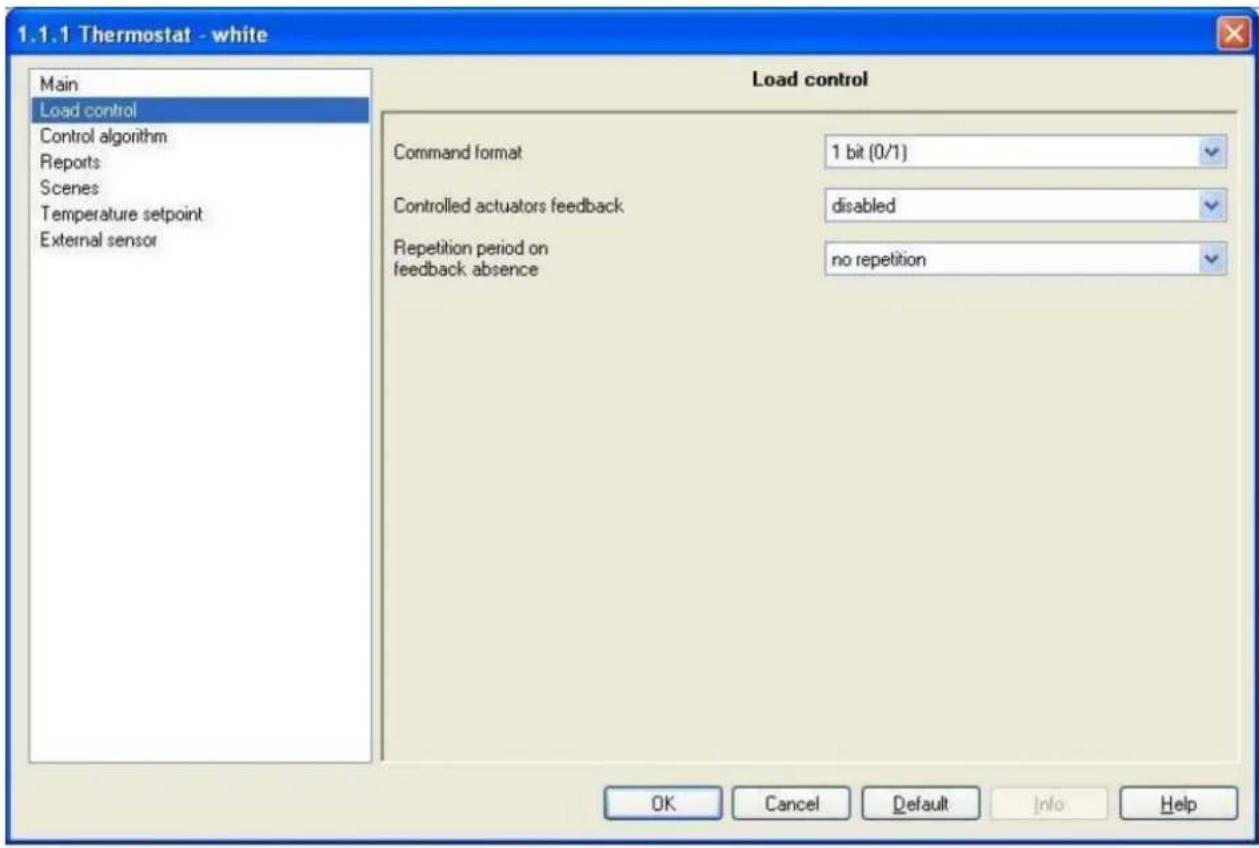
Fig. 4.1
4.1 Parameters
4.1.1 Command format
Here you can configure the format for the communication objects that control the loads, and also the control algorithms that allow the loads to be managed; the settings are:
- 1 bit (0/1)
The format of the communication objects that manage the loads is 1 bit; with this configuration the Load control algorithms that can be configured, and analysed in detail in Chapter 6 Control algorithm menu (1 bit) are as follows: 2 on/off and PMW proportional points. The Heating switching and Air cooling switching communication objects are visible and allow the loads to controlled.
- 1 byte (value %)
The format of the communication objects that manage the loads is 1 byte; with this configuration the Load control algorithms that can be configured, and analysed in detail in Chapter 7 Control algorithm menu (1 byte) are as follows: 2 0%/100% and continuous proportional points
The Heating continuous command and Air cooling continuous command communication objects are visible and allow the loads to be controlled.
4.1.2 Controlled actuators feedback
This allows you to enable the device so it can receive feedbacks from the actuators (loads) it controls; the settings are:
- disabled
The device is not able to receive feedback from the actuators (loads) that the command sent has actually been performed. The Repetition period on feedback absence option appears which allows you to define the repetition interval for the commands sent to the loads.
- enabled
The device is able to receive feedback from the actuators (loads) that the command sent has actually been performed. The Heating status feedback and the Air cooling status feedback communication objects are visible if the Command format option is set to 1 bit (0/1) whilst if this option is set to 1 byte (% value) the Heating continuous control feedback and the Air cooling continuous control feedback communication objects are visible.
The Repetition period on feedback absence option is not visible as the device is always aware of the status of the loads it commands; in fact, if within one minute from sending a command to a load, the latter does not send confirmation of execution of the command to the thermostat, it will send the command again every minute until it receives due confirmation from the load; the heating/air conditioning system pilot light will blink to signal this anomaly.
4.1.3 Repetition period on feedback absence
Here you can set the retransmission period of the command to the loads; the settings are provided in the drop-down menu (an interval of from “no repetition” to 30 minutes).
4.2 Communication objects
The communication objects, whose visibility depends on the settings in the items of the Load control menu, are those indicated in Fig. 4.2.
| Number | Name | Object Function | Length | C | R | W | T | U | Data Type | Priority |
| 14 | Heating status feedback | On/Off status | 1 bit | C | - | W | - | - | 1 bit DPT_Switch | Low |
| 16 | Air cooling status feedback | On/Off status | 1 bit | C | - | W | - | - | 1 bit DPT Switch | Low |
| 30 | Heating switching | On/Off | 1 bit | C | R | - | T | - | 1 bit DPT Switch | Low |
| 32 | Air cooling switching | On/Off | 1 bit | C | R | - | T | - | 1 bit DPT Switch | Low |
| 5 | Heating continuous control feedback | % Value | 1 Byte | C | - | W | - | - | 8 bit unsigned value DPT Scaling | Low |
| 7 | Air cooling continuous control feedback | % Value | 1 Byte | C | - | W | - | - | 8 bit unsigned value DPT Scaling | Low |
| 31 | Heating continuous command | % Value | 1 Byte | C | R | - | T | - | 8 bit unsigned value DPT Scaling | Low |
| 33 | Air cooling continuous command | % Value | 1 Byte | C | R | - | T | - | 8 bit unsigned value DPT Scaling | Low |
Fig. 4.2
4.2.1 Heating status feedback
This allows the device to be informed on the status of the actuator that manages the heating system controlled by the thermostat; once the command has been sent to this actuator, if the device does not receive confirmation within one minute that the load has executed the command by bus telegram to the communication object in question, it will instantly send the command again every minute until it receives due confirmation from the load; the heating/air conditioning system pilot light will blink to signal this anomaly (according to which is displayed on the screen). If a feedback is received by the actuator that does not copy the command sent, the device will instantly send another command and trigger the above described control.
The enabled flags are C (communication), W (written by bus).
The standard format of the object is 1.001 DPT_Switch, so the size of the object is 1 bit and the commands it receives are the heating system actuator status On/Off.
4.2.2 Air cooling status feedback
The same applies as indicated in the previous paragraph, but in relation to the air conditioning system actuator (please refer to 4.2.1 for further details).
4.2.3 Heating switching
This allows the device to send ON/OFF commands to the actuator that manages the heating system controlled by the thermostat; according to the control algorithm set, the device calculates when it has to intervene on the heating system to regulate the ambient temperature and therefore sends a telegram with a "1" logic value to activate the system, and "0" logic value to deactivate the same system.
The enabled flags are C (communication), R (read by bus) and T (transmission).
The standard format of the object is 1.001 DPT_Switch, so the size of the object is 1 bit and the commands it sends are heating system On/Off.
4.2.4 Air cooling switching
The same applies as indicated in the previous paragraph, but in relation to the air conditioning system actuator (please refer to 4.2.3 for further details).
4.2.5 Heating continuous control feedback
This allows the device to be informed on the status of the actuator that manages the heating system controlled by the thermostat; once the command has been sent to this actuator, if the device does not receive confirmation within one minute that the load has executed the command by bus telegram to the communication object in question, it will instantly send the command again every minute until it receives due confirmation from the load; the heating/air conditioning system pilot light will blink to signal this anomaly (according to which is displayed on the screen). If a feedback is received by the actuator that does not copy the command sent, the device will instantly send another command and trigger the above described control.
The enabled flags are C (communication), W (written by bus).
The standard format of the object is 5.001 DPT_Scaling, so the size of the object is 1 byte and the commands it interprets are the heating system actuator percentage status.
4.2.6 Air cooling continuous control feedback
The same applies as indicated in the previous paragraph, but in relation to the air conditioning system actuator (please refer to 4.2.5 for further details).
4.2.7 Heating continuous command
This allows the device to send percentage regulation commands to the actuator that manages the heating system controlled by the thermostat; according to the control algorithm set, the device calculates when it has to intervene on the heating system to regulate the ambient temperature and therefore sends a telegram with the system activation percentage information.
The enabled flags are C (communication), R (read by bus) and T (transmission).
The standard format of the object is 5.001 DPT_Scaling, so the size of the object is 1 byte and the commands it interprets are the heating system percentage values.
4.2.8 Air cooling continuous command
The same applies as indicated in the previous paragraph, but in relation to the air conditioning system actuator (please refer to 4.2.7 for further details).
5 "Load control" menu (fan coil enabled)"
In the Load control menu that, in this chapter will be presented with the "fan coil enabled" configuration, that is the one you see if the Fan coil control option in the Main menu is set to enabled; here you have all the parameters used to enable the device to receive feedbacks from the actuators that control the speed of the fan coils and the solenoid valves on the heating and air-conditioning systems (see Fig. 5.1).
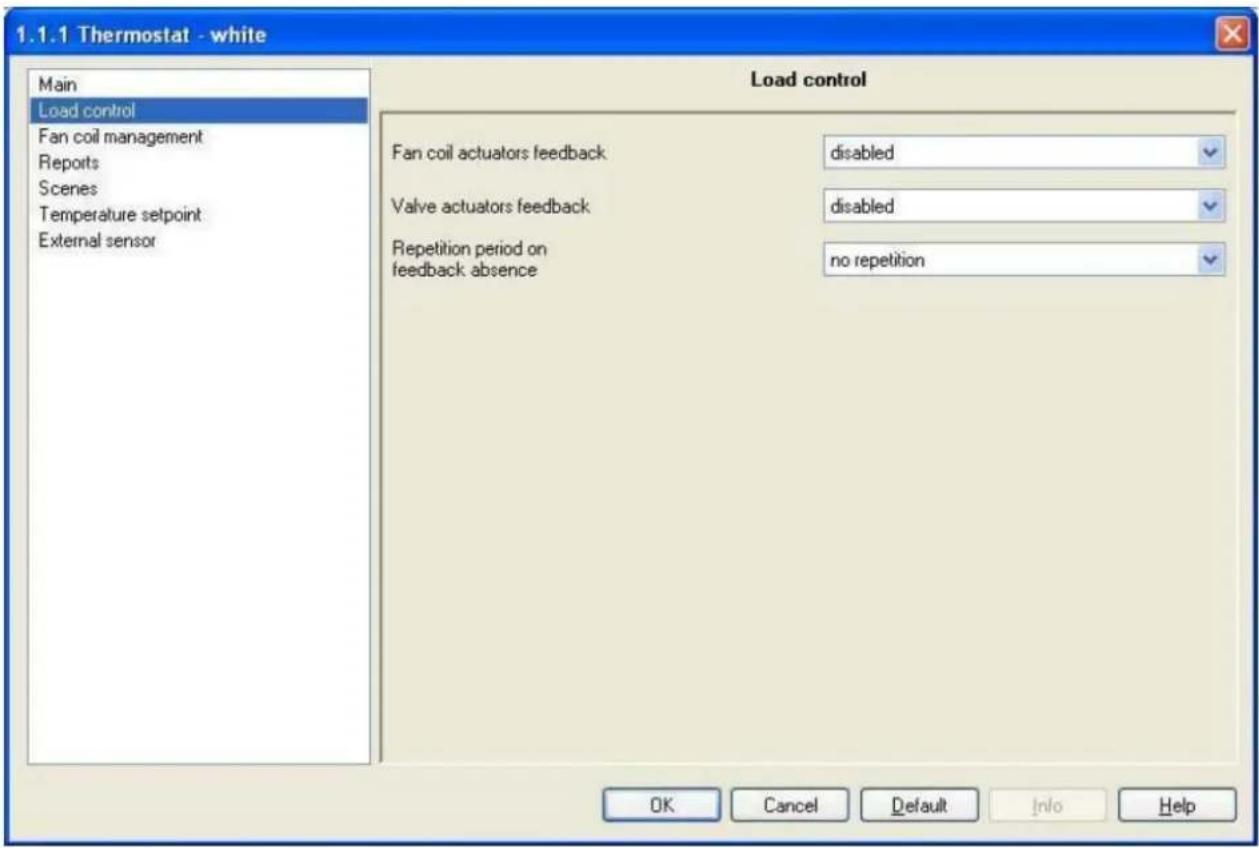
Fig. 5.1
5.1 Parameters
5.1.1 Fan coil actuators feedback
This allows you to enable the device so it can receive feedbacks from the actuators that manage the fan coil speeds it controls; the settings are:
- disabled
The device is not able to receive feedback from the actuators that the command sent has actually been performed; the Repetition period on feedback absence option appears which allows you to enter a repetition period for the commands sent to the actuators that control the fan coils and those which control the solenoid valves.
- enabled
The device is able to receive feedback from the actuators that the command sent has actually been performed; the V1 fan status feedback, V2 fan status feedback and the V3 fan status feedback communication objects are visible if the Command format option in the Fan coil management menu is set to 1 bit (0/1) whilst of this option is set to 1 byte (% value) the Fan coil continuous feedback communication object is visible.
The device is always aware of the status of the loads it commands; in fact, if within one minute from sending a command to a load, the latter does not send confirmation of execution of the command to the thermostat, it will send the command again every minute until it receives due confirmation of the same;
the fan coil pilot light will blink to signal this anomaly. The device software also has a logic interlock function that allows you to activate a different fan coil speed from that currently activated only if the correct feedback has been received by the latter that the speed has been deactivated; until the thermostat receives feedback that the enabled speed has been deactivated, it will not send activation commands for the new speed, to prevent a series of fan coil windings being powered at the same time which would break the fan coil.
5.1.2 Valve actuators feedback
This allows you to enable the device so it can receive feedbacks from the actuators that manage the heating and air conditioning system solenoid valves it controls; the settings are:
- disabled
The device is not able to receive feedback from the actuators that the command sent has actually been performed; the Repetition period on feedback absence option appears which allows you to enter a repetition period for the load commands.
- enabled
The device is able to receive feedback from the actuators (loads) that the command sent has actually been performed; the following communication objects are now visible:
- Heating valve feedback and Air conditioning valve feedback if the Valves management option in the Fan coil management menu is set to 4-pipes on/off.
- Heating/Air conditioning valve feedback if the Valves management option in the Fan coil management menu is set to 2-pipes on/off
- Heating valve % feedback and Air conditioning valve % feedback if the Valves management option in the Fan coil management menu is set to 4-pipes control percentage 0%/100%
- Heating/Air conditioning valve % feedback if the Valves management option in the Fan coil management menu is set to 2-pipes control percentage 0%/100%
The Repetition period on feedback absence option is not visible as the device is always aware of the status of the valves it commands; in fact, if within one minute from sending a command to a valve, the latter does not send confirmation of execution of the command to the thermostat, it will send the command again every minute until it receives due confirmation; the heating/air conditioning system pilot light will blink to signal this anomaly.
5.1.3 Repetition period on feedback absence
Here you can set the retransmission period of the command to the fan coils and/or the valves as the device is not informed, in this case, of the actual status of the same.
The settings are provided in the drop-down menu, with an interval of from "no repetition" to 30 minutes.
If both fan coil and valve feedbacks are disabled, the value set for this option will naturally refer to both.
5.2 Communication objects
The communication objects, whose visibility depends on the settings in the items of the Load control menu, are those indicated in Fig. 5.2.
| Number | Name | Object Function | Length | C | R | W | T | U | Data Type | Priority |
| 4 | Heating/Air conditioning valve feedback | On/Off status | 1 bit | C | - | W | - | - | 1 bit DPT_Switch | Low |
| 4 | Heating valve feedback | On/Off status | 1 bit | C | - | W | - | - | 1 bit DPT_Switch | Low |
| 6 | Air conditioning valve feedback | On/Off status | 1 bit | C | - | W | - | - | 1 bit DPT_Switch | Low |
| 5 | Heating/Air conditioning valve % feedback | 0%/100% | 1 Byte | C | - | W | - | - | 8 bit unsigned value DPT_Scaling | Low |
| 5 | Heating valve % feedback | 0%/100% | 1 Byte | C | - | W | - | - | 8 bit unsigned value DPT_Scaling | Low |
| 7 | Air conditioning valve % feedback | 0%/100% | 1 Byte | C | - | W | - | - | 8 bit unsigned value DPT_Scaling | Low |
| 9 | V1 fan status feedback | On/Off status | 1 bit | C | - | W | - | - | 1 bit DPT_Switch | Low |
| 10 | V2 fan status feedback | On/Off status | 1 bit | C | - | W | - | - | 1 bit DPT_Switch | Low |
| 11 | V3 fan status feedback | On/Off status | 1 bit | C | - | W | - | - | 1 bit DPT_Switch | Low |
| 12 | Fan coil continuous feedback | % Value | 1 Byte | C | - | W | - | - | 8 bit unsigned value DPT_Scaling | Low |
Fig. 5.2
5.2.1 Heating/Air conditioning valve feedback
This allows the device to be informed on the status of the actuator that manages the heating and air conditioning system valve controlled by the thermostat; once the command has been sent to this actuator, if the device does not receive confirmation within one minute that the actuator has executed the command by bus telegram to the communication object in question, it will instantly send the command again every minute until it receives due confirmation; the heating/air conditioning system pilot light will blink to signal this anomaly (according to which is displayed on the screen). If a feedback is received by the actuator that does not copy the command sent, the device will instantly send another command and trigger the above described control.
The enabled flags are C (communication), W (written by bus).
The standard format of the object is 1.001 DPT_Switch, so the size of the object is 1 bit and the commands it receives are heating and air conditioning system actuator valve status: On/Off.
5.2.2 Heating valve feedback
The same characteristics and function apply as indicated in the previous paragraph, the different being that they refer to the actuator that controls the heating system solenoid valve (see 5.2.1).
5.2.3 Air conditioning valve feedback
The same characteristics and function apply as indicated in the previous paragraph, the different being that they refer to the actuator that controls the air conditioning system solenoid valve (see 5.2.1).
5.2.4 Heating/Air conditioning valve % feedback
This allows the device to be informed on the status of the actuator that manages the heating and air conditioning system valve controlled by the thermostat; once the command has been sent to the actuator that controls the heating and air conditioning system valve, if the device does not receive confirmation within one minute that the actuator has executed the command by bus telegram to the communication object in question, it will instantly send the command again every minute until it receives due confirmation; the heating/air conditioning system pilot light will blink to signal this anomaly (according to which is displayed on the screen). If a feedback is received by the actuator that does not copy the command sent, the device will instantly send another command and trigger the above described control. The enabled flags are C (communication), W (written by bus).
The standard format of the object is 5.001 DPT_Scaling, so the size of the object is 1 byte and the commands it receives are heating system valve opening percentage status.
5.2.5 Heating valve % feedback
The same characteristics and function apply as indicated in the previous paragraph, the different being that they refer to the actuator that controls the heating system valve (see 5.2.4).
5.2.6 Air conditioning valve % feedback
The same characteristics and function apply as indicated in the previous paragraph, the different being that they refer to the actuator that controls the air conditioning system valve (see 5.2.4).
5.2.7 V1 fan status feedback
This allows the device to be informed on the status of the actuator that manages the speed 1 on the fan coil; once the command has been sent to this actuator, if the device does not receive confirmation within one minute that the speed has been activated by bus telegram to the communication object in question, it will instantly send the command again every minute until it receives due confirmation; the fan coil control pilot light will blink to signal this anomaly. If a feedback is received by the actuator that does not copy the command sent, the device will instantly send another command and trigger the above described control.
The enabled flags are C (communication), W (written by bus).
The standard format of the object is 1.001 DPT_Switch, so the size of the object is 1 bit and the commands it receives are fan coil speed 1 status: On/Off.
5.2.8 V2 fan status feedback
The same characteristics and function apply as indicated in the previous paragraph, the different being that they refer to the actuator that controls speed 2 on the fan coil (see 5.2.7).
5.2.9 V3 fan status feedback
The same characteristics and function apply as indicated in the previous paragraph, the different being that they refer to the actuator that controls speed 3 on the fan coil (see 5.2.7).
5.2.10 Fan coil continuous feedback
This allows the device to be informed on the status of the actuator that manages the speed on the fan coil; once the command has been sent to this actuator, if the device does not receive confirmation within one minute that the speed has been activated by bus telegram to the communication object in question it will instantly send the command again every minute until it receives due confirmation; the fan coil control pilot light will blink to signal this anomaly. If a feedback is received by the actuator that does not copy the command sent, the device will instantly send another command and trigger the above described control.
The enabled flags are C (communication), W (written by bus).
The standard format of the object is 5.001 DPT_Scaling, so the size of the object is 1 byte and the commands it receives are the fan coil speed percentage values.
6 "Control algorithm (1 bit)" menu
The Control algorithm menu lists all the parameters used to set the Load control algorithms for the heating and air conditioning system; in this chapter you will find the menu and relative options when the Command format option in the Load control (fan coil disabled) menu is set to 1 bit (0/1) (see Fig. 6.1).
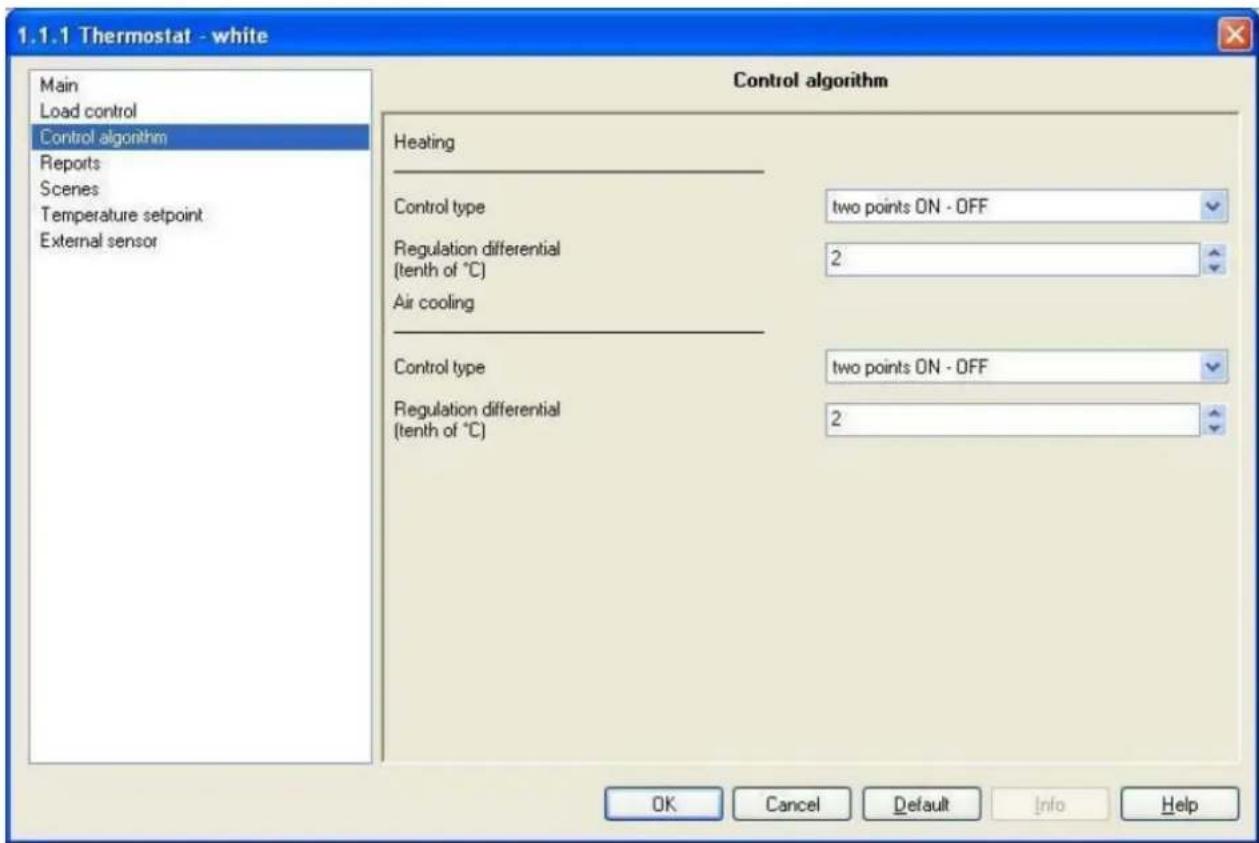
Fig. 6.1
6.1 Parameters
6.1.1 Control type
Here you can set the Load control algorithms applied to the heating system, given that this item is found in the heating menu (see subtitle in Diag. 6.1); the settings are:
- two points ON - OFF
The algorithm used to control the heating system is the classic algorithm defined as a two points control. This control type turns the heating system ON and OFF according to a hysteresis cycle, that is there is no single threshold that discriminates the ON and OFF command but two are identified (see Diag. 6.2).
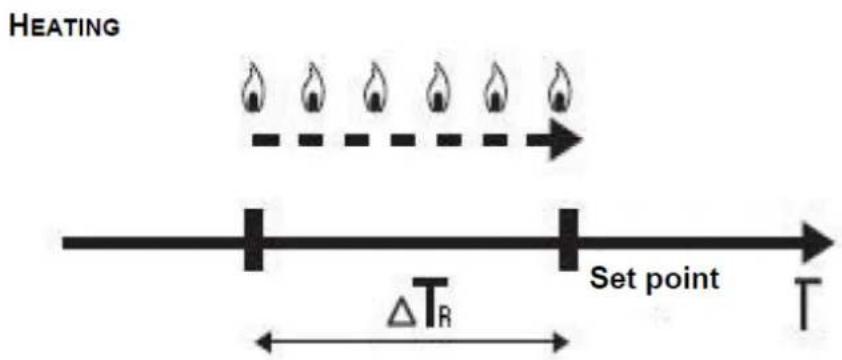
Fig. 6.2
When the measured temperature is below the “setpoint- T_ R ” value (where T_ R identifies the heating regulation differential value) the device starts the heating system by sending the relative bus command to the actuator that manages it; when the measured temperature reaches the indicated setpoint value, the device switches off the heating system by sending the relative bus command to the actuator that controls it.
You can see in this diagram that there are two thresholds which control the ON and OFF commands for the heating system; the first consists in the "setpoint- T " value, below which the device switches the system ON, the second consists in the indicated setpoint value, over which the device switches the system OFF.
With this setting, the Regulation differential (tenth of °C) option is visible.
• proportional PWM
The algorithm used to control the heating system is the algorithm which allows you to reduce heat inertia times caused by a two points control, called a PMW control. This control type foresees the modulation of the pulse duty-cycle, represented by the heating system activation time, according to the difference between the indicated setpoint and the detected temperature. (see Fig. 6.3).
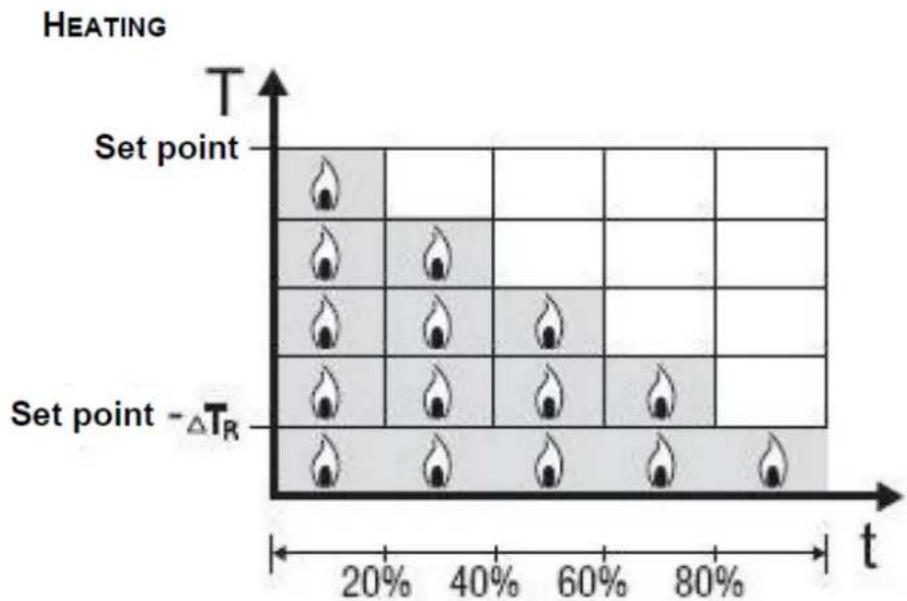
heatmap
HEATING | Set point | T | t (%) | Set point - ΔTR | | :--- | :--- | :--- | :--- | | 1 | 0 | 20 | 0 | | 2 | 0 | 40 | 0 | | 3 | 0 | 60 | 0 | | 4 | 0 | 80 | 0 | | 5 | 0 | 0 | 0 | | 6 | 0 | 20 | 0 | | 7 | 0 | 40 | 0 | | 8 | 0 | 60 | 0 | | 9 | 0 | 80 | 0 | | 10 | 0 | 0 | 0 | The image contains a heatmap with a legend indicating 't' and 'ΔTR'. The color scale ranges from 0 to 1, and the legend is implied by the flame icons. No numerical values or trends are provided in the image.Fig. 6.3
The device keeps the heating system ON for a percentage of time that depends on the difference between the measured temperature and the indicated setpoint; the setpoint and "setpoint- T " values
are indicated on the ordinate axis, that determines the proportional band limits within which the device constantly regulates the heating system, modulating the system's ON and OFF times.
With this type of algorithm there is no hysteresis cycle on the heating element and therefore the inertia time (system heating and cooling time) introduced by the two points control is eliminated. This also leads to energy savings as the system does not stay ON for no reason and, once the desired temperature has been reached, it continues to supply amounts of heat just to compensate any dispersion of heat in the environment.
With this setting the Regulation differential (tenth of ^ ) disappears and is replaced by new options, namely Cycle time and PWM regulation differential.
➢ 6.1.2 Regulation differential (tenth of °C)
Here you can set the heating regulation differential value which, subtracted from the indicated setpoint value, determines the threshold value below which the heating system is switched ON upon two points control.
The settings range from 2 (tenths of degrees centigrade) to 20 (tenths of degrees centigrade).
6.1.3 Cycle time
Here it is possible to set the time within which the device must perform PWM modulation. The settings are provided in the drop-down menu (an interval of from 5 to 60 minutes).
The settings are all multiples of 5 because, as you can see in Diag. 6.3, the duration of the heating system activation time is expressed as a percentage compared to the cycle time with a step of 20%. This means that, should the result of the control algorithm lead to a system activation time equal to 40% of the cycle time, if the value of the latter is 20 minutes, the device will activate the system for 8 minutes and then deactivate it until the end of the cycle time; at this point the PMW control algorithm is applied again and the activation time will be duly modified.
6.1.4 Regulation differential
Here you can set the heating PMW regulation differential value which, subtracted from the indicated setpoint value, determines the lowest limit of the proportional band limits used to modulate the time when the heating system is switched ON upon PWM proportional control. The settings are provided in the drop-down menu (an interval of from 0.4°C to 3.2°C).
The settings are all multiples of 0.4 because, as you can see in Diag. 6.3, the proportional band is divided into four zones and the minimum resolution for the device is 0.1 °C. This value set for this option, divided by 4, determines the width of the proportional sub-band within which the device determines the system ON and OFF times.
As the air conditioning parameters have the same characteristics and functions, with the sole difference being that they refer to the AIR CONDITIONING operating mode, please refer to the paragraphs above (from 6.1.1 to 6.1.4) for further information.
6.2 Communication objects
There are no communication objects enabled by the Control algorithm (1bit) menu.
7 "Control algorithm (1 byte)" menu
The Control algorithm menu lists all the parameters used to set the Load control algorithms for the heating and air conditioning system; in this chapter you will find the menu and relative options when the Command format option in the Load control (fan coil disabled) menu is set to 1 byte (% value) (see Fig. 7.1).
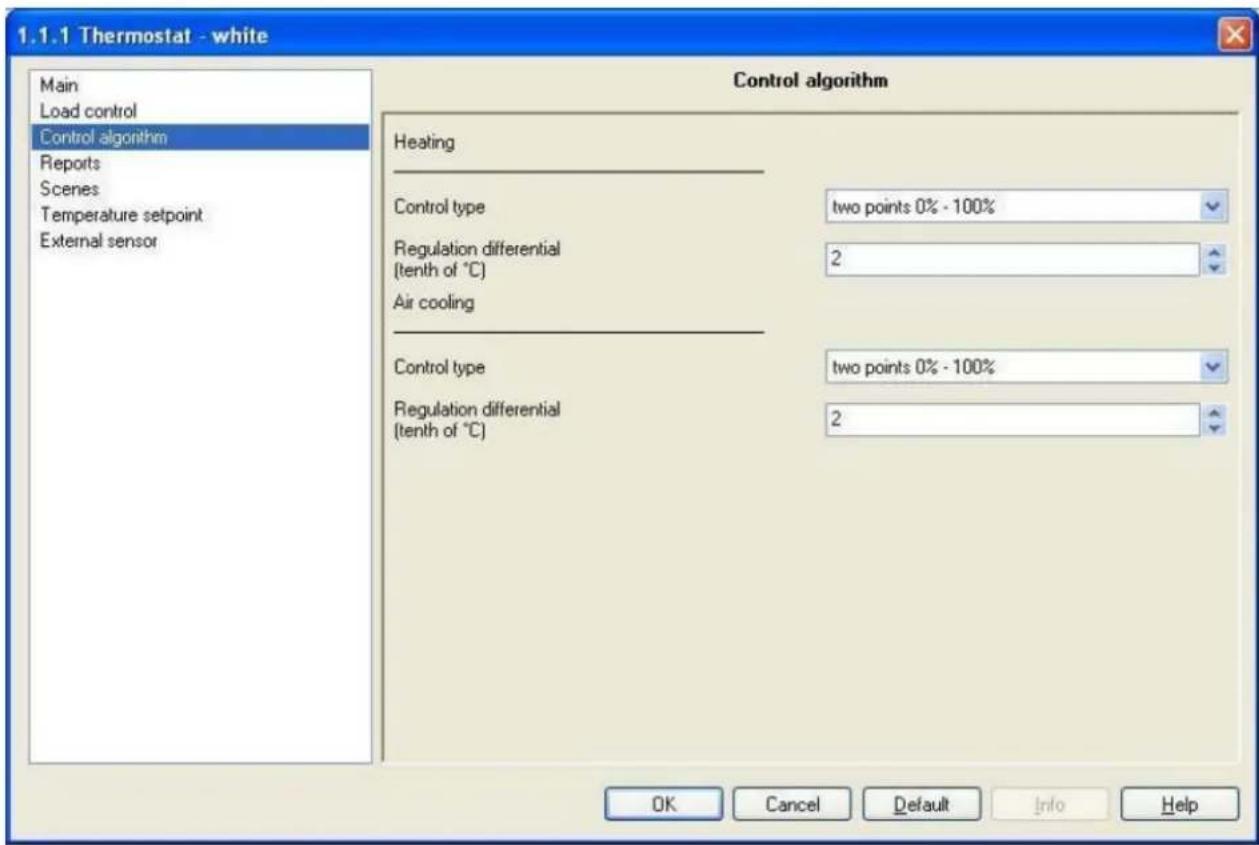
Fig. 7.1
7.1 Parameters
7.1.1 Control type
Here you can set the Load control algorithms applied to the heating system, given that this item is found in the heating menu (see subtitle in Diag. 7.1); the settings are:
• two points 0% - 100%
The functions and characteristics are the same as those illustrated for 1 bit control algorithm therefore please refer to 6.1.1. With this setting, the Regulation differential (tenth of °C) option is visible.
• continuous proportional
The algorithm used to control the heating system is the algorithm which allows you to reduce heat inertia times caused by a two points control, called continuous control. This control type foresees the continuous control of the difference between the measured temperature and the indicated setpoint and consequently the sending of power modulation commands to the heating system (see Fig. 7.2).
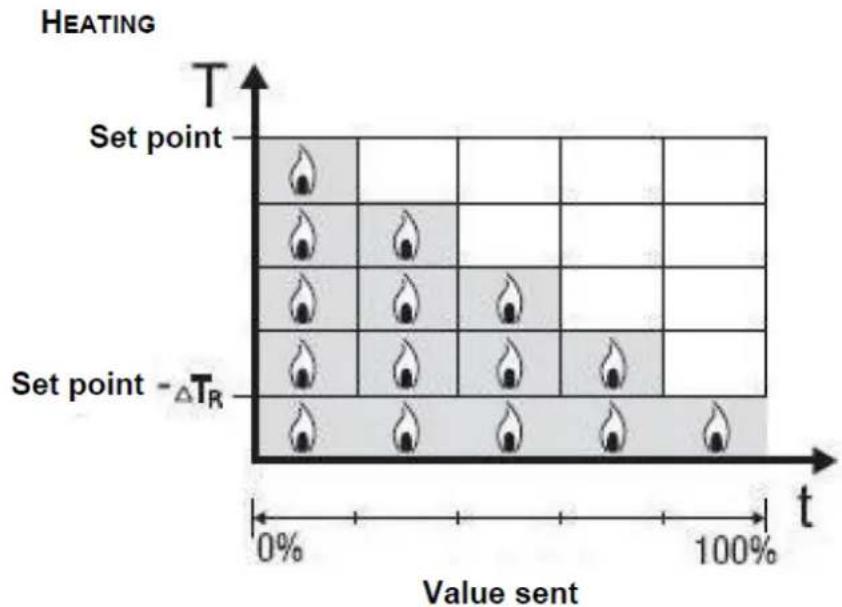
heatmap
HEATING | Set point | T | Value sent | | :--- | :--- | :--- | | 1 | 0% | 0% | | 2 | 100% | 50% | | 3 | 0% | 100% | | 4 | 100% | 75% | | 5 | 0% | 100% | | 6 | 100% | 80% | | 7 | 0% | 100% | | 8 | 100% | 90% | | 9 | 0% | 100% | | 10 | 100% | 85% | | 11 | 0% | 100% | | 12 | 100% | 95% | | 13 | 0% | 100% | | 14 | 100% | 90% | | 15 | 0% | 100% | | 16 | 100% | 85% | | 17 | 0% | 100% | | 18 | 100% | 90% | | 19 | 0% | 100% | | 20 | 100% | 85% | | 21 | 0% | 100% | | 22 | 100% | 90% | | 23 | 0% | 100% | | 24 | 100% | 85% | | 25 | 0% | 100% | | 26 | 100% | 90% | | 27 | 0% | 100% | | 28 | 100% | 85% | | 29 | 0% | 100% | | 30 | 100% | 90% | | 31 | 0% | 100% | | 32 | 100% | 85% | | 33 | 0% | 100% | | 34 | 100% | 90% | | 35 | 0% | 100% | | 36 | 100% | 85% | | 37 | 0% | 100% | | 38 | 100% | 90% | | 39 | 0% | 100% | | 40 | 100% | 85% | | 41 | 0% | 100% | | 42 | 100% | 90% | | 43 | 0% | 100% | | 44 | 100% | 85% | | 45 | 0% | 100% | | 46 | 100% | 90% | | 47 | 0% | 100% | | 48 | 100% | 85% | | 49 | 0% | 100% | | 50 | 100% | 90% | | Note: The heatmap is a visual representation of the heat distribution across different temperature values. The x-axis represents 'Value sent' and the y-axis represents 'Heating'. The legend indicates 'Set point' and 'ΔTR'.Fig. 7.2
The device sends the commands to the actuator that manages the heating system according to the difference between the measured temperature and the indicated setpoint; the setpoint and “setpoint- T_R ” values are indicated on the ordinate axis, that determines the proportional band limits within which the device constantly regulates the heating system, modulating the power supplied to the same.
With this type of algorithm there is no hysteresis cycle on the heating element and therefore the inertia time (system heating and cooling time) introduced by the two points control is eliminated. This also leads to energy savings as the system does not stay ON for no reason and, once the desired temperature has been reached, it continues to supply amounts of heat just to compensate any dispersion of heat in the environment.
With this setting the Regulation differential (tenth of °C) disappears and is replaced by new options, namely Cycle time and PWM regulation differential.
Furthermore, a new option appears in the air conditioning system configuration menu, namely Min % variation for continuous proportional command sending (see Fig.7.3).

Fig. 7.3
7.1.2 Regulation differential (tenth of °C)
Here you can set the heating regulation differential value which, subtracted from the indicated setpoint value, determines the threshold value below which the heating system is switched ON upon two points control. The settings range from 2 (tenths of degrees centigrade) to 20 (tenths of degrees centigrade).
7.1.3 Cycle time
Here you can set the value that defines the period between the various applications of the continuous proportional control algorithm and the period for sending telegrams to the load. Once the algorithm has been applied and the percentage power value for the heating system has been sent, this value remains in force until the cycle time ends and a new algorithm is used to calculate the new value for the power to be applied.
The settings are provided in the drop-down menu, in an interval of from 5 to 60 minutes.
7.1.4 Regulation differential PWM
Here you can set the heating proportional regulation differential value which, subtracted from the indicated setpoint value, determines the lowest limit of the proportional band limits used to modulate the power supplied to heating system upon continuous proportional control. The settings are provided in the drop-down menu, with an interval of from 0.4^ C to 3.2^ C.
The settings, multiplied by the value set in the Min. % variation for continuous proportional command sending option, determines the width of the proportional sub-band within which the device determines the power to be supplied to the system.
As the air conditioning parameters have the same characteristics and functions, with the sole difference being that they refer to the AIR CONDITIONING operating mode, please refer to the paragraphs above (from 7.1.1 to 7.1.4) for further information.
7.1.5 Min. % variation for continuous proportional command sending
The seventh and final option on the Control algorithm menu (that appears under the heating/air conditioning sub-title, see Diag. 7.3), visible if the Control type is set to continuous proportional, is the Min. % variation for continuous proportional command sending option; here you can set the minimum variation value for sending commands to the actuator that controls the heating system and/or to the actuator that controls the air conditioning system.
The settings are: 5% - 10% - 20%.
This value determines the number of proportional sub-bands within which the device determines the value of the power to be sent to the system; in this case, in fact, there is no fixed number of proportional sub-bands, and this depends on the value set for this option. This means that it is necessary to pay careful attention when setting this value as, bearing in mind that the temperature measure resolution is 0.1 °C, the sub-bands that are created can not be lower in dimension than the resolution.
If, for instance the regulation differential value is 0.4^ C, the minimum variation for a send command event would have to be 20% (generating in this case 4 sub-bands each with a width of 0.1^ C) whilst, if the regulation differential value is 1.2^ C, the minimum variation for a send command event would have to be 10% (generating in this case 10 sub-bands each with a width of 0.12^ C).
A value of 5% can only be set where the regulation differential value is over 2°C.
Please note that this option appears when the heating and air conditioning control is switched to continuous proportional mode, and also when only one is in continuous proportional mode; in the former case, the value set for this option is applied to both operating types.
7.2 Communication objects
There are no communication objects enabled by the Control algorithm (1 byte) menu.
8 "Fan coil management" menu
The Fan coil management menu, visible if the Fan coil control function in the Main menu is set to enabled, displays the parameters which are used to control the fan coil (see Fig. 8.1).
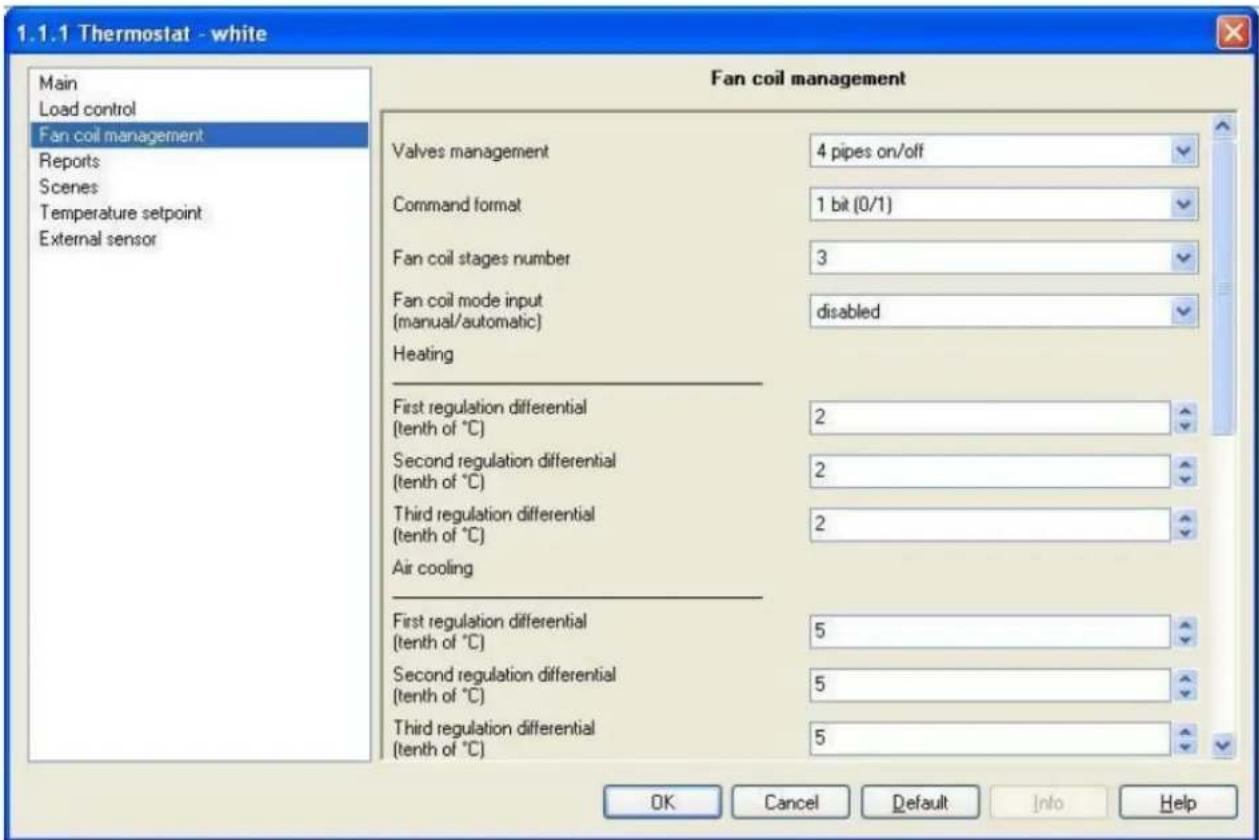
Fig. 8.1
The control type applied if the fan coil control is enabled, is similar to the two points control analysed in the previous chapters; that is it activates/deactivates the fan coil speeds according to the difference in the configured setpoint and the measured temperature.
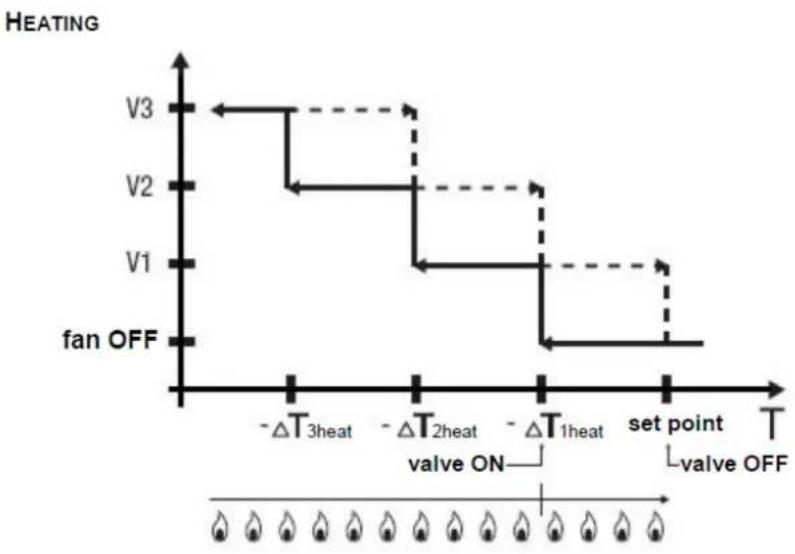
The actual difference between the 2 points algorithm is that, in this case, there is not one stage when the hysteresis cycle is performed to set the ON and OFF speed thresholds, but there are three; this means that each stage corresponds to a speed and when the difference between the measured temperature and the configured setpoint determines the activation of a specific speed, the other two must be deactivated before the new speed can be activated. There are two diagrams below which illustrate how the speeds to be activated are determined, according to the measured temperature for both the heating (Fig. 8.2), and air conditioning systems (Fig. 8.3).
line
| Set Point | Temperature (T) | | --------- | --------------- | | V1 | -ΔT₃heat | | V2 | -ΔT₂heat | | V3 | -ΔT₁heat |Fig. 8.2
The diagram refers to the speed control of the fan coil with three function stages for the heating system. Looking at the graph, you can see that there is a hysteresis cycle for each stage, and two thresholds are associated to each speed that determine activation and deactivation. The thresholds are calculated by the values set for the various regulation differentials, and can be summarised as follows:
- Speed V1 (stage 1): the speed is activated when the value of the temperature is less than the "setpoint- T_1 heat " value and deactivated when the temperature reaches the configured setpoint value (remember that speed 1 is deactivated also when a higher speed is activated)
- Speed V2 (stage 2): the speed is activated when the value of the temperature is less than the "setpoint- T_1 heat - T_2 heat " value and deactivated when the temperature reaches the "setpoint- T_1 heat " value (remember that speed 2 is deactivated also when a speed V3 is activated)
- Speed V3 (stage 3): the speed is activated when the value of the temperature is less than the "setpoint- T_1 heat - T_2 heat - T_3 heat " value and deactivated when the temperature reaches the "setpoint- T_1 heat - T_2 heat " value
You can see that, once the measured temperature is lower than the “setpoint- T_1 heat ”, value, further to activate the fan coil speed according to the algorithm analysed before, the thermostat also sends an open command to the solenoid value that controls the heating system; the solenoid valve is however closed when the measured temperature reaches the configured setpoint value.
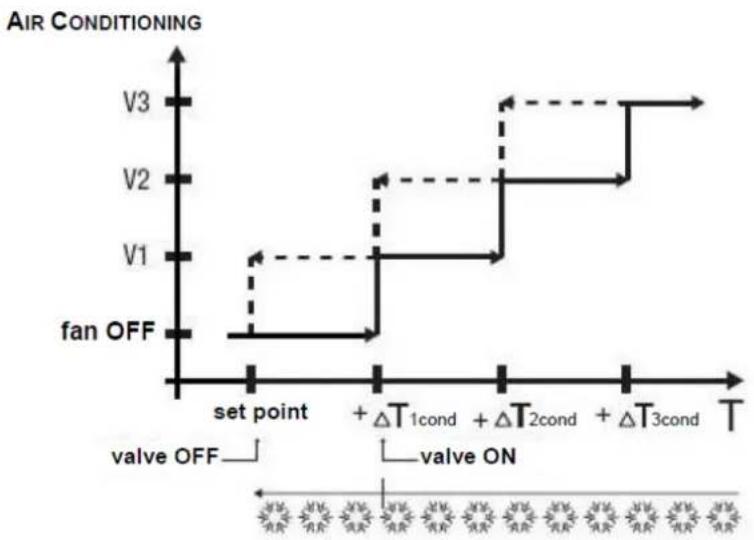
The diagram concerning the air conditioning system can be seen in the diagram below.
line
| Time Point | Voltage Level | | ---------- | ------------- | | set point | V1 | | | V2 | | | V3 | | | fan OFF | | | V3 | | | V2 | | | V1 | | | V3 | | | V2 | | | V1 | | | V3 | | | V2 | | | V1 | | | V3 | | | V2 | | | V1 | | | V3 | | | V2 | | | V1 | | | V3 | | | V2 | | | | V1 | | | V3 | | | V2 | | | V1 | | | V3 | | | V2 | | | V1 | | | V3 | | | V2 | | | V1 | | | V3 | | | V2 | | | V1 | | | V3 | | | | | | set point | | | ΔT₁cond | | | +ΔT₂cond | | | +ΔT₃cond | | | T | | | valve OFF | | | valve ON | | | valve ON | | | valve ON | | | valve ON | | | valve ON | | | valve ON | | | valve ON | | | valve ON | | | valve ON | | | valve ON | | | valve ON | | | valve ON | | | valve ON | | | valve ON | | | valve ON | | | | valve ON | | | | valve ON | | | | valve ON | | | | valve ON | | | | valve ON | | | | valve ON | | | | valve ON | | | | valve ON | | | | valve ON | | | | valve ON | | | | valve ON | | | | valve ON | | | | Valve ON | | | | Valve ON | | | | Valve ON | | | | Valve ON | | | | Valve ON | | | | Valve ON | | | | Valve ON | | | | Valve ON | | | | Valve ON | | | | Valve ON | | | | Valve ON | | | | Valve ON | | | | Valve ON | | | | Valve ON | | | | Valve ON | | | | Valve ON | | | | Valve ON | | | | Valve ON | | | | Valve ON | | | | Valve ON | | | | Valve ON | | | | Valve ON | | | | Valve ON | | | | Valve ON | | | | Valve ON | | | | Valve ON, Valve ON, Valve ON, Valve OFF, Valve ON, Valve OFF, Valve ON, Valve ON, Valve ON, Valve ON, Valve ON, Valve ON, Valve ON, Valve ON, Valve ON, Valve ON, Valve ON, Valve ON, Valve ON, Valve ON, Valve ON, Valve ON, Valve ON, Valve ON, Valve ON, Valve ON, Valve ON, Valve ON, Valve ON, Valve ON, Valve ON, Valve ON, Valve ON, Valve ON, Valve ON, Valve ON, Valve ON, Valve ON, Valve ON, Valve ONFig. 8.3
The diagram refers to the speed control of the fan coil with three function stages for the air conditioning system. Looking at the graph, you can see that there is a hysteresis cycle for each stage, and two thresholds are associated to each speed that determine activation and deactivation. The thresholds are calculated by the values set for the various regulation differentials, and can be summarised as follows:
- Speed V1 (stage 1): the speed is activated when the value of the temperature is greater than the "setpoint- T_1cond " value and deactivated when the temperature reaches the configured setpoint value (remember that speed 1 is deactivated also when a higher speed is activated)
- Speed V2 (stage 2): the speed is activated when the value of the temperature is greater than the "setpoint- T_1cond + T_2cond " value and deactivated when the temperature reaches the setpoint+ T_1cond " value (remember that speed 2 is deactivated also when a speed V3 is activated)
- Speed V3 (stage 3): the speed is activated when the value of the temperature is less than the "setpoint- T_1 cond - T_2 cond - T_3 cond " value and deactivated when the temperature reaches the "setpoint- T_1 cond - T_2 cond " value
You can see that, once the measured temperature is higher than the "setpoint- T_1cond ", value, further to activate the fan coil speed according to the algorithm analysed before, the thermostat also sends an open command to the solenoid value that controls the air conditioning system; the solenoid valve is however closed when the measured temperature reaches the configured setpoint value.
Both these diagrams refer to the three stage control of the fan coil, as the explanations provided herein are exhaustive and, in the case of one or two stage setups, the functions are the same as those analysed above, the sole difference being that not all the speeds will be controlled. The functions described are applied when the fan coil operating mode is set to AUTO, whilst if it is in MANUAL mode and the operator sets a specific speed, the speed activation command is set when the measured temperature is lower than the
“setpoint- T_1 heat ” value in heating mode, and lower that the “setpoint+ T_1 cond ” value in air conditioning mode.
8.1 Parameters
8.1.1 Valves management
Here you can configure the management of the solenoid valves used by the heating and air conditioning systems, according to the type of hydraulic system installed; the settings are:
- 2 ways on/off
The thermostat is configured to manage one valve that controls both the air conditioning system and the heating system; with this configuration, the device controls one single actuator to which it sends ON/OFF
commands according to whether the system must be activated or deactivated. On setting this value, the Heating/Air conditioning valve switch communication object appears, and this allows command telegrams to be sent to the actuator that controls the solenoid valve; moreover, if the feedback option is enabled on the actuators that control the valves (see paragraph 5.1.2) the Heating/Air conditioning valve feedback object appears through which the device is able to receive status feedback bus telegrams from the actuator that controls the solenoid valve.
- 4 ways on/off
The thermostat is configured to manage two different valves, one that controls the air conditioning system and one that controls the heating system; with this configuration, the device controls two different actuators to which it sends ON/OFF commands according to whether the system must be activated or deactivated depending on the set operating type (heating/air conditioning). On setting this value, the Heating valve switch and Air conditioning valve switch communication objects appears, and these allow command telegrams to be sent to the actuators that control the solenoid valves for the heating system and the air conditioning system; moreover, if the feedback option is enabled on the actuators that control the valves (see paragraph 5.1.2) the Heating valve feedback and Air conditioning valve feedback objects appears through which the device is able to receive status feedback bus telegrams from the actuators that control the two systems.
• 2 ways percentage command 0%/100%
The thermostat is configured to manage one valve that controls both the air conditioning system and the heating system; with this configuration, the device controls one single actuator to which it sends ON (100%) / OFF(0%) commands according to whether the system must be activated or deactivated. On setting this value, the Heating/Air conditioning valve % command communication object appears, and this allows command telegrams to be sent to the actuator that controls the solenoid valve; moreover, if the feedback option is enabled on the actuators that control the valves (see paragraph 5.1.2) the Heating/Air conditioning valve % feedback object appears through which the device is able to receive status feedback bus telegrams from the actuator that controls the solenoid valve.
• 4 ways percentage command 0%/100%
The thermostat is configured to manage two different valves, one that controls the air conditioning system and one that controls the heating system; with this configuration, the device controls two different actuators to which it sends ON (100%) /OFF (0%) commands according to what type of system must be activated or deactivated (heating/air conditioning). On setting this value, the Heating valve % command and Air conditioning valve % command communication objects appears, and these allow command telegrams to be sent to the actuators that control the solenoid valves for the heating system and the air conditioning system; moreover, if the feedback option is enabled on the actuators that control the valves (see paragraph 5.1.2) the Heating valve % feedback and Air conditioning valve % feedback objects appears through which the device is able to receive status feedback bus telegrams from the actuators that control the two systems.
8.1.2 Command format
This allows you to configure the format for the communication objects used to control the fan coil; the settings are:
- 1 bit (0/1)
The format for the communication objects used to control the fan coil is 1 bit. The number of communication objects enabled is equal to those indicated in the setting in the Fan coil stages number option; in fact, this value is entered when there is an actuator for each fan coil speed to be controlled, each of which powers the winding at the speed it controls.
• 1 byte (value %)
The format for the communication object used to control the fan coil is 1 byte.
One single communication object is enabled through which percentage speed commands are to sent to the actuator that controls the fan coil. In this case, a speed percentage value corresponds to each speed, which depends on the value set in the Fan coil stages number option; this value is entered when there is an actuator for each fan coil speed to be controlled, changing the speed of the latter according to the percentage values sent.
8.1.3 Fan coil stages number
This allows you to configure the number of stages to control the fan coil speed, according to the type of fan coil used; the settings are:
• 1
The number of stages used to control the fan coil speed is 1; it is presumed that the fan coil being used has just one operating speed. According to the settings under the Command format option, the following communication objects are enabled:
- if the value set for this option is 1 bit (0/1), the Fan V1 switch communication object is enabled to control the first and only fan speed; if the fan coil actuator feedbacks are enabled in the Load control menu, the V1 fan status feedback object is visible.
- if the value set for this option is 1 byte (% value), the Fan coil continuous command communication object is enabled to control the fan coil speed; if the fan coil actuator feedbacks are enabled in the Load control menu, the Fan coil continuous feedback object is visible. In this case the commands sent are percentage values of the fan coil speed, that are summarised below:
| Fan coil speed | Percentage value sent |
| Fan OFF | 0% |
| Speed 1 (V1) | 100% |
• 2
The number of stages used to control the fan coil speed is 2; it is presumed that the fan coil being used has two operating speeds.
According to the settings under the Command format option, the following communication objects are enabled:
- if the value set for this option is 1 bit (0/1), the Fan V1 switch and Fan V2 switch communication objects are enabled to control the first and second fan speeds; if the fan coil actuator feedbacks are enabled in the Load control menu, the V1 fan status feedback and V2 fan status feedback objects are visible.
- if the value set for this option is 1 byte (% value), the Fan coil continuous command communication object is enabled to control the fan coil speed; if the fan coil actuator feedbacks are enabled in the Load control menu, the Fan coil continuous feedback object is visible. In this case the commands sent are percentage values of the fan coil speed, that are summarised below:
| Fan coil speed | Percentage value sent |
| Fan OFF | 0% |
| Speed 1 (V1) | 50% |
| Speed 2 (V2) | 100% |
• 3
The number of stages used to control the fan coil speed is 3; it is presumed that the fan coil being used has three operating speeds.
According to the settings under the Command format option, the following communication objects are enabled:
- if the value set for this option is 1 bit (0/1), the Fan V1 switch, Fan V2 switch and Fan V3 switch communication objects are enabled to control the first, second and third fan speeds; if the fan coil actuator feedbacks are enabled in the Load control menu, the V11 fan status feedback, V2 fan status feedback and V3 fan status feedback objects are visible.
- if the value set for this option is 1 byte (% value), the Fan coil continuous command communication object is enabled to control the fan coil speed; if the fan coil actuator feedbacks are enabled in the Load control menu, the Fan coil continuous feedback object is visible. In this case the commands sent are percentage values of the fan coil speed, that are summarised below:
| Fan coil speed | Percentage value sent |
| Fan OFF | 0% |
| Speed 1 (V1) | 33% |
| Speed 2 (V2) | 67% |
| Speed 3 (V3) | 100% |
8.1.4 Fan coil mode input (manual/automatic)
Here you can set the control mode (automatic or manual) of the fan coil speed through a telegram received from the bus; the settings are:
- disabled
It is not possible to modify the control mode (automatic or manual) of the fan coil speed using a telegram received from the bus; it is however possible to modify the fan coil speed control mode using the local keyboard on the device.
- enabled
It is possible to modify the control mode (automatic or manual) of the fan coil speed using a telegram received from the bus; the Fan coil mode input communication object is visible and here you can enable the receipt of telegrams to modify the fan coil speed control mode. It is however possible to modify the fan coil speed control mode using the local keyboard on the device.
8.1.5 First regulation differential (tenth of °C)
Here you can set the first heating fan coil speed regulation differential ( T_1 heat) , given that this item is found in the heating menu (see subtitle in Fig. 8.1). The settings range from 2 (tenths of degrees centigrade) to 20 (tenths of degrees centigrade).
8.1.6 Second regulation differential (tenth of °C)
The same applies as indicated in the previous paragraph, but in relation to the second heating fan coil speed regulation differential ( T_2 heat) , so please refer to 8.1.6 for further details.
8.1.7 Third regulation differential (tenth of °C)
The same applies as indicated in the previous paragraph, but in relation to the third heating fan coil speed regulation differential ( T_3 heat) , so please refer to 8.1.6 for further details.
8.1.8 First regulation differential (tenth of °C)
Here you can set the first air conditioning fan coil speed regulation differential ( T_1cond ), given that this item is found in the air conditioning menu (see subtitle in Fig. 8.1). The settings range from 2 (tenths of degrees centigrade) to 20 (tenths of degrees centigrade).
8.1.9 Second regulation differential (tenth of °C)
The same applies as indicated in the previous paragraph, but in relation to the second air conditioning fan coil speed regulation differential ( T_2cond) , so please refer to 8.1.8 for further details.
8.1.10 Third regulation differential (tenth of °C)
The same applies as indicated in the previous paragraph, but in relation to the third air conditioning fan coil speed regulation differential ( ^T_3cond ), so please refer to 8.1.8 for further details.
8.2 Communication objects
The communication objects, whose visibility depends on the settings in the items of the Load control menu, are those indicated in Diag. 8.4.
| Number | Name | Object Function | Length | C | R | W | T | U | Data Type | Priority |
| 8 | Fan coil mode input | Automatic/Manual | 1 bit | C | - | W | - | - | 1 bit DPT_Switch | Low |
| 30 | Heating/Air conditioning valve switch | On/Off | 1 bit | C | R | - | T | - | 1 bit DPT_Switch | Low |
| 30 | Heating valve switch | On/Off | 1 bit | C | R | - | T | - | 1 bit DPT_Switch | Low |
| 32 | Air conditioning valve switch | On/Off | 1 bit | C | R | - | T | - | 1 bit DPT_Switch | Low |
| 31 | Heating/Air conditioning valve % command | 0%/100% | 1 Byte | C | R | - | T | - | 8 bit unsigned value DPT_Scaling | Low |
| 31 | Heating valve % command | 0%/100% | 1 Byte | C | R | - | T | - | 8 bit unsigned value DPT_Scaling | Low |
| 33 | Air conditioning valve % command | 0%/100% | 1 Byte | C | R | - | T | - | 8 bit unsigned value DPT_Scaling | Low |
| 35 | Fan V1 switch | On/Off | 1 bit | C | R | - | T | - | 1 bit DPT_Switch | Low |
| 36 | Fan V2 switch | On/Off | 1 bit | C | R | - | T | - | 1 bit DPT_Switch | Low |
| 37 | Fan V3 switch | On/Off | 1 bit | C | R | - | T | - | 1 bit DPT Switch | Low |
| 38 | Fan coil continuous command | % Value | 1 Byte | C | R | - | T | - | 8 bit unsigned value DPT_Scaling | Low |
Fig. 8.4
8.2.1 Fan coil mode input
Here you can configure the remote control of the fan coil speed control mode by bus command, changing it from automatic to manual mode and vice-versa. When this object receives a bus telegram with a "1" logic value, the device sets the fan coil speed control mode to AUTOMATIC mode; vice-versa if the object receives a "0" logic value, the device sets the fan coil speed control mode to MANUAL and sets speed V1. The configuration of the fan coil speed control mode with a bus command only allows the setting of speed V1; the other speeds, again in MANUAL speed control mode, can be enabled using the local keyboard.
The enabled flags are C (communication), W (written by bus).
The standard format of the object is 1.001 DPT_Switch, so the size of the object is 1 bit and the commands it receives are fan coil speed control mode: automatic/manual.
8.2.2 Heating/air conditioning valve switch
This allows the device to send ON/OFF commands to the actuator that manages the control valve on the heating system and the air conditioning system. The device not only triggers the fan coil speed, but it also sends the open/close command to the solenoid valve that controls in this case both the HVAC systems; to be precise, the thermostat will send a telegram with a "1" logic value to open the solenoid valve and "0" a logic value to close the same valve.
The enabled flags are C (communication), R (read by bus) and T (transmission).
The standard format of the object is 1.001 DPT_Switch, so the size of the object is 1 bit and the commands it sends are heating/air conditioning valve open/closed.
8.2.3 Heating valve switch
This allows the device to send ON/OFF commands to the actuator that manages the control valve on the heating system. The device not only triggers the fan coil speed, but it also sends the open/close command to the solenoid valve that controls in this case only the heating system; to be precise, the thermostat will send a telegram with a "1" logic value to open the solenoid valve and a "0" logic value to close the same valve.
The enabled flags are C (communication), R (read by bus) and T (transmission).
The standard format of the object is 1.001 DPT_Switch, so the size of the object is 1 bit and the commands it sends are heating valve open/closed.
8.2.4 Air conditioning valve switch
This allows the device to send ON/OFF commands to the actuator that manages the control valve on the air conditioning system. The device not only triggers the fan coil speed, but it also sends the open/close command to the solenoid valve that controls in this case only the air conditioning system; to be precise, the thermostat will send a telegram with a "1" logic value to open the solenoid valve and a "0" logic value to close the same valve.
The enabled flags are C (communication), R (read by bus) and T (transmission).
The standard format of the object is 1.001 DPT_Switch, so the size of the object is 1 bit and the commands it sends are air conditioning valve open/closed.
8.2.5 Heating/air conditioning valve % command
This allows the device to send open (100%) / closed (0%) commands to the actuator that manages the control valve on the heating system and the air conditioning system. The device not only triggers the fan coil speed, but it also sends the open/close command to the solenoid valve that controls in this case both the HVAC systems; to be precise, the thermostat will send a percentage value of 100% to open the solenoid valve and a percentage value of 0% to close the same valve.
The enabled flags are C (communication), R (read by bus) and T (transmission).
The standard format of the object is 5.001 DPT_Scaling, so the size of the object is 1 byte and the commands it sends are heating/air conditioning valve open (100%)/closed (0%).
8.2.6 Heating valve % command
This allows the device to send open (100%) and close (0%) commands to the actuator that manages the control valve on the heating system. The device not only triggers the fan coil speed, but it also sends the open/close command to the solenoid valve that controls in this case only the heating system; to be precise, the thermostat will send a percentage value of 100% to open the solenoid valve and a percentage value of 0% to close the same valve.
The enabled flags are C (communication), R (read by bus) and T (transmission).
The standard format of the object is 5.001 DPT_Scaling, so the size of the object is 1 byte and the commands it sends are heating valve open (100%)/closed (0%).
8.2.7 Air conditioning valve % command
This allows the device to send open (100%) and close (0%) commands to the actuator that manages the control valve on the air conditioning system. The device not only triggers the fan coil speed, but it also sends the open/close command to the solenoid valve that controls in this case only the air conditioning system; to be precise, the thermostat will send a percentage value of 100% to open the solenoid valve and a percentage value of 0% to close the same valve.
The enabled flags are C (communication), R (read by bus) and T (transmission).
The standard format of the object is 1.001 DPT_Scaling, so the size of the object is 1 byte and the commands it sends are air conditioning valve open (100%)/closed (0%).
8.2.8 Fan V1 switch
This allows the device to send ON/OFF commands to the actuator that manages speed one on the fan coil. The device calculates the speed to activate on the fan coil to regulate the ambient temperature and sends a telegram with a "1" logic value to activate speed one and a "0" logic value to deactivate the same speed.
The enabled flags are C (communication), R (read by bus) and T (transmission).
The standard format of the object is 1.001 DPT_Switch, so the size of the object is 1 bit and the commands it sends are fan coil speed one ON/OFF.
8.2.9 Fan V2 switch
The same applies as indicated in the previous paragraph, but in relation to fan coil speed two. For further details see 8.2.8.
8.2.10 Fan V3 switch
The same applies as indicated in the previous paragraph, but in relation to fan coil speed three. For further details see 8.2.8.
8.2.11 Fan coil continuous command
This allows the device to send percentage values to the actuator that manages the fan coil speed. The device calculates the speed to activate on the fan coil to regulate the ambient temperature and sends a telegram whose value determines the percentage speed to be activated on the fan coil; please remember that the values sent through this communication object depend on the value entered in the Fan coil stages number option (see paragraph 8.1.3).
The enabled flags are C (communication), R (read by bus) and T (transmission).
The standard format of the object is 5.001 DPT_Scaling, so the size of the object is 1 byte and the commands it sends are the fan coil speed percentage values.
9 "Reports" menu
The Reports menu lists all the parameters needed to configure the send feedback settings that the device sends by bus telegram (see Fig. 9.1).
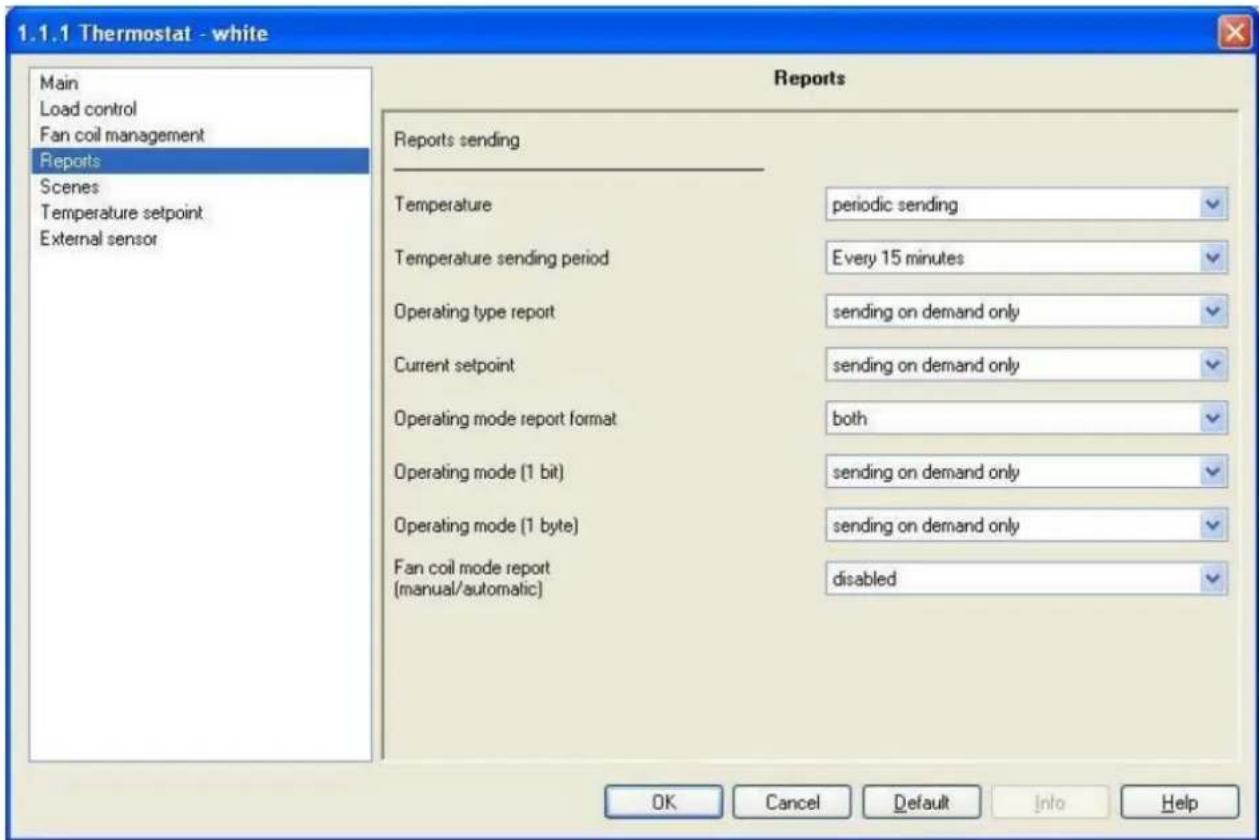
Fig. 9.1
9.1 Parameters
9.1.1 Temperature
This allows you to set the conditions for sending the measured temperature value; the settings are:
- sending on demand only
The temperature value is not sent spontaneously by the device, but only upon receiving a status read request, when the device sends a response telegram to the applicant with the relative measured temperature value, which is that displayed on the screen. The Temperature sending period option is not visible.
- sending on variation only (1/2 °C)
The temperature value is sent spontaneously by the device, but only if the variation in temperature compared to the last sent value is equal to at least 0.5 degrees centigrade. The Temperature sending period option is not visible.
• periodic sending
The temperature value is sent periodically by the device, according to set intervals. The Temperature sending period option is also visible and is used to set the interval at which the measured temperature value should be sent.
9.1.2 Temperature sending period
Here you can set the interval at which the measured temperature telegrams are sent; the settings are provided in the drop-down menu and range from "Every minute" to "Every 255 minutes".
9.1.3 Operating type report
Here you can configure the send conditions for the operating type feedbacks through the Operating type report communication object.
The settings are:
- sending on demand only
The feedbacks of the operating type enabled on the device are not sent spontaneously by the device through the Operating type report communication object, but only upon receiving a status read request, when the device sends a response telegram to the applicant with the relative information on the operating type set for the device.
- sending on variation only
The feedbacks for the operating type enabled on the device are sent spontaneously by the device through the Operating type report communication object every time there is a variation in operating mode.
9.1.4 Current setpoint
Here you can configure the send conditions for the feedbacks of the current setpoint value enabled on the device by bus telegram to the Current setpoint feedback communication object.
The settings are:
- sending on demand only
The feedbacks of the current setpoint value enabled on the device are not sent spontaneously by the device through the Current setpoint feedback communication object, but only upon receiving a status read request, when the device sends a response telegram to the applicant with the relative information on the current setpoint set for the device.
- sending on variation only
The feedbacks for the current setpoint enabled on the device are sent spontaneously by the device through the Current setpoint feedback communication object every time there is a variation in operating mode.
Even when the setpoint value is temporarily forced, the forced value is sent nevertheless.
9.1.5 Operating mode report format
Here you can configure the bus telegram format used by the device to report the HVAC operating mode is enabled on the device. The settings are:
- 1 byte
The device notifies the operating mode using one single 1 byte communication object; with this configuration the Operating mode (1 byte) and the Thermoregulation mode feedback communication object are visible.
• 1 bit
The device identifies the operating mode using series of communication objects with a 1 bit format; to be precise, one per mode. When a mode is actually enabled, it is notified by bus telegram to the object associated to the new mode, and a disabled mode feedback is sent to the object associated to the mode that was previously enabled. There are never circumstances where more than one HVAC mode is enabled at the same time. With this setting enabled, the Operating Mode (1 bit) option and the Off mode feedback, Economy mode feedback, Precomfort mode feedback, and Comfort mode feedback communication objects become visible.
- both
The device identifies the operating mode using the communication object with a 1 byte format and the communication object with a 1 bit format. With this setting enabled, the Operating mode (1 byte) and Operating mode (1 bite) options and the Thermoregulation mode feedback, Off mode feedback,
Economy mode feedback, Precomfort mode feedback and Comfort mode feedback communication objects become visible.
9.1.6 Operating mode (1 byte)
Here you can configure the send conditions for the operating mode feedbacks through the Thermoregulation mode feedback 1 byte communication object.
The settings are:
- sending on demand only
The feedbacks of the operating mode are not sent spontaneously by the device with a 1 byte command through the Thermoregulation mode feedback communication object, but only upon receiving a status read request, when the device sends a response telegram to the applicant with the relative information on the operating mode set for the device.
- sending on variation only
The 1 byte operating mode feedbacks are sent spontaneously by the device through the Thermoregulation mode feedback communication object every time there is a variation in mode status.
9.1.7 Operating mode (1 bit)
Here you can configure the send conditions for the operating mode feedbacks through the Off mode feedback, Economy mode feedback, Precomfort mode feedback and Comfort mode feedback 1 bit communication objects. The settings are:
- sending on demand only
The feedbacks of the operating mode are not sent spontaneously by the device with a 1 bit command through the Off mode feedback, Economy mode feedback, Precomfort mode feedback and Comfort mode feedback communication objects, but only upon receiving a status read request, when the device sends a response telegram to the applicant with the relative information on the operating mode set for the object the request was sent for. This means that, when a read status request is received on one of the above listed objects, the device responds with status of that operating mode (enabled/disabled) and not with the status of the operating mode set on the device, which is on the other hand what happens with a 1 byte object.
- sending on variation only
The 1 bit operating mode feedbacks are sent spontaneously by the device through the Off mode feedback, Economy mode feedback, Precomfort mode feedback and Comfort mode feedback communication objects, every time there is a variation in mode status. This means that, every time the HVAC mode changes on the device, it notifies the enabling of the new mode through the communication object associated to it, and notifies the disabling of the previous operating mode through the communication object associated to the latter.
9.1.8 Fan coil mode report (manual/automatic)
This is used to enable the Fan coil mode feedback communication object through which the device notifies the fan coil speed control mode (manual/automatic) with a bus telegram; the settings are:
- disabled
The device does not send a bus telegram with the fan coil speed control mode (automatic or manual); the Fan coil mode feedback communication object which enables the sending of this feedback is not visible.
- enabled
The device does not send a bus telegram with the fan coil speed control mode (automatic or manual); with this setting the Fan coil mode feedback communication object which enables the sending of this feedback is now visible.
9.2 Communication objects
The communication objects, whose visibility depends on the settings in the items of the Reports menu, are those indicated in Fig. 9.2.
| Number | Name | Object Function | Length | C | R | W | T | U | Data Type | Priority |
| 29 | Current setpoint feedback | Setpoint value | 2 Byte | C | R | - | T | - | 2 byte float value DPT_Value_Temp | Low |
| 34 | Fan coil mode feedback | Automatic/Manual | 1 bit | C | R | - | T | - | 1 bit DPT_Switch | Low |
| 39 | Measured temperature output | Value °C | 2 Byte | C | R | - | T | - | 2 byte float value DPT_Value_Temp | Low |
| 40 | Thermoregulation mode feedback | Auto/Eco/Precom/Comf/Off | 1 Byte | C | R | - | T | - | Low | |
| 41 | Operating type feedback | Heating/Air conditioning | 1 bit | C | R | - | T | - | Low | |
| 42 | Off mode feedback | Enabled/Disabled | 1 bit | C | R | - | T | - | 1 bit DPT_Enable | Low |
| 43 | Economy mode feedback | Enabled/Disabled | 1 bit | C | R | - | T | - | 1 bit DPT_Enable | Low |
| 44 | Precomfort mode feedback | Enabled/Disabled | 1 bit | C | R | - | T | - | 1 bit DPT_Enable | Low |
| 45 | Comfort mode feedback | Enabled/Disabled | 1 bit | C | R | - | T | - | 1 bit DPT_Enable | Low |
Fig. 9.2
9.2.1 Current setpoint feedback
The device uses this communication object to notify the setpoint value currently enabled, that is the one seen on the display which can be temporarily forced by the user where necessary.
The sending of such feedback depends on the settings entered for the Current setpoint option.
The enabled flags are C (communication), R (read by bus) and T (transmission).
The standard format of the object is 9.001 DPT_Value_Temp, so the size of the object is 2 byte and the commands it sends are current setpoint values expressed in degrees centigrade (rounded off to a tenth of a degree).
9.2.2 Fan coil mode feedback
The device uses this communication object to notify the fan coil speed control mode, according to when it is switched from automatic to manual mode and vice-versa. When the fan coil speed control mode switches from MANUAL to AUTOMATIC the device send a telegram to the bus with a "1" logic value; when the fan coil speed control mode switches from AUTOMATIC to MANUAL, the device send a telegram to the bus with a "0" logic value.
The enabled flags are C (communication), R (read by bus) and T (transmission).
The standard format of the object is 1.001 DPT_Switch, so the size of the object is 1 bit and the commands it sends are fan coil speed control mode feedback: automatic/manual.
9.2.3 Measured temperatura output
The device uses this communication object to notify the measured temperature value, that is the one displayed on the screen that may or may not be calculated with the contribution of an external sensor.
The sending of such feedback depends on the settings entered for the Temperature option.
The enabled flags are C (communication), R (read by bus) and T (transmission).
The standard format of the object is 9.001 DPT_Value_Temp, so the size of the object is 2 byte and the commands it sends are measured temperature values expressed in degrees centigrade (rounded off to a tenth of a degree).
9.2.4 Thermoregulation mode feedback
This allows the device to notify the operating mode set by bus command.
The sending of such feedback depends on the settings entered for the Operating mode (1 byte) option.
The enabled flags are C (communication), R (read by bus) and T (transmission).
The standard format of the object is 20.102 DPT_HVACMode, so the size of the object is 1 byte and the commands it sends are Operating mode: Economy/Precomfort/Comfort/Off.
9.2.5 Operating type feedback
This allows the device to notify the operating type set by bus command
The sending of such feedback depends on the settings entered for the Operating type feedback option.
The enabled flags are C (communication), R (read by bus) and T (transmission)
The standard format of the object is 1.100 DPT_Heat/Cool, so the size of the object is 1 bit and the commands it sends are operating type: Heating/Air conditioning.
9.2.6 Off mode feedback
This allows the device to notify the enabling/disabling of the OFF operating mode.
The sending of such feedback depends on the settings entered for the Operating Mode (1 bit) option.
The enabled flags are C (communication), R (read by bus) and T (transmission).
The standard format of the object is 1.003 DPT_Enable, so the size of the object is 1 bit and the commands it sends are operating mode OFF enabled/disable.
9.2.7 Economy mode feedback
The same applies as indicated in the previous paragraph, but in relation to the ECONOMY mode; please refer to 9.2.6 for further details.
9.2.8 Precomfort mode feedback
The same applies as indicated in the previous paragraph, but in relation to the PRECOMFORT mode; please refer to 9.2.6 for further details.
9.2.9 Comfort mode feedback
The same applies as indicated in the previous paragraph, but in relation to the COMFORT mode; please refer to 9.2.6 for further details.
10 "Scene" menu
The Scenes menu lists all the parameters needed to configure the scene operating mode (see Fig. 10.1).
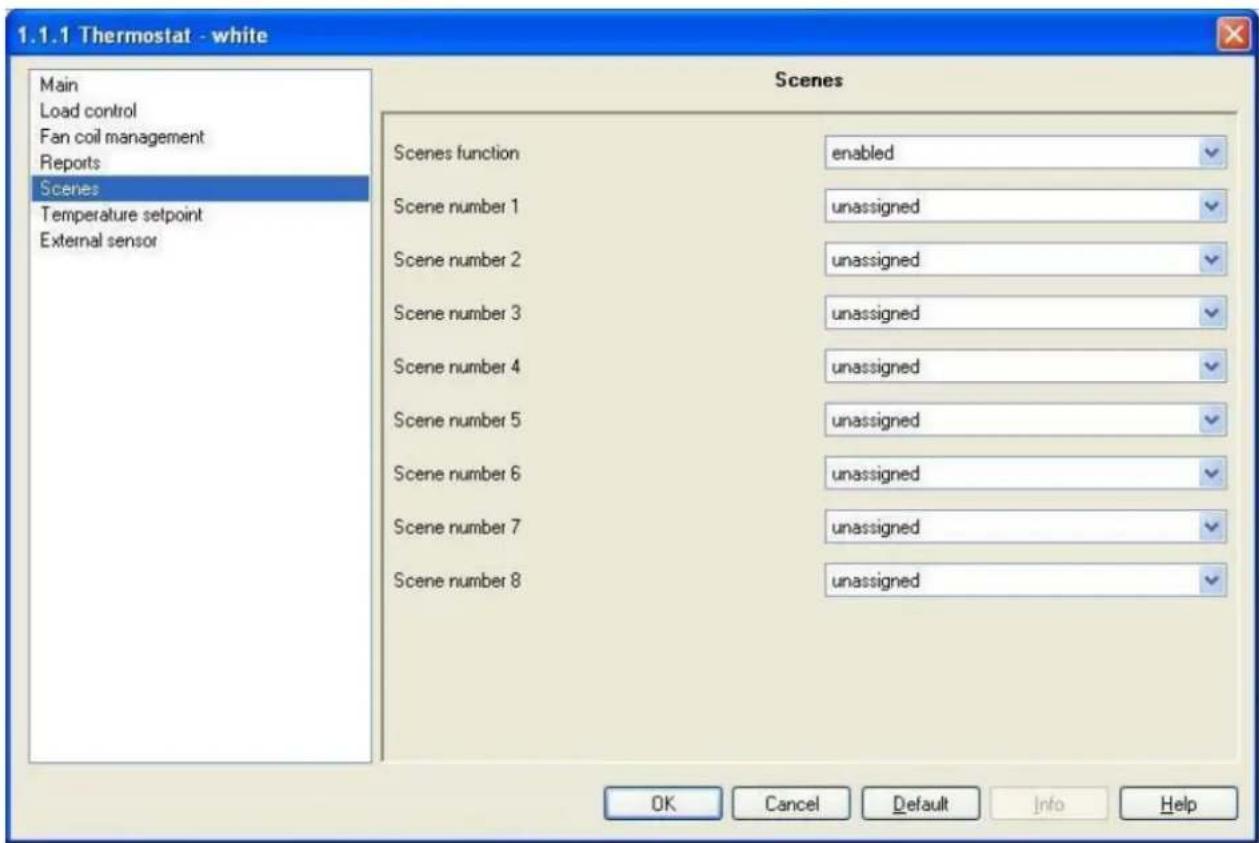
Fig. 10.1
10.1 Parameters
10.1.1 Scenes function
This is to enable and configure the function and make the sub items (Scene number x) and the relative Scene communication object visible. (x refers to the number associated to the scene).
The scene function sends two possible commands to the device:
- execute scene, that is a command to create a specific condition - store scene, that is a command to memorise the current status (at the moment the command is received) of the operating mode, operating type and any indicated setpoint temporary forced positioning.
This function foresees 8 different scenes, so the device can memorise /reproduce 8 different operating modes and types. The settings are:
- disabled
The scene function is not enabled and consequently the various options and communication object are not visible.
- enabled
The scene function is enabled and is managed by the Scene communication object. In this section you can also view the other settings (Scene number x) needed to configure the function.
10.1.2 Scene number x
Here you can assign a number to the scene x (where x indicates any scene, from 1 to 8, to which a common number is assigned) so that it can be recalled by a bus command.
The values that can be configured are shown in a drop down menu and can range from 0 to 63, plus the "unassigned" value if you decide not to number or use scene x.
There is only one rule to follow when assigning this value: it must be different from the number assigned to other scenes.
10.2 Communication objects
The Scenes function in the Scenes menu, if enabled, makes the communication object visible, as seen in Fig. 10.2.
| Number | Name | Object Function | Length | C | R | W | T | U | Data Type | Priority |
| 28 | Scene | Execute/Store | 1 Byte | C | - | W | - | - | Low |
Fig. 10.2
10.2.1 Scene
Using this communication object, the device is able to receive the execute and store scene commands from the bus.
On receiving a store scene command, through a bus telegram to the communication object in question, please remember that the device memorises the operating mode, operating type and any temporary forced setpoint.
The enabled flags are C (communication), W (written by bus).
The standard format of the object is 18.001 DPT_SceneControl, so the size of the object is 1 byte and the commands it receives are execute/store scene.
11 "Temperature setpoint" menu
The Temperature setpoint menu lists all the parameters needed to configure the setpoint values for the various HVAC modes and the two different operating types (see Fig. 11.1).
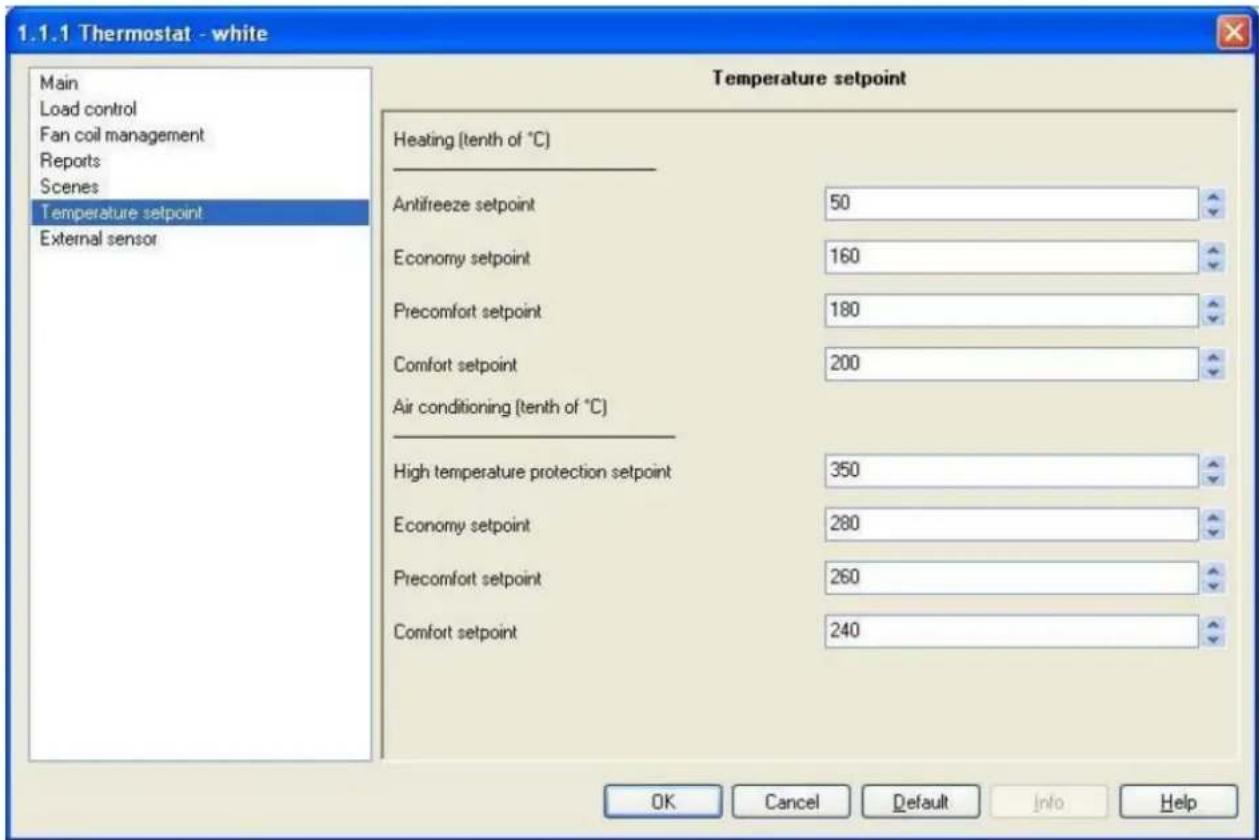
Fig. 11.1
11.1 Parameters
11.1.1 Antifreeze setpoint
Here you can set the setpoint value for the OFF mode when it is HEATING operating mode; the values range from 20 (2 degrees centigrade) to 70 (7 degrees centigrade).
The restrictions listed in 3.1.9 must be complied with when setting this value.
This value can in any case be modified by the operator using the setting in the local navigation menu on the device and, where enabled, modified by a bus telegram to the relative communication object.
11.1.2 Economy setpoint
Here you can set the setpoint value for the ECONOMY mode when it is HEATING operating mode; the values range from 50 (5 degrees centigrade) to 400 (40 degrees centigrade).
The restrictions listed in 3.1.9 must be complied with when setting this value.
This value can in any case be modified by the operator using the setting in the local navigation menu on the device and, where enabled, modified by a bus telegram to the relative communication object.
The features, functions and restrictions listed above also apply to the Precomfort setpoint, Comfort setpoint parameters for the HEATING operating type.
11.1.3 High temperature protection setpoint
Here you can set the setpoint value for the OFF mode when it is AIR CONDITIONING operating mode; the values range from 300 (30 degrees centigrade) to 400 (40 degrees centigrade).
The restrictions listed in 3.1.9 must be complied with when setting this value.
This value can in any case be modified by the operator using the setting in the local navigation menu on the device and, where enabled, modified by a bus telegram to the relative communication object.
11.1.4 Setpoint economy
Here you can set the setpoint value for the ECONOMY mode when it is AIR CONDITIONING operating mode; the values range from 50 (5 degrees centigrade) to 400 (40 degrees centigrade).
The restrictions listed in 3.1.9 must be complied with when setting this value.
This value can in any case be modified by the operator using the setting in the local navigation menu on the device and, where enabled, modified by a bus telegram to the relative communication object.
The features, functions and restrictions listed above also apply to the Precomfort setpoint, Comfort setpoint parameters for the AIR CONDITIONING operating type.
11.2 Communication objects
There are no communication objects enabled by the Temperature setpoint menu.
12 "External sensor" menu
The External sensor menu lists all the parameters needed to enable and configure the use of an auxiliary input for an external sensor, used to determine the temperature in the environment to be controlled in the various HVAC modes of the two different operating types (see Fig. 12.1).
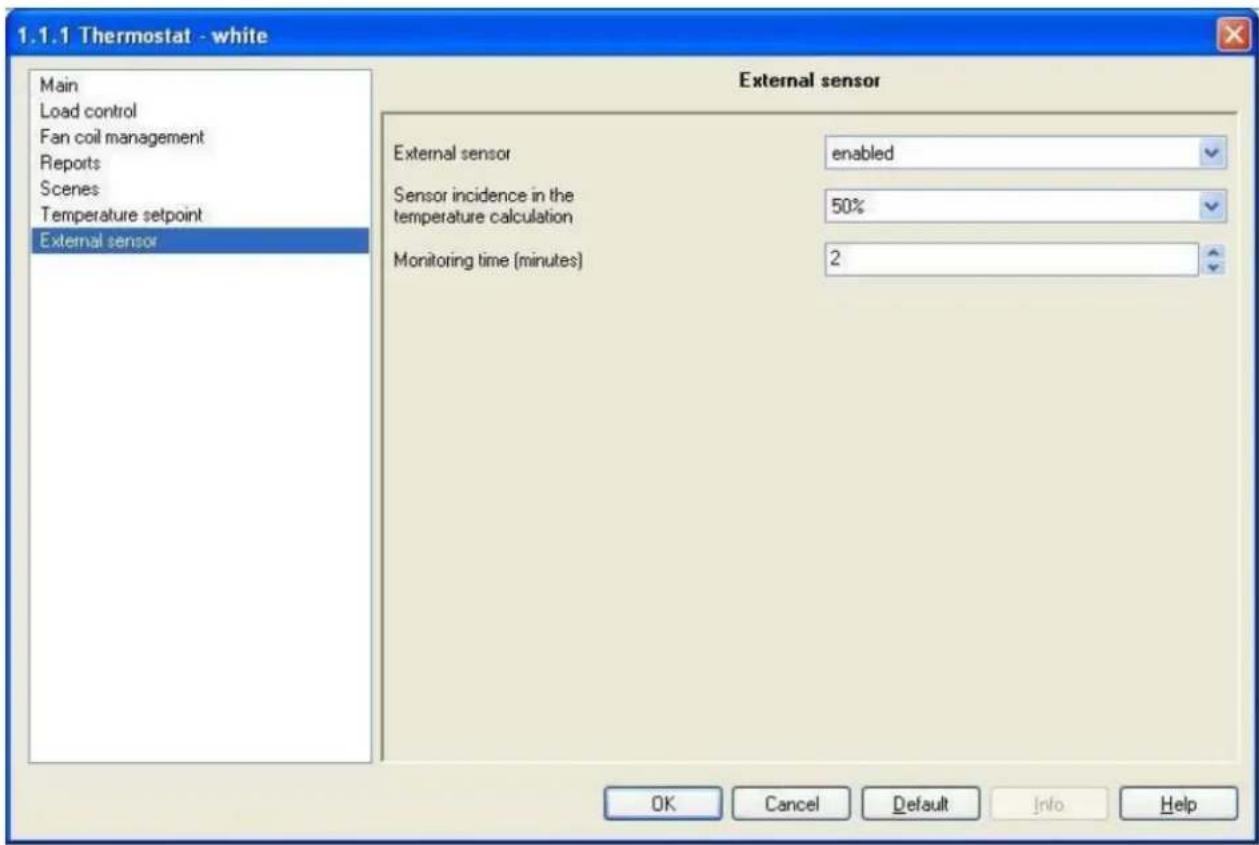
Fig. 12.1
12.1 Parameters
12.1.1 External sensor
This is to enable the auxiliary input to measure the ambient temperature and consequently the configuration settings and the communication object which will receive the temperature value; the settings are:
- disabled
The auxiliary input is not available and the measured temperature only depends on the value measured by the sensor onboard the device. With this configuration the Sensor incidence in the temperature calculation and Monitoring time (minutes) and the communication object External sensor input are not visible.
- enabled
The auxiliary input is available and the measured temperature depends on the value measured by the sensor onboard the device and also by the external sensor, calculated as a weighted mean of the two values. With this configuration the Sensor incidence in the temperature calculation and Monitoring time (minutes) and the communication object External sensor input are all visible.
12.1.2 Sensor incidence in the temperature calculation
Here you can set the sensor incidence on the weighted mean used to calculate the measured temperature; the settings can be seen in the drop down menu, in an interval between 10% and 100%. Once the auxiliary input has been enabled for the external sensor, the measured temperature will not be measured only by the sensor onboard the device, but it will be calculated as the weighted mean between the value measured by the onboard sensor and the value measured by the auxiliary external sensor.
The complete formula used to calculate temperature is:
T_measured = T_external sensor × Incidence_external sensor + T_device sensor × (100%-Incidence_external sensor)
➢ 12.1.3 Monitoring time [min]
Here you can set the time, expressed in minutes, after which the device assigns the value of the temperature detected by the device onboard sensor to the measured temperature value if it does not periodically receive the telegram with the value measured by the external sensor; the settings range from 2 (minutes) to 10 (minutes).
This parameter allows the calculation of the time within which the device expects to receive the temperature value measured by the external sensor in order to calculate the measured temperature; in fact, the device maintains the last value received from the external sensor as valid for a maximum period which is configured under this option; after this time, if the device does not receive another value from the sensor, the device will assign the value received from the sensor onboard the device as the measured temperature, without applying the weighted mean.
This type of configuration has been adopted to prevent any malfunctions on the external sensor from creating incorrect temperature values and consequently an incorrect management of the whole system. When the sensor sends another new value, the weighted mean will be applied again to determine the value of the measured temperature.
12.2 Communication objects
The communication object, whose visibility depends on the settings in the items of the External sensor menu, is that indicated in Fig. 12.2.
| Number | Name | Object Function | Length | C | R | W | T | U | Data Type | Priority |
| 27 | External sensor input | Sensor measured temper... | 2 Byte | C | - | W | - | - | 2 byte float value DPT_Value_Temp | Low |
Fig. 12.2
12.2.1 External sensor input
This allows the device to receive bus telegrams with the temperature value measured by the auxiliary external sensor, in order to calculate the measured temperature value. The value received by this communication object is subject to a monitoring time; when this lapses the measured temperature is determined by the sensor onboard the device only.
The enabled flags are C (communication), W (written by bus).
The standard format of the object is 9.001 DPT_Value_Temp, so the size of the object is 2 byte and the commands it receives are temperature values detected by external sensor expressed in degrees centigrade (rounded off to a tenth of a degree).

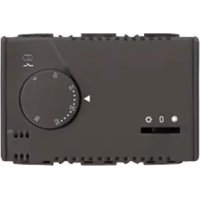
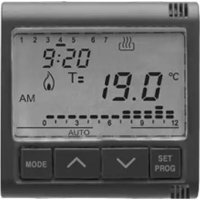
- KNX thermostat - wall mounting
- Technical Manual
- Summary
- Introduction
- Application
- Limits to the associations
- "Main" menu
- Parameters
- Operating
- - slave
- - stand alone
- Fan coil control
- - disabled
- - enabled
- Master/slave control type
- - mode
- - setpoint
- Mode and type remote setting
- Mode setting command format
- - 1 byte
- • 1 bit
- - both
- Input for setpoint variation range (°C) for manual forced positioning
- Behaviour on receiving a new setpoint
- - cancel temperature forced positioning
- - maintain temperature forced positioning
- Input for setpoint variation range (°C) for manual forced positioning via bus
- Setpoint setting via bus
- Operating parameters local modification
- Via bus operating modification (slave or stand alone)
- Temperature measurement unit selection (display on screen)
- - Fahrenheit
- - Celsius
- Communication objects
- Day/hour input
- Operating type input
- Setpoint input
- HVAC mode input
- Heating antifreeze setpoint
- Setpoint regulation range setting
- Enabling slave function
- Off mode input
- "Load control" menu (fan coil disabled)
- Parameters
- Command format
- - 1 bit (0/1)
- - 1 byte (value %)
- Controlled actuators feedback
- Repetition period on feedback absence
- Communication objects
- Heating status feedback
- Air cooling status feedback
- Heating switching
- Air cooling switching
- Heating continuous control feedback
- Air cooling continuous control feedback
- Heating continuous command
- Air cooling continuous command
- "Load control" menu (fan coil enabled)"
- Parameters
- Fan coil actuators feedback
- Valve actuators feedback
- Repetition period on feedback absence
- Communication objects
- Heating/Air conditioning valve feedback
- Heating valve feedback
- Air conditioning valve feedback
- Heating/Air conditioning valve % feedback
- Heating valve % feedback
- Air conditioning valve % feedback
- V1 fan status feedback
- V2 fan status feedback
- V3 fan status feedback
- Fan coil continuous feedback
- "Control algorithm (1 bit)" menu
- Parameters
- Control type
- - two points ON - OFF
- • proportional PWM
- ➢ 6.1.2 Regulation differential (tenth of °C)
- Cycle time
- Regulation differential
- Communication objects
- "Control algorithm (1 byte)" menu
- Parameters
- Control type
- Regulation differential (tenth of °C)
- Cycle time
- Regulation differential PWM
- Min. % variation for continuous proportional command sending
- Communication objects
- "Fan coil management" menu
- Parameters
- Valves management
- - 2 ways on/off
- - 4 ways on/off
- • 2 ways percentage command 0%/100%
- • 4 ways percentage command 0%/100%
- Command format
- • 1 byte (value %)
- Fan coil stages number
- • 1
- • 2
- • 3
- Fan coil mode input (manual/automatic)
- First regulation differential (tenth of °C)
- Second regulation differential (tenth of °C)
- Third regulation differential (tenth of °C)
- First regulation differential (tenth of °C)
- Second regulation differential (tenth of °C)
- Third regulation differential (tenth of °C)
- Communication objects
- Fan coil mode input
- Heating/air conditioning valve switch
- Heating valve switch
- Air conditioning valve switch
- Heating/air conditioning valve % command
- Heating valve % command
- Air conditioning valve % command
- Fan V1 switch
- Fan V2 switch
- Fan V3 switch
- Fan coil continuous command
- "Reports" menu
- Parameters
- Temperature
- - sending on demand only
- - sending on variation only (1/2 °C)
- • periodic sending
- Temperature sending period
- Operating type report
- - sending on variation only
- Current setpoint
- Operating mode report format
- Operating mode (1 byte)
- Operating mode (1 bit)
- Fan coil mode report (manual/automatic)
- Communication objects
- Current setpoint feedback
- Fan coil mode feedback
- Measured temperatura output
- Thermoregulation mode feedback
- Operating type feedback
- Off mode feedback
- Economy mode feedback
- Precomfort mode feedback
- Comfort mode feedback
- "Scene" menu
- Parameters
- Scenes function
- Scene number x
- Communication objects
- Scene
- "Temperature setpoint" menu
- Parameters
- Antifreeze setpoint
- Economy setpoint
- High temperature protection setpoint
- Setpoint economy
- Communication objects
- "External sensor" menu
- Parameters
- External sensor
- Sensor incidence in the temperature calculation
- ➢ 12.1.3 Monitoring time [min]
- Communication objects
- External sensor input
Brand : Gewiss
Model : GW10793
Category : Thermostat