PT-E-HD50 - Audio/video extender PureLink - Free user manual and instructions
Find the device manual for free PT-E-HD50 PureLink in PDF.


| Product Type | Audio/Video Extender |
| Brand | PureLink |
| Model | PT-E-HD50 |
| Dimensions (W x D x H) | 100 mm x 70 mm x 25 mm |
| Weight | 200 g |
| Power Supply | DC 5V, 1A |
| Power Consumption | 2.5 W |
| Video Resolution Support | 1080p Full HD, up to 1920x1080@60Hz |
| Transmission Distance | Up to 50 m over Cat5e/6 cable |
| Audio Support | Stereo audio, PCM 2.0 |
| Connector Input | HDMI Type A (female) |
| Connector Output | RJ45 (female) |
| Compliance | HDCP 1.4, HDMI 1.4 |
| Operating Temperature | 0°C to 45°C |
| Storage Temperature | -20°C to 60°C |
| Humidity | 10% to 85% RH (non-condensing) |
| Maintenance | Wipe with a dry, soft cloth. Do not use liquids. |
| Safety Warnings | Use only in dry indoor environments. Do not expose to moisture. |
| Spare Parts & Repairability | No user-serviceable parts inside. Contact PureLink for service. |
| General Information | Designed for extending HDMI signals over long distances via Ethernet cable. |
Frequently Asked Questions - PT-E-HD50 PureLink
User questions about PT-E-HD50 PureLink
0 question about this device. Answer the ones you know or ask your own.
Ask a new question about this device
Download the instructions for your Audio/video extender in PDF format for free! Find your manual PT-E-HD50 - PureLink and take your electronic device back in hand. On this page are published all the documents necessary for the use of your device. PT-E-HD50 by PureLink.
USER MANUAL PT-E-HD50 PureLink
natural_image
Two black electronic devices labeled 'ProTools' and 'RX', each with ports, connectors, and a central port (no visible text beyond labels)Model no.
PT-E-HD50
Designed in Germany
Made in Taiwan
© 2010 PureLink GmbH. All rights reserved.
Table of Contents
Section 1: Getting Started....3
1.1 Safety and Notice 3
1.2 Introduction 3
1.3 Package Contents.... 4
1.4 Panel Descriptions....4
1.5 Installation 6
Section 2: Specifications .... 7
Section 3: Notice....8
Section 4: Performance Guide .... 8
Section 1: Getting Started
1.1 Safety and Notice
Please read all of these instructions carefully before you use the device. Save this manual for future reference.
The PT-E-HD50 HDMI Extender over Single Cat.X with RS-232,2-way IR, Ethernet & PoE has been tested for conformance to safety regulations and requirements, and has been certified for international use. However, like all electronic equipments, the PT-E-HD50 should be used with care. Please read and follow the safety instructions to protect yourself from possible injury and to minimize the risk of damage to the unit.
- Follow all instructions and warnings marked on this unit.
- Do not attempt to service this unit yourself, except where explained in this manual.
- Provide proper ventilation and air circulation and do not use near water.
- Keep objects that might damage the device and assure that the placement of this unit is on a stable surface.
- Use only the power adapter and power cords and connection cables designed for this unit.
- Do not use liquid or aerosol cleaners to clean this unit. Always unplug the power to the device before cleaning.
1.2 Introduction
The PT-E-HD50 HDMI Extender over Single Cat.X with RS-232,2-way IR, Ethernet & PoE boosts up your video/audio transmission distance up to m (ft) in HDTV 1080p with 48-bit color depth. PT-E-HD50 also supports the most advanced 3D video format complaint with HDMI specification and therefore guarantees the highest 3D video compatibility on the market. With only one cost effective Cat.5/5e/6 cable, users can readily extend HDTV sources from DVD players, Blu-ray Disc player, PS3, PC, and any other kinds of sources compliant with TMDS to distant display monitors including HDMI or DVI enabled TV sets or LCD PC monitors. With the advanced design for the latest HDMI technology, deep color video, DTS-HD or Dolby TrueHD audio, and HDCP supports and compatibility are all further insured. This flexibility makes HDCP compliant DVD players or PS3 transmit utmost high quality video and audio with a greater distance at the minimal cost, when integrating several components apart. In addition, PT-E-HD50 is also equipped with bi-directional IR pass-through path and RS-232 serial port control. These bonus features allow users to boost IR control distance up to 100m (330 ft) and makes IR control possible through only single Cat.5/5e/6 cable including HDMI signals. In addition, serial port offers the convenient path for interactive application, such as touch panels. In addition, PT-E-HD50 also supports POE (Power over Cable) which can power both units from TX or RX with power supply.
The PT-E-HD50 includes two units: transmitting unit PT-E-HD50-TX and receiving unit PT-E-HD50-RX. The transmitting unit is used to capture the input HDMI / DVI signals with IR control packets and carry the signals via one cost effective Cat.5/5e/6 cable. The receiving unit is responsible for equalizing the transmitted HDMI signal and reconstructing IR and serial control signals. PT-E-HD50 offers the most convenient solution for digital signage with long distance A/V transmission path, and with 10G transmission width ready, PT-E-HD50 is ready for your next HDMI generation and applications!
— Support HDMI Deep Color, full 3D & 4K2K@30 (HDBaseT technology)
— Extend the transmission up to 100m (330ft) from the HDMI source at Full HD 1080p 48-bit
— Support POE(Power over Cable) which can power both units from TX or RX with power supply.
— HDCP & EDID Bypass
— CEC support
— Auto equalization
— Pure unaltered uncompressed 7.1ch digital HDMI over Cat.5/5e/6 cable transmission
— DTS-HD Master Audio and Dolby TrueHD high bit rate audio support
— Support full frequency IR signal from 20KHz to 60KHz
— Bi-directional IR path-through
— Full Duplex RS-232 control up to 115,200 bps through connector
— Integrated Ethernet port for LAN/ network device
— Wall mounting housing design for easy and robust installation
*The length depends on the characteristics and quality of the cables. Higher resolutions and longer transmission distances require low skew cables (<25ns/100m) for best performance. Unshielded CAT6 with metal RJ-45 connectors is recommended.
1.3 Package Contents
Before you start the installation of the switch, please check the package contents.
— PT-E-HD50 [TX & RX] x1
— DC 24V in-line with C7 power cord x1
— IR blaster x1
— IR receiver x1
— User's Guide x1
1.4 Panel Descriptions
FRONT PANEL — PT-E-HD50, transmitting unit (TX)
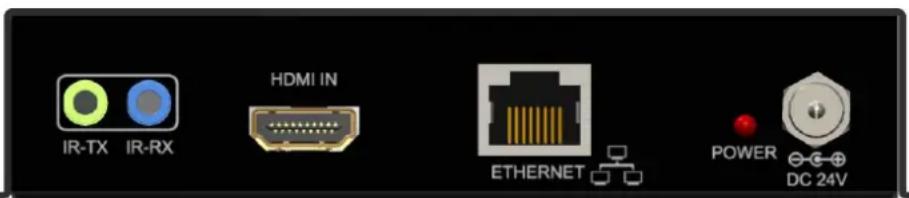
IR TX: Infrared 3.5mm socket for plugging in the extension cable of IR blaster
IR RX: Infrared 3.5mm socket for plugging in the extension cable of IR receiver
HDMI IN: Connects to a HDMI source with a HDMI male-male cable
Ethernet
LED: Power indicator
+24V DC: Connect to a 5V DC power supply.
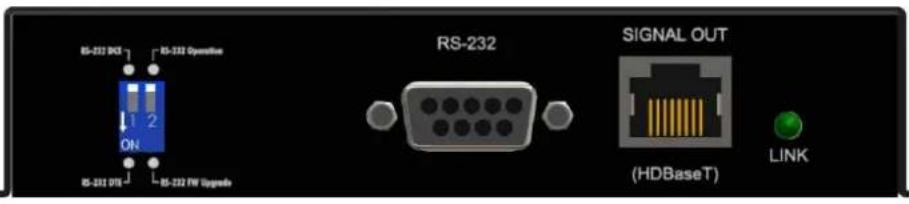
DIP Switch: PIN#1: Setup the RS-232 mode for serial communication channel.
PIN#2: For Firmware Update
RS-232: Connect to serial port device with a DSUB-9 male-male or male-female cable here
RJ45: Plug in a Cat-5/5e/6 cable that needs to be linked to the transmitting unit PT-E-HD50-RX.
LED: TX/RX link indicator
FRONT PANEL — PT-E-HD50, receiving unit (RX)
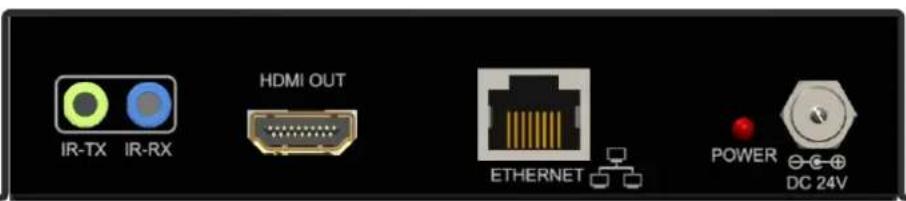
IR TX: Infrared 3.5mm socket for plugging in the extension cable of IR blaster
IR RX: Infrared 3.5mm socket for plugging in the extension cable of IR receiver
HDMI OUT: Connect to a HDMI display with a HDMI male-male cable
Ethernet
LED: Power indicator
+24V DC: Connect to a 5V DC power supply.
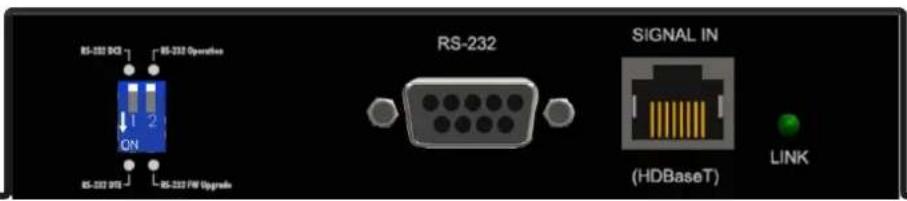
DIP Switch: PIN#1: Setup the RS-232 mode for serial communication channel.
PIN#2: For Firmware Update
RS-232: Connect to serial port device with a DSUB-9 male-male or male-female cable here
RJ45: Plug in a Cat-5/5e/6 cable that needs to be linked to the transmitting unit PT-E-HD50-TX.
LED: TX/RX link indicator
| DIP Switch Position | Description | |
| TX & RX | ||
| PIN#1 | ON [↓] | TxD: The 2^nd pin of RS-232, which is in charge of sending dataRxD: The 3^rd pin of RS-232, which is in charge of receiving data |
| OFF [↑] | TxD: The 3^rd pin of RS-232, which is in charge of sending dataRxD: The 2^nd pin of RS-232, which is in charge of receiving data | |
| PIN#2 | ON [↓] | Firmware Update |
| OFF [↑] | Normal | |
1.5 Installation
- Connect a HDMI or DVI source (such as a Blu-ray Disc player) to the transmitting unit PT-E-HD50-TX.
- Connect a HDMI or DVI display (such as a LCD TV) to the receiving unit PT-E-HD50-RX.
- Connect IR Blaster/Receiver to both TX and RX units.
- Connect USB cable to PC/Laptop
- Connect a Cat-5/5e/6 cable between the transmitting and receiving units.
- Make sure this Cat-5/5e/6 cable is tightly connected and not loose.
- Plug in 24V DC power supply unit to the power jack of the transmitting unit PT-E-HD50-TX.
Section 2: Specifications
| Item | Description | |
| Units | PT-E-HD50-TX | PT-E-HD50-RX |
| Unit Description | Transmitter | Receiver |
| HDMI compliance | HDMI Deep Color, full 3D & 4K2K@30 | |
| HDCP compliance | Yes | |
| Video bandwidth | Single-link 340MHz [10.2Gbps] | |
| Video support | 480i / 480p / 720p / 1080i / 1080p60 | |
| HDMI over UTP | 1080p@60 100m (330ft) [CAT5e] | |
| Audio support | Surround sound [up to 7.1ch] or stereo digital audio | |
| Equalization | Auto | |
| Input TMDS signal | 1.2 Volts [peak-to-peak] | |
| Input DDC signal | 5 Volts [peak-to-peak, TTL] | |
| ESD protection | [1] Human body model — ±19kV [air-gap discharge] & ±12kV [contact discharge][2] Core chipset — ±8kV | |
| PCB stack-up | 6-layer board [impedance control — differential 100Ω; single 50Ω] | |
| IR pass-thru | Bi-directional | |
| RS-232 support | Yes | |
| Ethernet support | Yes | |
| POE support | Yes | |
| Input | 1x HDMI1x 3.5mm | 1x RJ-45(Video)1x 3.5mm |
| Output | 1x RJ-45(Video)1x 3.5mm | 1x HDMI1x 3.5mm |
| In / Out | 1x DIN91x RJ-45(Ethernet) | 1x DIN91x RJ-45(Ethernet) |
| HDMI source control | Controllable via IR pass-through from RX to TX with IR extenders | |
| HDMI connector | Type A [19-pin female] | |
| Min DIN connector | DIN-9 | |
| RJ-45 connector | WE/SS 8P8C(Reverse Mode) | |
| Rotary control switch | None | |
| 3.5mm connector | IR receiver / IR blaster | IR receiver / IR blaster |
Environmental
| Operating Temperature | 32° ~ 104°F (0° to 40°C) |
| Storage Temperature | -4° ~ 140°F (-20° ~ 60°C) |
| Relative Humidity | 20~90% RH (no condensation) |
Section 3: Notice
- All HDMI over CAT5 transmission distances are measured using Belden 1583A CAT5e 125MHz UTP cable and ASTRODESIGN Video Signal Generator VG-859C & VG-870B.
- Incorrect placement of IR Blaster and Receiver may result in the failure of the IR extenders. Please check carefully before plugging in the IR extender to the respective IR sockets. Warranty will not cover the damage.
- The transmission length is largely affected by the type of Cat-5/5e/6 cables, the type of HDMI sources, and the type of HDMI display. The testing result shows solid UTP cables (usually in the form of 300m [1,000ft] bulk cables) can transmit a lot longer signals than stranded UTP cables (usually in the form of fixed length patch cords). Shielded STP cables are better suited than unshielded UTP cables. A solid UTP Cat-5e cable shows longer transmission range than stranded STP Cat-6 cable. For long extension applications, solid UTP/STP cables are the only viable choice.
- EIA/TIA-568-B termination (T568B) for Cat-5/5e/6 cables is recommended for better performance.
- To reduce the interference among the unshielded twisted pairs of wires in Cat-5/5e/6 cable, one can use shielded STP cables to improve EMI problems, which is worsen in long transmission.
- Because the quality of the CAT5/6 cables has the major effect on how long the transmission limit can achieve and how good is the received picture quality, the actual transmission range is subject to one's choice of Cat-5/5e/6 cables. For desired resolutions greater than 1080i or 1280x1024, a Cat-6 cable is recommended.
- If your HDMI display has multiple HDMI inputs, it is found that the first HDMI input [HDMI input #1] generally can produce better transmission performance among all HDMI inputs.
Section 4: Performance Guide
| Performance rating | Type of CAT5/6 cable | |||
| Wiring | Shielding | CAT5 | CAT5e | CAT6 |
| Solid | Unshielded (UTP) | ★★★ | ★★★★ | ★★★★★ |
| Shielded (STP) | ★★★ | ★★★ | ★★★★ | |
| Stranded | Unshielded (UTP) | ★ | ★★ | ★★ |
| Shielded (STP) | ★ | ★ | ★★ | |
| Termination | Please use EIA/TIA-568-B termination (T568B) at any time | |||