PT-HDBT-200 - Audio/video extender PureLink - Free user manual and instructions
Find the device manual for free PT-HDBT-200 PureLink in PDF.


User questions about PT-HDBT-200 PureLink
0 question about this device. Answer the ones you know or ask your own.
Ask a new question about this device
Download the instructions for your Audio/video extender in PDF format for free! Find your manual PT-HDBT-200 - PureLink and take your electronic device back in hand. On this page are published all the documents necessary for the use of your device. PT-HDBT-200 by PureLink.
USER MANUAL PT-HDBT-200 PureLink
text_image
PureTools 1X UPDATE: 6-2 L ↑ UPDATE A CTRL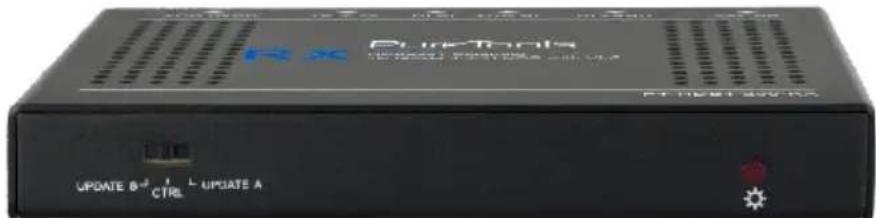
text_image
Rx Rx Tools UPDATE 6-1 L UPDATE A CTRLUser Manual
HDBaseT Extender, 4K (60Hz 4:4:4) HDR with VLC
Model PT-HDBT-200
Designed in Germany
Preface
Read this user manual carefully before using this product. Pictures shown in this manual are for reference only. Different model layouts and specifications are subject to the physical product.
This manual is for operation instructions only, not for any maintenance usage.
In the constant effort to improve our product, we reserve the right to make changes in functions or parameters without prior notice or obligation.
Trademarks
Product model and logo are trademarks. Any other trademarks mentioned in this manual are acknowledged as the properties of the trademark owner. No part of this publication may be copied or reproduced without the prior written consent.
FCC Statement
This equipment generates, uses and can radiate radio frequency energy and, if not installed and used in accordance with the instructions, may cause harmful interference to radio communications. It has been tested and found to comply with the limits for a Class B digital device, pursuant to part 15 of the FCC Rules. These limits are designed to provide reasonable protection against harmful interference in a commercial installation.
Operation of this equipment in a residential area is likely to cause interference, in which case the user at their own expense will be required to take whatever measures may be necessary to correct the interference.
Any changes or modifications not expressly approved by the manufacture would void the user's authority to operate the equipment.
REACH | 1907/2006/EU
ROHS | 2011/65/EU
PureLink hereby declares that this product PureTools PT-HDBT-200 complies with Directives 1907/2006/EU und 2011/65/EU.
EMC / LVD (Electro Magnetic Compatibility / Low Voltage Directive)
PureLink GmbH hereby declares that this product PureTools PT-HDBT-200 complies with Directives 2014/30/EU and 2014/35/EU. The full text of the EU Declaration of Conformity is available at the following Internet address:
http://www.purelink.de/ce/4251364706787_CE.pdf

SAFETY PRECAUTIONS
To insure the best from the product, please read all instructions carefully before using the device. Save this manual for further reference.
- Unpack the equipment carefully and save the original box and packing material for possible future shipment
- Follow basic safety precautions to reduce the risk of fire, electrical shock and injury to persons.
- Do not dismantle the housing or modify the module. It may result in electrical shock or burn.
- Using supplies or parts not meeting the products' specifications may cause damage, deterioration or malfunction.
● Refer all servicing to qualified service personnel.
- To prevent fire or shock hazard, do not expose the unit to rain, moisture or install this product near water.
- Do not put any heavy items on the extension cable in case of extrusion.
- Do not remove the housing of the device as opening or removing housing may expose you to dangerous voltage or other hazards.
- Install the device in a place with fine ventilation to avoid damage caused by overheat.
- Keep the module away from liquids.
- Spillage into the housing may result in fire, electrical shock, or equipment damage. If an object or liquid falls or spills on to the housing, unplug the module immediately.
- Do not twist or pull by force ends of the optical cable. It can cause malfunction.
- Do not use liquid or aerosol cleaners to clean this unit. Always unplug the power to the device before cleaning.
● Unplug the power cord when left unused for a long period of time.
● Information on disposal for scrapped devices: do not burn or mix with general household waste, please treat them as normal electrical wastes.
Introduction to PT-HDBT-200
The PT-HDBT-200 is an ultra-thin HDMI2.0 Extender consist of PT-HDBT-200-TX transmitter and PT-HDBT-200-RX receiver. It extends 1080p/4K HDMI signal over CAT5e/CAT6a cable up to 70m /40m (PoC), and enables IR and RS232 pass-through to control source or display device remotely. It also adopt a visually lossless video compression technology (VLC) to ensure the HD lossless transmission of HDR and 4K@60Hz/4:4:4 over CAT5e/CAT6a cable.
Feature
■ Supports 4K/UHD/60Hz/4:4:4.
■ Supports HDMI2.0 & HDCP2.2, and is backward compatible to the previous version.
■ Maximum transmission distance is up to 40m for 4Kx2K, and 70m for 1080p.
■ Supports CEC, IR and RS232 pass-through for long-distance control.
■ Supports bi-directional PoC for simplified wiring.
■ Supports HDR.
■ Features DIP switch for choosing mode from: Control, Update A, Update B.
Package List
■ 1 x PT-HDBT-200-TX Transmitter
■ 4 x Mounting Ears & 4 x Screws
■ 2 x 3-pin Phoenix Connector
■ 1 x User Manual
■ 1 x PT-HDBT-200-RX Receiver
- 8 x Plastic Cushions
■ 1 x Power Adaptor (12VDC, 2A)
Panel Description

text_image
Transmitter HDMI IN TX HX IHN IR OUT HDBT OUT DC 12V 1 2 3 4 5 6 7 8
text_image
Receiver HDM10T TX4X THIN IKU UI HUSTIN DG 12V 1 2 3 4 5 6 7 8| No. | Name | Description |
| 1 | MODE Switcher | CTRL: RS232 pass-through control mode.UPDATE A: Update Valens IC program, connect a PC to the RS232 port, and then double-click the update file (.bat).UPDATE B: Update compression IC program, the upgrade method is the same as the above UPDATE A. |
| 2 | Power LED | RED: DC power present. |
| 3 | HDMI IN (Transmitter) | Connect with HDMI source. |
| HDMI OUT(Receiver) | Connect with HDMI display. | |
| 4 | 3-pin Terminal Block | If one is connected with control device (e.g. PC), and the other should be connected with the third-party that need to be controlled. |
| 5 | IR IN | Work with far-end IR OUT port, connect with IR Receiver (with carrier) to collect IR signal to control far-end display device from local. |
| 6 | IR OUT | Work with far-end IR IN port, connect with IR Emitter to send IR signal to control input source device from remote. |
| 7 | HDBTOUT(Transmitter) | Connect to the HDBT IN socket on Receiver via CAT5e/6a cable. |
| HDBT IN (Receiver) | Connect to the HDBT OUT socket on Transmitter CAT5e/6a cable. | |
| 8 | DC 12V Power Port | Support bi-directional PoC, either ports should be connected with 12V DC 2A power adaptor. |
Specification
| PT-HDBT-200-TX Transmitter | |
| Input | HDMI IN |
| Output | HDBT OUT |
| Control Ports | IR IN, IR OUT, RS232 |
| PT-HDBT-200-RX Receiver | |
| Input | HDBT IN |
| Output | HDMI OUT |
| Control Ports | IR IN, IR OUT, RS232 |
| General | |
| Transmission Mode & Distance | HDBaseT; 1080p ≤ 70m; 4K×2K ≤ 40m |
| Resolution | Up to 4K×2K@60Hz 4:4:4 |
| Bandwidth | 18Gbps |
| HDMI Standard | HDMI2.0 & HDCP2.2 |
| Power Consumption | 14W (max) |
| Operation Temperature | 0 ~ +40°C |
| Storage Temperature | -10 ~ +50°C |
| Relative Humidity | 0% ~ 90% |
| External Power Supply | Input: 100VAC~240VAC, 50/60Hz; Output: 12VDC 2A |
| Dimension (W*H*D) | 115mm x 16 mm x 84mm |
| Net Weight (g) | Transmitter: 150g; Receiver: 153g |
System Diagram
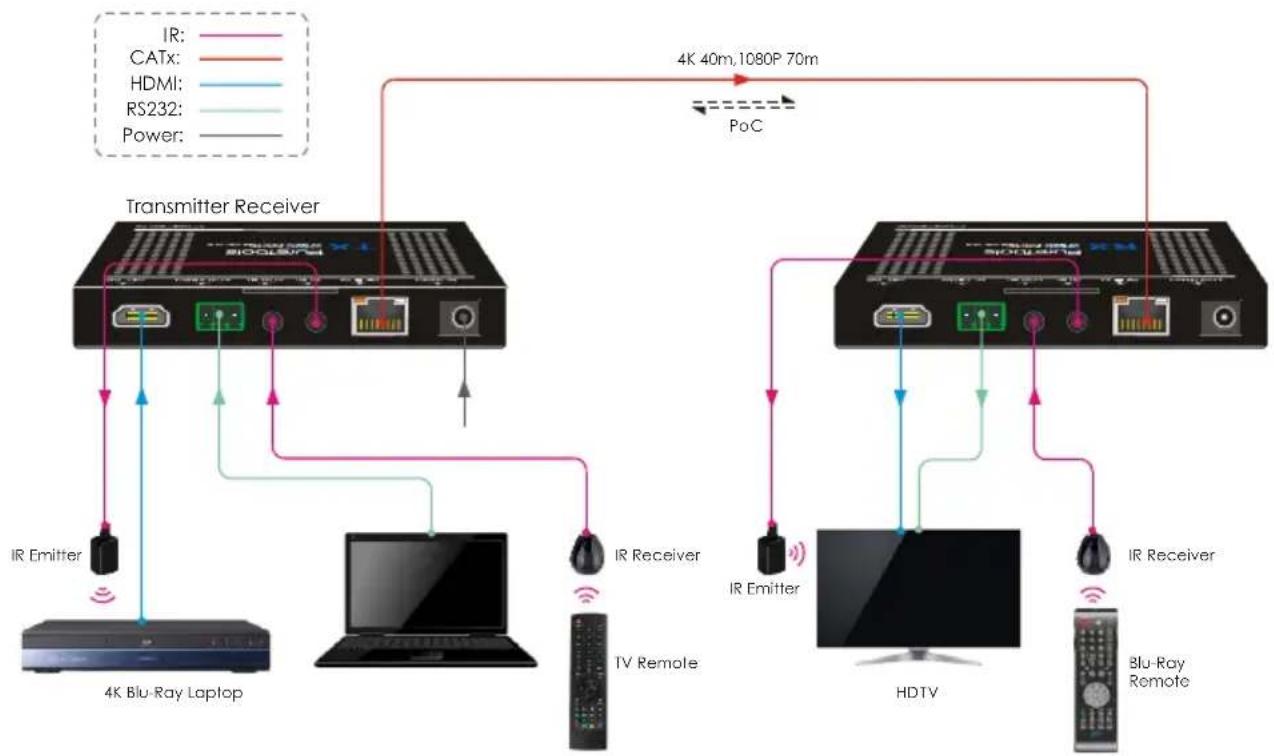
flowchart
graph TD
    A["4K Blu-Ray Laptop"] -->|IR Emitter| B["Transmitter Receiver"]
    B -->|4K 40m,1080P 70m| C["4K Bluetooth Receiver"]
    C -->|PoC| D["4K Bluetooth Receiver"]
    D -->|IR Emitter| E["HDTV"]
    E -->|IR Receiver| F["Blu-Ray Remote"]
    F -->|Power| G["BLu-Ray Remote"]
    B -->|IR Receiver| H["Computer"]
    H -->|4K Bluetooth Laptop| I["4K Bluetooth Receiver"]
    I -->|4K 40m,1080P 70m| J["4K Bluetooth Receiver"]
    J -->|PoC| K["4K Bluetooth Receiver"]
After-Sales Service
If there appear some problems when running the product, please check and deal with the problems referring to this user manual. Any transport costs are borne by the users during the warranty.
1) Product Limited Warranty: This product will be free from defects in materials and workmanship for two years (The purchase invoice shall prevail).
Proof of purchase in the form of a bill of sale or receipted invoice which is evidence that the unit is within the Warranty period must be presented to obtain warranty service.
2) What the warranty does not cover (servicing available for a fee):
- Warranty expiration.
- Factory applied serial number has been altered or removed from the product.
-
Damage, deterioration or malfunction caused by:
-
Normal wear and tear.
- Use of supplies or parts not meeting our specifications.
- No certificate or invoice as the proof of warranty.
- The product model showed on the warranty card does not match with the model of the product for repairing or had been altered.
- Damage caused by force majeure.
- Servicing not authorized by distributor.
- Any other causes which does not relate to a product defect.
- Delivery, installation or labor charges for installation or setup of the product.
3) Technical Support: For any questions or problems, contact your distributor or reseller and tell them the respective product name and version, the detailed failure situation as well as the formation of the cases.
Asking for Assistance
Technical Support:
Phone: +49 5971 800299 - 0
Fax: +49 5971 800299 - 99
Technical Support Hours:
8:30 AM to 5:00 PM Monday thru Thursday
8:30 AM to 4:00 PM Friday
Write to:
PureLink GmbH