DC510I1 DICTEE KID MASTER LISTEN AND SPELL MASTER - Educational Toys LEXIBOOK - Free user manual and instructions
Find the device manual for free DC510I1 DICTEE KID MASTER LISTEN AND SPELL MASTER LEXIBOOK in PDF.


| Product Type | Educational toy - Electronic dictation |
| Brand | LEXIBOOK |
| Model | DC510i1 |
| Power supply | 3 AA/LR6 1.5 V alkaline batteries (included) |
| Activities | 10 activities: progressive dictation, challenge dictation, ecology dictation, riddles, English dictation, grammar, conjugation/verb tenses, mixed words, vocabulary, hangman |
| Number of dictations | Over 160 dictations on various themes |
| Languages | French and English |
| Player profiles | Up to 5 profiles with saved scores |
| Package contents | 1 Dictée Kid Master game, 1 instruction manual |
| Warranty | 2 years (Europe) |
| Care and cleaning | Clean with a slightly damp cloth. Protect from moisture and heat. |
| Safety | Not suitable for children under 36 months (small detachable parts) |
| Manufacturing | Made in China, designed in Europe |
Frequently Asked Questions - DC510I1 DICTEE KID MASTER LISTEN AND SPELL MASTER LEXIBOOK
User questions about DC510I1 DICTEE KID MASTER LISTEN AND SPELL MASTER LEXIBOOK
0 question about this device. Answer the ones you know or ask your own.
Ask a new question about this device
Download the instructions for your Educational Toys in PDF format for free! Find your manual DC510I1 DICTEE KID MASTER LISTEN AND SPELL MASTER - LEXIBOOK and take your electronic device back in hand. On this page are published all the documents necessary for the use of your device. DC510I1 DICTEE KID MASTER LISTEN AND SPELL MASTER by LEXIBOOK.
USER MANUAL DC510I1 DICTEE KID MASTER LISTEN AND SPELL MASTER LEXIBOOK
Acide (4 possibilities)
cédai
aide
aide
céda
91953 Courtaboeuf Cedex, France.
Service consommateurs: 0892 23 27 26 (0.34€ TTC/min)
www.lexibook.com
LEXIBOOK Limited
8th Floor, 17 Wang Chiu Road,
Kowloon Bay, Kowloon,
Hong Kong SAR
www.lexibook.com
© 2009 Lexibook®
Start-up guide 18
Rules of the Game 19
Helpful keys 19
Scoring rules 20
Add players and compare scores 20
Contents of the packaging 20
Battery information 21
Key Guide 21
Settings. 23
Capital letters, accented characters and punctuation 24
Description of the activities 24
Activity 1 - Progressive dictation 24
Activity 2 - Challenge dictation 25
Activity 3 - Ecology dictation 25
Activity 4 - Jokes dictation 26
Activity 5-French dictation 26
Activity 6 - Grammar 27
Activity 7 - Conjugation / verb tenses 27
Activity 8 - Word mix 28
Activity 9 - Vocabulary. 28
Activity 10-Hangman 28
Troubleshooting 28
Maintenance 30
Warranty 30
Start-up guide
Type your way to perfect spelling with Listen & Spell Master! From jokes and stories to information about the environment, you can choose from more than 160 different dictations and become a champion speller in no time! Plus there are 5 other fun word games to test your grammar and vocabulary.
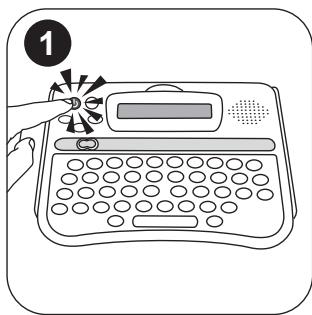
- Press the POWER key to turn on or turn off the Listen & Spell Master.
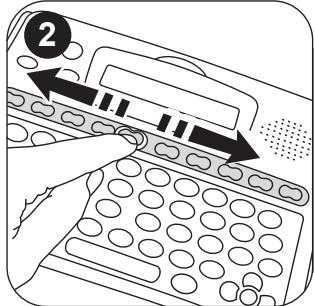
2.Use the activity selector.
to choose 1 of the 10 activities about dictation, grammar, vocabulary, spelling exercises and games.
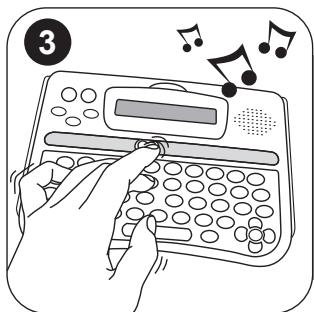
- When the unit speaks a dictation out loud, type in what you hear. Pay attention to spelling, punctuation and letter spacing!
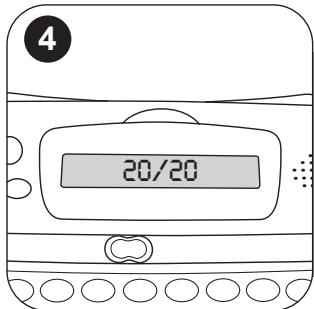
- When you have finished typing, press the OK key OK to check your dictation. When you have finished, press OK and Listen & Spell Master will show you if you have spelt any words wrong. Press OK once again to see your score out of 20!
Rules of the Game
The first 5 games are dictation games. The Listen & Spell Master will speak a dictation out loud, and you must type in what you hear, making sure you pay attention to spelling, punctuation and letter spacing. Press OK when you have finished typing and the Listen & Spell Master will show you if you have spelt any words wrong! Press OK after this to see how well you've done with a score out of 20!
Helpful keys
Use these buttons to control the speed of the dictation and to help you find the answers.

PAUSE key - pause the dictation at any time by pressing the PAUSE key once.
- The cursor will stop flashing indicating that the speech is paused.
- Press PAUSE again to re-start the speech from where you left off!

REPEAT key - listen again to any words you may have missed.
- Press the REPEAT key at any time during the dictation to hear the last phrase again.
- Press the SHIFT key and the REPEAT key at the same time, to hear the entire dictation repeated.
- Press the REPEAT key when you hear the unit say "end of the dictation", to hear the entire dictation without any pauses or phrase repetition.
- Your Listen & Spell Master repeats each phrase of the dictation activities twice before moving onto the next phrase. You can turn off this feature by pressing the SETTINGS key > Dictation Repetition > Off.

DICTIONARY key - press to view a word in the dictionary.
- Press when writing or editing a dictation to view the dictionary. If the dictionary contains a word from your dictation it will be highlighted. Press OK to see the dictionary's description. Press Dict or to return to the dictation. Careful though! If you choose to look at a dictionary word to find out the spelling, one point will be deducted from your score!
- Press the DICTIONARY key at any time to enter the dictionary. Type a word or use the ARROW keys to find a word and then press OK to view the description.

ANSWER key - let Listen & Spell Master help you with the tricky words.
- When playing the activities 1 to 4, press the ANSWER key at any time during the dictation to find out how a word is spelt correctly. Use the ARROW keys to move the highlight to the word you want to check and press the ANSWER key again to display the word with the correct spelling. Remember, if you choose to display the answer, one point will be deducted from your score! To exit the Answer key mode, simply press OK and return to your dictation. Listen & Spell Master will pick up where you've left off!
- When playing the activities 5 to 10, press the ANSWER key to display the correct answer at once.
Scoring rules
The score is always given out of a total of 20 points. The score is given at the end of each game round. The game round length varies between activities, for example in Activity 1 you need to type in 5 dictations in order to see your score, whereas in activity 2 it is displayed after every dictation.
The score is calculated in different ways in different game rounds. A summary of the scoring rules is given below:
For activities 1, 2, 3, 4,
The score is calculated as a percentage of how many letters you have written correctly, and then converted into a score out of 20. Make sure you try and finish the entire dictation to get a true reading of your score!
For activity 5, 6, 7, 9, 10
The answer is correct at the first try. 4 points
The answer is correct at the second try 2 points
Remember that if you use the ANSWER key or the DICTIONARY key to find an answer then one point is deducted from your final score.
For activity 8
The score is calculated as a percentage of how many words you have found on the total of possible answers (it's the number displayed on the right of the question word). Then this percentage is converted into a score out of 20.
Add players and compare scores
Use the PROGRESS key to check how you and your friends are doing! Use the ARROW keys to select a player and press OK. To add a new player see the Settings section on pg 23.
Overall Performance
This shows your overall average dictation score and the number of dictations you have completed. This score only reflects your progress in the first 5 activities of the unit.
Activity Scores
In here you can find your average scores for each individual activity. Scroll down the list to see how you measure up in each of the 10 activities.
Contents of the packaging
1 x Listen & Spell Master game
1 x instruction manual
WARNING: All packaging materials, such as tape, plastic sheets, wire ties and tags are not part of this toy and should be discarded for your child's safety.
Battery information
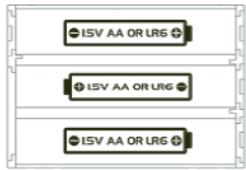
The Listen & Spell Master game works with 3 X 1,5V --- AA/LR6 alkaline type batteries (included). This product is supplied with batteries for demonstration purposes. They should be replaced with new batteries before use. Ask an adult to help you to find and install the correct batteries.
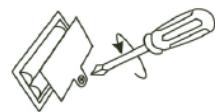
- Using a screwdriver, open the battery compartment cover located under the unit.
- Install the 3 AA batteries observing the polarity indicated at the bottom of the battery compartment, and as per the diagram shown opposite.
- Close the battery compartment and tighten the screw.
Non-rechargeable batteries are not to be recharged. Rechargeable batteries are to be removed from the toy before being charged. Rechargeable batteries are only to be charged under adult supervision. Different types of batteries or new and used batteries are not to be mixed. Only batteries of the same or equivalent type as recommended are to be used. Batteries are to be inserted with the correct polarity. Exhausted batteries are to be removed from the toy. The supply terminals are not to be short circuited. Do not throw batteries into a fire. Remove the batteries if you are not going to use the game for a long period of time.
WARNING: Malfunction or loss of memory may be caused by strong frequency interference or electrostatic discharge. Should any abnormal function occur, press the RESET button located under the product or remove the batteries and insert them again.
Key Guide

POWER key
Turns the Listen & Spell Master on/off. Note: The unit will automatically turn off after 8 minutes of inactivity.
DEMO key
Launches a demonstration of the Listen & Spell Master activities.
Activity selector
Slide to select the activity you want to play.
| OK | OK key | Confirms a setting or a dictation. |
| Punctuation keys | To type brackets, apostrophe, colon, dash, comma, dot, question mark and exclamation mark. | |
| ACCENT key | Types an accented character. | |
| SETTINGSE lungskey | Accesses the settings menu. Press once again to exit. | |
| Language key | Toggles between English and French. | |
| Dict. | DICTIONARY key | Views a word and its description in the dictionary. |
| PROGRESS Progrès | PROGRESS key | Accesses your scores. |
| SHIFT key | Use this key to type capital letters. You can also hold down the SHIFT key and the REPEAT key at the same time, to hear the entire dictation repeated. | |
| BACKSPACE | Deletes a typed character. You can also use this key to exit the Dictionary or a menu function like the Settings or the Progress menus. | |
| PAUSE | PAUSE key | Press the PAUSE key at any time to pause the dictation. The cursor will stop flashing indicating that the speech is paused. Press the PAUSE key again to return to the activity. |
| RepeatRépéter | REPEAT key | To listen again to any words you may have missed. |
| Answer Réponse | ANSWER key | Press the ANSWER key to let Listen & Spell Master help you with the tricky words. |
| ARROW key | Use the ARROW keys to highlight the desired option, insert a letter or to navigate in the settings menu. | |
| RESET | RESET key | If the unit malfunctions or receives an electrostatic shock, press the RESET key located under the unit. |
Settings
You can access the settings menu at any time by pressing the SETTINGS key.
Volume
- Use and to highlight "Volume" then press OK.
- Use and to select a volume level (High, Medium or Low) and press OK to confirm and return to the settings menu.
Contrast
- Use and to highlight "Contrast" then press OK
- Use l and l to select a contrast level (Light, Medium or Dark) and press OK to confirm and return to the settings menu.
Repetition
- Use and to highlight "Repetition" then press OK.
- Use 1 and 2 to select "Yes" or "No" and activate or deactivate the dictation repetition. Press OK to confirm and return to the settings menu.
Change player
- Use A and v to highlight "Change player" then press OK
- Use and to select "new player", then press OK to confirm.
- Type in the name of the new player, then press the OK key to confirm and return to the settings menu.
To change the player:
- Use and to highlight "Change Player" then press OK
- Use A and to select a player and press OK to start an activity.
To delete a player:
- Use and to highlight "Change Player" then press OK
- Use and to select a player and press the BACKSPACE key.
- Use l and l to select "Yes" or "No" and press OK to confirm.
Note: Listen & Spell Master can store up to 5 players.
Reset the memory
- Use A and to highlight "Erase memory" then press OK
- Use l and l to select "Yes" or "No" and press OK to confirm and return to the settings menu.
Exit menu
- Use the and keys to highlight "Exit menu" then press OK to return to the welcome screen.
Note: Use the SETTINGS key at any time to return to the settings list or to exit from the setting menu.
Capital letters, accented characters and punctuation
Correcting the typed word
To edit typed words, use the ARROW keys to move the cursor to the place you wish to insert or delete letters, (use to delete the character to the left of the cursor).
Typing capital letters or accented characters
- To type a capital letter, press and hold and press the desired letter key once. For example, + types an "E".
- To type an accented character(French only), press the desired letter then press the ACCENT key repeatedly until the desired accented character is displayed (e.g. press , then press the ACCENT key twice to type an "è").
Punctuation
Use the punctuation keys to include the punctuation in your dictation.
Description of the activities
How to play the dictation games 1-4
Listen to the dictation and type what you hear into the unit, being sure to include the punctuation and to spell all the words correctly. Listen & Spell Master will repeat each phrase twice before moving on to the next one, to be sure that you have time to catch up. You can press the PAUSE key at any time, or the REPEAT key to hear the phrase repeated again. Press OK when you have finished and check your dictation. When you are sure there are no mistakes, press OK once again to confirm. Listen & Spell Master will scan the dictation for mistakes and show the corrections. Press OK and you will be given a score out of 20. Look at for the fun pictures of your dictation that sometime appear before your score appears.

Activity 1 - Progressive Dictation
For the Progressive Dictation activity, Listen & Spell Master tells simple sentences. There are 3 levels which increase in difficulty. To move up a level you have to score 16/20 in two dictations. If you score below 12/20 in two dictations, you will automatically go down a level.
Example of a full dictation text:
My grandmother brings me fig cakes every Sunday. I always savour them fondly.
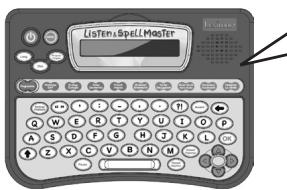
Listen carefully and type what you hear. My grandmother...
brings me fig cakes...
every Sunday... full stop
Educational value: The Listen & Spell Master contains 60 short stories – 20 in each level – chosen specifically to address classic and easy to make spelling and punctuation mistakes.
Activity 2 - Challenge Dictation
The Listen & Spell Master tells a challenging short story using tricky words and punctuation.
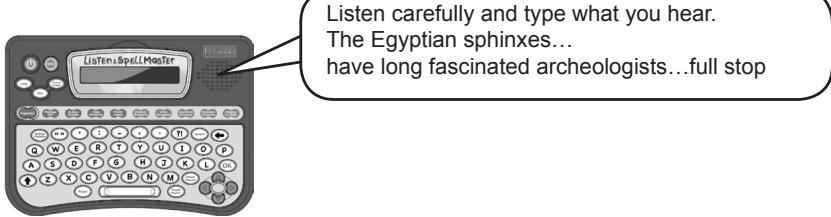
Example of a full dictation text:
The Egyptian sphinxes have long fascinated archaeologists. Many scientists have studied the secrets of the pyramids and of life at the time of the Pharaohs. But numerous facts about ancient Egypt have yet to be elucidated.
Example of a typical question:
Educational value: Fun and engaging stories, created specially for the product. They pay particular attention to age-appropriate vocabulary, punctuation, grammatical or conjugation topics such as adjectives, tense, adverbs, homophones and "problem" words that children often find challenging to spell. This activity contains 30 short stories.
Activity 3 - Ecology Dictation
Your Listen & Spell Master also provides short ecological dictations that will raise your awareness of your environment. The dictations are divided into 2 parts: Listen & Spell Master will first dictate a fact. Then, for the next dictation, you will be given a tip to know how to act 'green'.
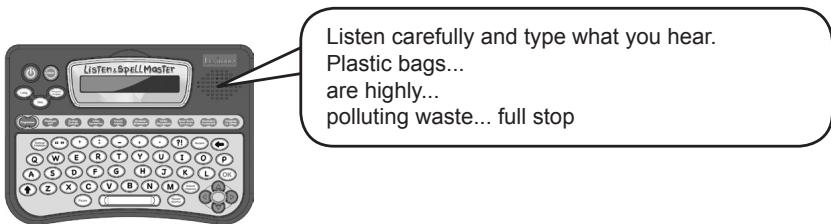
Example of a full dictation text:
Fact: Plastic bags are highly polluting waste.
Tip: Whenever you go shopping, take along a reusable bag (next dictation).
Educational value: The 40 ecological sentences are topical and engaging to the specific age-group of this product.
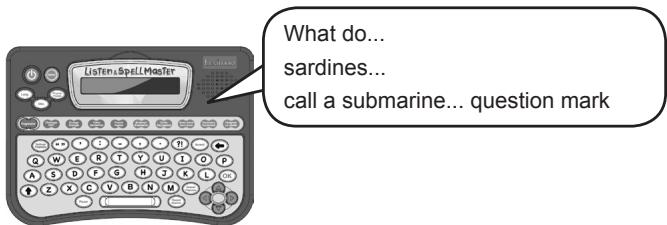
Activity 4 - Jokes Dictation
Listen to the dictation of the joke question and type in the question. You will only receive the answer when you type the question correctly. You can repeat the question as many times as you like by pressing the REPEAT key after your score.
Example of a joke:
Q: What do sardines call a submarine?
A: A tin of people.
Educational value: Another fun-filled activity tailored made to make the learning process more entertaining.
Activity 5 - French Dictation
Improve your French vocabulary and spelling by listening to the French words and then typing them in without any mistakes. There are 100 useful words to learn! Press OK when you have finished. You have two chances to try and spell the word correctly. When you have completed 5 questions, you will be given a score out of 20.
Examples of French words:
Educational value: The simple words in this activity are specifically designed to build up a child's vocabulary and help them gain confidence in French spelling.
Activity 6 - Grammar
This activity is a fun way to practice your grammar and learn new grammar rules. You need to find the grammatical form such as 'the direct object' in a sentence. Use and to highlight the grammatical form and press OK to confirm. You have two chances to try and find the grammatical form. You can display the grammatical form you need to find as many times as you like by pressing the REPEAT key. When you have completed 5 questions, you will be given a score out of 20.
Examples of grammar questions:
Find this grammatical form in the sentence:
the personal pronoun

She looks for her rabbit in the garden.

She looks for her rabbit in the garden.


Educational value: The child will learn to recognize the grammatical forms as learned at school.
Activity 7 - Conjugation / Verb tenses
Making a verb the correct tense can often be tricky. Read the sentence and change the verb in brackets to the correct verb tense, and press OK to confirm. You have two chances to try and spell the verb correctly. When you have completed 5 questions, you will be given a score out of 20.
Example of a conjugated verb:
Use the verb in the following tense:
Past tense

The little goblin [to be born] inside a rose.

The little goblin [was born] inside a rose.


Educational value: There are 150 sentences for a child to practice the difficult art of conjugating verbs.
Activity 8 - Word mix
Enjoy mixing up letters and creating new words! The Listen & Spell Master will display a word on the screen from which you need to make as many new words as possible. The words must be more than 2 letters and include conjugated verbs. Type in the new words pressing OK after each one. Use and to scroll through your typed answers. If you're having trouble completing the game, press the ANSWER key to see all the missing words. Watch out as you will lose points for each missing answer.
Example of a word mix:
Post (8 possibilities)
Opt s
Pots Pot
Tops Top
Spot Stop
Educational value: Develops the child's interest in playing with words and ability to build up different letter combinations to form a new word.
Activity 9 - Vocabulary
Increase your vocabulary by selecting the word that matches the definition. Use and to select the correct word and press OK to confirm. You have two chances to try and find the correct answer. When you have completed 5 questions, you will be given a score out of 20.
Activity 10 - Hangman
The classic children's favourite. Guess the hidden word, letter by letter, in the smallest number of tries as you can! You have 10 tries to guess the hidden word before the game is over, and the answer is displayed. Press a letter key to make your guess. When you key in a correct letter, Listen & Spell Master will replace the question mark in the appropriate position. If you type a letter that is not in the word, the unit will reduce your lives by one. If you type a correct or wrong letter that you have already tried, the unit will not remove a life. If your lives reach zero, you have lost the game and the correct word will be revealed. If you want to give-up the game and reveal the word, press ANSWER.
Troubleshooting
Q: How do I slow down the dictation to a speed I'm comfortable with?
A: You can pause the dictation at any time by pressing the Pause key, and you can repeat any phrase by pressing the Repeat key. If you want to hear the entire dictation from the beginning, hold down Shift and press the Repeat key at the same time.
Q: How do I stop Listen & Spell Master from repeating every phrase?
A: Listen & Spell Master has been programmed to repeat every phrase of a dictation twice. You may feel that this speed is too slow for you, in which case this feature can be turned off. To do this, push the Settings button and go to 'Dictation Repetition' and press 'off'. Now every time Listen & Spell Master dictates a sentence, each phrase will only be spoken once.
Q: How do I know when a dictation has finished?
A: When the unit says 'End of the dictation' then you know that the Dictation is finished. After this you must press the OK key to read over what you have written.
Q: Sometimes I get a question mark (?) symbol when the Listen & Spell Master is displaying my corrections. Why does this happen?
A: You may get a question mark if you have added an extra word by mistake, or if you have inserted a punctuation mark where there should be none. The unit will count this as one mistake.
Q: Sometimes I get a black or white rectangle (■□) symbol when the Listen & Spell Master is displaying my corrections. Why does this happen?
A: You get a white rectangle symbol if you have added an extra space by mistake in front or after a punctuation mark. And you get a black rectangle symbol if you forgot a space by mistake in front or after a punctuation mark. The unit will count this as one mistake.
Q: How do I find the answer to the joke in game 4?
A: In the Joke dictation, you must spell the joke question with no mistakes before the Listen & Spell Master tells you the answer to the joke. You can have as many tries as you like at getting the joke question right. Simply press the REPEAT key after your score has been displayed to have another go at the same dictation.
Q: I'm bored of this dictation. How do I skip to the next one?
A: To start a new dictation you must exit the activity and then return to it again by sliding the selector switch.
Q: Help! I've pressed the ANSWER key by mistake and now I'm stuck. How do I return to my dictation?
A: You can exit the Answer mode at any time by pressing the OK key. Listen & Spell Master will continue with your dictation where you left off. If you exit the Answer mode without checking any of the words, then you won't lose any points.
Q: I want to see how I'm doing. How can I check my score?
A: Press the PROGRESS key to find your average number of dictations, as well as a game-by-game report of your average scores in each activity.
Q: My sister / brother wants to play. How can I keep their score separate from my own?
A: You can easily create up to 5 player profiles. To add a player press the SETTINGS key and select 'Change Player'. Here you can add a player by choosing 'new player', or delete a player by selecting the player's name and pressing the BACKSPACE key. The scores for each player are saved inside the unit.
Q: I'm stuck in the settings menu. How do I get out?
A: To exit any of the menus (settings, progress or player menu), simply press the menu key a second time. For example, to exit the settings menu, just press the SETTINGS key again and you will go back to the game that you were playing before.
Maintenance
Only use a soft, slightly damp cloth to clean the unit. Do not use detergent. Do not to expose the unit to direct sunlight or any other heat source. Do not immerse the unit in water. Do not dismantle or drop the unit. Do not try to twist or bend the unit.
Warranty (Europe only)
NOTE: please keep this instruction manual, it contains important information.
This product is covered by our 2-year warranty. For any claim under the warranty or after sale service, please contact your distributor and present a valid proof of purchase. Our warranty covers any manufacturing material and workmanship defect, with the exception of any deterioration arising from the non-observance of the instruction manual or from any careless action implemented on this item (such as dismantling, exposition to heat and humidity, etc.). It is recommended to keep the packaging for any further reference. Not suitable for children under 36 months old, as it contains small detachable elements which could be swallowed. In a bid to keep improving our services, we could implement modification on the colours and the details of the product shown on the packaging.
This Class B digital apparatus complies with Canadian ICES-003.
Reference: DC510i1
Designed and developed in Europe - Made in China
Lexibook UK Ltd,
Unit 10 Petersfield Industrial Estate,
Bedford Road, Petersfield,
Hampshire, GU32 3QA, United Kingdom.
Helpline: 0808 1003015.
www.lexibook.com
LEXIBOOK Limited
8th Floor, 17 Wang Chiu Road,
Kowloon Bay, Kowloon,
Hong Kong SAR
www.lexibook.com
© 2009 Lexibook®