
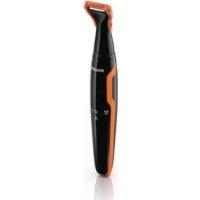
QC-5130 - Electric mower PHILIPS - Free user manual and instructions
Find the device manual for free QC-5130 PHILIPS in PDF.


| Brand | Philips |
| Model | QC-5130 |
| Product type | Electric trimmer |
| Power supply | Mains adapter (local mains voltage), built-in rechargeable battery |
| Charging time | Approximately 8 hours (do not exceed 24 hours) |
| Battery life | Approximately 60 minutes |
| Use while plugged in | Yes, when battery is low |
| Cutting heights (with comb) | 10 settings: 3, 5, 7, 9, 11, 13, 15, 17, 19, 21 mm |
| Cutting height (without comb) | 0.5 mm |
| Taper comb | Not included (QC5132 model only) |
| Storage cover | Not included |
| Cleaning | Cleaning brush included; do not use water or abrasive products |
| Replacing the cutting unit | Possible (original Philips part) |
| Mains adapter | Provided, do not replace the plug |
| Operating temperature | 15°C to 35°C |
| Warranty | Consult the international warranty leaflet |
| Included accessories | Hair comb (NORMAL), cleaning brush, adapter |
| Weight | Not specified (approx. 200 g) |
| Dimensions | Not specified (approx. 15 x 4 x 5 cm) |
Frequently Asked Questions - QC-5130 PHILIPS
User questions about QC-5130 PHILIPS
0 question about this device. Answer the ones you know or ask your own.
Ask a new question about this device
Download the instructions for your Electric mower in PDF format for free! Find your manual QC-5130 - PHILIPS and take your electronic device back in hand. On this page are published all the documents necessary for the use of your device. QC-5130 by PHILIPS.
USER MANUAL QC-5130 PHILIPS
Always here to help you
Register your product and get support at
www.philips.com/welcome

QC5132
QC5130
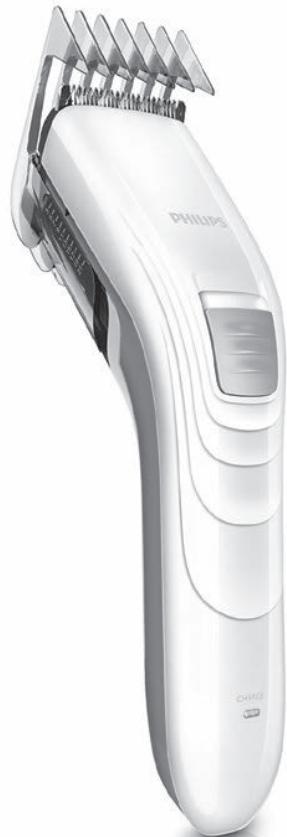
natural_image
White Philips 3D hairbrush with multiple teeth and a black handle (no visible text or symbols)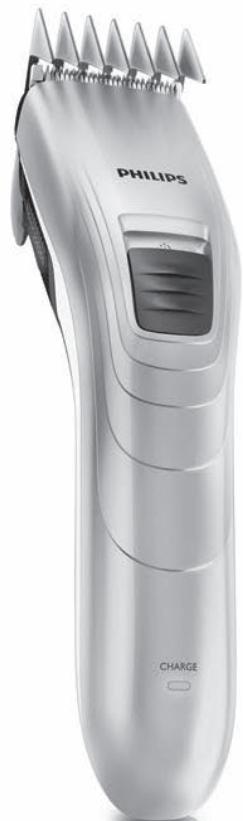
natural_image
White Philips 3D hair curler with spiked teeth and a 'CHARGE' button (no text or symbols on the device itself)User manual
PHILIPS
natural_image
Illustration of an open book with a grid layout and an arrow indicating the page direction (no text or symbols present)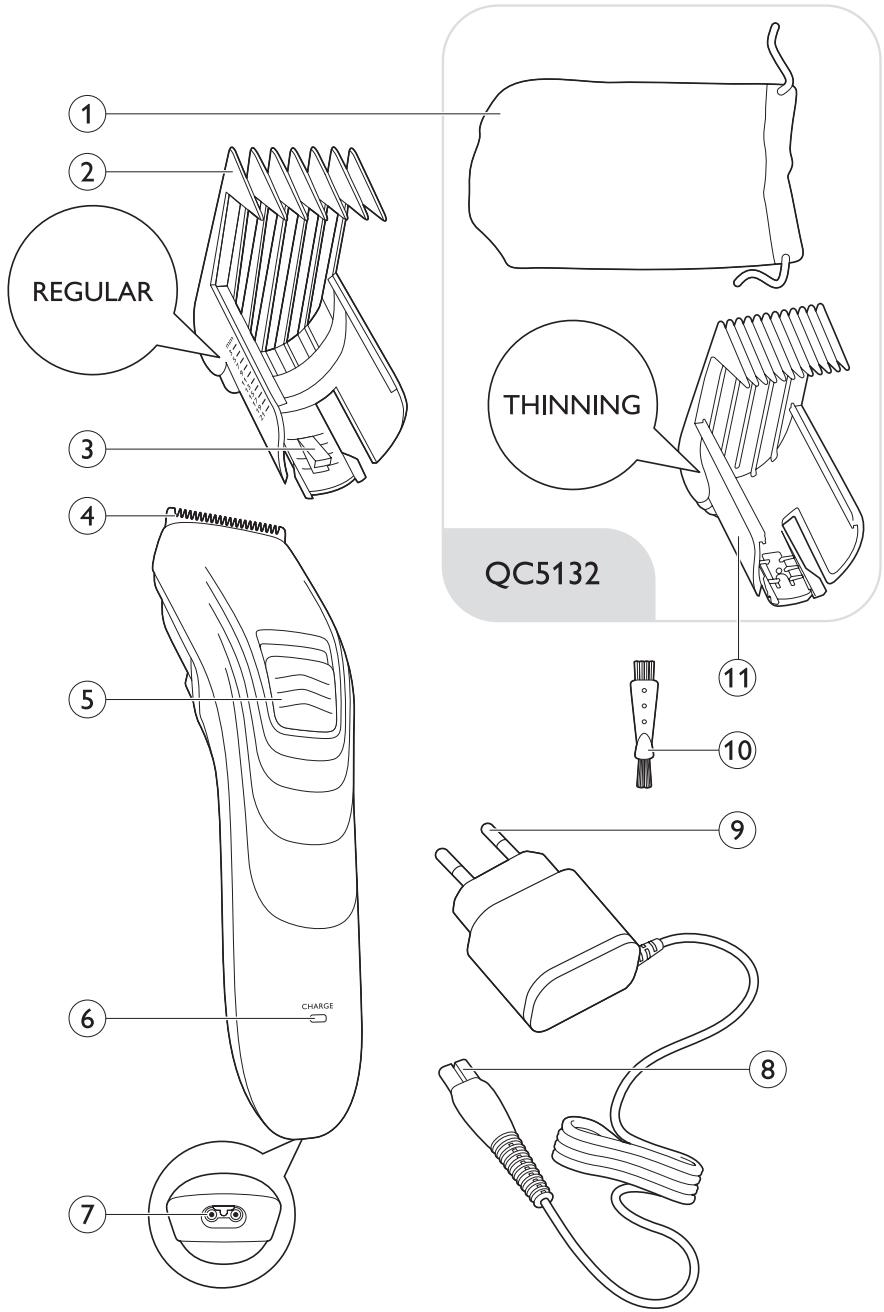
ENGLISH 6
ESPAÑOL 15
FRANÇAIS 24
INDONESIA 34
한국어 43
BAHASA MELAYU 52
PORTUGUÊS 61
ภาษาไทย 70
TIÊNG VIÊT 78
繁體中文 87
简体中文 95
111 ۴ارسی
119 العربية
Introduction
Congratulations on your purchase and welcome to Philips! To fully benefit from the support that Philips offers, register your product at www.philips.com/welcome.
General description (Fig. 1)
1 Pouch (QC5132 only)
2 Hair clipping comb (REGULAR)
3 Length setting selector
4 Cutting element
5 On/off slide
6 CHARGE light
7 Socket for appliance plug
8 Appliance plug
9 Adapter
10 Cleaning brush
11 Hair thinning comb (THINNING) (QC5132 only)
Important
Read this user manual carefully before you use the appliance and save it for future reference.
Danger
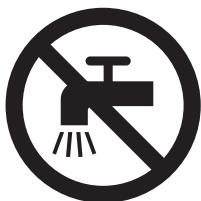
- Keep the appliance and the adapter dry.
Warning
- Check if the voltage indicated on the adapter and on the appliance corresponds to the local mains voltage before you connect the appliance.
- The adapter contains a transformer. Do not cut off the adapter to replace it with another plug, as this causes a hazardous situation.
- This appliance is not intended for use by persons (including children) with reduced physical, sensory or mental capabilities, or lack of experience and knowledge, unless they have been given supervision or instruction concerning use of the appliance by a person responsible for their safety.
- Children should be supervised to ensure that they do not play with the appliance.
- Always check the appliance before you use it. Do not use the appliance if it is damaged, as this may cause injury.
Caution
- Only use the adapter supplied to charge the appliance.
- Use, charge and store the appliance at a temperature between 15irc C and 35irc C.
- If the adapter is damaged, always have it replaced with one of the original type in order to avoid a hazard.
- If the appliance is subjected to a major change in temperature, pressure or humidity, let the appliance acclimatise for 30 minutes before you use it.
- Do not use the appliance if the cutting element, hair clipping comb (REGULAR) or hair thinning comb (THINNING) is damaged or broken, as this may cause injury.
- Never use compressed air, scouring pads, abrasive cleaning agents or aggressive liquids such as petrol or acetone to clean the appliance.
natural_image
Prohibition sign showing a faucet crossed out by a diagonal line, indicating no leakage or anti-leaching action (no text present)Electromagnetic fields (EMF)
This Philips appliance complies with all applicable standards and regulations regarding exposure to electromagnetic fields.
Charging
natural_image
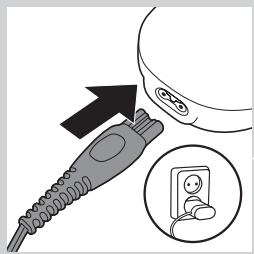
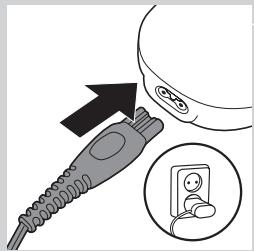
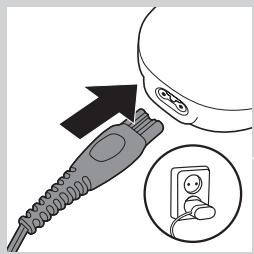
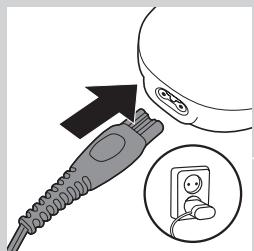
Illustration of a plug inserted into a device with an arrow pointing to the plug and an inset showing a socket (no text or symbols)Do not charge the appliance for more than 24 hours.
Charging takes approx. 8 hours.
When the appliance is fully charged, it has an operating time of 60 minutes.
1 Make sure the appliance is switched off.
2 Insert the appliance plug into the appliance.
3 Put the adapter in the wall socket.
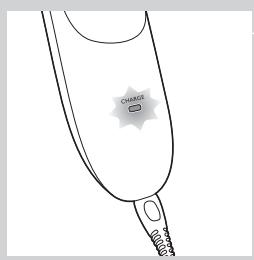
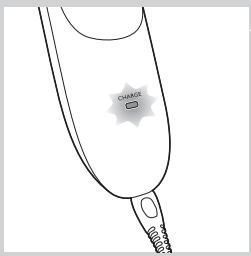
The green CHARGE light starts to flash to indicate that the appliance is charging.
When the batteries are fully charged, the green CHARGE light burns continuously. After 30 minutes the CHARGE light goes out to save energy.
Optimising the lifetime of the rechargeable batteries
Discharge the rechargeable batteries completely twice a year by letting the motor run until it stops. Then fully recharge the batteries.
Corded clipping
If the batteries are low, you can also use the appliance from the mains.
Only use the appliance from the mains when the rechargeable batteries are almost empty.
1 Switch off the appliance.
2 Connect the appliance to the mains and wait a few seconds before you switch it on.
If the rechargeable batteries are completely empty, wait a few minutes before you switch on the appliance.
Using the appliance
Note: Make sure your hair is clean and dry. Do not use the appliance on freshly washed hair.
Clipping with hair clipping comb (REGULAR)
natural_image
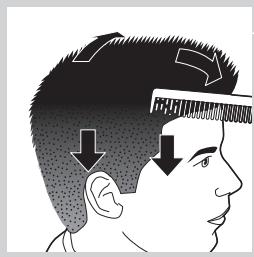
Side profile illustration of a human head with hair and facial features, showing reduced hair density (no text or symbols)1 Comb your hair with a styling comb in the direction of hair growth.
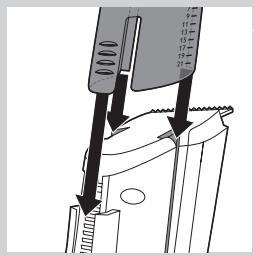
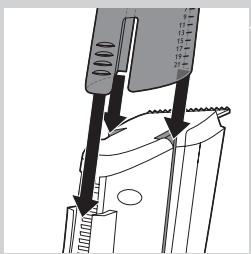
2 Slide the hair clipping comb (REGULAR) into the guiding grooves of the appliance ('click').
Make sure that you slide the arms of the comb properly into the grooves on both sides.
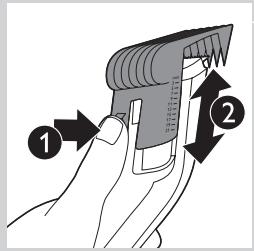
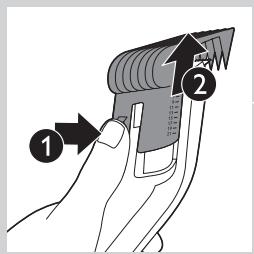
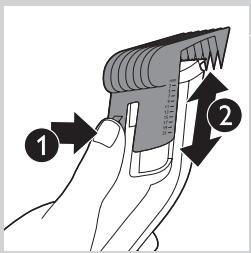
3 Press the length setting selector (1) and then move the hair clipping comb up or down (2) to set the desired length setting.
The corresponding hair length is visible on the side of the comb.
Length settings
With the hair clipping comb attached, the appliance can cut hair to 10 different lengths:
| Hair lengths in mm | Hair lengths in inches |
| 3 | 1/8 |
| 5 | 1/5 |
| 7 | 2/7 |
| 9 | 1/3 |
| 11 | 3/7 |
| 13 | 1/2 |
| 15 | 3/5 |
| 17 | 2/3 |
| 19 | 3/4 |
| 21 | 5/6 |
natural_image
Diagram of a car's side panel with a black arrow pointing to the front panel and a power button icon (no text or symbols)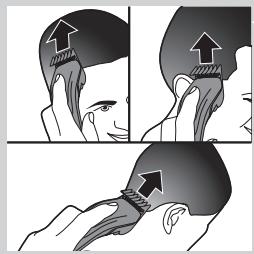
natural_image
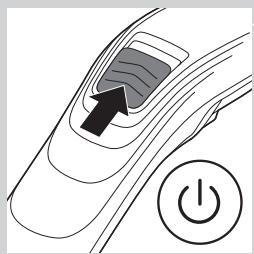
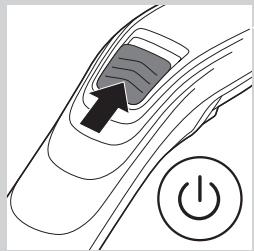
Illustration showing a person's head with arrows indicating the application of a specific anatomical or mechanical component (no text or symbols present)4 Slide the on/off slide upwards to switch on the appliance.
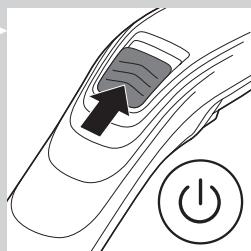
5 Place the hair clipping comb on the scalp and move the appliance through the hair slowly.
Tips
- Start clipping at the highest length setting of the hair clipping comb and reduce the length setting gradually.
- Write down the length settings you have used to create a certain hairstyle as a reminder for future clipping sessions.
- To clip in the most effective way, move the appliance against the direction of hair growth.
- Since hair grows in different directions, you need to move the appliance in different directions as well (upward, downward or across).
- Make overlapping passes over the head to ensure that the appliance catches all the hairs that need to be cut.
- Make sure that the flat part of the hair clipping comb is fully in contact with the scalp to obtain an even clipping result.
- To achieve a good result with curly, sparse or long hair, you can use a styling comb to guide the hair towards the appliance.
- Regularly remove cut hair from the hair clipping comb. If a lot of hair has accumulated in the comb, remove it from the appliance and blow and/or shake the hair out of it.
Clipping without hair clipping comb
natural_image
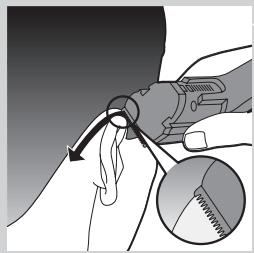
Diagram of a car's side panel with a black arrow pointing to the front panel and a power button icon (no text or symbols)You can use the appliance without hair clipping comb to clip your hair very close to the skin (0.5mm) or to contour the neckline and the area around the ears.
1 To remove the hair clipping comb, press the length setting selector (1), move the comb upwards and then pull it off the appliance (2).
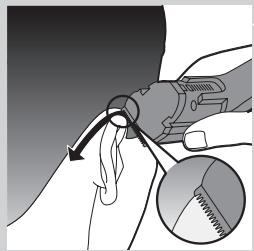
2 Comb the hair ends over the ears before you start to contour the hairline.
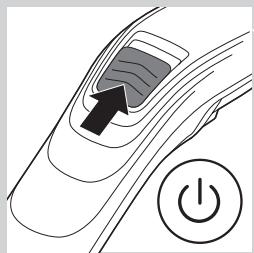
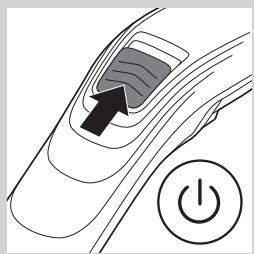
3 Slide the on/off slide upwards to switch on the appliance.
natural_image
Illustration of a hand holding a tool with a magnified inset showing a textured object (no text or symbols)
natural_image
Illustration of a person receiving a medical or cosmetic procedure, showing two views of the subject (no text or symbols present)4 Tilt the appliance in such a way that only one edge of the cutting element touches the hair ends.
5 Only cut the hair ends. The hairline has to be close to the ear.
6 To contour the neckline and the sideburns, turn the appliance and make downward strokes.
7 Move the appliance slowly and smoothly. Follow the natural hairline.
Clipping with the thinning comb (THINNING)
natural_image
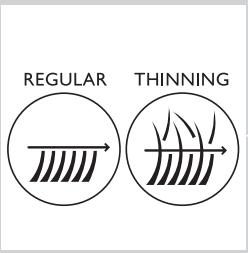
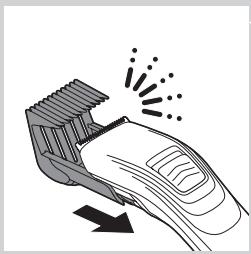
Illustration of a hand using a hairbrush with motion lines indicating compression (no text or symbols)Make sure you use the right comb. If you use the hair clipping comb (REGULAR) instead of the hair thinning comb (THINNING), the appliance will clip all hair to the same length.
- With the thinning comb, you can give your haircut a natural look. It also allows you to create a smooth transition between two different hair lengths.
- The thinning comb cuts only half of the hair that enters the comb, which results in a natural look.
Thinning an entire haircut
We advise you not to use the thinning comb for very short haircuts.
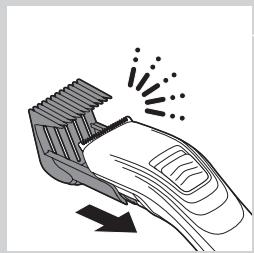
1 Slide the hair-thinning comb into the guiding grooves of the appliance ('click').
Make sure that you slide the arms of the comb properly into the grooves on both sides.
2 Set the thinning comb to a lower setting than the one you just used for the regular hair clipping comb to create the haircut.
Note: How much lower the setting for the thinning comb should be depends on your hairstyle and hair length. Never use the thinning comb at a setting that is lower than half the setting you used to create the haircut. For example, if you used the large clipping comb at 30mm to create the haircut, do not use the thinning comb at a setting lower than 15mm.
natural_image
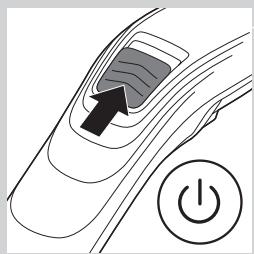
Diagram of a car's side panel with a black arrow pointing to the front panel and a power button icon (no text or symbols)3 Slide the on/off slide upwards to switch on the appliance.
4 Move the hair thinning comb through the hair.
Make sure that the thinning comb only touches each spot once, otherwise it cuts all the hair to the set hair length.
Creating a smooth transition between two hair lengths
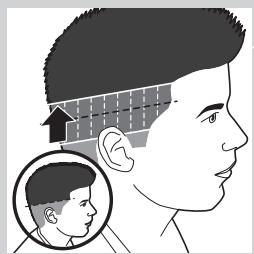
If you have cut your hair to two different lengths, you can use the thinning comb to create a smooth transition between these two lengths.
natural_image
Illustration of a hairbrush cutting through a slot with motion lines indicating compression (no text or symbols)1 Slide the hair-thinning comb into the guiding grooves of the appliance ('click').
Make sure that you slide the arms of the comb properly into the grooves on both sides.
2 Set the thinning comb to a hair length setting that is halfway between the two hair length settings you used to create the haircut.
For instance, set the thinning comb to 15mm if you have cut the top part of the haircut to a length of 20mm and the bottom part of the haircut to a length of 10mm.
3 Move the thinning comb upwards through the transition between the two lengths.
Make sure that the thinning comb only touches each spot once, otherwise it cuts all the hair to the set hair length.
natural_image
Side profile illustration of a human head with a magnified inset showing the head and ear (no text or symbols)Cleaning
natural_image
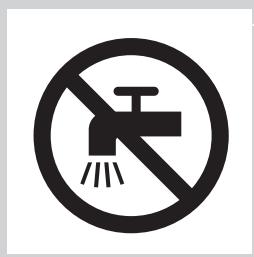
Prohibition sign of a faucet without any text or symbolsKeep the appliance and the adapter dry. Only clean the appliance and the adapter with the cleaning brush supplied.
Never use compressed air, scouring pads, abrasive cleaning agents or aggressive liquids such as alcohol, petrol or acetone to clean the appliance.
Do not use any sharp objects to clean the appliance.
Clean the appliance after every use.
natural_image
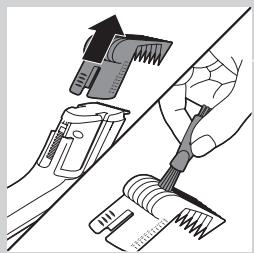
Illustration of a hand using a tool to adjust or clean a brush, with no visible text or symbols.1 Make sure the appliance is switched off and disconnected from the mains.
2 To remove the comb, press the length setting selector, move the comb upwards and then pull it off the appliance. Clean the comb with the cleaning brush supplied.
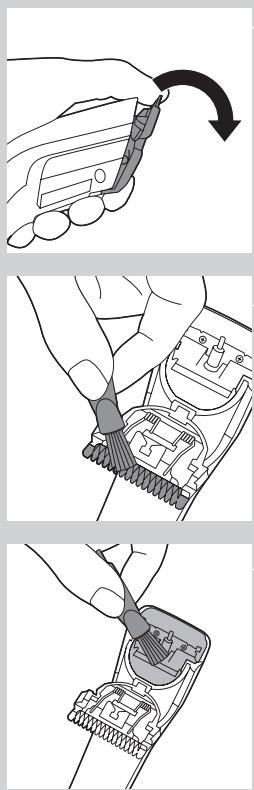
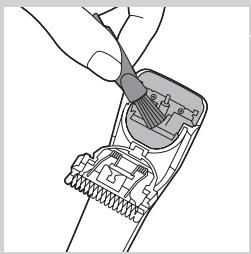
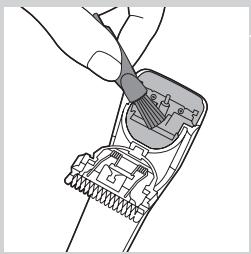
3 Push the edge of the cutting unit upwards with your thumb until the cutting unit opens.
4 Clean the cutting unit with the cleaning brush supplied.
5 Clean the inside of the appliance with the cleaning brush supplied.
Note: The appliance does not need any lubrication.
Ordering accessories
To buy accessories or spare parts, visit www.shop.philips.com/service or go to your Philips dealer. You can also contact the Philips ConsumerCare Centre in your country (see the worldwide guarantee leaflet for contact details). The cutting unit, the adapter and the hair clipping comb are replaceable.
Replacing the cutting unit
Replace the cutting unit if it is damaged or worn. Only replace the cutting unit with an original Philips cutting unit.
1 Push the middle part of the cutting unit upwards with your thumb until it opens (1). Then pull it off the appliance (2).
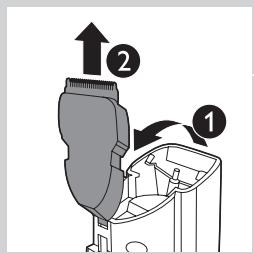
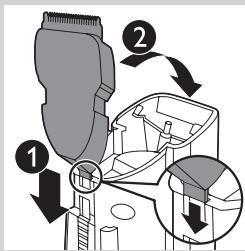
2 Place the lug of the new cutting unit in the slot (1) and push the cutting unit onto the appliance ('click') (2).
Environment
natural_image
Symbol of a trash bin crossed with no text or numbers, representing waste sorting or disposal (no text present)- Do not throw away the appliance with the normal household waste at the end of its life, but hand it in at an official collection point for recycling. By doing this, you help to preserve the environment.
natural_image
Symbol of a trash bin crossed out by two diagonal lines (no text or numbers present)- The built-in rechargeable batteries contain substances that may pollute the environment. Always remove the batteries before you discard and hand in the appliance at an official collection point. Dispose of the batteries at an official collection point for batteries. If you have trouble removing the batteries, you can also take the appliance to a Philips service centre. The staff of this centre will remove the batteries for you and will dispose of them in an environmentally safe way.
Removing the rechargeable batteries
natural_image
Illustration of a hand using a tool to adjust or install a component, with a plus button and magnifying glass nearby (no text or symbols)Only remove the rechargeable batteries when you discard the appliance. Make sure the appliance is disconnected from the mains and the batteries are completely empty when you remove them.
Do not connect the appliance to the mains again after you have removed the rechargeable batteries.
1 Disconnect the appliance from the mains and let the appliance run until the motor stops.
2 Remove the comb and the cutting unit.
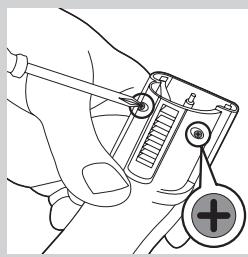
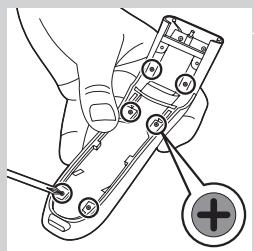
3 Remove the 2 screws at the back of the appliance with a screwdriver.
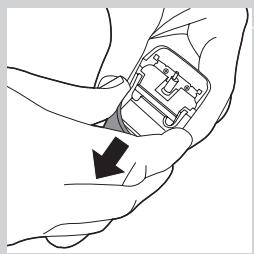
natural_image
Illustration of a hand holding an electronic device with a black arrow pointing to it (no text or symbols present)4 Pull the back panel off the appliance.
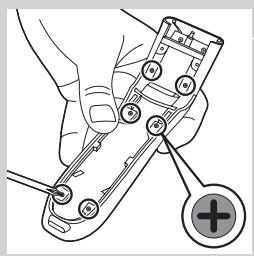
natural_image
Illustration of a hand holding a handheld device with a plus button, no text or symbols present5 Remove the 6 screws on the inside of the appliance with a screwdriver.
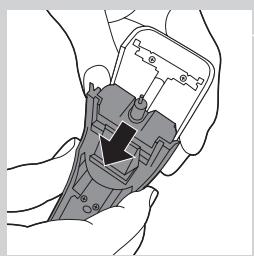
natural_image
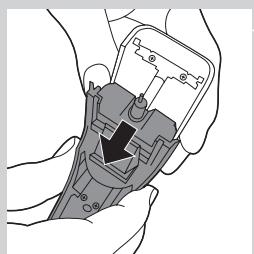
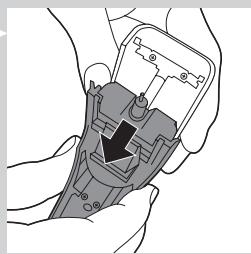
Illustration of hands holding a device with a black arrow pointing to a component (no text or symbols visible)6 Separate the power unit from the front panel.
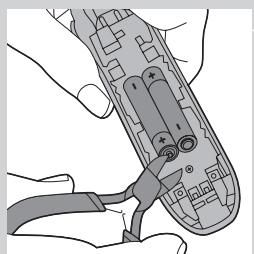
natural_image
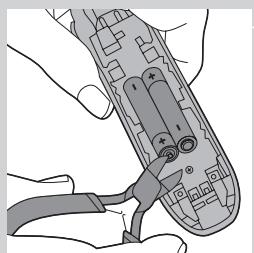
Illustration of hands using a handheld device to interact with a cable (no text or symbols visible)7 Cut the wires close to the batteries and then remove the batteries.
Guarantee and support
If you need information or support, please visit www.philips.com/support or read the separate worldwide guarantee leaflet.
Introducción
natural_image
Prohibition sign showing a faucet crossed out by a diagonal line, indicating no pollution or leakage (no text present)Campos electromagnéticos (CEM)
natural_image
Illustration of a plug inserted into a socket with an arrow indicating direction (no text or symbols)natural_image
Side profile illustration of a human head with hair and facial features, showing reduced hair density (no text or symbols)natural_image
Diagram of a car's side panel with an arrow pointing to the front panel and a power button (no text or symbols)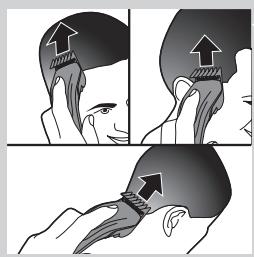
natural_image
Illustration showing a person's head with arrows indicating muscle or anatomical changes, no text or symbols present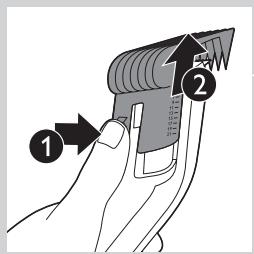
natural_image
Diagram of a car's side panel with a black arrow pointing to the front panel and a power button symbol (no text or labels)natural_image
Illustration of a hand holding a tool with a magnified inset showing a textured object (no text or symbols)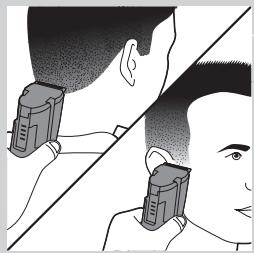
natural_image
Illustration of a person receiving a medical or cosmetic procedure, showing two views of the neck and head (no text or symbols present)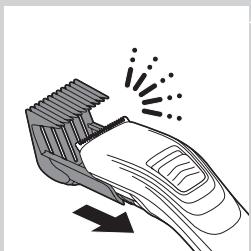
natural_image
Illustration of a hairbrush cutting through a showerhead with motion arrows indicating compression (no text or symbols)natural_image
Diagram of a car's side panel with an arrow pointing to the front panel and a power button (no text or symbols)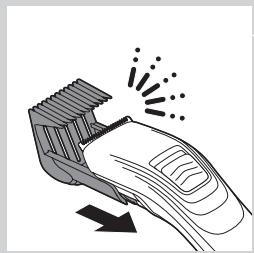
natural_image
Line drawing of a hairbrush cutting through a clip with motion lines indicating compression (no text or symbols)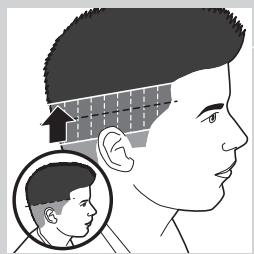
natural_image
Side profile illustration of a human head with a magnified inset showing the head and ear (no text or symbols)natural_image
Prohibition sign of a faucet without any text or symbols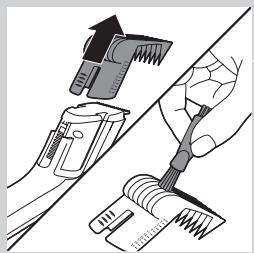
natural_image
Illustration of a hand using a tool to adjust or clean a brush, with no visible text or symbols.natural_image
Illustration of a hand holding a small object with an arrow indicating rotation (no text or symbols)natural_image
Close-up of hands using a tool to adjust or install a component, no visible text or symbolsnatural_image
Diagram of a hand inserting a plug into a connector socket (no text or symbols)natural_image
Symbol of a trash bin crossed with no text or labels, representing waste sorting or disposal (no text present)natural_image
Symbol of a trash bin crossed out by two diagonal lines (no text or numbers present)natural_image
Illustration of a hand using a tool to adjust or install a mechanical component, with a plus button and circular symbol (no text or labels)natural_image
Illustration of a hand holding a small device with a black arrow pointing to it (no text or symbols present)natural_image
Illustration of a hand holding a small electronic device with a plus button, no text or symbols presentnatural_image
Illustration of hands using a handheld device to adjust or install a component (no text or symbols visible)natural_image
Illustration of hands using a handheld device to interact with a cable (no text or symbols visible)natural_image
Prohibition sign showing a faucet crossed out by a diagonal line, indicating no leakage or anti-leaching action (no text present)natural_image
Illustration of a plug inserted into a device with an arrow pointing to the plug and a close-up of a socket (no text or symbols)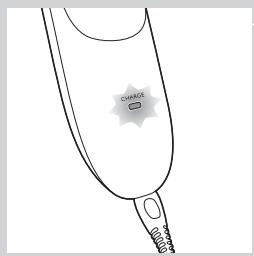
natural_image
Side profile illustration of a human head with hair and facial features, showing reduced hair density (no text or symbols)natural_image
Diagram of a car's side panel with an arrow pointing to the front panel and a power button (no text or symbols)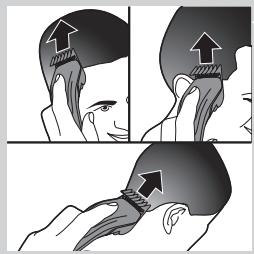
natural_image
Illustration showing a person's head with arrows indicating movement or force (no text or symbols present)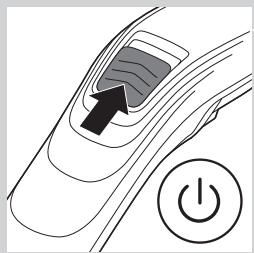
natural_image
Diagram of a car's front wheel with a power button and arrow indicating the wheel's center (no text or symbols present)natural_image
Illustration of a hand holding a tool with a magnified inset showing a textured object (no text or symbols)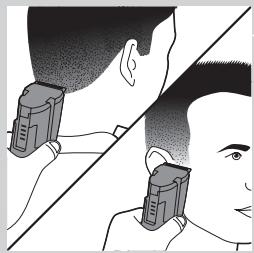
natural_image
Illustration of a person receiving a medical or cosmetic procedure, showing two views of the neck and head (no text or symbols present)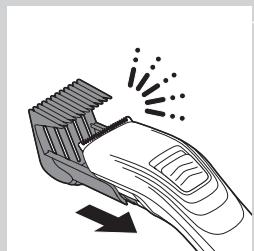
natural_image
Illustration of a hairbrush cutting through a showerhead with motion arrows indicating compression (no text or symbols)natural_image
Diagram of a car's side panel with an arrow pointing to the front panel and a power button (no text or symbols)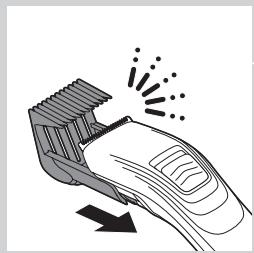
natural_image
Illustration of a hairbrush cutting through a clip with motion lines indicating compression (no text or symbols)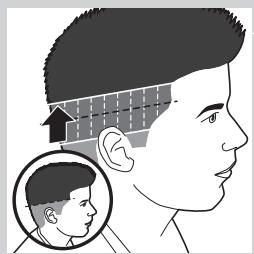
natural_image
Side profile illustration of a human head with a magnified inset showing the head and ear (no text or symbols)natural_image
Prohibition sign of a faucet without any text or symbols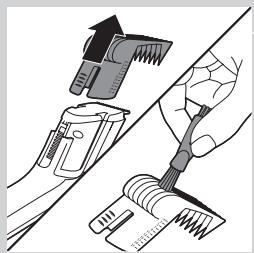
natural_image
Illustration of a hand using a tool to clean or brush using a brush (no text or symbols present)natural_image
Illustration of a hand holding a small object with an arrow indicating rotation (no text or symbols)natural_image
Close-up of hands using a tool to adjust or install a component, no visible text or symbolsnatural_image
Diagram of a hand inserting a plug into a connector socket (no text or symbols)natural_image
Symbol of a trash bin crossed with no text or labels, representing waste sorting or disposal (no text present)natural_image
Symbol of a trash bin crossed out by two diagonal lines (no text or numbers present)natural_image
Illustration of a hand holding a handheld electronic device with a plus button (no text or symbols)natural_image
Illustration of a hand holding a small electronic device with an arrow pointing to it (no text or symbols present)natural_image
Illustration of a hand holding a handheld device with a plus button and circular symbol (no text or labels)natural_image
Illustration of hands holding a device with a black arrow pointing to a component (no text or symbols visible)natural_image
Illustration of hands using a handheld tool to adjust or install a device (no text or symbols visible)natural_image
Prohibition sign showing a faucet crossed out by a diagonal line, indicating no pollution or leakage (no text present)natural_image
Illustration of a plug inserted into a device with an arrow pointing to the plug and a close-up of a socket (no text or symbols)natural_image
Side profile illustration of a human head with hair and facial features, showing measurement arrows (no text or symbols)natural_image
Diagram of a car's side panel with an arrow pointing to the front panel and a power button (no text or symbols)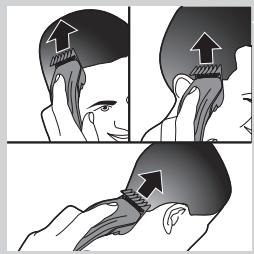
natural_image
Illustration showing a person's head with arrows indicating movement or force (no text or symbols present)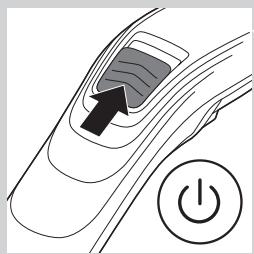
natural_image
Diagram of a car's side panel with an arrow pointing to the center and a power button symbol (no text or labels)natural_image
Illustration of a hand holding a tool with a magnified inset showing a textured object (no text or symbols)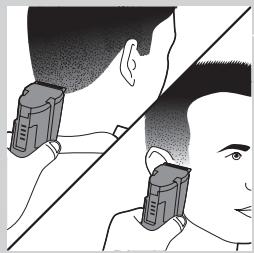
natural_image
Illustration of a person receiving a pair of medical or surgical devices, no text or symbols present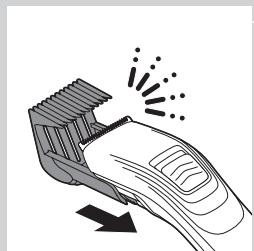
natural_image
Illustration of a hairbrush cutting through a nozzle with motion lines indicating compression (no text or symbols)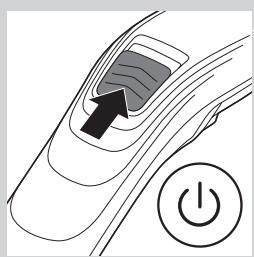
natural_image
Diagram of a car interior with a black arrow pointing to the window and a power button (no text or symbols)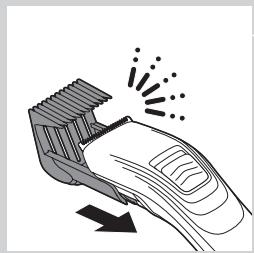
natural_image
Line drawing of a hairbrush cutting through a clip with motion lines indicating compression (no text or symbols)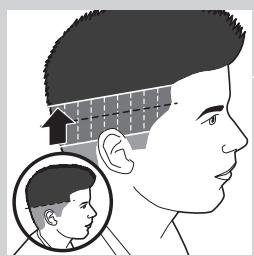
natural_image
Side profile illustration of a human head with a magnified inset showing the head and ear (no text or symbols)natural_image
Prohibition sign showing a faucet with no text or symbols (no readable text)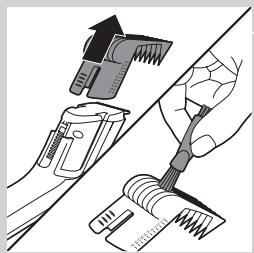
natural_image
Illustration of a hand using a tool to clean or adjust a brush, with no visible text or symbols.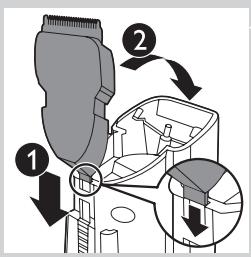
natural_image
Symbol of a trash bin crossed with no text or labels, representing waste sorting or disposal (no text present)natural_image
Symbol of a trash bin crossed out by two diagonal lines (no text or numbers present)natural_image
Illustration of a hand using a tool to adjust or install a component, with a plus button and magnifying glass nearby (no text or symbols)natural_image
Illustration of a hand holding an electronic device with a black arrow pointing to it (no text or symbols present)natural_image
Illustration of a hand holding a handheld device with a plus button, no text or symbols presentnatural_image
Illustration of hands holding a device with a black arrow pointing to a component (no text or symbols visible)natural_image
Illustration of hands using a handheld device to interact with a cable (no text or symbols visible)7 Potong kabel di dekat baterai lalu lepaskan baterai.
natural_image
Prohibition sign showing a faucet with a diagonal line and a diagonal line, indicating no text or symbols beyond the prohibition symbol.EMF(전자기장)
natural_image
Illustration of a plug inserted into a device with an arrow pointing to the plug and an inset showing a socket (no text or symbols)natural_image
Side profile illustration of a human head with hair and facial features, showing hairpinning and facial changes (no text or symbols)natural_image
Diagram of a car's side panel with an arrow pointing to the front panel and a power button (no text or symbols)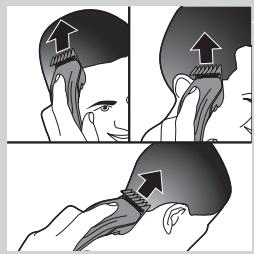
natural_image
Illustration showing a person's head with arrows indicating movement or force (no text or symbols present)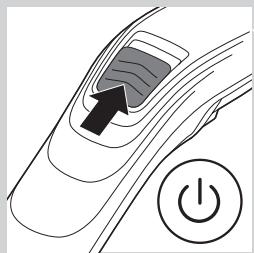
natural_image
Diagram of a car's front wheel with a power button and arrow indicating the wheel's center (no text or symbols present)natural_image
Illustration of a hand holding a tool with a magnified inset showing a textured object (no text or symbols)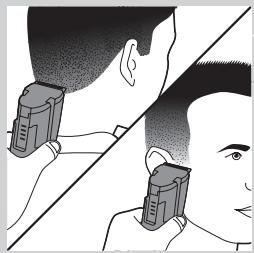
natural_image
Illustration of a person receiving a pair of medical or surgical devices, no text or symbols present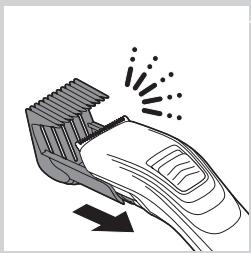
natural_image
Illustration of a hairbrush cutting through a showerhead with motion lines indicating compression (no text or symbols)natural_image
Diagram of a car's side panel with a black arrow pointing to the front panel and a power button icon (no text or symbols)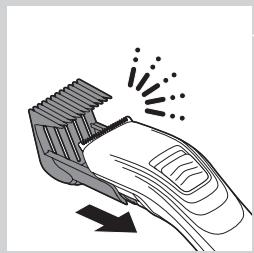
natural_image
Illustration of a hairbrush cutting through a clip with motion lines indicating compression (no text or symbols)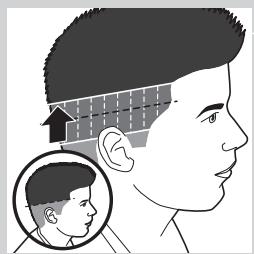
natural_image
Side profile illustration of a human head with a magnified inset showing the head and ear (no text or symbols)natural_image
Prohibition sign showing a faucet with no text or symbols (no readable text)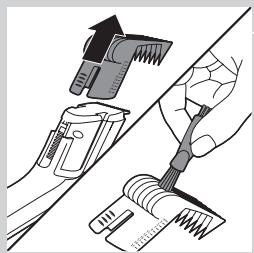
natural_image
Illustration of a hand using a tool to clean or brush using a brush (no text or symbols present)natural_image
Line drawing of a hand holding a small object with an arrow indicating rotation (no text or symbols)natural_image
Close-up of hands using a tool to adjust or install a component, no visible text or symbolsnatural_image
Diagram of a hand inserting a plug into a connector socket (no text or symbols)natural_image
Symbol of a trash bin crossed with no text or numbers, representing waste sorting or disposal (no text present)natural_image
Symbol of a trash bin crossed out by two diagonal lines (no text or numbers present)natural_image
Illustration of a hand using a tool to adjust or install a device with a plus button (no text or symbols present)natural_image
Illustration of a hand holding a small electronic device with an arrow pointing to it (no text or symbols present)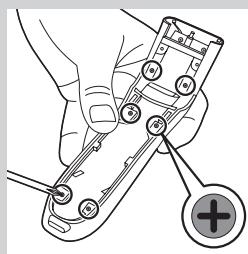
natural_image
Illustration of a hand holding a small electronic device with a plus button, no text or symbols presentnatural_image
Illustration of hands holding a device with a black arrow pointing to a component (no text or symbols visible)natural_image
Illustration of hands using a handheld remote control with a cable (no text or symbols visible)natural_image
Prohibition sign of a faucet with diagonal line and raindrops (no text)natural_image
Illustration of a plug inserted into a device with an arrow pointing to it, and a close-up of electrical socket (no text or symbols)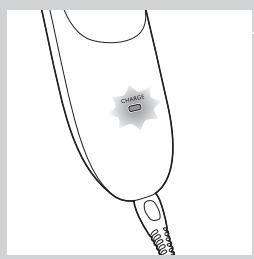
natural_image
Side profile illustration of a human head with hair and facial features, showing reduced hair density (no text or symbols)natural_image
Diagram of a car's side panel with an arrow pointing to the front panel and a power button (no text or symbols)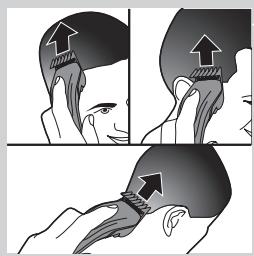
natural_image
Illustration showing a person's head with arrows indicating muscle or anatomical changes (no text or symbols present)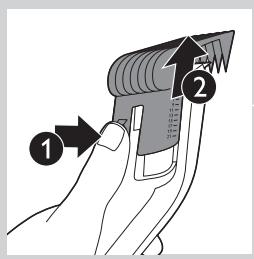
natural_image
Diagram of a car's front wheel with a power button and arrow indicating the wheel's center (no text or symbols present)natural_image
Illustration of a hand holding a tool with a magnified inset showing a textured object (no text or symbols)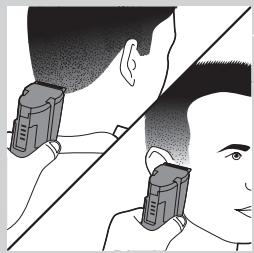
natural_image
Illustration of a person receiving a pair of medical or surgical devices, no text or symbols present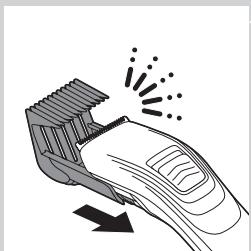
natural_image
Illustration of a hairbrush cutting through a clip with motion lines indicating compression (no text or symbols)natural_image
Diagram of a car's side panel with a black arrow pointing to the front panel and a power button icon (no text or symbols)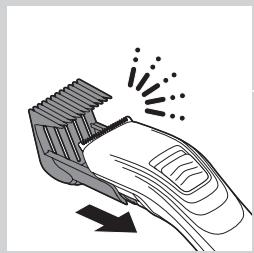
natural_image
Illustration of a hairbrush cutting through a nozzle with motion lines indicating compression (no text or symbols)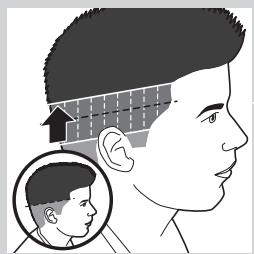
natural_image
Side profile illustration of a human head with a magnified inset showing the head and ear (no text or symbols)natural_image
Prohibition sign showing a faucet with no text or symbols (no readable text)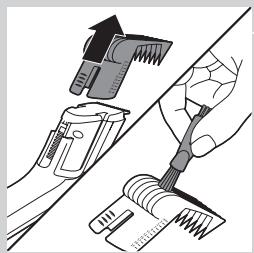
natural_image
Illustration of a hand using a tool to clean or brush using a brush (no text or symbols present)natural_image
Illustration of a hand holding a small object with an arrow indicating rotation (no text or symbols)natural_image
Close-up of hands using a tool to adjust or install a component, no visible text or symbolsnatural_image
Diagram of a hand inserting a plug into a connector socket (no text or symbols)Ganti unit pemotong jika ia rosak atau haus. Ganti unit pemotong hanya dengan unit pemotong Philips yang asli sahaja.
natural_image
Symbol of a trash bin crossed with no text or numbers, representing waste sorting or disposal (no text present)natural_image
Symbol of a trash bin crossed out by two diagonal lines (no text or numbers present)natural_image
Illustration of a hand using a handheld device to adjust or install a component, with a plus button and circular symbol (no text or labels)natural_image
Illustration of a hand holding an electronic device with a black arrow pointing to it (no text or symbols present)natural_image
Illustration of hands holding a device with a black arrow pointing to a component (no text or symbols visible)natural_image
Illustration of hands using a handheld device to interact with a cable (no text or symbols visible)natural_image
Prohibition sign of a faucet with diagonal line indicating no pollution or leakage (no text present)natural_image
Illustration of a plug inserted into a device with an arrow pointing to the plug and a close-up of a socket (no text or symbols)natural_image
Side profile illustration of a human head with hair and facial features, showing reduced hair density (no text or symbols)natural_image
Diagram of a car's side panel with an arrow pointing to the front panel and a power button (no text or symbols)
natural_image
Illustration showing a person's head with arrows indicating the application of a specific anatomical or mechanical component (no text or symbols present)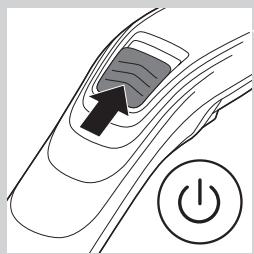
natural_image
Diagram of a car's side panel with an arrow pointing to the center and a power button symbol (no text or labels)natural_image
Illustration of a hand holding a tool with a magnified inset showing a textured object (no text or symbols)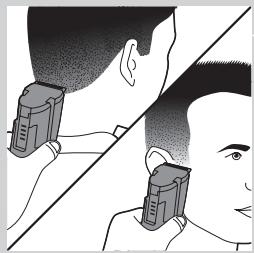
natural_image
Illustration of a person receiving a medical or surgical procedure, showing two views of the neck and head (no text or symbols present)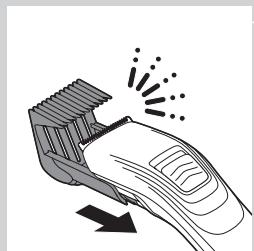
natural_image
Illustration of a hairbrush cutting through a showerhead with motion arrows indicating compression (no text or symbols)natural_image
Diagram of a car's side panel with an arrow pointing to the front panel and a power button (no text or symbols)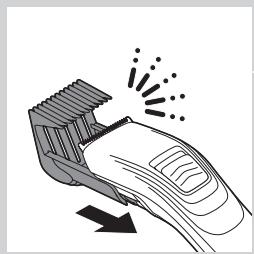
natural_image
Illustration of a hairbrush cutting through a showerhead with motion lines indicating compression (no text or symbols)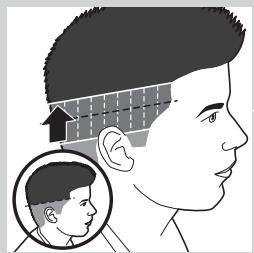
natural_image
Side profile illustration of a human head with a magnified inset showing facial features (no text or symbols)natural_image
Prohibition sign of a faucet with no text or symbols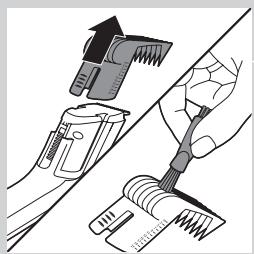
natural_image
Illustration of a hand using a hairdryer brush to cut the blade (no text or symbols present)natural_image
Illustration of a hand holding a small object with an arrow indicating rotation (no text or symbols)natural_image
Close-up of hands using a tool to adjust or install a component, no visible text or symbolsnatural_image
Diagram of a hand inserting a plug into a connector socket (no text or symbols)Encomendar acessórios
Substitua o componente de corte caso este esteja danificado ou gasto.
natural_image
Symbol of a trash bin crossed with no text or labels, representing waste sorting or disposal (no text present)natural_image
Symbol of a trash bin crossed out by two diagonal lines (no text or numbers present)natural_image
Illustration of a hand using a screwdriver to adjust a mechanical component with a plus button (no text or symbols)natural_image
Illustration of a hand holding a small electronic device with an arrow pointing to it (no text or symbols present)natural_image
Illustration of hands holding a device with a black arrow pointing to a component (no text or symbols visible)natural_image
Illustration of hands using a handheld device to interact with a cable (no text or symbols visible)natural_image
Prohibition sign showing a faucet without spraying water, enclosed in a circle (no text or symbols)การชาร์จแบตเตอรี่
natural_image
Illustration of a hairpin inserted into a device with an arrow pointing to the component (no text or symbols present)natural_image
Side profile illustration of a human head with hair and facial features, showing reduced hair density (no text or symbols)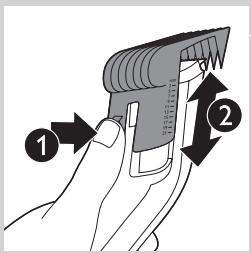
natural_image
Diagram of a car's side panel with a black arrow pointing to the center and a power button symbol (no text or labels)natural_image
Illustration showing a person's head with arrows indicating movement or force (no text or symbols present)natural_image
Diagram of a car's side panel with an arrow pointing to the front panel and a power button (no text or symbols)natural_image
Illustration of a hand holding a tool with an arrow indicating rotation, and an inset showing a magnified view of the tool (no text or symbols present)natural_image
Illustration of a person receiving a pair of cigarettes from their neck (no text or symbols)
natural_image
Prohibition sign of a faucet with no text or symbolsnatural_image
Illustration of a hand using a tool to adjust or install a component, showing mechanical parts and a brush (no text or symbols present)natural_image
Illustration of a hand holding a cart with an arrow indicating clockwise motion (no text or symbols)natural_image
Illustration of a hand inserting a cable into a connector (no text or symbols visible)natural_image
Line drawing of a hand inserting a plug into a connector (no text or symbols)natural_image
Symbol of a trash bin crossed with no visible text or labelsnatural_image
Symbol of a trash bin crossed out by two crossed lines (no text or numbers present)natural_image
Illustration of a hand using a screwdriver to adjust a component with a plus button (no text or symbols)natural_image
Illustration of a hand holding a small device with a black arrow pointing to it (no text or symbols present)natural_image
Illustration of a hand holding a handheld device with a plus button, no text or symbols presentnatural_image
Illustration of hands using a handheld device to adjust or install a component (no text or symbols visible)natural_image
Illustration of hands using a handheld device to interact with a cable (no text or symbols visible)natural_image
Prohibition sign showing a faucet crossed out by a diagonal line, indicating no leakage or anti-leaching action (no text present)natural_image
Illustration of a plug inserted into a device with an arrow indicating direction (no text or symbols)natural_image
Side profile illustration of a human head with hair and facial features, showing arrows indicating direction (no text or symbols)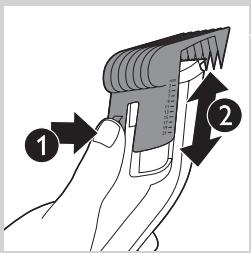
natural_image
Diagram of a car's dashboard with a power button and an arrow pointing to the dashboard area (no text or symbols present)natural_image
Illustration showing a person's head with arrows indicating movement or force, no text or symbols present1 public law, public law, public law, public law, public law, public law, public law, public law, public law, public law, public law, public law, public law, public law, public law, public law, public law, public law, public law, public law, public law, public law, public law, public law, public law, public law, public law, public law, public law, public law, public law, public law, public law, public law, private law, private law, private law, private law, private law, private law, private law, private law, private law, private law, private law, private law, private law, private law, private law, private law, private law, private law, private law, private law, private law, private law, private law, private law, private law, private law, private law, private law, private law, private law, private law, private law, private law, private legal and administrative laws.
2 Dùng lược chải đầu tóc chòm qua tai trước khi bắt đầu tĩa chân tóc.

natural_image
Diagram of a car's side panel with an arrow pointing to the front panel and a power button (no text or symbols)natural_image
Illustration of a hand holding a tool with an arrow indicating direction, and an inset showing a magnified view of the tool (no text or symbols present)natural_image
Illustration of a person receiving a pair of cigarettes from their neck, separated by a diagonal line (no text or symbols)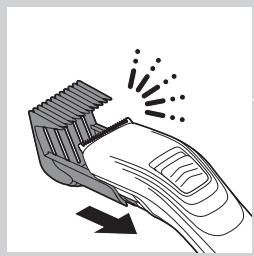
natural_image
Illustration of a hand using a hairbrush with motion lines indicating compression (no text or symbols)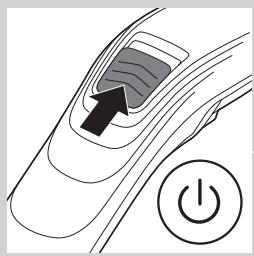
natural_image
Diagram of a car's front wheel with a power button and arrow indicating motion (no text or symbols)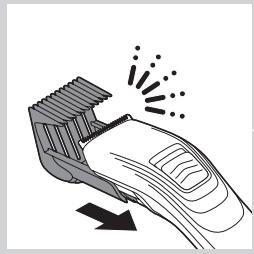
natural_image
Illustration of a hairbrush cutting through a slot with motion lines indicating compression (no text or symbols)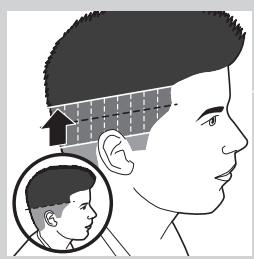
natural_image
Side profile illustration of a human head with a magnified inset showing the head and ear area (no text or symbols)natural_image
Prohibition sign showing a faucet with a diagonal line and a diagonal line, indicating no restrictions or leakage.natural_image
Illustration of a hand using a tool to clean or adjust a surface, showing mechanical components and tool path (no text or symbols)natural_image
Illustration of a hand holding a cart with an arrow indicating direction (no text or symbols)natural_image
Illustration of hands connecting a connector to an electrical socket (no text or symbols visible)natural_image
Diagram of a hand holding a connector to a mechanical component (no text or symbols visible)natural_image
Symbol of a trash bin with crossed lines indicating no waste or discharge, and a solid black rectangle below (no text or labels)natural_image
Symbol of a trash bin crossed out by two crossed lines (no text or labels)natural_image
Illustration of a hand using a tool to adjust or install a mechanical component, with a plus button and circular symbol (no text or labels)natural_image
Illustration of a hand holding a small device with a black arrow pointing to it (no text or symbols present)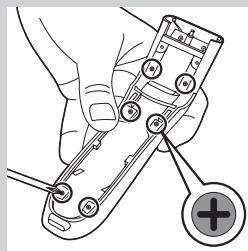
natural_image
Illustration of a hand holding a handheld device with a plus button, no text or symbols presentnatural_image
Illustration of hands holding a device with a black arrow pointing to a component (no text or symbols visible)natural_image
Illustration of hands using a pliers to adjust internal components (no text or symbols visible)natural_image
Prohibition sign showing a faucet without raindrops, enclosed in a circle (no text or symbols)充電
natural_image
Illustration of a plug inserted into a socket with an arrow indicating direction (no text or symbols)請勿讓本產品充電超過 24 小時。
充電時間約需 8 個小時。
natural_image
Side profile illustration of a human head with hair and facial features, showing measurement arrows (no text or symbols)1 使用造型梳在順著頭髮生長方向梳髮。
natural_image
Diagram of a car's front wheel with a power button and arrow indicating the wheel's center (no text or symbols present)natural_image
Illustration showing a person performing a neck massage technique with directional arrows (no text or symbols)natural_image
Diagram of a car's side panel with an arrow pointing to the front panel and a power button (no text or symbols)natural_image
Illustration of a hand holding a tool with an arrow indicating direction, and an inset showing a magnified view of the tool (no text or symbols present)natural_image
Illustration of a person receiving a medical or therapeutic device, showing eye and mouth (no text or symbols)natural_image
Illustration of a hand using a hairbrush with motion lines indicating compression or compression (no text or symbols)natural_image
Diagram of a car's front wheel with a power button and arrow indicating direction (no text or symbols)natural_image
Illustration of a hairbrush cutting through a slot with motion lines indicating compression (no text or symbols)natural_image
Side profile illustration of a human head with a magnified inset showing the head and ear (no text or symbols)3 讓打薄梳通過兩種髮長,往上移動。
natural_image
Prohibition sign showing a faucet with a diagonal line and a diagonal line, indicating no restrictions or leakage.natural_image
Illustration of a hand using a tool to clean or adjust a surface, showing mechanical components and tool path (no text or symbols)natural_image
Illustration of a hand holding a cart with an arrow indicating direction (no text or symbols)natural_image
Illustration of a hand inserting a cable into a connector (no text or symbols visible)4 使用隨附的清潔刷清潔修剪組件。
natural_image
Line drawing of a hand inserting a plug into a connector (no text or symbols)5 使用隨附的清潔刷清潔產品內部。
注意:本產品不需要任何潤滑。
訂購配件
natural_image
Symbol of a waste bin with no text or labels, featuring crossed lines and a rectangular block below (no readable text or symbols)natural_image
Symbol of a trash bin crossed out by two crossed lines (no text or labels)natural_image
Illustration of a hand holding a handheld electronic device with a plus button (no text or symbols)natural_image
Prohibition sign showing a faucet without raindrops, enclosed in a circle (no text or symbols)充电
natural_image
Illustration of a plug inserted into a device with an arrow pointing to the plug and a close-up inset showing a socket (no text or symbols)请勿连续为本产品充电超过 24 小时。
充电约需8小时。
产品充满电后,可持续工作 60 分钟。
natural_image
Side profile illustration of a human head with hair and facial features, showing measurement arrows (no text or symbols)natural_image
Diagram of a car's side panel with a black arrow pointing to the left side and a power button symbol (no text or labels)4 向上滑动开/关滑钮启动产品。
natural_image
Illustration showing a person's head with arrows indicating movement or pressure points, no text or symbols presentnatural_image
Diagram of a car's dashboard with a power button and an arrow indicating the lever (no text or symbols present)3 向上滑动开/关滑钮启动产品。
natural_image
Illustration of a hand holding a tool with a magnified inset showing a screwdriver (no text or symbols)natural_image
Illustration of a person's head and neck with a pair of eyeglasses, showing different angles (no text or symbols)natural_image
Illustration of a hand using a hairbrush with motion lines indicating compression (no text or symbols)natural_image
Diagram of a car's side panel with an arrow pointing to the front panel and a power button (no text or symbols)natural_image
Illustration of a hairbrush cutting into a corner with motion lines indicating compression (no text or symbols)natural_image
Side profile illustration of a human head with a magnified inset showing the head and ear area (no text or symbols)natural_image
Prohibition sign of a faucet with no text or symbolsnatural_image
Illustration of a hand using a tool to adjust or install a component, showing mechanical parts and a magnified view (no text or symbols)natural_image
Illustration of a hand holding a cart with an arrow indicating direction (no text or symbols)natural_image
Illustration of a hand inserting a cable into a connector (no text or symbols visible)4 用随附的清洁刷清洁修剪部件。
natural_image
Line drawing of a hand holding a small electronic component with a handle (no text or symbols)5 用随附的清洁刷清洁产品内侧。
注意:产品不需要任何润滑。
订购附件
natural_image
Symbol of a waste bin with no text or labels, featuring crossed lines and a rectangular block below (no readable text or symbols)natural_image
Symbol of a trash bin crossed out by two crossed lines (no text or labels)natural_image
Illustration of a hand holding a handheld electronic device with a plus button (no text or symbols)natural_image
Illustration of a hand holding a small electronic device with an arrow indicating motion (no text or symbols present)4 拉开本产品的后面板。
5 用螺丝刀卸下产品内部的6个螺钉。
natural_image
Illustration of hands holding a device with a black arrow pointing to a component (no text or symbols visible)6 从正面拆开电源部件。
natural_image
Illustration of hands using a handheld device to interact with a device (no text or symbols visible)natural_image
Illustration of a hand using a screwdriver to adjust a mechanical component with a plus button (no text or symbols)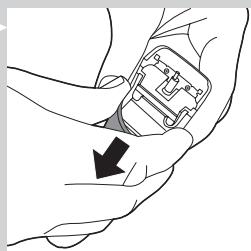
natural_image
Illustration of a hand holding a small electronic device with an arrow indicating motion (no text or symbols present)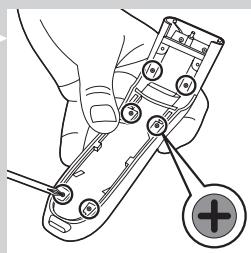
natural_image
Illustration of a hand holding a small electronic device with a plus button, no text or symbols present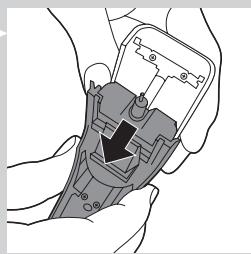
natural_image
Illustration of hands holding a handheld device with a black arrow pointing to a component (no text or symbols visible)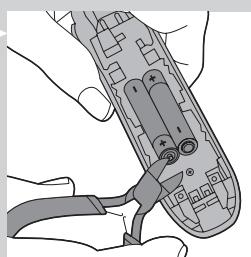
natural_image
Illustration of hands using a handheld device to adjust or install a component (no text or symbols visible)سفارش دادن لوازم
محيط زیست
natural_image
Symbol of a trash bin crossed with a diagonal line, no text or numbers presentnatural_image
Symbol of a trash bin crossed out by a diagonal line, representing no waste or discharge (no text or labels present)natural_image
Prohibition sign of a faucet without any text or symbols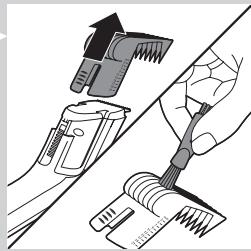
natural_image
Illustration of a hand using a hairdryer brush to clean or adjust the hair (no text or symbols present)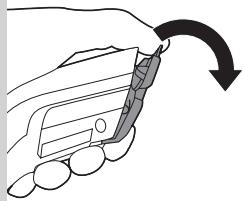
natural_image
Illustration of a hand holding a car with an arrow indicating rotation (no text or symbols)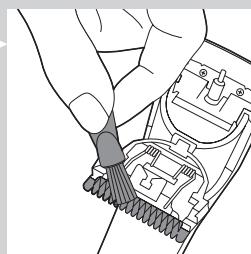
natural_image
Close-up of hands inserting a cable into an electronic component (no text or symbols visible)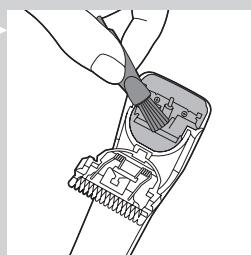
natural_image
Diagram of a hand holding a connector with internal components (no text or symbols visible)natural_image
Illustration of a hairbrush cutting through a tube with motion lines indicating brush motion (no text or symbols)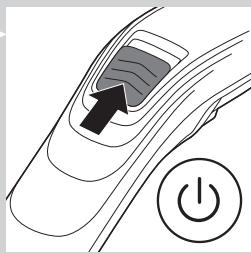
natural_image
Diagram of a car's side panel with a black arrow pointing to the front panel and a power button icon (no text or symbols)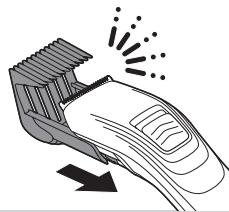
natural_image
Illustration of a hairbrush with motion lines indicating brush movement (no text or symbols)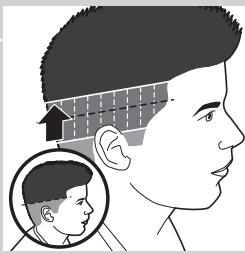
natural_image
Illustration of a human head profile with a magnified inset showing the head and ear (no text or symbols)natural_image
Illustration of a person applying a medical or therapeutic tool to their head, showing two views (front and side) with arrows indicating direction (no text or symbols present)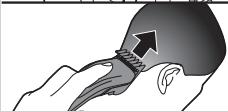
natural_image
Illustration of a hand holding a tool with an arrow indicating direction (no text or symbols)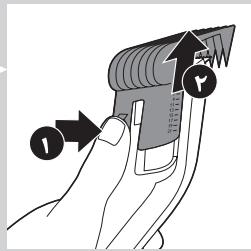
natural_image
Diagram of a car's side profile with a black arrow pointing to the front wheel and a power button icon (no text or symbols)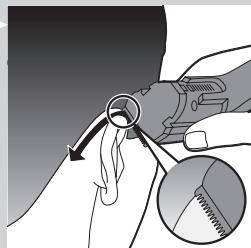
natural_image
Illustration of a hand holding a tool with a magnified inset showing a mechanical component (no text or symbols)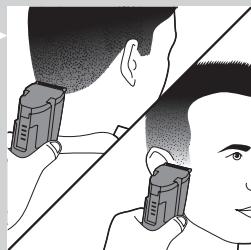
natural_image
Illustration of a person receiving a medical device from another person (no text or symbols visible)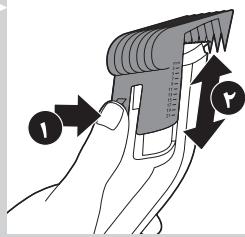
natural_image
Diagram of a car's side profile with a black arrow pointing to the center and a power button icon (no text or symbols)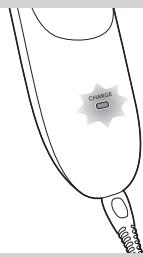
natural_image
Side profile illustration of a person's head with hair and a comb, showing head-to-ear alignment (no text or symbols)مقدمه
ب (% ) خ (% ) خ (% ) خ (% ) خ (% ) خ (% ) خ (% ) خ (% ) خ (% ) خ (% ) خ (% ) خ (% ) خ (% ) خ (% ) خ (% ) خ (% ) خ (% ) خ (% ) خ (% ) خ (% ) خ (% ) خ (% ) خ (% ) خ (% ) خ (% ) خ (% ) خ (% ) خ (% ) خ (% ) خ (% ) خ (% ) خ (% ) خ (% ) خ (% ) خ (%)
شرح کلی (شکل 1)
natural_image
Prohibition sign showing a faucet with a diagonal line and raindrops, no text presentnatural_image
Illustration of a hand holding a handheld device with a plus button, no text or symbols present
natural_image
Illustration of a hand holding an electronic device with a black arrow pointing to it (no text or symbols present)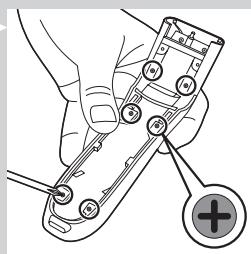
natural_image
Illustration of hands assembling a mechanical component with a black arrow indicating assembly (no text or symbols present)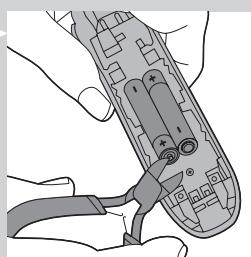
natural_image
Illustration of hands using a handheld device to adjust or install a component (no text or symbols visible)طلب المлечات
الhfاظ على البيئة
natural_image
Symbol of a trash bin with crossed lines indicating no waste or restriction, and a solid black rectangle below (no text or symbols)natural_image
Symbol of a trash bin crossed out by two diagonal lines (no text or numbers present)natural_image
Prohibition sign of a faucet without any text or symbols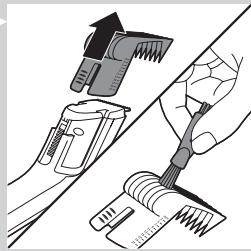
natural_image
Illustration of a hand using a hairbrush to clean or adjust a hair accessory (no text or symbols present)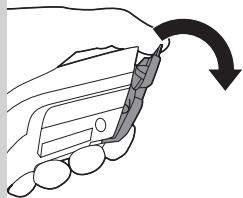
natural_image
Illustration of a hand holding a car with an arrow indicating rotation (no text or symbols)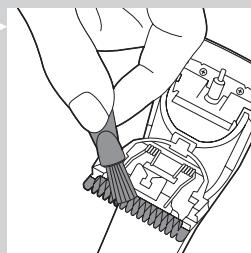
natural_image
Illustration of a hand inserting a cable into an electrical connector (no text or symbols visible)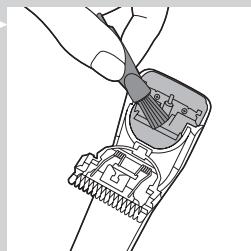
natural_image
Line drawing of a hand holding a connector or connector with a cable (no text or symbols)natural_image
Two circular diagrams showing abstract wave patterns, one with a straight arrow and the other with curved lines (no text or symbols)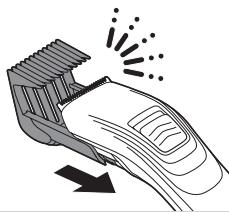
natural_image
Illustration of a hairbrush with motion lines indicating brush movement (no text or symbols)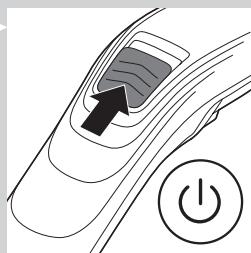
natural_image
Diagram of a car's side profile with a black arrow pointing to the front wheel and a power button icon (no text or symbols)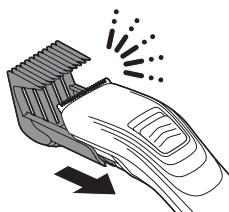
natural_image
Illustration of a hairbrush cutting through a circular cutter (no text or symbols)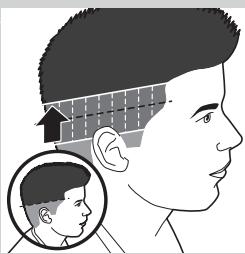
natural_image
Illustration of a human head with an arrow indicating head compression or stress, showing a magnified inset of the head (no text or symbols present)natural_image
Illustration showing a person's head with arrows indicating finger movement (no text or symbols)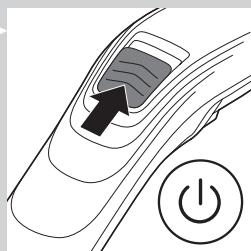
natural_image
Diagram of a car's side profile with a black arrow pointing to the front wheel and a power button icon (no text or symbols)natural_image
Illustration of a hand using a tool to adjust or apply a component, with an inset showing the same tool (no text or symbols present)natural_image
Illustration of a person receiving a medical device from another person's neck (no text or symbols present)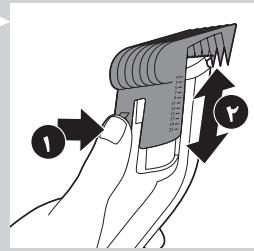
natural_image
Diagram of a car's front wheel with a black arrow pointing to the wheel and a power button (no text or symbols)الشحن
natural_image
Illustration of a plug inserted into a device with an arrow pointing to the plug and a magnified inset showing a close-up of a person's head (no text or symbols present)مقدمة
natural_image
Prohibition sign of a faucet without any text or symbols


- Always here to help you
- User manual
- PHILIPS
- Introduction
- General description (Fig. 1)
- Important
- Danger
- Warning
- Caution
- Electromagnetic fields (EMF)
- Charging
- Do not charge the appliance for more than 24 hours.
- Optimising the lifetime of the rechargeable batteries
- Corded clipping
- Only use the appliance from the mains when the rechargeable batteries are almost empty.
- Using the appliance
- Clipping with hair clipping comb (REGULAR)
- Length settings
- Tips
- Clipping without hair clipping comb
- Clipping with the thinning comb (THINNING)
- Thinning an entire haircut
- Creating a smooth transition between two hair lengths
- Cleaning
- Ordering accessories
- Replacing the cutting unit
- Environment
- Removing the rechargeable batteries
- Guarantee and support
- Introducción
- Campos electromagnéticos (CEM)
- EMF(전자기장)
- Encomendar acessórios
- การชาร์จแบตเตอรี่
- 充電
- 訂購配件
- 充电
- 订购附件
- سفارش دادن لوازم
- محيط زیست
- مقدمه
- شرح کلی (شکل 1)
- طلب المлечات
- الhfاظ على البيئة
- الشحن
- مقدمة
Brand : PHILIPS
Model : QC-5130
Category : Electric mower