QC 5390 - Electric mower PHILIPS - Free user manual and instructions
Find the device manual for free QC 5390 PHILIPS in PDF.

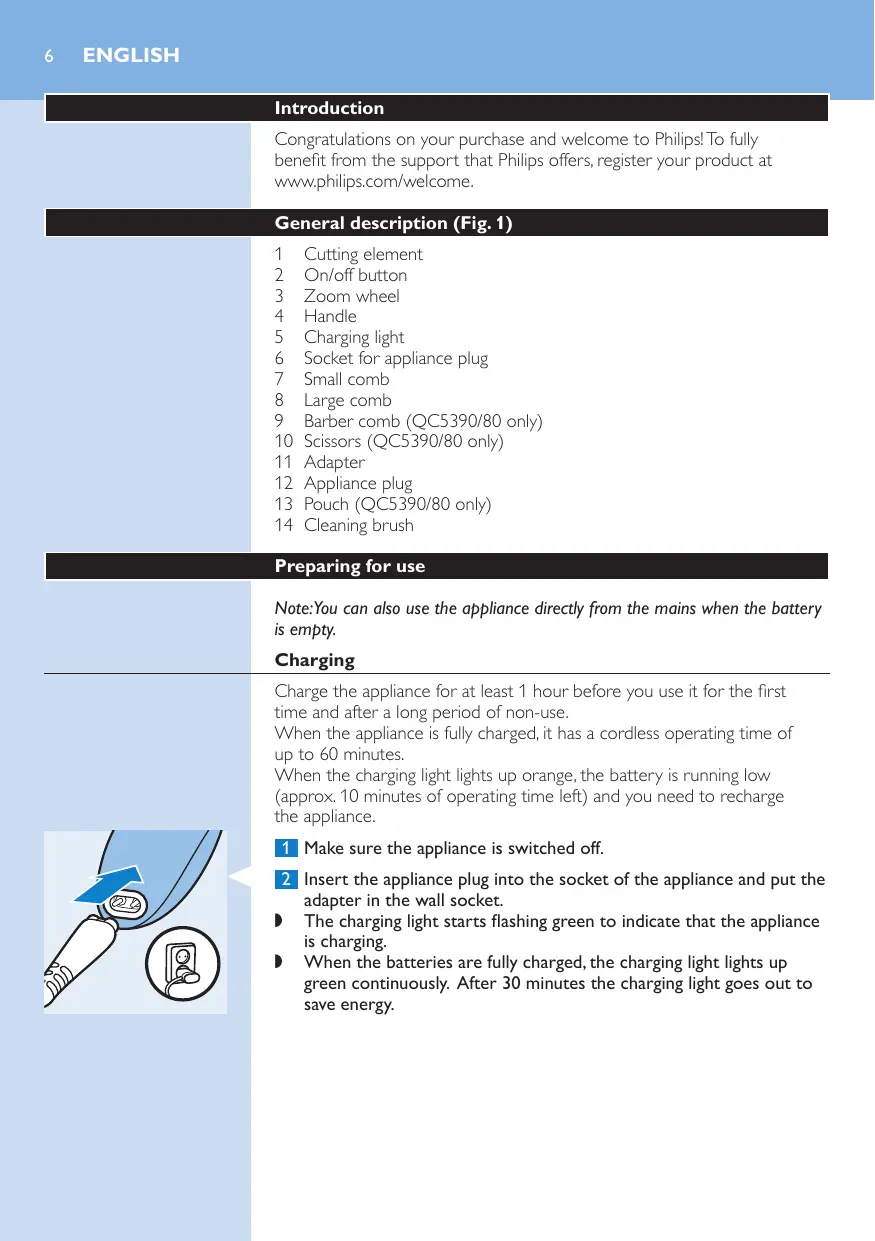


| Product type | Electric hair clipper |
| Brand | Philips |
| Model | QC5390 |
| Power source | Mains and rechargeable battery |
| Charging time | 1 hour |
| Cordless runtime | 60 minutes |
| Minimum cutting height (without guard) | 0.5 mm |
| Cutting range small guard | 3 to 22 mm |
| Cutting range large guard | 23 to 42 mm |
| Number of guards supplied | 2 |
| Charge indicator | Yes (flashing/continuous green light) |
| Low battery indicator | Yes (orange) |
| Cleaning | With warm water (max 40°C) and brush |
| Use | Hair |
| Included accessories (version QC5390/80) | Comb, scissors, pouch |
| Mains operation | Possible even when battery is empty |
Frequently Asked Questions - QC 5390 PHILIPS
User questions about QC 5390 PHILIPS
0 question about this device. Answer the ones you know or ask your own.
Ask a new question about this device
Download the instructions for your Electric mower in PDF format for free! Find your manual QC 5390 - PHILIPS and take your electronic device back in hand. On this page are published all the documents necessary for the use of your device. QC 5390 by PHILIPS.
USER MANUAL QC 5390 PHILIPS
Always here to help you
Register your product and get support at
www.philips.com/welcome
QC5390

text_image
Question? Contact Philips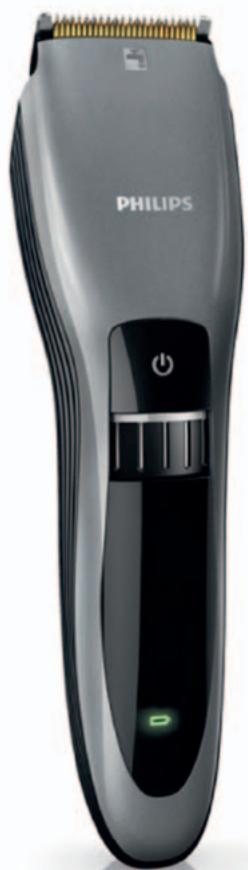
natural_image
Black Philips 1000 electric toothbrush with black filter and green power button (no text or symbols on body)User manual

natural_image
Illustration of an open book with a grid layout and an arrow indicating the page direction (no text or symbols present)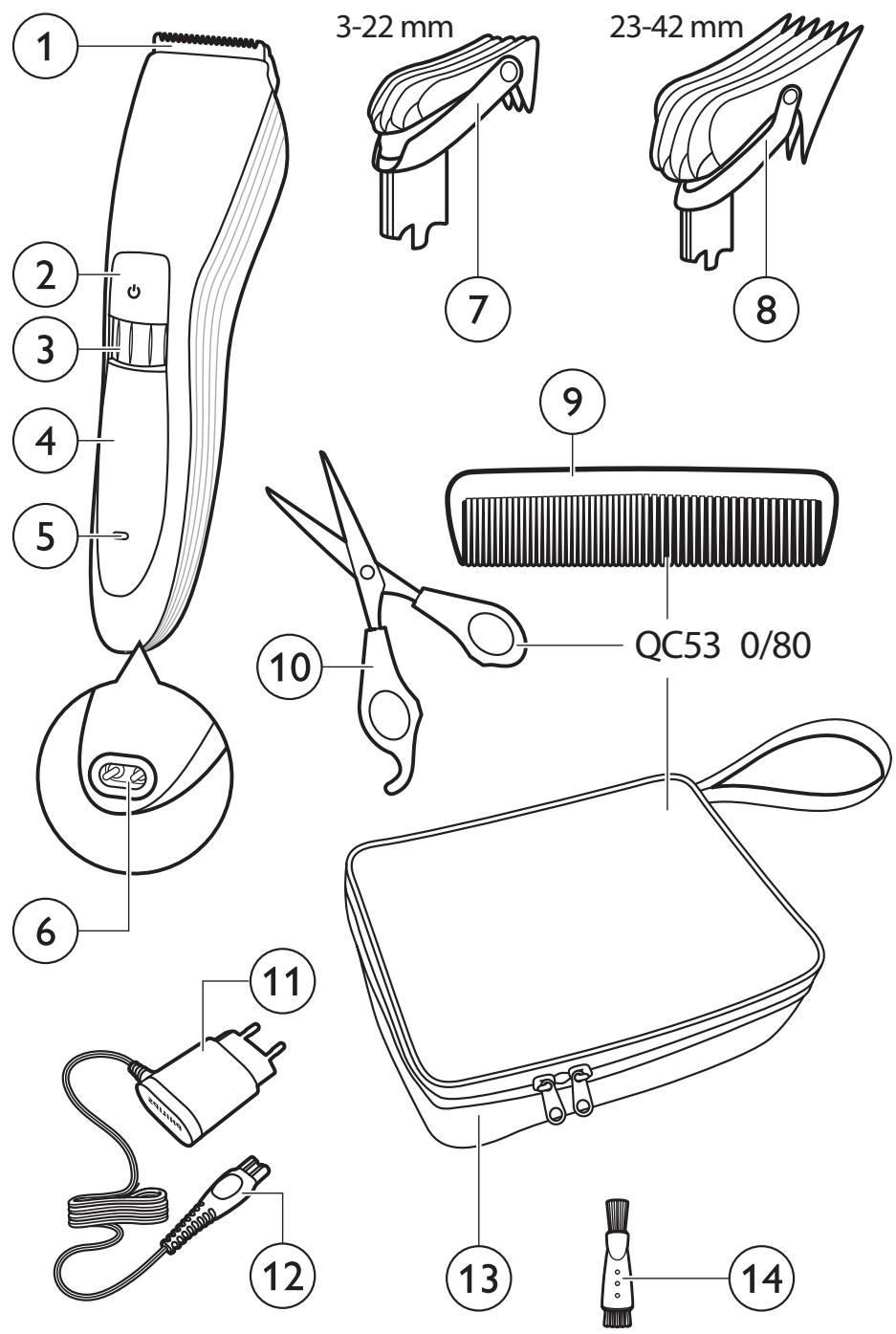
text_image
1 2 3 4 5 6 7 3-22 mm 23-42 mm 8 9 QC53 0/80 10 11 12 13 14ENGLISH 6
DANSK 10
DEUTSCH 14
ΕΛΛΗΝΙΚΑ 18
ESPAÑOL 22
SUOMI 26
FRANÇAIS 30
ITALIANO 34
NEDERLANDS 38
NORSK 42
PORTUGUÊS 46
SVENSKA 50
TÜRKÇE 54
Introduction
Congratulations on your purchase and welcome to Philips! To fully benefit from the support that Philips offers, register your product at www.philips.com/welcome.
General description (Fig. 1)
1 Cutting element
2 On/off button
3 Zoom wheel
4 Handle
5 Charging light
6 Socket for appliance plug
7 Small comb
8 Large comb
9 Barber comb (QC5390/80 only)
10 Scissors (QC5390/80 only)
11 Adapter
12 Appliance plug
13 Pouch (QC5390/80 only)
14 Cleaning brush
Preparing for use
Note: You can also use the appliance directly from the mains when the battery is empty.
Charging
Charge the appliance for at least 1 hour before you use it for the first time and after a long period of non-use.
When the appliance is fully charged, it has a cordless operating time of up to 60 minutes.
When the charging light lights up orange, the battery is running low (approx. 10 minutes of operating time left) and you need to recharge the appliance.
text_image
Diagram showing a medical or surgical tool with a blue arrow and circular annotation highlighting a device component.1 Make sure the appliance is switched off.
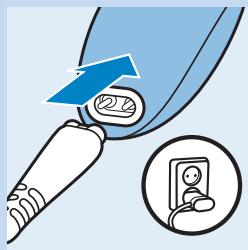
2 Insert the appliance plug into the socket of the appliance and put the adapter in the wall socket.
The charging light starts flashing green to indicate that the appliance is charging.
When the batteries are fully charged, the charging light lights up green continuously. After 30 minutes the charging light goes out to save energy.
Using the appliance
Clipping with comb
The appliance comes with 2 combs for different hair lengths.
The hair length settings are indicated in millimetres on the comb.
The settings correspond to the remaining hair length after clipping.
natural_image
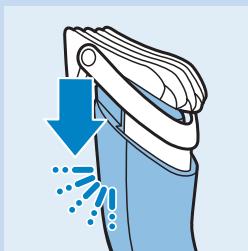
Illustration of a garment being compressed with a blue downward arrow and sparkles (no text or symbols)1 Select the comb you want to use.
The small comb cuts the hair to a length of 3mm to 22mm.
The large comb cuts the hair to a length of 23mm to 42mm.
2 Slide the comb straight into the guiding grooves on both sides of the handle ('click').
natural_image
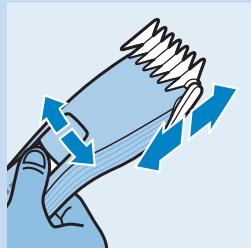
Illustration of a hand holding a coiled spring with directional arrows indicating motion (no text or symbols)3 To set the comb to the desired setting, turn te zoom wheel to the desired hair length setting.
The display on front of the appliance shows the selected hair length in millimetres after cutting.
After 8 minutes, the display goes out to save energy. To activate the display again, turn the zoom wheel or press the on/off button.
Tip: Write down the hair length settings you selected to create a certain hairstyle as a reminder for future clipping sessions.
text_image
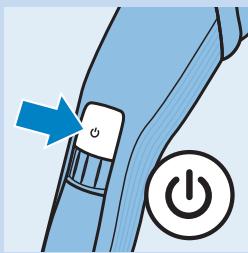
Diagram showing a blue mechanical component with a power button and an orange arrow indicating direction, alongside a power symbol.4 Press the on/off button to switch on the appliance.
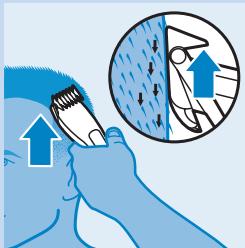
5 Move the appliance through the hair slowly.
Tips
- To clip most effectively, move the appliance against the hair growth direction.
- Since all hair does not grow in the same direction, you need to move the appliance in different directions (upwards, downwards and across).
natural_image
Illustration of a hand brushing teeth with an arrow indicating upward motion (no text or symbols)- Make sure that the flat part of the comb is always fully in contact with the scalp to obtain an even result.
- Make overlapping passes over the head to ensure that you cut all the hair that needs to be cut.
6 Regularly remove cut hair from the comb.
If a lot of hair has accumulated in the comb, remove the comb from the appliance and blow and/or shake the hair out of it.
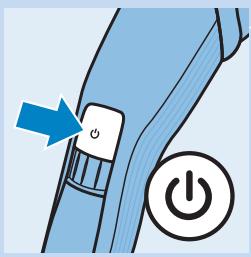
text_image
Diagram showing a blue mechanical switch with an arrow pointing to the button and a power button icon.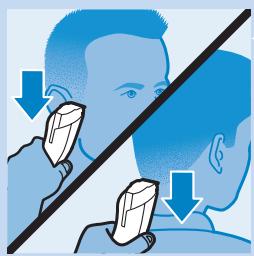
natural_image
Illustration showing two people using a tool to apply or inspecting a diamond-shaped object, with no visible text or symbols.Contouring without comb
You can use the appliance without comb to clip hair very close to the skin (0.5mm) or to contour the neckline and the area around the ears.
Be careful when you clip without comb because the cutting element removes every hair it touches.
1 Pull the comb off the appliance.
2 Before you start to contour the hairline around the ears, comb the hair ends over the ears.
3 Press the on/off button to switch on the appliance.
4 Tilt the appliance in such a way that only one edge of the cutting element touches the hair ends when you shape the contours around the ears.
Only cut the hair ends. The hairline should be close to the ear.
5 To contour the neckline and sideburns, turn the appliance and make downward strokes.
Move the appliance slowly and smoothly. Follow the natural hairline.
Cleaning
Clean the appliance every time you have used it with the cleaning brush and with warm water (max. 40^ C).
Never use compressed air, scouring pads, abrasive cleaning agents or aggressive liquids such as petrol, acetone or ethereal oils to clean the appliance.
Note: The appliance does not need any lubrication.
natural_image
Illustration of a hand holding a device with blue arrows indicating rotation or movement (no text or symbols)1 Switch off the appliance and disconnect it from the mains.
2 Remove the comb from the appliance and clean it with the cleaning brush.
3 Brush the outside of the shaving unit.
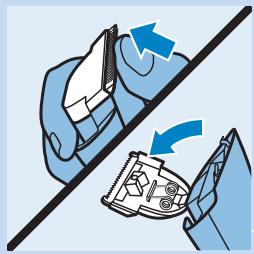
4 Push the centre top end of the cutting element upwards with your thumb until it opens.
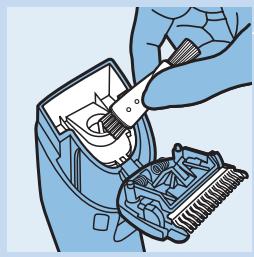
5 Use the cleaning brush to remove the cut hair.
natural_image
Illustration of a hand using a tool to adjust or install a small electronic device (no text or symbols visible)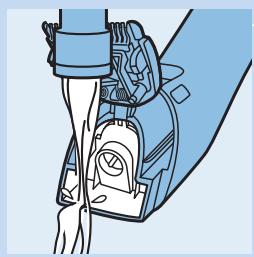
natural_image
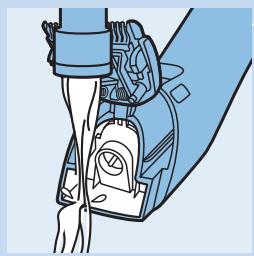
Illustration of a medical device with a hand holding a wrist, no text or symbols present6 Clean the appliance under a warm running tap.
Introduktion
text_image
Diagram illustrating a medical procedure with labeled components and an inset showing a close-up of a device's screen.natural_image
Illustration of a garment being compressed with a blue downward arrow and splash effect (no text or symbols)natural_image
Illustration of a hand holding a coiled spring with blue directional arrows indicating motion (no text or symbols)text_image
Diagram showing a blue mechanical component with a power button and an arrow indicating direction, symbolizing action or operation.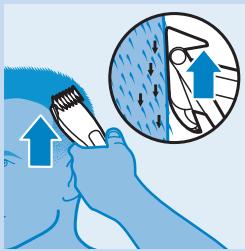
natural_image
Illustration of a person using a tool to clean or wear a surface, with an inset showing the same object (no text or symbols present)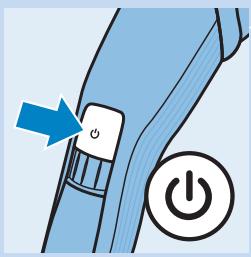
text_image
Diagram showing a blue mechanical switch with an arrow pointing to the power button, indicating action or operation.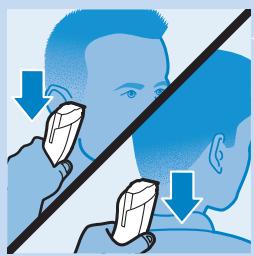
natural_image
Illustration showing two people using a tool on their head, with arrows indicating direction of movement (no text or symbols)Tilretning uden kam
natural_image
Illustration of two hands performing a mechanical operation with directional arrows indicating motion (no text or symbols)natural_image
Illustration of a hand using a tool to clean or adjust a small electronic device (no text or symbols visible)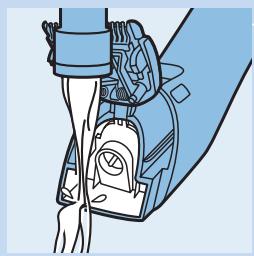
natural_image
Illustration of a medical or robotic device with hands and a device attached (no text or symbols visible)text_image
Diagram illustrating a medical or surgical procedure with labeled components and an inset showing a close-up of a device.natural_image
Illustration of a cleaning tool with blue spray and downward arrow (no text or symbols)natural_image
Illustration of a hand holding a coiled spring with directional arrows indicating motion (no text or symbols)text_image
Diagram showing a blue mechanical component with a power button and an orange arrow, indicating action or operation.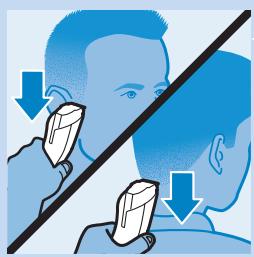
natural_image
Illustration showing two people using a tool on a diagonal line, with arrows indicating direction of use (no text or symbols present)natural_image
Illustration of a hand holding a device with blue arrows indicating rotation or movement (no text or symbols)natural_image
Illustration of a hand using a tool to adjust or install a small electronic device (no text or symbols visible)natural_image
Diagram of a mechanical device with hands operating a belt and a valve (no text or symbols present)Εισαγωγή
text_image
Diagram illustrating a medical procedure with labeled components and an inset showing a close-up of a device's internal structure.natural_image
Illustration of a cleaning or cleaning device with blue spray and downward arrow (no text or symbols)natural_image
Illustration of a hand holding a coiled spring with blue directional arrows indicating motion (no text or symbols)text_image
Diagram showing a blue mechanical component with an arrow pointing to a button labeled 'O', and a power button symbol.text_image
Illustration showing a person using a tool to clean or brush, with an inset magnified view highlighting the process.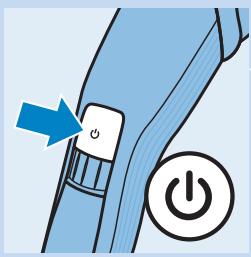
text_image
Diagram showing a blue mechanical switch with an arrow pointing to the button and a power button icon.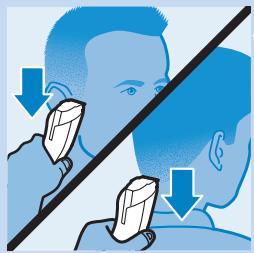
natural_image
Illustration showing two people using a tool on a diagonal line, with arrows indicating direction of use (no text or symbols present)natural_image
Illustration of a hand holding a device with blue arrows indicating rotation or movement (no text or symbols)natural_image
Illustration of a hand using a tool to adjust or install a small electronic device (no text or symbols visible)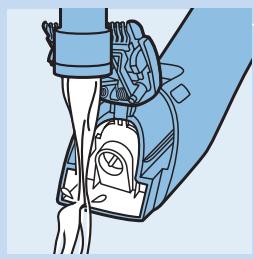
natural_image
Illustration of a mechanical device with hands operating a lever (no text or symbols visible)text_image
Diagram showing a medical or surgical tool with a blue arrow and circular annotation highlighting a device component.natural_image
Illustration of a cleaning or cleaning device with blue spray and downward arrow (no text or symbols)natural_image
Illustration of a hand holding a coiled spring with directional arrows indicating motion (no text or symbols)text_image
Diagram showing a blue mechanical switch with an arrow pointing to the button and a power button icon.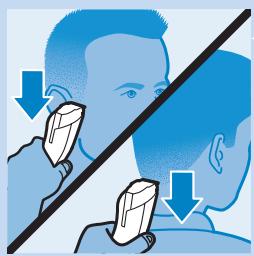
natural_image
Illustration of a person using a tool to examine facial features, with no text or symbols present.natural_image
Illustration of two hands performing a mechanical operation with directional arrows indicating motion (no text or symbols)natural_image
Illustration of a hand using a tool to clean or adjust a small electronic device (no text or symbols visible)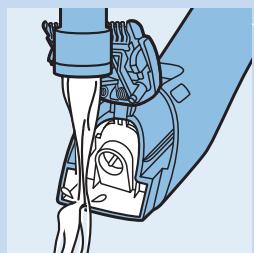
natural_image
Illustration of a medical device with tubing and a valve (no text or symbols)natural_image
Illustration of a medical or surgical tool with a blue arrow and circular component, alongside an inset showing a close-up of a patient's ear (no text or symbols present)natural_image
Illustration of a cleaning or cleaning device with blue spray and downward arrow (no text or symbols)natural_image
Illustration of a hand holding a coiled spring with blue directional arrows indicating motion (no text or symbols)text_image
Diagram showing a blue mechanical component with a power button and an orange arrow pointing to it, indicating action or operation.text_image
Illustration showing hair brushing technique with magnified view of hair texture and upward arrows indicating direction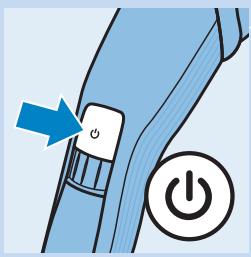
text_image
Diagram showing a blue mechanical switch with an arrow pointing to the power button, indicating action or operation.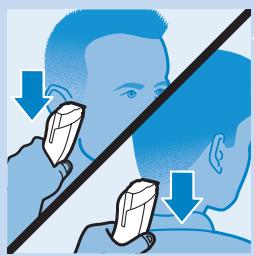
natural_image
Illustration of a person using a tool to interact with another person, both showing downward arrows (no text or symbols)natural_image
Illustration of two hands performing a mechanical operation with directional arrows indicating motion (no text or symbols)natural_image
Illustration of a hand using a tool to clean or adjust a small electronic device (no text or symbols visible)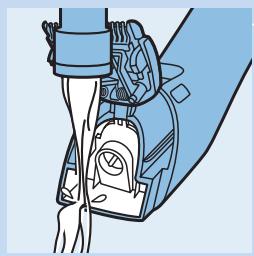
natural_image
Illustration of a medical or robotic device with hands and a device attached (no text or symbols visible)text_image
Diagram showing a medical or surgical tool with a blue arrow and circular annotation highlighting a device component.natural_image
Illustration of a cleaning or cleaning device with blue spray and downward arrow (no text or symbols)natural_image
Illustration of a hand holding a coiled spring with blue directional arrows indicating motion (no text or symbols)text_image
Diagram showing a blue mechanical switch with an arrow pointing to the power button, indicating action or operation.natural_image
Illustration of a hand brushing a tooth with an arrow indicating upward motion (no text or symbols)
text_image
Diagram showing a blue mechanical component with a power button and an orange arrow pointing to it, indicating action or operation.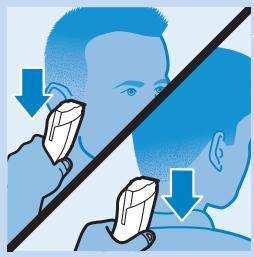
natural_image
Illustration of a person using a tool to address another's face, with arrows indicating direction (no text or symbols)Contours sans sabot
natural_image
Illustration of a hand holding a device with blue arrows indicating rotation or movement (no text or symbols)natural_image
Illustration of a hand using a tool to adjust or install a small electronic device (no text or symbols visible)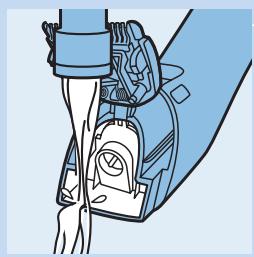
natural_image
Illustration of a medical device with a hand holding a wrist, no text or symbols presenttext_image
Diagram showing a medical or surgical tool with a blue arrow and circular annotation highlighting a device component.natural_image
Illustration of a hand cleaning a bag with blue spray and downward arrow (no text or symbols)natural_image
Illustration of a hand holding a coiled spring with blue directional arrows indicating motion (no text or symbols)text_image
Diagram showing a blue mechanical switch with an arrow pointing to the power button, indicating action or operation.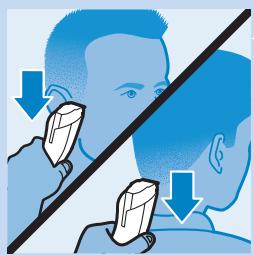
natural_image
Illustration of a person using a tool to interact with another person, both showing downward arrows (no text or symbols)natural_image
Illustration of a hand holding a device with blue arrows indicating rotation or movement (no text or symbols)natural_image
Illustration of a hand using a tool to adjust or install a small electronic device (no text or symbols visible)natural_image
Diagram of a mechanical device with lever and clamped components (no text or symbols)Inleiding
text_image
Diagram showing a medical or surgical tool with a blue arrow and circular annotation highlighting a device component.natural_image
Illustration of a cleaning or cleaning device with blue spray and downward arrow (no text or symbols)natural_image
Illustration of a hand holding a coiled spring with directional arrows indicating motion (no text or symbols)text_image
Diagram showing a blue mechanical component with an arrow pointing to a button labeled 'O', and a power button symbol.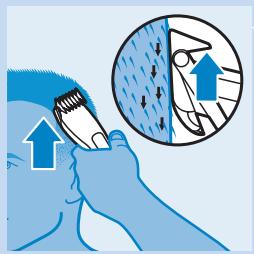
natural_image
Illustration of a person using a brush to clean or brush another, with an inset showing hand positioning (no text or symbols)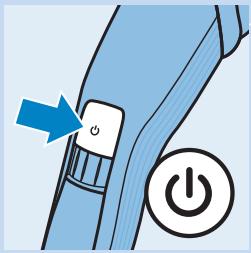
text_image
Diagram showing a blue mechanical component with a power button and an orange arrow pointing to it, indicating action or operation.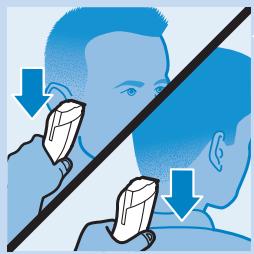
natural_image
Illustration showing two people using a tool on their face, with arrows indicating direction of movement (no text or symbols)natural_image
Illustration of a hand holding a device with blue arrows indicating rotation or movement (no text or symbols)natural_image
Illustration of a hand using a tool to clean or adjust a small electronic device (no text or symbols visible)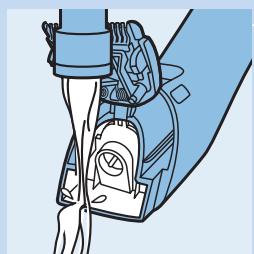
natural_image
Illustration of a medical device with tubing and a gauze (no text or symbols)text_image
Diagram illustrating a medical procedure with labeled components and an inset showing a close-up of a device's interior.natural_image
Illustration of a garment being compressed with a blue downward arrow and splash effect (no text or symbols)1 Velg den kammen du vil bruke.
Den lille kammen klipper håret til en lengde på 3–22 mm.
Den store kammen klipper håret til en lengde på 23–42 mm.
natural_image
Illustration of a hand holding a coiled spring with blue directional arrows indicating motion (no text or symbols)text_image
Diagram showing a blue mechanical component with a power button and an orange arrow indicating direction, alongside a circular icon labeled 'Power'.natural_image
Illustration of a hand using a tool to clean or brush with an inset showing hair texture and upward arrows (no text or symbols)text_image
Diagram showing a blue mechanical switch with an arrow and a power button, likely illustrating a power switch mechanism.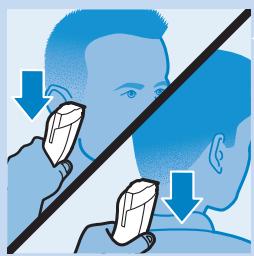
natural_image
Illustration showing two people using a tool on their head, with arrows indicating direction of movement (no text or symbols)Konturer uten kam
natural_image
Illustration of two hands performing a mechanical operation with directional arrows indicating motion (no text or symbols)natural_image
Illustration of a hand using a tool to clean or adjust a small electronic device (no text or symbols visible)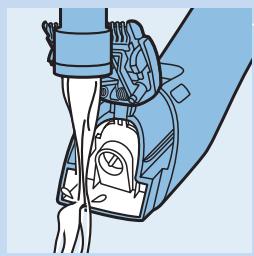
natural_image
Illustration of a medical device with attached arm and clasp (no text or symbols)text_image
Diagram illustrating a medical or surgical procedure with labeled components and an inset showing a close-up of a device.text_image
Diagram showing a blue mechanical component with a power button and an orange arrow pointing to it, indicating action or operation.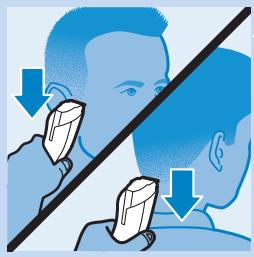
natural_image
Illustration showing two people using a tool on a diagonal line, with arrows indicating direction of use (no text or symbols present)Contornos sem pente
natural_image
Illustration of two hands performing a mechanical operation with directional arrows indicating motion (no text or symbols)natural_image
Illustration of a hand using a screwdriver to clean or adjust a small electronic device (no text or symbols visible)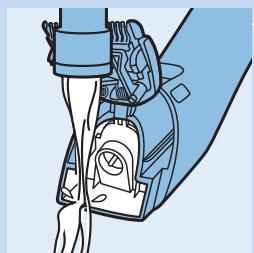
natural_image
Illustration of a medical device with tubing and a valve (no text or symbols)text_image
Diagram illustrating a medical procedure with labeled components and an inset showing a close-up of a device's interior.natural_image
Illustration of a garment being compressed with a blue downward arrow and splash effect (no text or symbols)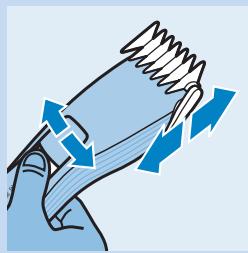
natural_image
Illustration of a hand gripping a spring with directional arrows indicating motion (no text or symbols)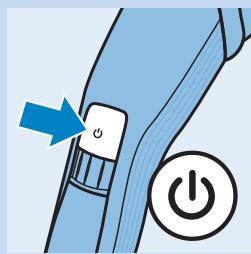
natural_image
Illustration of a blue mechanical component with a power button and power symbol (no text or labels)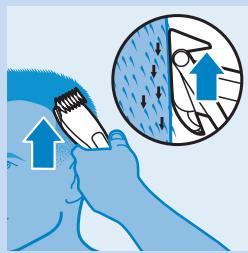
natural_image
Illustration of a person using a brush to clean or wear a surface, with an inset showing a hand holding a tool (no text or symbols present)text_image
Diagram showing a blue mechanical switch with an arrow pointing to the power button, indicating action or operation.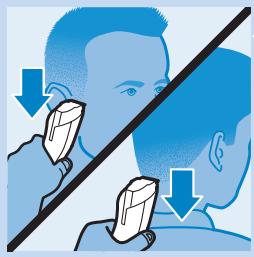
natural_image
Illustration showing two people using a tool on a diagonal line, with arrows indicating direction of use (no text or symbols present)natural_image
Illustration of two hands performing a mechanical operation with directional arrows indicating motion (no text or symbols)natural_image
Illustration of a hand using a tool to clean or adjust a small electronic device (no text or symbols visible)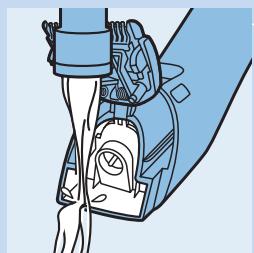
natural_image
Illustration of a medical device with tubing and a valve (no text or symbols)text_image
Diagram illustrating a medical procedure with labeled components and an inset showing a close-up of a device's internal structure.natural_image
Illustration of a garment being compressed with a blue downward arrow and splash effect (no text or symbols)natural_image
Illustration of a hand holding a coiled spring with blue directional arrows indicating motion (no text or symbols)text_image
Diagram showing a blue mechanical component with a power button and an arrow indicating direction, symbolizing action or operation.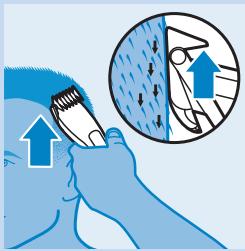
natural_image
Illustration of a person using a tool to clean or wear a surface, with an inset showing the same object (no text or symbols present)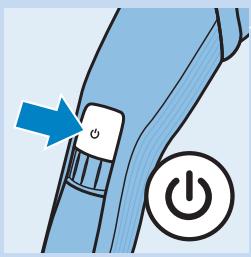
text_image
Diagram showing a blue mechanical switch with an arrow pointing to the power button, indicating action or operation.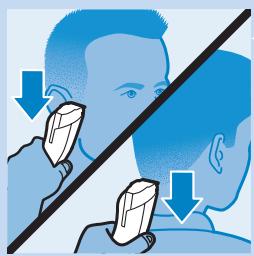
natural_image
Illustration of a person using a tool to interact with another person, both showing downward arrows (no text or symbols)natural_image
Illustration of a hand holding a device with blue arrows indicating rotation or movement (no text or symbols)natural_image
Illustration of a hand using a tool to clean or adjust a small electronic device (no text or symbols visible)