Pro Twist - Camera Beemoo - Free user manual and instructions
Find the device manual for free Pro Twist Beemoo in PDF.


| Type of product | Baby Monitor Camera with Pan/Tilt |
| Brand | Beemoo |
| Model | Pro Twist |
| Dimensions (camera) | 8.5 x 8.5 x 12.5 cm |
| Weight (camera) | 245 g |
| Power supply | AC adapter (5V/1A) or built-in rechargeable battery (Li-ion 2000 mAh) |
| Video resolution | 1080p Full HD |
| Night vision | Infrared LED up to 10 meters |
| Pan/Tilt range | 360° pan, 120° tilt |
| Two-way audio | Built-in microphone and speaker |
| Temperature sensor | Yes, with alerts |
| Connectivity | 2.4 GHz Wi-Fi (802.11 b/g/n) |
| Compatible app | Bemoo Smart (iOS/Android) |
| Maintenance | Clean with dry cloth; do not use solvents or abrasive cleaners |
| Safety | Keep away from water; use only supplied adapter; do not disassemble |
| Spare parts | Available on Beemoo official website: lens cover, power cable, wall mount |
| Repairability | Modular design; battery and lens replaceable |
| Warranty | 2 years limited warranty |
Frequently Asked Questions - Pro Twist Beemoo
User questions about Pro Twist Beemoo
0 question about this device. Answer the ones you know or ask your own.
Ask a new question about this device
Download the instructions for your Camera in PDF format for free! Find your manual Pro Twist - Beemoo and take your electronic device back in hand. On this page are published all the documents necessary for the use of your device. Pro Twist by Beemoo.
USER MANUAL Pro Twist Beemoo
natural_image
Line drawing of a baby stroller with four wheels and a canopy cover (no text or symbols)
max 22 kg
nax 4 years
IMPORTANT!
READ CAREFULLY AND KEEP FOR FUTURE REFERENCE.
Model: Beemoo Pro Twist
VIKTIGT!
LÄS NOGA OCH BEHÅLL FÖR FRAMTIDA REFERENS.
Modell: Beemoo Pro Twist
ADVARSEL!
LES N∅YE OG BEHOLD FOR FREMTIDIG REFERANSE.
Modell: Beemoo Pro Twist
ADVARSEL!
LÆS OMHYGGELIGT OG GEM TIL FREMTIDIG REFERENCE.
Model: Beemoo Pro Twist
TÄRKEÄÄ!
LUE OHJEET HUOLELLISESTI JA SÄILYTÄ NE TULEVAA TARVETTA VARTEN
Malli: Beemoo Pro Twist
WICHTIG!
Please follow these instructions carefully before using the pushchair at the first time, this will guarantee safe usage of the product and enable you to find out about all its handy features.
- WARNING! Never leave the child unattended.
- WARNING! Ensure that all the locking devices are engaged before use.
- WARNING! To avoid injury ensure that the child is kept away when unfolding and folding this product.
- WARNING! Do not let the child play with this product.
- WARNING! This seat unit is not suitable for children under 6 months.
- WARNING! Always use the restraint system.
- WARNING! Check that the pram body or seat unit devices are correctly engaged before use.
-
WARNING! This product is not suitable for running or skating.
-
Never lift the pushchair with the child inside it.
- Never adjust the stroller while your baby inside it.
- This product is not suitable for overnight sleeping, your child may be at risk of serious harm or injury. This product does not replace a cot or a bed. Should your child need to sleep, then it should be placed in a suitable pram body, cot or bed.
- Use the stroller with only one child at a time. Never place purses, shopping bags, parcels or accessory items on the handle or canopy.
- Any load attached to the handle, backrest or sides affects the stability of the pram/pushchair.
• To avoid the risk of suffocation, keep all plastic bags and packaging out of reach of babies and young children. - Never use stairs or escalators with your child in the pushchair.
• Always check that the parking device is fully engaged before letting go of your stroller.
• To prevent tipping, never let child climb the stroller. Always lift the child in and out of the stroller. - Keep away from fire!
- This product is suitable for children up to 22kg or 4 years whichever comes first.
- To prevent a hazardous, unstable condition, do not place more than 2kg in the storage basket.
- Make sure your child's body is clear from the moving parts when adjusting the stroller.
- Be sure the stroller is fully open or folded before allowing child near the stroller.
- Never use stroller on stairs or escalators
- Keep away from high temperature objects, liquids, and electronics.
- Never allow your child to stand on the stroller or sit in the stroller with head toward front of stroller.
- To avoid injury ensure that the child is kept away when unfolding and folding this product.
- Never use or storage this product in the environment of wet, cold, high temperature, and keep away from fire or strong heat source.
- Do not attach items to the handle, seat back or sides of the stroller. Any additional load will affect the stability of the stroller and could cause the stroller to tip.
- Accessories which are not approved by the manufacturer shall not be used. Only replacement parts supplied or recommended by the manufacturer shall be used.
• Overloading, folding incorrectly, or using component parts from other manufacturers may cause the stroller to be damaged, broken or unsafe. Please read the instruction manual carefully.
• Always engage the parking device when parking the stroller.
- Pushchair designed to be used from birth shall recommend the use of the most reclined position for new born babies.
- The parking device shall be engaged when placing and removing children.
PART LIST
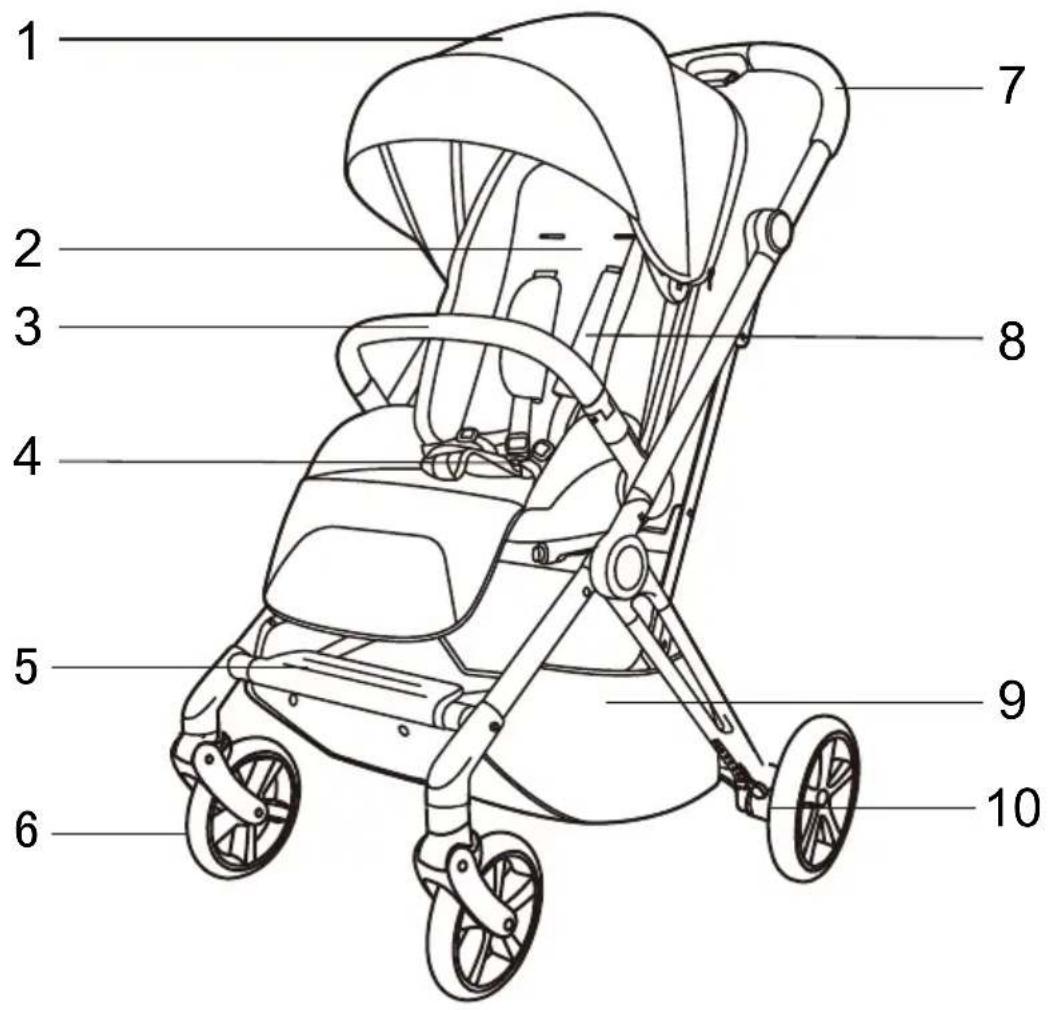
- Canopy
- Seat
- Bumper Bar
- Safety Buckle
-
Pedal
-
Front Wheels
- Handle
- Shoulder Pad
- Basket
10.Rear Wheels
ASSEMBLY
A
natural_image
Mechanical device diagram showing a lever mechanism with a red arrow indicating upward motion (no text or symbols present)B
natural_image
Technical line drawing of a mechanical device with no visible text or symbolsC
natural_image
Line drawing of a folding chair with a red arrow indicating rotation (no text or symbols)D
1. Unfold the Chassis
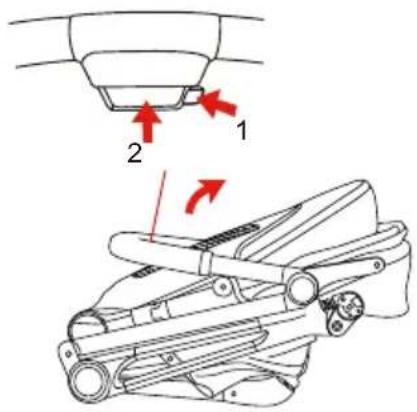
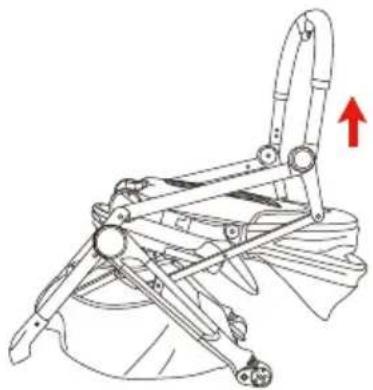
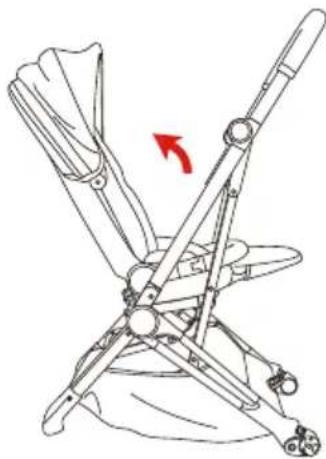
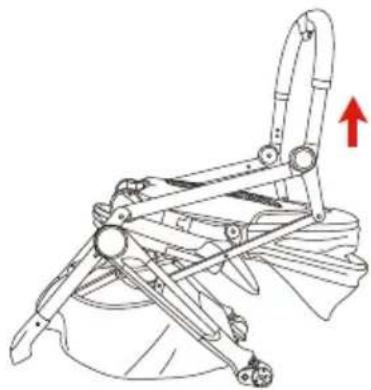
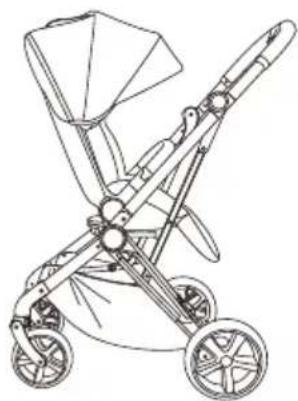
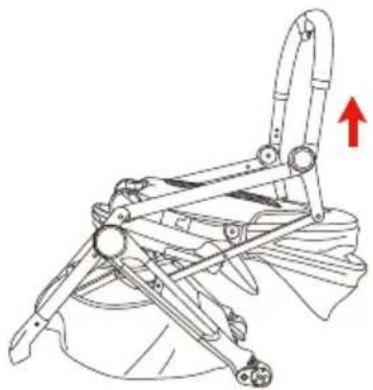
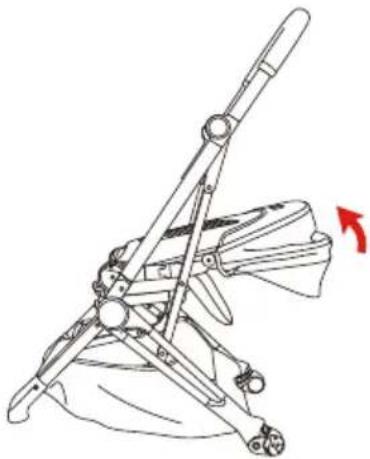
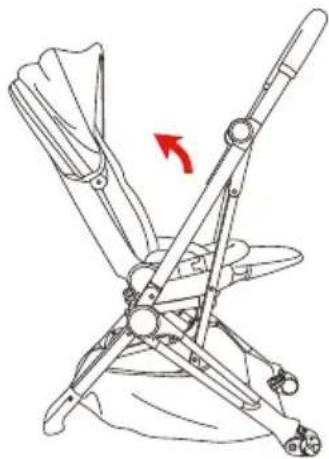
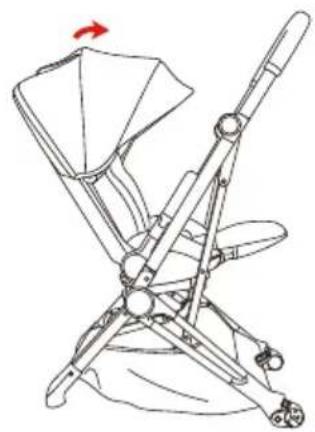
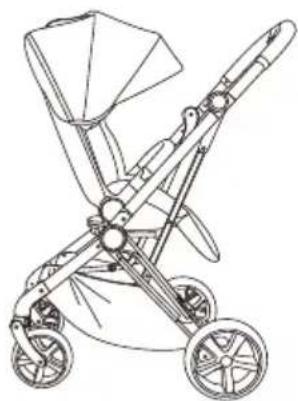
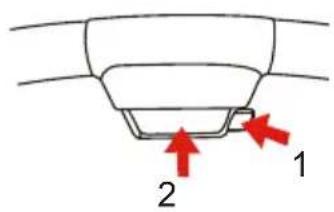
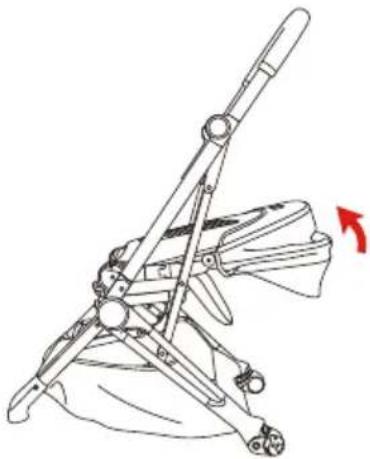
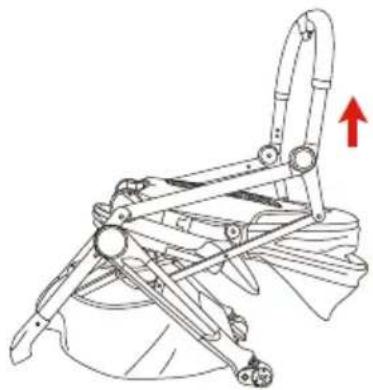
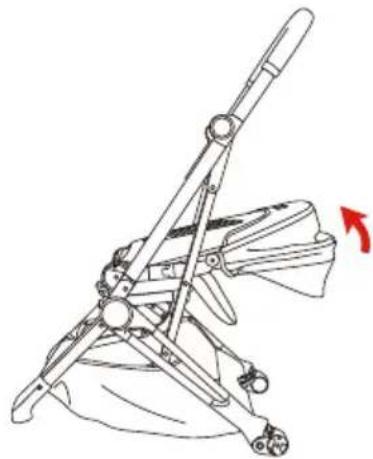
(Picture A) Place the stroller with handle facing upward. Press button 1 and 2 simultaneously to unlock the chassis then lift the push handle gently. (Picture B) Keep pulling up the push handle until the chassis is fully engaged.
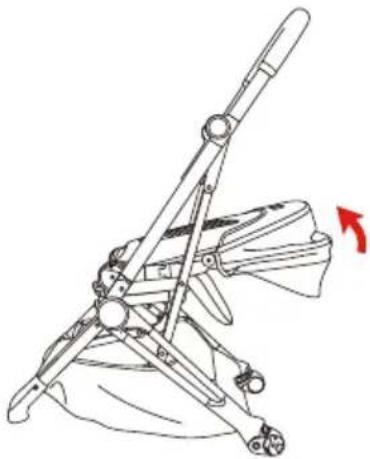
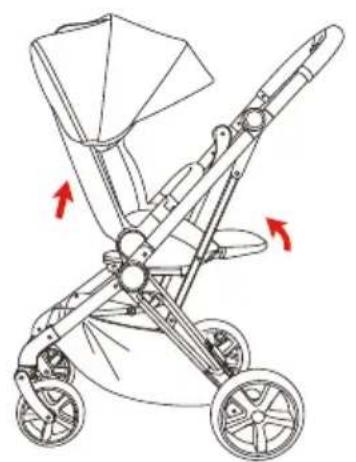
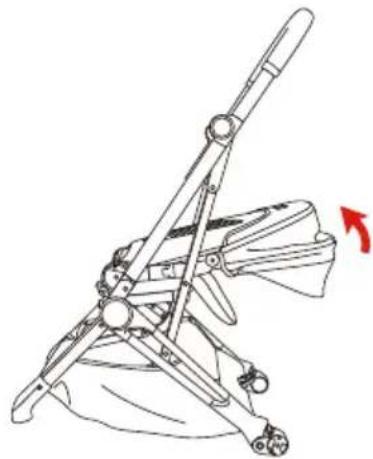
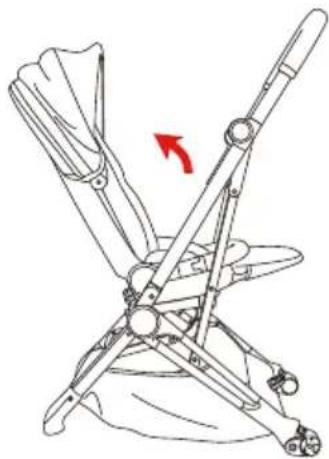
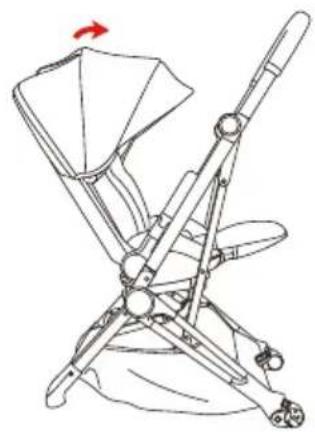
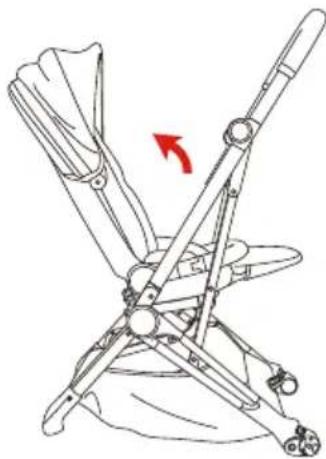
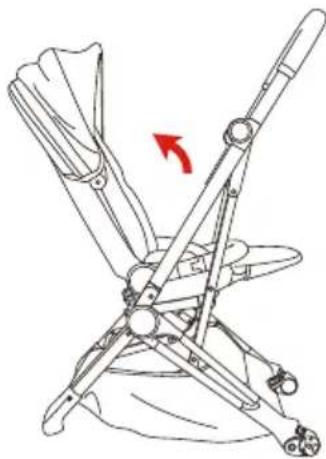
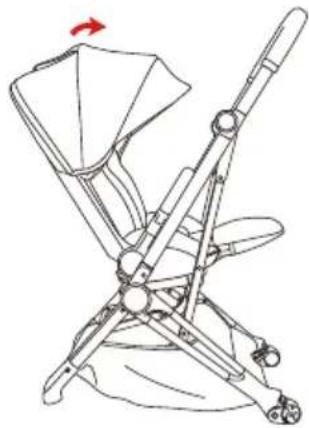
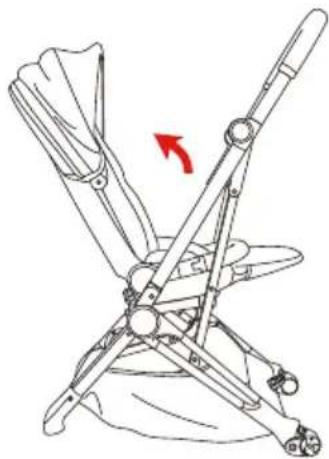
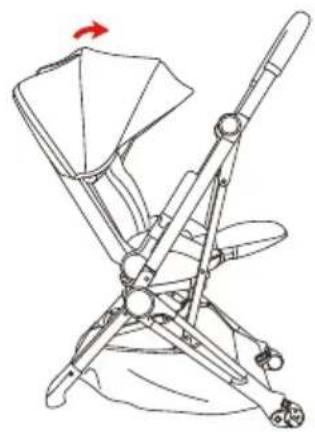
(Picture C) Pull up the backrest of seat until it clicks into place. (Picture D)
natural_image
Line drawing of a car interior showing hand positioning and red arrows indicating movement or force (no text or symbols)E
natural_image
Line drawing of a folding chair with seatbelt and armrest (no text or symbols)F
natural_image
Illustration of a hand operating a wheel with a red arrow indicating rotation (no text or symbols)G
natural_image
Illustration of a hand using a bicycle to lift a wheel, with a red arrow indicating the motion (no text or symbols present)H
natural_image
Line drawing of a baby stroller with two wheels and a canopy cover (no text or symbols)|
2.Assemble the stroller
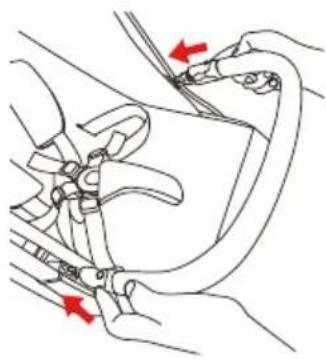
(Picture E) Insert the bumper bat into the sockets locate on both side of seat. Pull gently to make sure it is engaged.
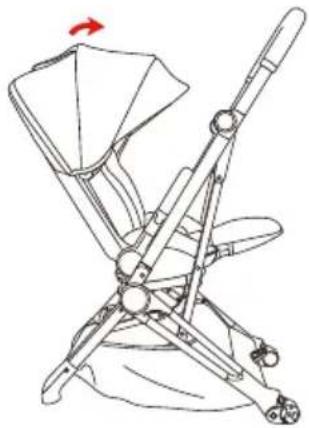
(Picture F) Pull the front of canopy gently to open the canopy.
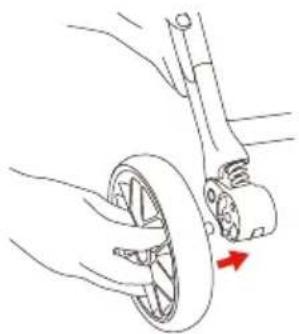
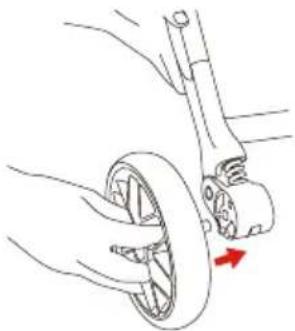
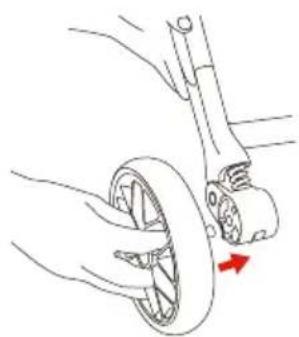
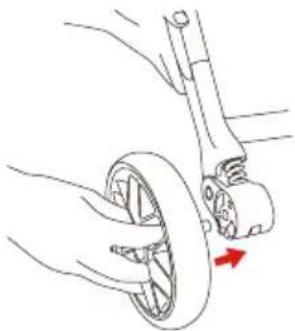
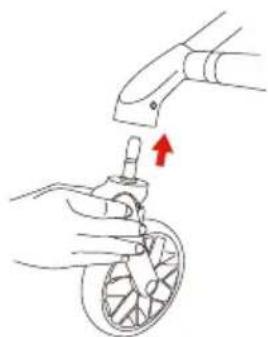
Install the rear wheels by inserting the rear wheel axle into the socket. (Picture G)
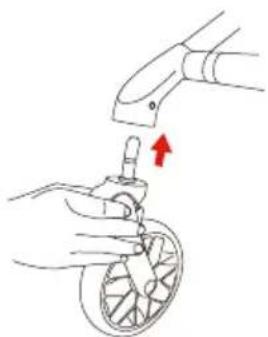
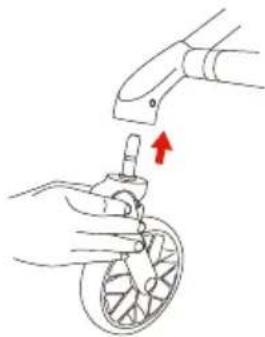
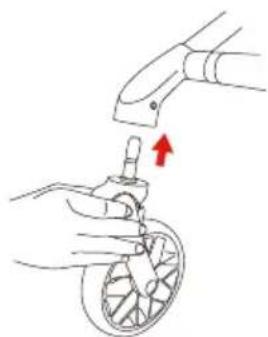
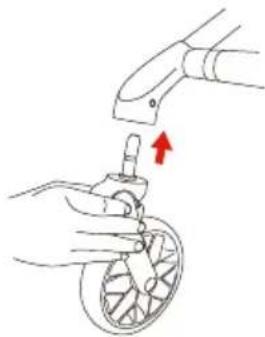
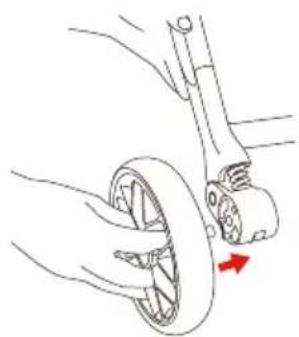
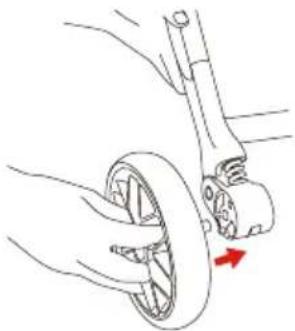
Install the front wheels by aligning it to the housing and insert the pin into socket until hearing a click sound. (Picture H)
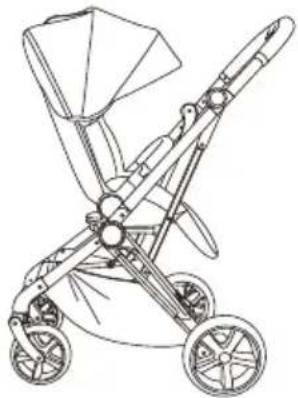
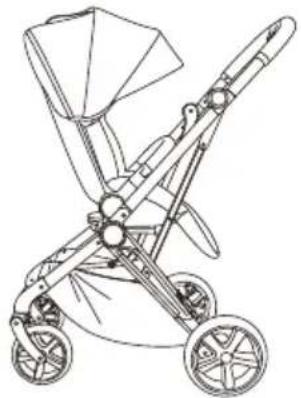
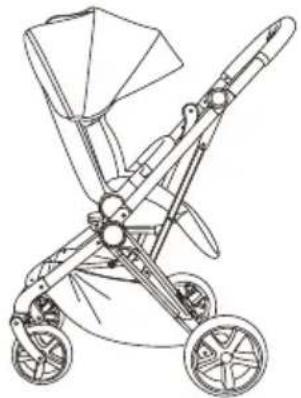
Then your Beemoo Pro Twist stroller is assembled. (Picture I)
USER INSTRUCTIONS
natural_image
Line drawing of a baby stroller with red directional arrows indicating motion (no text or symbols)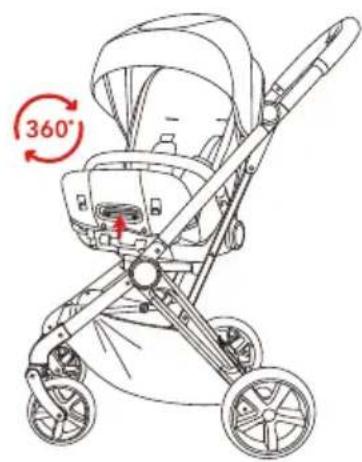
natural_image
Line drawing of a baby stroller with twin wheels and canopy (no text or symbols)Change the Direction of Seat
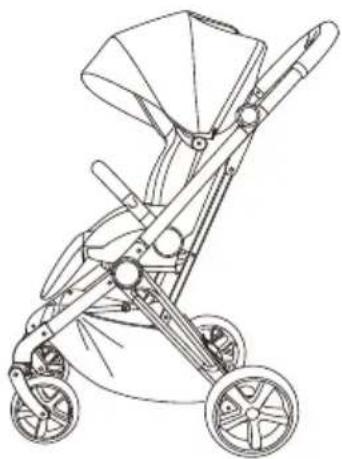
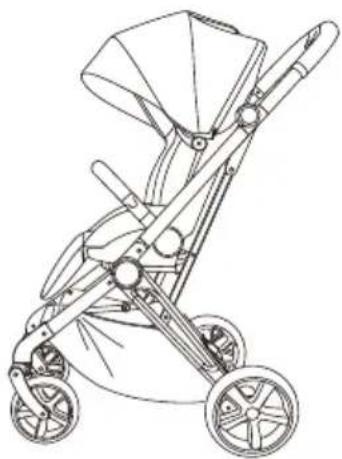
Adjust the seat to sitting (upright) position.
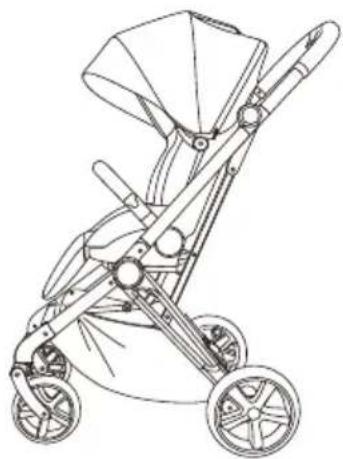
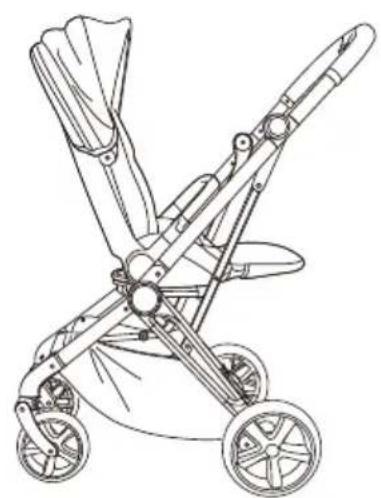
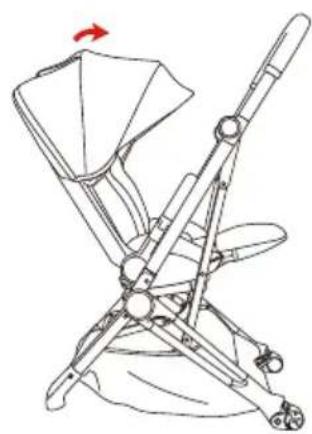
Lift the leg rest and pull the adjustment lever underneath to rotate the seat. The seat is 360-degree rotatable. Release the adjustment lever after the seat is rotated to a desired direction (rear or forward-facing).
CAUTION!
- Make sure the seat is locked before putting your child in it.
- Do not rotate or remove the seat whenever the child is in the stroller.
natural_image
Diagram of a car seat with a red arrow indicating upward motion (no text or symbols)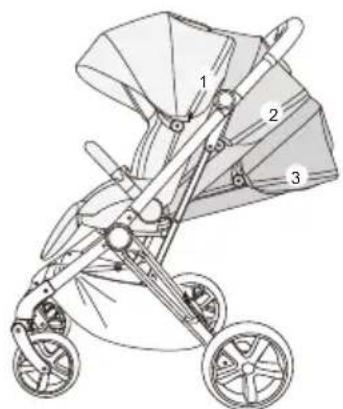
natural_image
Line drawing of a baby stroller with three labeled parts (1, 2, 3), no text or symbols present.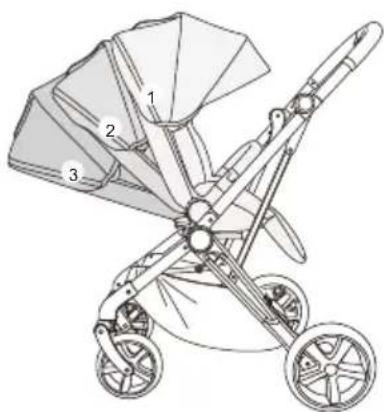
natural_image
Line drawing of a baby stroller with three labeled parts (1, 2, 3), no text or symbols present.Adjust Backrest
Pull up the backrest adjuster to adjust the seat to a desired recline position.
There are three positions of the backrest.
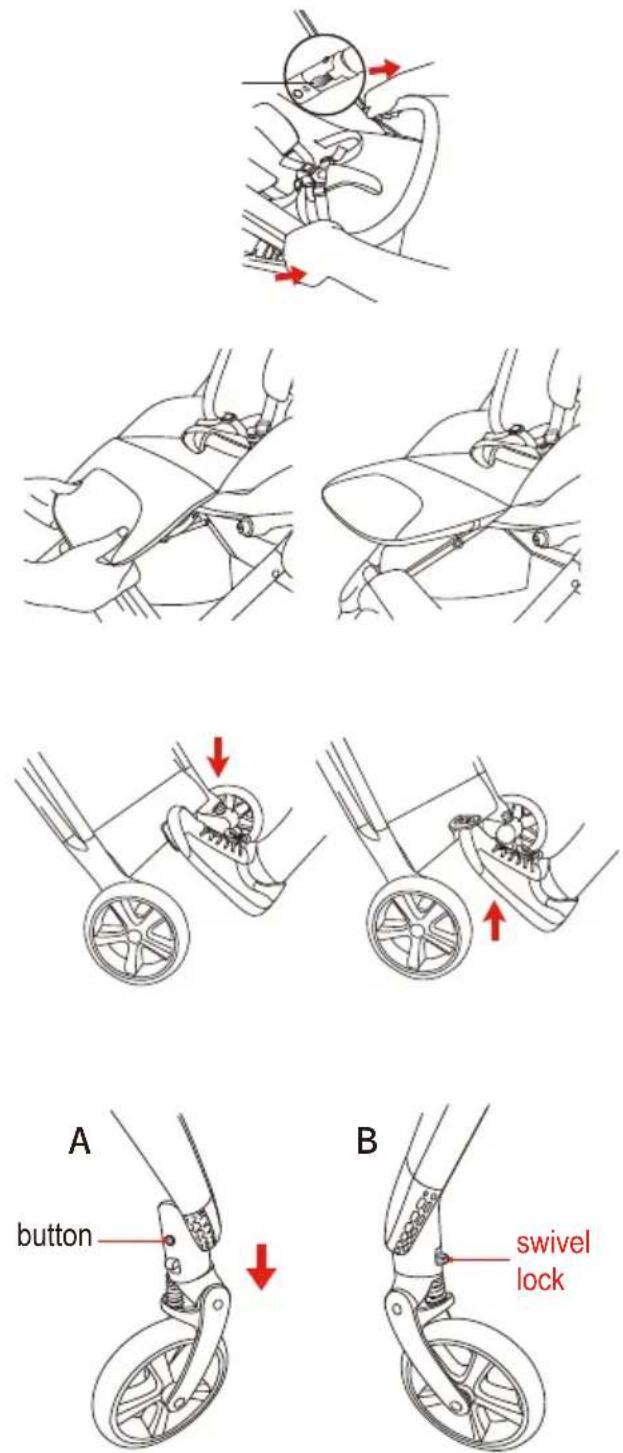
Detach Bumper Bar
Press down both buttons inside to release the bumper bar, pull gently to detach it.
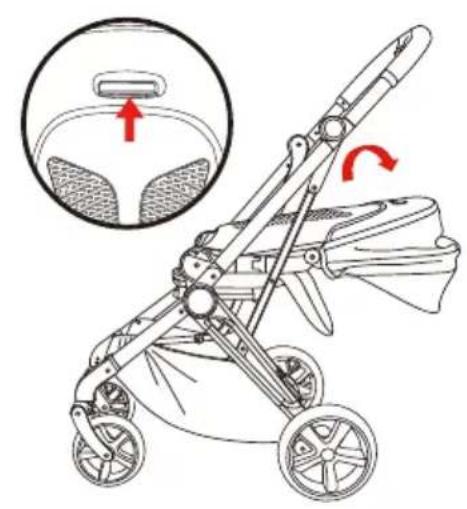
Adjust Leg Rest
There are two positions of the leg rest:
press down both button under the footrest to adjust it to the lower position; lift up the footrest for the higher position.
Use Brake
To park: Push down the parking lever located between rear wheels to engage the parking device.
To release: lift up the lever.
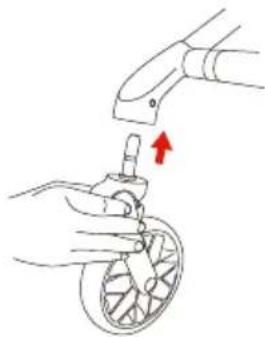
Detach Front Wheel (Picture A)
Press the front wheel release button to detach the front wheel.
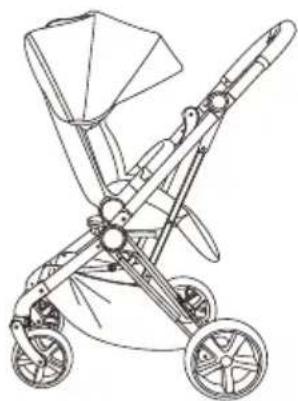
To Switch Between Swivel and Non-Swivel Mode (Picture B)
By sliding the swivel lock upward or downward to switch between modes.
IMPORTANT: It is recommended to use swivel lock on uneven surfaces.
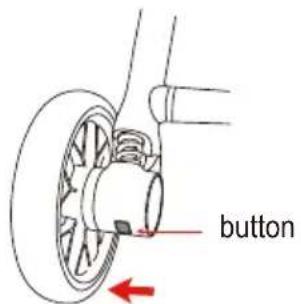
Detach Rear Wheel
Press the button under wheel housing and pull the wheel outward gently.
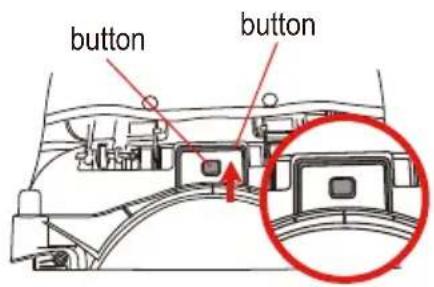
A
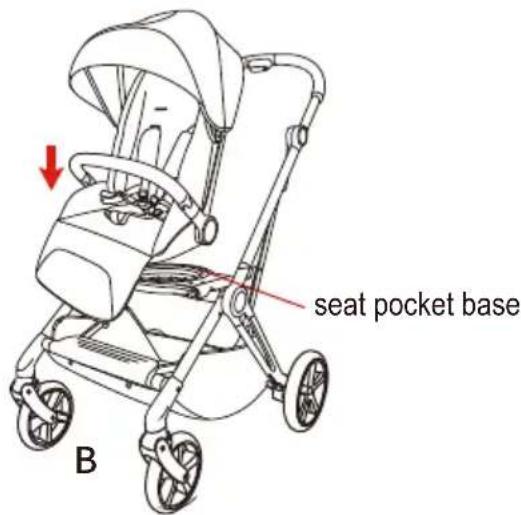
Remove or Install Seat Unit Form Chassis
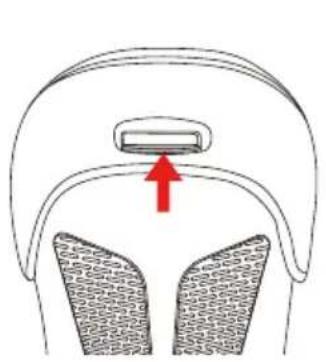
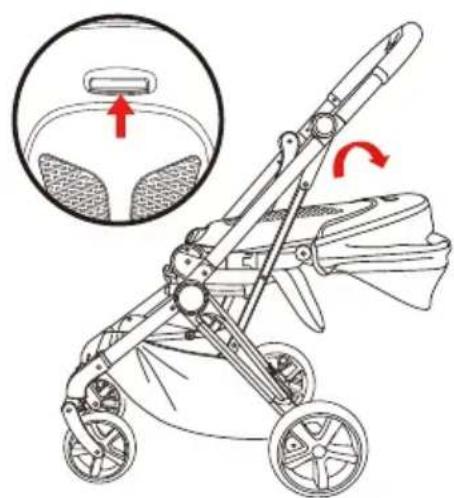
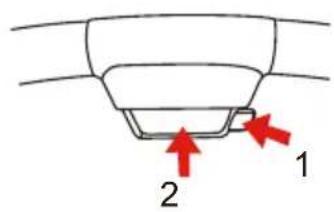
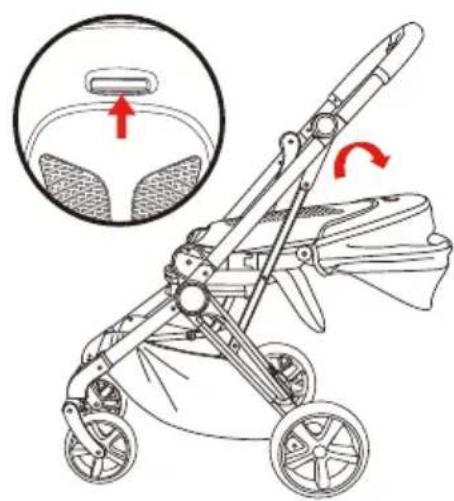
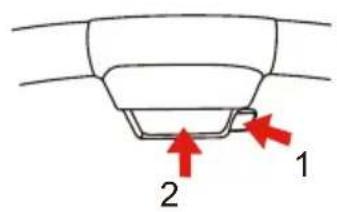
To remove the seat, press the square button under the seat plastic and pull out another button at the same time, then detach the seat.
To install the seat, align the seat with seat base and insert it. The seat is fixed well when hear "click" sound.
USE RESTRAINT SYSTEM
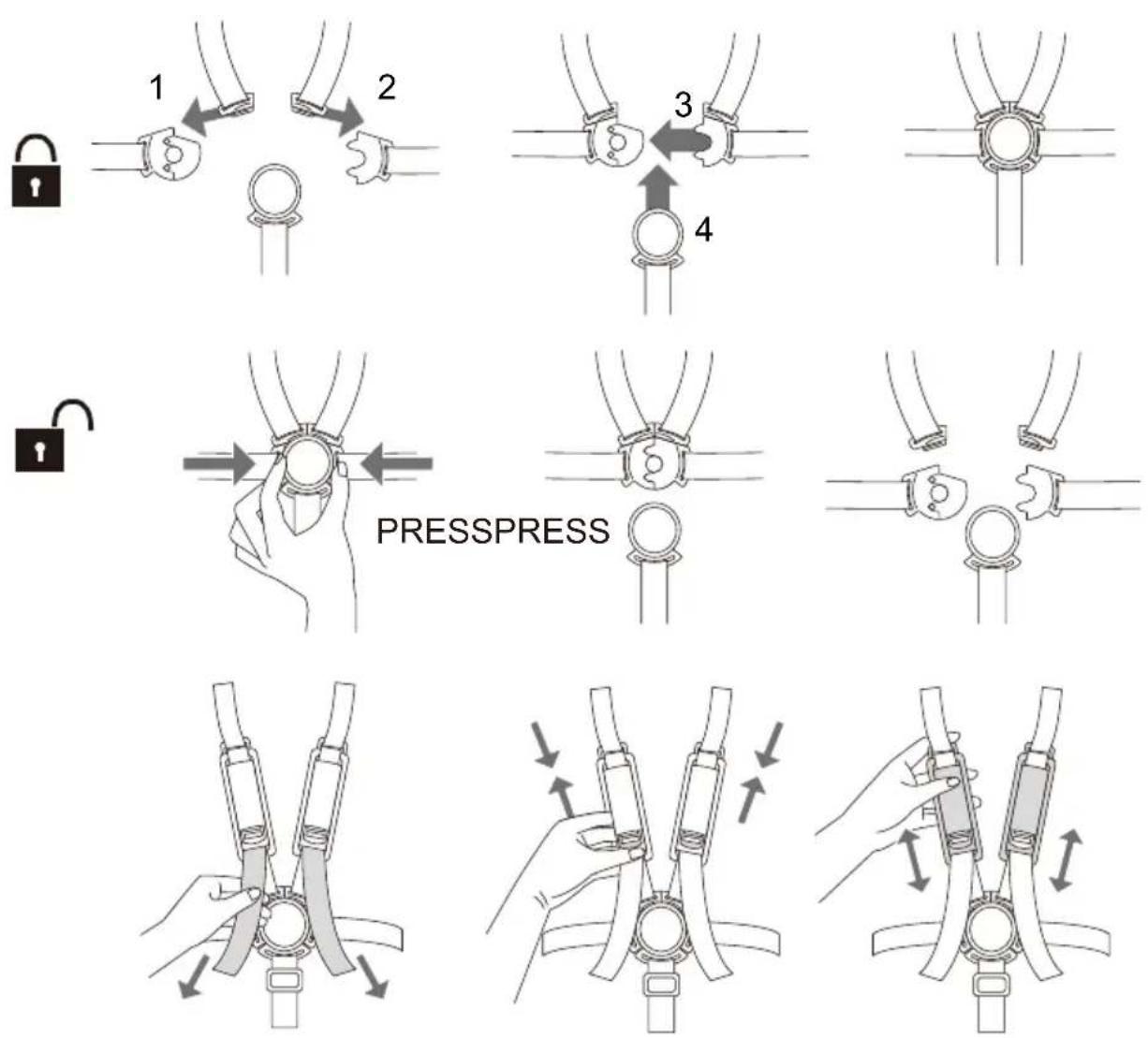
To adjust the height of shoulder harness, slide the adjuster on the upper webbing.
To adjust the length of shoulder harness, pull down the loose end webbing strap for a proper fit for your child.
To release the magnetic safety buckle, press the buttons on both side of the buckle, hold it and take out the upper part of buckler to release it.
CAUTION! The magnetic safety buckle should be operated by adult care takers, it is not a toy for child to play with.
natural_image
Line drawing of a baby stroller with twin arms and wheels (no text or symbols)A
natural_image
Illustration of a baby stroller with an inset showing the seat and wheel (no text or symbols)B
C
natural_image
Line drawing of a stroller with wheels and handle, showing no text or symbolsD
natural_image
Line drawing of a stroller with wheels and handlebars (no text or symbols)E
Fold Stroller
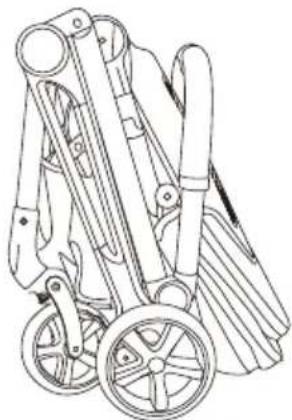
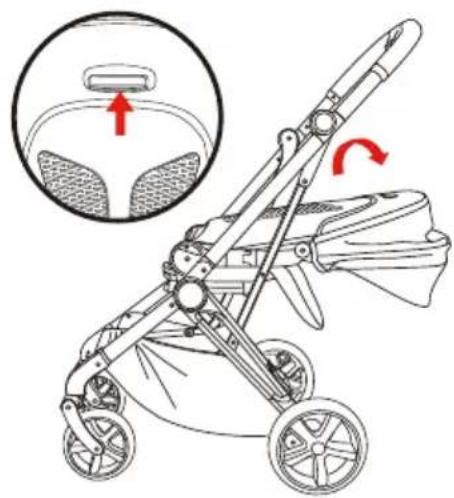
Rotate the seat to face to face (rear-facing) direction and close the canopy. (Picture A)
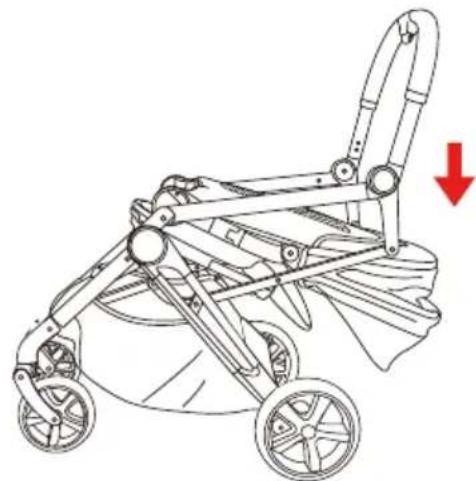
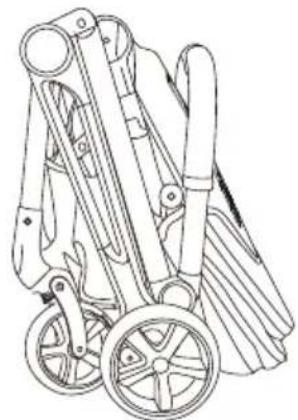
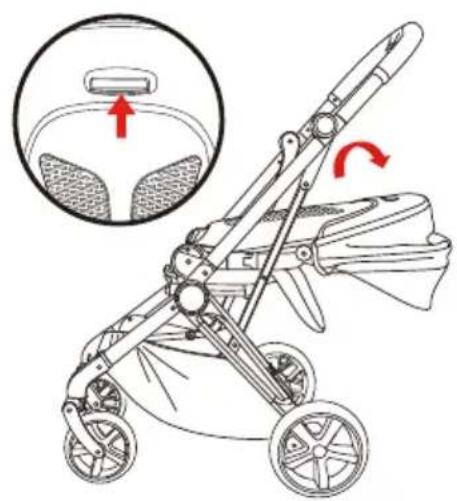
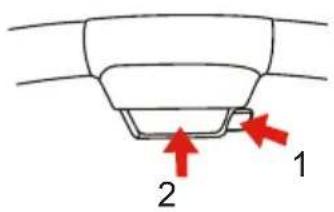
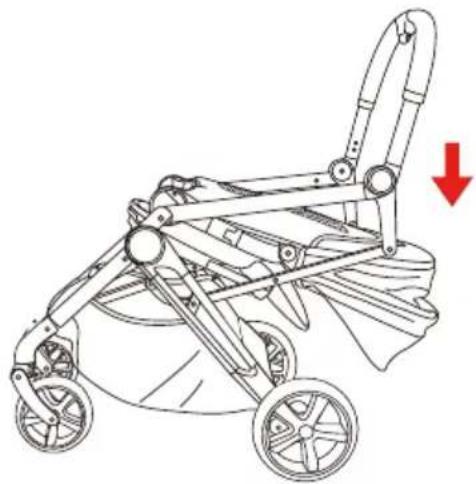
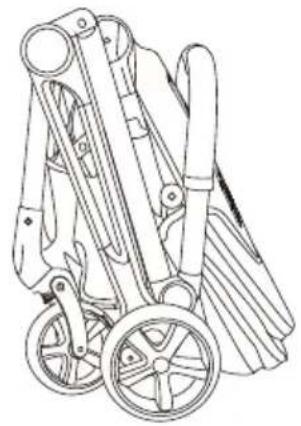
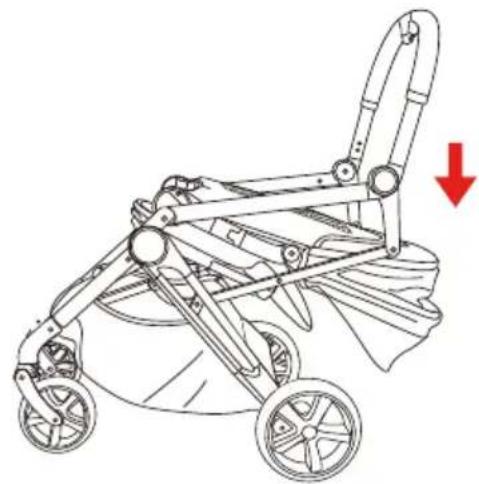
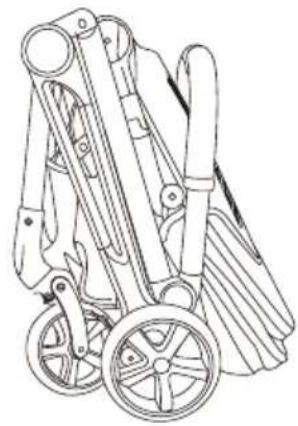
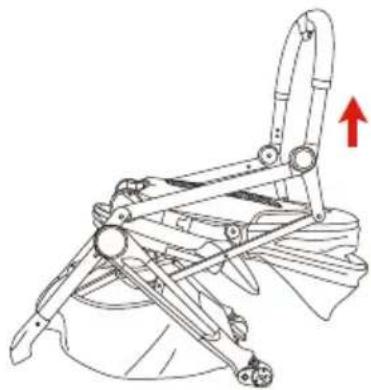
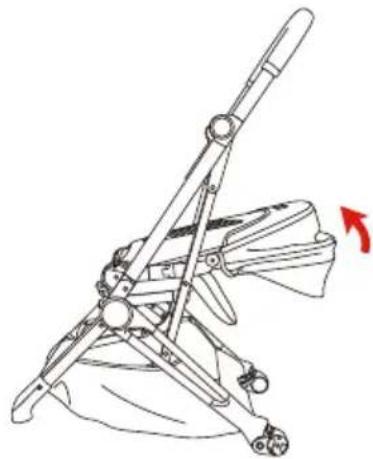
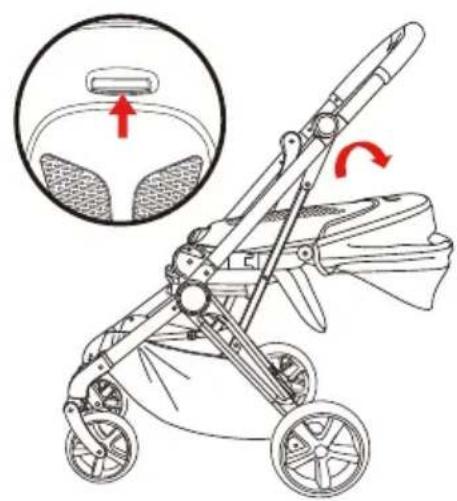
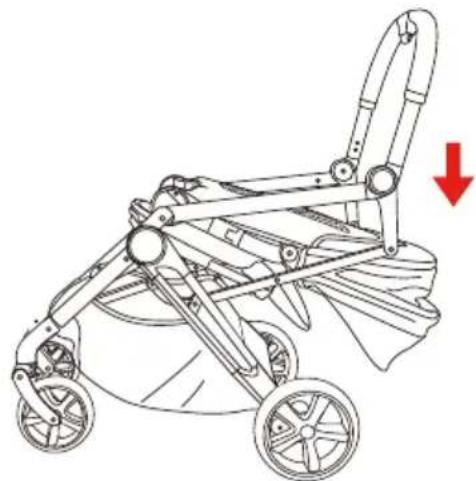
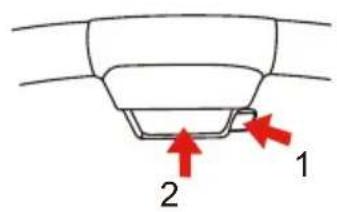
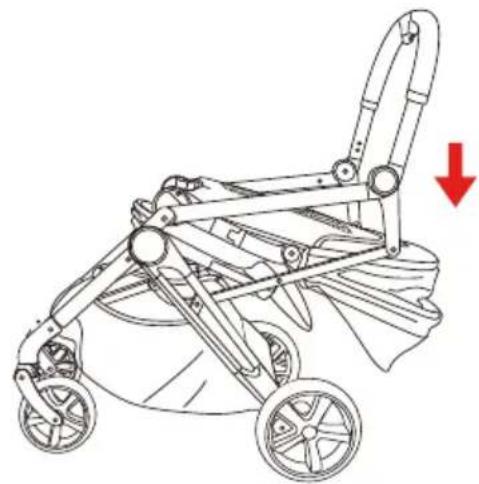
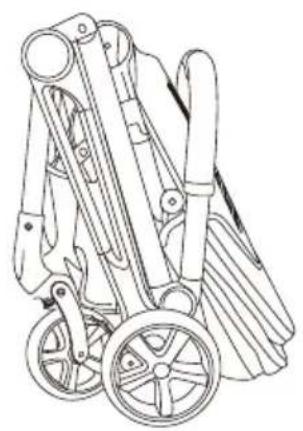
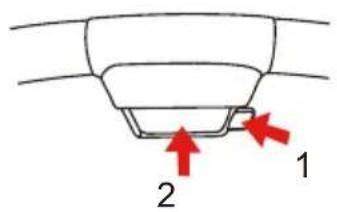
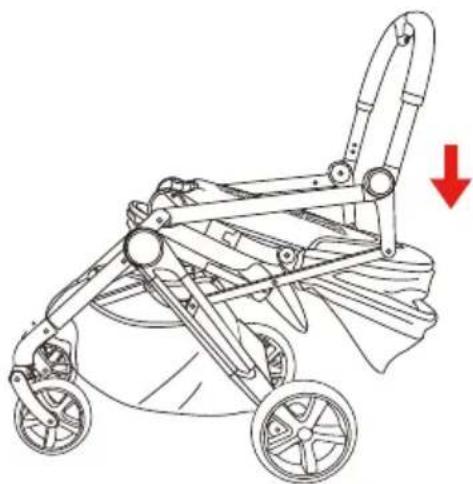
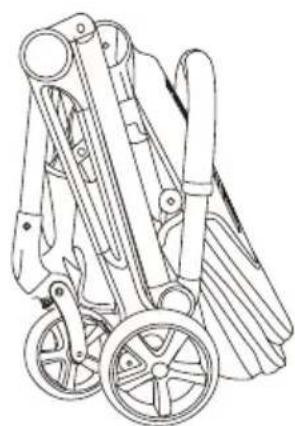
Pull up the backrest adjuster and fold the seat downward. (Picture B) Press button 1 and 2 simultaneously to unlock the chassis and start folding by pushing handle bar downward (Picture D) until the stroller is folded. (Picture E)
MAINTENANCE
To avoid risk of injury to your child, please check and maintain the stroller periodically.
Frame & Wheel
- Use only household soap and warm water. No bleach or detergent.
• Always dry the metal parts to prevent the formation of rust if the stroller has come into contact with water.
- If wheels squeak, use a light oil (e.g., Silicon Spray, antirust oil, or sewing machine oil). It is important to get the oil into the axle and wheel assembly.
- When using your stroller at the beach or other sandy/dusty environments, completely clean your stroller after use to remove sand and salt from mechanisms and wheel assemblies.
Fabric
- Please refer to the care label for instructions on cleaning the fabric parts of the stroller.
- If stroller becomes wet, open canopy and allow to dry thoroughly before storing.
IMPORTANT:
- From time to time, check your stroller for loose screws, worn parts, torn material or stitching. Replace or repair the parts as needed. Periodically wipe clean plastic parts with a soft damp cloth.
- Excessive exposure to sun or heat could cause fading or warping of parts.
- Discontinue using stroller if it is damaged or broken.
WARNING
A
natural_image
Mechanical device diagram showing a lever mechanism with a red arrow indicating upward motion (no text or symbols present)B
natural_image
Technical line drawing of a mechanical device with no visible text or symbolsC
natural_image
Line drawing of a mechanical device with a red arrow indicating rotation (no text or symbols)D
1.Vik ut chassit
natural_image
Illustration of hands adjusting a cable or connector with red arrows indicating direction (no text or symbols)E
natural_image
Line drawing of a folding chair with seat, legs, and armrest (no text or symbols)F
natural_image
Line drawing of a hand using a bicycle to lift a wheel, with a red arrow indicating the motion direction (no text or symbols)G
natural_image
Illustration of a hand using a small mechanical device to lift a wheel (no text or symbols)H
natural_image
Line drawing of a baby stroller with twin wheels and a canopy cover (no text or symbols)|
2.Sätt ihop vagnen
natural_image
Line drawing of a baby stroller with four wheels and handlebars (no text or symbols)A
natural_image
Illustration of a stroller with a close-up inset showing the seat and wheel (no text or symbols)B
C
natural_image
Line drawing of a baby stroller with wheels and handle, showing no text or symbolsD
natural_image
Line drawing of a stroller with wheels and handlebars (no text or symbols)E
A
natural_image
Technical line drawing of a mechanical device with no visible text or symbolsB
natural_image
Technical line drawing of a mechanical device with no visible text or symbolsC
natural_image
Line drawing of a folding chair with a red arrow indicating rotation (no text or symbols)D
1.Brett ut chassiset
natural_image
Line drawing of a car interior showing hand positioning and red arrows indicating movement or force (no text or symbols)E
natural_image
Line drawing of a folding chair with seatbelt and armrest (no text or symbols)F
natural_image
Diagram of a hand operating a car wheel with a red arrow indicating rotation (no text or symbols present)G
natural_image
Illustration of a hand using a tool to lift a wheel, with a red arrow indicating the motion (no text or symbols present)H
natural_image
Line drawing of a baby stroller with wheels and canopy (no text or symbols)|
natural_image
Line drawing of a baby stroller with directional arrows indicating movement or change (no text or symbols)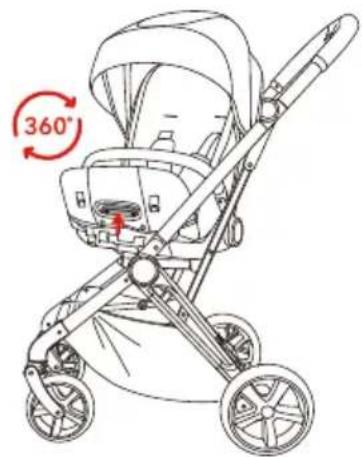
natural_image
Line drawing of a baby stroller with twin wheels and canopy (no text or symbols)Endre retningen på setet
JUSTERING AV SETERYGGEN
natural_image
Line drawing of a baby stroller with twin arms and wheels (no text or symbols)A
natural_image
Illustration of a baby stroller with a close-up inset showing the seat and torso (no text or symbols)B
C
natural_image
Line drawing of a stroller with wheels and handle, showing no text or symbolsD
natural_image
Line drawing of a stroller with wheels and handlebars (no text or symbols)E
A
natural_image
Mechanical device diagram showing a lever mechanism with a red arrow indicating upward motion (no text or symbols present)B
natural_image
Technical line drawing of a mechanical device with a red arrow indicating motion direction (no text or symbols)C
natural_image
Line drawing of a mechanical device with a red arrow indicating rotation (no text or symbols)D
1.Fold stellet ud
natural_image
Medical illustration showing hands performing a procedure with red arrows indicating direction (no text or symbols present)E
natural_image
Line drawing of a folding chair with seat, legs, and armrest (no text or symbols)F
natural_image
Line drawing of a hand gripping a car wheel with a red arrow indicating rotation (no text or symbols)G
natural_image
Illustration of a hand using a tool to lift a wheel, with a red arrow indicating the motion (no text or symbols present)H
natural_image
Line drawing of a baby stroller with wheels and canopy (no text or symbols)|
2.Saml klapvognen
natural_image
Line drawing of a baby stroller with twin wheels and a wide canopy (no text or symbols)A
natural_image
Line drawing of a baby stroller with an inset showing the seat and wheel (no text or symbols)B
C
natural_image
Line drawing of a baby stroller with wheels and handle, showing no text or symbolsD
natural_image
Line drawing of a baby stroller with wheels and handle (no text or symbols)E
A

natural_image
Mechanical device diagram showing a lever mechanism with a red arrow indicating upward motion (no text or symbols present)B
natural_image
Technical line drawing of a mechanical device with no visible text or symbolsC
natural_image
Diagram of a folding chair with a red arrow indicating rotation (no text or symbols)D
1. Rungon avaaminen
natural_image
Line drawing of a car interior showing hand positioning and red arrows indicating movement or force (no text or symbols)E
natural_image
Line drawing of a folding chair with seatbelt and armrest (no text or symbols)F
natural_image
Diagram of a hand operating a car wheel with a red arrow indicating rotation (no text or symbols present)G
natural_image
Illustration of a hand using a tool to lift a wheel, with a red arrow indicating the motion (no text or symbols present)H
natural_image
Line drawing of a baby stroller with wheels and canopy (no text or symbols)|
natural_image
Line drawing of a baby stroller with two wheels and a canopy cover, showing directional arrows (no text or symbols)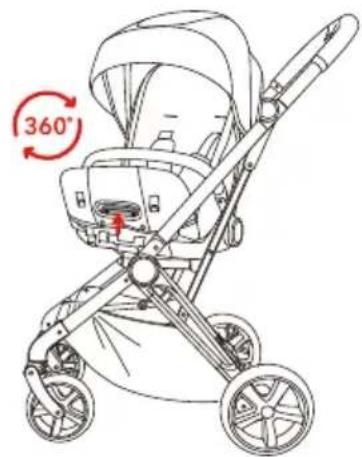
natural_image
Line drawing of a baby stroller with twin wheels and canopy (no text or symbols)natural_image
Diagram of a mechanical component with a red arrow indicating upward motion (no text or symbols)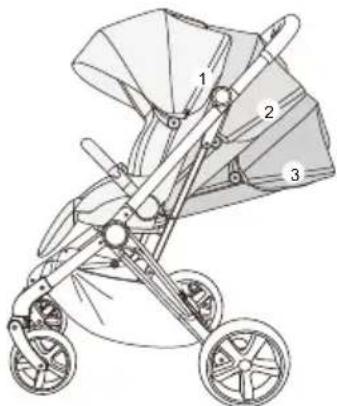
natural_image
Line drawing of a baby stroller with three wheels and a canopy cover (no text or symbols)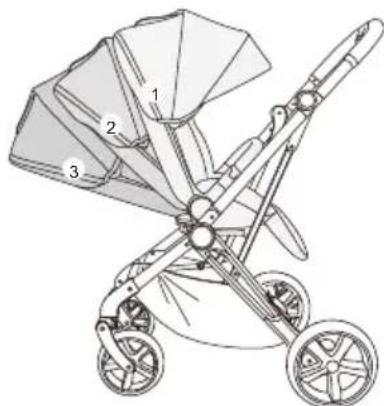
natural_image
Line drawing of a baby stroller with three labeled parts (1, 2, 3), no text or symbols present.natural_image
Line drawing of a baby stroller with four wheels and handlebars (no text or symbols)A
natural_image
Line drawing of a baby stroller with an inset showing the seat and seatbelt (no text or symbols)B
C
natural_image
Line drawing of a baby stroller with wheels and a red arrow indicating downward motion (no text or symbols)D
natural_image
Line drawing of a two-wheeled stroller with wheels and handlebars (no text or symbols)E
A
natural_image
Mechanical device diagram showing a lever mechanism with a red arrow indicating upward motion (no text or symbols present)B
natural_image
Technical line drawing of a mechanical device with a red arrow indicating motion direction (no text or symbols)C
natural_image
Line drawing of a mechanical device with a red arrow indicating rotation (no text or symbols)D
natural_image
Illustration of hands adjusting a cable or connector with red arrows indicating direction (no text or symbols)E
natural_image
Line drawing of a folding chair with seat, legs, and armrest (no text or symbols)F
natural_image
Line drawing of a hand operating a bicycle wheel with a red arrow indicating rotation (no text or symbols)G
natural_image
Illustration of a hand using a mechanical tool to lift a wheel (no text or symbols)H
natural_image
Line drawing of a baby stroller with twin wheels and a canopy cover (no text or symbols)|
natural_image
Diagram of a car seat with a red arrow indicating upward motion (no text or symbols)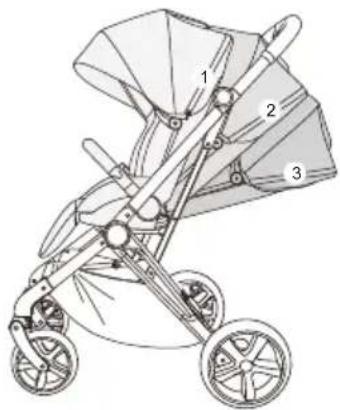
natural_image
Line drawing of a baby stroller with three wheels and a canopy cover (no text or symbols)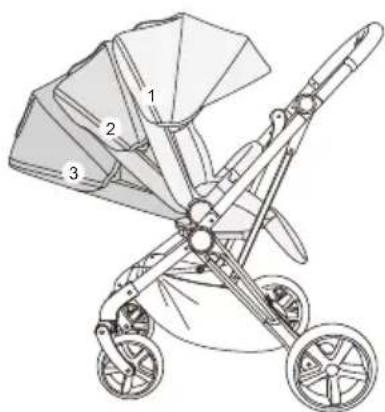
natural_image
Line drawing of a baby stroller with three wheels and a canopy cover (no text or symbols)natural_image
Line drawing of a baby stroller with twin arms and wheels (no text or symbols)A
natural_image
Line drawing of a stroller with an inset showing the seat and wheel (no text or symbols)B
C
natural_image
Line drawing of a stroller with wheels and handle, showing no text or symbolsD
natural_image
Line drawing of a stroller with wheels and handle (no text or symbols)E
Produced by: Jollyroom AB
Sörredsvägen 111
SE- 418 78 Göteborg
SWEDEN
Contact:
+46(0)31 310 00 00

Fremstillet af: Jollyroom AB
Sörredsvägen 111
SE-418 78 Gøteborg
SVERIGE
Kundeservice:
+45 88 44 88 88

Producerad av:
Jollyroom AB
Sörredsvägen 111
SE-418 78 Göteborg
SVERIGE
Konsumentkontakt:
+46(0)31 310 00 00

Valmistuttaja:
Jollyroom AB
Sörredsvägen 111
SE-418 78 Göteborg
RUOTSI
Asiakaspalvelu:
09-42 41 55 55

Produsert av :
Jollyroom AB
Sörredsvägen 111
SE-418 78 Göteborg
SWEDEN
Kundekontakt:
+47 33 50 93 50

Hergestellt von:
Jollyroom AB
Sörredsvägen 111
SE-418 78 Göteborg
SCHWEDEN
Kundenservice:
+49 (0) 40 2999 7999