IM5341LV - Microwave Cylinda - Free user manual and instructions
Find the device manual for free IM5341LV Cylinda in PDF.


| Product Type | Built-in Microwave |
| Brand | Cylinda |
| Model | IM5341LV |
| Dimensions (W x D x H) | 595 x 455 x 350 mm |
| Weight | 25 kg |
| Power Supply | 230 V, 50 Hz, 10 A |
| Microwave Power | 900 W |
| Grill Power | 1000 W |
| Convection Power | 1500 W |
| Cavity Capacity | 34 L |
| Turntable Diameter | 315 mm |
| Display Type | LED |
| Control Type | Touch Control |
| Number of Power Levels | 10 |
| Defrost Function | Auto Defrost by Weight |
| Auto Cook Programs | 8 |
| Clock & Timer | Yes |
| Child Lock | Yes |
| Cleaning & Maintenance | Clean with damp cloth; avoid abrasive cleaners |
| Spare Parts Availability | Contact Cylinda customer service |
| Repairability Index | 6.5/10 |
| Energy Consumption (in use) | 0.9 kWh per cycle |
| Noise Level | 52 dB(A) |
| Color | Silver/Stainless Steel |
Frequently Asked Questions - IM5341LV Cylinda
User questions about IM5341LV Cylinda
0 question about this device. Answer the ones you know or ask your own.
Ask a new question about this device
Download the instructions for your Microwave in PDF format for free! Find your manual IM5341LV - Cylinda and take your electronic device back in hand. On this page are published all the documents necessary for the use of your device. IM5341LV by Cylinda.
USER MANUAL IM5341LV Cylinda
natural_image
Simple line drawing of a kitchen appliance with oven, refrigerator, and washing machine (no text or symbols)IM 5341L RF - IM 5341 LV
EN - DA - SV - NO - FI
CONTENTS
| ENGLISH | 03-22 |
| DANSK | 23-43 |
| SVENSKA | 44-62 |
| NORSK | 63-82 |
| SUOMI | 83-104 |
Please read this manual first!
Dear Customer,
Thank you for selecting a Cylinda product. We hope that you get the best results from your product which has been manufactured with high quality and state-of-the-art technology. Therefore, please read this entire user manual and all other accompanying documents carefully before using the product and keep it as a reference for future use. If you handover the product to someone else, give the user manual as well. Follow all warnings and information in the user manual.
Remember that this user manual may also apply to other models. Differences between models are explicitly described in the manual.
Meanings of the symbols
Following symbols are used in the various section of this user manual:

Important information and useful hints about usage.

Warnings for dangerous situations concerning the safety of life and property.
Warning for electric shock.

Warning for hot surfaces.
1 Important safety and environmental instructions
Important Safety Instructions Read Carefully And Keep For Future Reference
1.1 Safety warnings
This section contains safety instructions that will help protect from risk of fire, electric shock, exposure to leak microwave energy, personal injury or property damage. Failure to follow these instructions shall void any warranty.
• Cylinda Microwave Ovens comply with the applicable safety standards; therefore, in case of any damage on the appliance or power cable, it should be repaired or replaced by the dealer, service center or a specialist and authorized service alike to avoid any danger. Faulty or unqualified repair work may be dangerous and
cause risk to the user.
• This appliance is intended to be used in household and similar applications such as:
-Staff kitchen areas in shops, offices and other working environments; -Farm houses -By clients in hotels, and other residential type environments; -Bed and Breakfast type environments.
- It is not intended for industrial or laboratory use.
- Do not attempt to start the oven when its door is open; otherwise you may be exposed to harmful microwave energy. Safety locks should not be disabled or tampered with.
• The microwave oven is
1 Important safety and environmental instructions
intended for heating food and beverages. Drying of food or clothing and heating of warming pads, slippers, sponges, damp cloth and similar may lead to risk of injury, ignition or fire.
- Do not place any object between the front side and the door of the oven. Do not allow dirt or cleaning agent remnants to build up on the closure surfaces.
- Any service works involving removal of the cover that provides protection against exposure to microwave energy must be performed by authorized persons/service. Any other approach is dangerous.
- Your product is intended for cooking, heating and defrost food at home. It must not be used for
commercial purposes.
- Your oven is not designed to dry any living being.
- Do not use your appliance to dry clothes or kitchen towels.
- Do not use this appliance outdoors, bathrooms, humid environments or in places where the it can get wet.
- No responsibility or warranty claim shall be assumed for damages arising from misuse or improper handling of the appliance.
- Never attempt to dismantle the appliance. No warranty claims are accepted for damage caused by improper handling.
- Only use the original parts or parts recommended by the manufacturer.
1 Important safety and environmental instructions
- Do not leave this appliance unattended while it is in use.
• Always use the appliance on a stable, flat, clean dry, and non-slip surface.
• The appliance should not be operated with an external clock timer or separate remote control system. - Before using the appliance for the first time, clean all parts. Please see the details given in the “Cleaning and Maintenance” section.
- Operate the appliance for its intended purpose only as described in this manual.
• Appliance becomes very hot while it is in use. Pay attention not to touch the hot parts inside the oven. - Do not operate the oven empty.
• Cooking utensil may get hot due to the heat transferred from the heated food to the utensil. You may need oven gloves to hold the utensil.
- Utensils shall be checked to ensure that they are suitable for use in microwave ovens.
- Do not place the oven on stoves or other heat generating appliances. Otherwise, it may be damaged and the warranty becomes void.
- Steam may come out while opening the covers or the foil after cooking the food.
- The appliance and its accessible surfaces may be very hot when the appliance is in use.
- Door and outer glass may be very hot when the appliance is in use.
• Make sure that your
1 Important safety and environmental instructions
mains power supply complies with the information supplied on the rating plate of the appliance.
• The only way to disconnect the appliance from the power supply is to remove the power plug from the power outlet.
- Use the appliance with a grounded outlet only.
- Never use the appliance if the power cable or the appliance itself is damaged.
- Do not use this appliance with an extension cord.
- Never touch the appliance or its plug with damp or wet hands.
- Place the appliance in a way so that the plug is always accessible.
- Prevent damage to the power cable by not squeezing, bending, or rub-
bing it on sharp edges. Keep the power cable away from hot surfaces and naked flame.
• Make sure that there is no danger that the power cable could be accidentally pulled or that someone could trip over it when the appliance is in use.
- Unplug the appliance before each cleaning and when the appliance is not in use.
- Do not pull the power cable of the appliance to disconnect it from its power supply and never wrap its power cable around the appliance.
- Do not immerse the appliance, power cable, or power plug in water or any other liquids. Do not hold it under running water.
- When heating food in
1 Important safety and environmental instructions
plastic or paper containers, keep an eye on the oven due to the possibility of ignition.
- Remove the wire strings and/or metal handles of paper or plastic bags before placing bags to the oven.
- If smoke is observed, switch off or unplug the appliance if safe to do so and keep the door closed in order to stifle any flames.
- Do not use microwave oven for storage. Do not leave paper items, coo-king material or food inside the oven when it is not being used.
• The contents of feeding bottles and baby food jars should be stirred or shaken and the temperature checked before consumption, in order to avoid burns.
- This appliance is a Group 2 Class B ISM equipment. Group 2 contains all ISM (Industrial, Scientific and Medical) equipment in which radio-frequency energy is intentionally generated and/or used in the form of electromagnetic radiation for the treatment of material, and spark erosion equipment.
• Class B equipment is suitable for use in domestic establishments and establishments directly connected to a low voltage power supply network.
- Do not use cooking oil in the oven. Hot oil may damage the components and materials of the oven, and it may even cause skin burns.
- Pierce food with thick crust such as potatoes,
1 Important safety and environmental instructions
courgettes, apples and chestnuts.
• Appliance must be placed so that the rear side is facing the wall.
- Before moving the appliance, please secure the turntable to prevent damage.
• Eggs in their shell and whole hard-boiled eggs must not be heated in microwave ovens since they may explode, even after microwave heating has ended.
WARNING: If the door or door seals are damaged, the oven must not be operated until it has been repaired by a competent person.
WARNING: It is hazardous for anyone other than a competent person to carry out any service or repair operation which involves the removal of a cover which gives protection against exposure to microwave energy.
WARNING: Liquids and other foods must not be heated in sealed containers since they are liable to explode.
• The oven should be cleaned regularly and any food deposits removed.
• There should be min 20 cm free space above the top surface of the oven.
- Do not over-cook foods; otherwise, you may cause a fire.
- Do not use chemicals and steam assisted cleaners to clean the appliance.
- Extreme caution is advised when being used near children and persons who are restricted in their physical, sensory or mental abilities.
• This appliance can be
1 Important safety and environmental instructions
used by the children who are at the age of 8 or over and by the people who have limited physical, sensory or mental capacity or who do not have knowledge and experience, as long as they are supervised with regard to safe use of the product or they are instructed accordingly or understand the risks of using the product. Children should not play with the appliance. Cleaning and user maintenance shall not be made by children unless they are older than 8 and supervised.
- Danger of choking! Keep all the packaging materials away from children.
- Due to excessive heat that arises in grill and combination modes, children should only be
allowed to use these modes under supervision of an adult.
- Keep the product and its power cable so that they are inaccessible by children under 8 years old. - Do not cook food directly on the glass tray. Put the food in / on appropriate kitchen utensils before placing them in the oven. - Metallic containers for food and beverages are not allowed during microwave cooking. Otherwise, sparking may occur.
- Microwave oven must not be placed in a cabinet that is not in compliance with the installation instructions.
- Microwave oven is intended for built-in use only. - If built-in appliances being used equal or higher than 900 mm above
1 Important safety and environmental instructions
the floor, care should be taken not to displace the turntable when removing containers from the appliance.
- If the built-in product is in a cabinet with a door, the product must be operated with the cabinet door open.
- Failure to maintain the oven in a clean condition could lead to deterioration of the surface that could adversely affect the life of the appliance and possibly result in a hazardous situation.
• The appliance shall not be cleaned with a steam cleaner.
1.2 Compliance with the WEEE Directive and Disposing of the Waste Product:
This product complies with EU WEEE Directive (2012/19/EU). This product bears a classification symbol for waste electrical and electronic equipment (WEEE).
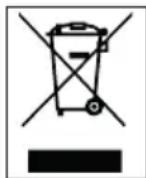
This symbol indicates that this product shall not be disposed with other household wastes at the end of its service life. Used device must be returned to offical collection point for recycling of electrical and electronic devices. To find these collection systems please contact to your local authorities or retailer where the product was purchased. Each household performs important role in recovering and recycling of old appliance. Appropriate disposal of used appliance helps prevent potential negative consequences for the environment and human health.
1.3 Compliance with RoHS Directive
The product you have purchased complies with EU RoHS Directive (2011/65/EU). It does not contain harmful and prohibited materials specified in the Directive.
1.4 Package information

Packaging materials of the product are manufactured from recyclable materials in accordance with our National Environment Regulations. Do not dispose of the packaging materials together with the domestic or other wastes. Take them to the packaging material collection points designated by the local authorities.
2 Your microwave oven
2.1 Overview
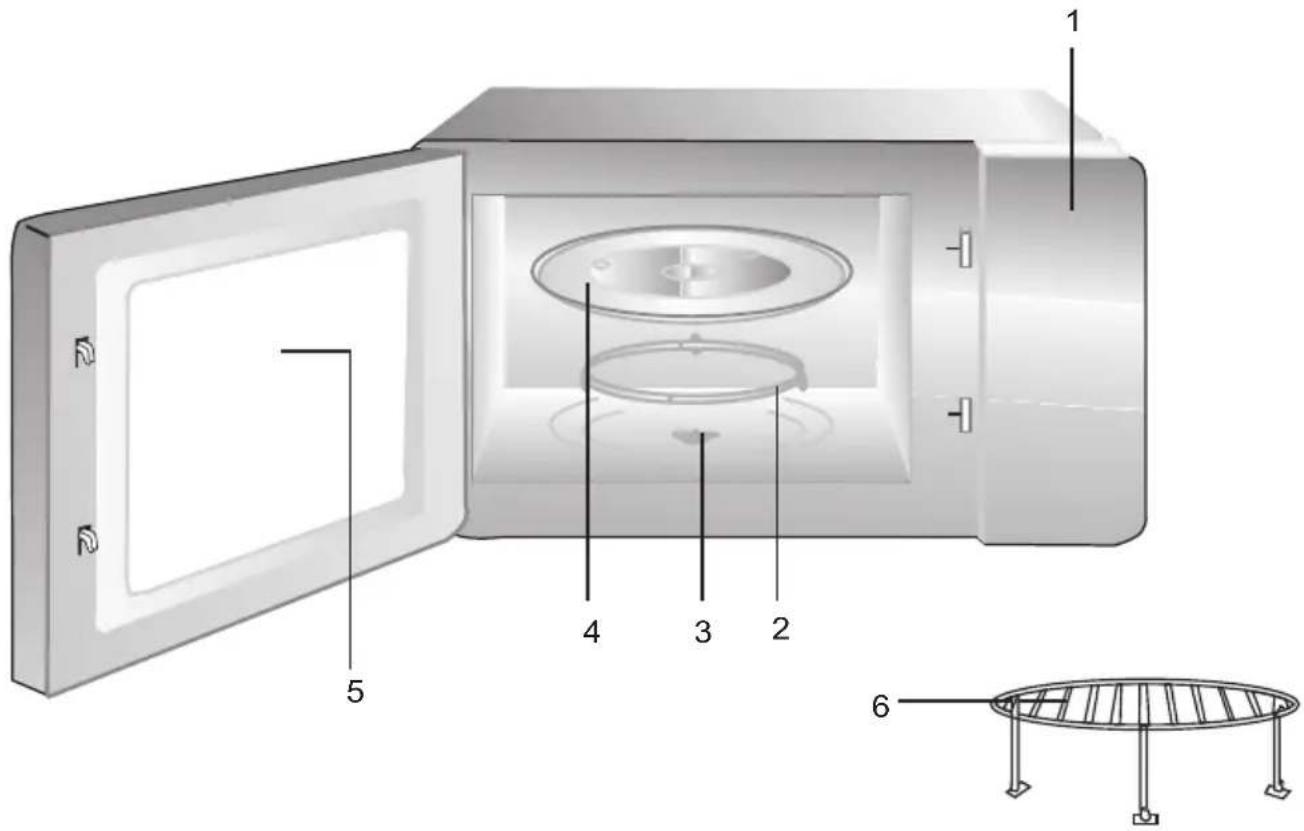
Controls and parts
- Control panel
- Turntable ring assembly
- Turntable shaft
- Glass tray
- Oven window
- Grill Rack( Only be used in grill function and be placed on the glass tray )
2.2 Technical data
| Rated voltage 230 V~50 Hz | |
| Rated input (Microwave) 1450 W | |
| Rated output (Microwave) 900 W | |
| Grill power 1000 W | |
| Microwave frequency 2450 MHz | |
| Oven capacity 25 Liter | |
| Net weight 17.83 kg | |
| External dimensions 594*403*380 mm |
Markings on the product or the values stated in other documents supplied with the product are values obtained under laboratory conditions as per relevant standards. These values may vary according to the usage of the appliance and ambient conditions. Power values are tested at 230V.
2 Your microwave oven
Technical and design modification rights are reserved.
2.3 Turntable installation
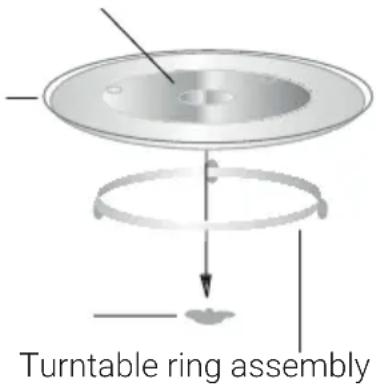
- Never place the glass tray upside down. The glass tray should never be restricted.
- Both glass tray and turntable support must always be used during cooking.
- All food and containers of food must always place on the glass tray for co-oking.
- If glass tray or turntable support crack or break, contact your nearest authorized service center.
Hub (underside)
Glass Cany tabla
Turntable shaft
3 Installation and connection
3.1 Installation and connection
- Remove all packing material and accessories. Examine the oven for any damage such as dents or broken door. Do not install if oven is damaged.
- Remove any protective film found on the microwave oven cabinet surface.
- Do not remove the light brown Mica cover that is attached to the oven cavity to protect the magnetron.
- This appliance has been designed for domestic use only.
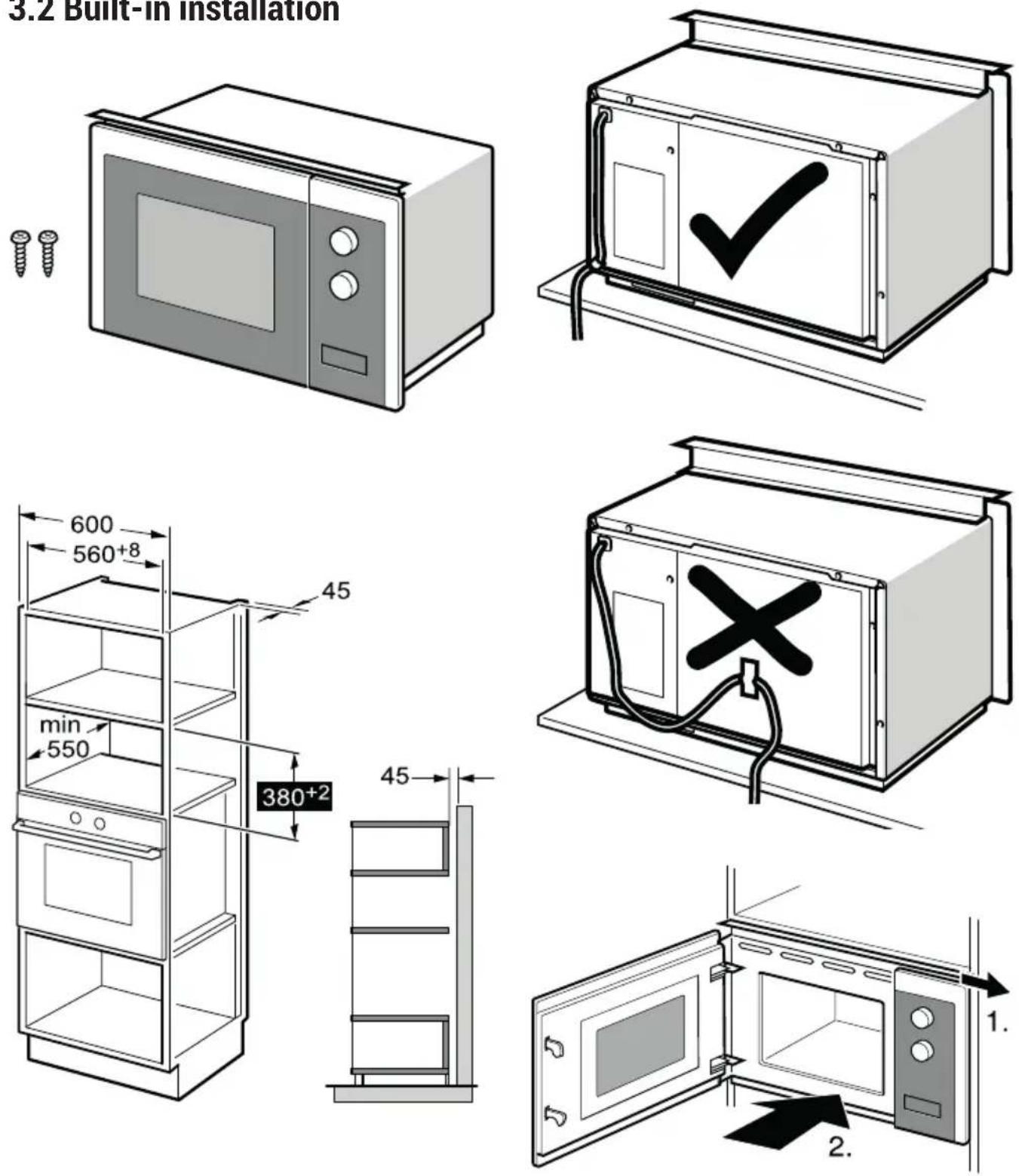
- This oven is intended for built-in use only. It is not intended for counter-top use or for use inside a cabinet.
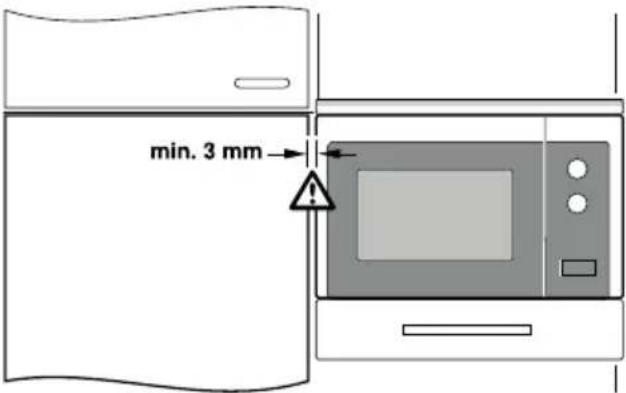
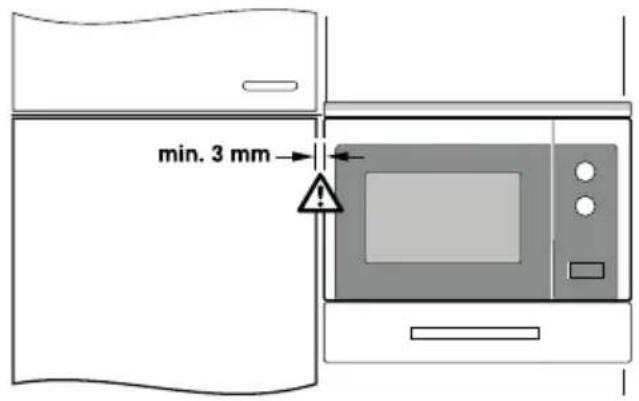
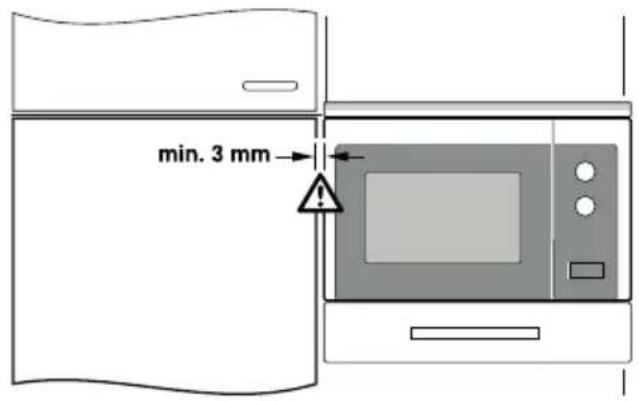
- Please observe the special installation instructions.
- The appliance can be installed in a 60 cm wide wall-mounted cabinet (at least 55 cm deep and 85 cm off the floor).
- The appliance is fitted with a plug and must only be connected to a properly installed grounded socket.
-
The mains voltage must correspond to the voltage specified on the rating plate.
-
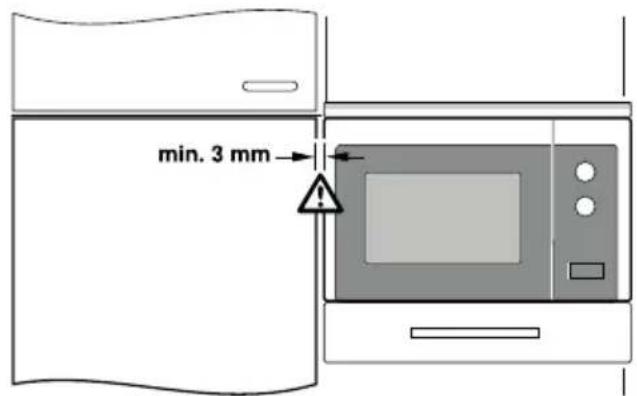
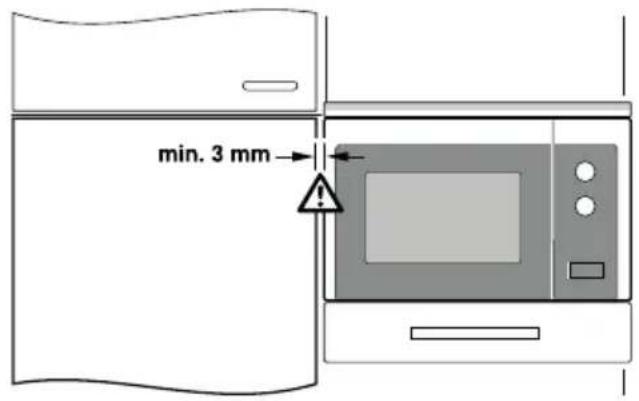
If the plug is no longer accessible after installation, an all-pole isolating switch must be present on the installation side with a contact gap of at least 3 mm.
- Adapters, multi-way sockets and extension cords must not be used. Overloading can result with a risk of fire.
The accessible surface may be hot during operation.

Do not trap or bend the power cable.
3 Installation and connection
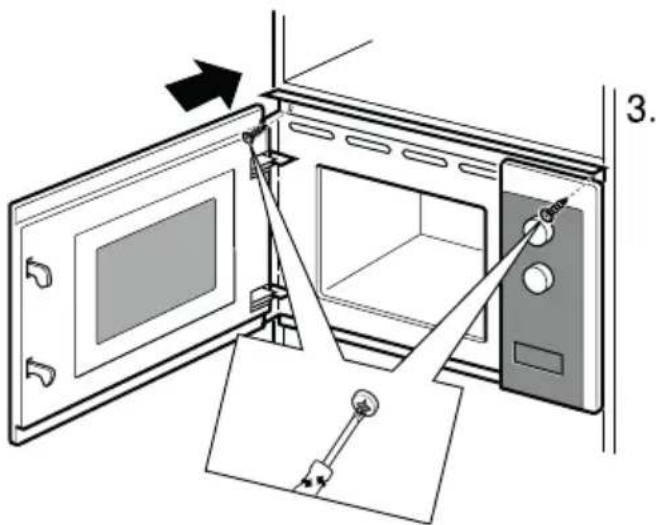
3.2 Built-in installation
3 Installation and connection
4 Operation
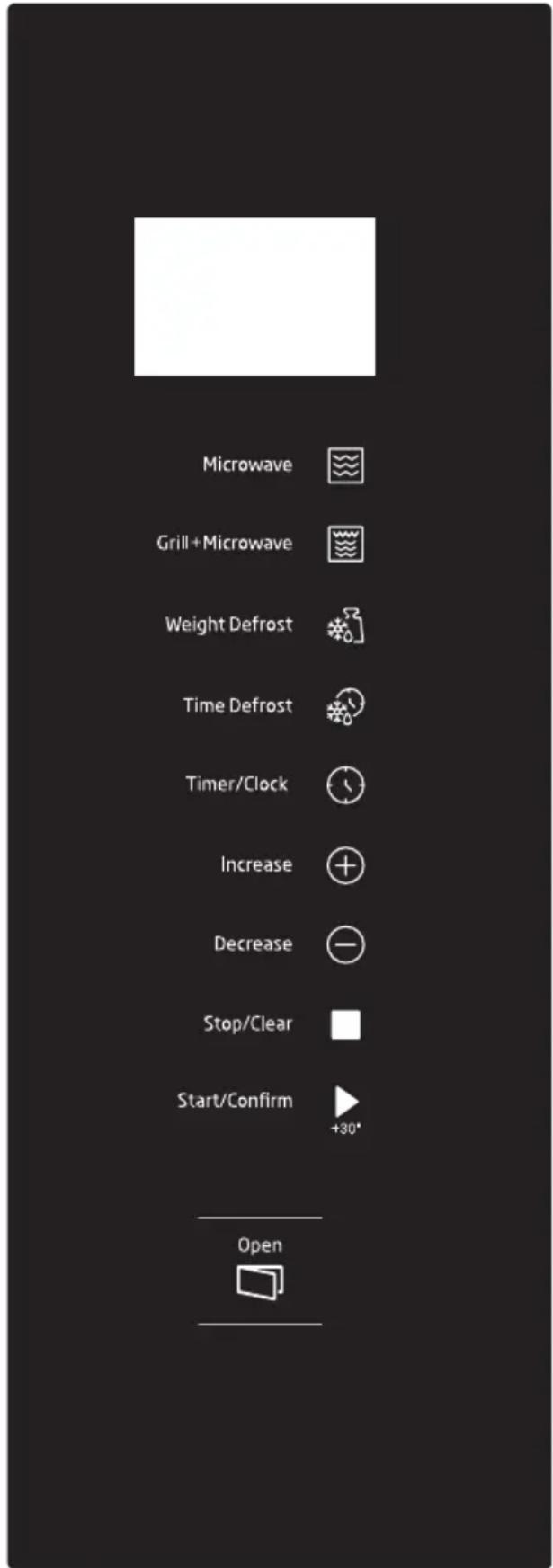
4.1 Control panel
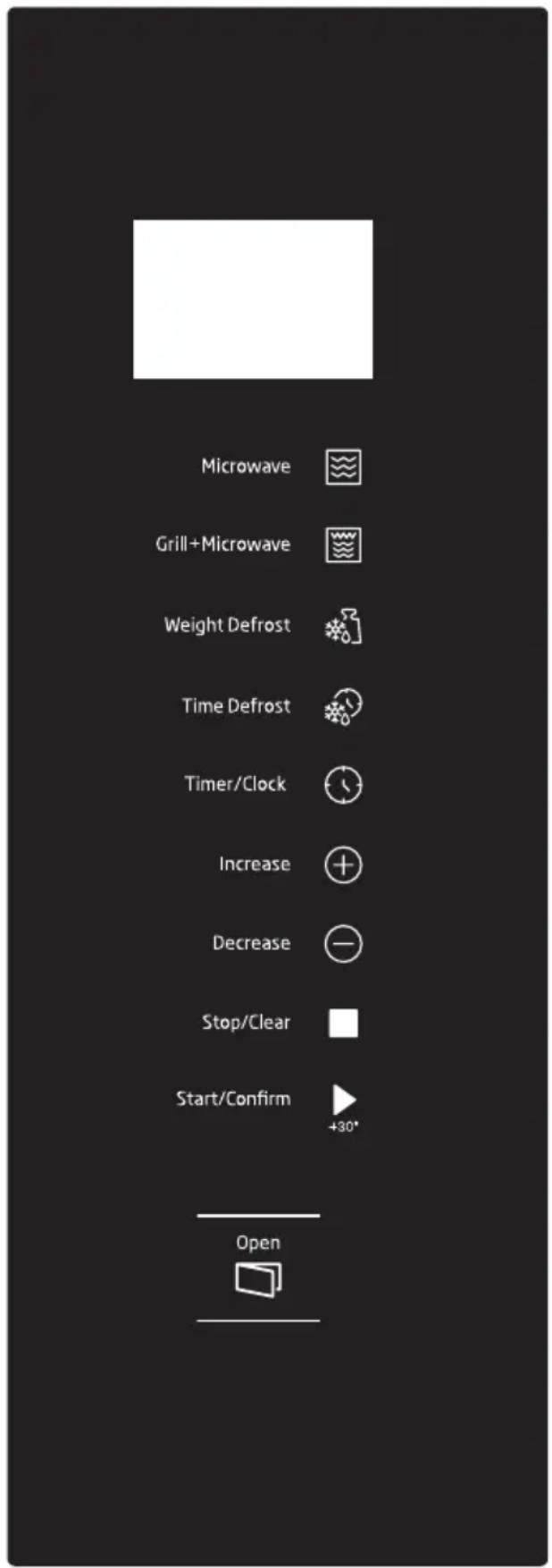
4.2 Clock setting
When the microwave oven is electrified, the oven will display "0:00", buzzer will ring once. The oven will enter to waiting state.
- Press "Timer/Clock" twice, the hour figures will flash;
- Press "+" or "-" to adjust the hour figures, the input time should be within 0--23.
- Press "Timer/Clock" to confirm, the minute figures will flash.
- Turn "+" or "-" to adjust the minute figures, the input time should be within 0--59.
- Press "Timer/Clock" to finish clock setting. ":" will flash. The current time will display.

If the clock is not set, it would not function when powered.
4.3 Microwave cooking
- Press the "Microwave" key once, and "P100" will display.
- Press "Microwave" repeatedly or press "+" or "-" to select the microwave power. "P100", "P80", "P50", "P30", "P10" will display in order.
- Press "Start/Confirm" to confirm setting.
- Press "+" or "-" to adjust the cooking time. (The maximum cooking time is 95 minutes)
- Press "Start/Confirm" to start cooking.

If the clock is not set, it will not work when powered.
4 Operation
The steps for setting the time with the "+" or "-" keys are as follows:
| Setting the duration Increment amount | |
| 0-1 minute 5 seconds | |
| 1-5 minutes 10 seconds | |
| 5-10 minutes 30 seconds | |
| 10-30 minutes 1 minute | |
| 30-95 minutes 5 minutes | |
Microwave power chart
| Display Microwave Power | |
| P100 High | |
| P80 Med.High | |
| P50 Med. | |
| P30 Me d.Low | |
| P10 Low | |
4.4 Grill or Combi. cooking
- Press "Grill+Microwave" once, the screen will display "G", and press "Grill+Microwave" repeatedly or press "+" or "-" to choose the power you want, and "G", "C-1" or "C-2" will display.
- Press "Start/Confirm" to confirm the power.
- Press the "+" or "-" keys to set the coo-king time between 0:05 and 95:00.
- Press "Start/Confirm" again to start cooking.

Example: If you want to use 55% microwave power and 45% grill power(C-1) to cook for 10 minutes, you can operate the oven as the following steps.
-
Press "Grill+Microwave" once, the screen displays "G".
-
Continue to press "Grill+Microwave" until the screen displays "C-1".
- Press "Start/Confirm" to confirm.
- Press "+" or "-" to adjust the cooking time until the oven displays "10:00".
- Press "Start/Confirm" to start cooking.
Combination power instructions:
| Program Display Microwave power | Grill power | ||
| Grill G %0 | %10 | 0 | |
| Combi.1 C-1 | %5 | 5 | %45 |
| Combi.2 C-2 | %36 | 6 | %64 |

If half the grill time passes, the oven sounds twice, and this is normal. In order to have a better effect of grilling food, you should turn the food over, close the door, and then press "Start/Confirm" to continue cooking. If no operation, the oven will continue working.
4.5 Defrost by weight
- Press "Weight Defrost" once, the screen will display "dEF1".
- Press "+" or "-" to select the food weight. The range of weight is 100-2000g.
- Press "Start/Confirm" key to start defrosting.
4 Operation

If half the defrost time passes, the oven sounds twice, and this is normal. In order to have a better effect of defrosting, you should turn the food over, close the door, and then press "Start/Confirm" to continue cooking. If no operation, the oven will continue working.
4.6 Defrost by time
- Press "Time Defrost" once, the screen will display "dEF2".
- Press "+" or "-" to select the cooking time. The maximum time is 95 minutes.
- Press "Start/Confirm" key to start defrosting.

If half the defrost time passes, the oven sounds twice, and this is normal. In order to have a better effect of defrosting, you should turn the food over, close the door, and then press "Start/Confirm" to continue cooking. If no operation, the oven will continue working.
4.7 Multi-Stage cooking
2 stages can be maximumly set. If one stages is defrosting, it should be put in the first stage automatically. The buzzer will ring once after each stage and the next stage will begin.

Auto menu and speedy coo-king cannot be set as one of the multi-stage.

Example: If you want to defrost the food for 5 minutes, then to cook with 80% microwave power for 7 minutes. The steps are as following.
- Press "Time Defrost" once, the screen will display "dEF2".
- Press "+" or "-" to adjust the defrost time of 5 minutes.
- Press "Microwave" once, the screen will display "P100".
- Press "Microwave" repeatedly to choose microwave power till "P80" displays
- Press "Start/Confirm" to confirm.
- Press "+" or "-" to adjust the cooking time of 7 minutes.
- Press "Start/Confirm" to start cooking.
4.8 Kitchen timer (counter)
Your oven is equipped with an automatic counter which is not linked with the oven functions and can be used separately at the kitchen ( it can be set to max. 95 minutes.)
- Press "Timer/Clock" once, the screen will display "00:00".
- Press "+" or "-" to enter the correct timer. (The maximum cooking time is 95 minutes)
- Press "Start/Confirm" to confirm setting.
- When the countdown from the entered time reaches to 00:00, the buzzer will ring for 5 times. If the time is set (24-hour system), current time will be displayed in LED screen.

Kitchen timer functions different than 24-hours system. Kitchen timer is just a timer.
4 Operation
4.9 Auto menu
- In waiting state, press "+" repeatedly to choose the menu.
- Press "Start/Confirm" to confirm the menu you choose.
- Press "+" or "-" to choose the food weight.
- Press "Start/Confirm" to start cooking.
The menu chart
| Display Menu Weight Power | |||
| A 1 Pizza | 200 g | C-2 | |
| 400 g | |||
| A 2 Meat | 250 g | 100%(Mic.)3 | |
| 450 g | |||
| A 3 | Vegetable | 200 g | 100%(Mic.)3 |
| 400 g | |||
| A 4 Pasta | 50 g (with 450g cold water) | 80%(Mic.) | |
| 100 g (with 800g cold water) | |||
| A 5 Potato | 200 g | 100%(Mic.)4 | |
| 600 g | |||
| A 6 Fish | 250 g | 80%(Mic.)35 | |
| 450 g | |||
| A 7 | Beverage | 1cup (about 120ml) | 100%(Mic.) |
| 2cups (about 240ml) | |||
| 3cups (about 360ml) | |||
| A 8 | Pop-corn | 50 g | 100%(Mic.) |
| 100 g |
4.10 Speedy cooking
- In waiting state, press "Start/Confirm" key to cook with 100% power level for 30 seconds. Each press on the same g key can increase 30 seconds. The maximum cooking time is 95 minutes.
- During the microwave, grill, combination cooking and the defrost by time process, press "Start/Confirm" to increase the cooking time.
- Under the states of auto menu and defrost by weight, cooking time cannot be increased by pressing "Start/Confirm".
- In waiting state, press “-” to choose the cooking time. After adjusting the cooking time, press “Start/Confirm” to start microwave cooking with 100% power lever.
4.11 Inquiring function
- In cooking states of microwave or grill and combination. Press "Microwave" or "Grill+Microwave", the current power will be displayed for 3 seconds.
- If the clock has been set, during cooking state, press "Timer/Clock" to check the current time. It will be displayed for 3 seconds.
4 Operation
4.12 Child lock
- Lock: In waiting state, press "Stop/Clear" for 3 seconds to enter the children-lock state and the current time will display if the time has been set, otherwise, the screen will display "[::]:".
- Lock quitting: In locked state, press "Stop/Clear" for 3 seconds, the lock is released.
4.13 Specification
- If the door is opened in the process of cooking, close the door and then press
"Start/Confirm" to continue cooking.
- Once the cooking programme has been set, "Start/Confirm" is not pressed in 1 minute. The current time will be displayed. The setting will be cancelled.
- The buzzer sounds once by efficient press, inefficient press will be no response.
4.14 Open the oven door
Press "Open the Cover" button, the oven door will open.
5 Cleaning and care
5.1 Cleaning and care

WARNING: Never use gasoline, solvent, abrasive cleaning agents, do not use harsh abrasive cleaners or sharp metal scrapers to clean the oven door glass since they can scratch the surface, which may result in shattering of the glass.
WARNING: Never immerse the appliance or its power cable in water or in any other liquid.
- Turn off the oven and remove the power plug from the wall socket before cleaning.
- Wait for the appliance to completely cool down.
- Keep the inside of the oven clean. When food splatters or spilled liquids adhere to oven walls, wipe with a damp cloth. Mild detergent may be used if the oven gets very dirty. Avoid the use of spray and other harsh cleaners as they may stain, streak or dull the door surface.
5 Cleaning and care
- The outside surfaces should be cleaned with a damp cloth. To prevent damage to the operating parts inside the oven, water should not be allowed to seep into the ventilation openings.
- Wipe the both sides of the door and window, the door seals and adjacent parts frequently with a damp cloth to remove any spills or spatters. Do not use abrasive cleaner.
- A steam cleaner is not be used.
- Do not allow the control panel to become wet. Clean with a soft, damp cloth. When cleaning the control panel, leave oven door open to prevent oven from accidentally turning on.
- If steam accumulates inside or around the outside of the oven door, wipe with a soft cloth. This may occur when the microwave oven is operated under high humidity condition. And it is normal.
- It is occasionally necessary to remove the glass tray for cleaning. Wash the tray in warm sudsy water or in a dishwasher.
- The roller ring and oven floor should be cleaned regularly to avoid excessive noise. Simply wipe the bottom surface of the oven with mild detergent. The roller ring may be washed in mild sudsy water or dishwasher. When removing the roller ring from cavity floor for cleaning, be sure to replace in the proper position.
- Remove odors from your oven by combining a cup of water with the juice and skin of one lemon in a deep microwaveable bowl, microwave for 5 minutes. Wipe thoroughly and dry with a soft cloth.
- When it becomes necessary to replace the oven light, please consult a dealer to have it replaced.
- The oven should be cleaned regularly and any food deposits removed. Failure to maintain the oven in a clean condition could lead to deterioration of the surface that could adversely affect the life of the appliance and possibly result in a hazardous situation.
- Please do not dispose this appliance into the domestic rubbish bin; it should be disposed to the particular disposal center provided by the municipalities.
- When the microwave oven with grill function is first used, it may produce slight smoke and smell. This is a normal phenomenon because the oven is made of a steel plate coated with lubricating oil, and the new oven will produce fumes and odor generated by burning the lubricating oil. This phenomenon will disappear after a period of using.
5.2 Storage
- If you do not intend to use the appliance for a long time, please store it carefully.
- Please make sure that the appliance is unplugged, cooled down and totally dry.
- Store the appliance in a cool and dry place.
- Keep the appliance out of the reach of children.
5 Cleaning and care
5.3 Handling and transportation
- During handling and transportation, carry the appliance in its original packaging. The packaging of the appliance protects it against physical damages.
- Do not place heavy loads on the appliance or the packaging. The appliance may be damaged.
- Dropping the appliance will render it non-operational or cause permanent damage.
6 Troubleshooting
| Problem Possible Reason Solution | ||
| Oven cannot be started. 1) | Power cable is not plugged in properly. | Unplug. Then plug again after 10 seconds. |
| 2) Fuse is blown or circuit breaker is activated. | Replace fuse or reset circuit breaker (repaired by professional personnel of our company). | |
| 3) Trouble with outlet. Test the | outlet with other electrical appliances. | |
| Oven does not heat. 4) | Door is not closed properly. Close | the door properly. |
| If none of the above rectifies the situation, then contact a qualified technician. Do not try to adjust or repair the oven yourself. | ||
Kontroller og dele
4 Betjening
4.1 Styrepanel 4.2 Urindstilling
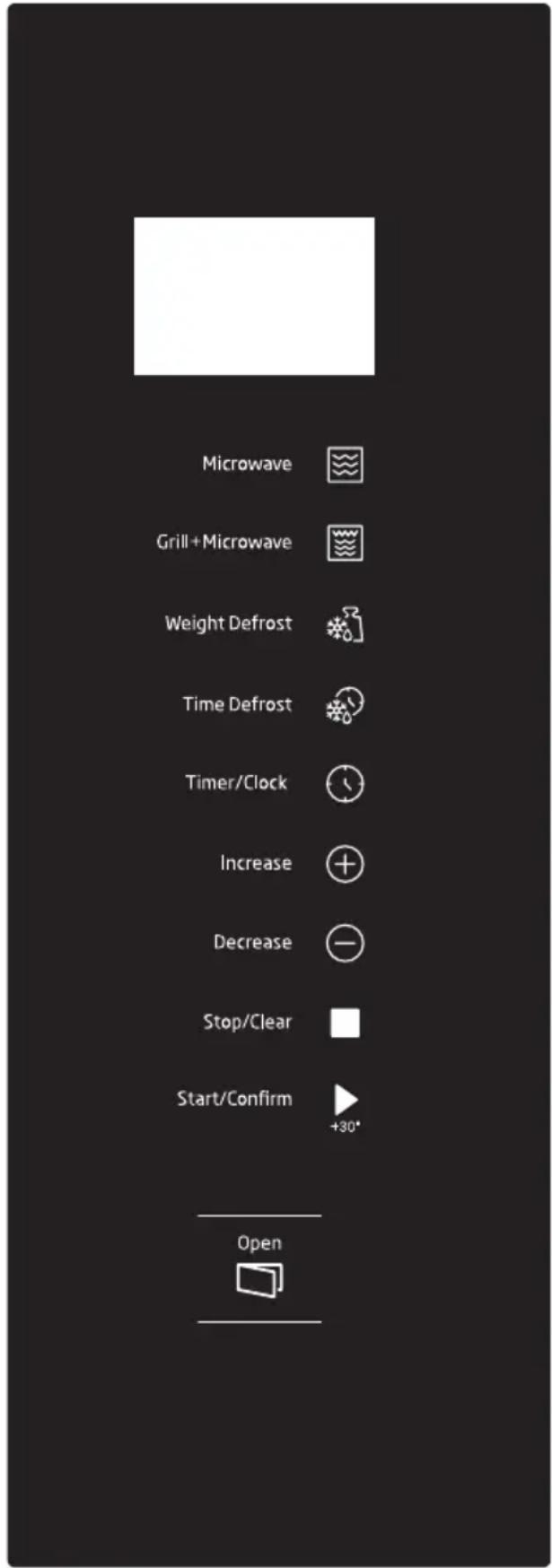
Kontroll och delar
4 Användning
Kontroller og deler
- Kontrollpanel
- Dreiehjulstøtte
- Dreieshjulskaft
- Glassfat
- Ovnsvindu
- Grillrist (kun til bruk med grillfunk- sjon, og skal plasseres på glassfa- tet)
2.2 Tekniske data
4 Bruk
4.1 Kontrollpanel 4.2 Klokkeinnstilling
4 Käyttö
Service: Nationwide service in Sweden
Visit www.cylinda.se Call 0771-25 25 00
Declare: Model code, Serial number, Purchase date, Problem description, Name and address, Phone number
Contact us: www.cylinda.se
- CONTENTS
- Please read this manual first!
- Meanings of the symbols
- Important safety and environmental instructions
- Important Safety Instructions Read Carefully And Keep For Future Reference
- Safety warnings
- Compliance with the WEEE Directive and Disposing of the Waste Product:
- Compliance with RoHS Directive
- Package information
- Your microwave oven
- Overview
- Controls and parts
- Technical data
- Turntable installation
- Installation and connection
- Installation and connection
- Operation
- Clock setting
- Microwave cooking
- Grill or Combi. cooking
- Defrost by weight
- Defrost by time
- Multi-Stage cooking
- Kitchen timer (counter)
- Auto menu
- Speedy cooking
- Inquiring function
- Child lock
- Specification
- Open the oven door
- Cleaning and care
- Cleaning and care
- Storage
- Handling and transportation
- Troubleshooting
- Kontroller og dele
- Betjening
- Styrepanel 4.2 Urindstilling
- Kontroll och delar
- Användning
- Kontroller og deler
- Tekniske data
- Bruk
- Kontrollpanel 4.2 Klokkeinnstilling
- Käyttö
Brand : Cylinda
Model : IM5341LV
Category : Microwave