TMDTA 25 - Compressor TOOLMATE - Free user manual and instructions
Find the device manual for free TMDTA 25 TOOLMATE in PDF.


| Brand | TOOLMATE |
| Model | TMDTA 25 |
| Product Type | Compressor |
| Power Supply | 230 V ~ 50 Hz |
| Motor Power | 1500 W |
| Tank Capacity | 25 L |
| Maximum Pressure | 8 bar |
| Displacement | 200 L/min |
| Free Air Delivery | 120 L/min |
| Noise Level | 78 dB(A) |
| Dimensions (L x W x H) | 600 x 300 x 600 mm |
| Weight | 25 kg |
| Protection Class | IP20 |
| Cooling Type | Air-cooled |
| Lubrication | Oil-free (maintenance-free) |
| Safety Valve | Yes, automatic |
| Pressure Gauge | Dual gauge (tank and output) |
| Regulator | Adjustable output pressure |
| Wheel Kit | Included for portability |
| Handle | Foldable handle |
| Certification | CE, RoHS |
| Included Accessories | Air hose, blow gun, tire inflator, spray gun |
Frequently Asked Questions - TMDTA 25 TOOLMATE
User questions about TMDTA 25 TOOLMATE
0 question about this device. Answer the ones you know or ask your own.
Ask a new question about this device
Download the instructions for your Compressor in PDF format for free! Find your manual TMDTA 25 - TOOLMATE and take your electronic device back in hand. On this page are published all the documents necessary for the use of your device. TMDTA 25 by TOOLMATE.
USER MANUAL TMDTA 25 TOOLMATE
Important: Please read this user manual before operating the
product.
natural_image
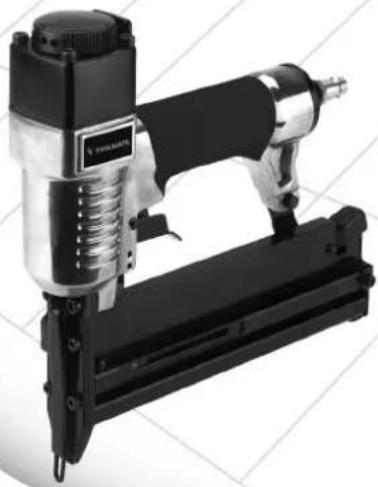
Exterior view of a PTA540 N180 electric shock absorer (no text or symbols visible)CE
1

"Caution - Read the operating instructions to reduce the risk of inquiry"

Wear ear-muffs.
The impact of noise can cause damage to hearing.

Wear safety goggles.
Sparks generated during working or splinters, chips and dust emitted by the device can cause loss of sight.
UK
⚠️ Important!
When using equipment, a few safety precautions must be observed to avoid injuries and damage. Please read the complete operating manual with due care. Keep this manual in a safe place, so that the information is available at all times. If you give the equipment to any other person, give them these operating instructions as well.
We accept no liability for damage or accidents which arise due to non-observance of these instructions and the safety information.
1. Safety regulations
CAUTION!
Read all safety regulations and instructions.
Any errors made in following the safety regulations and instructions may result in an electric shock, fire and/or serious injury.
Keep all safety regulations and instructions in a safe place for future use.
Take suitable precautions to protect yourself and your environment from potential hazards.
Take suitable precautions to protect yourself and your environment from potential hazards.
●Never put the stapler to any use other than that intended.
- Keep pneumatic tools safe from children.
●Always concentrate while you work. Do not work if you are tired.
- Use only a quick-release coupling to connect up the air supply.
- It is imperative to use a pressure reducer to set the working pressure.
●Never use oxygen or combustible gases as an energy source.
●Always disconnect the tool from the air supply before carrying out any repairs or maintenance work.
●Use only original replacement parts.
●Wear the necessary protective clothing, particularly goggles and safety gloves, when working with the stapler.
●Do not exceed a maximum pressure of 6 bar.
●Never point the stapler at any persons when it is connected up and loaded.
- Do not remove any protective devices or contact guards.
●Never leave the tool unattended when loaded.
●Never use defective tools.
●Use only original Einhell staples/nails.
- When the tool is disconnected it must not be under any pressure.
●Never use the tool without staples.
●Never point an operational stapler directly at yourself or at any other person.
●Whilst working with the stapler, hold it in such a way that your head and body cannot be injured in case of kickback caused by disruption of the power supply or by hard areas of the workpiece.
●Never trigger the stapler into the open air. This is important to avoid the hazards of free-flying staples and of overloading the appliance.
●For the purposes of transportation, the stapler must be disconnected from the compressed-air system, especially if you are using a ladder or are adopting an unusual posture.
●In the workplace, carry the stapler only by its handle and ensure that the trigger is inactivated.
●Make allowance for the workplace conditions. Staples can potentially go straight through thin workpieces or they can slide off workpieces when working on corners and edges, thus putting persons at risk.
●For you own personal safety, always use suitable protective equipment such as, for example, hearing and eye protection.
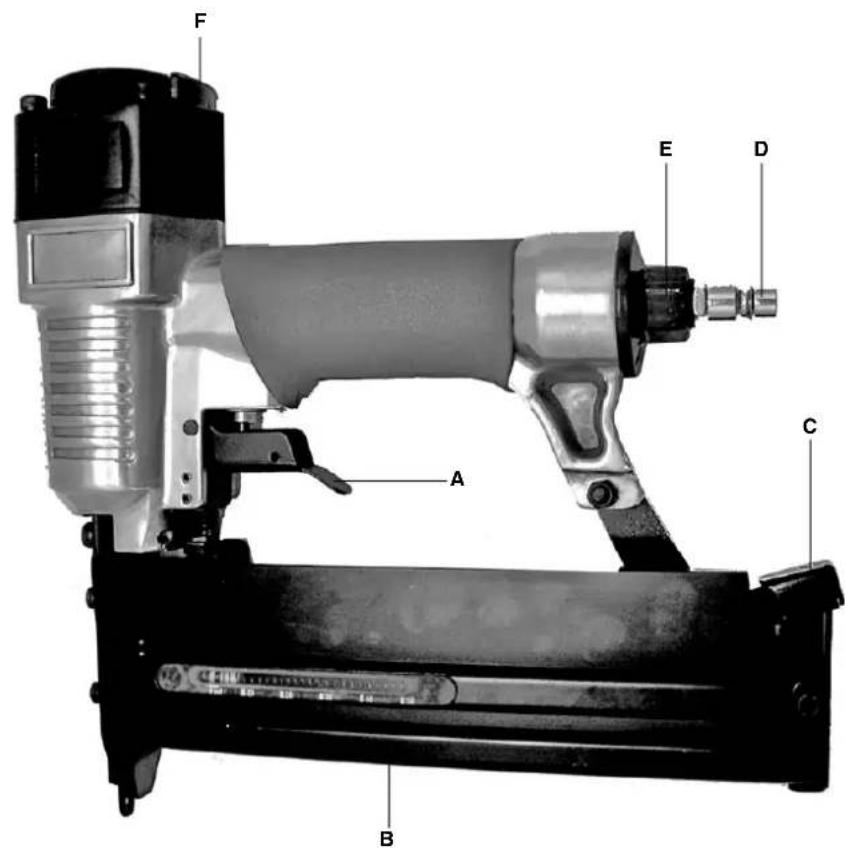
2. Layout (Fig. 1)
A trigger lever
B magazine
C magazine lever
D plug-in nipple for the air supply
E air connection
F Swivel air-outlet
3. Proper use
The stapler is a pneumatic tool for universal service.
The exhaust air leaves the housing to the front.
The equipment is to be used only for its prescribed purpose. Any other use is deemed to be a case of misuse. The user / operator and not the manufacturer will be liable for any damage or injuries of any kind caused as a result of this.
Please note that our equipment has not been designed for use in commercial, trade or industrial applications. Our warranty will be voided if the machine is used in commercial, trade or industrial businesses or for equivalent purposes.
Repairs and maintenance work are to be carried out only by authorized specialist workshops.
Please note!
The power of the tool will be reduced if you use a hose that has too small an inner diameter or which is too long.
4. Technical data
Permissible working pressure max. 7 bar
| Air consumption approx. ca. 0.11 L/blast | |
| Staple width 5.7 mm | |
| Staple length 13-40 mm | |
| Nail length 10-50 mm | |
| Recommended hose diameter 9 mm ∅ | |
| Sound pressure level L_pA | 80.8 dB(A) |
| Sound power level L_WA | 93.8 dB(A) |
| Vibration a_w | ≤ 2.5 m/s^2 |
Air quality
cleaned and oiled
Air supply
via conditioning unit with filter pressure reducer and mist oiler
Compressor capacity
approx. 250 l/min. equivalent to a motor rating of 2.2 kW
Work settings
6 bar working pressure set at the pressure reducer or filter pressure reducer
Please note:
When working with the stapler, be sure to wear the necessary protective clothing, particularly goggles.
Observe the safety regulations.
5. Putting into operation
Screw the supplied plug-in nipple into the air connection. To fill the magazine, press on the magazine lever and pull back the lower magazine shaft as far as the stop. Insert the staples/nails into the magazine rail from above. Do not insert more than one complete stick of staples/nails or the magazine will be too full and can no longer be
closed. After connecting the stapler to the air supply, place it in stapling/nailing position and pull the trigger lever. The trigger lever has to be released after each shot.
Automatic operation: If you keep the trigger lever pressed, the staples/nails will be shot automatically when the stapler is placed against the workpiece.
Be careful not to staple twice in the same place.
Caution!
If a staple/nail becomes stuck in the piston shaft, first disconnect the stapler and make sure it is not under any pressure before you remove the cover plate.
With the magazine open and the rest of the staples/nails removed you can then take out the jammed staple. Clean the shaft if necessary and close again.
6. Maintenance and cleaning
Observance of the following maintenance instructions will ensure that this quality tool gives you years of troublefree service.
Before starting to work, always check that the magazine is secure. Clean the tool thoroughly when you are finished with your work.
Regular lubrication is vital for the long-term, reliable operation of your stapler. Use only special tool oil for this purpose.
You can choose from the following options for lubricating the tool:
6.1 By mist oiler
A complete conditioning unit includes a mist oiler and is fitted to the compressor.
6.2 By hand
If your air system has neither a conditioning unit nor a line oiler, you must feed 3-5 drops of special tool oil into the air connection each time before you use your stapler. If the pneumatic tool has not been used for several days, you must feed 5-10 drops of oil into the air connection before you switch on.
Keep your pneumatic tool in dry rooms only.
UK
7. The warranty does not cover:
●Wearing parts
●Damage caused by an unacceptable level of working pressure.
●Damage caused by unconditioned compressed air.
●Damage caused by improper use or unauthorized tampering.
8. Cleaning, maintenance and ordering of spare parts
8.1 Cleaning
- Keep all safety devices, air vents and the motor housing free of dirt and dust as far as possible. Wipe the equipment with a clean cloth or blow it with compressed air at low pressure.
●We recommend that you clean the device immediately each time you have finished using it.
●Clean the equipment regularly with a moist cloth and some soft soap. Do not use cleaning agents or solvents; these could attack the plastic parts of the equipment. Ensure that no water can seep into the device.
8.2 Maintenance
There are no parts inside the equipment which require additional maintenance.
8.3 Ordering replacement parts:
Please quote the following data when ordering replacement parts:
●Type of machine
●Article number of the machine
●Identification number of the machine
●Replacement part number of the part required For our latest prices and information please go to www.isc-gmbh.info
9. Disposal and recycling
The unit is supplied in packaging to prevent its being damaged in transit. This packaging is raw material and can therefore be reused or can be returned to the raw material system.
The unit and its accessories are made of various types of material, such as metal and plastic. Defective components must be disposed of as special waste. Ask your dealer or your local council.
Declaration of Conformity - Overensstemmelseserklæring –Försäkran om överensstämmelse – Samsvarserklæring – Vaatimustenmukaisuusvakuutus
Signature – Underskriver - Allekirjoitus: Ole Mikael Jensen Group Vice President– Direktør
DK N
The reprinting or reproduction by any other means, in whole or in part, of documentation and papers accompanying products is permitted only with the express consent of ISC GmbH.
Service contact:
Danish trading A/S
Bergsøesvej 36
8600 Silkeborg Denmark
Tlf: +45 87 20 12 00
Fax: +45 87 20 12 03
@Technical changes subject to change

DK N GARANTIBEVIS
Kære kunde!
All of our products undergo strict quality checks to ensure that they reach you in perfect condition. In the unlikely event that your device develops a fault, please contact our service department at the address shown on this guarantee card. Of course, if you would prefer to call us then we are also happy to offer our assistance under the service number printed below. Please note the following terms under which guarantee claims can be made:
- These guarantee terms cover additional guarantee rights and do not affect your statutory warranty rights. We do not charge you for this guarantee.
- Our guarantee only covers problems caused by material or manufacturing defects, and it is restricted to the rectification of these defects or replacement of the device. Please note that our devices have not been designed for use in commercial, trade or industrial applications. Consequently, the guarantee is invalidated if the equipment is used in commercial, trade or industrial applications or for other equivalent activities. The following are also excluded from our guarantee: compensation for transport damage, damage caused by failure to comply with the installation/assembly instructions or damage caused by unprofessional installation, failure to comply with the operating instructions (e.g. connection to the wrong mains voltage or current type), misuse or inappropriate use (such as overloading of the device or use of non-approved tools or accessories), failure to comply with the maintenance and safety regulations, ingress of foreign bodies into the device (e.g. sand, stones or dust), effects of force or external influences (e.g. damage caused by the device being dropped) and normal wear resulting from proper operation of the device. This applies in particular to rechargeable batteries for which we nevertheless issue a guarantee period of 12 months.
The guarantee is rendered null and void if any attempt is made to tamper with the device.
-
The guarantee is valid for a period of 5 years starting from the purchase date of the device. Guarantee claims should be submitted before the end of the guarantee period within two weeks of the defect being noticed. No guarantee claims will be accepted after the end of the guarantee period. The original guarantee period remains applicable to the device even if repairs are carried out or parts are replaced. In such cases, the work performed or parts fitted will not result in an extension of the guarantee period, and no new guarantee will become active for the work performed or parts fitted. This also applies when an on-site service is used.
-
In order to assert your guarantee claim, please send your defective device postage-free to the address shown below. Please enclose either the original or a copy of your sales receipt or another dated proof of purchase. Please keep your sales receipt in a safe place, as it is your proof of purchase. It would help us if you could describe the nature of the problem in as much detail as possible. If the defect is covered by our guarantee then your device will either be repaired immediately and returned to you, or we will send you a new device.
Of course, we are also happy offer a chargeable repair service for any defects which are not covered by the scope of this guarantee or for units which are no longer covered. To take advantage of this service, please send the device to our service address.
TOOLMATE is a trademark belonging to DT Group A/S © 2004 DT Group A/S. No part of this userguide may be reproduced in any form or by any means without written permission from DT Group A/S. All rights reserved.