
VC78 - Fan Bimar - Free user manual and instructions
Find the device manual for free VC78 Bimar in PDF.


| Product Type | Tower Fan |
| Model | VC78 (YF-TO3214) |
| Brand | Bimar |
| Power Supply | 220-240 V ~ 50/60 Hz |
| Power Consumption | Approx. 50 W |
| Number of Speeds | 3 (Low, Medium, High) |
| Modes | Normal, Natural, Sleep |
| Timer | Up to 7.5 hours |
| Oscillation | Horizontal (left-right) |
| Remote Control | Yes, with CR2025 battery (not included) |
| Control Panel | Touch buttons with LED display |
| Assembly Required | Yes, base attachment |
| Dimensions (approx.) | Height 80 cm, Diameter 30 cm |
| Weight (approx.) | 4.5 kg |
| Material | Plastic body |
| Safety Features | Overheat protection, tip-over switch |
| Cleaning | Wipe with damp cloth; do not immerse |
| Warranty | 24 months (conditions apply) |
| Compliance | Class II, tropical climate rated |
Frequently Asked Questions - VC78 Bimar
User questions about VC78 Bimar
0 question about this device. Answer the ones you know or ask your own.
Ask a new question about this device
Download the instructions for your Fan in PDF format for free! Find your manual VC78 - Bimar and take your electronic device back in hand. On this page are published all the documents necessary for the use of your device. VC78 by Bimar.
USER MANUAL VC78 Bimar
natural_image
Line drawing of a tall vertical tower with horizontal slats and grid-like panels (no text or symbols)VENTILATORE A COLONNA TOWER FAN
type VC78 (mod. YF-TO3214)


natural_image
Close-up of a mechanical component with a metallic rod inserted, no visible text or symbols

Please read these instructions carefully before using the appliance, and instruct other persons using it, too, when necessary. Keep booklet Handy for further use.
If when reading this instructions manual certain parts should remain difficult to understand, or if there is any confusion, contact the company indicated on the last page before using the product.

This symbol show: the appliance is class II equipment, for which the power cord plug is without of the pole to the ground.

This symbol highlights instructions and precautions for safe use. Warnings and appliance installation, use, cleaning and maintenance procedures may be updated slightly from those described in this manual; for further details, please consult the updated on-line manual at www.bimaritaly.it.
T
This symbol shows that tower fan is suitable for tropical climate for room temperature about 40^ C.
GENERAL NOTICES
- This device is intended for home use only, to ventilate rooms, and in the manner described in this manual: do not use it for any other purpose.
Attention: the fan can only be used if complete with the support base (front and rear shell).
- Any other use is to be considered inappropriate and therefore dangerous. The manufacturer cannot be held responsible for eventual damage caused by inappropriate, improper or irresponsible use and/or for repairs made to the product by unauthorised personnel.
This appliance is intended to be used in household and similar applications such as:
- staff kitchen in shops, offices and other working environments;
- by clients in hotels, motels and other residential type environments
- bed and breakfast type environments, farm houses
- Do not insert any tool, or your fingers, into the grille protecting the blades.
- This appliance can be used by children aged from 8 years and above and persons with reduced physical, sensory or mental capabilities or lack of experience and knowledge if they have been given supervision or instruction concerning use of the appliance in a safe way and if they understand the hazards involved. Children shall not play with the appliance. Cleaning and user maintenance shall not be made by children without supervision.
- The appliance must be kept out of children's reach.
- Keep the battery out of reach of children.
- Attention: when using electric appliances, the basic safety precautions must always be observed to avoid risks of fire, electric shocks and physical injury.
- Always unplug the appliance before you assemble, disassemble or clean the appliance.
- Do not use the appliance if it is not operating correctly or seems damaged; if in doubt, contact professionally qualified personnel.
- Make sure that the appliance is working correctly: if not, turn the appliance off and have it checked by professionally qualified personnel.
- Check that the fan does not come into contact with water or other liquids. If it is accidentally wet or immersed in a liquid, first disconnect the power supply by turning off the control panel switch, and only then remove the plug from the power socket. Dry both the plug and the power socket carefully before reactivating the power socket. Reconnect the plug to the power socket and then use the appliance. If in doubt, call in qualified staff.
- Do not move the appliance when it is operating.
- Unplug the appliance when not in use.
- Do not leave the device exposed to the weather (sun, rain, etc.).
-
Do not touch the appliance with wet hands or feet.
-
Do not pull on the cord to move the appliance.
- Do not pull on the cord to disconnect the plug from the socket.
- If the supply cord is damaged, it must be replaced by the manufacturer, its service agent or similarly qualified persons in order to avoid a hazard.
- Do not use the appliance with a timer or a programmer or with a system that can switch on the appliance automatically, to avoid risk of fire, since a fire risk exists if the appliance is covered or positioned incorrectly.
- If the appliance breaks down or there is a malfunction, switch off the appliance and have it checked by qualified personnel; repairs carried out by unauthorised personnel may be dangerous and invalidate the guarantee.
INSTALLATION
- After removing the packing materials, check the integrity of the appliance; if you are unsure, do not use it and ask for qualified professional help. The packing materials (plastic bags, polystyrene foam, nails, etc.) must be kept out the reach of children because they are potential sources of danger.
All packaging elements must be disposed of according to their raw material (see the symbol stamped on each one) and according to the provisions of their municipality. The bag containing the base or screws, which is unmarked due to its small size, therefore you have to follow the procedures for the disposal of their municipality. - Before connecting the appliance, check that the voltage values shown on the data plate correspond to those of the electricity supply network. In the event of incompatibility between the electric outlet and the plug of the appliance, have the outlet replaced with another more suitable type by professionally qualified personnel, who will make sure that the section of the wires of the outlet is appropriate for the absorbed power of the heater. In general, the use of adapters or extension cords is not recommended; if their use is indispensable, they must conform to existing safety standards and their current capacity (amperes) must not be less than the maximum of the appliance.
- The power socket must be easy to reach so the plug can be removed quickly in case of emergency.
- Before each use, check that the equipment is in good condition, and that the power cable is not damaged: if in doubt consult a qualified professional.
-
Place the appliance far from
-
Heat sources (e.g. flames, gas stoves etc.)
- container of liquids (e.g.sinks etc) to avoid any spray or the appliance falling into it (minimum distance of 2 meters)
- fabrics (curtains, etc.) or unstable materials that could obstruct the air intake grille; make sure that the front is free of unstable materials (dust, etc.).
- The surface on which the appliance is placed must be stable, level (otherwise the unit may fall over) and smooth. Do not place the fan on shelves. Do not hang the unit on the wall.
- This appliance is not intended to be operated by means of an external timer or a separate remote control system, to avoid the risk of fire in case the device is covered or is positioned incorrectly.
- Do not place the wall fan into the room to avoid the back-flow of gases from the open flue of gas or other fuel-burning appliances (for duct and partition fans).
- This device is NOT suitable to use it in an explosive environment (in the presence of flammable substances such as gas, vapor, mist or dust, in atmospheric conditions when, after ignition, the combustion is spread in the air).
- Do not connect to thermal control systems or a programmer or timer or other device that can automatically turn on the unit, thus avoiding the risk of damage to people, animals or property.
ASSEMBLY
Attention: always unplug the appliance before you assemble.
To assemble it, refer to figures.
- Unscrew the ring nut on counterclockwise bottom of the body, if the nut is screwed.
- Insert the rear shell (that with cable clamp) on the bottom in manner that the hole coincides with the protrusion.
- Couple the rear shell to the front, by exerting some pressure all the way down, making sure the clips are firmly locked.
- Plug the power cord through the hole. Plug the power cord through the guidance of the shell. Secure the set by turning clockwise the ring nut.
At the end of the operation, check that the support base is firmly coupled and attached to the motor body.


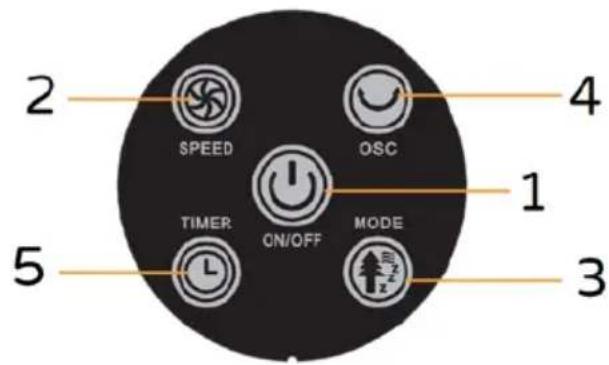
- On/off button
- Speed button
- Mode button: normal, natural, sleep
- Swing functionbutton
- Timer button
Remote control
USE
Before each use, verify that the unit is in good condition, the electric cord is not damaged, if the power cord is damaged, it must be replaced by the manufacturer or a competent qualified electrician or a person with similar qualifications, in order to avoid any risk.
The functions of this appliance can be started using they keyboard of the control panel or the remote control which has to be pointed in the correct direction (at a max distance of 4m).
Do not allow children to insert and replace battery.
Insert n.1 battery type: CR2025: 3V of the remote control (not included in the package), move the plastic tab to the right ( PUSH) and simultaneously remove the battery slot ( OPEN). Insert the battery (following the right polarity: +/-) and close the battery slot.

natural_image
Close-up of a black plastic clip attached to a surface, with a metallic rod inserted (no visible text or symbols)

Should the remote control not be used for long periods of time remove the battery.
Plug the fan into the power outlet, you will hear a "beep" that indicates that the appliance is in stand-by mode.
Running the fan:
1) To turn the fan on, press the "ON/OFF ⏻" (1) button on the control panel or the remote control.
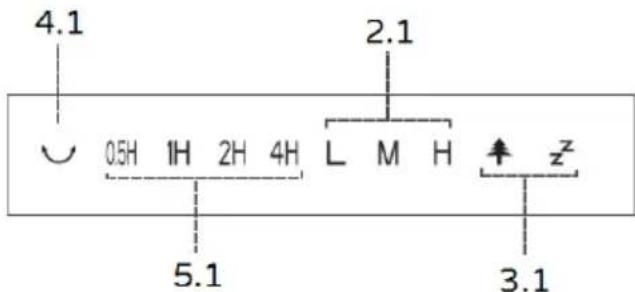
2) The fan starts at the lowest speed. On the display of the control panel, an "L" icon will light up, and other selected functions will display.
3) In order to select the desired speed, press the "SPEED (2) repeatedly on the control panel or the remote control (minimum, medium or maximum).
“L”= minimum speed “M”= medium speed “H”= maximum speed
Timer: This function allows you to set the time of operation, after which the unit will stop automatically.
To set the operating time, press the “TIMER Ⓤ” (5) button on the remote or the control panel repeatedly: each press of the button changes the time set, and the selected time appears on the display (0,5 hour - 1 hour – 1,5 hours-2 hours, etc...): the maximum operating time is 7.5 hours. To disable the timer, set the maximum time, then press the button again and the corresponding indicator lights will turn off.
Mode :the fan can work both at a constant speed “SPEED ” (minimum, medium and max), as well as at two different speeds that are intermittent: “Sleep” and “Natural”.
To activate "Natural" mode, press the “Z” (3) button until “↑” appears on the display: speeds are random and cyclic. See images with specified time and speed (minimum / medium / maximum) during each cycle.

line
| Panel | X (Tempo/Time (s)) | Y (Velocità/Speed) | |-------|---------------------|---------------------| | 1 | 0 | 1 | | 1 | 1 | 1 | | 1 | 2 | 1 | | 1 | 3 | 1 | | 1 | 4 | 1 | | 1 | 5 | 1 | | 1 | 6 | 1 | | 1 | 7 | 1 | | 1 | 8 | 1 | | 1 | 9 | 1 | | 1 | 10 | 1 | | 1 | 11 | 1 | | 1 | 12 | 1 | | 1 | 13 | 1 | | 1 | 14 | 1 | | 1 | 15 | 1 | | 1 | 16 | 1 | | 1 | 17 | 1 | | 1 | 18 | 0 | | 2 | 0 | 1 | | 2 | 1 | 2 | | 2 | 2 | 2 | | 2 | 3 | 2 | | 2 | 4 | 2 | | 2 | 5 | 2 | | 2 | 6 | 2 | | 2 | 7 | 2 | | 2 | 8 | 2 | | 2 | 9 | 2 | | 2 | 10 | 2 | | 2 | 11 | 2 | | 2 | 12 | 2 | | 2 | 13 | 2 | | 2 | 14 | 2 | | 2 | 15 | 2 | | 2 | 16 | 2 | | 2 | 17 | 2 | | 2 | 18 | 0 | | 3 | 0 | 2 | | 3 | 1 | 2 | | 3 | 2 | 2 | | 3 | 3 | 2 | | 3 | 4 | 2 | | 3 | 5 | 2 | | 3 | 6 | 2 | | 3 | 7 | 2 | | 3 | 8 | 2 | | 3 | 9 | 2 | | 3 | 10 | 2 | | 3 | 11 | 2 | | 3 | 12 | 2 | | 3 | 13 | 2 | | 3 | 14 | 2 | | 3 | 15 | 2 | | 3 | 16 | 2 | | 3 | 17 | 2 | | 3 | 18 | -1 | | ... | ... | ... | | ... | ... | ... | | ... | ... | ... | | ... | ... | ... | | ... | ... | ... | | ... | ... | ... | | ... | ... | ... | | ... | ... | ... | | ... | ... | ... | | ... | ... | ... | | ... | ... | ... (with label "Velocità/Speed" in the chart) | | ... | ... | ... | | ... | ... | ... | | ... | ... | ... | | ... | ... | ... | | ... | ... | ... | | ... | ... | ... | | ... | ... | ... | | ... | ... | ... | | ... | ... | ... | | ... | ... | ... | | ... | ... | ... | | ... | ... | ... | | ... | ... | ... | | ... | ... | ... | | ... | ... | ... | | ... | ... | ... | | ... | ... | ... | | ... | ... | ... | | ... | ... | ... | | ... | ... | ... (with label "Velocità/Speed" in the chart) | | ... | ... | ... | | ... | ... | ... | | ... | ... | ... | | ... | ... | ... | | ... | ... | ... | | ... | ... | ... | | ... | ... | ... | | ... | ... | ... | | ... | ... | ... | | ... | ... | ... | | ... | ... | ... | | ... | ... | ... | | ... | ... | ... | | ... | ... | ... | | ... | ... | ... | | ... | ... | ... | | ... | ... | ... | | ... | ... | ... | | ... | ... | ... | | ... | ... | ... (with label "Velocità/Speed" in the chart) | | .... (with label "Velocità/Speed" in the chart) ) [Line Chart] ] [Line Chart] [Line Chart] [Line Chart] [Line Chart] [Line Chart] [Line Chart] [Line Chart] ] [Line Chart] [Line Chart] [Line Chart] [Line Chart] [Line Chart] ] [Line Chart] [Line Chart] [Line Chart] [Line Chart] [Line Chart] [Line Chart] ] [Line Chart] [Line Chart] [Line Chart] [Line Chart] [Line Chart] [Line Chart] [Line Chart] ] [Line Chart] [Line Chart] [Line Chart] [Line Chart] [Line Chart] [Line Chart] [Line Chart] [Line Chart] ] [Line Chart] [Line Chart] [Line Chart] [Line Chart] [Line Chart] [Line Chart] [Line Chart] [Line Chart] ] [Line Chart] [Line Chart] [Line Chart] [Line Chart] [...]To activate “Sleep” mode, press button (3) once more until “ Z ” appears on the display: this mode reduces ventilation speed from one speed to the lower speed every half hour. The cycles are:
- Maximum speed (H) set: the fan will run at maximum speed for 30 minutes, then at medium speed for 30 minutes and then will switch to low speed until the unit is turned off manually or by the timer which has been previously set.
- Average speed (M) set: the fan runs at medium speed for 30 minutes, it changes to minimum speed for 30 minutes.
- Minimum speed (L) set: the fan runs at minimum speed

line
| Tempo/Time (min) | Velocità/Speed | | ---------------- | -------------- | | 0 | 3 | | 30 | 2 | | 60 | 1 | | 210 | 1 |To activate the constant speed mode, press the button again until the three speed icon appears on the display: "L" or "M" or "H".
Horizontal oscillation (right-left): this is done by pressing button "OSC 😊" on the remote control or the keypad. To stop the movement, press button (4) once again.
To turn the fan off press the "button" button on the remote control or the control panel, then unplug the plug from the mains.
If the appliance is not being used for long periods of time, remove the plug from the plug point.
CLEANING AND MAINTENANCE
Attention: before normal cleaning, remove the plug from the socket.
- Clean the body with soft, slightly damp, cloth; do not use abrasive or corrosive products.
- Do not immerse any part of the fan in water or other liquid: if this should happen, do not put your hand in the liquid, but first remove the plug from the socket. Carefully dry the appliance and make sure that all the electrical parts are dry: in the case of doubt, ask for professionally qualified help.
- It is essential that the motor's air holes be kept from dust and lint.
- If the fan will not be used for long periods, it must be protected from dust and humidity; we recommend storing it in its original packaging.
- Should you decide not to use the appliance any more, we recommend making it inoperative by cutting the power cord (after making sure you have disconnected the plug from the socket) and make dangerous parts harmless if children are allowed to play with them.
BATTERY - Remove the battery from the remote control before its disposal. Do not dispose the battery with domestic waste. The battery must be disposed of in the appropriate containers or in the specific collecting centre. Suitable segregated collection helps prevent damage to the environment and to human health. To remove battery, refer to Instructions for use.

IMPORTANT INFORMATION FOR CORRECT DISPOSAL OF THE PRODUCT IN ACCORDANCE WITH EC DIRECTIVE 2011/65/EC.
At the end of its working life, the product must not be disposed of as urban waste. It must be taken to a special local authority differentiated waste collection centre or to a dealer providing this service. Disposing of a household appliance separately avoids possible negative consequences for the environment and health deriving from inappropriate disposal and enables the constituent materials to be recovered to obtain significant savings in energy and resources. As a reminder of the need to dispose of household appliances separately, the product is marked with a crossed-out wheeled dustbin.

it is advised to register the appliance on the website https://www.bimaritaly.it/it/garanzia or to scan the QR code on the side to properly register the warranty (fill out the form to activate the warranty on the product you purchased).

GB General guarantee terms
Guarantee coverage starts from the moment of purchase of the appliance as indicated by a fiscally mandatory delivery document (bill or tax receipt or shipping document). Guarantee coverage lasts 24 months and terminates after the prescribed term. Guarantee coverage covers all replacements or repairs that become necessary due to defects in material or manufacture. Guarantee coverage does not cover all those parts which become defective due to failure to comply with installation, operating or maintenance instructions, shipping damage, operating neglect or negligence, improper use or any circumstances which are not due to manufacturing defects of the appliance. Guarantee coverage is also excluded for replacement or repair of all parts subject to fair wear and tear or to expiry, as well as removable parts, light bulbs, glass components, ceramic parts, external tubes, batteries and disposable (throw-away) accessories. Replacements or repairs that come under guarantee coverage are performed free of charge for goods delivered free the Manufacturer's factory or to one of our Technical Service Centres. The Customer must only pay for shipping costs. Guarantee coverage is not granted if repairs are performed by personnel not belonging to authorized Technical Service Centres or when non-genuine spare parts are used. This warranty is governed by and construed in accordance with applicable laws in force in the country where the product is purchased. For details, contact the Customer Support in your country or the Bimar website. (www.bimaritaly.it). The Manufacturer declines all responsibility for any direct or indirect harm to persons, pets or property consequent to failure to comply with all the provisions specified in the appliance instruction booklet and especially those regarding appliance maintenance, operation, installation or warnings.

Via G.Amendola, 16/18 25019 Sirmione (BS) – ITALY www.bimaritaly.it
Servizio clienti:
assistenza.clienti@bimaritaly.it
VC78_I.B._22_rev01


Brand : Bimar
Model : VC78
Category : Fan