MX BOARD 5.0 - Keyboard Cherry - Free user manual and instructions
Find the device manual for free MX BOARD 5.0 Cherry in PDF.


| Product Type | Mechanical Keyboard |
| Brand | Cherry |
| Model | MX BOARD 5.0 |
| Form Factor | Full-size (104 keys) with numpad |
| Dimensions (W x D x H) | 430 x 140 x 40 mm |
| Weight | 1.0 kg |
| Connection Type | USB 2.0 (detachable cable) |
| Cable Length | 1.8 m |
| Switch Type | Cherry MX (Red, Brown, Black, or Blue) |
| Key Rollover | N-Key Rollover (NKRO) |
| Backlighting | None |
| Keycap Material | PBT double-shot |
| Layout | ANSI (US) |
| Wrist Rest | Detachable, magnetic |
| Polling Rate | 1000 Hz |
| OS Compatibility | Windows, macOS, Linux |
| Software | CHERRY Utility Software |
| Warranty | 2 years |
| Cleaning | Use compressed air or damp cloth; unplug first |
| Safety | Avoid liquids; unplug during cleaning |
| Spare Parts | Keycaps, USB cable (standard mini-USB) |
Frequently Asked Questions - MX BOARD 5.0 Cherry
User questions about MX BOARD 5.0 Cherry
0 question about this device. Answer the ones you know or ask your own.
Ask a new question about this device
Download the instructions for your Keyboard in PDF format for free! Find your manual MX BOARD 5.0 - Cherry and take your electronic device back in hand. On this page are published all the documents necessary for the use of your device. MX BOARD 5.0 by Cherry.
USER MANUAL MX BOARD 5.0 Cherry
natural_image
Front view of a black computer keyboard with visible keys and control buttons (no text or symbols on the keys themselves)CHERRY

CHERRY MX BOARD 5.0
Corded Keyboard with XL Palm Rest
CHERRY MX BOARD 5.0 - Corded Keyboard with XL Palm Rest
Herzlichen Glückwunsch ...
natural_image
Pure technical line drawing of a mechanical or architectural component without any text, numbers, or symbolsnatural_image
Line drawing of a vehicle with two wheels and a cab, no text or symbols presentCHERRY MX BOARD 5.0 - Corded Keyboard with XL Palm Rest
4 Lautstärke ändern
CHERRY MX BOARD 5.0 - Corded Keyboard with XL Palm Rest
DE
CHERRY MX BOARD 5.0 - Corded Keyboard with XL Palm Rest
Congratulations ...
CHERRY has been developing and producing innovative input systems for computers since 1967. You will now be able to feel the difference in quality, reliability and design with your new favorite piece of equipment.
Always order original CHERRY equipment.
Your CHERRY MX BOARD 5.0 particularly stands out due to the following features:
- Mechanical corded keyboard with patented ergonomic solution and extra large, individually adjustable palm rest
- Extremely sturdy and non-slip feet due to duplicate design and rubber elements
- Aluminum frame
- Prepared for the CHERRY Performance Key Kit (see 10.1 "Performance Key Kit")
- Precise response of the legendary CHERRY MX key modules, which you can still feel after 50 million key strokes. The modules are entirely developed and manufactured in Germany.
- Dimmable, white key backlighting with several light effects
- Win-Key lock: Windows buttons can be disabled to prevent inadvertent operation
• Full N-Key Rollover: Simultaneous operation of all keys without any key ghosting effects For information on additional products, downloads, and much more, please visit
www.cherry.de.

1 Connecting the keyboard
natural_image
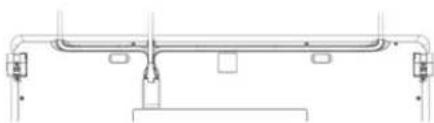
Pure technical line drawing of a mechanical assembly without any text, numbers, or symbols1 Run the cable in one of the ducts on the underside of the keyboard so that it comes out of the keyboard on the left, the middle or the right.
2 Connect the keyboard to the USB port of the PC/laptop.
The keyboard is ready to use without installing any software. Regularly check that the software is up to date (see 9.3 "Updating the firmware").
2 Attaching the palm rest
1 Slide the palm rest close to the keyboard.
2 Align the palm rest with the center of the keyboard.
3 Raise the front edge of the keyboard and the rear edge of the palm rest together.
4 Lower the keyboard again by pressing it gently downwards and in the direction of the palm rest.
The holding tabs glide into the slots on the bottom edge of the keyboard.
3 Adjust the inclination of the keyboard and the palm rest
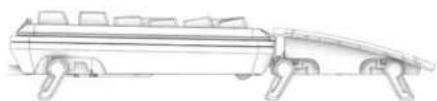
The adjustable feet are located on the rear edge of the keyboard and on both edges of the palm rest. After you have attached the palm rest, you can adjust the keyboard in 7 variations.

1 Fold the corresponding adjustable feet in or out.
natural_image
Line drawing of a vehicle chassis with wheels and structural supports (no text or symbols)2 If necessary, reattach the palm rest.
4 Adjusting the volume
The symbols for adjusting the volume are secondary functions of F1 to F3.
• To adjust the volume, press the FN key and the appropriate key as shown in the table.
Example:
To switch the sound on or off, press the FN key and F1 I _4
The keys have the following functions:
| Key Function | |
| F1 | Sound on/off |
| × | |
| F2 | Volume down |
| - | |
| F3 | Volume up |
| + | |
5 Changing the lighting
The backlighting of the keys can be adjusted in 10 increments or be switched off.
You can also adjust the light effects. See 6 "Changing the light effect".
The symbols for adjusting the backlighting are secondary functions of F5 to F7.
- To adjust the backlighting, press the FN key and the appropriate key as shown in the table.
Example:
To switch the backlighting on or off, press the FN key and F5 ( _^F5 )
The keyboard backlighting is switched on or off.
When adjusting the brightness, the LED above the CHERRY key blashes once for confirmation until the highest or lowest level is reached. The keyboard saves the setting.
The keys have the following functions:
| Key Function | |
| F5※× | Backlighting on/off(When you switch the backlighting on again, the keys are lit with the most recently set brightness.) |
| F6※√ | Backlighting 10% dimmer |
| F7※^ | Backlighting 10% brighter |
6 Changing the light effect
In addition to constant backlighting of all keys (see 5 "Changing the lighting"), you can choose between 2 different light effects:
Name Effect
| Breath The illumination changes smoothly between bright and dim. |
| Pulse The illumination briefly lights up with high brightness twice in an interval, resulting in a heartbeat effect. |
You can change the speed for both effects (see 6.2 "Changing the speed of the light effects").
6.1 Selecting the light effect
- Press the FN key and the F12 key (F12) The light effect changes in the following sequence: Breath, Pulse, and no light effect (constant backlighting).
The keyboard saves the setting.
6.2 Changing the speed of the light effects
With the light effects, you can change the speed in 4 increments. You set the speed with the brightness keys.
- To adjust the speed, press the FN key and the appropriate key as shown in the table. Example: To reduce the speed, press the FN key and F6
The red LED above the CHERRY key (flashes once for confirmation until the highest or lowest level is reached. The speed of the light effect is reduced.
The keyboard saves the setting.
The keys have the following functions:
| Key Function | |
| FG | Speed slower |
| F7 | Speed faster |
OPERATING MANUAL
CHERRY MX BOARD 5.0 - Corded Keyboard with XL Palm Rest
7 Media keys
The media keys above the numerical keypad have the following functions:
Key Function
| ◀◀ | Previous title |
| ▶II | Play/pause |
| ▶▶ | Next title |
8 Function of the CHERRY key
Use the CHERRY key [ ] to switch between Office and Gaming mode.
Office mode:
Office mode is suitable for entering text and numbers. It stops entries being duplicated from keys that are accidentally held down too long.
All Windows commands are available.
Gaming mode:
In Gaming mode, the Win-Key lock is activated. This stops you selecting Windows commands by mistake.
When the Win-Key lock is activated, the signals from the following keys are not sent to the PC:
- Windows key
• A L T + F 4
• ALT + TAB
• CTRL + ESC
- CTRL + ALT + DEL
To switch between Office and Gaming mode, press the CHERRY key (above the numerical keypad.
The red LED above the CHERRY key ( switches out of [Office mode) and into [Gaming mode).
The keyboard saves the setting.
9 Tips
9.1 Cleaning the keyboard

CAUTION: Damage may be caused by harsh cleaning agents or liquids in the keyboard
- Do not use solutions such as gasoline or alcohol and scouring agents or scouring sponges for cleaning.
- Prevent fluids from entering the devices.
- Do not remove the keycaps of the keyboard.
1 Unplug the keyboard.
2 Clean the keyboard with a slightly damp cloth and some mild cleaning agent (e.g.: dishwashing liquid).
3 Dry off the devices with a soft, lint-free cloth.
9.2 Cleaning the palm rest
When the rubberized surface of the palm rest is dirty, it provides less grip.
1 Separate the palm rest from the keyboard by lifting the keyboard on the front edge.
2 Already when the palm rest is only slightly soiled, clean it with a slightly damp cloth and a some mild detergent (such as dishwashing liquid).
3 Dry the palm rest with a soft, lint-free cloth.
4 Reattach the palm rest to the keyboard (see 2 "Attaching the palm rest").
9.3 Updating the firmware

NOTE: The firmware update resets the keyboard settings back to the default values.
Always use the latest keyboard driver. You can download it for free from: www.cherry.de > Help & Support > Downloads > CHERRY MX BOARD 5.0.
The update package includes a PDF file that describes the changes and the new functions.
1 Load the file onto your PC/laptop.
2 Run the *.exe file.
3 Follow the instructions on the screen.
9.4 RSI syndrome

RSI stands for "Repetitive Strain Injury". RSI arises due to small movements continuously repeated over a long period of time.
Typical symptoms are discomfort in the fingers or neck.
- Set up your workspace ergonomically.
- Position the keyboard and mouse in such a manner that your upper arms and wrists are outstretched and to the sides of your body.
- You can choose the most comfortable angle for the keyboard by adjusting the feet on the back.
- Use the palm rest.
• Take several short breaks, with stretching exercises if necessary. - Change your posture often.
9.5 Troubleshooting
- Make sure that the Win-Key lock is not activated (see 8 "Function of the CHERRY key").
- Update the firmware (see 9.3 "Updating the firmware").
• To make sure that the keyboard is not defective, test it if possible with another PC/laptop. - Use another USB port on the PC/laptop.
- Set the option "USB Keyboard Support" or "USB Legacy Mode" to enabled in the BIOS of the PC.
10 Accessories
Accessories are available from specialist dealers or at www.cherry.de.
10.1 Performance Key Kit
The Performance Key Kit contains key caps for the W, A, S, and D keys as well as the 4 navigation keys (extended kit with the Q, E, R, and F keys).
The performance keys provide you with the following advantages:
- Special key profile with a structured surface for improved grip.
- Pre-travel reduced from 2 mm to 1.6 mm for faster response.
- The pre-travel can also be reduced to as little as 1.1 mm using the included spacer discs.
11 Technical data
Designation Value
| Supply voltage 5.0 V/DC ±5% SELV/LPS |
| Current consumption Max. 500 mA |
| Storage temperature -20 °C ... +60 °C |
| Operating temperature 0 °C ... +50 °C |
12 Contact
Please have the following information on hand when contacting technical support:
- Item and serial no. of the product
• Name and manufacturer of your system - Operating system and, if applicable, installed service pack version
For Europe:
Cherry GmbH
Cherrystraße
91275 Auerbach/OPf.
Germany
Dispose of the used device at an official collection point for electronic waste or at your local dealer.
OPERATING MANUAL
CHERRY MX BOARD 5.0 - Corded Keyboard with XL Palm Rest
14 Key configuration
The key configuration does not comply with the ISO 9995-1 layout. This means that the keyboard must not be permanently used for workstations.
15 General user information
We reserve the right to make technical modifications which serve the development of our products. Improper use and storage can lead to faults and damage to the product.
These instructions are only valid for the supplied product.
16 Warranty
The statutory warranty applies. Please contact your specialist dealer or contractual partner.
The warranty expires completely once unauthorized modifications to the product have been carried out. Do not carry out any unauthorized repairs and do not open up the product.
For more information on the warranty see www.cherry.de/warranty.
17 Certifications
17.1 Federal Communications Commission (FCC) Radio Frequency Interference Statement
Information to the user: This equipment has been tested and found to comply with the limits for Class B digital device, pursuant to Part 15 of the FCC Rules. These limits are designed to provide reasonable protection against harmful interference in a residential installation. This equipment generates, uses and can radiate radio frequency energy and, if not installed and used in accordance with the instructions, may cause harmful interference to radio communications. However, there is no guarantee that interference will not occur in a particular installation. If this equipment does cause harmful interference to radio or television reception, which can be determined by turning the equipment off and on, the user is encouraged to try to correct the interference by one or more of the following measures:
- Reorientate or relocate the receiving antenna.
- Increase the separation between the equipment and receiver.
- Connect the equipment into an outlet on a circuit different from that to which the receiver is connected.
- Consult the dealer or an experienced radio/TV technician for help.
Caution: Any changes or modifications not expressly approved by the party responsible for compliance could void the user's authority to operate the equipment.
17.2 For UL
For use with Listed Personal Computers only!
CHERRY MX BOARD 5.0 - Corded Keyboard with XL Palm Rest
祝贺...
natural_image
Pure technical line drawing of a mechanical or structural assembly without any text, numbers, or symbolsnatural_image
Line drawing of a vehicle chassis with wheels and structural brackets (no text or symbols)2 必要时重新安装手托。
4 调节音量
CHERRY MX BOARD 5.0 - Corded Keyboard with XL Palm Rest
5 改变背光
CHERRY MX BOARD 5.0 - Corded Keyboard with XL Palm Rest
9.5 故障排除
16 User Guide about Hazardous Materials
(People's Republic of China Electronic Industry
Standard SJ/T11364-2014)
[关于有害物质的用户说明
0: Indicates that the concentration of the hazardous substance in all homogeneous materials in the parts is below the relevant threshold of the GB/T 26572-2011 standard.
[表示该有害物质在该部件所有均质材料中的含量均在 GB/T 26572-2011 标准规定的限量以下。]
X: Indicates that the concentration of the hazardous substance of at least one of all homogeneous materials in the parts is above the relevant threshold of the GB/T 26572-2011 standard.
[表示该有害物质至少在该部件的某一均质材料中的含量超过 GB/T 26572-2011 标准规定的限量。]
| Part name[部件名称] | Toxic and hazardous materials or elements[有毒有害物质或元素] | |||||
| Pb[铅 | Hg[求] | Cd[镉] | Cr6+[六价铬] | PBB[多溴联苯] | PBDE[多溴二苯醚] | |
| PCB's/flex circuits[PCB/挠性电路] | 00 | 000 | ||||
| Electronic components[电子元器件] | X0 | 000 | ||||
| Solder paste [锡膏] | 00 | 000 | ||||
| Cable [缆线] 000000 | ||||||
| Plastic parts [塑料部件] | 0000 | 00 | ||||
| Metal parts [金属部件] | 00000 | |||||
| Rubber parts [橡胶部件] | 000000 | |||||
操作說明書
CHERRY MX BOARD 5.0 - Corded Keyboard with XL Palm Rest
設定…
natural_image
Pure technical line drawing of a mechanical assembly without any text, numbers, or symbolsnatural_image
Line drawing of a tanker truck with side-mounted engine compartment (no text or symbols)2 必要時重新安裝手托。
4 調節音量
CHERRY MX BOARD 5.0 - Corded Keyboard with XL Palm Rest
8 CHERRY 鍵的功能
CHERRY MX BOARD 5.0 - Corded Keyboard with XL Palm Rest
16 限用物質含有情況標示聲明書 (Declaration of the Presence Condition of the Restricted Substances Marking)
| 限用物質及其化學符號[Restricted substances and its chemical symbols] | ||||||
| 單元(Unit) | 鉛Pb[Lead] | 汞Hg(Mer-cury) | 鎘Ca(Cad-mium) | 六價鉻 Cr^6+ [Hexavalent chromium] | 多溴聯苯PBB(Polybrominated biphenyls) | 多溴二苯醚PBDE(Polybrominated diphenyl ethers) |
| 電路板(PCB)000000 | ||||||
| 電子部件(Electric components) | X00000 | |||||
| 電源線(Cable)000000 | 0 | |||||
| 外殼(Plastic parts)00 | 0000 | |||||
| 導電薄膜(Membrane) | 000000 | |||||
| 腳墊(Rubber feet)000000 | ||||||
| 螺丝(Screw)000000 | ||||||
0: 係指該項限用物質之百分比含量未超出百分比含量基準值。(Indicates that the percentage content of the restricted substance does not exceed the percentage of reference value of presence.)
X: 係指該項限用物質為排除項目。(Indicates that the restricted substance corresponds to the exemption.)
사용 안내서
CHERRY MX BOARD 5.0 - Corded Keyboard with XL Palm Rest
구입해주셔서 감사 합니다...
natural_image
Pure technical line drawing of a mechanical assembly without any text, numbers, or symbolsnatural_image
Line drawing of a vehicle chassis with wheels and structural supports (no text or symbols)CHERRY MX BOARD 5.0 - Corded Keyboard with XL Palm Rest
4 볼륨 조절
CHERRY MX BOARD 5.0 - Corded Keyboard with XL Palm Rest