
AJ3145 - Alarm clock radio PHILIPS - Free user manual and instructions
Find the device manual for free AJ3145 PHILIPS in PDF.


| Product type | Clock radio |
| Brand | PHILIPS |
| Model | AJ3145 |
| Power supply | AC mains (power cord) |
| Backup battery | 9V (type 6F22, not included) |
| Radio bands | FM, MW, LW |
| FM antenna | Built-in telescopic antenna |
| MW/LW antenna | Integrated antenna (device orientation) |
| Alarm | Dual alarms (ALARM 1 and ALARM 2), wake up by radio or buzzer |
| Sleep function | Sleep timer up to 59 minutes |
| Alarm snooze | Repeat every 7 minutes (Snooze) |
| Alarm stop for 24 hours | RESET button |
| Display | Digital display with alarm indicators |
| Dimensions (approx.) | 18 x 10 x 8 cm |
| Weight (approx.) | 0.5 kg |
| Maintenance and cleaning | Clean cloth slightly damp; avoid products containing benzene or thinner |
| Safety | Do not expose to rain, humidity or excessive heat; unplug during prolonged absence |
| Reparability | Do not repair yourself to avoid voiding warranty; contact dealer or service center |
| Environment | Recyclable materials; follow local regulations for disposal |
Frequently Asked Questions - AJ3145 PHILIPS
1. Stop for 24 hours: press RESET. The alarm is deactivated until the next day.
2. Snooze: press SLUMBER OFF/REPEAT ALARM to repeat the alarm every 7 minutes.
3. Complete stop: set the alarm selector (ALARM 1 or 2) to OFF.
- Radio alarm (RAD position): the radio turns on at the set time and stops after 59 minutes.
- Buzzer alarm (BUZ position): a buzzer sounds and stops automatically after 59 minutes.
- The alarm is set (ALARM 1 or 2 button).
- The mode selector is set to RAD (for radio) or BUZ (for buzzer), not OFF.
- If using radio, the volume is high enough.
- The backup battery is not drained (if the device was unplugged).
User questions about AJ3145 PHILIPS
0 question about this device. Answer the ones you know or ask your own.
Ask a new question about this device
Download the instructions for your Alarm clock radio in PDF format for free! Find your manual AJ3145 - PHILIPS and take your electronic device back in hand. On this page are published all the documents necessary for the use of your device. AJ3145 by PHILIPS.
USER MANUAL AJ3145 PHILIPS
FITTING A MAINS PLUG (U.K. only)
This apparatus is fitted with an approved 13 Amp plug. To change a fuse in this type of plug proceed as follows:
- Remove fuse cover and fuse.
- Fix new fuse which should be a BS1362 5A, A.S.T.A. or BSI approved type.
- Refit the fuse cover.
If the fitted plug is not suitable for your socket outlets, it should be cut off and an appropriate plug fitted in its place.
If the mains plug contains a fuse, this should have a value of 5A. If a plug without a fuse is used, the fuse at the distribution board should not be greater than 5A.
Note: The severed plug must be disposed to avoid a possible shock hazard should it be inserted into a 13A socket elsewhere.
How to connect a plug
The wires in the mains lead are coloured in accordance with the following code:
BLUE – "NEUTRAL" ("N") and BROWN – "LIVE" ("L").
As these colours may not correspond with the colour markings identifying the terminals in your plug, proceed as follows:
- The BLUE wire must be connected to the terminal which is marked with the letter "N" or coloured BLACK.
- The BROWN wire must be connected to the terminal which is marked with the letter "L" or coloured RED.
- Do not connect either wires to the earth terminal in the plug which is marked by the letter "E" or by the safety earth symbol or coloured green or green-and-yellow.
Before replacing the plug cover, make certain that the cordgrip is clamped over the sheath of the lead – not simply over the two wires.
Copyright in the U.K.
Recording and playback of material may require consent. See Copyright Act 1956 and The Performer's Protection Acts 1958 to 1972.
NORGE
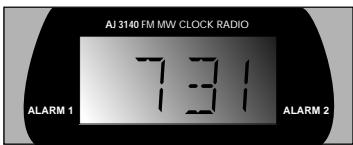
DISPLAY 2
DISPLAY 3
GB Time 10:50 - Alarm 1 activated
F L'heure 10:50 - Alarme 1 activée
E Hora 10:50 - Despertador 1 activado
D Zeit 10:50 - Weckfunktion 1 aktiviert
NL Tijd 10:50 - Wekker 1 aan
① Ora 10:50 - attivata Sveglia 1
GB Clock time (AM) - Alarm setting deactivated
F L'heure actuelle (AM) - Alarme désactivée
E La hora del reloj (AM) - Despertador apagado
(D) Uhrzeit (AM) - Weckfunktion deaktiviert
NL Kloktijd (AM) - Wekker uit
① Ora sull'orologio (AM) - Regolazione delle sveglie disattivata
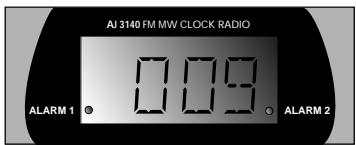
GB Slumber time - Alarm 1 and 2 both active
F La durée SLUMBER - Alarme 1 et 2 activées
E El tiempo de dormitado - Despertador 1 y 2 activados
(D) Schlummerzeit - Weckfunktion 1 und 2 aktiv
NL Sluimertijd - Wekker 1 en 2 beide aan
① Spegnimento automatico - attive sia Sveglia 1 che Sveglia 2
DISPLAY 1
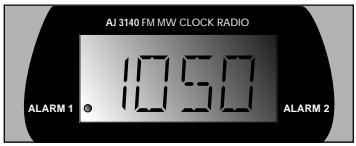
P Hora 10:50 - Despertador 1 activado
DK Tid 10:50 - Alarm 1 indstillet
⑤ Tid 10;50 - Alarm 1 aktiverat
FIN Aika 10:50 - herätys ALARM 1 kytketty
GR Ωρα 10:50μμ - Το ξυπνητήρι 1 έχει ενεργοποιηθεί
DISPLAY 2
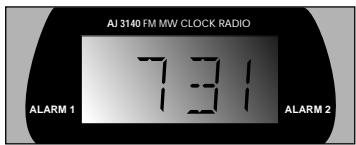
P Hora do relógio (AM) - Despertador desactivado
DK Klokkeslæt (AM) - Ingen alarm indstillet
⑤ Klocktid (AM) - Alarminställningen kopplas bort
FIN Kellonaika (AM) - herätysasetus katkaistu
GR Όρα ρολογιού πμ (ΑΜ) - Το ξυπνητήρι έχει απενεργοποιηθεί
DISPLAY 3
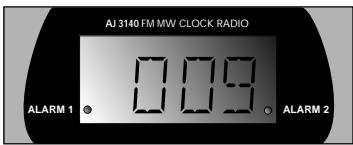
P Tempo de adormecer - Ambos os despertadores 1 e 2 activos
DK Slumretid - Både Alarm 1 og Alarm 2 indstillet
⑤ Slummertid - Både Alarm 1 och Alarm 2 aktiverade
FIN Torkahdusaika - herätykset ALARM 1 ja 2 ovat toiminnassa
GR Όρα χρονοδιακόπτη ύπνου - Τα ξυπνητήρια 1 και 2 είναι και τα δυο ενεργοποιημένα
CONTROLS
① RADIO
to switch radio mode ON/OFF
② ALARM 2 mode selector
BUZ(zer) - to activate buzzer for Alarm 2 setting RAD(io) - to activate radio for Alarm 2 setting OFF - to switch off Alarm 2
③ ALARM 1 mode selector
BUZ(zer) - to activate buzzer for Alarm 1 setting RAD(io) - to activate radio for Alarm 1 setting OFF - to switch off Alarm 1
④ Speaker
⑤ SLUMBER
to set/activate slumber time
⑥ ▲ fast up:
to adjust the hours and minutes for TIME and ALARM TIME
⑦ ▼ slow down:
to adjust the hours and minutes for TIME and ALARM TIME
⑧ ALARM 1
to adjust/review ALARM 1
⑨ ALARM 2
to adjust/review ALARM 2
⑩ TIME
to adjust clock time
⑪ RESET
to stop the active alarm for 24 hours
⑫ SLUMBER OFF/REPEAT ALARM
to switch off the alarm for 7 minutes
⑬ Dial scale
⑭ VOLUME
to adjust the sound level
⑮ Display
⑯ BAND
to select FM-MW or LW waveband
⑰ TUNING
to tune to radio stations
MAINS CONNECTION
- Check if the mains voltage as shown on the type plate on the back of the set corresponds to your local mains supply.
If it does not, consult your dealer or service organisation.
- Connect the mains plug into the wall socket.
- The mains supply is now switched on and the numbers on the display will start to flash. You will need to set the correct time.
- To disconnect the set from the mains completely, withdraw the mains plug from the wall socket.
POWER FAILURE
- When a power failure occurs, the complete clock radio will be switched off.
- When the mains supply returns, the numbers on the display will start to flash and you will need to reset the correct time on the clock.
- To retain the clock time and the set alarm time(s) in the event of an power failure or disconnection, you can insert a 9 volt battery (not included), type 6F22, into the battery compartment:
should there be a power failure, the clock will continue to function. However, the time will not be illuminated on the clock display, as the use of the battery is strictly to retain both the set clock and alarm time(s) only, where actual operation of the alarm and radio is excluded.
As soon as the power is switched on again, the display will indicate the correct time.
-
Before inserting the battery, connect the mains plug to the wall socket.
-
Place the battery into the battery compartment on the underside of the clock radio.
- Replace the battery once a year, or as often as necessary.
MAINTENANCE
- If you do not intend to use the clock radio for a long time, disconnect the set by removing the plug from the wall socket. The battery should also be removed to prevent danger of leakage which will damage your set.
- To clean your set from fingerprints, dust and dirt, use a clean and soft damp cloth or chamois leather. Do not use cleaning products which contain, benzene, thinner, etc. as these may harm the housing.
- Avoid exposing the clock radio to rain, dampness and extreme heat to prevent a safety hazard as well as damage to the set.
Environmental information
All unnecessary packaging material has been omitted. We have done our utmost to make the packaging easily separable into three monomaterials: cardboard (box), expandable polysyrene (buffer), polyethylene (bags, protective).
Your set consists of materials which can be recycled if disassembled by a specialized company. Please observe the local regulations regarding the disposal of packing materials, exhausted batteries and old equipment.
IMPORTANT NOTE FOR USERS IN THE U.K.: SEE PAGE 2
SETTING THE CLOCK
Clock display
The time is shown and the display also indicates whether you have switched on the alarm(s), and these indicators will light up respectively next to ALARM 1 and ALARM 2 on the display:
- Press and hold down the TIME button.
- Use the ▼ and ▲ buttons to set and adjust the hours and minutes.
- With ▲ pressed, the time will increase rapidly from minutes to hours. Release ▲ when you have reached the correct setting.
- Pressing ▼ will allow you to adjust the time slowly back minute by minute if necessary.
RADIO
You can use this clock solely as a radio.
- Set the RADIO switch to ON.
- Select your wave band using the BAND switch.
- Tune to desired radio station using the TUNING knob.
- Set the volume by turning the VOLUME knob.
- To turn off the radio, set the RADIO switch to OFF.
Antenna:
- For FM reception, use the built-in pigtail aerial. Adjust the pigtail aerial slightly to obtain optimum reception if needed.
- For MW/LW reception, the set is provided with a built-in aerial. Simply by adjusting the position of your clock radio, optimum reception can be obtained. Place the set on a non-metallic surface to avoid any deterioration of MW/LW reception.
SETTING THE ALARM
You may set two different alarm times with this clock radio. This can be useful when, for example, you need to be woken up at a different time during the week and at the weekend.
Setting alarm time 1 and 2
- Press and hold down the ALARM 1 or ALARM 2 button, to set the alarm time.
- Use the ▼ and ▲ buttons to set and adjust the hours and minutes.
- With ▲pressed; the time will increase rapidly from minutes to hours. Release ▲when you have reached the correct setting.
- Pressing ▼ will allow you to adjust the time slowly back minute by minute.
- Release the ALARM 1 or ALARM 2 button and the ▲ or ▼ buttons when you have reached the correct setting.
- The clock display goes back to clock time. To review your set alarm time, press the appropriate ALARM 1 or ALARM 2 button.
ALARM ON
The clock radio can awaken you in two ways:
Wake by radio:
- Tune to the desired radio station using the TUNING knob.
Make sure you have adjusted the volume loud enough to wake you up. - Set the ALARM 1 mode or ALARM 2 mode selector to RAD(io).
- The respective ALARM indicator lights up on the display.
At the set alarm time, the radio will switch on and it will automatically switch off 59 minutes later.
Wake by buzzer:
- Set the ALARM 1 mode or ALARM 2 mode selector to BUZ(zer).
- The respective ALARM indicator lights up on the display.
At the set alarm time, the buzzer will switch on and it will automatically switch off 59 minutes later.
ALARM OFF
There are three ways of switching off the alarm:
Switching off the alarm for 24 hours
- Press the RESET button.
- The alarm is now switched off for 24 hours and will call again the next day at the same time.
Switching off the alarm temporarily
For both alarm call modes (radio or buzzer) this will repeat your alarm call at 7 minute intervals.
- Press the SLUMBER OFF/REPEAT ALARM button.
- The alarm will temporarily switch off. 7 minutes later, the alarm (radio or buzzer) will call again.
- Press the SLUMBER OFF/REPEAT ALARM button again if you wish to repeat the alarm call.
- If the SLUMBER OFF/REPEAT ALARM button is not pressed again, the alarm will automatically switch off 59 minutes later. Your alarm time setting will then automatically enter the RESET mode and will call at the same time next day.
Switching off the alarm completely
- Push the ALARM 1 mode or ALARM 2 mode selector to the OFF position, before or during the set alarm time goes off.
- The alarm indicator will disappear from the display.
SLUMBER TIME
The clock radio has a built-in SLUMBER function. This function enables you to listen to the RADIO at bed time without having to get up to switch the radio off. The radio will automatically switch off at the time set. The maximum slumber time is 59 minutes.
Setting the slumber time
The period which you continue to listen to the radio before you fall asleep is called the slumber time.
-
Set the RADIO switch to OFF.
-
Set your slumber time by pressing on the SLUMBER button.
-
If you press the SLUMBER button once, 59 will appear on the display indicating that you have a slumber time of 59 minutes.
- If you keep the SLUMBER button pressed, the display will slowly begin to count down from 59 to 00 minutes. Release the button as soon as the required slumber time is reached.
Cancelling the slumber time
You can switch off the radio before the slumber time has elapsed.
- Press the SLUMBER OFF/REPEAT ALARM button to cancel the slumber function.
Note:
- The slumber function does not affect the alarm setting(s).
- If you have an alarm set in the radio mode, make sure you have adjusted the volume loud enough to wake you up before you set the slumber time.
Troubleshooting
If a fault occurs, first check the points listed below before taking the set for repair.
If you are unable to remedy a problem by following these hints, consult your dealer or service centre.
WARNING:
Under no circumstances should you try to repair the set yourself, as this will invalidate the guarantee.
Problem
- Possible Cause
- Remedy
No sound
– Volume not adjusted.
- Adjust the VOLUME.
– Mains lead not securely connected.
- Connect the mains lead properly.
MW/LW broadcast cannot be received
- Set too close to electrical equipment e.g. TVs, computer, fluorescent lamps.
- Move the clock radio away from electrical equipment.
Intermittent crackling sound during FM reception
- Weak signal.
- Adjust the pigtail aerial.
The alarm does not function
- The alarm is not set.
- Set the alarm time and the alarm switch to BUZ or RAD.
– Volume too low for radio. - Increase the volume.
This set complies with the radio interference requirements of the European Community.
The model and production number are located on the rear of the set.
CONTRÔLES
⑫ SLUMBER OFF/REPEAT ALARM
③ ALARM 1 mode selector
⑫ SLUMBER OFF/REPEAT ALARM
③ ALARM 1 mode selector
⑫ SLUMBER OFF/REPEAT ALARM
⑫ SLUMBER OFF/REPEAT ALARM
⑫ SLUMBER OFF/REPEAT ALARM
Regular as horas de despertar 1 e 2
⑫ SLUMBER OFF/REPEAT ALARM
⑫ SLUMBER OFF/REPEAT ALARM
HERÄTYSTOIMINNON KATKAISU
⑫ SLUMBER OFF/REPEAT ALARM
natural_image
Abstract recycling symbol composed of three chasing arrows forming a triangle (no text or labels)Meet Philips at the Internet
http://www.philips.com