
ORD2105C - Alarm Clock PHILIPS - Free user manual and instructions
Find the device manual for free ORD2105C PHILIPS in PDF.


| Product Type | Alarm Clock Radio |
| Brand | Philips |
| Model | ORD2105C |
| Dimensions (WxHxD) | Approx. 15 x 8 x 10 cm |
| Weight | Approx. 0.3 kg |
| Power Supply | AC 100-240V, 50/60Hz; battery backup (CR2032) |
| Alarm | Dual alarm with weekday/weekend settings |
| Radio | FM tuner with presets |
| Display | LED display with adjustable brightness |
| Snooze | Yes, with adjustable duration |
| Sleep Timer | Yes, up to 90 minutes |
| Volume Control | Adjustable rotary knob |
| Cleaning Instructions | Use a soft dry cloth; do not use liquids |
| Safety Precautions | Keep away from water and extreme temperatures |
| Spare Parts | Contact Philips customer support |
| General Information | Alarm clock radio with FM radio and dual alarms |
Frequently Asked Questions - ORD2105C PHILIPS
User questions about ORD2105C PHILIPS
0 question about this device. Answer the ones you know or ask your own.
Ask a new question about this device
Download the instructions for your Alarm Clock in PDF format for free! Find your manual ORD2105C - PHILIPS and take your electronic device back in hand. On this page are published all the documents necessary for the use of your device. ORD2105C by PHILIPS.
USER MANUAL ORD2105C PHILIPS
Always there to help you
Register your product and get support at
www.philips.com/welcome

ORD2105

natural_image
Illustration of a Philips electronic device with a smartphone, playing music on top (no text or symbols on the device body)User manual
PHILIPS
Contents
1 Safety 3
Important Safety Instructions 3
2 Your clock radio 5
Introduction 5
What's in the box 5
3 Get started 6
Connect power 6
Set the clock 6
Adjust brightness 7
4 Use the alarm timer 8
Set an alarm 8
Activate/deactivate the alarm timer 8
Snooze the alarm 8
Stop the alarm 8
5 Use the dock 9
Compatible iPod/iPhone models 9
Enjoy audio 9
6 Listen to radio 10
7 Play from an external device 11
8 Use the sleep timer 12
9 Adjust volume 13
10 Product information 14
General information 14
Tuner (FM) 14
Amplifier 14
11 Troubleshooting 15
12 Notice 16
Compliance 16
Care of the environment 16
Trademark notice
Copyright
Register online at www.philips.com/welcome today to get the very most from your purchase.
Registering your model with PHILIPS makes you eligible for all of the valuable benefits listed below, so don't miss out. Register online at www.philips.com/welcome to ensure:
\*Product Safety Notification
By registering your product, you'll receive notification - directly from the manufacturer.
\*Additional Benefits
Registering your product guarantees that you'll receive all of the privileges to which you're entitled, including special money-saving offers.
PHILIPS
Congratulations on your purchase, and welcome to the "family!"
Dear PHILIPS product owner:
Thank you for your confidence in PHILIPS.You've selected one of the best-built, best-backed products available today.We'll do everything in our power to keep you happy with your purchase for many years to come.
As a member of the PHILIPS "family," you're entitled to protection by one of the most comprehensive warranties in the industry. What's more, your purchase guarantees you'll receive all the information and special offers for which you qualify, plus easy access to accessories from our convenient home shopping network.
Most importantly, you can count on our uncompromising commitment to your total satisfaction.
All of this is our way of saying welcome - and thanks for investing in a PHILIPS product.
P.S. To get the most from your PHILIPS purchase, be sure to register online at:
www.philips.com/welcome
Know these
safety symbols

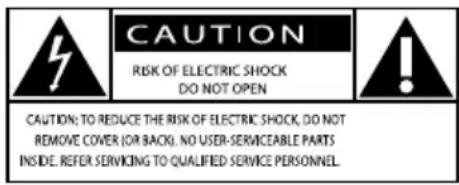
CAUTION: TO REDUCE THE RISK OF ELECTRIC SHOCK, DO NOT REMOVE COVER (OR BACK). NO USER-SERVICEABLE PARTS INSIDE. REFER SERVICING TO QUALIFIED SERVICE PERSONNEL.
This "bolt of lightning" indicates uninsulated material within your unit may cause an electrical shock. For the safety of everyone in your household, please do not remove product covering.
The “exclamation point” calls attention to features for which you should read the enclosed literature closely to prevent operating and maintenance problems.
WARNING: To reduce the risk of fire or electric shock, this apparatus should not be exposed to rain or moisture and objects filled with liquids, such as vases, should not be placed on this apparatus.
CAUTION: To prevent electric shock, match wide blade of plug to wide slot, fully insert.
Enter below the Serial No. w hich is loca- ed on the rear of the cabinet. Retain this information for future reference.
Model No. ____ Serial No. ____
PHILIPS
Visit our World Wide Web Site at http://www.philips.com/welcome
1 Safety
Read and understand all instructions before you use this product. If damage is caused by failure to follow the instructions, the warranty does not apply.
This 'bolt of lightning' indicates uninsulated material within your unit may cause an electrical shock. For the safety of everyone in your household, please do not remove product covering.
The 'exclamation point' calls attention to features for which you should read the enclosed literature closely to prevent operating and maintenance problems.
WARNING: To reduce the risk of fire or electric shock, this apparatus should not be exposed to rain or moisture and objects filled with liquids, such as vases, should not be placed on this apparatus.
CAUTION: To prevent electric shock, match wide blade of plug to wide slot, fully insert.
Important Safety Instructions
① Read these instructions.
② Keep these instructions.
③ Heed all warnings.
④ Follow all instructions.
⑤ Do not use this apparatus near water.
⑥ Clean only with dry cloth.
⑦ Do not block any ventilation openings. Install in accordance with the manufacturer's instructions.
⑧ Do not install near any heat sources such as radiators, heat registers, stoves, or other apparatus (including amplifiers) that produce heat.
⑨ Protect the power cord from being walked on or pinched, particularly at plugs, convenience receptacles, and the point where they exit from the apparatus.
⑩ Only use attachments/accessories specified by the manufacturer.
⑪ Use only with the cart, stand, tripod, bracket, or table specified by the manufacturer or sold with the apparatus. When a cart is used, use caution when moving the cart/apparatus combination to avoid injury from tip-over.

⑫ Unplug this apparatus during lightning storms or when unused for long periods of time.
⑬ Refer all servicing to qualified service personnel. Servicing is required when the apparatus has been damaged in any way, such as power-supply cord or plug is damaged, liquid has been spilled or objects have fallen into the apparatus, the apparatus has been exposed to rain or moisture, does not operate normally, or has been dropped.
⑭ Apparatus shall not be exposed to dripping or splashing.
⑮ Do not place any sources of danger on the apparatus (e.g. liquid filled objects, lighted candles).
⑯ This product may contain lead and mercury. Disposal of these materials may be regulated due to environmental considerations. For disposal or recycling information, please contact your local authorities or the Electronic Industries Alliance: www.eiae.org.
⑰ Where the plug of the Direct Plug-in Adapter is used as the disconnect device, the disconnect device shall remain readily operable.

Warning
- Never remove the casing of this apparatus.
• Never lubricate any part of this apparatus. - Never place this apparatus on other electrical equipment.
- Ensure that you always have easy access to the power cord, plug or adaptor to disconnect this apparatus from the power.
Risk of overheating! Never install this apparatus in a confined space. Always leave a space of at least four inches around this apparatus for ventilation. Ensure curtains or other objects never cover the ventilation slots on this apparatus.

Note
•The rated input voltage and current is printed on the power adaptor. The model number and serial number are printed on the bottom of the main unit.
2 Your clock radio
Congratulations on your purchase, and welcome to Philips! To fully benefit from the support that Philips offers, register your product at www.philips.com/welcome.
Introduction
With this product, you can:
- enjoy audio from an iPod/iPhone or external device,
• charge your iPod/iPhone,
• listen to FM radio stations, and
• gently wake up to different alarm sources.
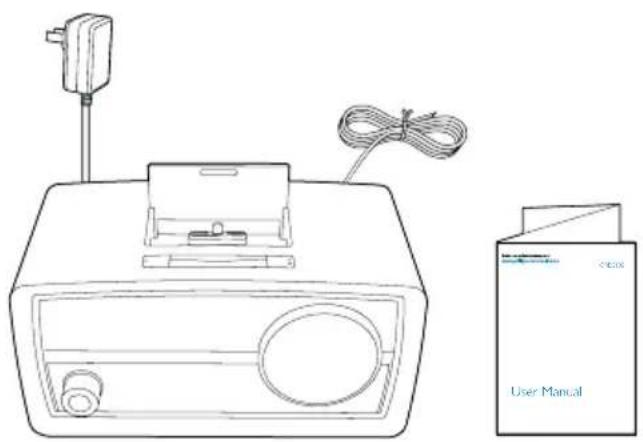
What's in the box
Check and identify the contents of the package:
natural_image
Line drawing of a device with a power outlet, cable, and a separate user manual device (no text or symbols on the device itself)3 Get started
Always follow the instructions in this chapter in sequence.
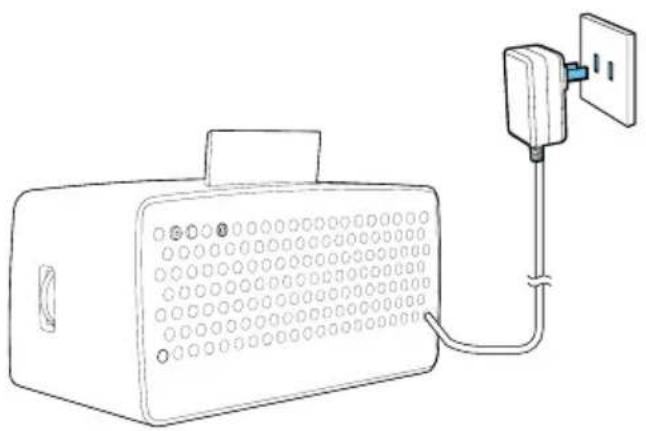
Connect power
natural_image
Line drawing of a portable electronic device connected to a wall-mounted power outlet (no text or symbols)Connect the power adaptor to the AC power outlet.
→ The product is switched to standby mode with the clock (if set) displayed.
- To select a source or switch the product back to standby mode, press the knob repeatedly.
- If no audio input is transferred from the iPod/iPhone or external device over 15 minutes, the product switches to standby mode automatically.
Set the clock

Note
• To manually set the clock, switch the product to standby mode first.

flowchart
graph TD
    A["SET TIME 2 sec."] --> B["124"]
    B --> C["244"]
    C --> D["7:00"]
    D --> E["7:35"]
    E --> F["7:35"]
1 In standby mode, press and hold SET TIME on the back of the product for two seconds.
→ [12H] (12-hour time format) or [24H]
(24-hour time format) begins to blink.
2 Rotate the knob to select a time format, and then press the knob to confirm.
→ The hour digits begin to blink.
3 Rotate the knob to set the hour, and then press the knob to confirm.
→ The minute digits begin to blink.
4 Rotate the knob to set the minute, and then press the knob to confirm.
→ The set clock is displayed.

Tip
•The product synchronizes its clock with iPod/iPhone automatically when the iPod/iPhone is docked and recognized.
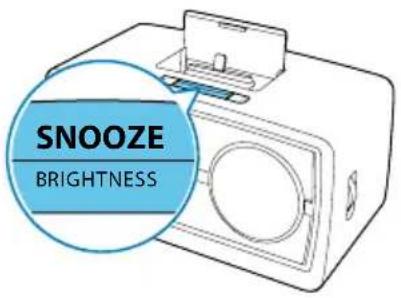
Adjust brightness
Press BRIGHTNESS repeatedly to adjust the brightness of the display panel: high, medium, or low.

4 Use the alarm timer
Set an alarm

Note
•Make sure that you have set the clock correctly.
You can set two alarms.

flowchart
graph TD
    A["Device"] --> B{Al 1 / Al 2}
    B -->|2 sec.| C["Clock"]
    B --> D["Clock"]
    D --> E["10:00"]
    E --> F["Clock"]
    F --> G["10:30"]
    G --> H["Clock"]
    H --> I["10:30"]
    I --> J["BUZZ/DOCK/FM"]
    J --> K["Clock"]
    K --> L["1:35"]
1 Press and hold AL1/AL2 for more than two seconds to activate alarm setting mode.
→ The current alarm time (if set) is displayed.
→ The hour digits and alarm icon begin to blink.
2 Rotate the knob to set the hour.
3 Press the knob to confirm.
→ The minute digits blink.
4 Repeat steps 2-3 to set the minute, select an alarm source ([BUZZ], [DOCK] or
[FM]), and adjust the alarm volume.
→ The corresponding alarm icon lights up.

Note
- If iPod/iPhone is selected as alarm source, but no iPod/iPhone is connected, the device switches to buzzer instead.
- The gentle wake-up function is available for [DOCK] and [FM]source.
Activate/deactivate the alarm timer
1 Press AL1 (or AL2) to view alarm settings.
2 Press AL1 (or AL2) repeatedly to select [ON] or [OFF].
• [ON]: The alarm timer is activated.
• [OFF]: The alarm timer is deactivated.
→ AL1 (or AL2) is displayed when the alarm timer is activated.
→ AL1 (or AL2) disappears when the alarm timer is deactivated.
Snooze the alarm
When an alarm sounds, press SNOOZE.
→ The alarm repeats after 9 minutes.
Stop the alarm
When an alarm sounds, press AL1 (or AL2).
→ The alarm stops and then repeats at the same time of next day.
5 Use the dock
You can enjoy audio from a compatible iPod/iPhone through this product.
Compatible iPod/iPhone models
The product supports the following iPod and iPhone models.
Made for
• iPod touch (5th generation)
• iPod nano (7th generation)
- iPhone 5
Enjoy audio
1 Press the knob repeatedly to select [DOCK]mode.

2 Connect your iPod/iPhone to the dock.

natural_image
Line drawing of a smartphone with an open device and a circular button, showing no text or symbols.→ The docked iPod/iPhone begins to charge automatically.
3 Play audio on the iPod/iPhone.
6 Listen to radio

Note
- Keep the unit away from other electronic devices to avoid radio interference.
- For better reception, do not place iPod/iPhone into the dock when you listen to the radio. Fully extend and adjust the position of the FM antenna.
1 Press the knob repeatedly to switch the source to [FM].
2 Search for a radio station manually or automatically.
To search for a radio station manually:

- Rotate TUNING until the frequency of target station is displayed.
To search for a radio station automatically:

- Rotate TUNING and then press the knob within two seconds.
→ The radio tunes to a station with strong signals automatically.
7 Play from an external device

Note
•The product switches to AUX mode automatically when an audio input cable is connected.

1 Connect an audio input cable with a 3.5-mm connector on both ends between
- the AUDIO IN socket on the back of this product, and - the headphone socket of an external device.
2 Play audio on the external device (see the user manual of the device).
8 Use the sleep timer
Press SLEEP on the back of the product repeatedly to select a time period (in minutes).
→ When the sleep timer is activated, appears.
→ After the set period, the product switches to standby mode.
- To deactivate the sleep timer, press SLEEP repeatedly until [OFF] (off) appears.

flowchart
graph LR
    A["15 → 30 → 60 → 90 → 120"] --> B["OFF"]
    B --> C["Next Step"]
9 Adjust volume
During play, rotate the knob to adjust volume.

Note
- When an alarm sounds, you cannot adjust volume.
10 Product information

Note
- Product information is subject to change without prior notice.
General information
| AC power adaptor Model No.: OH-1015A0592000U1-ULBrand name: PhilipsInput: 100-240V~,50/60Hz, 350 mA;Output: 5.9 V==2 A | |
| Operation Power Consumption | 12 W |
| Standby Power Consumption | <2 W |
| Dimensions:- Main Unit(W × H × D) | 245 × 123 × 122 mm |
| Weight:- Main Unit | 1.1 kg |
Tuner (FM)
| Tuning range 87.5 - 108 MHz | |
| Tuning grid 100 kHz | |
| Sensitivity | |
| - Mono, 26 dB S/N Ratio | < 22 dBu |
| - Stereo, 46 dB S/N Ratio | < 43 dBu |
| Search Selectivity > 28 dBf | |
| Total Harmonic Distortion < 2% | |
| Signal to Noise Ratio > 55 dB | |
Amplifier
| Rated Output Power 4 W RMS | |
| Signal to Noise Ratio | >67 dBA |
| Total Harmonic Distortion | <1% |
| Audio In (MP3 link) | 0.6 V RMS 20 kohm |
11 Troubleshooting

Warning
• Never remove the casing of this device.
To keep the warranty valid, never try to repair the system yourself.
If you encounter problems when using this device, check the following points before requesting service. If the problem remains unsolved, go to the Philips Web page (www.philips.com/support). When you contact Philips, make sure that the device is nearby and the model number and serial number are available.
No power
- Ensure that the AC power plug of the unit is connected properly.
- Ensure that there is power at the AC outlet.
No sound
- Adjust the volume.
Poor radio reception
- Increase the distance between the unit and your TV or VCR.
• Fully extend the FM antenna.
Alarm does not work
- Set the clock/alarm correctly.
Clock/alarm setting erased
- Power has been interrupted or the power plug has been disconnected.
- Reset the clock/alarm.
12 Notice
Any changes or modifications made to this device that are not expressly approved by Philips Consumer Lifestyle may void the user's authority to operate the equipment.
Compliance
Class II equipment symbol:

CLASS II apparatus with double insulation, and no protective earth provided.
This Class B digital apparatus complies with Canadian ICES-003.
This device complies with Part 15 of the FCC Rules. Operation is subject to the following two conditions:
• This device may not cause harmful interference, and
- This device must accept any interference received, including interference that may cause undesired operation.
This equipment has been tested and found to comply with the limits for a Class B digital device, pursuant to part 15 of the FCC Rules.
These limits are designed to provide reasonable protection against harmful interference in a residential installation. This equipment generates, uses, and can radiate radio frequency energy and, if not installed and used in accordance with the instruction manual, may cause harmful interference to radio communications.
However, there is no guarantee that interference will not occur in a particular installation. If this equipment does cause harmful interference to radio or television reception, which can be determined by turning the equipment off and on, the user is encouraged
to try to correct the interference by one or more of the following measures:
- Relocate the receiving antenna.
- Increase the separation between equipment and receiver.
- Connect the equipment into an outlet on a circuit different from that to which the receiver is connected.
- Consult the dealer or an experienced radio/TV technician for help.
Care of the environment
Your product is designed and manufactured with high quality materials and components, which can be recycled and reused.
Never dispose of your product with other household waste. Please inform yourself about the local rules on the separate collection of electrical and electronic products. The correct disposal of these products helps prevent potentially negative consequences on the environment and human health.
Please visit www.recycle.philips.com for additional information on a recycling center in your area.
Environmental information
All unnecessary packaging has been omitted.
We have tried to make the packaging easy to separate into three materials: cardboard (box), polystyrene foam (buffer) and polyethylene (bags, protective foam sheet.)
Your system consists of materials which can be recycled and reused if disassembled by a specialized company. Please observe the local regulations regarding the disposal of packaging materials, exhausted batteries and old equipment.
Trademark notice
Made for

iPod

iPhone
"Made for iPod" and "Made for iPhone" mean that an electronic accessory has been designed to connect specifically to iPod or iPhone respectively, and has been certified by the developer to meet Apple performance standards. Apple is not responsible for the operation of this device or its compliance with safety and regulatory standards. Please note that the use of this accessory with iPod or iPhone may affect wireless performance. iPod and iPhone are trademarks of Apple Inc., registered in the U.S. and other countries.
Copyright
2013 © Koninklijke Philips Electronics N.V. Specifications are subject to change without notice. Trademarks are the property of Koninklijke Philips Electronics N.V or their respective owners. Philips reserves the right to change products at any time without being obliged to adjust earlier supplies accordingly.
PHILIPS LIMITED WARRANTY
ONE (1) YEAR
WARRANTY COVERAGE:
PHILIPS warranty obligation is limited to the terms set forth below.
WHO IS COVERED:
Philips warrants the product to the original purchaser or the person receiving the product as a gift against defects in materials and workmanship as based on the date of original purchase (“Warranty Period”) from an Authorized Dealer. The original sales receipt showing the product name and the purchase date from an authorized retailer is considered such proof.
WHAT IS COVERED:
The Philips warranty covers new products if a defect in material or workmanship occurs and a valid claim is received by Philips within the Warranty Period. At its option, Philips will either (1) repair the product at no charge, using new or refurbished replacement parts, or (2) exchange the product with a product that is new or which has been manufactured from new, or serviceable used parts and is at least functionally equivalent or most comparable to the original product in Philips current inventory, or (3) refund the original purchase price of the product. Philips warrants replacement products or parts provided under this warranty against defects in materials and workmanship from the date of the replacement or repair for ninety (90) days or for the remaining portion of the original product's warranty, whichever provides longer coverage for you. When a product or part is exchanged, any replacement item becomes your property and the replaced item becomes Philips' property. When a refund is given, your product becomes Philips' property.
Note: Any product sold and identified as refurbished or renewed carries a ninety (90) day limited warranty.
Replacement product can only be sent if all warranty requirements are met. Failure to follow all requirements can result in delay.
WHAT IS NOT COVERED - EXCLUSIONS AND LIMITATIONS:
This Limited Warranty applies only to the new products manufactured by or for Philips that can be identified by the trademark, trade name, or logo affixed to it. This Limited Warranty does not apply to any non-Philips hardware product or any software, even if packaged or sold with the product. Non-Philips manufacturers, suppliers, or publishers may provide a separate warranty for their own products packaged with the bundled product.
Philips is not liable for any damage to or loss of any programs, data, or other information stored on any media contained within the product, or any non-Philips product or part not covered by this warranty. Recovery or reinstallation of programs, data or other information is not covered under this Limited Warranty.
This warranty does not apply (a) to damage caused by accident, abuse, misuse, neglect, misapplication, or non-Philips product, (b) to damage caused by service performed by anyone other than Philips or Philips Authorized Service Location, (c) to a product or a part that has been modified without the written permission of
Philips, or (d) if any Philips serial number has been removed or defaced, or (e) product, accessories or consumables sold "AS IS" without warranty of any kind by including refurbished Philips product sold "AS IS" by some retailers.
This Limited Warranty does not cover:
• Shipping charges to return defective product to Philips.
- Labor charges for installation or setup of the product, adjustment of customer controls on the product, and installation or repair of antenna/signal source systems outside of the product.
- Product repair and/or part replacement because of improper installation or maintenance, connections to improper voltage supply, power line surge, lightning damage, retained images or screen markings resulting from viewing fixed stationary content for extended periods, product cosmetic appearance items due to normal wear and tear, unauthorized repair or other cause not within the control of Philips.
- Damage or claims for products not being available for use, or for lost data or lost software.
- Damage from mishandled shipments or transit accidents when returning product to Philips.
- A product that requires modification or adaptation to enable it to operate in any country other than the country for which it was designed, manufactured, approved and/or authorized, or repair of products damaged by these modifications.
- A product used for commercial or institutional purposes (including but not limited to rental purposes).
- Product lost in shipment and no signature verification receipt can be provided.
- Failure to operate per Owner's Manual.
TO OBTAIN ASSISTANCE IN THE U.S.A., CANADA, PUERTO RICO, OR U.S. VIRGIN ISLANDS...
Contact Philips Customer Care Center at: 1-866-309-0845
REPAIR OR REPLACEMENT AS PROVIDED UNDER THIS WARRANTY IS THE EXCLUSIVE REMEDY FOR THE CONSUMER. PHILIPS SHALL NOT BE LIABLE FOR ANY INCIDENTAL OR CONSEQUENTIAL DAMAGES FOR BREACH OF ANY EXPRESS OR IMPLIED WARRANTY ON THIS PRODUCT. EXCEPT TO THE EXTENT PROHIBITED BY APPLICABLE LAW, ANY IMPLIED WARRANTY OF MERCHANTABILITY OR FITNESS FOR A PARTICULAR PURPOSE ON THIS PRODUCT IS LIMITED IN DURATION TO THE DURATION OF THIS WARRANTY.
Some states do not allow the exclusions or limitation of incidental or consequential damages, or allow limitations on how long an implied warranty lasts, so the above limitations or exclusions may not apply to you.
This warranty gives you specific legal rights. You may have other rights which vary from state/province to state/province.
P&F USA, Inc. PO Box 2248, Alpharetta, GA 30023-2248
3140 035 51091
P&F USA Inc.
PO Box 2248
Alpharetta, GA 30023-2248
Phone 1 866 309 0845
Meet Philips at the Internet
http://www.philips.com/welcome


- Always there to help you
- User manual
- PHILIPS
- Contents
- Safety 3
- Your clock radio 5
- Get started 6
- Use the alarm timer 8
- Use the dock 9
- Listen to radio 10
- Play from an external device 11
- Use the sleep timer 12
- Adjust volume 13
- Product information 14
- Troubleshooting 15
- Notice 16
- Register online at www.philips.com/welcome today to get the very most from your purchase.
- \*Product Safety Notification
- \*Additional Benefits
- Dear PHILIPS product owner:
- Safety
- Important Safety Instructions
- Warning
- Note
- Your clock radio
- Introduction
- With this product, you can:
- What's in the box
- Get started
- Connect power
- Set the clock
- Tip
- Adjust brightness
- Use the alarm timer
- Set an alarm
- Activate/deactivate the alarm timer
- Snooze the alarm
- Stop the alarm
- Use the dock
- Compatible iPod/iPhone models
- Made for
- Enjoy audio
- Listen to radio
- Play from an external device
- Use the sleep timer
- Adjust volume
- Product information
- Troubleshooting
- No power
- No sound
- Poor radio reception
- Alarm does not work
- Clock/alarm setting erased
- Notice
- Compliance
- Care of the environment
- Environmental information
- Trademark notice
- Copyright
- PHILIPS LIMITED WARRANTY
- ONE (1) YEAR
- WARRANTY COVERAGE:
- WHO IS COVERED:
- WHAT IS COVERED:
- WHAT IS NOT COVERED - EXCLUSIONS AND LIMITATIONS:
- This Limited Warranty does not cover:
- TO OBTAIN ASSISTANCE IN THE U.S.A., CANADA, PUERTO RICO, OR U.S. VIRGIN ISLANDS...
Brand : PHILIPS
Model : ORD2105C
Category : Alarm Clock