
SW6AM2QW - Dishwasher WHIRLPOOL - Free user manual and instructions
Find the device manual for free SW6AM2QW WHIRLPOOL in PDF.



| Brand | WHIRLPOOL |
| Model | SW6AM2QW |
| Category | Refrigerator / Freezer |
| Product Type | Combined Refrigerator-Freezer |
| Main Functions | 6th Sense Fresh Control, Rapid Cooling, Open Door Alarm, Fan, Sleep Mode |
| Defrosting | Automatic (No-Frost) for refrigerator compartment |
| Lighting | Interior LED (replacement by after-sales service) |
| Temperature Adjustment | Yes, factory preset to recommended average temperature |
| Installation | Alone or in pair (freezer on left, refrigerator on right); at least 50 mm clearance required at back |
| Adjustable Hinges | Yes, to level doors using an M10 wrench |
| Cleaning and Maintenance | Unplug before cleaning; clean with damp cloth and mild detergent; vacuum rear condenser regularly; clean drain hole |
| Safety | Open door alarm after 5 minutes (LED flashing) |
| Repairability | After-sales service for LED replacement; parts available; warranty does not cover door reversal |
| General Information | 184-page manual available in multiple languages; free download |
Frequently Asked Questions - SW6AM2QW WHIRLPOOL
User questions about SW6AM2QW WHIRLPOOL
0 question about this device. Answer the ones you know or ask your own.
Ask a new question about this device
Download the instructions for your Dishwasher in PDF format for free! Find your manual SW6AM2QW - WHIRLPOOL and take your electronic device back in hand. On this page are published all the documents necessary for the use of your device. SW6AM2QW by WHIRLPOOL.
USER MANUAL SW6AM2QW WHIRLPOOL
natural_image
Close-up of wooden clothespins and clips, no text or symbols visibleKäyttöohje
natural_image
Black and white photo of multiple glass bottles with black lids, one partially visible in a transparent container (no text or symbols)
natural_image
Black and white close-up of multiple glasses with blurred background (no text or symbols)natural_image
Close-up of a stainless steel kitchen grater with perforated door and lid (no text or symbols visible)Instructions for use
| عربي | دليل الاستعمال | صفحة 3 |
| БЪЛГАРСКИ | Инструкции за употреба | Стр. 11 |
| ČESKY | Návod k obsluze | Strana 19 |
| DANSK | Brugsanvisninger | Page 27 |
| NEDERLANDS | Gebruiksaanwijzing | Pagina 35 |
| SUOMI | Käyttöohje | Sivu 43 |
| FRANÇAIS | Mode d'emploi | Page 51 |
| DEUTSCH | Gebrauchsanweisung | Seite 59 |
| ΕΛΛΑΣ | Οδηγίες χρήσης | Σελίδα 67 |
| MAGYAR | Használati utasítás | Oldal 75 |
| ITALIANO | Istruzioni per l'uso | Pagina 83 |
| ҚАЗАҚ ТІЛ | Нұсқаулар игерушілік үшін | Бет 91 |
| NORSK | Bruksanvisning | Side 99 |
| POLSKI | Instrukcje użytkowania | Strona 107 |
| PORTUGUÊS | Manual de utilização | Página 115 |
| ROMANA | Instrucțiuni de utilizare | Pagina 123 |
| РУССКИЙ | Инструкции по эксплуатации | Страница 131 |
| SLOVENSKY | Návod na použitie | Strana 139 |
| ESPAÑOL | Instrucciones para el uso | Página 147 |
| SVENSKA | Bruksanvisning | Sidan 155 |
| УКРАЇНСЬКА | Інструкция з експлуатації | Сторінка 163 |
| ENGLISH | Instructions for use | Page 171 |
text_image
50mm 50mm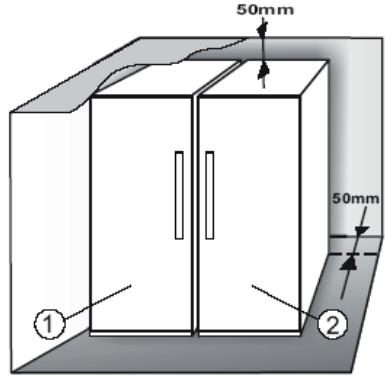
text_image
50mm 50mm ① ②
natural_image
Cross-sectional diagram of a mechanical or electrical cabinet with internal shelves and structural ribs (no text or symbols)
text_image
max 5 mm/ 6th Sense Fresh Control
.Green Intelligence ProFresh وظيفة
ملاحظة
6th sense 6TH SENSE FRESH CONTROL .2.2
PROFRESH uptี่فية
"ProFresh" وظيفة / "6th Sense Fresh Control"
natural_image
Illustration of a globe, a box, and a bag with 'Brrrr' label (no text or symbols on objects)natural_image
Three grayscale icons showing a hand pressing a button, a refrigerator, and a hanging device with a 'Click' label (no text or symbols on objects)text_image
Diagram illustrating wine being poured into a glass with a gruckle, and finally pouring liquid into a container with a coiled tube.text_image
Crack Cracknatural_image
Illustration of a server rack with heat exchanger and a magnified view showing internal components (no text or symbols)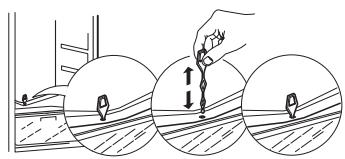
text_image
Diagram illustrating three-step installation or inspection process with tool and directional arrows indicating movement7. Psيانة والynnظيف
text_image
Diagram illustrating a wine bottle being poured into a sink with a gudge, alongside a gas cylinder and a coiled tube.text_image
Crack Cracknatural_image
Illustration of three objects: a cartoon character, a globe with a dome, and an open box with a speech bubble containing 'Brmrr' (no text or symbols on objects)natural_image
Three grayscale illustrations showing a hand pointing to a button, a cabinet, and a hanging object with a 'Click' button (no text or symbols on objects)6. ПРЕПОРЪКА В СЛУЧАЙ НА НЕИЗПОЛЗВАНЕ НА УРЕДА
6.1. ОТСЪСТВИЕ/ВАКАНЦИЯ
natural_image
Illustration of a server rack with heat sinks and a magnified view of the rack (no text or symbols)
natural_image
Illustration showing three progressive steps of a tool application on a surface, with no text or symbols present.8. ОТСТРАНЯВАНЕ НА НЕИЗПРАВНОСТИ
8.1. ПРЕДИ ДА СЕ ОБЪРНЕТЕ КЪМ ОТДЕЛА ЗА СЛЕДПРОДАЖБЕНО ОБСЛУЖВАНЕ...
text_image
Diagram illustrating a water transfer process with labeled components: receiving from a bottle, pouring liquid into a sink, and adding a coiled tube to a container.text_image
Crack Cracknatural_image
Illustration of three objects: a small figure with a globe, a globe-like structure, and a server unit (no text or symbols)natural_image
Three grayscale illustrations showing a hand pointing at a panel, a cabinet, and a hanging object with a 'Click' button (no text or symbols on objects)6. DOPORUČENÍ V PŘÍPADĚ NEPOUŽÍVÁNÍ SPOTŘEBIČE
6.1. NEPŘÍTOMNOST/PRÁZDNINY
natural_image
Illustration of a server rack with heat exchanger and a magnified view showing internal components (no text or symbols)
natural_image
Illustration showing three steps of a tool interacting with a surface, with arrows indicating movement direction (no text or symbols present)8. ODSTRAŇOVÁNÍ PORUCH
8.1. NEŽ SE OBRÁTÍTE NA SERVISNÍ STŘEDISKO...
1.2. OPSTILLING AF TO APPARATER
EKSEMPEL PÅ OPTIMAL FYLDNING

text_image
Diagram illustrating wine being poured into a sink with a gruckle, alongside a container labeled 'Gruckle' and a coiled tube.text_image
Crack CrackBRRR lyden kommer fra kompressoren.

natural_image
Illustration of a globe, server, and cloud device (no text or symbols)natural_image
Three grayscale illustrations showing a hand pointing at a panel, a cabinet, and a hanging object with a 'Click' button (no text or symbols on objects)6. ANBEFALING HVIS APPARATET IKKE BRUGES
6.1. VED LÆNGEREVARENDE FRAVÆR/FERIE
natural_image
Illustration of a server rack with heat sinks and a magnified view of the rack (no text or symbols)
natural_image
Illustration showing three steps of a tool interacting with a surface, with arrows indicating movement (no text or symbols present)8. FEJLFINDINGSOVERSIGT
8.1. F∅R SERVICEAFDELINGEN KONTAKTES
VOORBEELD VAN RANGSCHIKKING ETENSWAAR

text_image
Diagram illustrating wine being poured into a sink with a griddle, alongside a close-up of the griddle and a coiled tube.text_image
Crack CrackBRRR geluid van de compressor die loopt..

natural_image
Illustration of a globe, server, and cloud device (no text or symbols)natural_image
Three grayscale illustrations showing a hand pointing at a panel, a cabinet, and a hanging object with a 'Click' button (no text or symbols on objects)6. AANBEVELINGEN WANNEER HET APPARAAT NIET WORDT GEBRUIKT
6.1. AFWEZIGHEID/VAKANTIE
natural_image
Illustration of a server rack with heat sinks and a magnified view of the rack (no text or symbols)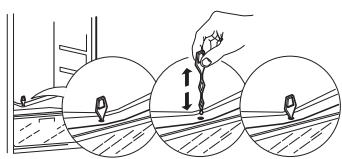
natural_image
Illustration showing three steps of a tool interacting with a surface, with arrows indicating movement (no text or symbols present)8. HANDLEIDING VOOR PROBLEEMOPLOSSING
8.1. VOORDAT U CONTACT OPNEEMT MET DE CONSUMENTENSERVICE
Luku 2: TOIMINNOT 45
2.1.VIRTA-/VALMIUSTILA 45
2.2. 6TH SENSE FRESH CONTROL / GREEN INTELLIGENCE PROFRESH 45
2.3.OVI AUKI -HÄLYTYS 45
2.4. PIKAJÄÄHDYTYS 45
2.5.TUULETIN 45
2.6. LÄMPÖTILA-ASETUS 45
2.7. NO-FROST HUURTUMATON JÄÄKAAPPIOSASTO 45
2.8. JÄÄKAAPIN SISÄVALO 45
Luku 3: KÄYTTÖ 46
3.1.HUOMAUTUKSIA 46
Luku 4: VINKKEJÄ RUOAN SÄILYTYKSEEN 46
4.1. ILMANVAIHTO 46
4.2. TUORETARVIKKEIDEN JA JUOMIEN SÄILYTYSOHJEITA 46
4.3. TUORETARVIKKEIDEN JA JUOMIEN SÄILYTYSPAIKAT 46
Luku 5: TOIMINTAÄÄNET 47
Luku 6: SUOSITELTAVAT TOIMENPITEET, JOS LAITETTA EI KÄYTETÄ....48
6.1. PITKÄ POISSAOLO / LOMA-AIKA 48
6.2.MUUTTAMINEN 48
6.3. SÄHKÖKATKO....48
Luku 7: LAITTEEN HUOLTO JA PUHDISTUS....48
Luku 8: VIANMÄÄRITYSOPAS ....49
8.1. ENNEN KUIN OTAT YHTEYTTÄ HUOLTOON.... 49
8.2.VIAT 49
Luku 9: HUOLTOPALVELU....50
Muut:
OVEN KÄTISYYDEN VAIHTAMINEN 179
HUOM.:
text_image
Diagram illustrating wine being poured into a sink with a griddle, alongside a close-up of the griddle and a coiled tube.text_image
Crack Cracknatural_image
Illustration of three objects: a cartoon character, a globe with a dome, and an open box with a speech bubble containing 'Brmrr' (no text or symbols on objects)natural_image
Three grayscale illustrations showing a hand pointing at a button, a cabinet, and a hanging object with a 'Click' button (no text or symbols on objects)6. SUOSITELTAVAT TOIMENPITEET, JOS LAITETTA EI KÄYTETÄ
6.1. PITKÄ POISSAOLO / LOMA-AIKA
natural_image
Illustration of a server rack with heat sinks and a magnified view of the rack (no text or symbols)
natural_image
Illustration showing three steps of a tool interacting with a surface, with arrows indicating movement (no text or symbols present)8. VIANETSINTÄOPAS
8.1. ENNEN KUIN OTAT YHTEYTTÄ HUOLTOON...
text_image
Diagram illustrating a wine bottle pouring liquid into a sink, with a close-up of the container labeled 'Gurde' and a coiled tube nearby.text_image
Crack Cracknatural_image
Illustration of a globe, a cabinet, and a device with a bag (no text or symbols)natural_image
Three grayscale icons showing a hand pointing at a panel, a refrigerator, and a hanging button with 'Click' labels (no text or symbols on main objects)6. RECOMMANDATION EN CAS DE NON-UTILISATION DE L'APPAREIL
6.1. ABSENCE/VACANCES
natural_image
Illustration of a server rack with heat exchanger and a magnified view showing internal components (no text or symbols)
natural_image
Illustration showing three steps of a tool interacting with a surface, with arrows indicating movement direction (no text or symbols present)8. GUIDE DE DÉPANNAGE
8.1. AVANT DE CONTACTER LE SERVICE APRÈS-VENTE...
text_image
Diagram illustrating wine being poured into a sink with a gruckle, alongside a container labeled 'Gruckle' and a coiled tube.text_image
Crack Cracknatural_image
Illustration of a globe, a server, and a bag with 'Brmm' label (no text or symbols on objects)natural_image
Three grayscale illustrations showing a hand pointing at a panel, a cabinet, and a hanging object with a 'Click' button (no text or symbols on objects)natural_image
Illustration of a server rack with heat sinks and a magnified view of the rack (no text or symbols)
natural_image
Illustration showing three sequential steps of a tool interacting with a surface, with arrows indicating movement direction (no text or symbols present)text_image
Gurcle Gurcletext_image
Crack Cracknatural_image
Illustration of three objects: a globe with 'Brmm' label, a dome-shaped container, and an open box labeled 'Brmm' (no text or symbols on objects)natural_image
Three grayscale illustrations showing a hand pointing at a panel, a cabinet, and a hanging tag with 'Click' labels (no text or symbols on objects)natural_image
Illustration of a server rack with heat exchanger and a magnified view showing internal components (no text or symbols)
natural_image
Illustration showing three steps of a tool interacting with a surface, with arrows indicating movement (no text or symbols present)text_image
Diagram illustrating wine being poured into a sink with a griddle, alongside a close-up of the griddle and a coiled tube.text_image
Crack Cracknatural_image
Illustration of a globe, server, and cloud device (no text or symbols)natural_image
Three grayscale illustrations showing a hand pointing to a button, a cabinet, and a hanging object with a 'Click' button (no text or symbols on objects)6. AJÁNLÁSOK ARRA AZ ESETRE, HA NEM HASZNÁLJA A KÉSZÜLÉKET
6.1. TÁVOLLÉT/NYARALÁS
natural_image
Illustration of a server rack with heat exchanger and a magnified view showing internal components (no text or symbols)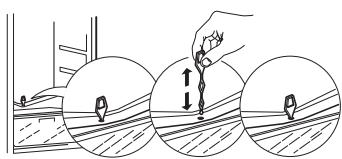
natural_image
Illustration showing three steps of a tool interacting with a surface, with arrows indicating movement (no text or symbols present)text_image
Gurgle Gurgletext_image
Crack Cracknatural_image
Illustration of a globe, server, and cloud device (no text or symbols)natural_image
Three grayscale illustrations showing a hand pointing at a panel, a cabinet, and a hanging object with a 'Click' button (no text or symbols on objects)6. RACCOMANDAZIONE IN CASO DI NON UTILIZZO DELL'APPARECCHIO
6.1. ASSENZA / VACANZE
natural_image
Illustration of a server rack with heat exchanger and a magnified view showing internal components (no text or symbols)
natural_image
Illustration showing three steps of a tool interacting with a surface, with arrows indicating movement (no text or symbols present)8. GUIDA ALLA RICERCA GUASTI
8.1. PRIMA DI CONTATTARE IL SERVIZIO ASSISTENZA:
text_image
Diagram illustrating wine being poured into a sink with a griddle, alongside a close-up of the griddle and a coiled tube.text_image
Crack Cracknatural_image
Illustration of a globe, a cabinet, and a server with a speech bubble (no text or symbols)natural_image
Three grayscale illustrations showing a hand pointing at a button, a cabinet, and a hanging object with a 'Click' button (no text or symbols on objects)natural_image
Illustration of a server rack with heat sinks and a magnified view of its internal structure (no text or symbols)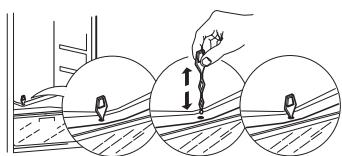
natural_image
Illustration showing three steps of a tool interacting with a surface, no text or symbols present8. АҚАУЛЫҚТАРДЫ ЖОЮ НЎСҚАУЛЫҚЫ
8.1. КЕПІЛДІК БОЙЫНША ҚЫЗМЕТ КӨРСЕТУ БӨЛІМІНЕ ХАБАРЛАСУДЫН АЛДЫНДА...
OMHENGLING AV D∅R....179
MERK:
Instruksene gjelder flere modeller, så det kan være forskjeller. Deler som gjelder kun visse apparater er merket med en asterisk (*).
text_image
Diagram illustrating wine being poured into a sink with a griddle, alongside a close-up of the griddle and a coiled tube.text_image
Crack Cracknatural_image
Illustration of a globe, storage unit, and computer monitor (no text or symbols)natural_image
Three grayscale icons showing a hand pointing at a panel, a refrigerator, and a hanging tag with 'Click' label (no text or symbols beyond basic icons)6. ANBEFALING HVIS APPARATET IKKE ER I BRUK
6.1. FRAVÆR/FERIE
natural_image
Illustration of a server rack with heat sinks and a magnified view of the rack (no text or symbols)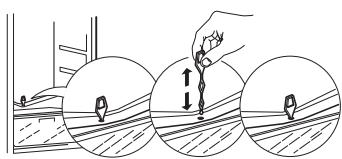
natural_image
Illustration showing three sequential steps of a tool interacting with a surface, with arrows indicating movement direction (no text or symbols present)8. FEILS∅KINGSLISTE
8.1. F∅R DU KONTAKTER SERVICEAVDELINGEN...
text_image
Diagram illustrating a wine bottle pouring liquid into a sink, with a close-up of the container labeled 'Gurde' and a coiled tube nearby.text_image
Crack Cracknatural_image
Illustration of three objects: a small creature, a dome structure, and a server unit with a speech bubble (no text or symbols)natural_image
Three grayscale icons showing a hand pointing at a panel, a refrigerator, and a hanging button with 'Click' label (no text or symbols beyond basic icons)6. ZALECENIA W PRZYPADKU NIEUŻYWANIA URZĄDZENIA
6.1. NIEOBECNOŚĆ/WAKACJE
natural_image
Illustration of a server rack with heat sinks and a magnified view of its internal structure (no text or symbols)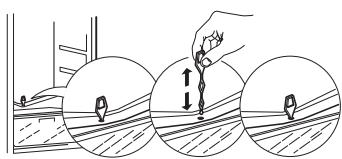
natural_image
Illustration showing three steps of a tool interacting with a surface, with arrows indicating movement (no text or symbols present)8. INSTRUKCJA ROZWIĄZYWANIA PROBLEMÓW
8.1. PRZED ZWRÓCENIEM SIĘ DO SERWISU TECHNICZNEGO...
text_image
Diagram illustrating wine being poured into a sink with a griddle, alongside a close-up of the griddle and a coiled tube.text_image
Crack Cracknatural_image
Illustration of a globe, server, and cloud device (no text or symbols)natural_image
Three grayscale illustrations showing a hand pointing at a panel, a cabinet, and a hanging object with a 'Click' button (no text or symbols on objects)natural_image
Illustration of a server rack with heat sinks and a magnified view of the rack (no text or symbols)
natural_image
Illustration showing three steps of a tool interacting with a surface, with arrows indicating movement (no text or symbols present)text_image
Diagram illustrating a water transfer process with labeled components: receiving from a bottle, pouring liquid into a sink, and adding a coiled tube to a container.text_image
Crack Cracknatural_image
Illustration of three objects: a small figure with a globe, a globe-like structure, and a server unit (no text or symbols)natural_image
Three grayscale illustrations showing a hand pointing at a panel, a cabinet, and a hanging object with a 'Click' button (no text or symbols on objects)6. RECOMANDĂRI ÎN CAZUL NEUTILIZĂRII APARATULUI
6.1. ABSENTĂ / VACANTĂ
natural_image
Illustration of a server rack with heat sinks and a magnified view of its internal structure (no text or symbols)
text_image
Diagram illustrating a hand using a tool to measure a surface with directional arrows, showing three progressive steps.8. GHID DE REMEDIERE A DEFECTIUNILOR
8.1. ÎNAINTE DE A CONTACTA SERVICIUL DE ASISTENTĂ TEHNICĂ...
text_image
Diagram illustrating wine being poured into a sink with a griddle, alongside a close-up of the griddle and a coiled tube.text_image
Crack Cracknatural_image
Illustration of three objects: a cartoon character, a globe with a dome, and an open box with a speech bubble containing 'Brmrr' (no text or symbols on objects)natural_image
Three grayscale illustrations showing a hand pointing to a door, a cabinet, and a hanging object with a 'Click' button (no text or symbols on objects)natural_image
Illustration of a server rack with heat sinks and a magnified view of its internal structure (no text or symbols)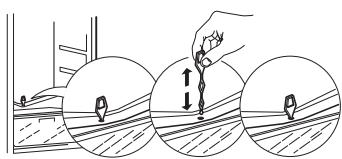
natural_image
Illustration showing three steps of a tool interacting with a surface, with no visible text or symbols.text_image
Diagram illustrating wine being poured into a sink with a griddle, alongside a close-up of the griddle and a coiled tube.Praskanie, ked' sa uvedie do činnosti kompresor alebo ked' l'ad spadne do nádobky na l'ad; prudké cvaknutie, ked' sa kompresor zapína a vypína.

text_image
Crack Cracknatural_image
Illustration of three objects: a small figure with a globe, a globe-like structure, and a server unit (no text or symbols)natural_image
Three grayscale illustrations showing a hand pointing at a panel, a cabinet, and a hanging object with a 'Click' button (no text or symbols on objects)6. ODPORÚČANIE V PRÍPADE NEPOUŽÍVANIA SPOTREBIČA
6.1. NEPRÍTOMNOST/DOVOLENKA
natural_image
Illustration of a server rack with heat sinks and a magnified view of its internal structure (no text or symbols)
natural_image
Illustration showing three steps of a tool interacting with a surface, with arrows indicating movement (no text or symbols present)8. PRÍRUČKA NA RIEŠENIE PROBLÉMOV
8.1. SKÔR AKO SA OBRÁTITE NA POPREDAJNÝ SERVIS...
text_image
Diagram illustrating wine being poured into a sink with a gruckle, alongside a container labeled 'Gruckle' and a coiled tube.text_image
Crack Cracknatural_image
Illustration of a globe, storage unit, and computer monitor (no text or symbols)natural_image
Three grayscale illustrations showing a hand pointing at a panel, a cabinet, and a hanging object with a 'Click' button (no text or symbols on objects)6. RECOMENDACIONES EN CASO DE FALTA DE USO DEL ELECTRODOMÉSTICO
natural_image
Illustration of a server rack with heat exchanger and a magnified view showing internal components (no text or symbols)
natural_image
Illustration showing three steps of a tool interacting with a surface, with arrows indicating movement (no text or symbols present)INNEHÅLLSFÖRTECKNING
Kapitel 1:INSTALLATION....156
1.1. INSTALLERA APPARATEN 156
1.2. INSTALLERA TVÅ APPARATER 156
1.3. JUSTERA LUCKORNA (I FÖREKOMMANDE FALL) 156
Kapitel 2: FUNKTIONER....157
2.1.ON/STANDBY 157
2.2. 6TH SENSE FRESH CONTROL / GREEN INTELLIGENCE PROFRESH 157
2.3. DÖRRLARM 157
2.4. SNABBKYLNING 157
2.5. FLÄKT 157
2.6. TEMPERATURINSTÄLLNING 157
2.7. KYLDEL MED AUTOMATISK AVFROSTNING 157
2.8. KYLSKÅPSLAMPA 157
Kapitel 3: ANVÄNDNING....158
text_image
Diagram illustrating a water transfer process with labeled components: receiving from a bottle, pouring liquid into a sink, and adding a coiled tube to a container.text_image
Crack Cracknatural_image
Illustration of three objects: a cartoon character, a globe, and a server unit (no text or symbols)natural_image
Three grayscale illustrations showing a hand pointing at a panel, a cabinet, and a hanging object with a 'Click' button (no text or symbols on objects)6. OM APPARATEN INTE ANVÄNDS
6.1. FRÅNVARO/SEMESTER
natural_image
Illustration of a server rack with heat sinks and a magnified view of its internal structure (no text or symbols)
natural_image
Illustration showing three sequential steps of a tool interacting with a surface, with no visible text or symbols.8. FELSÖKNING
8.1. INNAN DU KONTAKTAR SERVICEORGANISATIONEN...
text_image
Diagram illustrating wine being poured into a sink with a gruckle, alongside a container labeled 'Gruckle' and a coiled tube.text_image
Crack Cracknatural_image
Illustration of three objects: a cartoon character, a globe with a dome, and an open box with a speech bubble containing 'Brmrr' (no text or symbols on objects)natural_image
Three grayscale illustrations showing a hand pointing to a door, a cabinet, and a hanging object with a 'Click' button (no text or symbols on objects)natural_image
Illustration of a server rack with heat sinks and a magnified view of the rack (no text or symbols)
natural_image
Illustration showing three progressive steps of a tool interacting with a surface, with no text or symbols present.Chapter 1: INSTALLATION....172
1.1. INSTALLING SINGLE APPLIANCE 172
1.2. INSTALLING TWO APPLIANCES 172
1.3. ADJUST DOORS (IF AVAILABLE) 172
Chapter 2: FUNCTIONS....173
2.1.ON/STAND BY....173
2.2. 6TH SENSE FRESH CONTROL / GREEN INTELLIGENCE PROFRESH.... 173
2.3.DOOR OPEN ALARM 173
2.4.FAST COOLING 173
2.5.FAN....173
2.6. TEMPERATURE SETTING 173
2.7. NO-FROST REFRIGERATOR COMPARTMENT 173
2.8. REFRIGERATOR LIGHT 173
Chapter 3: USE....174
3.1. NOTES 174
Chapter 4: FOOD-STORAGE TIPS ....174
4.1. AIR VENTILATION 174
4.2. HOW TO STORE FRESH FOOD AND BEVERAGE 174
4.3. WERE TO STORE FRESH FOOD AND BEVERAGE 174
Chapter 5: FUNCTIONAL SOUNDS ......175
Chapter 6: RECOMMENDATION IN CASE OF NO USE OF THE APPLIANCE....176
6.1. ABSENCE / VACATION 176
6.2.MOVING 176
6.3. POWER FAILURE 176
Chapter 7: MAINTENANCE AND CLEANING....176
Chapter 8: TROUBLESHOOTING GUIDE ......177
8.1. BEFORE CONTACTING AFTER-SALES SERVICE.... 177
8.2. FAILURES 177
Chapter 9: AFTER-SALES SERVICE ....178
Others:
REVERSE DOOR SWING.... 179
NOTE:
The instructions apply to several models, so there may be differences. Sections which only apply to certain appliances are indicated with an asterisk (*).
Functions which are dedicated specially for your already bought model of product you will find in QUICK START GUIDE.
1. INSTALLATION
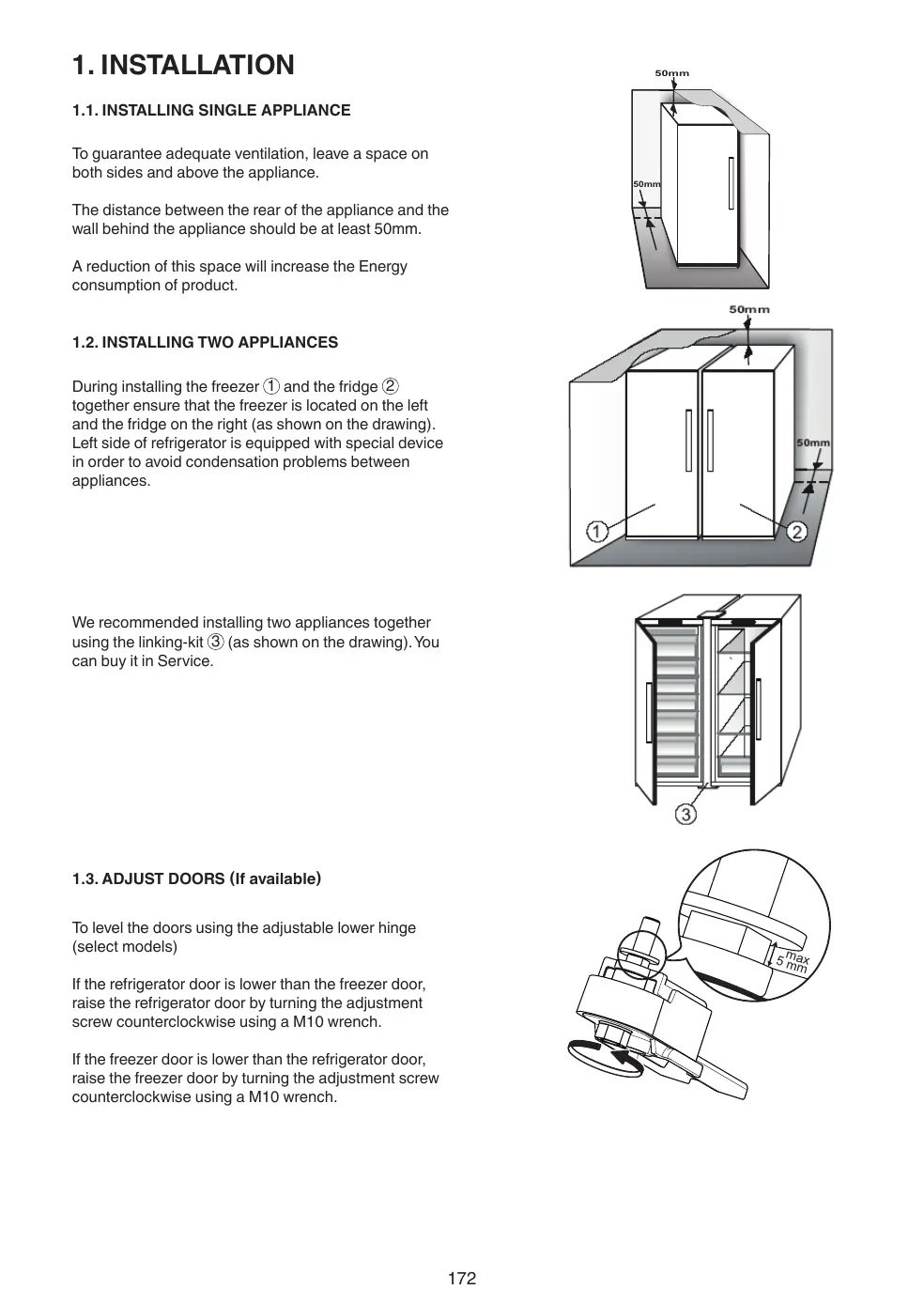
1.1. INSTALLING SINGLE APPLIANCE
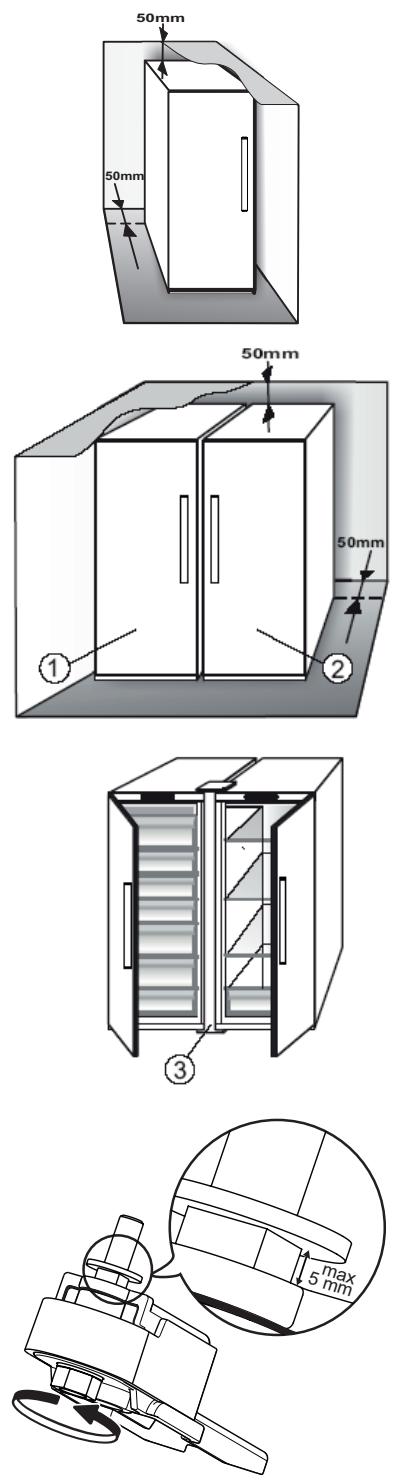
To guarantee adequate ventilation, leave a space on both sides and above the appliance.
The distance between the rear of the appliance and the wall behind the appliance should be at least 50mm.
A reduction of this space will increase the Energy consumption of product.
1.2. INSTALLING TWO APPLIANCES
During installing the freezer ① and the fridge ② together ensure that the freezer is located on the left and the fridge on the right (as shown on the drawing). Left side of refrigerator is equipped with special device in order to avoid condensation problems between appliances.
We recommended installing two appliances together using the linking-kit ③ (as shown on the drawing). You can buy it in Service.
1.3. ADJUST DOORS (If available)
To level the doors using the adjustable lower hinge (select models)
If the refrigerator door is lower than the freezer door, raise the refrigerator door by turning the adjustment screw counterclockwise using a M10 wrench.
If the freezer door is lower than the refrigerator door, raise the freezer door by turning the adjustment screw counterclockwise using a M10 wrench.
2. FUNCTIONS
2.1. ON/STAND BY
This function turns On/Stand-by the refrigerator. To put the product in Stand-by, press & hold the On/Stand-by button ⏻ for 3 seconds. All the icons turn off except On/Stand-by icon ⏻ back light to indicate that the appliance is in Stand-by. When the appliance is in Stand-by, the light inside the refrigerator compartment does not work. Remember that this operation does not disconnect the appliance from the power supply. To switch the appliance On again, simply press the On/Stand-By button ⏻.
2.2. 6TH SENSE FRESH CONTROL 6 ^th sense /
PROFRESH
This function allows optimum storage conditions (regarding temperature and humidity) to be quickly reached inside the appliance. The fan must also be switched on for it to work properly. The “6th Sense Fresh Control” / “ProFresh” is activated by default To activate or deactivate this function – see enclosed Quick Start Guide.
2.3. DOOR OPEN ALARM
The Door Open Alarm is activated when the door is left open for more than 5 minutes. Indication of the alarm is shown by the blinking of the LED Door Light. If the door is left open more than 8 minutes the LED Door Light switches off.
2.4. FAST COOLING
The use of this function is recommended when placing a very high quantity of food in the refrigerator compartment.
Using Fast Cooling function it is possible to increase the cooling capacity in the refrigerator compartment. To maximize the cooling capacity, please keep the fan switch on.
2.5. FAN
The Fan improves temperature distribution inside the product, allowing better preservation of stored food. By default, the fan is switched on. It is advisable to keep the fan switched on, so that the 6th Sense Fresh Control / Green Intelligence ProFresh function can work properly and also when the ambient air temperature is above 27 ÷ 28^ or if you notice drops of water on the glass shelves or in sever humidity conditions. Please note that when the fan is switched on it will not continuously work. The fan will start/stop working depending on the temperature and/or humidity level inside the product. It is therefore absolutely normal if the fan does not move even if the fan is switched on.
To activate or deactivate this function – see enclosed Quick Start Guide.
Attention: Switching- off the Fan deactivate the 6th Sense Fresh Control / Green Intelligence ProFresh function.
Note:
Do not obstruct the air intake area with food items. To guarantee the right performance at lower ambient temperature (colder than 18^ C) and to minimize Energy Consumption, turn off the fan.
If the appliance has the Fan it can be equipped with the antibacterial filter.
Remove it from the box placed in the crisper drawer and insert into the cover of fan.
The replacement procedure is included in the filter box.
2.6. TEMPERATURE SETTING
The appliance is normally factory-set for operation at the recommended medium temperature.
For details of setting temperature - see enclosed Quick Start Guide.
Note: Displayed set points correspond to the average temperature throughout the whole refrigerator
2.7. NO-FROST REFRIGERATOR COMPARTMENT
Refrigerator compartment defrosting is completely automatic.
Droplets of water on the rear wall inside the refrigerator compartment indicate that the automatic defrost phase is in progress. The defrost water is automatically run into a drain hole and collected in a container, where it evaporates.
2.8. REFRIGERATOR LIGHT
The light system inside the fridge compartment uses LEDs light, allowing a better lightning as well as very low energy consumption.
If the LED light system does not work, please contact the Service to replace it.
Important:
The refrigerator compartment light switches on when the refrigerator door is opened. If the door is kept open for more than 8 minutes the light will be automatically switched off.
3. USE
3.1. NOTES
- Do not block the air outlet area (on the back wall inside the product) with food products.
- All shelves, flaps and pull-out baskets are removable.
- The internal temperatures of the appliance may be affected by the ambient temperature, frequency of door opening, as well as location of the appliance. Temperature setting should take into consideration these factors.
- Unless otherwise specified the appliance accessories are not dishwasher safe.
4. FOOD-STORAGE TIPS
The refrigerator is the ideal storage location for ready meals, fresh and preserved food, dairy products, fruit and vegetables and beverage.
4.1. AIR VENTILATION
- The natural circulation of air in the refrigerator compartment results in zones with different temperatures. It is coldest directly above the fruits and vegetables crisper and at the rear wall. It is warmest at the top front of the compartment.
- Insufficient ventilation results in an increase in energy consumption and reduction of the refrigerating performance.
4.2. HOW TO STORE FRESH FOOD AND BEVERAGE
- Use recyclable plastic, metal, aluminum and glass containers and cling film to wrap foods.
- Always use closed containers for liquids and for food that may give off or be tainted by odor or flavor transfer or cover them.
- Foods which give off a large amount ethylene gas and those that are sensitive to this gas, such as fruit, vegetables and salad, should always be separated or wrapped so as not to reduce the storage life; for example do not store tomatoes together with kiwi fruits or cabbage.
- Do not store food too close together to enable sufficient air circulation.
- To avoid bottles falling over, you can use the bottle holder (available on selected models).
- If you have a little quantity of food to store in the refrigerator, we recommend to use the shelves above the crisper for fruits and vegetables since this is the coolest area of the compartment.
4.3. WERE TO STORE FRESH FOOD AND BEVERAGE
- On the fridge shelves: ready meals, tropical fruits, cheeses, deli.
- In the coldest area – Zero Degrees drawer* (the one above Cooler Compartment*): meat, fish, cold cuts, cakes.
- In the fruits and vegetables crisper: fruits, salad, vegetables.
- In the door: butter, jams, sauces, pickles, cans, bottles, beverage cartons, eggs.
EXAMPLE OF FOOD ARRANGEMENT

text_image
Tropical fruits Cheeses, Deli, Ready Meals Meat, Fish, Cold Cuts, Cakes Meat, Fish Fruits, Salad, Vegetables Butter, Jams Jams, Sauces, Pickles, Cans Bottles Eggs Bottles, Beverage Cartons5. FUNCTIONAL SOUNDS
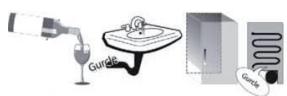
Sounds coming from your appliances are normal since it has a number of fans and engines to regulate performances that switch on and off automatically.
Some of the functional sounds can be reduced through
- Leveling the appliance and installing it on an even surface.
- Separating and avoiding contact between the appliance and furniture.
- Checking if the internal components are correctly placed.
- Checking if bottles and containers are not in contact with each other.
Some of the functional sounds you might hear:
A hissing sound when switching on the appliance for the first time or after a long pause.

text_image
Hissss HissssBuzzing sound when water valve or fan start working.

text_image
Buzzz BuzzzA gurgling sound when refrigerant fluid enters into the pipes.
text_image
Diagram illustrating wine being poured into a sink with a gruckle, alongside a container labeled 'Gruckle' and a coiled tube.A cracking sound when compressor starts or when ready ice drops into ice box abrupt clicks when compressor switches on and off.

text_image
Crack CrackBRRR sound is from the compressor running.

natural_image
Illustration of three objects: a small figure with 'Brrrr' label, a globe-like structure, and a server unit (no text or symbols on objects)The CLICK is from the thermostat which adjusts how often the compressor is running.

natural_image
Three grayscale illustrations showing a hand pointing at a panel, a cabinet, and a hanging object with a 'Click' button (no text or symbols on objects)6. RECOMMENDATION IN CASE OF NO USE OF THE APPLIANCE
6.1. ABSENCE / VACATION
In case of vacation its recommended to use up food and to disconnect the appliance to save energy.
6.2. MOVING
- Take out all internal parts.
- Wrap them well, and fix them together with adhesive tape so that they do not bang together or get lost.
- Screw the adjustable feet so that they do not touch the support surface.
- Close and fix door with adhesive tape and, again using adhesive tape, fix the power cable to the appliance.
6.3. POWER FAILURE
In the event of a power failure, call the local office of your electricity supply company and ask how long it is going to last.
Note: Bear in mind that a full appliance will stay cold longer than a partially filled one.
If food is found to be in a poor condition, it is best to throw it away.
For power failures lasting up to 24 hours.
- Keep the door of the appliance closed. This will allow the stored food to stay cold as long as possible.
For power failures lasting more than 24 hours.
- Try to use up the food, which is more easily perishable.
7. MAINTENANCE AND CLEANING
Before any cleaning or maintenance operation, unplug the appliance from the mains or disconnect the electrical power supply.
Periodically clean the appliance with a cloth and a solution of lukewarm water and neutral detergent specifically for refrigerator interiors. Never use abrasives. Never clean refrigerator parts with flammable fluids. The fumes can create a fire hazard or explosion. Clean the outside of the appliance and the door seal with a damp cloth and dry with a soft cloth. Do not use steam cleaners.
Condenser placed in the rear of the appliance should be cleaned regularly using a vacuum cleaner.
Condenser placed in the rear of the appliance should be cleaned regularly using a vacuum cleaner.
Important:
- The buttons and control panel display must not be cleaned with alcohol or alcohol-derived substances, but with a dry cloth.
- The refrigeration system pipes are located near the defrost pan and can become hot. Periodically clean them with a vacuum cleaner.
To ensure continuous and correct flow of defrost water, regularly clean the inside of the draining hole on the back of the refrigerator near the fruit and vegetable drawer, using the tool provided.

natural_image
Illustration of a server rack with heat sinks and a magnified view of the rack (no text or symbols)
natural_image
Illustration showing three steps of a tool interacting with a surface, with no visible text or symbols.8. TROUBLESHOOTING GUIDE
8.1. BEFORE CONTACTING AFTER-SALES SERVICE...
Performance problems often result from little things you can find and fix yourself without tools of any kind.
| PROBLEM | SOLUTION |
| The appliance is not working: | Is the power cable plugged into a live socket with the proper voltage?Have you checked the protection devices and fuses of the electrical system in your home? |
| If there is water in the defrost pan: | This is normal in hot, damp weather. The pan can even be half full. Make sure the appliance is level so that the water does not overflow. |
| If the edges of the appliance cabinet, which come in contact with the door seal, are warm to the touch: | This is normal in hot weather and when the compressor is running. |
| If the light does not work: | Have you checked the protection devices and fuses of the electrical system in your home?Is the power cable plugged into a live socket with the proper voltage?In case the LEDs are broken the user must call the Service for exchange of the same type available only at our After-sales Service Centers or authorized dealers. |
| If the motor seems to run too much: | Motor running time depends on different things: number of door openings, amount of food stored, temperature of the room, setting of the temperature controls.Is the condenser (back the appliance) free of dust and fluff?Are the door properly closed?Are the door seals properly fitted?On hot days or if the room is warm, the motor naturally runs longer.If the appliance door has been left open for a while or if large amounts of food have been stored, the motor will run longer in order to cool down the interior of the appliance. |
| If the appliance temperature is too high: | Are the appliance controls correctly set?Has a large amount of food been added to the appliance?Check that the door is not opened too often.Check that the door close properly. |
| If the doors do not open and close properly: | Check that food packages are not blocking the door.Check that the internal parts or automatic ice maker are not out of position.Check that the door seals are not dirty or sticky.Ensure the appliance is level. |
8.2. FAILURES
When any failure appears any LEDs indicator start blinking, it is necessary to call service. The appliance will work preserving the food stored.
Note: In case of power failure, appliance goes back to normal operation and previously chosen temperature setpoint is restored.
9. AFTER-SALES SERVICE
Before contacting After-Sales Service:
Switch the appliance on again to see if the problem has been solved. If it has not, disconnect the appliance from the power supply and wait for about an hour before switching on again.
If, after performing the checks described in the Troubleshooting Guide and switching the appliance on again, your appliance still does not work properly, contact the After-sales Service, explain the problem.
Specify:
- the model and appliance serial number (stated on the rating plate),
• the nature of the problem,
SERVICE
0000 000 00000

- the Service number (the number after the word SERVICE on the data plate on the inside of the appliance),
- your full address,
- your telephone number and area code.
Note:
The direction of door opening can be changed. If this operation is performed by After-sales Service it is not covered by the warranty.


text_image
6a.
text_image
6b.
natural_image
Line drawing of a mechanical device with an inset showing a close-up of a component (no text or symbols)
text_image
8.
text_image
9.
text_image
10.EAC
400010844157
195138714.00
AR BG CZ DA NL FI FR DE EL HU IT
KZ NO PL PT RO RU SK ES SV UK EN
CE
10/15