SDH20L13E - Humidifier Sandstrøm - Free user manual and instructions
Find the device manual for free SDH20L13E Sandstrøm in PDF.


| Product Type | Dehumidifier |
| Brand | Sandstrøm |
| Model | SDH20L13E |
| Power Supply | 220-240 V ~ 50 Hz |
| Dehumidification Capacity | 20 L/day (at 30°C, 80% RH) |
| Power Consumption | 400 W (at 35°C, 90% RH) |
| Air Flow | 140 m³/h |
| Water Tank Capacity | 3.7 L |
| Dimensions (L × W × H) | 390 × 296 × 572 mm |
| Humidity Settings | 40%, 60%, 80%, Continuous |
| Timer | 1, 2, 4, or 8 hours (auto shut-off) |
| Fan Speeds | High (H) and Low (L) |
| Auto-Defrost | Yes (indicator light) |
| Compressor Protection | 3-minute restart delay |
| Continuous Drainage | Yes (with 12 mm hose, not included) |
| Air Filter | Washable, clean every 2 weeks |
| Operating Temperature Range | 5 °C to 35 °C |
| Operating Humidity Range | 40% RH to 90% RH |
| Use | Indoor domestic only |
| Safety Features | Automatic shut-off when tank full, tip-over protection (unplug immediately) |
Frequently Asked Questions - SDH20L13E Sandstrøm
User questions about SDH20L13E Sandstrøm
0 question about this device. Answer the ones you know or ask your own.
Ask a new question about this device
Download the instructions for your Humidifier in PDF format for free! Find your manual SDH20L13E - Sandstrøm and take your electronic device back in hand. On this page are published all the documents necessary for the use of your device. SDH20L13E by Sandstrøm.
USER MANUAL SDH20L13E Sandstrøm
natural_image
White portable electronic device labeled 'Sondeam' with gray casing and handle (no additional text or symbols visible)Contents
GB
Safety Warnings....5
Unpacking....19
Product Overview....20
Front View....20
Rear View....20
Control Panel 21
Before Use 22
Operation 22
Water Tank Full....22
Compressor Protection 23
Auto-Defrost 23
Suitable Environments....23
Drying Clothes 23
Continuous Drainage 24
Cleaning & Maintenance 25
Hints & Tips 26
Specifications....26
Sisältö
FI
Please follow all the safety precautions listed below for safety and to reduce the risk of injury or electrical shock.
- Read all the instructions before using the appliance and keep them for future reference.
- Please ensure that your electricity supply is 220-240V \~50/60Hz.
- Do not use the appliance in the bathroom or shower room.
- Do not place unit appliance near radiators or heating appliances, also do not operate the unit in direct sunlight.
- Do not use the unit near flammable materials or fire.
- Close supervision is required when the unit is used by or near children.
- Ensure that the unit is used on a stable and level surface. If the floor surface is uneven there is a risk that the appliance could tip over. Also, excessive vibration and noise may occur.
- If the appliance tips over, immediately disconnect from the power supply.
- Do not block or restrict the airflow around the appliance. Position the unit so that the air inlet and exhaust grilles are not blocked or restricted in anyway.
- Allow 300mm of clearance around the unit.
- Do not spray water on the unit as this may cause irreparable damage to the unit and the risk of electric shock.
- Do not unplug the unit from the mains socket with wet hands.
- Switch off the power before removing the plug from the mains socket.
• Empty the water when the water tank is full or the unit is not in use for a prolonged period.
• To disconnect the power, grip the plug and pull it out from the mains socket. NEVER pull the mains cable.
- Do not push any objects in the air inlet and exhaust grilles.
- This unit is not intended for use by persons (including children) with reduced physical, sensory or mental capabilities, or lack of experience and knowledge, unless they have been given supervision or instruction concerning use of the unit by a person responsible for their safety.
• Children should be supervised to ensure that they do not play with the unit.
- If the mains cable is damaged, the unit must be replaced by themanufacturer, its service agent or similarly qualified persons in order to avoid a hazard.
• Children should be supervised so they do not play with the main cable.
• This appliance is intended for domestic use only.
- If the mains cable is damaged, do not use the appliance. Ensure the appliance unlpugged from the mains socket. Contact your qualified service agent to replace the mains cable.
Remove all packaging from the unit. Retain the packaging. If you dispose of it please do so according to local regulations.
The following items are included:

natural_image
Line drawing of a suitcase with handle and wavy internal bands (no text or symbols)Main Unit
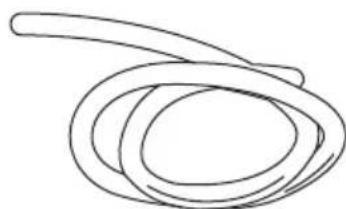
natural_image
Simple line drawing of a coiled rope or rope-like structure (no text or symbols)Water Hose
(Not included; sold separately)
Product Overview
GB
Front View
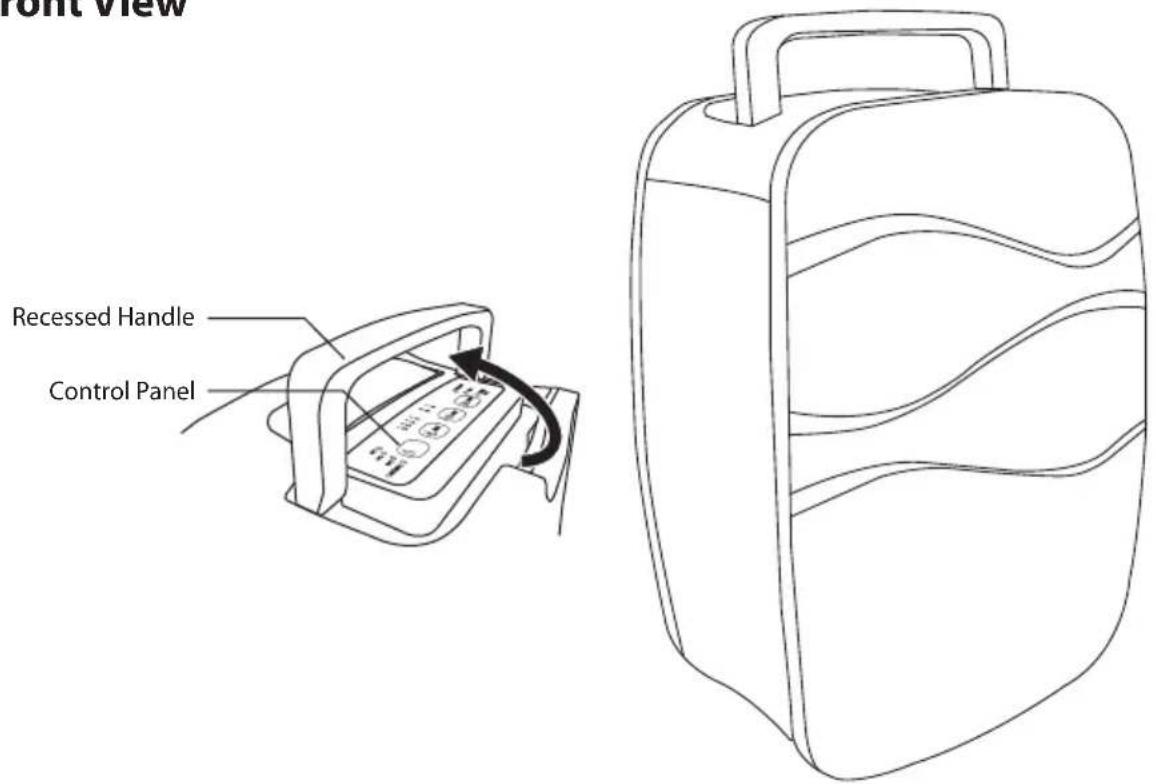
Rear View

Control Panel
GB
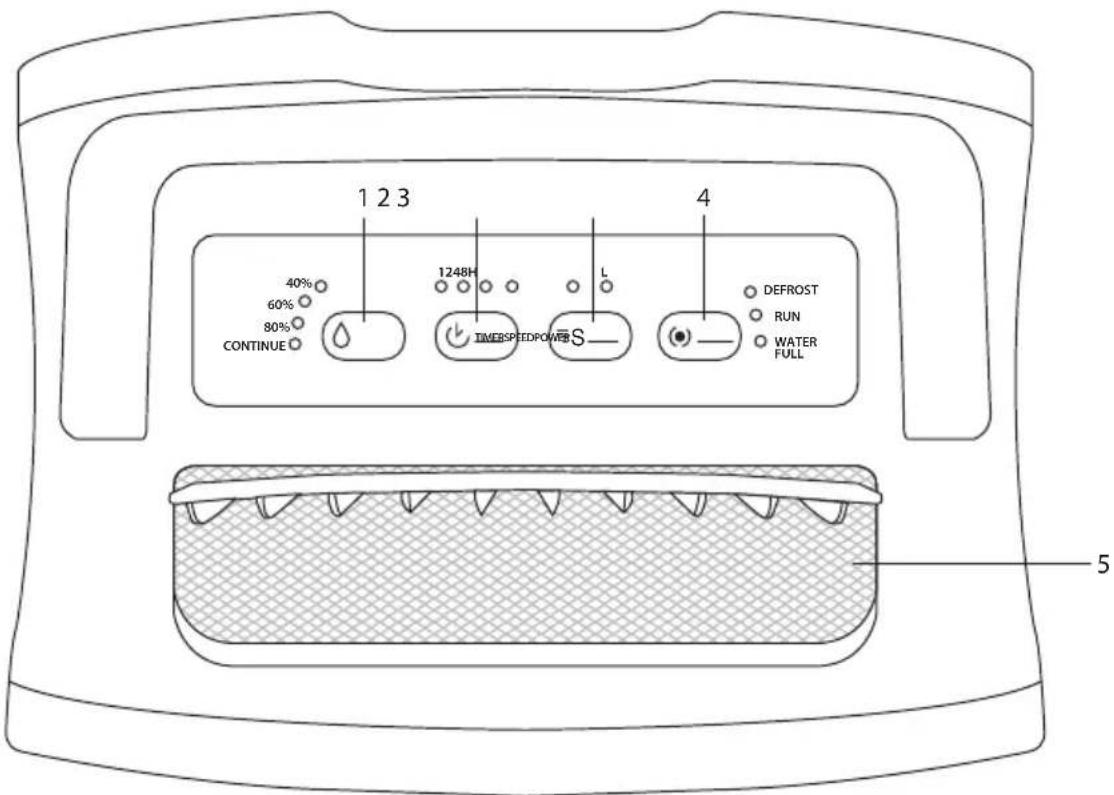
1. HUMIDITY button
40%: Maintain room humidity at 40%.
60%: Maintain room humidity at 60%.
80%: Maintain room humidity at 80%.
CONTINUE: Continuous
dehumidification regardless of room humidity.
2. TIMER button
Select the auto shut off function (select from 1/2/4/8 hours.)
3. SPEED button
H: Quiet dehumidification with high fan speed
L: Quiet dehumidification with low fan speed
4. POWER button
To turn the unit on and off.
DEFROST indicator:
Illuminates when ambient temperature is ≤0^ or ≥40^ .
RUN indicator:
Illuminates when the compressor is shutdown.
WATER FULL indicator:
Illuminates when the water tank is full.
5. Air Outlet
Before Use
- Place on a stable, flat floor. If the floor surface is not even:
• Vibration and noise will occur.
• Water may leak from the water tank.
-
Make sure the air inlet and air outlet are clear and free from blockages.
-
Allow at least 300mm clearance space around the unit.

Your unit must stand upright for at least 2 hours prior to use.
Operation
- Connect the unit to the mains socket. The units alarm will sound 3 times.
- Press the POWER button to turn the unit on. The indicators on the control panel will illuminate to show the currently selected functions.
- Select the desired functions by repeatedly pressing the relevant button.
- Press the POWER button to turn the unit off.

When the unit is turned off, the motor will keep running for 5-10 minutes. Do not unplug the unit unless the motor has stopped as this may damage the motor.
Water Tank Full
When the water tank is full, the unit will beep 10 times. The WATER FULL indicator will illuminate and the unit will automatically stop operating. Turn off the unit and remove the water tank. Empty the water and then refit the water tank. Turn the unit on again and continue operation.

natural_image
Line drawing of a mechanical device with internal mesh structure and directional arrow (no text or symbols)Compressor Protection
When the compressor is shut down, the RUN indicator will light up. Wait for 3 minutes to re-start the unit.
Auto-Defrost
When using the appliance in low ambient conditions, frost will build-up inside the unit. The unit will automatically enter Defrost Mode. The DEFROST Indicator will illuminate.
Suitable Environments
* This unit is designed to operate in the following ambient domestic room conditions:
• Minimum: 5°C, 40%RH
• Maximum: 35°C, 90%RH
It is suitable for use in bedrooms, studies, cellars/basements, kitchens, storage rooms, and home computer rooms.
* This unit is intended for indoor domestic use only.
Drying Clothes
When the unit is used to dry clothes, press the HUMIDITY button to select CONTINUE (this is the higest dehumidification setting of the unit.) Put the unit next to the wet clothes and allow the dry air to blow towards the clothes.

Do not put the unit immediately under wet clothes. Water must not drip onto the unit. This may damage the unit or cause the risk of an electric shock.

natural_image
Illustration of a jacket and a suitcase with a directional arrow indicating movement (no text or symbols)Continuous Drainage
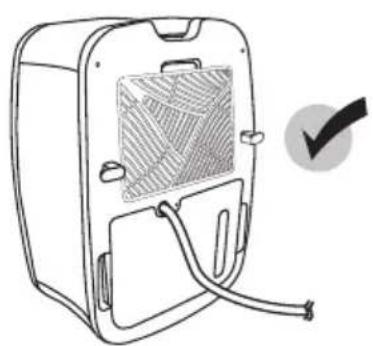
Water can be automatically emptied into a floor drain by attaching the unit with a water hose (12mm).
- Insert the water hose into the drain outlet as shown. Extend the hose to a suitable drainage facility.
- Connect the unit to the mains socket and continue operation.
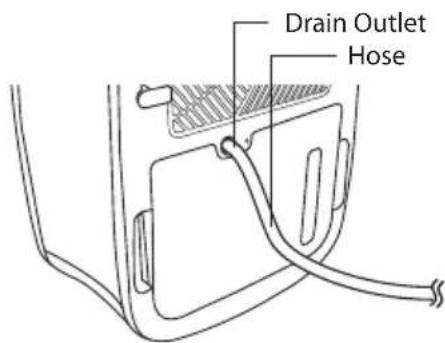

When the hose is not being used, remove the hose from the drain outlet. The hose level must be lower than the drainage outlet, see diagrams shown below.
natural_image
Line drawing of a device casing with internal panel and cable, no text or symbols present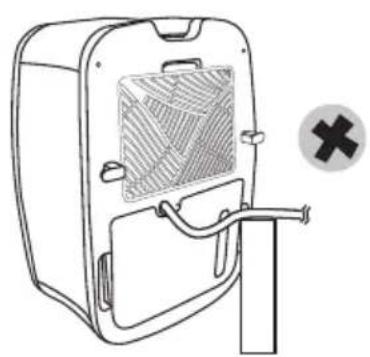
natural_image
Line drawing of a portable refrigerator with a grid-patterned vent and a cross symbol (no text or labels)Cleaning & Maintenance
Maintenance of your air filter
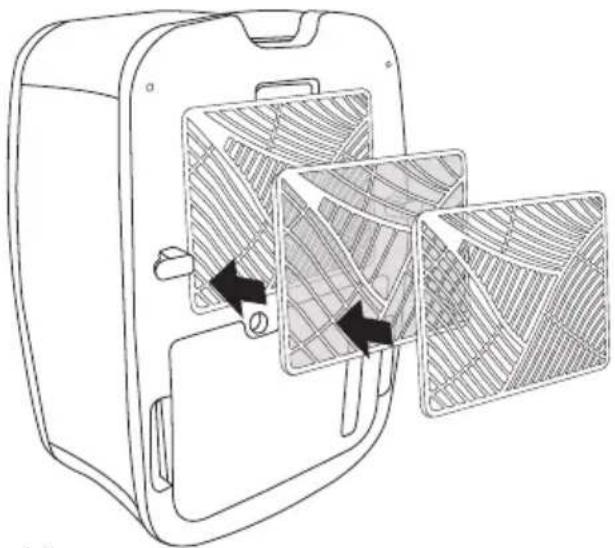
The air filter located inside the air inlet of the unit collects dust contained in the air. The build up of dust reduces the efficiency of the unit. To prevent the dust from clogging up the unit always use it with the air filter in place.
Always clean the air filter every 2 weeks. If the unit operates in a dusty atmosphere clean the air filter more often.
- To remove the filter, push the cover's 2 tabs toward each other and pull towards you. Then repeat this action to remove the filter.
- Before refitting the filter ensure it is thoroughly dry. Do not bend the filter and make sure it is fitted correctly. Replace the filter cover before operating the unit.
natural_image
Line drawing of a refrigerator interior with two compartments showing internal patterns and arrows indicating movement (no text or symbols)Cleaning the unit
• Clean the unit by using a damp sponge, and dry it with a clean, soft cloth.
• Never use alcohol or any product containing solvents.
• Do not immerse the unit in water.
Hints & Tips
GB
| Issue Solution | |
| The WATER FULL indicator is illuminated | Empty the water tank. |
| Dehumidifying function does not work. | Clean the air filter. Make sure that the air inlet and the air outlet are not obstructed. |
| Excessive noise. Ensure the unit is on a stable flat surface.Clean the air filter. | |
| No air coming out from the air outlet. | Clean the air filter. |
Specifications
| Model SDH20L13E | |
| Power Supply 220-240V~50Hz | |
| Dehumidification 20 L / D (30°C, 80% RH) | |
| Power Consumption 400W (35°C, 90% RH) | |
| Air Flow 140 CBM / hr | |
| Capacity of Water Reservoir 3.7 L | |
| Dimension (L x M x H) 390 x 296 x 572 mm |
We continually strive to improve our products, specifications may change without prior notice.
Pakke opp
natural_image
Line drawing of a suitcase with handle and wavy internal bands (no text or symbols)natural_image
Simple line drawing of a coiled ribbon or rope (no text or symbols)(Ikke inkludert; selges separat)
* Alle bilder i denne bruksanvisningen er kun for illustrasjon – detaljene kan være annerledes på den enkelte enheten.
Produktoversikt
Sett forfra

Sett bakfra

Kontrollpanel

NO
1. Fuktighetsknapp
natural_image
Line drawing of a mechanical device with internal mesh structure and directional arrow (no text or symbols)Kompressorbeskyttelse
natural_image
Illustration of a jacket and a suitcase, showing clothing items with no text or symbolsKontinuerlig drenering
Vann kan automatisk tømmes i en sluk ved å feste enheten til en vannslange (12 mm).
natural_image
Line drawing of a portable electronic device with a grid and cable, no text or symbols present
natural_image
Line drawing of a portable device with a mesh cover and handle, next to a cross symbol (no text or labels)natural_image
Line drawing of a refrigerator interior with two compartments showing internal mesh patterns (no text or symbols)Rengjøre apparatet
natural_image
Line drawing of a suitcase with handle and wavy internal bands (no text or symbols)natural_image
Simple line drawing of a coiled ribbon or rope (no text or symbols)1. FUKTIGHET-knapp
natural_image
Line drawing of a device casing with internal mesh structure and directional arrow (no text or symbols)Kompressorskydd
natural_image
Illustration of a jacket and a suitcase, showing clothing items with no text or symbolsnatural_image
Line drawing of a device casing with internal components and a checkmark indicating selection (no text or symbols)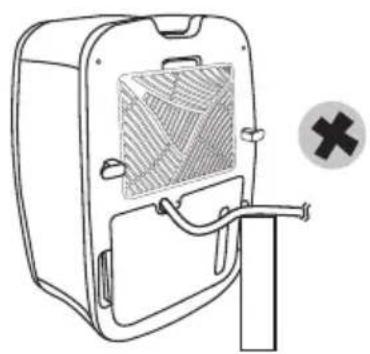
natural_image
Line drawing of a portable device with a mesh cover and handle, no text or symbols presentnatural_image
Line drawing of a refrigerator interior with two compartments showing internal mesh patterns (no text or symbols)Rengöra enheten
natural_image
Line drawing of a suitcase with handle and wavy internal bands (no text or symbols)Päälaite Vesiletku

natural_image
Simple line drawing of a coiled rope or rope-like structure (no text or symbols)1. KOSTEUS-painike
When the unit is turned off, the motor will keep running for 5-10 minutes. Do not unplug the unit unless the motor has stopped as this may damage the motor.
Vesisäiliö täynnä
natural_image
Line drawing of a mechanical device with internal mesh structure and directional arrow (no text or symbols)natural_image
Illustration of a jacket and a suitcase, showing clothing items with no text or symbolsJatkuva kuivaus
natural_image
Line drawing of a portable electronic device with a mesh chamber and cable, no text or symbols present
natural_image
Line drawing of a portable refrigerator with a mesh vent and handle, no text or symbols presentnatural_image
Line drawing of a refrigerator interior with two compartments showing internal mesh patterns (no text or symbols)natural_image
Line drawing of a suitcase with handle and wavy internal bands (no text or symbols)natural_image
Simple line drawing of a coiled ribbon or rope (no text or symbols)DK
natural_image
Line drawing of a device casing with internal mesh structure and directional arrow (no text or symbols)Kompressorbeskyttelse
natural_image
Illustration of a jacket and a suitcase, showing clothing items with no text or symbolsKonstant afløb
natural_image
Line drawing of a portable electronic device with a grid-patterned panel and cable, no text or symbols present
natural_image
Line drawing of a portable refrigerator with a ventilation grille and handle, no text or symbols presentnatural_image
Line drawing of a refrigerator interior with two compartments showing internal mesh patterns (no text or symbols)DK
natural_image
Line drawing of a suitcase with handle and wavy internal bands (no text or symbols)natural_image
Simple line drawing of a coiled ribbon or rope (no text or symbols)CZ
natural_image
Line drawing of a device casing with internal panel and door, showing no text or symbolsOchrana kompresoru
natural_image
Illustration of a jacket and a suitcase, showing clothing items with no text or symbolsnatural_image
Line drawing of a portable refrigerator with a mesh vent and cable, no text or symbols present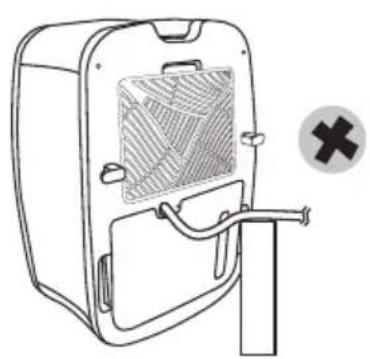
natural_image
Line drawing of a door with a gridded panel and a cross symbol (no text or labels)Čištění a údržba
natural_image
Line drawing of a refrigerator interior with two compartments showing internal mesh patterns (no text or symbols)Čištění přístroje
natural_image
Line drawing of a suitcase with handle and wavy internal bands (no text or symbols)Hlavné zariadenie Vandslange

natural_image
Simple line drawing of a coiled ribbon or rope (no text or symbols)SK
1. Tlačidlo VLHKOST
natural_image
Line drawing of a device casing with internal grating and mounting bracket (no text or symbols)Ochrana kompresora
natural_image
Illustration showing a jacket and a suitcase with a directional arrow (no text or symbols)Konstant afløb
natural_image
Line drawing of a portable electronic device with ventilation slots and cable (no text or symbols)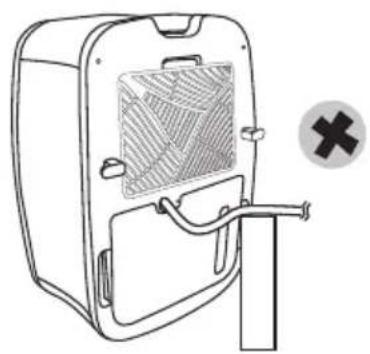
natural_image
Line drawing of a door with a mesh vent and a cross symbol (no text or labels)Čistenie a údržba
natural_image
Line drawing of a refrigerator interior with two compartments filled with patterned wood grilles, showing internal structure and arrows indicating movement (no text or symbols)This symbol on the product or in the instructions means that your electrical and electronic equipment should be disposed at the end of its life separately from your household waste. There are separate collection systems for recycling in the EU.
For more information, please contact the local authority or your retailer where you purchased the product.
NO
Maylands Avenue, Hemel Hempstead, Herts., HP2 7TG, UK
- Contents
- Sisältö
- Product Overview
- Control Panel
- HUMIDITY button
- TIMER button
- SPEED button
- POWER button
- DEFROST indicator:
- RUN indicator:
- WATER FULL indicator:
- Air Outlet
- Before Use
- Operation
- Water Tank Full
- Compressor Protection
- Auto-Defrost
- Suitable Environments
- Drying Clothes
- Continuous Drainage
- Cleaning & Maintenance
- Maintenance of your air filter
- Cleaning the unit
- Hints & Tips
- Specifications
- Pakke opp
- Produktoversikt
- Kontrollpanel
- Fuktighetsknapp
- Kompressorbeskyttelse
- Kontinuerlig drenering
- Rengjøre apparatet
- FUKTIGHET-knapp
- Kompressorskydd
- Rengöra enheten
- KOSTEUS-painike
- Vesisäiliö täynnä
- Jatkuva kuivaus
- Konstant afløb
- Ochrana kompresoru
- Čištění a údržba
- Čištění přístroje
- Tlačidlo VLHKOST
- Ochrana kompresora
- Čistenie a údržba
- NO
Brand : Sandstrøm
Model : SDH20L13E
Category : Humidifier