Navigator Quality 28Z022 - Iron Zelmer - Free user manual and instructions
Find the device manual for free Navigator Quality 28Z022 Zelmer in PDF.


| Product Type | Steam Iron |
| Brand | Zelmer |
| Model | Navigator Quality 28Z022 |
| Dimensions (approx.) | 30 x 12 x 15 cm |
| Weight | 1.4 kg |
| Power Supply | 220-240 V ~ 50/60 Hz |
| Power Consumption | 2400 W |
| Water Tank Capacity | 300 ml |
| Soleplate Material | Stainless Steel with Ceramic Coating |
| Steam Output (max) | 40 g/min |
| Shot of Steam | Yes, up to 120 g/min |
| Spray Function | Yes |
| Anti-Drip System | Yes |
| Self-Cleaning System | Yes |
| Anti-Calc Protection | Yes |
| Automatic Shut-Off | Yes, after 8 min (vertical) / 30 sec (horizontal) |
| Variable Temperature Control | Yes |
| Cord Length | 2.5 m |
| Heating Time | Approx. 1 min |
| Maintenance | Regular descaling with self-clean function |
| Safety Features | Auto shut-off, thermal fuse, non-slip handle |
| Repairability | Spare parts available (soleplate, buttons, cord) |
Frequently Asked Questions - Navigator Quality 28Z022 Zelmer
User questions about Navigator Quality 28Z022 Zelmer
0 question about this device. Answer the ones you know or ask your own.
Ask a new question about this device
Download the instructions for your Iron in PDF format for free! Find your manual Navigator Quality 28Z022 - Zelmer and take your electronic device back in hand. On this page are published all the documents necessary for the use of your device. Navigator Quality 28Z022 by Zelmer.
USER MANUAL Navigator Quality 28Z022 Zelmer
natural_image
Line drawing of a vintage steam iron with a flag and mechanical components (no text or symbols)natural_image
Line drawing of a steam iron with exhaust plume (no text or symbols)natural_image
Line drawing of a steam iron with flame-like smoke platters (no text or symbols)natural_image
Line drawing of a steam iron with decorative cloud-like patterns on the side (no text or symbols)natural_image
Line drawing of a steam iron with bubbles and a syringe, no text or symbols presentnatural_image
Line drawing of a mechanical device with a stand and cylindrical base (no text or symbols)| 28Z019 | economic | |
| 28Z020 |  ne ne | Self-classVerticalAnti-scalsAnti-drip |
| 28Z021 |  omfort omfort | iSelf-classVerticalAnti-scalsAnti-drip |
| 28Z022 |  ,uality ,uality | iSelf-classVerticalAnti-scalsAnti-drip |
Pokyny k žehlení
natural_image
Line drawing of a mechanical device with a flag and handle (no text or symbols)natural_image
Line drawing of an iron iron with steam rising (no text or symbols)natural_image
Line drawing of an iron (£) with decorative cloud-like patterns on the side (no text or symbols)natural_image
Line drawing of a steam iron with attached screw and cooling fins (no text or symbols)natural_image
Line drawing of a mechanical device with a stand (no text or symbols)Čištění a údržba
natural_image
Line drawing of a vintage steam iron with handle, spout, and base plate (no text or symbols)natural_image
Line drawing of a steam iron with visible exhaust plume (no text or symbols)natural_image
Line drawing of an iron (£) with steam rising nearby (no text or symbols)natural_image
Line drawing of a steam iron with water droplets below (no text or symbols)natural_image
Line drawing of a hand washing a small object with a stand (no text or symbols)Čistenie a údržba
natural_image
Line drawing of a mechanical device with a flag, handle, and base (no text or symbols)natural_image
Line drawing of an iron (£) with steam rising (no text or symbols)natural_image
Line drawing of a steam iron with three flame-like drops below (no text or symbols)FIGYELEM:
natural_image
Line drawing of an iron (£) with decorative cloud-like patterns on the side (no text or symbols)natural_image
Line drawing of a steam iron with water droplets below (no text or symbols)natural_image
Line drawing of a mechanical device with a stand and cylindrical base (no text or symbols)natural_image
Line drawing of a vintage office machine with a flag and handle (no text or symbols)natural_image
Line drawing of a steam iron with exhaust plume (no text or symbols)natural_image
Line drawing of a vintage steam iron with smokestacks emitting vapor (no text or symbols)natural_image
Line drawing of an iron (£) with steam rising from its side (no text or symbols)Sistem anti-picurare – Anti-Drip

natural_image
Line drawing of a steam iron with liquid droplets below (no text or symbols)Oprire automată:
(Pentru fierul de călcat tip 28Z021, 28Z022)

natural_image
Line drawing of a mechanical device with a stand and base (no text or symbols)| 28Z019 | Economic | self-classVertical | Anti-drip |
| 28Z020 | fine | self-classVertical | Anti-scaesAnti-drip |
| 28Z021 | Comfort | Self-classVertical | Anti-scaesAnti-drip |
| 28Z022 | Quality | Self-classVertical | Anti-scaesAnti-drip |
natural_image
Line drawing of a vintage mechanical device with a flag and handle (no text or symbols)natural_image
Line drawing of a steam iron with visible steam and handle (no text or symbols)natural_image
Line drawing of a vintage steam iron with smokestacks emitting vapor (no text or symbols)
natural_image
Line drawing of a steam iron with attached syringe and droplets below (no text or symbols)natural_image
Line drawing of a mechanical device with a lever and base mount (no text or symbols)| 28Z019 | economic | Self-classVertical | Anti-drip |
| 28Z020 | fine | Self-classVertical | Anti-scalsAnti-drip |
| 28Z021 | Comfort | Self-classVertical | Anti-scalsAnti-drip |
| 28Z022 | Quality | Self-classVertical | Anti-scalsAnti-drip |
natural_image
Line drawing of a mechanical device with a flag and internal components (no text or symbols)natural_image
Line drawing of a steam iron with exhaust plume (no text or symbols)natural_image
Line drawing of a steam iron with three flame-like drops below (no text or symbols)natural_image
Line drawing of a steam iron with decorative leaf patterns on the side (no text or symbols)natural_image
Line drawing of a steam iron with bubbles at the base (no text or symbols)natural_image
Line drawing of a mechanical device with a stand (no text or symbols)natural_image
Line drawing of a mechanical device with a handle and base plate (no text or symbols)natural_image
Line drawing of an iron (£) with steam rising (no text or symbols)natural_image
Line drawing of a portable electric stove with four fans below (no text or symbols)УВАГА:
natural_image
Line drawing of an iron (£) with steam rising nearby (no text or symbols)natural_image
Line drawing of a mechanical device with a lever and base mount (no text or symbols)natural_image
Line drawing of a mechanical device with a flag and handle (no text or symbols)natural_image
Line drawing of an iron (£) with steam rising (no text or symbols)natural_image
Line drawing of a steam iron with decorative leaf-like patterns (no text or symbols)natural_image
Line drawing of a steam iron with attached components and a droplet pattern below (no text or symbols)natural_image
Line drawing of a mechanical device with a lever and base mount (no text or symbols)natural_image
Line drawing of a mechanical device with a flag and handle (no text or symbols)natural_image
Line drawing of an iron (£) with steam rising (no text or symbols)natural_image
Line drawing of a steam iron with a screw and flame-like base (no text or symbols)natural_image
Line drawing of an iron (£) with steam rising, showing no text or symbolsnatural_image
Line drawing of a steam iron with water droplets below (no text or symbols)natural_image
Line drawing of a mechanical device with a lever and base mount (no text or symbols)natural_image
Line drawing of a mechanical device with a flag and handle (no text or symbols)natural_image
Line drawing of a steam iron with visible steam and handle (no text or symbols)natural_image
Line drawing of an iron (£) with steam rising, showing steam dispersion (no text or symbols)natural_image
Line drawing of a steam iron with water droplets below (no text or symbols)natural_image
Line drawing of a mechanical device with a lever and base mount (no text or symbols)Important safety and proper handling instructions....79
Hints for ironing 80
Technical characteristics 80
Outline 80
How to fill the water 81
Preparation for operation – first time ironing 81
After ironing 81
Spraying 81
Dry ironing 81
Steam ironing 81
Burst of steam 82
Burst of steam in vertical position....82
Built-in anti-scale system 83
Self-cleaning....83
Anti-drip system....83
Auto shut-off feature 83
Auto shut-off in horizontal position 83
Auto shut-off in vertical position 83
Draining the water 84
Cleaning and maintenance....84
Ecology – environment protection 84
Dear Clients!
Congratulations on your choice of our appliance, and welcome among the users of Zelmer products.
In order to achieve best possible results we recommend using exclusively original Zelmer accessories. They have been specially designed for this product.
Please read these instructions carefully. Pay your special attention to important safety instructions. Keep this User's Guide for future reference.
Important safety and proper handling instructions
Always keep these basic safety instruction during ironing:
- The iron is intended for domestic usage only and you can use it solely according to herewith manual.
- Remove any protective films or stickers from the sole plate and the cabinet. Unwind and straighten the power cord before usage.
Unplug before filling or emptying the water tank. -
Fill the water using included vessel for water. — Empty the tank after each usage. —
- If any part of the iron is damaged, it must be replaced by the manufacturer or its service agent or similarly qualified person in order to avoid a hazard.
- If the non-detachable part of the cord is damaged, it should be replaced by the producer or at a proper service point or by a qualified person in order to avoid any hazards.
- It can be refurbished by qualified staff only. Improper refurbishment can cause serious hazard for the user. In case of any defects, please contact service desk.
- Do not use the appliance when it is damaged or performs abnormally.
- Do not touch the iron rest during or just after ironing. It is hot!
- Avoid any contact of supplying cord with the iron rest. Always connect the iron to a suitable mains supply outletm (AC - only), with grounding, which voltage complies with the voltage indicated on the appliance nameplate.
The appliance generates high temperature. Use it carefully and warn – other users against possible hazard.
- Do not use an extension power cord set without grounding!
- Do not add perfumed, vinegar or other chemical liquids into the water tank; they can damage the appliance seriously.
- Do not immerse the appliance in water or any other liquid.
- Do not roll the power cord around the iron until it has cooled down completely.
- Do not attempt to open the cabinet or dismantle any parts from the appliance.
- Use and place the appliance on a firm and steady surface. - Do not open water inlet during ironing.
- Keep special care when ironing in presence of children. Do not allow to touch the iron during ironing.
- This appliance can be used by children aged from 8 years and above and persons with reduced physical, sensory or mental capabilities or lack of experience and knowledge if they have been given supervision or instruction concerning use of the appliance in a safe way and understand the hazards involved. Children shall not play with the appliance. Cleaning and user maintenance shall not be made by children unless they are aged from 8 years and above and supervised.
- The appliance is not intended to be operated by means of an external timer or separate remote-control system.
- Do not leave the appliance unattended when it is connected to a mains supply outlet or it is hot.
- The iron is not to be used if it has been dropped, if there are visible signs of damage or if it is leaking.
- If you do not use the iron, even for short time, switch it off, turning Temperature Dial in anti-clockwise direction to „MIN”.
- If you do not use the iron, even for short time, switch the steam function off, setting the knob on position.
- Never iron and clothes or fabrics that are being worn by human or pets. Never direct the steam to human or pets. – Use self-cleaning function at least once a month. –
| 28Z019 | economic | Self-classVertical | Anti-drip |
| 28Z020 | fine | Self-classVertical | Anti-scalAnti-drip |
| 28Z021 | Comfort | Self-classVertical | Anti-scalAnti-drip |
| 28Z022 | Quality | Self-classVertical | Anti-scalAnti-drip |
Hints for ironing
- Sort out the articles to be ironed according to the type of fabric. This will minimize the frequency of temperature adjustment for different garments.
- Test ironing a small area on the backside or inside the garment if you are unsure about the type of fabric. Start with a low temperature and increase gradually.
- Wait for about three minutes before ironing heat sensitive fabrics. Temperature adjustment needs certain time to reach the required level no matter it is higher or lower.
- Delicate fabrics such as silk, wool, velour, etc. are best ironed with an ironing cloth to prevent shine marks.
- You may need a few times of press to activate the spray, burst and vertically burst function.
- Read the garment labels and follow the manufacturer's ironing instructions which are often shown by symbols similar to the following:
| Temperature settings | ||
 AcetateElasticsPolyamidePolypropylene AcetateElasticsPolyamidePolypropylene | Cupro TriacetatePolyester ViscoseProteins WoolSilk | CottonLinen |
Technical data
The iron technical parameters are included at the name plate. The iron is I class appliance, equipped with supplying cord and plug with grounding. ZELMER iron meets the requirements of effective standards.
The appliance meets the requirements of the following directives: -Low Voltage Device (LVD) - 2006/95/EC.
- Electro- Magnetic Compatibility (EMC) - 2004/108/EC.
The product is marked with CE symbol on the name plate.
Outline
- Sole plate
- Temperature Dial
- Temperature dial pointer
- Water inlet cover
- Spraying nozzle
- Steam control knob
- Self-cleaning button
- Burst of Steam button
- Water Spray button
- Pilot light indicating the heater in operation (red)
- Cord grommet
-
Power cord
-
Auto shut-off indicator (for iron model 28Z021, 28Z022)

How to fill the water
Disconnect the iron from mains supply outlet. -
- Move the Steam Control Knob (7) to position.
- Release the water inlet cover (5) and fill water through the water inlet hole. Fill up to the „- MAX" level marked on the side of water tank.
- Close the water inlet cover (5).

natural_image
Line drawing of a vintage mechanical device with a flag and handle (no text or symbols)Note:
For best result, it is advisable to use demineralised water or distilled water. Do not use chemically descaled water or any other liquids.
Preparation for operation – first ironing
- Remove any protective films or sticker from the soleplate (1) and the cabinet, if any.
– Unwind and straighten the power cord (13).
– Fill the iron as described in "How to fill water".
- Connect the iron to a suitable mains supply outlet.
- Turn the Temperature Dial (2) in clockwise direction to ●●● position - control light (11) glows.
– Control light goes off when the required temperature is reached.
- Move the Steam Control Knob (7) to ⬇ position.
- Steam starts coming out from the holes in the sole plate after putting the iron in horizontal position and after pressing the Burst of Steam Button (9).
- Begin first time ironing with an old towel.
- The steam is not generated after the water tank is emptied.
- The preparation work is completed. The iron is now ready for proper use.
After operation
- Move the Temperature Dial (2) in anti-clockwise direction to „MIN"; the iron is switched off.
- Move the Steam Control Knob (7) to position.
– Disconnect the iron from mains supply outlet.
- When the iron gets cool completely, store it vertically in a safe place.
Spraying

- This function can be used any time and is not affect any setting.
- Fill the water tank as described in How to Fill Water.
- Aim the nozzle (6) to the garment.
- Press the Spray Button (10).
- It may be necessary to press the spray button a few times to start this function.

natural_image
Line drawing of a steam iron with exhaust plume (no text or symbols)Dry ironing – Always follow the garment manufacturer's ironing instructions mentioned at the garment label.
– Unwind and straighten the power cord (13).
- Move the Steam Control Knob (7) to position.
- Connect the iron to a suitable mains supply outlet.
- Turn the Temperature Dial (2) in clockwise direction to; set , or position.
– Control light (11) glows, indicating that the iron is on.
- Control light goes off when the required temperature is reached. The iron is now ready for use.
- Move the Temperature Dial (2) in anti-clockwise direction to „MIN"; the iron is switched off.
– Disconnect the iron from mains supply outlet.
- When the iron gets cool completely, store it vertically in a safe place.
Steam ironing – Always follow the garment manufacturer's ironing instructions mentioned at the garment label.
– Unwind and straighten the power cord (13).
– Fill the iron as described in "How to fill water".
- Connect the iron to a suitable mains supply outlet.
- Turn the Temperature Dial (2) in clockwise direction to ●●● position. (For optimum steam quality, do not use ● or ●● setting for steam ironing).
– Control light (11) glows, indicating that the iron is on.

- Control light goes off when the required temperature is reached. The iron is now ready for use.
- Move the Steam Control Knob (7) to selected position, in order to set the amount of steam.
- After finishing move the Temperature Dial (2) in anti-clockwise direction to „MIN"; the iron is switched off.
- Move the Steam Control Knob (7) to ✗ position.
Disconnect the iron from mains supply outlet. – - When the iron gets cool completely, store it vertically in a safe place.
Burst of steam – Always follow the garment manufacturer's ironing instructions mentioned at the garment label.
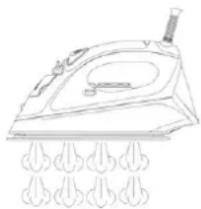
This function provides extra amount of steam which can be used for ironing very wrinkled (crumpled) clothes.
– Unwind and straighten the power cord (13).
— Fill the water tank in as described under "How To Fill Water".
- Connect the iron to a suitable mains supply outlet.
- Turn the Temperature Dial (2) in clockwise direction to ●●● position. See preparation for operation.
- Control light (11) glows, indicating that the iron is on.
- Control light goes off when the required temperature is reached. The iron is now ready for use.
- Press the Burst of Steam Button (9) once – steam will shoot from the holes of the soleplate.
- For stubborn wrinkles, wait a few seconds before pressing the Burst of Steam Button (9) again. Most wrinkles can be removed within three presses.
- After finishing move the Temperature Dial (2) in anti-clockwise direction to „MIN“; the iron is switched off.
- Move the Steam Control Knob (7) to ✉ position. Disconnect the iron from mains supply outlet. -
- When the iron gets cool completely, store it vertically in a safe place.
natural_image
Line drawing of a steam iron with multiple flutes at the base (no text or symbols)ATTENTION:
It may be necessary to press the burst of steam button a few times to start this function.
For optimum steam quality, do not operate the Burst Of Steam more than three times after the pilot light goes off.
Burst of steam in vertical position – Always follow the garment manufacturer's ironing instructions mentioned at the garment label.
This function provides extra amount of steam to remove wrinkles on delicate garments in hanging position, hanging curtains, or other hanging fabrics.

Warning:
Do not apply steam on any clothes or fabrics that are being worn by human or pets. Temperature of steam is very high. Never direct the steam to human or pets.
- Fill the water tank in as described under "How To Fill Water".
- Connect the iron to a suitable mains supply outlet.
- Turn the Temperature Dial (2) to ••• position. See „Preparation for operation“.
- Control light (11) glows, indicating that the iron is on.
- Control light goes off when the required temperature is reached. The iron is now ready for use.
- Hold the iron between 15 and 30 centimetres away from the garment.
- Press the Burst of Steam Button (9) once – steam will shoot from the holes of the soleplate.
- For stubborn wrinkles, wait a few seconds before pressing the Burst of Steam Button (9) again. Most wrinkles can be removed within three presses.
- After operation turn the temperature dial knob (2) in counter clockwise direction to „MIN“ position. The iron is switched off.
- Lock the iron with stand as described in "How to Use Iron Lock".
- Move the Steam Control Knob (7) to ✗ position. Disconnect the iron from mains supply outlet. -
- When the iron gets cool completely, store it vertically in a safe place.
natural_image
Line drawing of a steam iron with multiple flutes at the base (no text or symbols)
natural_image
Line drawing of a steam iron with decorative cloud patterns on the side (no text or symbols)It may be necessary to press the burst of steam button a few times to start this function.
For optimum steam quality, do not operate the Burst Of Steam more than three times after the pilot light goes off.
Hold the iron some centimetres away from delicate garments (artificial, silk, velvet etc.), otherwise they can be damaged.
Build-in anti-scale system
(concerning irons type 28Z020, 28Z021, 28Z022)

The build-in anti-scale cartridge is designed to reduce the build-up of lime scale that occurs during steam ironing. This will prolong the working life of your iron, although it does not stop the natural process of build-up of lime scale completely.

Self-cleaning
This function removes the scales and minerals built up in the Steam Chamber.
The iron will remain in the best condition if this function is performed at least once a month or more regularly depending on the hardness of the water used.
Fill the iron as described in "How to fill water".
- Connect the iron to a suitable mains supply outlet. See „Preparation for operation”.
- Turn the Temperature Dial (2) in clockwise direction to „MAX“ position. Control light (11) – glows, indicating that the iron is on.
- Control light goes off when the required temperature is reached. The iron is now ready for use.
Wait for one more cycle; pilot light glows and goes off. –
- After finishing move the Temperature Dial (2) in anti-clockwise direction to „MIN"; the iron is switched off.
– Disconnect the iron from mains supply outlet.
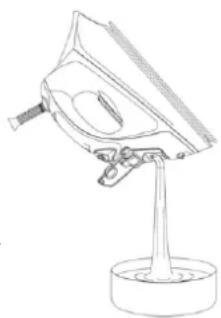
-Hold the iron horizontally over a sink.
- Press and hold the Self-Cleaning Knob (8).
- Steam and boiling hot water will drain from the holes on the soleplate washing away the scales and minerals that have built up inside the Steam Chamber.
– Gently move the iron back and forth until the water tank is empty.
- When Self-Cleaning is complete, release the Self-Cleaning Knob.
– Rest your iron at the stand and allow to fully cool down.
- Wipe the soleplate with a cold damp cloth.
Caution!
Keep skin/body away from the hot water.
Anti-Drip System

-The system, which is designed to prevent automatically water escaping from the sole-plate when the iron is too cold.
- During use, the anti-drip system may emit a loud clicking sound, particularly during heat-up or whilst cooling down. This is per-fectly normal and indicates that the system is functioning correctly.
Auto shut-off feature
(Concerning iron 28Z021, 28Z022)


natural_image
Line drawing of a steam iron with liquid droplets below (no text or symbols)The Auto shut-off feature will operate automatically when the iron is un-attended and it is connected to a mains supply outlet.
AUTO SHUT-OFF IN HORIZONTAL POSITION
- The iron will switch off automatically after approximately 30 seconds, if it is immobile in the ironing position (horizontal).
- You can hear a sound signal. The auto switch-off pilot light (4), shall flash indicating that the iron changed to auto switch-off mode.
- Simply moving the iron, it will back on and the auto switch-off function shall be wyzerowana. You will hear a sound signal, the pilot light shall go off, whereas the pilot light indicating heater in operation shall glow (11) – the iron shall reheat again.
AUTO SHUT-OFF IN VERTICAL POSITION
- The iron will switch off automatically after approximately 5-10 min-utes, if it is immobile in the rest position (vertical).
-
You can hear a sound signal. The auto switch-off pilot light (4), shall flash indicating that the iron changed to auto switch-off mode.
-
Simply moving the iron, it will back on and the auto switch-off function shall be wyzerowana. You will hear a sound signal, the pilot light shall go off, whereas the pilot light indicating heater in operation shall glow (11) – the iron shall reheat again.
Attention: Each time usage – moving the iron shall bring it back to the previous setting. The iron will take about 60 seconds to reach its previous temperature setting.
Draining the water
- Move the Steam Control Knob (7) to position.
Disconnect the iron from mains supply – outlet.
Press the - Burst of Steam Button (9), to release any trapped water when the soleplate still hot.
- Press the Spray Buttons (10), to release any trapped water.
Turn the iron upside down and gently shake – it to remove the remaining water.
Before storage make sure that Steam Control Knob (7) is in ✗ position.
natural_image
Line drawing of a mechanical device with a stand and cylindrical base (no text or symbols)Cleaning and maintenance
– Disconnect the iron from mains supply outlet.
– The iron should get cool completely before cleaning.
- Use a damp cloth and gentle washing liquid for cleaning.
- Do not use aggressive detergents like cream, milk, paste etc. to clean the casing. They can remove graphic symbols such as: scales, marking, caution signs, etc.
- Never use sharp or rough objects to remove the deposits on the sole plate.
- Never use any abrasive, vinegar or descaling agents to clean the iron.
Ecology – Environment protection
Each user can protect the natural environment. It is neither difficult nor expensive.
In order to do it: put the cardboard packing into recycling paper container; put the polyethylene (PE) bags into container for plastic.
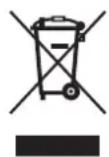
When worn out, dispose the appliance to particular disposal centre, because of the dangerous elements of this appliance, which can be hazardous for natural environment.
Do not dispose into the domestic waste disposal!!!
The manufacturer/importer does not accept any liability for any damages resulting from unintended use or improper handling.
The manufacturer/importer reserves his rights to modify the product any time in order to adjust it to law regulations, norms, directives, or due to construction, trade, aesthetic or other reasons, without notifying in advance.
- Pokyny k žehlení
- Čištění a údržba
- Čistenie a údržba
- FIGYELEM:
- Sistem anti-picurare – Anti-Drip
- Oprire automată:
- УВАГА:
- Dear Clients!
- Important safety and proper handling instructions
- Hints for ironing
- Technical data
- Outline
- How to fill the water
- Note:
- Preparation for operation – first ironing
- After operation
- Spraying
- Dry ironing – Always follow the garment manufacturer's ironing instructions mentioned at the garment label.
- Steam ironing – Always follow the garment manufacturer's ironing instructions mentioned at the garment label.
- Burst of steam – Always follow the garment manufacturer's ironing instructions mentioned at the garment label.
- ATTENTION:
- Burst of steam in vertical position – Always follow the garment manufacturer's ironing instructions mentioned at the garment label.
- Warning:
- Build-in anti-scale system
- Self-cleaning
- Caution!
- Anti-Drip System
- Auto shut-off feature
- AUTO SHUT-OFF IN HORIZONTAL POSITION
- AUTO SHUT-OFF IN VERTICAL POSITION
- Draining the water
- Cleaning and maintenance
- Ecology – Environment protection
Brand : Zelmer
Model : Navigator Quality 28Z022
Category : Iron