ETV-2460 - Oven Concept - Free user manual and instructions
Find the device manual for free ETV-2460 Concept in PDF.


User questions about ETV-2460 Concept
0 question about this device. Answer the ones you know or ask your own.
Ask a new question about this device
Download the instructions for your Oven in PDF format for free! Find your manual ETV-2460 - Concept and take your electronic device back in hand. On this page are published all the documents necessary for the use of your device. ETV-2460 by Concept.
USER MANUAL ETV-2460 Concept
Built-in Multifunctional Electric Oven

natural_image
Modern stainless steel oven with digital display and 'concept' branding (no text or symbols on main body)ETV2460
SK PL ENCZ
PODĚKOVÁNÍ
text_image
1 08:22 2 3 4 conceptPOPIS OVLÁDACÍHO PANELU
natural_image
Row of nine grayscale icons with no text or symbols, including a white circular icon on the right (no readable text or symbols)Obr. 2
text_image
A H G F B A L K J C EObr. 3a
text_image
D A F C E B AObr. 3b
A 600 mm
B 565 mm
C 560 mm
D 90 mm
E 24 mm
F 5 mm
G 118 mm
H 113 mm
J 80 mm
K 70 mm
L 25 mm
text_image
1 08:22 2 3 4 conceptPOPIS OVLÁDACIEHO PANELA
- Volič funkcií
- Tlačidlo na nastavenie doby odpočítavania (minútka)
- Tlačidlo na nastavenie denného času
- Tlačidlo STOP
- Tlačidlo ŠTART
- Volič -/+

text_image
88:28' 900' 13NÁVOD NA OBSLUHU
Pred prvým použitím
natural_image
Pure electrical circuit lines without any symbolsObr. 2
text_image
A H G F B A L K J C EObr. 3a
text_image
D A F C E B AObr. 3b
A 600 mm
B 565 mm
C 560 mm
D 90 mm
E 24 mm
F 5 mm
G 118 mm
H 113 mm
J 80 mm
K 70 mm
L 25 mm
text_image
1 08:22 2 3 4 conceptOPIS PANELU STEROWANIA
natural_image
Row of eight grayscale icons with no text or symbols, including a speech bubble and a circular icon (no readable text or symbols)Rys. 2
text_image
A H G F K J L C E B ARys. 3a

text_image
D A F B A C ERys. 3b
A 600 mm
B 565 mm
C 560 mm
D 90 mm
E 24 mm
F 5 mm
G 118 mm
H 113 mm
J 80 mm
K 70 mm
L 25 mm
Thank you for purchasing a Concept product. We hope you will be satisfied with our product throughout its service life.
Please study the entire Operating Manual carefully before you start using the product. Keep the manual in a safe place for future reference. Make sure other people using the product are familiar with these instructions.
TABLE OF CONTENTS
Technical Parameters 1
Importance notices 2
Product Description....3
Description of the Control Panel....3
Operating Instructions 4
Basic Functions of the Unit 4
Individual Functions of Baking 4
Informative Values of Temperature, Position Heights and Times of Baking.....5
Baking Tips 6
Advanced Functions of Baking 7
Cleaning and Maintenance 8
Unit installation 8
Service 10
Environmental protection 10
| Technical parameters | |
| Voltage 220-240 V ~ 50/60 Hz | |
| Power input 3100 W | |
| Temperature setting range 50 – 240 °C | |
| Installation dimensions (w x d x h) 595 x 580 x 600 mm | |
| External dimensions (w x d x h): 595 x 580 x 590 mm | |
| Internal dimensions (w x d x h): 465 x 430 x 340 mm | |
| Internal volume 56 l | |
| Weight 38 kg | |
IMPORTANT NOTICES:
Upon delivery
- Check the package and unit immediately after delivery for any damage that may have o shipping.
• If the unit is damaged, do not operate it. Contact the supplier as soon as possible. - Remove all the packaging and marketing materials from the unit before the first use.
- Dispose of the packaging material properly.
During installation
- When connecting and installing the device, follow the instructions.
- Do not lift the unit holding it by the door handle.
• The unit has to be disconnected from the power socket during installation. - Make sure the mains voltage and current protection correspond to the values on the rating plate. Use grounded wall outlets only.
• After installation of the unit, its plug shall be freely accessible.
During normal operation
• Use the unit only as described in this operating manual.
• Use the unit in a household and for baking food only.
• Do not use the unit if you are barefoot.
• Do not put oversized food or metal objects inside the oven. These could cause a fire.
• Do not sit or stand on the open door of the unit.
- WARNING! A large volume of steam may be released or grease may splash out when you open the door. Be careful. There is a risk of scalding!
- Do not touch hot surfaces or heating bodies during use or shortly after use of the unit.
• Do not store anything inside the oven.
• Do not touch the unit with wet or damp hands.
• Turn off the unit and disconnect the plug from the mains outlet in case of any failure.
- When disconnecting the unit from the wall outlet, never pull the power cord. Grasp the plug and disconnect it by pulling.
- Check the appliance and power cord for damage regularly. Do not switch on a damaged unit.
- Do not use the unit if the door or packing is damaged. Have the unit repaired in an authorized service center.
- Do not immerse the power cord, plug, or appliance in water or any other liquid.
- When the unit is out of operation, make sure that all its controls are in the OFF position.
- When the unit is in operation, do not leave the doors of the wall boxes above it open, otherwise these could be damaged by the released steam and heat e.g. in case of opening the oven door.
- Do not use accessories which have the surface treatment damaged, are worn or have other defects.
If there are children in the household
• Do not allow children or unskilled people to handle the unit. Use the unit out of the reach of these individuals.
- Persons with limited movement capacities, reduced sensory perception, insufficient mental capacity or those who are unaware of the proper handling should use the unit only under the supervision of a responsible, aware person.
• Take extra care when using the unit near children.
- Don't let anyone use the unit as a toy.
• Use only accessories recommended by the manufacturer.
WARNING!
Open the unit only for a short time to put in or remove food, to prevent injury caused e.g. by tripping. Children could lock themselves in the unit (risk of suffocation), or exposed to other dangers.
Possible defects
• Only qualified personnel may repair and intervene in the unit.
- The unit shall be disconnected from the electric network during repairs and interventions. Switch off the circuit breaker, or disconnect the plug of the supply cable.
- When disconnecting the unit from the wall outlet, never pull the power cord. Grasp the plug and disconnect it by pulling.
Failure to follow the manufacturer's instructions may invalidate the warranty.
PRODUCT DESCRIPTION
- Control panel
- Door handle
- Door
- Triple-glass window of the door

text_image
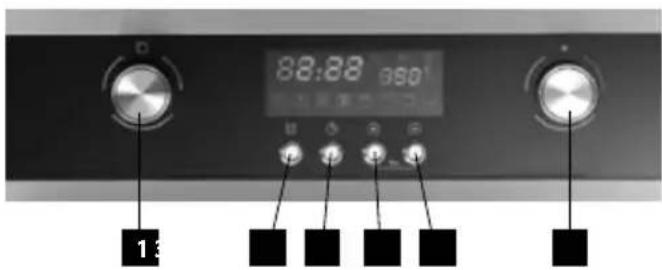
1 2 3 4 conceptDESCRIPTION OF THE CONTROL PANEL
- Mode selector
- Button for setting the countdown time (minute clock)
- Button for setting the time of day
- STOP button
- START button
- -/+ selector
text_image
88:88 950' 13OPERATING INSTRUCTIONS
Before the first use
Prior to using a new unit, wipe the surface and the inside with a wet cloth for hygienic reasons. Wash all the removable parts in warm water with a detergent, or in a dishwasher.
Then, heat the unit without food at maximum temperature for 20 minutes (see the Operating Instructions below).
It's possible that the unit will emit a slight smell and smoke, which should disappear after a while. Air the room well during this process.
After connecting to the mains
- After connecting the unit to the mains, the symbols 00:00 shine on the display.
- Press the time of day button (3) to activate the mode of setting the time of day. The hour position blinks. Turn the -/+ selector to set the current hour on the display.
- To set the current minutes, press the time of day button (3) again and turn the -/+ selector.
- To confirm the setting, press the time of day button (3). The symbol ":" starts blinking (see Fig. 1).

text_image
88:30 820°CFig. 1
Basic Functions of the Unit
- Put the pan with food in the selected position height (numbered from below).
- Turn the function selector (1) to select the required baking function (see Fig. 2).

text_image
Control panel interface with gender symbols and function icons, including a highlighted circular iconFig. 2
-
Turn the -/+ selector (6) to set the temperature to the required value.
-
Press the START button (5); heating will start in several seconds. The temperature set on the display blinks. When the unit reaches the set temperature, the displayed value will shine without blinking.
-
Turn the function selector (1) to set the required time of baking on the display. Press START (5) to confirm the selection.
Note: To pause the baking time, press the STOP button (4) once; to resume it, press the START button (5). To cancel the current program, press the STOP button (4) twice.
- After the end of baking, the unit switches off and a short sound signal is heard. The display will show the current time of day.
Individual Functions of Baking
| Symbol Function description | |
 | Lighting the internal space of the oven. |
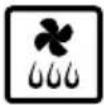 | This mode of oven function setting serves for particularly careful defrosting of food. Air at room temperature is forced into the internal space of the oven.Note: This function is suitable for defrosting food or raw products before final preparation. |
 | Heating the oven using the circular heater and the fan function. The air circulation creates an even temperature throughout the oven.The temperature can be set within the range of 50 – 240 °C.Note: This function is also suitable for baking food on two pans simultaneously (suitable for baking higher and thicker baked goods, such as cakes, or a larger amount of food). Preheating of the oven is not necessary. |
 | Grilling together with the fan function. Due to the air circulation, the temperature in the oven is higher in the upper part (above the grill or pan). The temperature can be set within the range of 50 – 200 °C.Note: This function is suitable for grilling or roasting big pieces of meat at a higher temperature. Leave the oven door closed. Preheating the oven is not necessary. |
 | Big grill - large area of the grill while utilizing infrared irradiation.The temperature can be set within the range of 180 – 240 °C.Note: For bigger pieces of meat. During baking, open the door as rarely as possible. During grilling, put the food as high as possible. |
 | Infrared grill.The temperature can be set within the range of 180 – 240 °C.Note: For smaller or thin pieces of meat. During baking, open the door as rarely as possible. During grilling, put the food as high as possible. |
 | Heating the oven using the upper and lower heaters.The temperature can be set within the range of 50 – 250 °C.Put in the food only after preheating the oven to the set temperature. During baking, open the door as rarely as possible. |
 | Heating the oven using the lower heater only.Preset temperature 60°C.Note: Thus function is suitable for the completion of baking foods which require a higher temperature from below (pizza). |
Informative Values of Temperature, Position Heights and Times of Baking
| Food Weight (g) | Position height | Baking function | Recommended temperature (°C) | Baking time (min.) | Dishes used | ||
| 1st side 2nd side | |||||||
| Cakes | -3 160 | 20-30 - Pan |  | ||||
| -3 160 | 20-30 - Pan |  | |||||
| -1+3 160 | 60 20-30 - Pans |  | |||||
| Apple pie | -2 190 | 50-70 - Pan |  | ||||
| 1+3 190 | 50-7  ans ans | ||||||
| Food Weight (g) | Position height | Baking function | Recommended temperature (°C) | Baking time (min.) | Dishes used | ||
| 1st side 2nd side | |||||||
| Swiss roll - 3 200 10-18 - Pan |  | ||||||
| Sausages | 400 g | 4 |  | 240 | 5-10 | 3-6 | |
| Beef | 1000 g | 2 |  | 210 | 10-20 | 5-15 | |
| Pork | 1000 g | 2 |  | 190 | 19-30 | 11-21 | |
| Chicken | 1300 g | 2 |  | 180 | 35-45 | 15-25 | |
| Hamburgers | 1000 g | 4 |  | 240 | 10-20 | 5-10 | |
| Pork slices | 1000 g | 4 |  | 240 | 15-25 | 10-20 | |
| Beef slices | 1000 g | 4 |  | 240 | 10-20 | 5-15 | |
* - put a pan with a little water in position height 1 under the grill to collect the drippings.
Baking Tips
• The exact values of temperature for each kind of food and each method of baking have to be tried.
- During baking, open the oven door as rarely as possible. Otherwise, the temperature regime of the baking will be disturbed, the time of baking will lengthen and the food could be scorched.
- Marinated meat and meat without bones roasts faster than unprepared meat. To check the thorough roasting of meat, press it, e.g. by a fork. If it does not release juice, it is well done.
- Meat that is larded or covered with bacon must not be roasted at too a high temperature, so that the grease does not splatter.
- When roasting big pieces of meat, fluids evaporate, which then condense on the oven door. This is and does not imply any danger in the use of the unit. After the end of baking, wipe the oven door and the surrounding space in the oven dry.
- Baked goods will rise only after 2/3 of the stated baking time. The time of baking depends on the type of filling (fruits, marmalade).
- Beaten dough should not contain too much water, which extends the baking time.
- Do not put utensils directly on the bottom of the oven, otherwise they will prevent the spread of heat and thus could cause damage to the enamel due to overheating.
- When baking in more than one pan, foods inserted simultaneously do not have to be ready at the same time.
- Baking pans are not designed for the long-term storage of food (more than 48 hours). For longer storage, put the food in a suitable container.
- When baking without the fan, we recommend preheating the oven for approximately 10 - 15 minutes. Do not open the oven door unnecessarily during baking.
- Before grilling, preheat the grill for approximately 5 minutes (until the grill heater is red). The grill with food shall be placed as close as possible to the heater. To collect the drippings, put a pan with a little water under the grill. Grilling will enable creating a brown and crispy surface on the roasted meat.
WARNING!
When using the grill, the accessible parts of the oven may become too hot. Prevent children from accessing the hot parts of the oven.
- When baking with using the fan, it is not necessary to preheat the oven, except when baking foods with a very short baking time, or when baking foods with a high water content (e.g. fruit cakes) to prevent the condensation of water vapour. Various foods with similar baking times can be prepared in two pans simultaneously, even if the baking time differs. The scent and taste of different foods do not have an influence on each other. Putting in and removing the food is not accompanied with too much heat loss. The temperature is quickly compensated by the fan. The baking temperatures are lower than those used in the standard baking mode (20 – 30°C for baked goods and 30 – 40°C for meat); the baking time is longer (approximately 5 - 10 minutes). When baking small baked goods in two pans, we recommend exchanging the height of both pans after 2/3 of the baking time or removing the ready pan earlier.
- When defrosting, put the frozen food in the packing on a dish, put the dish on the grill in the center of the oven and switch on the oven in the mode. The oven door must be closed.
- When grilling with the fan it is not necessary to preheat the oven. Grill with the oven door closed. With this method of grilling set the thermostat as needed within the range from 50 to 200 °C. The distance between the food and the grill heater must correspond to the required results:
- less distance for a brown surface and rare inside,
- more distance for thorough roasting of the food.
To collect the drippings, put a pan with a little water under the food.
Advanced Functions of Baking
a) Function of displaying the time of day during baking
During baking, press the button for setting the time of day. The time of day appears on the display for several seconds.
b) Child lock function
To activate/deactivate the child lock, press the STOP and START buttons simultaneously in the OFF status for 5 seconds. Now control using the panel is blocked.
c) Countdown function
In the OFF status you can use the unit as a kitchen minute clock for counting down the set time.
-
To activate the countdown mode, press the countdown time setting button (2). The hour position blinks. Turn the -/+ selector to set the required hours on the display.
-
To set the required minutes, press the countdown time setting button (2) again and turn the -/+ selector.
-
Press START to confirm the setting. The symbol ":" starts blinking.
-
After the set time elapses, a short sound signal is heard.
Note: For this function, the time of day must be set on the unit.
d) Automatic switch-off function
If you select a baking function but you do not press the START button within 5 minutes, the unit switches off automatically.
Note: Manual or automatic switch-off of the unit results in the clearing of all set functions and values.
Cooling fan
The fan is located on the upper side of the oven and provides the circulation of cool air in the furniture. The fan switches on automatically according to the cooling needs. The fan switches off automatically, once the temperature of the outer housing of the oven drops below 60^ C. After switching off the oven run at a temperature of 200^ C, the cooling fan switches off after approximately 10 minutes.
CLEANING AND MAINTENANCE
For the sake of a good appearance and reliability, keep the unit clean.
The modern design of the unit facilitates maintenance to a minimum.
The parts of the unit which come into contact with food have to be cleaned regularly.
- Before any maintenance and cleaning, disconnect the power cord from the mains or switch off the circuit breaker of the mains outlet of the unit.
• Set all controls in the OFF position. - Wait until the inside of the unit is not hot but only lukewarm - cleaning is easier than when it is cold.
- Clean the surface of the unit with a damp cloth, soft brush or fine sponge and then wipe it dry. In case of heavy soiling, use hot water with non-aggressive detergent.
- For cleaning the glass of the oven door, do not use coarse abrasive cleaners or sharp metal scrapers, since they can scratch the surface or the glass can be broken.
• Never leave aggressive or acidic substances (lemon juice, vinegar) on enamelled, varnished or stainless parts.
• Do not use an autoclave for cleaning the unit!
• The baking pans may be washed in a dishwasher.
UNIT INSTALLATION
- The installation of the unit is the customer's responsibility, not the manufacturer's. Defects caused by incorrect installation are not covered by the warranty.
- The manufacturer bears no responsibility for damage caused to people, animals and objects as a result of incorrect installation.
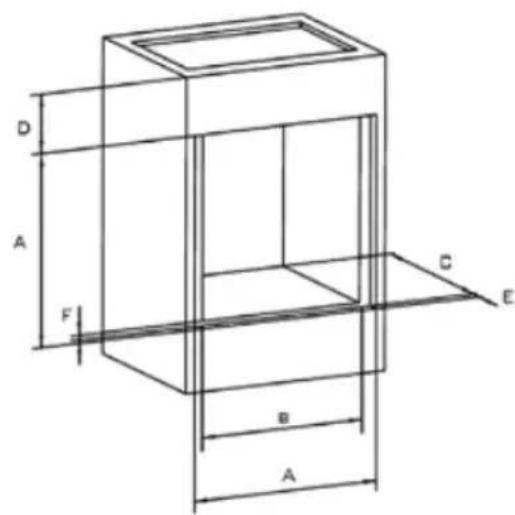
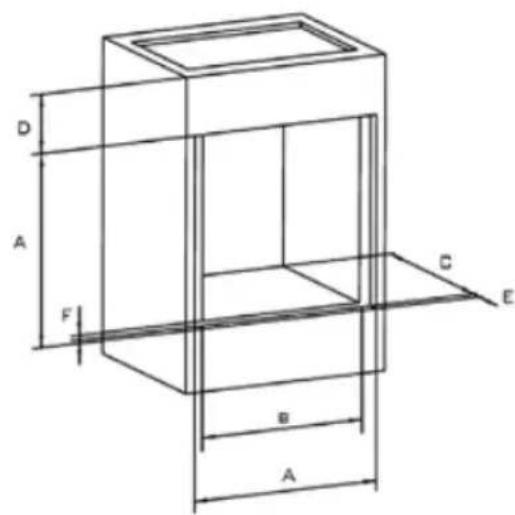
• To ensure the correct function of the unit, place it in suitable furniture. - The unit shall be installed in standardized kitchen furniture designed for built-in appliances or in properly adapted furniture of dimensions according to Figs. 3a, 3b.
- The kitchen furniture must be made of sufficiently heat-resistant material. The materials and glues used must be resistant to heating of the unit according to the standard ESN EN 60335-2-6. Materials and glues that do not meet the stated standard may deform or unstick.
Connecting to the mains
- Make sure the mains voltage and current protection correspond to the values on the rating plate. We recommend using a separate outlet circuit with a 16A circuit breaker.
• Use grounded wall outlets only. -
Do not use adapter plugs, connectors or extension cables. They could create a risk of fire from overheating.
• The supply cable plug has to be freely accessible even after the installation of the unit.
• Only a qualified expert can perform connection changes. -
Electrical safety of the unit can only be guaranteed if the protective terminal of the unit is connected to the protective conductor of the mains.
- The manufacturer bears no responsibility for damage caused to people or objects as a result of missing or bad protective connection.
- The power cord must be located so that it does not come into contact with hot parts of the unit and so that it is not deformed or excessively bent.
When installing the unit, follow these instructions:
- Remove all the packaging and marketing materials from the unit before the first use.
- For the required built-in box dimensions, see Figs. 3a, 3b. For the sake of efficient air circulation, the unit has to be located according to the dimensions on the pictures and the design of the cabinet must enable air flow into the bottom part. The gap behind the rear wall of the built-in oven must be 45 - 50 mm.
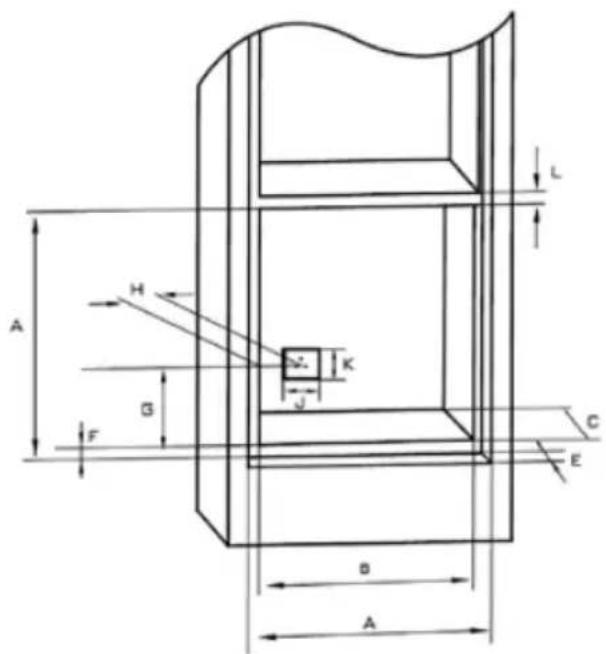
text_image
A H G F B A L K J C EFig. 3a
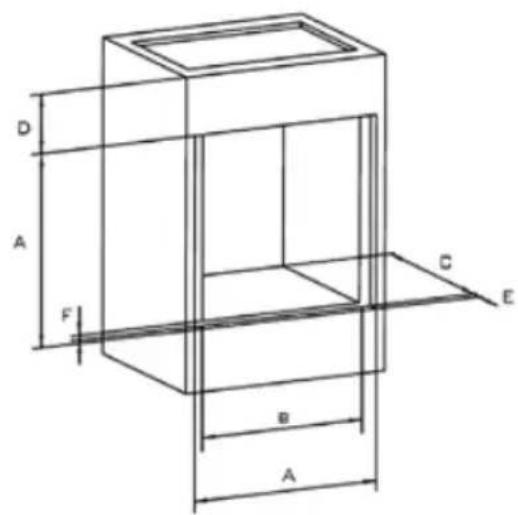
text_image
D A F C E B AFig. 3b
A 600 mm
B 565 mm
C 560 mm
D 90 mm
E 24 mm
F 5 mm
G 118 mm
H 113 mm
J 80 mm
K 70 mm
L 25 mm
- Put the unit on the edge of the cabinet and run the power cord through the rear wall of the cabinet so that the plug is accessible after installation.
- Push the unit carefully into the selected place in the cabinet. Be careful not to squeeze the power cord.
- Attach the unit to the cabinet by screwing four screws in the holes in the side walls of the unit. The holes can be seen after opening the door.
- Plug the power cord into the mains outlet.
Dismounting
If you are dismounting the unit, it is important to proceed correctly:
- First, unplug the power cord from the mains (pull out the plug or switch off the circuit breaker).
- Release the attachment screws.
- Slide out the unit and at the same time, pull out the power cord carefully.
SERVICE
Bulb replacement
The bulb of the internal space lighting is special, with a high thermal resistance (25 W, 300 °C).
For replacement, proceed as follows:
• Pull out the power cord from the mains outlet or switch off the circuit breaker of the unit's mains outlet.
• Unscrew the covering glass and replace the bulb with a new one of the same type.
• Screw the covering glass back in place.
WARNING!
The customer may only perform the bulb replacement. Any extensive maintenance or repair that requires access to the inner parts of the product must be performed by an expert service center.
ENVIRONMENTAL PROTECTION
• Packaging materials and obsolete appliances should be recycled.
• The transport box may be disposed of as sorted waste.
• Polyethylene bags shall be handed over for recycling.

Appliance recycling at the end of its service life:
A symbol on the product or its packaging indicates that this product should not go into household waste. It must be taken to the collection point of an electric and electronic equipment recycling facility. By making sure this product is disposed of properly, you will help prevent the negative effects on the environment and human health that would otherwise result from inappropriate disposal of this product. You can learn more about recycling this product from your local authorities, a household waste disposal service or in the shop where you bought this product.
Jindřich Valenta - ELKO Valenta Czech Republic, Vysokomýtská 1800, 565 01 Choceň, Tel. +420 465 322 895, Fax: +420 465 473 304, www.my-concept.cz
Elko Valenta Slovakia s. r. o., Kasárenská 396/14, 911 05 Trenčín Tel.: +421 326 583 465, Fax: +421 326 583 466, www.my-concept.sk
Elko Valenta Polska Sp. Z. o. o., Ostrowskiego 30, 53-238 Wroclaw Tel.: +48 71 339 04 44, Fax: 71 339 04 14, www.my-concept.pl