HCE-C200 - Autoradio ALPINE - Notice d'utilisation et mode d'emploi gratuit
Retrouvez gratuitement la notice de l'appareil HCE-C200 ALPINE au format PDF.


| Intitulé | Description |
|---|---|
| Type de produit | Caméra de recul |
| Caractéristiques techniques principales | Résolution : 720p, Angle de vue : 120 degrés |
| Alimentation électrique | 12V DC |
| Dimensions approximatives | 75 mm x 50 mm x 50 mm |
| Poids | 200 g |
| Compatibilités | Compatible avec la plupart des systèmes de navigation et écrans de voiture |
| Type de batterie | Non applicable (fonctionne sur alimentation externe) |
| Tension | 12V |
| Puissance | Consommation : 1.5W |
| Fonctions principales | Vision nocturne, détection de mouvement |
| Entretien et nettoyage | Essuyer avec un chiffon doux, éviter les produits abrasifs |
| Pièces détachées et réparabilité | Réparabilité limitée, pièces disponibles sur demande |
| Sécurité | Installation recommandée par un professionnel pour éviter les erreurs de câblage |
| Informations générales | Garantie de 2 ans, support technique disponible |
FOIRE AUX QUESTIONS - HCE-C200 ALPINE
Questions des utilisateurs sur HCE-C200 ALPINE
0 question sur cet appareil. Repondez a celles que vous connaissez ou posez la votre.
Poser une nouvelle question sur cet appareil
Téléchargez la notice de votre Autoradio au format PDF gratuitement ! Retrouvez votre notice HCE-C200 - ALPINE et reprennez votre appareil électronique en main. Sur cette page sont publiés tous les documents nécessaires à l'utilisation de votre appareil HCE-C200 de la marque ALPINE.
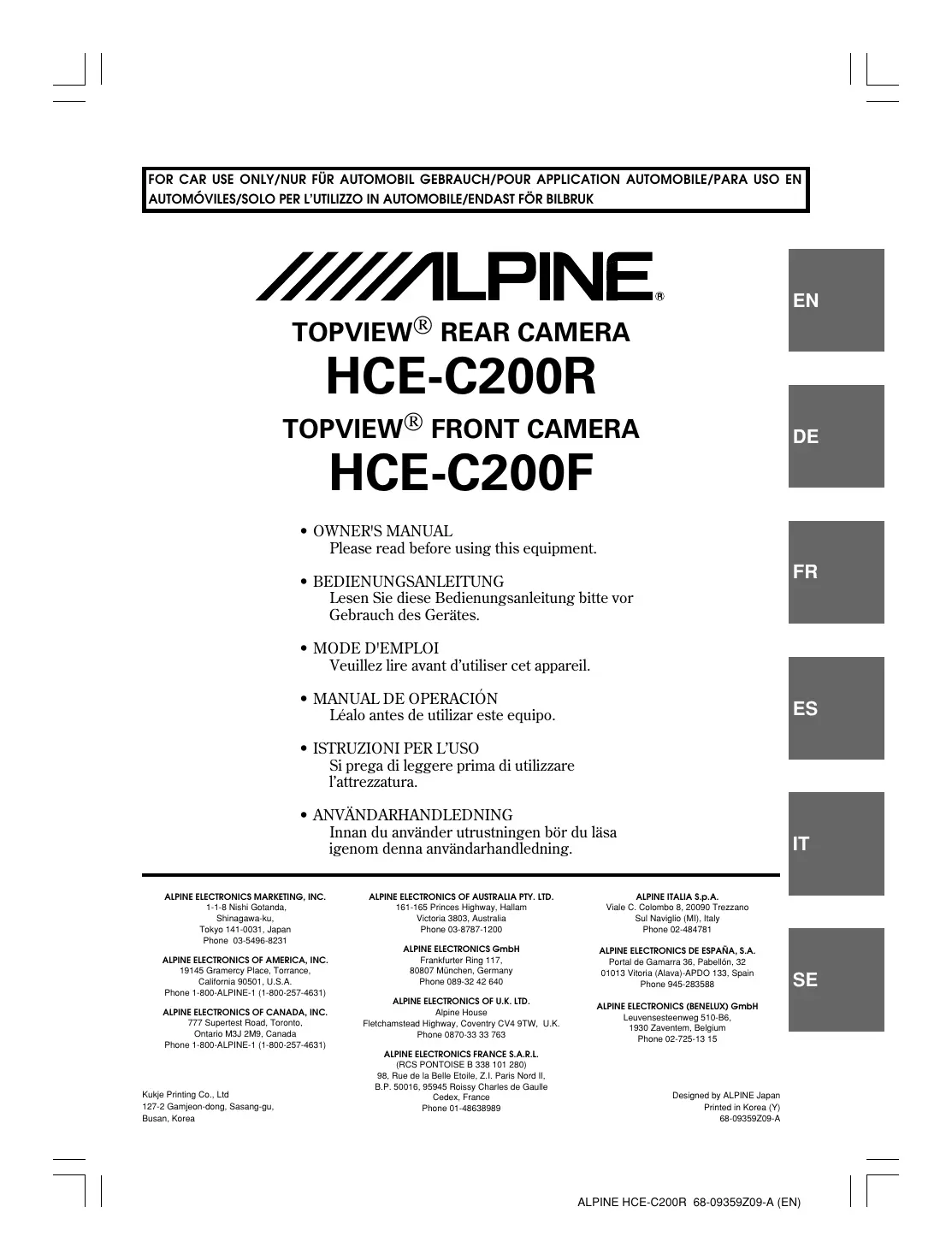
MODE D'EMPLOI HCE-C200 ALPINE
ALPINE
TOPVIEW® REAR CAMERA HCE-C200R
TOPVIEW® FRONT CAMERA HCE-C200F
- OWNER'S MANUAL Please read before using this equipment.
- BEDIENUNGSANLEITUNG Lesen Sie diese Bedienungsanleitungitte vor Gebrauch des Gerätes.
- MODE D'EMPLOI Veuillez dire avant d'utiliser cet apparéil.
- MANUAL DE OPERACION
Léalo antes de utiliser este equipo. - ISTRUZIONI PER L'uso
- Si prega di leggere prima di utilizzato l'attrezzatura.
ANVANDARHANDLEDNING Innan du anvander utrustingen bor du la saigenomenna anvandarhandledning.
ALPINE ELECTRONICS MARKETING, INC.
1-1-8 Nishi Gotanda,
Shinagawa-ku,
Tokyo 141-0031, Japan
Phone 03-5496-8231
ALPINE ELECTRONICS OF AMERICA, INC.
19145 Gramercy Place, Torrance,
California 90501, U.S.A.
Phone 1-800-ALPINE-1 (1-800-257-4631)
ALPINE ELECTRONICS OF CANADA, INC.
777 Supertest Road, Toronto,
Ontario M3J 2M9, Canada
Phone 1-800-ALPINE-1 (1-800-257-4631)
ALPINE ELECTRONICS OF AUSTRALIA PTY. LTD.
161-165 Princes Highway, Hallam
Victoria 3803, Australia
Phone 03-8787-1200
ALPINE ELECTRONICS GmbH
Frankfurter Ring 117,
80807 München, Germany
Phone 089-32 42 640
ALPINE ELECTRONICS OF U.K. LTD.
Alpine House
Fletchamstead Highway, Coventry CV4 9TW, U.K.
Phone 0870-33 33 763
ALPINE ELECTRONICS FRANCE S.A.R.L.
(RCS PONTOISE B 338 101 280)
98, Rue de la Belle Etoile, Z.I. Paris Nord II
B.P. 50016, 95945 Roissy Charles de Gaulle
Cedex, France
Phone 01-48638989
ALPINE ITALIA S.p.A.
Viale C. Colombo 8, 20090 Trezzano
Sul Naviglio (MI), Italy
Phone 02-484781
ALPINE ELECTRONICS DE ESPAÑA, S.A.
Portal de Gamarra 36, Pabellon, 32
01013 Vitoria (Alava)-APDO 133, Spain
Phone 945-283588
ALPINE ELECTRONICS (BENELUX) GmbH
Leuvensesteenweg 510-B6,
1930 Zaventem, Belgium
Phone 02-725-13 15
Contents
Operating Instructions

WARNING
WARNING 2
CAUTION 3
PRECAUTIONS 3
Getting Started
Feature 4
Rear Camera Operation
Turning the Rear Camera On and Off 5
Changing the Rear Image Configuration 5
Front Camera Operation
Turning the Front Camera On and Off 6
Changing the Front Image Configuration 6
Installation and Connections
Mounting the Rear Camera (HCE-C200R) .... 7
Mounting the Front Camera (HCE-C200F) (If HCE-C200F is purchased) 10
Connections 11
System Example 12
Confirmation 14
Information
Specifications 15
Operating Instructions
WARNING

WARNING
This symbol means important instructions. Failure to heed them can result in serious injury or death.
WHEN REVERSING THE CAR, CHECKING BEHIND AND AROUND THE CAR MUST BE DONE VISUALLY BY THE DRIVER.
The TOPVIEW® FRONT/REAR CAMERA assists the driver in checking behind and around by sending images to the screen showing conditions behind and around the car. The camera uses a wide-angle lens, therefore, there is a difference in distance perspective between what is normally seen and what appears on the screen. Also, the images shown by the rear camera are reversed, so as to appear the same as what is seen through the rearview mirror.
DO NOT DISASSEMBLE OR ALTER.
Doing so may result in an accident, fire or electric shock.
KEEP SMALL OBJECTS SUCH AS BOLTS OR SCREWS OUT OF THE REACH OF CHILDREN.
Swallowing them may result in serious injury. If swallowed, consult a physician immediately.
USE THE CORRECT AMPERE RATING WHEN REPLACING FUSES.
Failure to do so may result in fire or electric shock.
USE ONLY IN CARS WITH A 12 VOLT NEGATIVE GROUND.
(Check with your dealer if you are not sure.) Failure to do so may result in fire, etc.
BEFORE WIRING, DISCONNECT THE CABLE FROM THE NEGATIVE BATTERY TERMINAL.
Failure to do so may result in electric shock or injury due to electrical shorts.
DO NOT SPLICE INTO ELECTRICAL CABLES.
Never cut away cable insulation to supply power to other equipment. Doing so will exceed the current carrying capacity of the wire and result in fire or electric shock.
DO NOT INSTALL IN LOCATIONS WHICH MIGHT HINDER VEHICLE OPERATION, SUCH AS THE STEERING WHEEL OR SHIFT LEVER.
Doing so may obstruct forward vision or hamper movement etc. and results in serious accident.
DO NOT DAMAGE PIPE OR WIRING WHEN DRILLING HOLES.
When drilling holes in the chassis for installation, take precautions so as not to contact, damage or obstruct pipes, fuel lines, tanks or electrical wiring. Failure to take such precautions may result in fire.
DO NOT USE BOLTS OR NUTS IN THE BRAKE OR STEERING SYSTEMS TO MAKE GROUND CONNECTIONS.
Bolts or nuts used for the brake or steering systems (or any other safety-related system), or tanks should NEVER be used for installations or ground connections. Using such parts could disable control of the vehicle and cause fire etc.
MINIMIZE DISPLAY VIEWING WHILE DRIVING.
Viewing the display may distract the driver from looking ahead of the vehicle and cause an accident.
DO NOT ALLOW CABLES TO BECOME ENTANGLED IN SURROUNDING OBJECTS.
Arrange wiring and cables in compliance with the manual to prevent obstructions when driving. Cables or wiring that obstruct or hang up on places such as the steering wheel, shift lever, brake pedals, etc. can be extremely hazardous.
USE THIS PRODUCT FOR MOBILE 12V APPLICATIONS.
Use for other than its designed application may result in fire, electric shock or other injury.
MAKE THE CORRECT CONNECTIONS.
Failure to make the proper connections may result in fire or product damage.
CHECK THAT THE CAMERA MOUNTING IS ATTACHED SECURELY, AND THAT THE SCREWS ARE TIGHT BEFORE DRIVING.
Failure to do so may result in an accident.
WHEN INSTALLING THE CAMERA, OR WHEN CHECKING IT IS INSTALLED SECURELY, DO SO AFTER PARKING THE CAR IN A LEVEL, SAFE PLACE, TURNING OFF THE ENGINE, AND APPLYING THE HAND BRAKE.
Failure to do so may result in an accident.
WHEN USING A DRILL TO MAKE A HOLE, TAKE PRECAUTIONS SUCH AS WEARING GOGGLESO FRAGMENTS DO NOT GET INTO THE EYES.
Failure to do so may result in injury.

CAUTION
This symbol means important instructions. Failure to heed them can result in injury or material property damage.
USE SPECIFIED ACCESSORY PARTS AND INSTALL THEM SECURELY.
Be sure to use only the specified accessory parts. Use of other than designated parts may damage this unit internally or may not securely install the unit in place. This may cause parts to become loose resulting in hazards or product failure.
EXCEPT FOR THE CAMERA ITSELF, DO NOT ATTACH ANY PARTS TO AREAS WHICH WILL GET WET, OR WHERE THERE IS A LOT OF HUMIDITY OR DUST.
Failure to do so may result in fire or damage.
HAVETHE WIRING AND INSTALLATIONDONE BY EXPERTS.
The wiring and installation of this unit requires special technical skill and experience. To ensure safety, always contact the dealer where you purchased this product to have the work done.
ARRANGE THE WIRING SO IT IS NOT CRIMPED OR PINCHED BY A SHARP METAL EDGE.
Route the cables and wiring away from moving parts (like the seat rails) or sharp or pointed edges. This will prevent crimping and damage to the wiring.
HALT USE IMMEDIATELY IF A PROBLEM APPEARS.
Failure to do so may cause personal injury or damage to the product. Return it to your authorized Alpine dealer or the nearest Alpine Service Centre for repairing.
DO NOT ATTACH THE CAMERA MOUNTING TO FLUOROCARBON RESIN FINISHED CAR BODIES OR GLASS.
Doing so could cause the strength of the camera mounting to weaken, which could cause it to fall of and cause accidents, injury, or damage to the car body.
DO NOT ATTACH THE CAMERA MOUNTING TO ANY SURFACE WHERE THE ENTIRE ADHESIVE SURFACE CANNOT BE APPLIED.
Doing so could cause the strength of the camera mounting to weaken, which could cause it to fall of and cause accidents, injury, or damage to the car body.
PRECAUTIONS
-
Do not assert any excess pressure to the camera or the mounting, as this could cause the camera direction to shift, or the camera mounting to come off.
-
To prevent the camera lens, mounting and cords from changing colour or shape, or from deteriorating, wipe with a chemical-free, damp cloth.
-
When washing the car, do not using an automatic car washer, or high-pressure washer. Doing so could cause the camera to come off, damage to the camera cord, or may allow water to enter the camera or the inside of the car.
-
Be sure to disconnect the cable from the (-) battery post before installing your HCE-C200R/HCE-C200F. This will reduce any chance of damage to the unit in case of a short-circuit.
-
Be sure to connect the colour coded leads according to the diagram. Incorrect connections may cause the unit to malfunction or damage to the vehicle's electrical system.
-
When making connections to the vehicle's electrical system, be aware of the factory installed components (e.g. on-board computer). Do not tap into these leads to provide power for this unit. When connecting the HCE-C200R/HCE-C200F to the fuse box, make sure the fuse for the intended circuit of the HCE-C200R/HCE-C200F has the appropriate amperage. Failure to do so may result in damage to the unit and/or the vehicle. When in doubt, consult your Alpine dealer.
-
In some cases, to attach the camera, a hole must be drilled in the car body, requiring use of touch-up paint (retail product) for rust-prevention, and should be prepared beforehand.
-
Route the cables and wiring away from hot or moving parts, and fix them securely to avoid heat/mechanical damage to the cable insulation, which may result in short-circuit, fire or electric shock.
- About Images
Images of the rearview camera are the images of the rearview mirror. The same images appear on the display as on the rearview mirror. The camera uses a wide-angle lens, therefore, there is a difference in distance perspective between what is normally seen and what appears on the display.
- About Power Connection
Connect a reverse input cable (orange/white) to the power cable of the rear lamp. For details, consult a dealer purchased the camera, or car dealer.
-
Connect this to a power cable of the rear lamp, but not to the positive (+) of the rear lamp signal cable.
-
Do not use a mobile phone or wireless device near the camera. Doing so may result in noise on the screen or malfunction. It is recommended to use a mobile phone or wireless device away from the camera.
-
If there is no reverse input on the monitor, this connection is not possible.
-
Before installing, make sure there is a enough space to be able to install the camera.
-
If possible, install the camera in the centre of the bumper or other fitting. If the camera is installed at a distance left or right of centre, the image may differ from the real view.
-
The HCE-C200F cannot be used independently, the HCE-C200R is also required.
- Confirming the Display Function
To connect the unit, confirm that the monitor will require a compatible RCA pin jack.
Getting Started
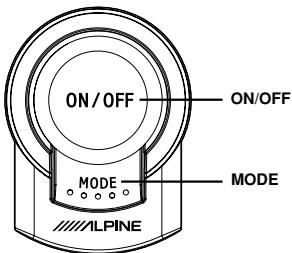
Operation is carried out by pressing the switch, or shifting the gear lever.
Feature
When reversing the car, you can check behind and around the car with the assistance of the TOPVIEW® REAR CAMERA (HCE-C200R) and the equipped monitor. If the TOPVIEW® REAR CAMERA is connected to the optional TOPVIEW® FRONT CAMERA (HCE-C200F), you can also check conditions ahead of you on the equipped monitor in the case of a difficult-to-judge road or cross-roads.
Rear Camera Operation
Turning the Rear Camera On and Off
1 Shift the gear lever to the reverse position (reversing).
The image display of the car rear and surround interruption depends on gear lever operation.
2 If you shift the gear lever to a position other than reverse (reversing), the monitor returns to the previous screen.
Refer also to the Owner's Manual of the connected monitor/observation system.
- Be sure to also check behind and around the car visually. Use the camera image to assist in showing conditions behind and around the car.
- Depending on where the unit is installed, actual conditions may differ from the displayed image.
- The ON/OFF switch is used to turn the front camera on/off. How the rear camera turns on/off depends on the position of the gear lever.
Changing the Rear Image Configuration
1 Press MODE.
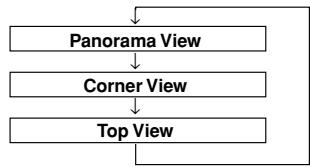
The image configuration changes every time MODE is pressed.
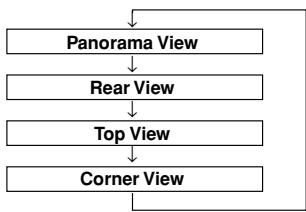
Panorama View:
Displays a general perspective of what is behind the car. Use this when you want to check mainly behind the car.
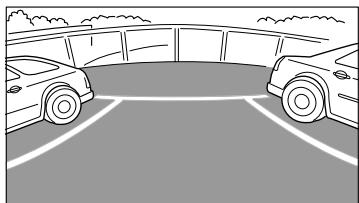
Rear View:
Displays what is behind the car. Use this when reversing into a parking space, for example.

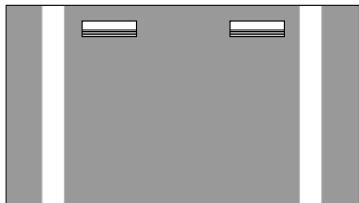
Top View:
Displays an image from above down to the lower section of the car. Use this when to determine the car's position in relation to the curb, etc.
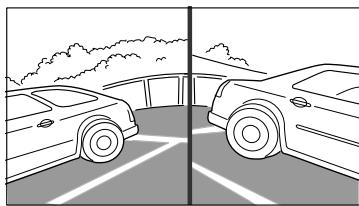
Corner View:
Displays a divided image left and right of centre. Use this mainly when checking the left and right directional view.
Front Camera Operation
Turning the Front Camera On and Off
1 Press ON/OFF.
Pressing ON/OFF will display an image of what is ahead of the car, interrupting the display screen.
2 Pressing ON/OFF again will turn off image of the car ahead, and return to the previous screen to be interrupted.
- Be sure to also check behind and around the car visually. Use the camera image to assist in showing conditions behind and around the car.
- Depending on where the unit is installed, actual view may differ from displayed image.
Changing the Front Image Configuration
1 Press MODE.
The image configuration changes every time MODE is pressed.
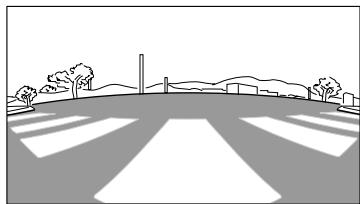
Panorama View:
Displays a general perspective of what is ahead of the car. Use this when you want to check mainly ahead of the car.
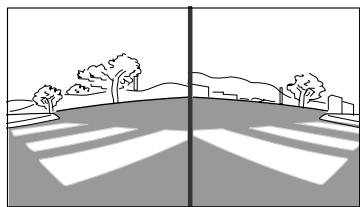
Corner View:
Displays a divided image left and right of centre. Use this mainly when checking left and right directional view.
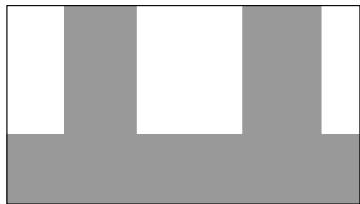
Top View:
Displays an image from above down to the lower section of the car. Use this when to determine the car's position in relation to the curb, etc.
Installation and
Connections
Mounting the Rear Camera
(HCE-C200R)
Preparation
1 Check accessory parts.
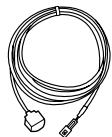
① Rear camera (1m)
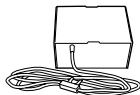
② Power unit (ACC:2m, GND:2m, Reverse In:6m, Reverse out:2m)
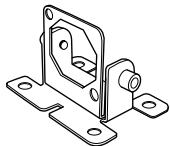
③ Camera mounting

④ Hex screw
x2
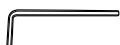
⑤ Hexagonal wrench
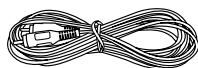
⑥ RCA extension cable (2m)
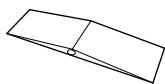
⑦ Waterproofing pad
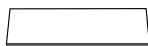
⑧ Waterproofing pad adhesive sheet
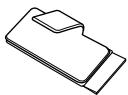
⑨ Cord clamp
x5
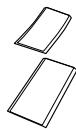
10 Velcro fastener
x2

⑪ Tapping screw
x4
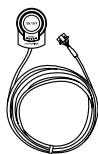
⑫ Switch (3m)
⑬ Switch adhesive sheet
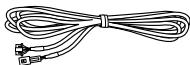
14 Camera extension cable (7m)
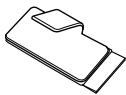
15 Cord clamp (Switch)
x3
Installing the Power Unit
1 Attach the Velcro fastener (hard side) to the bottom of the power unit ②.
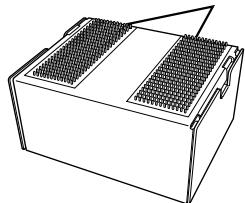
Velcro fastener (hard side)
2 Attach the Velcro fastener (soft side) to the floor, and secure the power unit ②.
- When attaching the Velcro fastener (hard side) to the floor carpet, do so without the Velcro fastener (soft side) attached.
- It is recommended to install the power unit on the rear of the instrument panel, or under a seat.
Installing the Switch
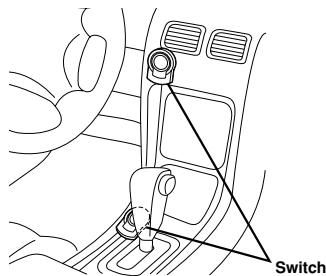
1 Attach the switch ⑫ according to the following illustration.
Attach the supplied switch adhesive sheet ⑬. Peel off the seal paper, and apply it to the back of the switch, then peel off the other seal paper and install in the desired location. If necessary, secure the cable with the supplied cord clamps ⑮.
- Before attaching the switch, wipe off any dust, oil, etc., on the attaching surface with a suitable cleaning cloth (sold separately).
- Attach the switch in a location where driving is not hindered.
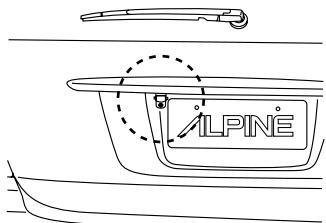
1 Attach the camera ① to the camera mounting ③.
Pull the camera cable through to the camera mounting ③ , and secure with the hex screws ④
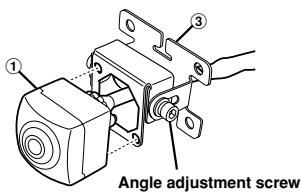
2 Use the hexagonal wrench ⑤ to loosen the camera mounting ③ and angle adjustment screw. Determine the attachment angle, and carefully tighten the angle adjustment screw.
3 Make a 13 mm hole in the rear garnish camera mounting.
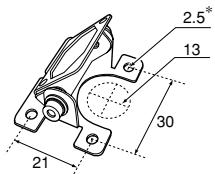
-
If the tapping screw ① is used, make a hole.
4 Pull the camera cable inside the car through the hole made in step 3.
5 Remove the adhesive seal from the camera mounting ③ , and attach the camera mounting while ensuring the camera cable remains inside the grommet. -
Attach the camera in a position where it does not touch the number plate.
- Use retail touch-up paint to paint the surface and surrounding area when a hole has been made in a metal surface.
- If necessary, use a tapping screw (1) to fix the camera mounting (In the case of a plastic mount area).
- Install the camera facing up so that the serial label on the rear of the camera is visible.
Securing the Camera Cable
1 Secure the camera cable.
Attach the waterproof pad ⑦ with the waterproof pad adhesive sheet ⑧ , and secure any slack cable around the waterproof pad ⑦ using the cord clamp ⑨ .
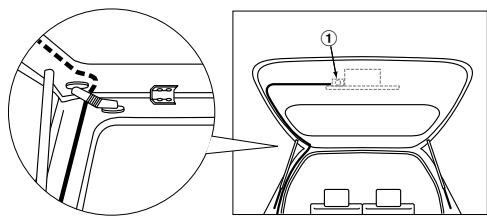
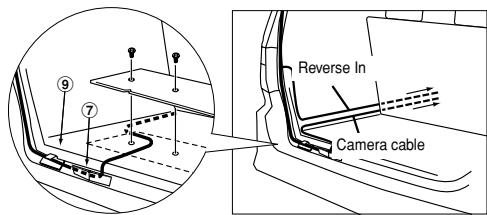
- Ensure the cable does not get caught in the trunk, rear door(s) or any hinges.
- The cable should go on the outside of car hinges and harness covers.
After completing wiring, open and close the trunk and the rear doors several times to confirm the cable is not getting caught or rubbing anywhere.
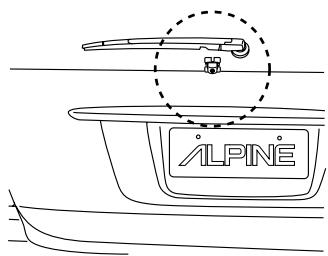
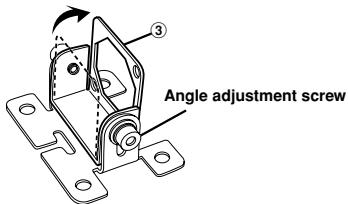
1 Assemble the camera mounting ③ Use the hexagonal wrench ⑤ to remove the camera mounting ③ and angle adjustment screw. Remove the mounting brackets, invert them, and then secure by tightening the angle adjustment screw.
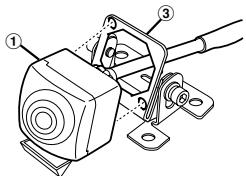
2 Attach the camera to the camera mounting ③. Pull the camera cable through to the camera mounting ③, and secure with the hex screws ④.
3 Loosen the camera mounting ③ and angle adjustment screw. Determine the attachment angle, and carefully tighten the angle adjustment screw.
4 Remove any dirt, dust, oil or chemicals from the rear window using a commercially-available cleaning cloth.
5 Remove the adhesive seal from the camera mounting ③ , and attach the camera mounting.
- Attach the camera in a position where it does not obstruct rear visibility, or touch wipers.
- Install the camera facing up so that the serial label on the rear of the camera is visible.
1 Secure the camera cable. Attach the waterproof pad ⑦ with the waterproof pad adhesive sheet ⑧ , and secure any slack cable around the waterproof pad ⑦ using the cord clamp ⑨ .
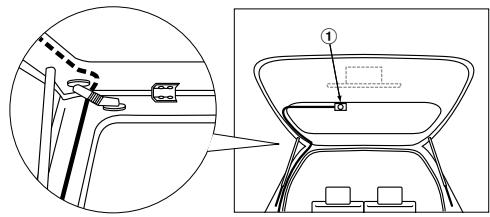
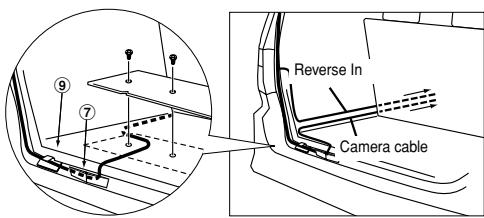
- Ensure the cable does not get caught in the trunk, rear door(s) or any hinges.
- The cable should go on the outside of car hinges and harness covers.
- After completing wiring, open and close the trunk and the rear doors several times to confirm the cable is not getting caught or rubbing anywhere.
Mounting the Front Camera (HCE-C200F) (If HCE-C200F is purchased)
Preparation
1 Check accessory parts.
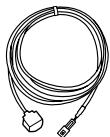
① Front camera (1m)

③ Hex screw
x2
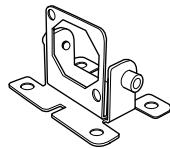
② Camera mounting
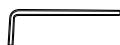
④ Hexagonal wrench
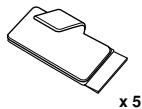
⑤ Cord clamp

⑥ Tapping screw
X4
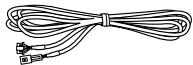
⑦ Camera extension cable (4m)
Install to the Front Bumper
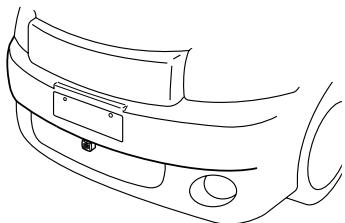
1 Attach the camera to the camera ① mounting ②.
Pull the camera cable through to the camera mounting ② , and secure with the hex screws ③
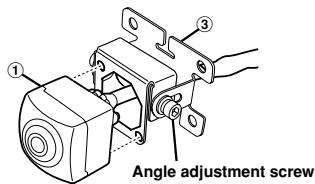
2 Use the hexagonal wrench ④ to loosen the camera mounting ② and angle adjustment screw. Determine the attachment angle, and carefully tighten the angle adjustment screw.
3 Make a 13mm hole in the front bumper camera mounting.
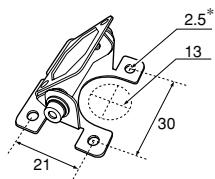
- If the tapping screw ⑥ is used, make a hole.
4 Pull the camera cable inside the car through the hole made in step 3.
5 Remove the adhesive seal from the camera mounting ② , and attach the camera mounting.
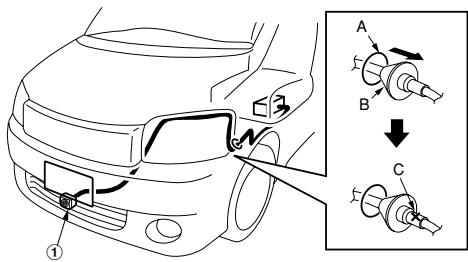
A Service hole
B Grommet
C Make an incision in the grommet.
- If necessary, use a tapping screw (6) to fix the camera mounting (In the case of a plastic mount area).
6 Connect the camera cable through the service hole to the power box.
- Attach the camera in a position where it does not touch the number plate.
- Use retail touch-up paint to paint the surface and surrounding area when a hole has been made in a metal surface.
- Route all cables away from hot areas/parts of the car.
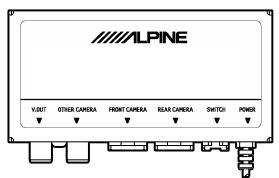
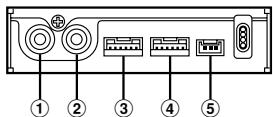
① V.OUT Terminal
Connect this to the camera terminal of the monitor or navigation.
OTHERCAMERA Terminal
Not used.
③ FRONT CAMERA Terminal
Connect this to the front camera (HCE-C200F)
④ REAR CAMERA Terminal
Connect this to the rear camera (HCE-C200R)
⑤ Switch Terminal
Connect this to the switch (HCE-C200R included)
System Example
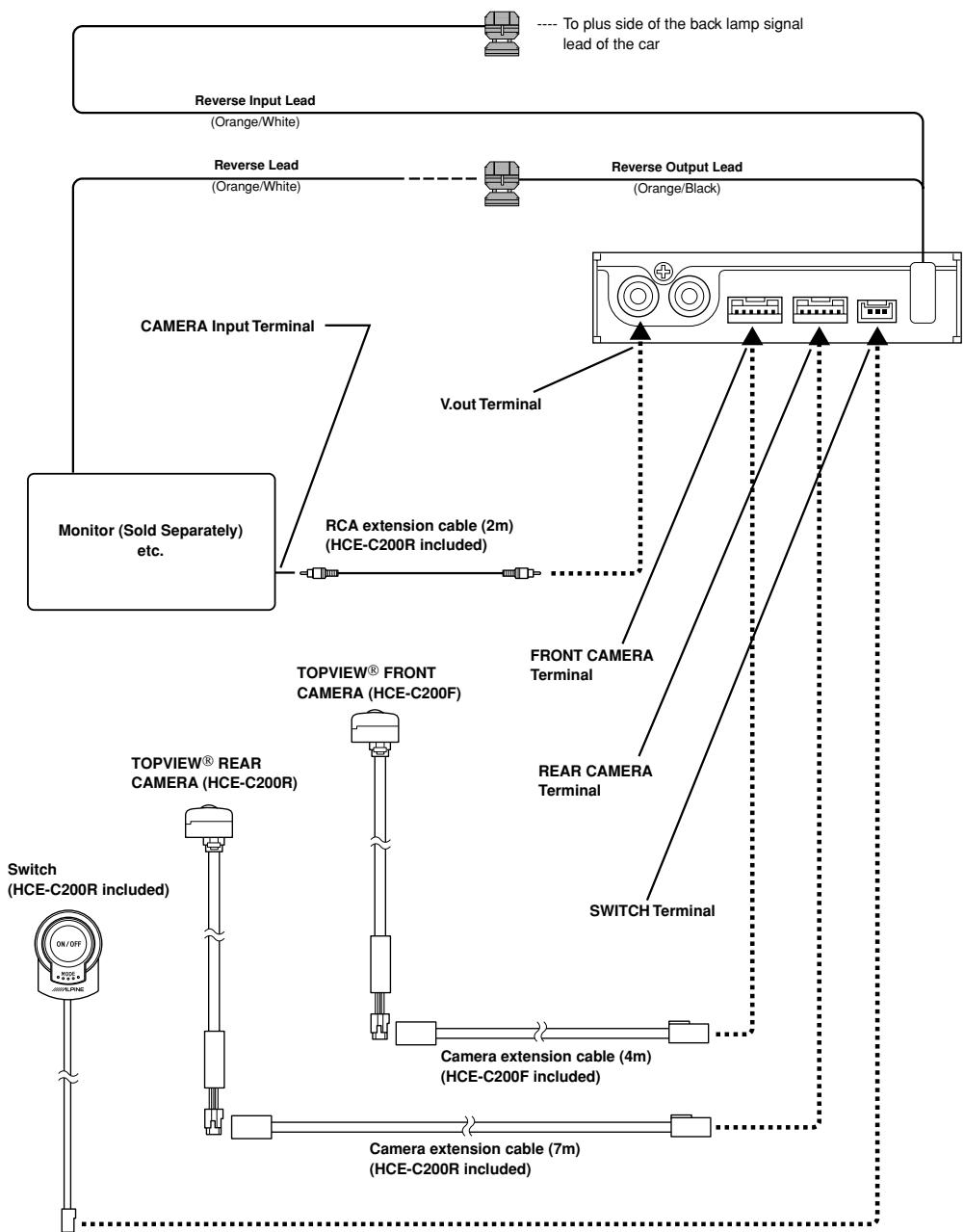
(1) Connecting an Alpine Monitor
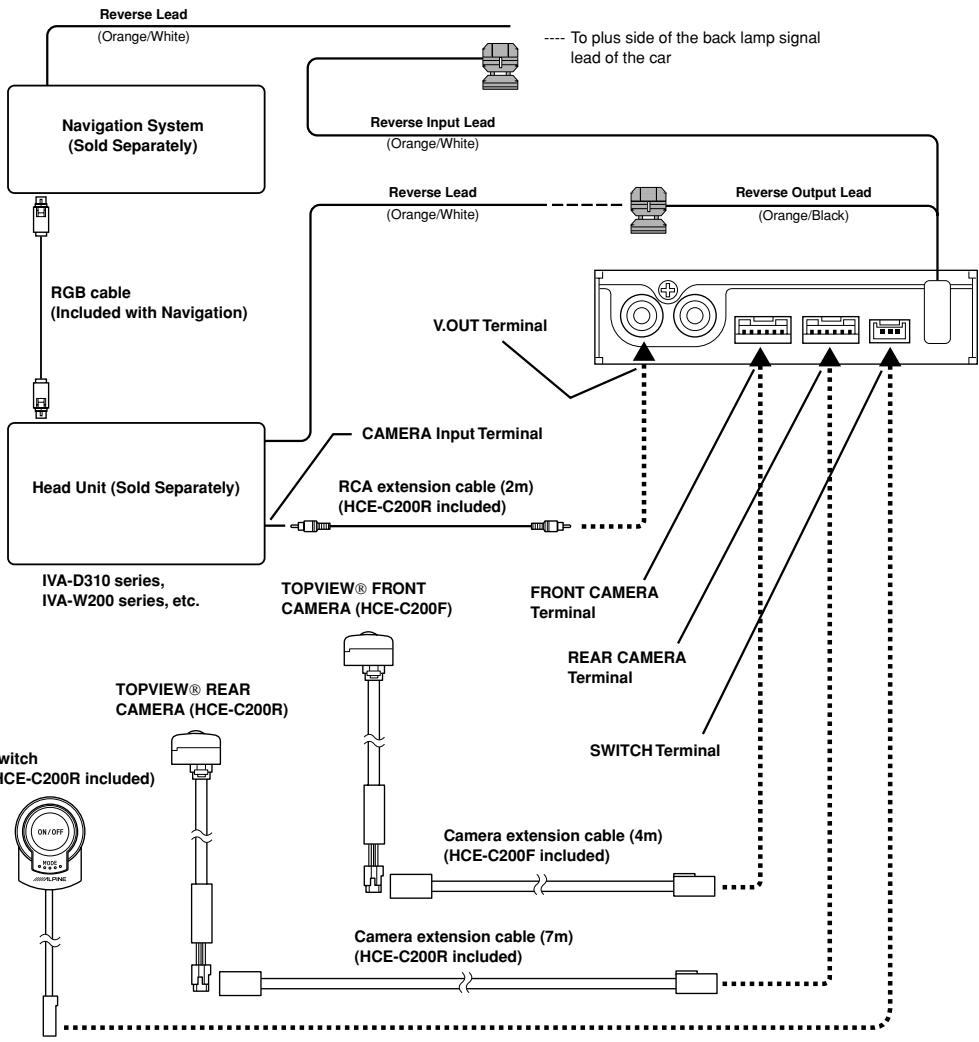
(2) Connecting an Alpine Head Unit and an Alpine Navigation System
- When you route and arrange cables around the engine or car interior, do so as to avoid hot parts.
- The front view camera (HCE-C200F) and rear view camera (HCE-C200R) are designed to be connected separately. The front camera and rear camera can be identified by their bottom labels.
- Connect the cameras by referring carefully to connection instructions or labels.
- The "OTHER CAMERA" terminal is not used, do not connect this.
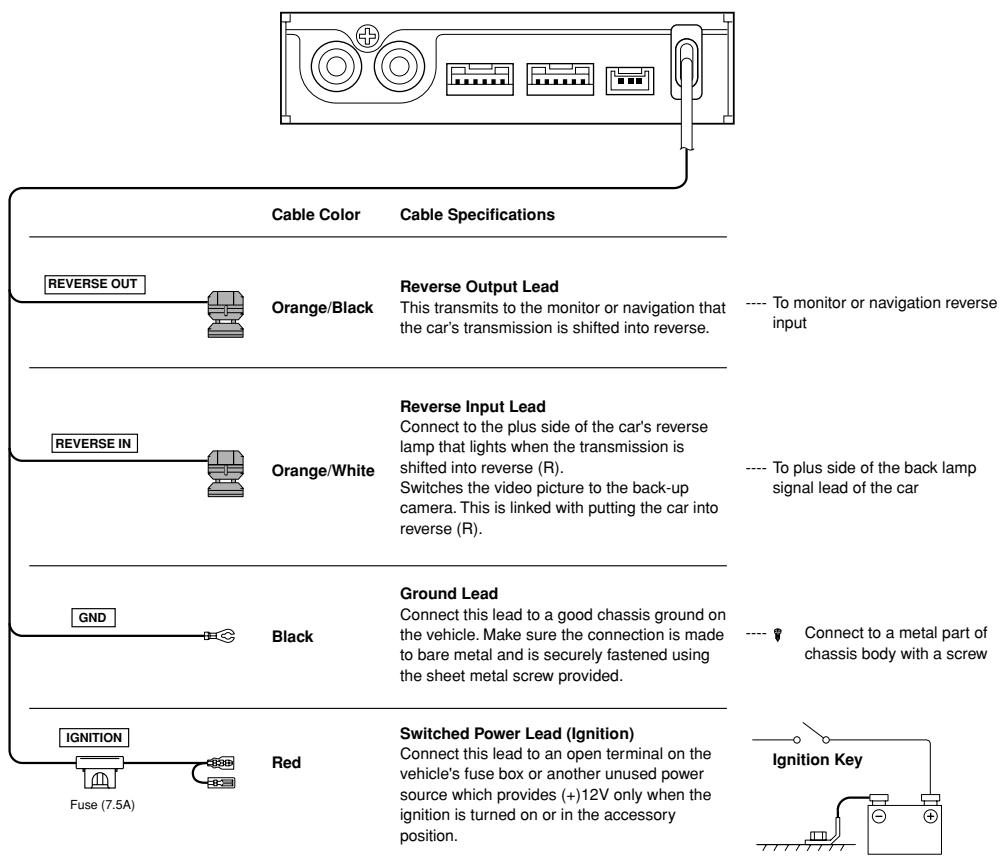
- Connect the Reverse Output Lead (Orange/Black) of this unit to the Reverse Lead (Orange/White) of the Head Unit/Monitor.
- Connect the Reverse Lead (Orange/White) of the Navigation System to the plus side of the back lamp signal lead of the car.
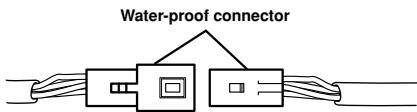
- Connect the water-proof connector for the camera and camera extension cable securely. When disconnecting the water-proof connector, use a minus screwdriver.
Confirmation
1 Securing leads, etc.
Make sure leads are not pinched by moving parts such as the seat rail, etc. Also check for damaged from sharp edges or protrusion.
Refer to "Securing the Camera Cable." (page 8, 9)
2 Connect the battery (-) terminal.
3 Turn on the engine key. Make sure the unit is operating correctly by referring to the Owner's Manual.
4 Adjust the camera angle.
5 Make sure all factory components such as the brake lamps, etc. work correctly.
Refer to "Adjusting the Camera Angle."
Adjusting the Camera Angle
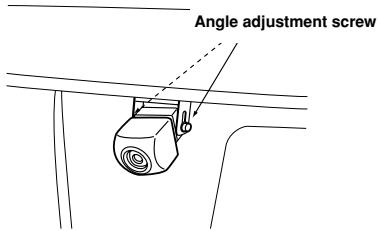
Caution
When adjusting the camera angle, do so after turning off the engine and applying the hand brake to avoid an accident.
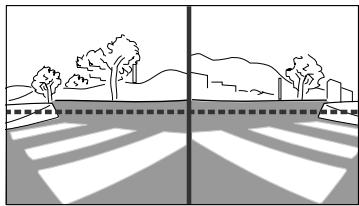
1 Put the gear shift into reverse (R) or press ON/OFF, and check the image from the camera on the display.
When you set the corner view, adjust the angle so that the road may be roughly viewed horizontally.
2 Loosen the camera mounting ③ and angle adjustment screw. Determine the camera angle, and carefully tighten the angle adjustment screw.
Specifications
HCE-C200R (Rear camera)
Power Requirements 14.4V DC
(11-16V allowable)
Ground Type Negative ground type
Power Consumption 1.7W
Output Image Mirror image, VBCS
(NTSC Colour signal
system) 16 : 9 Image
output for wide-screen
Output Drive Capacity 75 Ohm (Ω)
CCD 1/3.8 Type Colour CMOS
Image sensor CCD
aspect ratio 4:3
Effective Number of Pixels .. 1280 (horizontal) x 960
vertical) approximately
1.23 Mega pixels
Lens Section Focal length f = 0.89mm
brightness F=
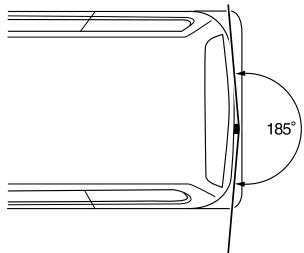
Angle of field Horizontal: 185^
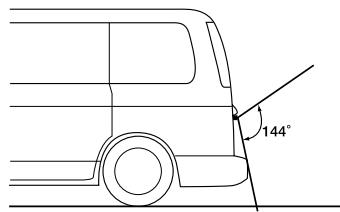
Vertical: 144
Automatic Image Adjusting Function
Automatic metering
adjustment, Automatic
white balance
adjustment
Synchro-System Internal synchronization
S/N 40dB or more
Resolution (horizontal) 300 lines (centre area)
Illumination Range 2 to 100,000 lx
Operating Temperature Range
Camera section -22 to +176^
(-30 to +80^ )
Power section -22 to +176^
(-30 to +80°C)
External Dimensions (W x H x D)
Camera section 23.4 x 23.4 x 21.3mm
(29 / 32^ × 29 / 32^ × 27 / 32^ )
(except projection on the rear)
Power section 100 x 50 x 25mm
(3-15/16" x 1-31/32" x 31/32")
(except projection)
Switch section 29 x 38.5 x 13.6mm
(1-1/8" x 1-1/2" x 17/32")
Weight
Camera section. 80g (including cable)
Power section 270g (including cable)
Switch section 50g (including cable)
HCE-C200F (Front camera)
Power Requirements 14.4V DC
(11-16V allowable)
Ground Type Negative ground type
Power Consumption 1.7W
Output Image Positive image, VBCS
(NTSC Colour signal
system) 16:9 Image
output for wide-screen
Output Drive Capacity 75 Ohm (Ω)
CCD 1/3.8 Type Colour CMOS
Image sensor CCD
aspect ratio 4:3
Effective Number of Pixels ... 1280 (horizontal) x 960
(vertical) approximately
1.23 Mega pixels
Lens Section Focal length f = 0.89mm
brightness F=2.8
Angle of field Horizontal: 185^
Vertical: 144
Automatic Image Adjusting Function
Automatic metering
adjustment, Automatic
white balance
adjustment
Synchro-System Internal synchronization
S/N 40dB or more
Resolution (horizontal) 300 lines (centre area)
Illumination Range 2 to 100,000 lx
Operating Temperature Range
Camera section. -22 to +176^
(-30 to +80°C)
External Dimensions (W x H x D)
Camera section 23.4 x 23.4 x 21.3mm
(29 / 32^ × 29 / 32^ × 27 / 32^ )
(except projection on the
rear)
Weight
Camera section. 80g (including cable)