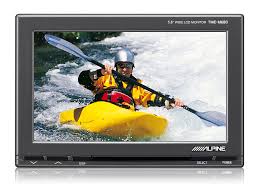
TME-M680 - Écran LCD ALPINE - Notice d'utilisation et mode d'emploi gratuit
Retrouvez gratuitement la notice de l'appareil TME-M680 ALPINE au format PDF.


| Type de produit | Écran LCD large 5,8 pouces pour divertissement arrière |
| Marque | ALPINE |
| Modèle | TME-M680 (moniteur principal) / TME-M680EM (moniteur supplémentaire) |
| Taille de l'écran | 5,8 pouces (diagonale) |
| Type d'affichage | LCD TN à projection arrière faible réflexion |
| Méthode de pilotage | Matrice active, affichage normalement blanc |
| Nombre d'éléments d'image | 400 (L) × 234 (H) × 3 (RVB) |
| Source lumineuse | Tube fluorescent à cathode froide en forme de U |
| Alimentation | 12 V CC, négatif à la masse (véhicule) |
| Dimensions du moniteur (L × H × P) | 153 × 102 × 20 mm |
| Poids du moniteur | 255 g |
| Dimensions du boîtier noir (L × H × P) | 177 × 103 × 28 mm |
| Poids du boîtier noir | 400 g |
| Entrées vidéo/audio | AUX1, AUX2, AUX3 (commutable via switch) |
| Sortie casque infrarouge | Oui (activation via menu IR-TX) |
| Fonctions d'affichage | Mode large, normal (4:3), zoom |
| Réglages d'image | Luminosité, contraste, couleur, gradation (0-32) |
| Consignes de sécurité | Ne pas regarder de vidéo en conduisant ; installation par expert ; utiliser uniquement en 12V négatif masse |
| Température de fonctionnement | 0 °C à +45 °C |
| Fusible | 7,5 A (type à remplacer par même calibre) |
FOIRE AUX QUESTIONS - TME-M680 ALPINE
Questions des utilisateurs sur TME-M680 ALPINE
0 question sur cet appareil. Repondez a celles que vous connaissez ou posez la votre.
Poser une nouvelle question sur cet appareil
Téléchargez la notice de votre Écran LCD au format PDF gratuitement ! Retrouvez votre notice TME-M680 - ALPINE et reprennez votre appareil électronique en main. Sur cette page sont publiés tous les documents nécessaires à l'utilisation de votre appareil TME-M680 de la marque ALPINE.
MODE D'EMPLOI TME-M680 ALPINE
ALPINE®
TME-M680
5.8-INCH WIDE VGA LCD MONITOR WITH BLACK BOX FOR REAR SEAT ENTERTAINMENT
TME-M680EM
EXTRA MONITOR FOR TME-M680
- OWNER'S MANUAL Please read before using this equipment.
- BEDIENUNGSANLEITUNG Lesen Sie diese Bedienungsanleitung bitte vor Gebrauch des Gerätes.
- MODE D'EMPLOI Veuillez lire avant d'utiliser cet appareil.
- MANUAL DE OPERACIÓN Léalo antes de utilizar este equipo.
- ISTRUZIONI PER L'USO Si prega di leggere prima di utilizzare l'attrezzatura.
- ANVÄNDARHANDLEDNING Innan du använder utrustningen bör du läsa igenom denna användarhandledning.
ALPINE ELECTRONICS, INC.
Tokyo office: 1-1-8 Nishi Gotanda,
Shinagawa-ku,
Tokyo 141-8501, Japan
Tel.: (03) 3494-1101
ALPINE ELECTRONICS OF AMERICA, INC.
19145 Gramercy Place, Torrance,
California 90501, U.S.A
Tel.: 1-800-ALPINE-1 (1-800-257-4631)
ALPINE ELECTRONICS OF CANADA, INC.
Suite 203, 7300 Warden Ave. Markham,
Ontario L3R 9Z6, Canada
Tel.: 1-800-ALPINE-1 (1-800-257-4631)
ALPINE ELECTRONICS OF AUSTRALIA PTY. LTD.
6-8 Fiveways Boulevard Keysborough,
Victoria 3173, Australia
Tel.: (03) 9769-0000
ALPINE ELECTRONICS GmbH
Frankfurter Ring 117 80807 Munich, Germany
Tel.: 089-32 42 640
ALPINE ITALIA S.p.A.
Via C. Colombo 8, 20090 Trezzano Sul Naviglio
MI, Italy
Tel.: 02-48 47 81
ALPINE ELECTRONICS (BENELUX) GmbH
Leuvensesteenweg 510-B6,
1930 Zaventem, Belgium
Tel.: 02-725 1315
ALPINE ELECTRONICS FRANCE S.A.R.L.
(RCS PONTOISE B 338 101 280)
98, Rue De La Belle Etoile, Z.I. Paris Nord II
B.P. 50016 F-95945, Roissy, Charles De Gaulle
Cedex, France
Tel.: 01-48 63 89 89
ALPINE ELECTRONICS OF U.K., LTD.
13 Tanners Drive, Blakelands, Milton Keynes
MK14 5BU, U.K.
Tel.: 01908-61 15 56
ALPINE ELECTRONICS DE ESPAÑA, S.A.
Portal De Gamarra 36, Pabellón 32
01013 Vitoria (Alava)-Apdo. 133, Spain
Tel.: 34-45-283588
Contents
Operating Instructions

WARNING
WARNING 2
CAUTION 3
PRECAUTIONS ....3

Basic Operation
Screen Display ON/OFF 4
Adjusting the Volume....4
Switching the Source ....4
Switching the display mode 5
Adjusting 5
Other Useful Feature
Remote Control Sensor 6
Information
In Case of Difficulty 7
Specifications 7
Installation and Connections
Warning 8
Caution 8
Precautions 9
Installation 10
Connections 11

WARNING
This symbol means important instructions. Failure to heed them can result in serious injury or death.
DO NOT OPERATE ANY FUNCTION THAT TAKES YOUR ATTENTION AWAY FROM SAFELY DRIVING YOUR VEHICLE.
Any function that requires your prolonged attention should only be performed after coming to a complete stop. Always stop the vehicle in a safe location before performing these functions. Failure to do so may result in an accident.
KEEP THE VOLUME AT A LEVEL WHERE YOU CAN STILL HEAR OUTSIDE NOISE WHILE DRIVING.
Failure to do so may result in an accident.
MINIMIZE DISPLAY VIEWING WHILE DRIVING.
Viewing the display may distract the driver from looking ahead of the vehicle and cause an accident.
DO NOT DISASSEMBLE OR ALTER.
Doing so may result in an accident, fire or electric shock.
USE THIS PRODUCT FOR MOBILE 12V APPLICATIONS.
Use for other than its designed application may result in fire, electric shock or other injury.
KEEP SMALL OBJECTS SUCH AS BATTERY OUT OF THE REACH OF CHILDREN.
Swallowing them may result in serious injury. If swallowed, consult a physician immediately.
USE THE CORRECT AMPERE RATING WHEN REPLACING FUSES.
Failure to do so may result in fire or electric shock.
DO NOT WATCH VIDEO WHILE DRIVING.
Watching the video may distract the driver from looking ahead of the vehicle and cause an accident.
INSTALL THE PRODUCT CORRECTLY SO THAT THE DRIVER CANNOT WATCH TV/VIDEO UNLESS THE VEHICLE IS STOPPED AND THE EMERGENCY BRAKE IS APPLIED.
It is dangerous (and illegal in many states) for the driver to watch TV/Video while driving a vehicle. Installing this product incorrectly enables the driver to watch TV/Video while driving. This may cause a distraction, preventing the driver from looking ahead, thus causing an accident. The driver or other people could be severely injured.

CAUTION
This symbol means important instructions. Failure to heed them can result in injury or material property damage.
HALT USE IMMEDIATELY IF A PROBLEM APPEARS.
Failure to do so may cause personal injury or damage to the product. Return it to your authorized Alpine dealer or the nearest Alpine Service Centre for repairing.

PRECAUTIONS
Temperature
Be sure the temperature inside the vehicle is between +45^ (+113°F) and 0^ (+32°F) before turning your unit on.
Fuse Replacement
When replacing the fuse(s), the replacement must be of the same amperage as shown on the fuse holder. If the fuse(s) blows more than once, carefully check all electrical connections for shorted circuitry. Also have your vehicle's voltage regulator checked.
Maintenance
If you have problems, do not attempt to repair the unit yourself. Return it to your Alpine dealer or the nearest Alpine Service Station for servicing.
Installation Location
Make sure the TME-M680 & TME-M680EM will not be exposed to:
- Direct sun and heat
- High humidity
- Excessive dust
• Excessive vibrations - After turning the system off, a slight ghost of the image will remain temporarily. This is an effect peculiar to LCD technology and is normal.
- Under cold temperature conditions, the screen may lose contrast temporarily. After a short warm-up period, it will return to normal.
Basic Operation
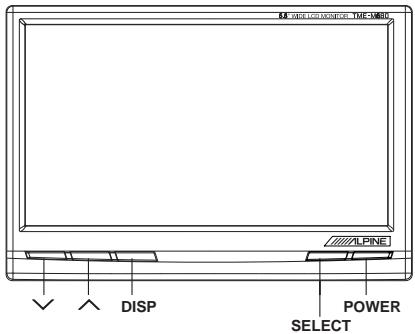
Screen Display ON/OFF
1 Press the POWER button.
2 To turn off the POWER, press the POWER button again.
- If properly connected, the monitors main POWER will turn off when the vehicle's ignition switch is off.
- After turning the system off, a slight ghost of the image will remain temporarily. This is an effect peculiar to LCD technology and is normal.
- Under cold temperature conditions, the screen may lose contrast temporarily. After a short warm-up period, it will return to normal.
Adjusting the Volume
1 Adjust the volume level by pressing the ∨ or ∧ button.
Switching the Source
Press the SELECT button.
Each press of the button will cycle through the modes as follows:
1 If AUX3 SELECTION S/W of Black Box is
- "IN" position

- "OUT" position

2 If current screen mode is AUX3, and AUX3 SELECTION S/W is switched to "OUT" then screen mode will be changed AUX1.
Switching the display mode
1 Press the DISP button.
Each press of the button will cycle through the modes as follows.

flowchart
graph LR
    A["WIDE"] --> B["NORMAL"]
    B --> C["ZOOM"]
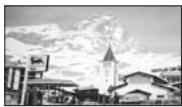
WIDE
Normal images are expanded uniformly in the horizontal direction and are displayed over the entire screen.
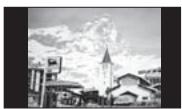
NORMAL
Normal image (4:3)
ZOOM
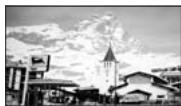
Normal images are expanded in the horizontal direction and are displayed over the entire screen. The expansion ratio increases towards the right and left edges of the screen.
Adjusting
1 Press and hold the DISP button for at least 2 seconds.
Adjustment screen will appear.
2 Press the DISP button and select the mode to be adjusted.
Adjust by pressing the ∨ or ∧ button.
DISP : Selects the mode. (downward)
∨ or ∧ : Adjusts.
1 Brightness adjustment (BRIGHT)
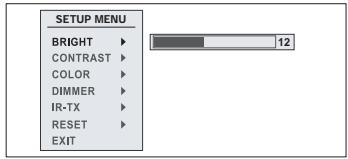
Allows the brightness (0 to 32) of the picture
2 Contrast adjustment (CONTRAST)
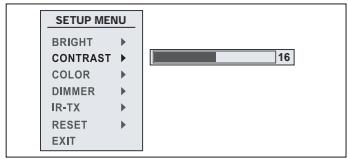
Contrast can be adjusted from 0 to 32
3 Color depth adjustment (COLOR)
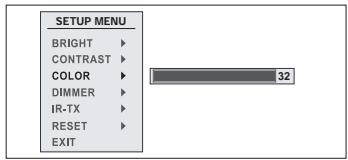
Color depth can be adjusted from 0 to 32
Basic Operation
4 Dimmer adjustment (DIMMER)
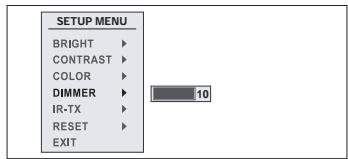
The backlighting is set to the value adjusted at 0\~10
5 IR-TX adjustment (IR-TX)
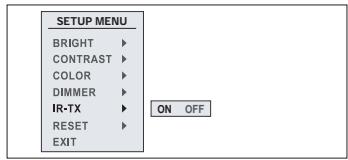
ON : Enable to use IR Headphone
6 Reset
Press ∨ or ∧ to restore system setting to factory default.
7 Exit
Select EXIT to exit setup menu, and the screen will return to normal mode.
3 After completing adjustments, press and hold the DISP button for at least 2 seconds. The screen will return to the normal mode.
- If no operation is made for 5 seconds after selecting a mode to be adjusted, the adjustment mode will be cleared.
Other Useful Feature
Remote Control Sensor
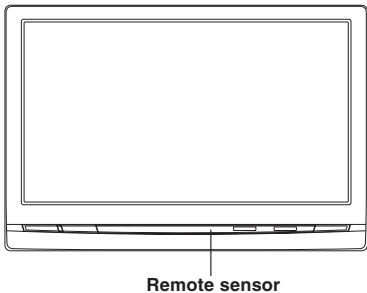
- Receives the remote control signal from connected ALPINE products such as DVD players and TV tuners.
Information
In Case of Difficulty
If you encounter a problem, please review the items in the following checklist. This guide will help you isolate the problem if the unit is at fault. Otherwise, make sure the rest of your system is properly connected or consult your authorized Alpine dealer.
No function or display.
- Car's ignition is off.
- Turn the ignition on.
- No fuse or blown fuse.
- Check the cause and replace the fuse.
- Incorrect connections.
- Check connection and remedy.
• Vehicle's battery is weak. - Check the voltage of vehicle's battery.
No picture display.
- Brightness control is set for minimum brightness control. - Adjust the brightness.
- Incorrect setting of the VTR mode.
- Switch to the correct mode.
- Protective circuit is on because of high temperature.
- Wait until the temperature inside the vehicle comes down to the operating temperature range (45°C).
- Incorrect or open connection with the Monitor, AV interface unit.
- Check the connection and remedy.
Picture color is poor.
- Brightness/Color/Tint control are not set to the proper positions.
- Check each control.
Spots or dotted lines/stripes appear.
- Caused by neon signs, high-voltage power lines, CB transmitter, other vehicle's ignition plugs, etc.
- Change the location of your vehicle.
Unit does not operate.
• Monitor's power is not turned on.
- Turn on the monitor's power.
Information
Specifications
MONITOR
| Screen Size | 5.8" |
| Display System | Low reflection rear projection type TN liquid crystal panel |
| Drive System | Active matrix drive, normally white display |
| Number of Picture Elements | 400(W) x 234(H) x 3 |
| Effective Number of Picture Elements | 99.99% or more |
| Light Source | Internal optical system (U-type cold cathode fluorescent tube) |
| Dimensions (W x H x D) | 153 x 102 x 20mm |
| Weight | 255g |
Black box
| Dimensions (W x H x D) | 177 x 103 x 28 mm |
| Weight | 400g |
- Due to continuous product improvement, specifications and design are subject to change without notice.
- The LCD panel is manufactured using an extremely high precision manufacturing technology. Its effective pixel ratio is over 99.99% . This means that there is a possibility that 0.01% of the pixels could be either always ON or OFF.
Installation and Connections
Before installing or connecting the unit, please read the following and pages 2 and 3 of this manual thoroughly for proper use.

Warning
MAKE THE CORRECT CONNECTIONS.
Failure to make the proper connections may result in fire or product damage.
USE ONLY IN CARS WITH A 12 VOLT NEGATIVE GROUND.
(Check with your dealer if you are not sure.) Failure to do so may result in fire, etc.
BEFORE WIRING, DISCONNECT THE CABLE FROM THE NEGATIVE BATTERY TERMINAL.
Failure to do so may result in electric shock or injury due to electrical shorts.
DO NOT ALLOW CABLES TO BECOME ENTANGLED IN SURROUNDING OBJECTS.
Arrange wiring and cables in compliance with the manual to prevent obstructions when driving. Cables or wiring that obstruct or hang up on places such as the steering wheel, shift lever, brake pedals, etc. can be extremely hazardous.
DO NOT SPLICE INTO ELECTRICAL CABLES.
Never cut away cable insulation to supply power to other equipment. Doing so will exceed the current carrying capacity of the wire and result in fire or electric shock.
DO NOT USE BOLTS OR NUTS IN THE BRAKE OR STEERING SYSTEMS TO MAKE GROUND CONNECTIONS.
Bolts or nuts used for the brake or steering systems (or any other safety-related system), or tanks should NEVER be used for installations or ground connections. Using such parts could disable control of the vehicle and cause fire etc.
KEEP SMALL OBJECTS SUCH AS BATTERY OUT OF THE REACH OF CHILDREN.
Swallowing them may result in serious injury. If swallowed, consult a physician immediately.
DO NOT INSTALL IN LOCATIONS WHICH MIGHT HINDER VEHICLE OPERATION, SUCH AS THE STEERING WHEEL OR SHIFT LEVER.
Doing so may obstruct forward vision or hamper movement etc. and results in serious accident.
DO NOT DAMAGE PIPE OR WIRING WHEN DRILLING HOLES.
When drilling holes in the chassis for installation, take precautions so as not to contact, damage or obstruct pipes, fuel lines, tanks or electrical wiring. Failure to take such precautions may result in fire.
DO NOT INSTALL THE MONITOR NEAR THE PASSENGER SEAT AIR BAG.
If the unit is not installed correctly the air bag may not function correctly and when triggered the air bag may cause the monitor to spring upwards causing an accident and injuries.

Caution
HAVE THE WIRING AND INSTALLATION DONE BY EXPERTS.
The wiring and installation of this unit requires special technical skill and experience. To ensure safety, always contact the dealer where you purchased this product to have the work done.
USE SPECIFIED ACCESSORY PARTS AND INSTALL THEM SECURELY.
Be sure to use only the specified accessory parts. Use of other than designated parts may damage this unit internally or may not securely install the unit in place. This may cause parts to become loose resulting in hazards or product failure.
ARRANGE THE WIRING SO IT IS NOT CRIMPED OR PINCHED BY A SHARP METAL EDGE.
Route the cables and wiring away from moving parts (like the seat rails) or sharp or pointed edges. This will prevent crimping and damage to the wiring. If wiring passes through a hole in metal, use a rubber grommet to prevent the wire's insulation from being cut by the metal edge of the hole.
DO NOT INSTALL IN LOCATIONS WITH HIGH MOISTURE OR DUST.
Avoid installing the unit in locations with high incidence of moisture or dust. Moisture or dust that penetrates into this unit may result in product failure.
Precautions
- Be sure to disconnect the cable from the (−) battery post before installing your TME-M680 & TME-M680EM. This will reduce any chance of damage to the unit in case of a short-circuit.
- Be sure to connect the color coded leads according to the diagram. Incorrect connections may cause the unit to malfunction or damage the vehicle's electrical system.
- When making connections to the car's electrical system, be aware of the factory installed components (e.g. on-board computer). Do not tap into these leads to provide power for this unit. When connecting the TME-M680 & TME-680EM to the fuse box, make sure the fuse for the intended circuit of the TME-M680 & TME-680EM has the appropriate amperage. Failure to do so may result in damage to the unit and/or the vehicle. When in doubt, consult your ALPINE dealer.
- The TME-M680 & TME-680EM uses female RCA-type jacks for connection to other units having RCA connectors. You may need an adaptor to connect other units. If so, please contact your authorized TME-M680 & TME-680EM dealer for assistance.
IMPORTANT
Please record the serial number of your unit in the space provided below and keep it as a permanent record. The serial number plate is located on the rear of the monitor or on the bottom of the AV interface unit.
SERIAL NUMBER: ____ INSTALLATION DATE: ____ INSTALLATION TECHNICIAN: ____ PLACE OF PURCHASE: ____
Installation and Connections
Installation
Installing Black box
This Unit can be placed inside the trunk, on the kick panel of the front passenger's seat or underdash. However, to avoid unnecessary signal wiring, it is better to mount the Unit as close as possible to the Display. DO NOT MOUNT THE INTERFACE UNIT IN LOCATIONS EXPOSED TO MOISTURE OR EXTREME HEAT (such as the engine compartment).
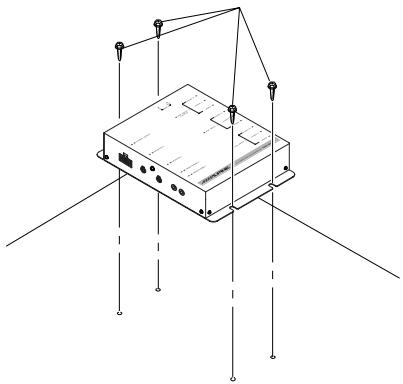
Mounting with screws
- Place the unit on the location chosen for installation.
- Mark the screw locations using the unit as a template.
- Drill a hole less than 3 mm in diameter.

WARNING
When you are drilling a hole in the car body, be careful not to damage pipes, tanks or electrical wiring etc.. It might cause an accident or a fire.
- Firmly attach the unit using 4 of the supplied self-tapping screws (M4 x 15).
Self-tapping screws (M4 x 15)
natural_image
Isometric line drawing of a device with mounting points and wiring (no text or symbols)Connections
Make connections correctly.
Improper connections may cause a fire or operation failure.
Basic connection
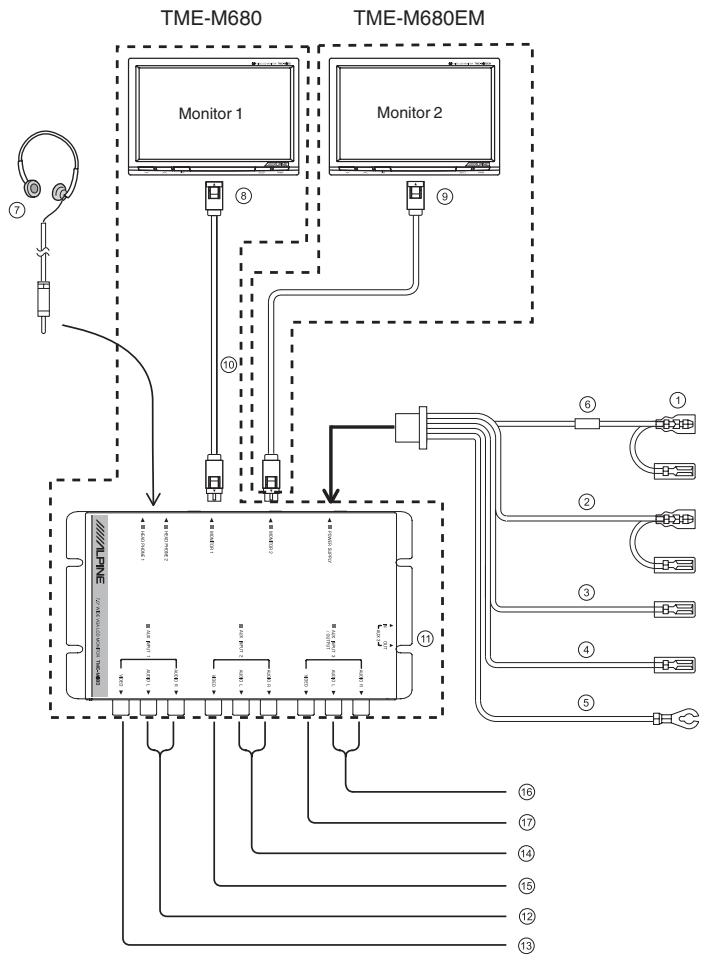
flowchart
graph TD
    A["Headphones"] --> B["Monitor 1"]
    C["Sensor"] --> D["Monitor 2"]
    B --> E["ALPINE"]
    D --> E
    E --> F["Switch ①"]
    E --> G["Switch ②"]
    E --> H["Switch ③"]
    E --> I["Switch ④"]
    E --> J["Switch ⑤"]
    E --> K["Switch ⑥"]
    E --> L["Switch ⑦"]
    E --> M["Switch ⑧"]
    E --> N["Switch ⑨"]
    E --> O["Switch ⑩"]
    E --> P["Switch ⑪"]
    E --> Q["Switch ⑫"]
    E --> R["Switch ⑬"]
    E --> S["Switch ⑭"]
    E --> T["Switch ⑮"]
    E --> U["Switch ⑯"]
    E --> V["Switch ⑰"]
    E --> W["Switch ⑱"]
    E --> X["Switch ⑲"]
Installation and Connections
① ACC power lead (Red)
To ACC power lead powered when engine key position is ACC.
② Parking brake lead (Yellow/Blue)
Connect this lead to the parking brake lead powered when parking brake is pulled.
③④ Remote control output lead (White/Brown)
To remote control input lead of ALPINE products used in the system.
⑤ Ground lead (Black)
Connect the lead to a good chassis ground on the vehicle. Make sure the connection is made to bare metal and is securely fastened using the sheet metal screw provided.
⑥ Fuse (7.5A)
⑦ Headphones (sold separately)
⑧ Main monitor
⑨ Extra monitor
⑩ Connection cable
⑪ AUX3 Selection S/W
⑫ Audio input connectors (AUX 1)
Use these connectors to input the audio signals from a DVD player, TV tuner etc.
⑬ Video input connector (AUX 1)
Use this connector to input the video signals from a DVD player, TV tuner etc.
⑭ Audio input connectors (AUX 2)
Use these connectors to input the audio signals from a DVD player, TV tuner etc.
⑮ Video input connectors (AUX 2)
Use this connector to input the video signals from a DVD player, TV tuner etc.
If ⑪ AUX3 SELECTION S/W "IN" position
⑯ Audio input / output connectors (AUX 3) Use these connectors to input the audio signals from a DVD player, TV tuner etc.
⑰ Video input / output connector (AUX 3) Use this connector to input the video signals from a DVD player, TV tuner etc.
If ⑪ AUX3 SELECTION S/W "OUT" position
16 Audio input / output connectors Use these connectors to output the audio signals to other products.
⑰ Video input / output connector Use this connector to output the video signals to other products.
To prevent external noise from entering the audio system.
- Locate the unit and route the leads at least 10 cm away from the car harness.
- Keep the battery power leads as far away from other leads as possible.
- Connect the ground lead securely to a bare metal spot (remove the coating if necessary) of the car chassis.
- If you add an optional noise suppressor, connect it as far away from the unit as possible. Your Alpine dealer carries various Alpine noise suppressors, contact them for further information.
- Your Alpine dealer knows best about noise prevention measures so consult your dealer for further information.