
C545BEE - Lecteur de CD NAD - Notice d'utilisation et mode d'emploi gratuit
Retrouvez gratuitement la notice de l'appareil C545BEE NAD au format PDF.

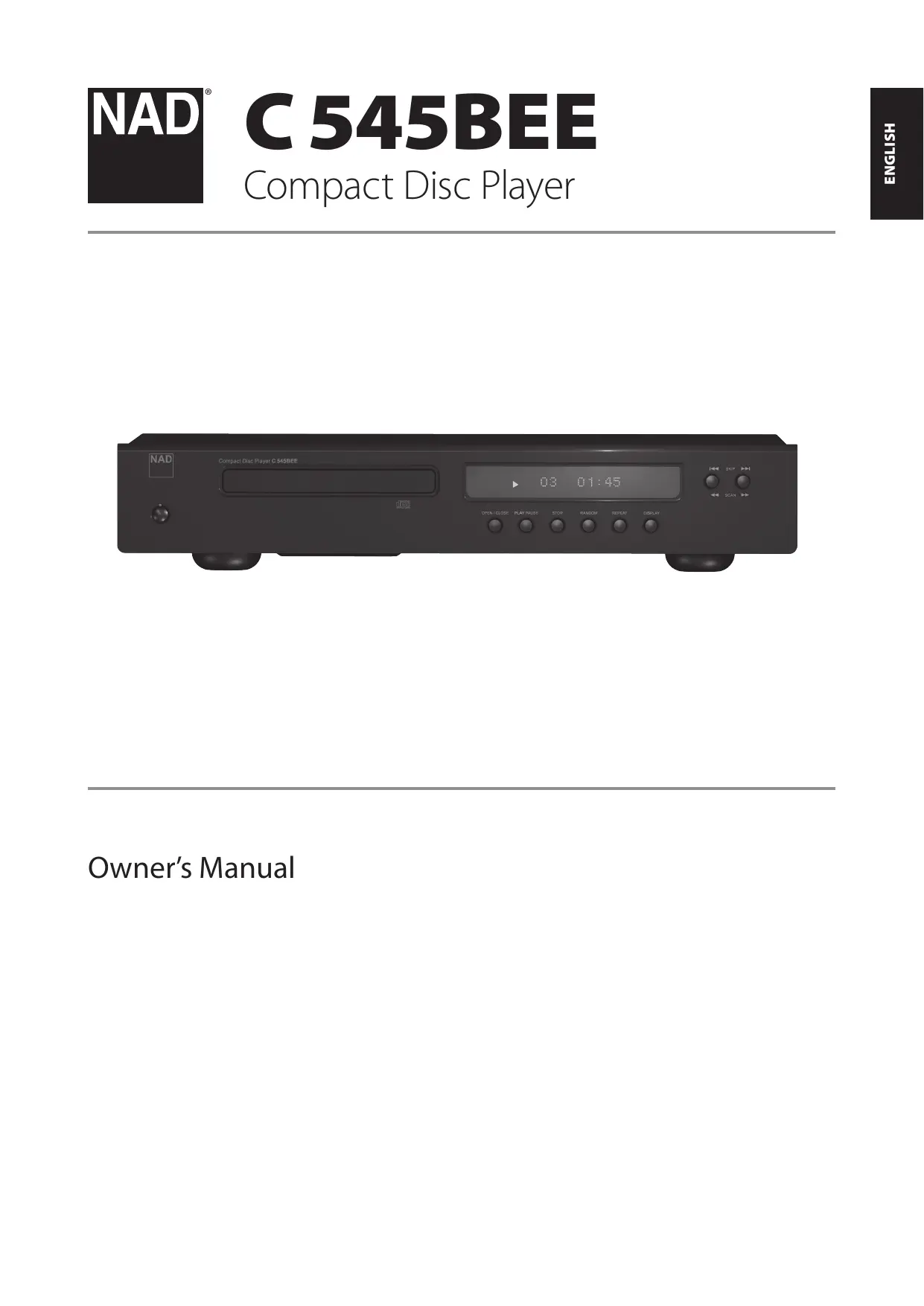

| Type de produit | Lecteur de CD |
| Marque | NAD |
| Modèle | C545BEE |
| Dimensions (net) | 435 × 285 × 70 mm |
| Dimensions (brut) | 435 × 293 × 86 mm |
| Poids net | 4,9 kg |
| Poids brut | 6,3 kg |
| Alimentation | 120 V ~ 60 Hz ou 230 V ~ 50 Hz (non auto-voltage) |
| Formats supportés | CD audio, CD-R, CD-RW, MP3, WMA |
| Sorties analogiques | Ligne stéréo (RCA) |
| Sorties numériques | Coaxiale et optique (S/PDIF) |
| Entrée déclencheur 12 V | Oui (pour mise en marche à distance) |
| Entrée IR | Oui (pour répéteur infrarouge) |
| Télécommande | CD 8 (incluse) |
| Niveau de sortie analogique | 2,2 ± 0,1 V |
| Rapport signal/bruit | 118 dB (pondéré A) |
| Distorsion harmonique totale | < 0,01 % (à 1 kHz) |
| Réponse en fréquence | ± 0,3 dB (20 Hz - 1 kHz), ± 0,5 dB (5 kHz - 20 kHz) |
| Fonctions de lecture | Lecture, pause, arrêt, saut, recherche, répétition (piste/tout), aléatoire, programmation (40 entrées), répétition A-B |
| Filtre audio | Normal ou Lent (sélectionnable) |
| Nettoyage | Chiffon sec uniquement |
| Sécurité | Produit laser de classe 1, consignes de sécurité importantes |
| Pièces détachées | Utiliser uniquement des pièces spécifiées par le fabricant |
FOIRE AUX QUESTIONS - C545BEE NAD
Questions des utilisateurs sur C545BEE NAD
0 question sur cet appareil. Repondez a celles que vous connaissez ou posez la votre.
Poser une nouvelle question sur cet appareil
Téléchargez la notice de votre Lecteur de CD au format PDF gratuitement ! Retrouvez votre notice C545BEE - NAD et reprennez votre appareil électronique en main. Sur cette page sont publiés tous les documents nécessaires à l'utilisation de votre appareil C545BEE de la marque NAD.
MODE D'EMPLOI C545BEE NAD
Owner's Manual
SAVE THESE INSTRUCTIONS FOR LATER USE. FOLLOW ALL WARNINGS AND INSTRUCTIONS MARKED ON THE AUDIO EQUIPMENT.
1 Read instructions - All the safety and operating instructions should be read before the product is operated.
2 Retain instructions - The safety and operating instructions should be retained for future reference.
3 HeedWarnings - All warnings on the product and in the operating instructions should be adhered to.
4 Follow Instructions - All operating and use instructions should be followed.
5 Cleaning - Unplug this product from the wall outlet before cleaning. Do not use liquid cleaners or aerosol cleaners. Use a dry cloth for cleaning.
6 Attachments - Do not use attachments not recommended by the product manufacturer as they may cause hazards.
7 Water and Moisture - Do not use this product near water-for example, near a bath tub, wash bowl, kitchen sink, or laundry tub; in a wet basement; or near a swimming pool; and the like.
8 Accessories - Do not place this product on an unstable cart, stand, tripod, bracket, or table. The product may fall, causing serious injury to a child or adult, and serious damage to the product. Use only with a cart, stand, tripod, bracket, or table recommended by the manufacturer, or sold with the product. Any mounting of the product should follow the manufacturer's instructions, and should use a mounting accessory recommended by the manufacturer.
9

A product and cart combination should be moved with care. Quick stops, excessive force, and uneven surfaces may cause the product and cart combination to overturn.
10 Ventilation - Slots and openings in the cabinet are provided for ventilation and to ensure reliable operation of the product and to protect it from overheating, and these openings must not be blocked or covered. The openings should never be blocked by placing the product on a bed, sofa, rug, or other similar surface. This product should not be placed in a built-in installation such as a bookcase or rack unless proper ventilation is provided or the manufacturer's instructions have been adhered to.
11 Power Sources - This product should be operated only from the type of power source indicated on the marking label. If you are not sure of the type of power supply to your home, consult your product dealer or local power company.
The primary method of isolating the amplifier from the mains supply is to disconnect the mains plug. Ensure that the mains plug remains accessible at all times. Unplug the AC power cord from the AC outlet if the unit will not be used for several months or more.
12 Grounding or Polarization - This product may be equipped with a polarized alternating-current line plug (a plug having one blade wider than the other). This plug will fit into the power outlet only one way. This is a safety feature. If you are unable to insert the plug fully into the outlet, try reversing the plug. If the plug should still fail to fit, contact your electrician to replace your obsolete outlet. Do not defeat the safety purpose of the polarized plug.
13 Power - Cord Protection - Power-supply cords should be routed so that they are not likely to be walked on or pinched by items placed upon or against them, paying particular attention to cords at plugs, convenience receptacles, and the point where they exit from the product.
14 Outdoor Antenna Grounding - If an outside antenna or cable system is connected to the product, be sure the antenna or cable system is grounded so as to provide some protection against voltage surges and built-up static charges. Article 810 of the National Electrical Code, ANSI/NFPA 70, provides information with regard to proper grounding of the mast and supporting structure, grounding of the lead-in wire to an antenna discharge unit, size of grounding conductors, location of antenna discharge unit, connection to grounding electrodes, and requirements for the grounding electrode.
NOTE TO CATV SYSTEM INSTALLER
This reminder is provided to call the CATV system installer's attention to Section 820-40 of the NEC which provides guidelines for proper grounding and, in particular, specifies that the cable ground shall be connected to the grounding system of the building, as close to the point of cable entry as practical.
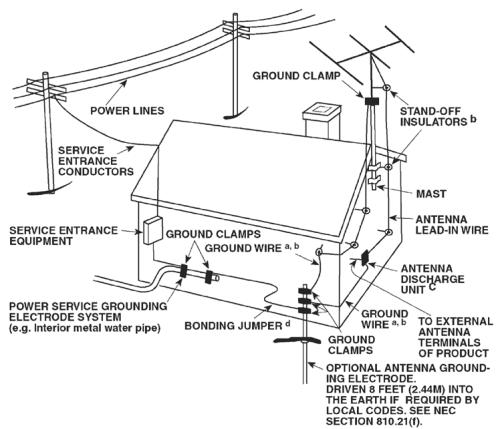
15 Lightning - For added protection for this product during a lightning storm, or when it is left unattended and unused for long periods of time, unplug it from the wall outlet and disconnect the antenna or cable system. This will prevent damage to the product due to lightning and power-line surges.
16 Power Lines - An outside antenna system should not be located in the vicinity of overhead power lines or other electric light or power circuits, or where it can fall into such power lines or circuits. When installing an outside antenna system, extreme care should be taken to keep from touching such power lines or circuits as contact with them might be fatal.
17 Overloading - Do not overload wall outlets, extension cords, or integral convenience receptacles as this can result in a risk of fire or electric shock.
18 Object and Liquid Entry - Never push objects of any kind into this product through openings as they may touch dangerous voltage points or short-out parts that could result in a fire or electric shock. Never spill liquid of any kind on the product.
WARNING: THE APPARATUS SHOULD NOT BE EXPOSED TO DRIPPING OR SPLASHING, AND OBJECTS FILLED WITH LIQUIDS, SUCH AS VASES, SHOULD NOT BE PLACED ON THE APPARATUS. AS WITH ANY ELECTRONIC PRODUCTS, USE CARE NOT TO SPILL LIQUIDS INTO ANY PART OF THE SYSTEM. LIQUIDS CAN CAUSE A FAILURE AND/OR A FIRE HAZARD.
19 Damage Requiring Service - Unplug this product from the wall outlet and refer servicing to qualified service personnel under the following conditions:
a) When the power-supply cord or plug is damaged.
b) If liquid has been spilled, or objects have fallen into the product.
c) If the product has been exposed to rain or water.
d) If the product does not operate normally by following the operating instructions. Adjust only those controls that are covered by the operating instructions as an improper adjustment of other controls may result in damage and will often require extensive work by a qualified technician to restore the product to its normal operation.
e) If the product has been dropped or damaged in any way.
f) when the product exhibits a distinct change in performance-this indicates a need for service.
20 Replacement Parts - When replacement parts are required, be sure the service technician has used replacement parts specified by the manufacturer or have the same characteristics as the original part. Unauthorized substitutions may result in fire, electric shock, or other hazards.
21 Safety Check - Upon completion of any service or repairs to this product, ask the service technician to perform safety checks to determine that the product is in proper operating condition.
22 Wall or Ceiling Mounting - The product should be mounted to a wall or ceiling only as recommended by the manufacturer.
23 Heat - The product should be situated away from heat sources such as radiators, heat registers, stoves or other products (including amplifiers) that produce heat.
WARNING
TO REDUCE THE RISK OF FIRE OR ELECTRIC SHOCK, DO NOT EXPOSE THIS PRODUCT TO RAIN OR MOISTURE.
CAUTION
TO PREVENT ELECTRIC SHOCK, MATCH WIDE BLADE OF PLUG TO WIDE SLOT, FULLY INSERT.
CAUTION
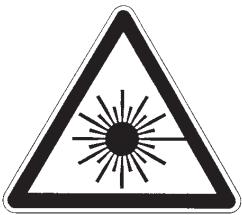
The C 545BEE employs a Laser System. To ensure proper use of this product, please read this owner's manual carefully and retain for future reference. Should the unit require maintenance, contact an authorized service location. Use of controls, adjustments or the performance of procedures other than those specified may result in exposure to laser radiation. To prevent direct exposure to laser beam, do not try to open the enclosure. Visible laser radiation when the enclosure is opened.
DO NOT STARE INTO BEAM.
FCC NOTICE
This equipment has been tested and found to comply with the limits for a Class B digital device, pursuant to part 15 of the FCC Rules. These limits are designed to provide reasonable protection against harmful interference in a residential installation.
This equipment generates, uses and can radiate radio frequency energy and if not installed and used in accordance with the instructions, may cause harmful interference to radio communications. However, there is no guarantee that interference will not occur in a particular installation. If this equipment does cause harmful interference to radio or television reception, which can be determined by turning the equipment off and on, the user is encouraged to try to correct the interference by one or more of the following measures
Reorient or relocate the receiving antenna.
- Increase the separation between the equipment and receiver.
- Connect the equipment into an outlet on a circuit different from that to which the receiver is connected
- Consult the dealer or an experienced radio/TV technician for help.
FCC WARNING
Changes or modifications not expressly approved by the party responsible for compliance could void the user's authority to operate the equipment.
INDUSTRY CANADA REQUIREMENT
This Class B digital apparatus meets all requirements of the Canadian Interference-Caising Equipment Regulations.

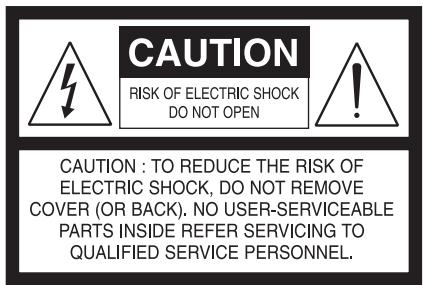
THE LIGHTNING FLASH WITH ARROWHEAD SYMBOL, WITHIN AN EQUILATERAL TRIANGLE, IS INTENDED TO ALERT THE USER TO THE PRESENCE OF UNINSULATED "DANGEROUS VOLTAGE" WITHIN THE PRODUCT'S ENCLOSURE THAT MAYBE OF SUFFICIENT MAGNITUDE TO CONSTITUTE A RISK OF ELECTRIC SHOCK TO PERSONS.

THE EXCLAMATION POINT WITHIN AN EQUILATERAL TRIANGLE IS INTENDED TO ALERT THE USER TO THE PRESENCE OF IMPORTANT OPERATING AND MAINTENANCE (SERVICING) INSTRUCTIONS IN THE LITERATURE ACCOMPANYING THE APPLIANCE.
The equipment draws its nominal non-operational power from the AC outlet with its POWER switch in the STANDBY position.
The socket-outlet shall be installed near the apparatus and shall be easily accessible.
TO COMPLETELY DISCONNECT THIS APPARATUS FROM THE AC MAINS, DISCONNECT THE POWER SUPPLY CORD PLUG FROM THE AC RECEPTACLE.
THE MAINS PLUG OF THE POWER SUPPLY CORD SHALL REMAIN READILY ACCESSIBLE.
CAUTION
Changes or modifications to this equipment not expressly approved by NAD Electronics for compliance could void the user's authority to operate this equipment.
CAUTION REGARDING PLACEMENT
To maintain proper ventilation, be sure to leave a space around the unit (from the largest outer dimensions including projections) that is equal to or greater than shown below.
Left and Right Panels: 10 cm
Rear Panel: 10 cm
Top Panel: 50 cm
IMPORTANT INFORMATION FOR UK CUSTOMERS
DO NOT cut off the mains plug from this equipment. If the plug fitted is not suitable for the power points in your home or the cable is too short to reach a power point, then obtain an appropriate safety approved extension lead or consult your dealer. If, nonetheless, the mains plug is cut off, REMOVE THE FUSE and dispose of the PLUG immediately, to avoid possible shock hazard by inadvertent connection to the mains supply. If this product is not provided with a mains plug, or one has to be fitted, then follow the instructions given below:
IMPORTANT
DO NOT make any connection to the larger terminal which is marked with the letter 'E' or by the safety earth symbol or colored GREEN or GREEN AND YELLOW.
The wires in the mains lead on this product are colored in accordance with the following code:
BLUE-NEUTRAL
BROWN-LIVE
As these colors may not correspond with the colored markings identifying the terminals in your plug, proceed as follows:
The BLUE wire must be connected to the terminal marked with the letter 'N' or colored BLACK.
The BROWN wire must be connected to the terminal marked with the letter 'L' or colored RED.
When replacing the fuse, only a correctly rated and approved type should be used, and be sure to re-fit the fuse cover.
IF IN DOUBT CONSULT A COMPETENT ELECTRICIAN.
CLASS 1 LASER product
LUOKAN 1 LASERPLAITE
KCLASS 1 LASERAPPARAT
THIS DIGITAL APPARATUS DOES NOT EXCEED THE CLASS B LIMITS FOR RADIO NOISE EMISSIONS FROM DIGITAL APPARATUS AS SET OUT IN THE RADIO INTERFERENCE REGULATIONS OF THE CANADIAN DEPARTMENT OF COMMUNICATIONS.
LE PRESENT APPAREIL NUMVERIQUE N'EMET PAS DE BRUITS RADIOELECTRIQUES DEPASSANT LES LIMITES APPLICABLES AUX APPAREILS NUMERIQUES DE LA CLASSE B PRESCRITES DANS LE REGLEMENT SUR LE BROUILLAGE RADIO ELECTRIQUE EDICTE PAR LE MINISTERE DES COMMUNICATIONS DU CANADA.
WARNING INVISIBLE LASER RADIATION WHEN OPEN AND INTERLOCKSEDEFADED. AVOID EXPOSURE TO BEAM.
VORSCHITI UNSCHIBTBAIRE LASERSTRAHLEN TRITT AUS, WENN DECKEL GOEFFnet und wenn sichereitsvergreitung überBrutt ist. Nicht dem stahl auszahlen.
ADVARSL - USYNLIG LASERSTRALING VED ABNING, NAR SIKKERHEDSAFBRYDERE ER UDE AF KUNPTION UNDGU ADSETTLE FOR STRALUNG.
ADVARSEL USYNLIG LERSTRAUNG NAR DEKSEL APNES OG SIKKERHEDSLAS BRYTES. UNNGA EKSPONDERING FOR STRÄLEN
VARNING - OSYNLIG LASERSTRAÑING NAR DENDNA DEL A R OPPNAD OCH SPARRAR A R URKOPLADE. STRALEN A R FARLIG.
VARO- AVATTAESSA JA SUOJALUKITUOS HITJETAESSA OLE ALTTIINA NAKYMATONN'TA LASETAEYLEILTE.LA ALKATO SATESEEEN.
INFORMATION ABOUT COLLECTION AND DISPOSAL OF WASTE BATTERIES (DIRECTIVE 2006/66/EC OF THE EUROPEAN PARLIAMENT AND THE COUNCIL OF EUROPEAN UNION) (FOR EUROPEAN CUSTOMERS ONLY)
Pb
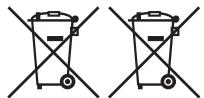
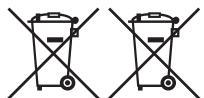
Batteries bearing any of these symbols indicate that they should be treated as "separate collection" and not as municipal waste. It is encouraged that necessary measures are implemented to maximize the separate collection of waste batteries and to minimize the disposal of batteries as mixed municipal waste.
Hg
Cd
End-users are exhorted not to dispose waste batteries as unsorted municipal waste. In order
to achieve a high level of recycling waste batteries, discard waste batteries separately and properly through an accessible collection point in your vicinity. For more information about collection and recycling of waste batteries, please contact your local municipality, your waste disposal service or the point of sale where you purchased the items.
By ensuring compliance and conformance to proper disposal of waste batteries, potential hazardous effects on human health is prevented and the negative impact of batteries and waste batteries on the environment is minimized, thus contributing to the protection, preservation and quality improvement of the environment.
NOTES ON ENVIRONMENTAL PROTECTION
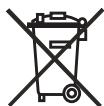
At the end of its useful life, this product must not be disposed of with regular household waste but must be returned to a collection point for the recycling of electrical and electronic equipment. The symbol on the product, user's manual and packaging, point this out.
The materials can be reused in accordance with their markings. Through re-use, recycling of raw materials or other forms of recycling of old products, you are making an important contribution to the protection of our environment. Your local administrative office can advise you of the responsible waste disposal point.
WARNING!
Batteries (battery pack or batteries installed) must not be exposed to excessive heat such as sunshine, fire or the like.
NOTE: THE C 545BEE IS NOT AN AUTO VOLTAGE CD PLAYER. CONNECT ONLY TO THE PRESCRIBED AC OUTLET, I.E., 120V 60HZ OR 230V 50HZ.
RECORD YOUR MODEL NUMBER (NOW, WHILE YOU CAN SEE IT)
The model and serial number of your new C 545BEE are located on the back of the cabinet. For your future convenience, we suggest that you record these numbers here:
Model no:
Serial no:
IMPORTANT SAFETY INSTRUCTIONS 2
INTRODUCTION
GETTING STARTED 6
UNPACKING AND SETUP 6
QUICK START .6
IDENTIFICATION OF CONTROLS
FRONT PANEL. 7
REAR PANEL 9
CD 8 REMOTE CONTROL. 10
OPERATION
USING THE C 545BEE - FEATURES 11
CD-R AND CD-RW AUDIO DISCS 11
PLAYING MP3/WMA FILES. 11
PROGRAMMING 11
THANK YOU FOR CHOOSING NAD.
The C 545BEE CD Player is a technologically advanced and highly capable product — yet we have invested great effort in making it simple and easy to use. We have been careful to ensure that the C 545BEE is as musically transparent and spatially accurate as possible, incorporating much of what we've learned from a quarter-century's experience designing audio and home-theater components. As with all our products, NAD's "Music First" design philosophy guided the C 545BEE's design in such a way that it can confidently promise you state-of-the-art audiophile-quality music listening for years to come.
USING THE C 545BEE - CD 8 REMOTE CONTROL 12
NUMERIC KEY PAD 12
RPT A-B. 12
DIMMER. 12
PROGRAM AND DELETE. 12
FILTER 12
REFERENCE
TROUBLESHOOTING 12
NOTES ON DISCS. 13
SPECIFICATIONS 13
We encourage you to take a few minutes now to read right through this manual. Investing a little time here at the outset might save you a good deal of time later, and is by far the best way to ensure that you make the most of your investment in the C 545BEE.
One more thing: We urge you to register your C 545BEE ownership on the NAD Worldwide Web site:
http://NADelectronics.com/warranty
For warranty information contact your local distributor.
GETTING STARTED
UNPACKING AND SETUP
WHAT'S IN THE BOX
Packed with your C 545BEE you will find:
An audio cable connector
The CD 8 remote control with two AA batteries
A detachable AC power cord
This owner's manual
SAVE THE PACKAGING
Please save the box and all of the packaging in which your C 545BEE arrived. Should you move or otherwise need to transport your C 545BEE, this is by far the safest container in which to do so. We've seen too many otherwise perfect components damaged in transit for lack of a proper shipping carton, so please: Save that box!
CHOOSING A LOCATION
Choose a location that is well ventilated (with at least several inches to both sides and behind), and that will provide a clear line of sight, within 23 feet/7 meters, between the C 545BEE's front panel and your primary listening/viewing position. This will ensure reliable infrared remote control communications. The C 545BEE generates a modest amount of heat, but nothing that should trouble adjacent components. It is perfectly possible to stack the C 545BEE on top of other components.
NOTE ON INSTALLATION
IMPORTANT! Install the C 545BEE Compact Disc player on a level, vibration-free surface. Severe vibration or operation in a tilted position may cause the player to mis-track. The player may be stacked with other stereo components, as long as there is adequate ventilation around it. If the C 545BEE is placed in close proximity to a radio tuner (AM or FM), a VCR or a television set, the operation of its digital circuits may produce static that would interfere with reception of weak broadcast signals. If this occurs, move the C 545BEE away from other devices or switch it off when viewing or listening to broadcasts.
QUICK START
In case you simply cannot wait to experience the performance of your new NAD C 545BEE, we provide the following "Quick Start" instructions to get you underway.
Please make all the connections to your C 545BEE with the unit unplugged. It is also advisable to power down or unplug all associated components while making or breaking any signal or AC power connections.
PLAY A CD
1 Connect a twin RCA-to-RCA lead from the L (left) and R (right) Line. Output jacks to the corresponding CD inputs on your amplifier.
2 Connect the AC cord to the C 545BEE's AC Mains input and then plug into an AC outlet. The Standby LED indicator embedded around the bezel of the STANDBY button will illuminate amber.
3 Press the STANDBY button to turn ON the player. The Standby LED indicator will turn from amber to blue and illuminate the Vacuum Fluorescent Display (VFD).
4 Press [OPEN/CLOSE] to open the disc drawer.
5 Place a CD, label side up, in the tray's circular recess. Be certain that the disc is centered within the recess.
6 Press [PLAY]. The drawer closes automatically, and the disc begins to play.
7 At any time you may press [SKIP▶/▶] to select different tracks on the disc.
8 Press [PAUSE] if you want to stop play temporarily while keeping the pickup at its current position on the disc. Press [PAUSE] again or [PLAY] when you want to resume playback. Press [STOP] if you want to end play and reset the pickup to the beginning of the disc.
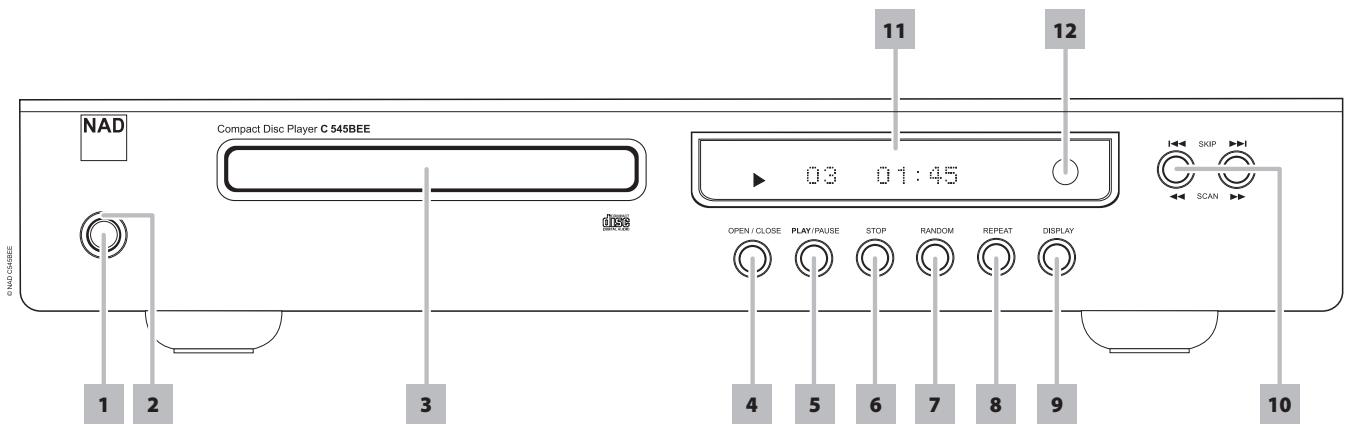
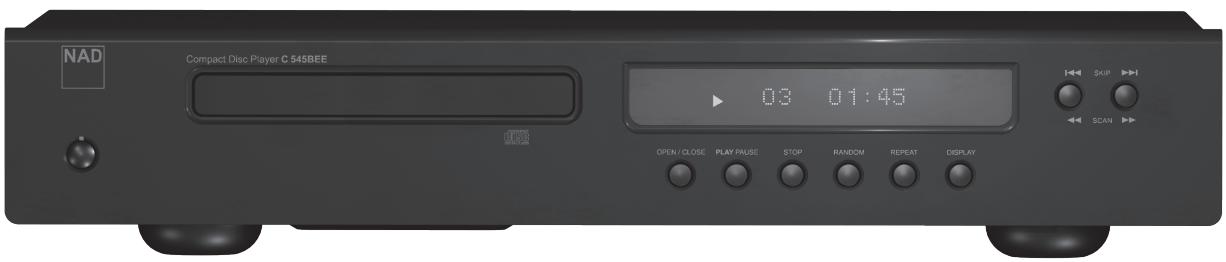
1 STANDBY: Press this button to switch ON the C 545BEE. The Standby LED indicator will turn from amber to blue and illuminate the Vacuum Fluorescent Display (VFD). Pressing the Standby button again turns the unit back to standby mode.
The C 545BEE can also be switched ON from standby mode by pressing [OPEN/CLOSE] or [PLAY/PAUSE] buttons on the front panel as well as on the remote control.
If the disc tray is open and the Standby button is pressed, the disc tray will draw close and the C 545BEE goes to standby mode.
2 STANDBY LED: This indicator will light up amber when the C 545BEE is in standby state. When the C 545BEE is at ON state, this indicator will illuminate blue.
3 DISC TRAY: With the disc tray open, insert a CD or other compatible media disc face down onto the tray.
"No Disc" appears on the C 545BEE's VFD if the disc is placed upside down or there is no disc loaded.
NOTE
This player is not designed to accommodate neither a "damping disc" placed on a CD nor two CDs stacked together. It plays audio CDs, but not discs identified as CD-V, DVD, CD-I, CD-ROM or PHOTO CD. Refer also to the item "CD-R AND CD-RW AUDIO DISCS" at the "USING THE C 545BEE - FEATURES" section of the "OPERATION" page.
4 OPEN/CLOSE: Press this button to open and close the disc tray. When in standby mode, pressing this button will also switch ON the C 545BEE and at the same time open the disc tray.
5 PLAY/PAUSE: This dual-function button alternates between starting and stopping playback. Press this button to toggle between Play and Pause of a CD or other compatible media disc. Press to start play or resume play after Pause. The icon [▶] is illuminated in the VFD indicating the C 545BEE is in playback mode. If the disc tray is open, press this button to automatically close the tray and start playback if a disc is loaded.
During playback, press this button to stop playback temporarily, keeping the optical pickup at its current position on the disc. The icon [II] is illuminated in the VFD indicating the C 545BEE is in pause mode. To resume playback at the exact point where it stopped, press [PLAY/ PAUSE] again.
6 STOP: Press the [STOP] button once to stop playback and re-set the pickup to the beginning of the disc. The display reverts to showing the number of tracks and total playing time on the disc; for WMA/MP3 files, the display will revert to total number of files. If the C 545BEE was programmed to play a selection of tracks, the program will be retained in the player's memory. Pressing [STOP] twice at program mode will delete the program.
Repeat and Random playback mode can be disengaged by pressing the [STOP] button.
7 RANDOM: This button when pressed will engage or disengage random playback mode. When engaged (a corresponding "RANDOM" icon is illuminated in the VFD), random playback of tracks or files will begin by pressing [PLAY/PAUSE] from STOP mode or [SKIP▶▶▶] during playback mode. Press [RANDOM] again to return to normal playback ("RANDOM" icon in the VFD is extinguished). Random playback mode can also be disengaged by pressing [STOP] button.
The Random playback mode can be used in combination with the Repeat Play All mode but not with Program playback mode.
FRONT PANEL
8 REPEAT: A particular track or file can be repeatedly played back by pressing this button. To repeat the playback of a particular track or file, press the C 545BEE's [REPEAT] button once - a corresponding "REPEAT" icon is illuminated in the VFD. Pressing the same [REPEAT] button a second time will repeat all the tracks or files - a corresponding "REPEAT ALL" icon is illuminated in the VFD. Turn off repeat mode by pressing [REPEAT] button a third time - "REPEAT" icon in the VFD is extinguished.
9 DISPLAY: Toggle to display the following disc information during playback
| INFORMATION | AUDIO CD | CD TEXT | MP3/WMA |
| Elapsed time of the current track | ✓ | ✓ | - |
| Remaining time of the current track | ✓ | ✓ | - |
| Total playback time of the disc | ✓ | ✓ | - |
| Remaining time of the disc | ✓ | ✓ | - |
| Song title | - | ✓ | ✓ |
| Artist name | - | ✓ | ✓ |
| Album name | - | ✓ | ✓ |
| File name | - | - | ✓ |
| Elapsed time of the current file | - | - | ✓ |
| Remaining time of the current file | - | - | ✓ |
| File number of the current file with respect to the total number of files under the current folder | - | - | ✓ |
NOTES
- Some information may not be displayed on some discs. Display is dependent on the disc's information content.
- If the file has no available information about the song title, artist or album, the display will show "NO TITLE", "NO ARTIST" or "NO ALBUM".
For audio CD, the default information display is the elapsed time of the current track.
VFD character length limits for MP3/WMA - File name: 32 characters; ID3 tag: 30 characters for Unicode, 60 characters for ASCII.
10 SKIP/SCAN: Press [▶I] to skip forward or [I←] to skip backward a track or file.
Press and hold [▶/▶] for more than 2 seconds to search up or down a track/file. The SCAN [▶] button causes the optical pickup to scan backwards through the recording at high speed. The SCAN [▶] button causes the optical pickup to scan rapidly forward through the music.
11 VFD: The Vacuum Fluorescent Display (VFD) provides playback information, settings and other indicators.
12 REMOTE SENSOR: Point the CD 8 at the remote sensor and press the buttons. Do not expose the remote sensor of the CD 8 to a strong light source such as direct sunlight or illumination. If you do so, you may not be able to operate the C 545BEE with the remote control.
Distance: About 23ft (7m) from the front of the remote sensor.
Angle: About 30o in each direction of the front of the remote sensor.
ATTENTION!
Please make all the connections to your C 545BEE with the unit unplugged. It is also advisable to power down or unplug all associated components while making or breaking any signal or AC power connections.
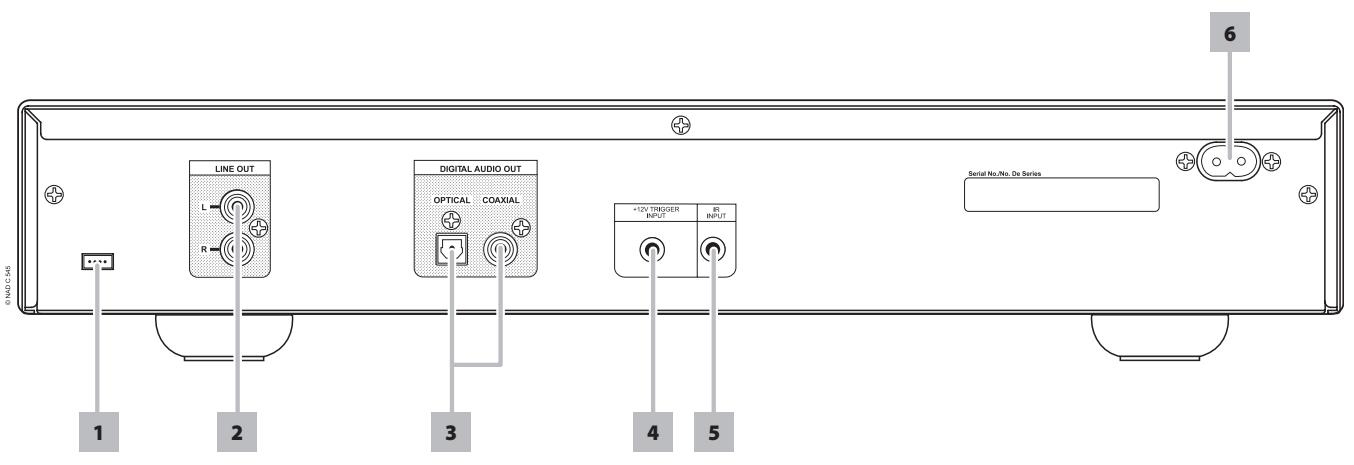
1 UPGRADE PORT: For future software program updates, use this port to upgrade the C 545BEE. Owners who register their C 545BEE in our international website www.nadelectronics.com will be advised of updates (if any). Your custom installer or dealer can assist you in the proper upgrade and setup of your C 545BEE.
2 LINE OUT: Connect to the corresponding analog audio input of an amplifier, receiver or stereo system.
3 DIGITAL OUT (COAXIAL, OPTICAL): The digital playback audio output signal is available at these ports. Connect the optical or coaxial digital OUT ports to the corresponding S/PDIF digital input of an amplifier, receiver, computer soundcard or other digital processors.
4 +12V TRIGGER INPUT: The +12V Trigger input allows the C 545BEE to be switched remotely from standby mode to ON and vice-versa by ancillary equipment such as a preamplifier, AV processor, etc. The controlling device must be equipped with a 12V trigger output to use this feature.
5 IR INPUT: This input is connected to the output of an IR (infrared) repeater (Xantech or similar) or the IR output of another component to allow control of the C 545BEE from a remote location.
6 AC MAINS INPUT: The C 545BEE comes supplied with a separate AC Mains cable. Before connecting the cable to a live wall socket ensure that it is firmly connected to the C 545BEE's AC Mains input socket first. Always disconnect the AC Mains cable plug from the live wall socket first, before disconnecting the cable from the C 545BEE's Mains input socket.
CD 8 REMOTE CONTROL
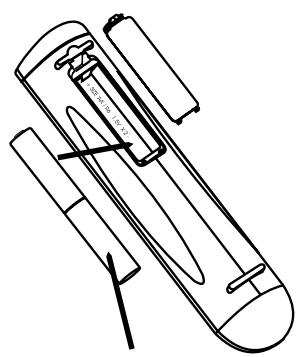
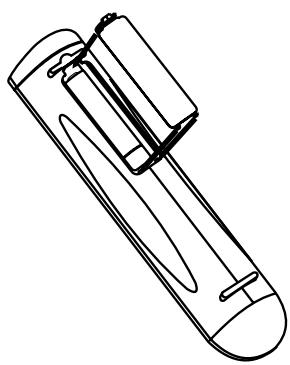
BATTERY ASSEMBLY
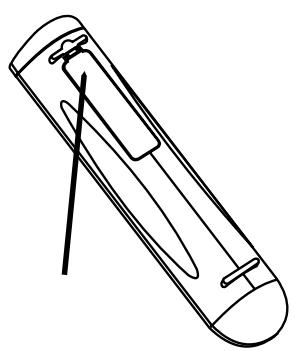
Press in and lift tab to remove battery cover out of recess.
Press batteries into opening. Ensure correct fitting is observed.
Replace battery cover by aligning and inserting the two tabs into the holes. Press battery cover into place until it "clicks" closed.
CD-R AND CD-RW AUDIO DISCS
The C 545BEE can play back CD-R or CD-RW audio discs that have been recorded on a computer or CD recorder. The quality of CD-R or CD-RW audio discs varies widely which may affect playability. Some factors that affect playability:
- The quality of the disc itself. Generally speaking, CD-R or CD-RW blanks from well-renowned companies give better results than unbranded ones.
- The quality of CD-recorder or computer CD re/writer. Some recorders and writers produce better results than others.
- The CD-R and CD-RW were created with high-speed writing. In general, the quality of a CD-R or CD-RW is better when produced at a lower speed against a higher speed on the same recorder or re/writer.
PLAYING MP3/WMA FILES
The C 545BEE can play MP3/WMA formatted recordings on CD-R or CD-RW discs. You may mix any of the file types on the disc. Using the CD 8 remote control, one can select through the MP3/WMA folders and files as well as start playback through the following steps
1 Load the applicable disc.
2 Press [FOLDER / ] to select desired folder. Press [ENTER].
3 Press [FILE ] to select desired file number. Press [ENTER] to start playback.
NOTES
- The file number is recognized per disc, not per folder – that is, the number assigned to each file corresponds to their sequence in the disc.
If you want to select file number "119" in a disc where there are 100 or more MP3/WMA files, press "1" twice and then "9."
IMPORTANT NOTICE
Customers should note that permission is required in order to download MP3/WMA files and music from the Internet. NAD ELECTRONICS INTERNATIONAL has no right to grant such permission. Permission should always be sought from the copyright owner.
PROGRAMMING
The program function enables you to store your favorite tracks from any disc in the player memory. When programming a sequence of tracks, the C 545BEE must be in STOP mode. Using the CD 8 remote control, enter your desired program sequence through the following steps
1 Press [PROG]. The display indicates "P01 T000". The "000" in the "T000" keeps on blinking, meaning that the player is awaiting the first Program entry.
2 Use the Direct-Entry numeric keypad buttons to enter the first track in your planned sequence. Upon entering the track number, the VFD will briefly show the total number and total time of the currently programmed tracks like "01 3:25".
3 The display will revert to show "P02 T000," indicating that the player is ready for your second program entry. Upon entering the second track, the VFD will again briefly show the total number and total time of the currently programmed tracks like "02 6:45" - "02" indicates that there are now a total of two programmed tracks and "6:45" is the total playback time of both programmed tracks.
4 Repeat steps 2 and 3 to select and store other track numbers in memory, up to a maximum of 40 entries. If you attempt to program more than 40 tracks or files, "P-FULL" will be displayed in the VFD.
5 Press [PROG] to end or finalize the program – the VFD will show the last programmed number and track.
6 Press [▶] to start program playback.
NOTES
-
Programming of MP3/WMA files is the same as above procedure.
If you want to select file number "119" in a disc where there are 100 or more MP3/WMA files, press "1" twice and then "9." -
Pressing [STOP] key at any time during the programming procedure will put to a STOP to the sequence and clear all the currently programmed tracks or files. VFD will revert back to displaying the total number of tracks and total playback time for audio CD and total number of files for MP3/WMA.
- Pressing [STOP] key twice during program playback will result in having the whole program list deleted.
REVIEW/EDIT PROGRAM LIST
1 Initiate review of your programmed entries by pressing [PROG].
If you are still in programming mode, press [PROG].
If during program playback, press [STOP] once, then [PROG].
2 The VFD will show the first Program Number and the corresponding "blinking" programmed track.
3 To change the programmed track of a particular sequence, use the Direct-Entry numeric keypad buttons. Press [SKIP▶/▶] to move forward or backward the programmed tracks as well as review the list and change if so desired.
4 If you want to delete a particular program sequence during program review, press [CLEAR] key.
5 After finalizing your program changes or completing your review, press [PROG] again.
PROGRAM PLAYBACK
1 To play the stored program, press [PLAY] while you are in "PROGRAM" mode. "PROG" icon will appear in the display, indicating that a stored program is being played. During Program Play, the SKIP buttons will access only the tracks in the program list.
2 If you want to play only a portion of a stored program, initiate play and press SKIP to jump over the programmed tracks that you don't want to hear.
STOP OR DELETE PROGRAM
1 To terminate Program play, press [STOP] once. The stored track list remains in memory. If you want to play the program again, simply press [PLAY].
2 To clear the program memory, perform any of the following steps
- Press [STOP] twice during program playback.
Press [OPEN] to open the disc tray. - Switch OFF the C 545BEE by pressing the Standby button.
USING THE C 545BEE - CD 8 REMOTE CONTROL
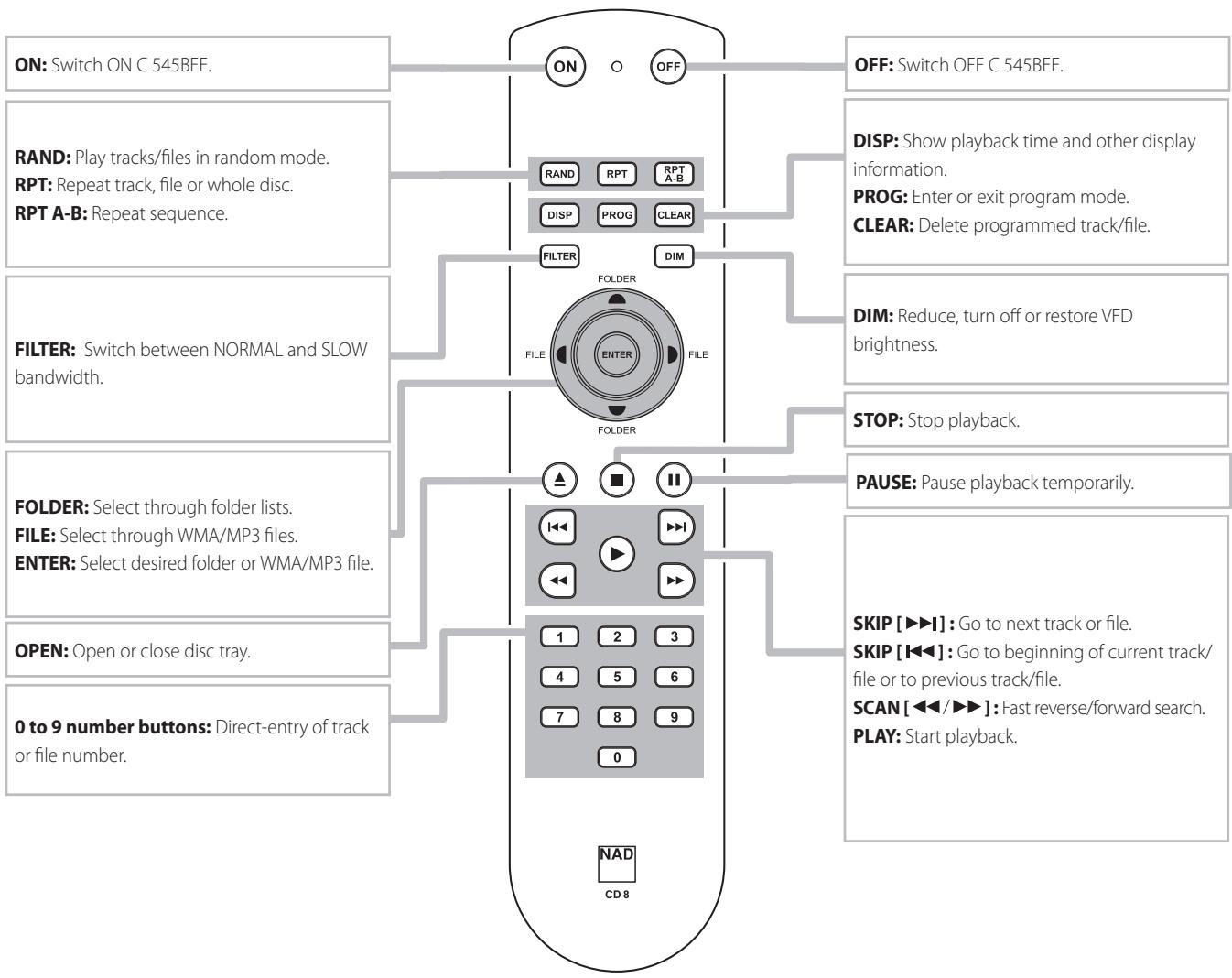
A wireless remote control is provided with your compact disc player, enabling you to operate playback functions from the comfort of your chair or from virtually anywhere in the room. For reliable operation there should be a clear line-of-sight path from the remote control to the front of the CD player. If the player does not respond to remote commands, it may be that this line-of-sight path is obstructed by clothing, paper or furnishings.
Most of the buttons on the remote control handset have the same effect as the corresponding buttons on the front panel of the player. In addition, the handset is equipped with some extra buttons like the following function keys.
NUMERIC KEY PAD
Using the direct-entry numeric keypad (0 to 9) causes the C 545BEE to jump directly to the beginning of a numbered track and commence play. Thus, to play Track 5, simply press "5". To play Track 20, press "2" and "0".
RPT A-B
To repeat a sequence, implement the following procedures:
1 Press [RPT A-B] at your chosen starting point.
2 Press [RPT A-B] again at your chosen end point. The repeat sequence begins.
3 Press [RPT A-B] again to cancel the sequence.
DIMMER
Toggle to reduce, turn off and restore VFD brightness.
PROGRAM AND DELETE
Use [PROG] button to start, review, edit or exit programming mode. In combination with [PROG] button, the [CLEAR] button allows the deletion of a programmed track during program review or edit sequence. Refer also to the item about "PROGRAMMING" at the "USING THE C 545BEE - FEATURES" section of the "OPERATION" page.
FILTER
The [FILTER] button is used for selecting the bandwidth of the audio low pass filter for the CD, MP3 and WMA media being played. The options are NORMAL Bandwidth and SLOW Bandwidth. For some recordings the SLOW Bandwidth may provide a wide frequency range and spatial feeling. Toggle CD 8's [FILTER] button to select "NORMAL" or "SLOW" mode. "NORMAL FILTER" or "SLOW FILTER" will be correspondingly shown in the VFD.
NORMAL: Select NORMAL bandwidth to engage a standard CD high-pass filter slope for playback of CD, MP3, and WMA music through the two channel stereo audio jacks.
SLOW: Select SLOW bandwidth to engage a gentle high-pass filter slope for playback of CD music through the two channel stereo audio jacks. This feature is particularly useful for higher bit rate recordings.
REFERENCE
TROUBLESHOOTING
| CONDITION | POSSIBLE CAUSES | POSSIBLE SOLUTIONS |
| No power. | ·The power cord is disconnected. | ·Plug the power cord into the wall outlet securely. |
| The power is ON, but the C 545BEE does not work. | ·No disc is inserted. | ·Insert a disc. |
| The C 545BEE does not start playback. | ·The disc is loaded upside down. | ·Reload the disc with the label side UP. |
| ·The disc is too dirty. | ·Clean the disc. | |
| No sound. | ·The equipment connected with the audio cable is not set to receive CD signal output. | ·Select the correct input mode of the audio receiver so you can listen to the sound from the C 545BEE. |
| ·The power of the equipment connected with the audio cable is turned off. | ·Turn on the equipment connected with the audio cable. | |
| Sound skips. | ·The C 545BEE is subject to vibration or physical shock from external sources. | ·Change the installation location. |
| The remote control does not work properly. | ·The remote control is not pointed at the remote sensor on the CD player. | ·Point the remote control at the remote sensor of the CD player. |
| ·The remote control is too far from the CD player. | ·Operate the remote control closer to the CD player. | |
| ·The remote control batteries are dead. | ·Replace the remote control batteries. |
HANDLING DISCS
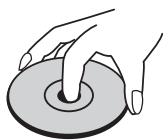
Do not touch the playback side of the disc. Hold the disc by the edges so that fingerprints do not get on the surface. Never stick paper or tape on the disc.

STORING DISCS
After playing, store the disc in its case. Do not expose the disc to direct sunlight or sources of heat and never leave it in a parked car exposed to direct sunlight.
CLEANING DISCS
Fingerprints and dust on the disc can cause poor picture quality and sound distortion. Before playing, clean the disc with a clean cloth. Wipe the disc from the center out.
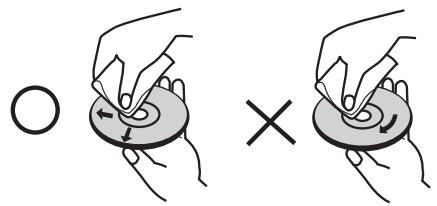
Do not use strong solvents such as alcohol, benzine, thinner, commercially available cleaners, or anti-static spray intended for older vinyl records
SPECIFICATIONS
GENERAL PARAMETERS
Output level - Analog 2.2 ± 0.1V
Optical -22.5 ± 3.5 dBm
Coaxial 650± 150mV
Frequency response ± 0.3 dB (ref. 0 dB 20 Hz-1 kHz)
± 0.5 dB (ref. 0 dB 5 kHz-20 kHz)
Total harmonic distortion < 0.01% (ref. 1 kHz)
Signal/Noise ratio 118 dB (A-weighted, ref. 1 kHz)
Channel balance ±0.5 dB (ref. 0dB 1kHz)
Dynamic range 95 dB
Channel separation >90 dB
De-emphasis -3.73 to -5.33 dB (ref. 0dB 5 kHz)
-8.04 to -10.04 dB (ref. 0 dB 16 kHz)
Linearity ± 0.01 dB (ref. 1kHz at -3 dB)
±0.02 dB (ref. 1 kHz at -6 dB)
±0.02 dB (ref. 1 kHz at -10 dB)
± 0.05 dB (ref. 1kHz at -20dB )
± 0.15 dB (ref. 1kHz at -60 dB)
DIMENSION AND WEIGHT
Unit Dimensions (W× H× D) 435× 285× 70mm (Net)
435 × 293 × 86 mm (Gross)*
Net weight 4.9 kg
Shipping weight 6.3 kg
-
- Gross dimensions include feet, extended buttons and rear panel terminals.
Specifications are subject to change without notice. For updated documentation and features, please log onto www.NADelectronics.com for the latest information about C 545BEE.

www.NADelectronics.com
©2008 NAD ELECTRONICS INTERNATIONAL
A DIVISION OF LENBROOK INDUSTRIES LIMITED
All rights reserved. No part of this publication may be reproduced, stored or transmitted in any form without the written permission of NAD Electronics International
- SAVE THESE INSTRUCTIONS FOR LATER USE. FOLLOW ALL WARNINGS AND INSTRUCTIONS MARKED ON THE AUDIO EQUIPMENT.
- NOTE TO CATV SYSTEM INSTALLER
- WARNING
- CAUTION
- DO NOT STARE INTO BEAM.
- FCC NOTICE
- FCC WARNING
- INDUSTRY CANADA REQUIREMENT
- TO COMPLETELY DISCONNECT THIS APPARATUS FROM THE AC MAINS, DISCONNECT THE POWER SUPPLY CORD PLUG FROM THE AC RECEPTACLE.
- THE MAINS PLUG OF THE POWER SUPPLY CORD SHALL REMAIN READILY ACCESSIBLE.
- CAUTION REGARDING PLACEMENT
- IMPORTANT INFORMATION FOR UK CUSTOMERS
- IMPORTANT
- IF IN DOUBT CONSULT A COMPETENT ELECTRICIAN.
- INFORMATION ABOUT COLLECTION AND DISPOSAL OF WASTE BATTERIES (DIRECTIVE 2006/66/EC OF THE EUROPEAN PARLIAMENT AND THE COUNCIL OF EUROPEAN UNION) (FOR EUROPEAN CUSTOMERS ONLY)
- NOTES ON ENVIRONMENTAL PROTECTION
- WARNING!
- NOTE: THE C 545BEE IS NOT AN AUTO VOLTAGE CD PLAYER. CONNECT ONLY TO THE PRESCRIBED AC OUTLET, I.E., 120V 60HZ OR 230V 50HZ.
- RECORD YOUR MODEL NUMBER (NOW, WHILE YOU CAN SEE IT)
- INTRODUCTION
- IDENTIFICATION OF CONTROLS
- OPERATION
- THANK YOU FOR CHOOSING NAD.
- REFERENCE
- GETTING STARTED
- UNPACKING AND SETUP
- WHAT'S IN THE BOX
- SAVE THE PACKAGING
- CHOOSING A LOCATION
- NOTE ON INSTALLATION
- QUICK START
- PLAY A CD
- NOTE
- FRONT PANEL
- NOTES
- ATTENTION!
- CD 8 REMOTE CONTROL
- BATTERY ASSEMBLY
- CD-R AND CD-RW AUDIO DISCS
- PLAYING MP3/WMA FILES
- IMPORTANT NOTICE
- PROGRAMMING
- REVIEW/EDIT PROGRAM LIST
- PROGRAM PLAYBACK
- STOP OR DELETE PROGRAM
- USING THE C 545BEE - CD 8 REMOTE CONTROL
- NUMERIC KEY PAD
- RPT A-B
- DIMMER
- PROGRAM AND DELETE
- FILTER
- HANDLING DISCS
- STORING DISCS
- CLEANING DISCS
- SPECIFICATIONS
- GENERAL PARAMETERS
- DIMENSION AND WEIGHT
Marque : NAD
Modèle : C545BEE
Catégorie : Lecteur de CD