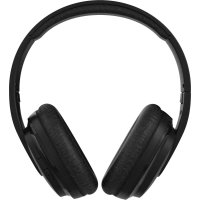
WIRELESS AUDIO HEADSET HS-37W - Casque audio NOKIA - Notice d'utilisation et mode d'emploi gratuit
Retrouvez gratuitement la notice de l'appareil WIRELESS AUDIO HEADSET HS-37W NOKIA au format PDF.


| Type de produit | Casque audio sans fil |
| Caractéristiques techniques principales | Technologie Bluetooth, microphone intégré, commandes tactiles |
| Alimentation électrique | Batterie rechargeable via USB |
| Dimensions approximatives | Non spécifiées |
| Poids | Non spécifié |
| Compatibilités | Compatible avec la plupart des appareils Bluetooth |
| Type de batterie | Batterie lithium-ion |
| Tension | Non spécifiée |
| Puissance | Non spécifiée |
| Fonctions principales | Écoute de musique, appels mains libres, commandes de lecture |
| Entretien et nettoyage | Essuyer avec un chiffon doux, éviter l'eau |
| Pièces détachées et réparabilité | Pas de pièces détachées disponibles, réparation limitée |
| Informations générales utiles | Vérifier la compatibilité Bluetooth avant l'achat |
FOIRE AUX QUESTIONS - WIRELESS AUDIO HEADSET HS-37W NOKIA
Questions des utilisateurs sur WIRELESS AUDIO HEADSET HS-37W NOKIA
0 question sur cet appareil. Repondez a celles que vous connaissez ou posez la votre.
Poser une nouvelle question sur cet appareil
Téléchargez la notice de votre Casque audio au format PDF gratuitement ! Retrouvez votre notice WIRELESS AUDIO HEADSET HS-37W - NOKIA et reprennez votre appareil électronique en main. Sur cette page sont publiés tous les documents nécessaires à l'utilisation de votre appareil WIRELESS AUDIO HEADSET HS-37W de la marque NOKIA.
MODE D'EMPLOI WIRELESS AUDIO HEADSET HS-37W NOKIA
User guide for the Nokia Bluetooth Headset (HS-37W)
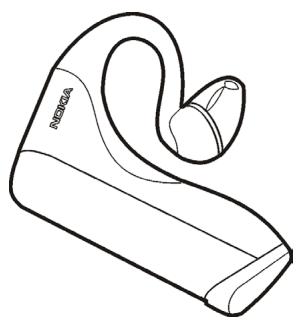
DECLARATION OF CONFORMITY
We, NOKIA CORPORATION declare under our sole responsibility that the product HS-37W is in conformity with the provisions of the following Council Directive: 1999/5/EC. A copy of the Declaration of Conformity can be found at http://www.nokia.com/phones/ declaration_of_conformity/.
C€0681
Copyright © 2005 Nokia. All rights reserved.
Reproduction, transfer, distribution or storage of part or all of the contents in this document in any form without the prior written permission of Nokia is prohibited.
Nokia and Nokia Connecting People are registered trademarks of Nokia Corporation. Other product and company names mentioned herein may be trademarks or tradenames of their respective owners.
Bluetooth is a registered trademark of Bluetooth SIG, Inc.
Nokia operates a policy of continuous development. Nokia reserves the right to make changes and improvements to any of the products described in this document without prior notice.
Under no circumstances shall Nokia be responsible for any loss of data or income or any special, incidental, consequential or indirect damages howsoever caused.
The contents of this document are provided "as is". Except as required by applicable law, no warranties of any kind, either express or implied, including, but not limited to, the implied warranties of merchantability and fitness for a particular purpose, are made in relation to the accuracy, reliability or contents of this document. Nokia reserves the right to revise this document or withdraw it at any time without prior notice.
The availability of particular products may vary by region. Please check with the Nokia dealer nearest to you.
Unauthorized changes or modifications to this device may void the user's authority to operate the equipment.
This device may contain commodities, technology or software subject to export laws and regulations from the US and other countries. Diversion contrary to law is prohibited.
9238645
Contents
- Introduction 5
Bluetooth wireless technology 5 - Get started 7
Insert the battery. 8
Pair the headset with a compatible phone 8 - Basic use 10
Call handling. 10
Standby mode 11
Light indicator 11
Use the headset on the left ear. 11
Store the headset 12
Troubleshooting 12
The audio quality is poor 12
There is no audio in the headset 12
Cannot answer calls with the headset because the phone stops ringing
before the headset is activated. 13
I have pairing problems even though my phone indicates otherwise. 13
Care and maintenance 14
1. Introduction
Read this user guide carefully before using the headset. Read also the user guide for your phone, which provides important safety and maintenance information. Keep the headset out of reach of small children.
The Nokia Bluetooth headset HS-37W is designed for all-day wear, and provides up to 15 hours of talk time with a single AAA battery.
This device is intended for use when supplied with power from a 1.5 V LR03 / AAA Alkaline battery. The use of any other types may invalidate any approval or warranty, and may be dangerous. Always switch the device off before removing the battery. Ensure the correct polarity is observed when inserting the battery.
Do not try to recharge the battery unless the manufacturer of the battery has intended the battery to be rechargeable.
Bluetooth wireless technology
The HS-37W headset can be connected to a compatible mobile phone that supports Bluetooth wireless technology. The Bluetooth wireless technology makes it possible to connect compatible communication devices without cables. A Bluetooth connection does not require that the phone and the headset be in line of sight, but both devices should be within 10 meters of each other. Connections can be subject to interference from obstructions, such as walls, or other electronic devices.
The HS-37W headset is compliant with the Bluetooth Specification 1.2 supporting the following profiles: Headset Profile and Handsfree Profile. Interoperability between the HS-37W headset and other Bluetooth-enabled products is not guaranteed. Check with the manufacturers of other devices to determine their compatibility with this device.
2. Get started
There may be restrictions on using Bluetooth wireless technology in some locations. Check with your local authorities or service provider.
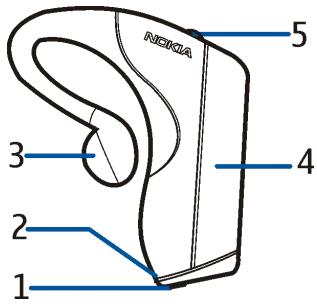
The headset contains the following parts:
Answer/end key (1)
- Yellow light indicator (LED) (2)
- Earpiece (3)
- Battery compartment (4)
Volume key (5)
Before you can start using the headset, you must insert a battery, and pair a compatible phone with the headset.
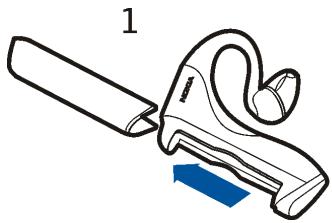
Insert the battery
Open the battery compartment by sliding the battery panel off, and insert the battery.
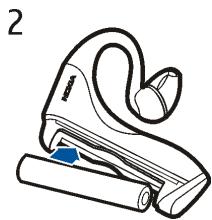
Pair the headset with a compatible phone
The HS-37W headset goes into the pairing mode when you insert or replace the battery. The yellow LED lights up and remains on for 5 minutes, during which the headset can be paired to a compatible mobile phone.
- Set the phone to search for Bluetooth devices. See the user guide of your phone for instructions.
- When your phone finds the HS-37W headset, confirm the pairing from your phone.
- When prompted for the Bluetooth passcode of the headset, enter 0000.
If the pairing was successful, the yellow LED flashes briefly and then switches off.
If the pairing was unsuccessful, the yellow LED stays on for 5 minutes, during which you must pair the devices again.
You only need to pair the headset with your phone once. To exit the pairing mode, press the answer/end key briefly.
You are now ready to use the headset.
3. Basic use
Call handling
To answer a call with your mobile phone, press the answer key on your phone. You can transfer the call to the headset by pressing the answer/end key on the headset briefly.
To answer a call with the headset, press the answer/end key on the headset briefly. There may be a slight delay in transferring the call from the mobile phone to the headset. To avoid missing calls, it is recommended that you answer calls with your mobile phone, and then transfer the call to the headset.
If you do not want to answer a call, press and hold the answer/end key on the headset for a second.
To make a call, dial the number with your mobile phone and press the answer key on your phone. Then press the answer/end key on the headset to transfer the call to the headset.
If your phone supports voice dialing and there is no call in progress, press the answer/end key on the headset, and proceed with the voice dialing as described in the user guide of your phone. For the best result, record the voice tag through your headset.
To increase or decrease the volume of the headset, press the volume key briefly until the satisfactory volume level is reached.
To end a call, press the end key on your mobile phone or the answer/end key on your headset.
Standby mode
To maximise the battery life, the headset automatically switches off after each call. To prevent this, set the headset in the standby mode. The standby mode speeds up the connection to your mobile phone, but reduces battery life. To activate the standby mode, press and hold the volume and answer/end keys for 5 seconds.
To switch the headset on in the standby mode, press the answer/end key. To switch the headset off in the standby mode, press and hold the answer/end key for 5 seconds.
Light indicator
The HS-37W headset has a yellow light indicator (LED). When you insert or replace the battery and switch the headset on, the LED lights up. This indicates that the headset is in the pairing mode. When the power level of the battery in the headset is getting low, the LED flashes twice every 5 seconds. Replace the battery.
Use the headset on the left ear
The HS-37W headset is ready to be worn on the right ear. If you want to use it on the left ear, gently rotate the earpiece.
Store the headset
Always store the headset with the power off and safely protected.
Avoid storage in high temperatures (above 45^ / 113^ ) – such as direct sunlight. Storage in high temperatures can degrade performance and reduce the battery life. Low temperatures (down to -10^ / 14^ ) shorten the battery life and may affect operation.
Do not expose the headset to rain or other liquids.
Troubleshooting
The audio quality is poor
Check that the headset is within a maximum of 10 meters from your phone, and that there are no obstructions, such as walls, or other electronic devices between the headset and the phone.
There is no audio in the headset
- Increase the volume on the headset by pressing the volume key.
- Ensure that the headset is paired with the phone.
- Make sure that the phone is connected to the headset. If not, try pairing the devices again.
Cannot answer calls with the headset because the phone stops ringing before the headset is activated
The headset is designed to maximise battery life by automatically switching off after a call. The standby mode speeds up the connection between your phone and the headset, see Standby mode, 11.
I have pairing problems even though my phone indicates otherwise
You may have deleted the headset pairing in your mobile phone. Pair the devices again.
Your device is a product of superior design and craftsmanship and should be treated with care. The suggestions below will help you protect your warranty coverage.
- Keep all accessories and enhancements out of the reach of small children.
- Keep the device dry. Precipitation, humidity and all types of liquids or moisture can contain minerals that will corrode electronic circuits. If your device does get wet, remove the battery and allow the device to dry completely before replacing it.
- Do not use or store the device in dusty, dirty areas. Its moving parts and electronic components can be damaged.
- Do not store the device in hot areas. High temperatures can shorten the life of electronic devices, damage batteries, and warp or melt certain plastics.
- Do not store the device in cold areas. When the device returns to its normal temperature, moisture can form inside the device and damage electronic circuit boards.
- Do not attempt to open the device other than as instructed in this guide.
- Do not drop, knock, or shake the device. Rough handling can break internal circuit boards and fine mechanics.
- Do not use harsh chemicals, cleaning solvents, or strong detergents to clean the device.
- Do not paint the device. Paint can clog the moving parts and prevent proper operation.
All of the above suggestions apply equally to your device, battery, charger, or any enhancement. If any device is not working properly, take it to the nearest authorized service facility for service.