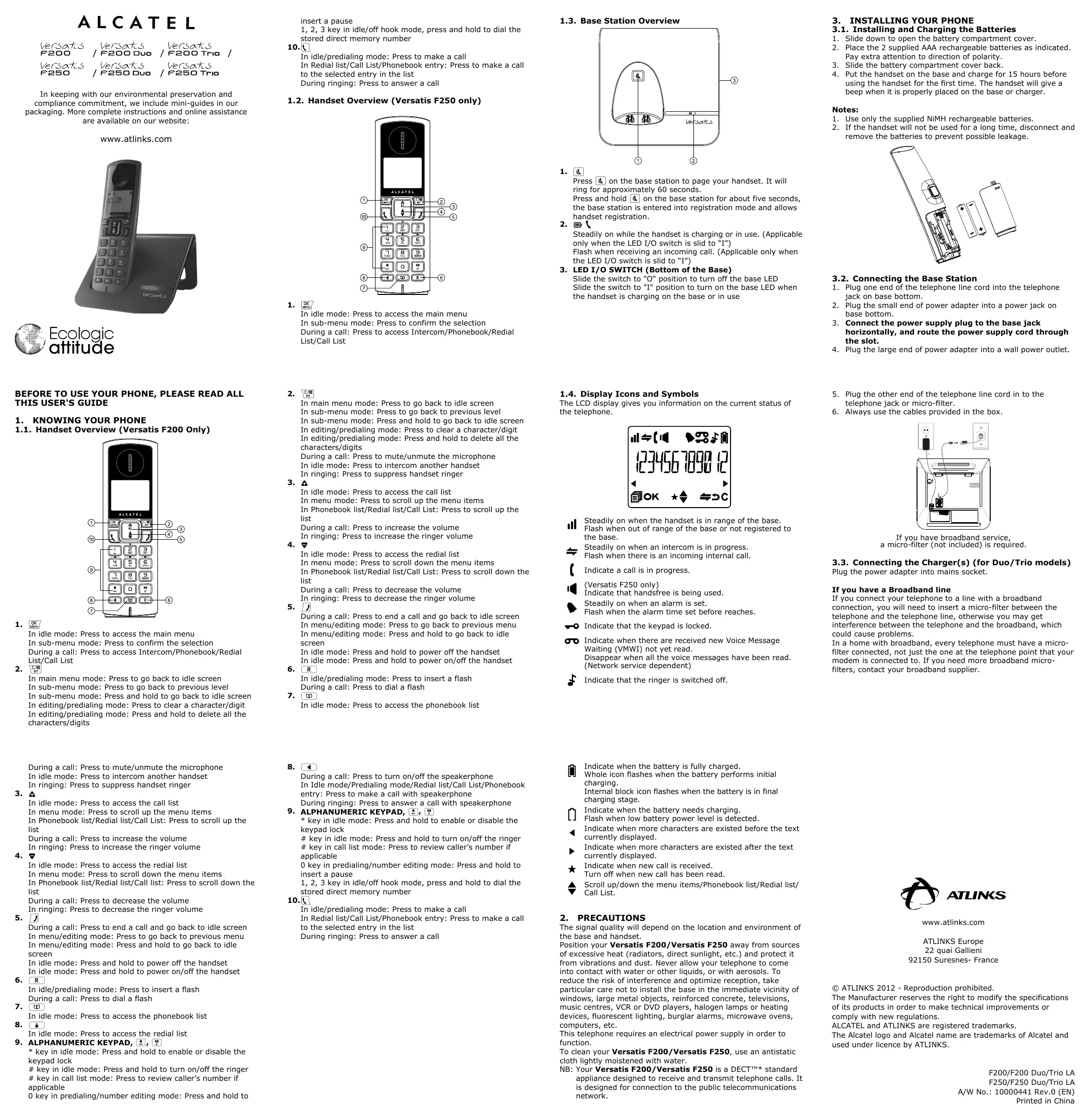
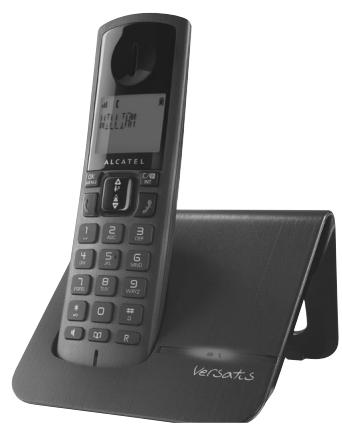
MODE D'EMPLOI VERSATIS F200 ALCATEL
ALCATEL
Versatz
Versa
VersaTUS 6300 Tn
Versatcs 250
Vers 1625
atss Dua
Versats/ 16250Tc
In keeping with our environmental preservation and compliance commitment, we include mini-guides in our packaging. More complete instructions and online assistance are available on our website:
www.atlinks.com

Ecologic
attitude
insert a pause
1, 2, 3 key in idle/off hook mode, press and hold to dial the stored direct memory number
10.
In idle/predialing mode: Press to make a call
In Redial list/Call List/Phonebook entry: Press to make a call to the selected entry in the list.
During ringing: Press to answer a call
1.2. Handset Overview (Versatis F250 only)
OK
In idle mode: Press to access the main menu
In sub-menu mode: Press to confirm the selection
During a call: Press to access Intercom/Phonebook/Redial
List/Call List
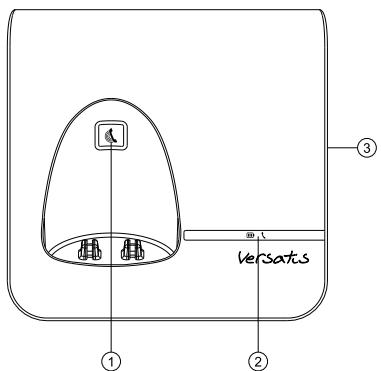
1.3. Base Station Overview
1.
Press on the base station to page your handset. It will ring for approximately 60 seconds.
Press and hold on the base station for about five seconds, the base station is entered into registration mode and allows handset registration.
2.
Steadily on while the handset is charging or in use. (Applicable only when the LED I/O switch is slid to "I")
Flash when receiving an incoming call. (Applicable only when the LED I/O switch is slid to "I")
- LED I/O SWITCH (Bottom of the Base)
Slide the switch to "O" position to turn off the base LED Slide the switch to "I" position to turn on the base LED when the handset is charging on the base or in use
- INSTALLING YOUR PHONE
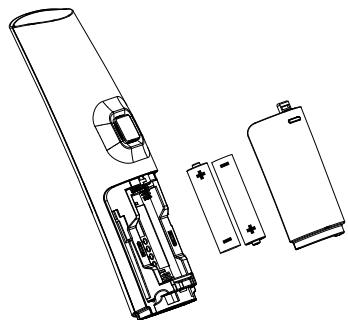
3.1. Installing and Charging the Batteries
-
Slide down to open the battery compartment cover.
-
Place the 2 supplied AAA rechargeable batteries as indicated Pay extra attention to direction of polarity.
-
Slide the battery compartment cover back
-
Put the handset on the base and charge for 15 hours before using the handset for the first time. The handset will give a beep when it is properly placed on the base or charger.
Notes:
-
Use only the supplied NiMH rechargeable batteries.
-
If the handset will not be used for a long time, disconnect and remove the batteries to prevent possible leakage.
3.2. Connecting the Base Station
- Plug one end of the telephone line cord into the telephone jack on base bottom.
- Plug the small end of power adapter into a power jack on base bottom.
- Connect the power supply plug to the base jack horizontally, and route the power supply cord through the slot.
- Plug the large end of power adapter into a wall power outlet.
BEFORE TO USE YOUR PHONE, PLEASE READ ALL THIS USER'S GUIDE
- KNOWING YOUR PHONE
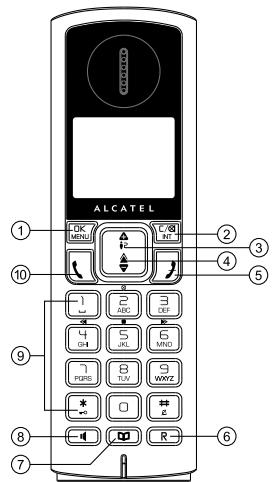
1.1. Handset Overview (Versatis F200 Only)
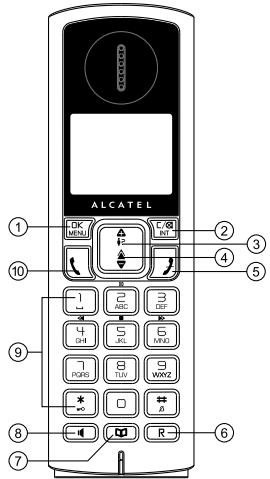
OK 1. MENU
In idle mode: Press to access the main menu
In sub-menu mode: Press to confirm the selection
During a call: Press to access Intercom/Phonebook/Redial List/Call List
- C/8
In main menu mode: Press to go back to idle screen
In sub-menu mode: Press to go back to previous level
In sub-menu mode: Press and hold to go back to idle screen
In editing/predialing mode: Press to clear a character/digit
In editing/predialing mode: Press and hold to delete all the characters/digits
- C/8
In main menu mode: Press to go back to idle screen
In sub-menu mode: Press to go back to previous level
In sub-menu mode: Press and hold to go back to idle screen
In editing/predialing mode: Press to clear a character/digit
In editing/predialing mode: Press and hold to delete all the characters/digits
During a call: Press to mute/unmute the microphone
In idle mode: Press to intercom another handset
In ringing: Press to suppress handset ringer
- A
In idle mode: Press to access the call list
In menu mode: Press to scroll up the menu items
In Phonebook list/Redial list/Set List: Press to scroll up the list
During a call: Press to increase the volume
In ringing: Press to increase the ringer volume
4.
In idle mode: Press to access the radial list
In menu mode: Press to scroll down the menu items
In Phonebook list/Redial list/Call List: Press to scroll down the list
During a call: Press to decrease the volume
In ringing: Press to decrease the ringer volume
5.
During a call: Press to end a call and go back to idle screen
In menu/editing mode: Press to go back to previous menu
In menu/editing mode: Press and hold to go back to idle screen
In idle mode: Press and hold to power off the handset
In idle mode: Press and hold to power on/off the handset
- R
In idle/predialing mode: Press to insert a flash During a call: Press to dial a flash
7.
In idle mode: Press to access the phonebook list
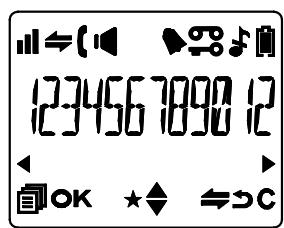
1.4. Display Icons and Symbols
The LCD display gives you information on the current status of the telephone.
St
Readily on when the handset is in range of the base.
Rash when out of range of the base or not registered to the base.
St
eadily on when an intercom is in progress.
Fla
cash when there is an incoming internal call.
In
dicate a call is in progress.
ersatis E250 only)
In
dicate that handsfree is being used.
St
readily on when an alarm is set.
Fla
cash when the alarm time set before reaches.
In
dicate that the keypad is locked.
In
dicate when there are received new Voice Message
aiting (VMWI) not yet read.
sappear when all the voice messages have been read.
network service dependent)
In
dicate that the ringer is switched off.
-
Plug the other end of the telephone line cord in to the telephone jack or micro-filter.
-
Always use the cables provided in the box.
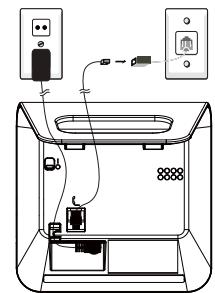
If you have broadband service, a micro-filter (not included) is required.
3.3. Connecting the Charger(s) (for Duo/Trio models)
Plug the power adapter into mains socket
If you have a Broadband line
If you connect your telephone to a line with a broadband connection, you will need to insert a micro-filter between the telephone and the telephone line, otherwise you may get interference between the telephone and the broadband, which could cause problems.
In a home with broadband, every telephone must have a microfilter connected, not just the one at the telephone point that your modem is connected to. If you need more broadband microfilters, contact your broadband supplier.
During a call: Press to mute/unmute the microphone
In idle mode: Press to intercom another handset
In ringing: Press to suppress handset ringer
- A
In idle mode: Press to access the call list
In menu mode: Press to scroll up the menu items
In Phonebook list/Redial list/Set List: Press to scroll up the list
During a call: Press to increase the volume
In ringing: Press to increase the ringer volume
4.
In idle mode: Press to access the radial list
In menu mode: Press to scroll down the menu items
In Phonebook list/Redial list/Call list: Press to scroll down the list
During a call: Press to decrease the volume
In ringing: Press to decrease the ringer volume
5.
During a call: Press to end a call and go back to idle screen
In menu/editing mode: Press to go back to previous menu
In menu/editing mode: Press and hold to go back to idle screen
In idle mode: Press and hold to power off the handset
In idle mode: Press and hold to power on/off the handset
6.
In idle/predialing mode: Press to insert a flash During a call: Press to dial a flash
7.
In idle mode: Press to access the phonebook list
8.
In idle mode: Press to access the radial list
-
ALPHANUMERIC KEYPAD, 串
-
key in idle mode: Press and hold to enable or disable the keypad lock
key in idle mode: Press and hold to turn on/off the ringer # key in call list mode: Press to review caller's number if applicable
0 key in predialing/number editing mode: Press and hold to
8.
During a call: Press to turn on/off the speakerphone
In Idle mode/Predialing mode/Redial list/List/Phonebook
entry: Press to make a call with speakerphone
During ringing: Press to answer a call with speakerphone
-
ALPHANUMERIC KEYPAD, 12
-
key in idle mode: Press and hold to enable or disable the keypad lock
key in idle mode: Press and hold to turn on/off the ringer # key in call list mode: Press to review caller's number if applicable
0 key in predialing/number editing mode: Press and hold to insert a pause
1, 2, 3 key in idle/off hook mode, press and hold to dial the stored direct memory number
10.
In idle/predialing mode: Press to make a call
In Redial list/Call List/Phonebook entry: Press to make a call to the selected entry in the list
During ringing: Press to answer a call
Indicate when the battery is fully charged.
Whole icon flashes when the battery performs initial charging.
Internal block icon flashes when the battery is in final charging stage.
Indicate when the battery needs charging.
. Flash when low battery power level is detected.
Indicate when more characters are existed before the text currently displayed.
Indicate when more characters are existed after the text currently displayed.
Indicate when new call is received.
Turn off when new call has been read.
Scroll up/down the menu items/Phonebook list/Redial list/ Call List.
- PRECAUTIONS
The signal quality will depend on the location and environment of the base and handset.
Position your Versatis F200/Versatis F250 away from sources of excessive heat (radiators, direct sunlight, etc.) and protect it from vibrations and dust. Never allow your telephone to come into contact with water or other liquids, or with aerosols. To reduce the risk of interference and optimize reception, take particular care not to install the base in the immediate vicinity of windows, large metal objects, reinforced concrete, televisions, music centres, VCR or DVD players, halogen lamps or heating devices, fluorescent lighting, burglar alarms, microwave ovens, computers, etc.
This telephone requires an electrical power supply in order to function.
To clean your Versatis F200/Versatis F250, use an antistatic cloth lightly moistened with water.
NB: Your Versatis F200/Versatis F250 is a DECT™* standard appliance designed to receive and transmit telephone calls. It is designed for connection to the public telecommunications network.

ATLINKS
www.atlinks.com
ATLINKS Europe
22 quai Gallieni
92150 Suresnes-France
© ATLINKS 2012 - Reproduction prohibited.
The Manufacturer reserves the right to modify the specifications of its products in order to make technical improvements or comply with new regulations.
ALCATEL and ATLINKS are registered trademarks.
The Alcatel logo and Alcatel name are trademarks of Alcatel and used under licence by ATLINKS.
F200/F200 Duo/Trio LA
F250/F250 Duo/Trio LA
A/W No.: 10000441 Rev.0 (EN)
Printed in China
4. USING YOUR PHONE
4.1. Make a Call
4.1.1. Preparatory Dialing
Enter the phone number and press or (Versatis F250 Only) to dial the number. Press to clear the entry.
4.1.2. Direct Dialoging
Press or (Versatis F250 Only) to take the line and enter the phone number.
4.1.3. Dial from Direct Memory Keys
In idle or off hook mode, press and hold 12 to dial the direct memory number. You have to store number to the related key first. See section 7.4 for reference.
4.1.4. Call from the Redial List
Press (Versatis F200 Only) or (Versatis F250 Only) to access the radial list and press / to select the desired radial number. Press (Versatis F250 Only) to dial out to the selected radial number.
4.2. Handset Speakerphone (Versatis F250 Only)
During a call, you can press to alternate between handsfree and normal handset use.
5. PRIVATE PHONEBOOK
Your phone can store up to 50 private phonebook entries with names and numbers. Each phonebook entry can have a maximum of 20 digits for the phone number and 12 characters for the name. You can also select different ringtones for your phonebook entries. Phonebook entries are stored alphabetically by name.
7.2. Set the Ringer Volume
- Press OK and A to select HS SETTINGS.
- Press OK and A to select RING SETUP.
- Press OK and A to select RING VOLUME.
- Press OK and A to select the desired ringer volume (a
total of 6 ringer volume levels including VOLUME OFF).
Note: The respective ringer volume will be played during your selection.
If VOLUME OFF is selected, icon will display.
- Press OK to confirm.
7.3. Adjust Earpiece and Handsfree (Versatis F250 Only) Volume
There are 5 levels (VOLUME 1 to VOLUME 5) to choose from for each of earpiece and handsfree (Versatis F250 Only) volume.
During a call:
Press / to select volume 1-5. The current setting is shown. When you end the call, the setting will remain at the last selected level.
7.4. Store Direct Memory Access Number
You can store three direct access numbers into digit KEY 1, KEY 2 and KEY 3, which will be convenient for you to dial to these numbers directly.
1. Press OK and A to select HS SETTINGS.
2. Press OK and to select DIRECT MEM.
3. Press OK and / to select any one from KEY 1, KEY 2 and KEY 3.
4. Press OK and then enter the number you would like to store, or edit the number existed before.
5. Press OK to confirm.
Note: Press and hold , or to call the stored number.
10. TROUBLESHOOTING
If you have difficulty with your phone, please try the suggestions listed below.
As a general rule, if a problem occurs, remove the batteries from all the handsets in your installation for about 1 minute, then disconnect and reconnect the power supply to the base and reinstall the handset batteries.
| Problem | Cause | Solutions |
| No dialtingone whenpressingkey | a. The connectioncord of the basestation is notplugged in. | a. Check theconnections. Unplugand plug back in themains. Check that thetelephone line cordhas been plugged intothe base station andthe phone socket. |
| b. The adapter cordis not plugged incorrectly in thebase station. | b. Check the basestation plug and theAC plug (remove andplug-in). |
| c. The line is busy, asanother handset isused. | c. Wait until the line isunoccupied. |
| d. Wrong connectioncord. | d. Use the originalconnection cord. |
| "OUT OFRANGE" isdisplayed. | a. Base station out ofrange. | a. Reduce the range. |
| b. Base station isnot connected tomains. | b. Connect base stationto mains. |
| The calldoes notwork. | Service not activatedor wrong operator. | Check your Subscriptionwith network. |
| No display. | Empty battery. | Recharge battery. |
The store where you bought your telephone can also provide you with information and after-sales support.
5.1. Add a New Phonebook Entry
In idle:
- Press to access the phonebook.
Press OK and to select PHONEBOOK main menu item and then press OK to access the phonebook.
- Press OK to select ADD.
- Press OK to enter the name.
- Press OK to enter the number.
- Press OK and / 一 to select the desired ringtone for your phonebook entry.
- Press DK to store the phonebook entry.
5.2. Call from the Phonebook
In idle:
- Press to access the phonebook.
OR
Press OK and to select PHONEBOOK main menu item and then press OK to access the phonebook.
- Press or (Versatis F250 Only) to dial out to the selected phonebook entry.
6. CALLER DISPLAY (NETWORK DEPENDENT)
This feature is available if you have subscribed the Caller Line Identification service with your telephone service provider. Your phone can store up to 20 received calls with date/time information in the Call List. The number will be shown on the LCD when the phone is ringing. If the number matches with one of the entries in your Private Phonebook, the caller's name stored in the private phonebook will be displayed alternatively with the number. The handset will ring with the melody associated with that phonebook entry.
If the caller number is disabled to send caller information, "WITHHIELD" will display.
If the caller number is not provided, "OUT OF AREA" will display. In standby, if three unanswered calls are received, "3 NEW
CALLS" will be displayed.
6.1.View the Call List
All received calls are saved in Call List with the latest call putting at the top of the list. When the call list is full, the oldest call will be replaced by a new call. The unanswered call which has not been read is marked with a at the centre of the bottom line of the display.
- Press A to access the call list.
OR
Press DK and / to select CALL LIST.
- Press / B to select the desired entry.
- Press #_ to view the caller's number if applicable.
6.2. Call from the Call List
In
- Press A to access the call list.
OR
Press DK and A to select CALL LIST.
- Press or (Versatis F250 Only) to dial out to the selected phonebook entry.
7. PHONE SETTINGS
7.1. Set the Ringer Melody for Internal/External Calls
- Press OK and A/ to select HS SETTINGS.
- Press OK and A to select RING SETUP.
- Press OK and A/ to select INT RING or EXT RING.
- Press OK and / to select the desired ringer melody from the melody list.
Note: The respective ringer melody will be played while browsing the melody list.
- Press OK to confirm.
8. REGISTRATION
Your handset and base station is pre-registered. Up to five handsets can be registered to a single base station.
If for some reason, the handset is not registered to the base station (if flashes even when the handset is near the base station), register your handset according to the following procedure.
- Press and hold on the base station for about five seconds,
the base station is entered into registration mode.
- Press OK and A to select REGISTRATION.
- Press DK and you are requested to enter the 4-digit system PIN (default PIN is 0000).
- Enter the 4-digit system PIN.
- Press OK to confirm.
If the handset registration is successful, you will hear a confirmation tone and the will stop flashing. The handset will automatically be allocated the next available handset number. This handset number is shown in the handset display in standby mode. If the handset registration is unsuccessful, the will still flash.
11. SAFETY
In the event of an electrical hazard, the mains adapter acts as AC power isolating device. It should therefore, as a precaution, be installed close to the appliance and be easily accessible. To disconnect the device from the primary power source, the mains adapter must be removed from the AC socket.
If the mains adapter fails, it must be replaced by an identical model.
If not connected to the mains power or if there is a mains power failure, telephones that use cordless handsets will not work.
You will then be unable to make or receive calls in the event of an emergency.
This is why we recommend that you also keep a conventional telephone - one that doesn't require a power supply - as a backup.
! Do not use your telephone to notify a gas leak when standing in the vicinity of the leak.
It is recommended that you avoid using this device during electrical storms.
Do not attempt to open the batteries, as they contain chemical substances. In the event of leakage, avoid contact with the skin, eyes, nose and mouth. In the event of contact, rinse the affected part for about twenty minutes with running water and seek urgent medical attention. Clean the product with absorbent paper or a dry cloth and contact your reseller for replacement batteries.
- TECHNICAL DETAILS
| Free Field Range | Up to 300 metres* |
| Indoor Range | Up to 50 metres* |
| Handset Battery Life (average values) | 10 hours talk time**
100 hours standby** |
| Number of Handsets | Up to 5 |
| Intercom Mode | Yes |
| Three-Way Conference (1 outside correspondent + 2 internal correspondents) | Yes |
| Electrical Connection/Base Mains Adaptor/Charger | Base main adaptor:
Input: 100-240 V/50-60 Hz/0.15 A
Output: 6 V DC/450 mA
Charger adaptor:
Input: 100-240 V/50-60 Hz/0.15 A
Output: 6 V DC/450 mA
Only use the adaptors supplied with the telephone
Caution: The network voltage is classified as a hazard by the criteria of this standard. |
| Telephone Connection | Appliance designed for connection to a TNV3 class (telecommunications network voltage) analogue telephone line. |
| Batteries | AAA – 1.2 V – 400 mA
Only use the batteries supplied with the telephone.
Use any other type of battery presents a risk of explosion.
Used batteries must be disposed of in compliance with current environmental protection regulations. |
| Operating Temperature | From 5°C to 40°C |
- Values may vary according to environment.
** Depending on initial battery charge.
12. ENVIRONMENT

This symbol means that your inoperative electronic appliance must be collected separately and not mixed with the household waste.
This appliance has been designed and manufactured with high quality materials and components that can be recycled and reused. Electrical and electronic appliances are liable to contain parts that are necessary in order for the system to work properly but which can become a health and environmental hazard if they are not handled or disposed of in the proper way. Consequently, please do not throw out your inoperative appliance with the household waste.
If you are the owner of the appliance, you must deposit it at the appropriate local collection point or leave it with the vendor when buying a new appliance.
-
If you are a professional user, please follow your supplier's instructions.
-
If the appliance is rented to you or left in your care, please contact your service provider.
Keen to preserve the environment, ATLINKS has equipped this appliance with a switching power supply, offering better energy efficiency. The advantages include not only very low electricity consumption, but also a more compact format than the conventional power supply units used by the previous range.
The used batteries from your telephone (if it has batteries) must be disposed of in compliance with current environmental protection regulations. Comply with your local regulations. Return your batteries to your reseller or dispose of them at an approved recycling centre.
Help us protect the environment in which we live!