
MZ-R5ST - Lecteur MiniDisc SONY - Notice d'utilisation et mode d'emploi gratuit
Retrouvez gratuitement la notice de l'appareil MZ-R5ST SONY au format PDF.


| Type de produit | Lecteur/Enregistreur MiniDisc station |
| Marque | Sony |
| Modèle | MZ-R5ST |
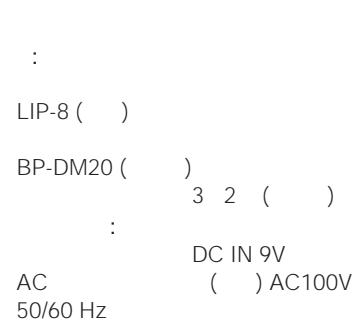
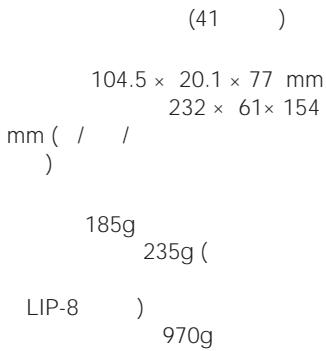
| Dimensions (enregistreur) | 104,5 × 20,1 × 77 mm |
| Dimensions (station) | 232 × 61 × 154 mm |
| Poids (enregistreur avec batterie LIP-8) | 185 g |
| Poids (station) | 970 g |
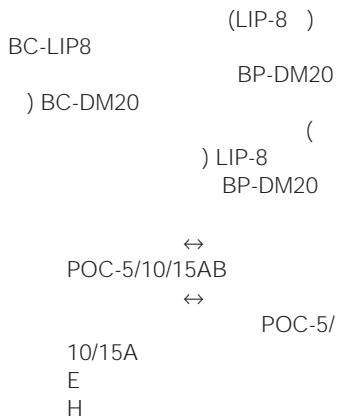
| Alimentation | Adaptateur secteur AC 100 V, 50/60 Hz ; batterie rechargeable lithium-ion LIP-8 ; piles sèches LR6 (AA) × 2 ; batterie rechargeable nickel-hydrure BP-DM20 |
| Durée de vie de la batterie (enregistrement) | Environ 3,5 h (LIP-8), 4,5 h (LR6), 4,5 h (BP-DM20), 8 h (LIP-8 + LR6), 8 h (LIP-8 + BP-DM20) |
| Durée de vie de la batterie (lecture) | Environ 5,5 h (LIP-8), 9 h (LR6), 6,5 h (BP-DM20), 16 h (LIP-8 + LR6), 13 h (LIP-8 + BP-DM20) |
| Fonctions d'enregistrement | Enregistrement numérique/analogique, synchro-recording, Time Machine Recording, enregistrement monaural (jusqu'à 148 min), réglage manuel du niveau |
| Fonctions de lecture | Lecture normale, répétition (une/piste, aléatoire), lecture programmée (jusqu'à 20 pistes), sélection directe par télécommande |
| Fonctions d'édition | Effacement de piste/disque, insertion/suppression de marque de piste, déplacement de piste, étiquetage (jusqu'à 200 caractères par titre, 1700 par disque), annulation (UNDO) |
| Connectique | Entrée numérique optique (OPT1, OPT2), sortie numérique optique, entrée/sortie analogique (RCA), sortie pour enceintes actives, casque (mini-jack stéréo), micro (mini-jack avec alimentation Plug-in Power) |
| Réponse en fréquence | 20 - 20 000 Hz (±3 dB en enregistrement, ±0,5 dB en lecture) |
| Rapport signal/bruit (lecture) | 96 dB (EIAJ) |
| Rapport signal/bruit (enregistrement) | 92 dB |
| Laser | GaAlAs, λ = 780 nm |
| Entretien | Nettoyer avec un chiffon doux et sec ; ne pas utiliser de solvants ni de produits abrasifs |
| Sécurité | Utiliser uniquement l'adaptateur secteur fourni ; ne pas exposer à l'humidité ou à des températures extrêmes ; ne pas ouvrir le boîtier |
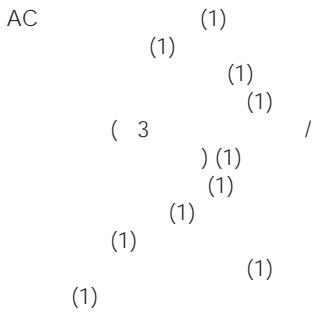
| Accessoires fournis | Adaptateur secteur, batterie LIP-8, télécommande à carte (avec pile CR2025), casque avec télécommande, boîtier pour piles, câbles de connexion |
FOIRE AUX QUESTIONS - MZ-R5ST SONY
Questions des utilisateurs sur MZ-R5ST SONY
0 question sur cet appareil. Repondez a celles que vous connaissez ou posez la votre.
Poser une nouvelle question sur cet appareil
Téléchargez la notice de votre Lecteur MiniDisc au format PDF gratuitement ! Retrouvez votre notice MZ-R5ST - SONY et reprennez votre appareil électronique en main. Sur cette page sont publiés tous les documents nécessaires à l'utilisation de votre appareil MZ-R5ST de la marque SONY.
MODE D'EMPLOI MZ-R5ST SONY
/Mode d'emploi



MZ-R5ST


6 9
1 1
CA


6

10
( ) 12
14

16
2 17
18
19
...... 20
21
22

24
24
24
( )......25
26
DIGITAL MEGA BASS 26
-AVLS 27
27

29
ERASE 29
1 29
29
TRACK MARK ON 30
TRACK MARK OFF 31
MOVE 32
TITRE 32
(ANNULER)...... 34
35
35
-CD 37
37
37
- ...... 38
38
38
39
39
39
/ 41
Notice d'utilisation
Notice d'utilisation 62




CA
CA




CA

CA

(Ni-Cd)
(Ni-MH)
(Li-ion)


AC
CD
(37)
1
2
3
→
RELEASE
(22)
CD
CD
AC
(ESP)
()
(10
)
37
20
19
1

2
ENTRÉE
ENTRÉE NUMÉRIQUE OPT 1 OPT 1
ENTRÉE NUMÉRIQUE OPT 2 OPT 2
3
FIN DE RECHERCHE
( )
4
① REC
REC
② CD
TOC EDIT
( )
1)
▶ ▶
REC
◀◀
OPEN
3)
POWER
1) 1
2)
3)

(53) SCMS NO COPY
(53
CASQUE
Ω/TÉLÉCOMMANDE
5
ALIMENTATION

(39)
1
2
① OUVERT
②
3


1) 2)
35
24

( )

3 REC
4
CD


• 2
18
3
SYNCHRO REC
1 2
1 INPUT
OPT2
OPT1
2 SYNCHRO REC
ON
SYNC
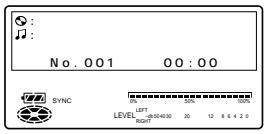
2 4 TIME MACHINE REC 2 2
FM 2 2
1" REC 2 3 6) (20
1
REC
2 MODE
MONO Monaural REC
3
20
6
4
5


OFF
ON
ECM-
717 ECM-MS907 ECM-MS957
1 MIC SENS
HIGH
LOW
2
REC
(10)
1 2
REC
2
3


4
4


MIC SENS
6 REC LEVEL 12 (dB) (37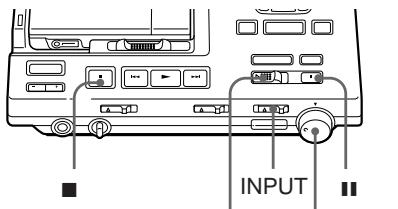
REC REC LEVEL (ANALOG)
7" REC LEVEL
1
2 INPUT
ANALOG
3
END SEARCH
4
REC
5
1 DISPLAY
A
B
A
B
*
1 DISPLAY
A
B
A
B
*
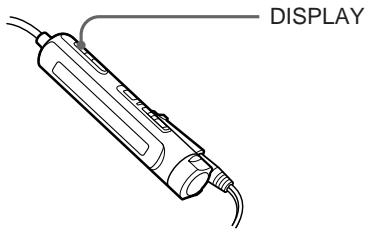
1 DISPLAY
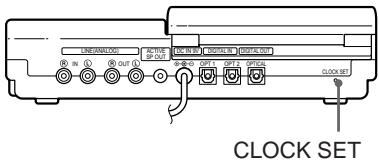
1 CLOCK SET
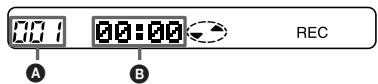
A B
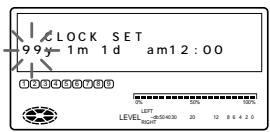
2 ↑ ↓ →
A B 3


TITLE/ENTER
0
CLOCK SET
24
AFFICHAGE
12
2

**
11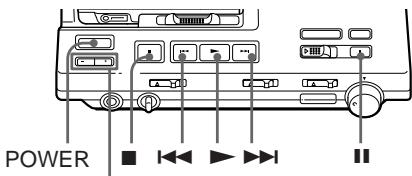
ALIMENTATION
NIVEAU SP ACTIF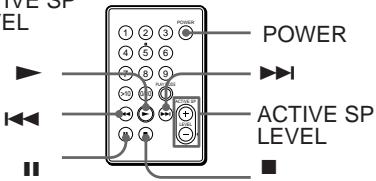
Z1000 (38) MD
SRS-

NIVEAU


OUVERT
**
ALIMENTATION
NIVEAU SP ACTIF /
1

SELECT
ERASE/DELETE
20
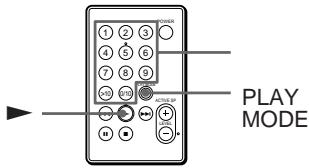
1 MODE PLAY PROGRAM
2
20
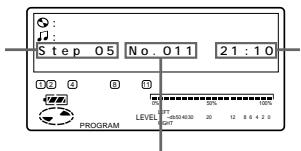
ERASE/DELETE
1 MODE PROGRAM
2 SELECT
3 2
4 ▶

DIGITAL MEGA BASS
1 3
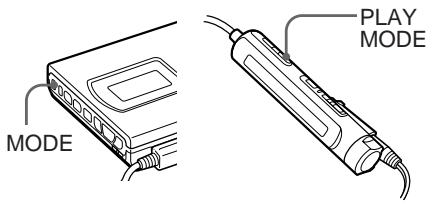
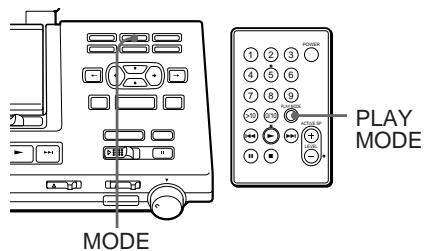
1 MODE PLAY MODE
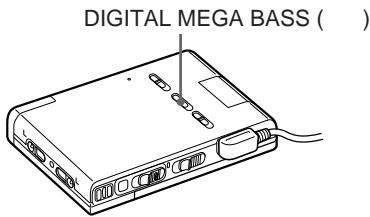
1 DIGITAL MEGA BASS
1 2
1 2 2
| REPEAT | |
| 1 | REPEAT1 |
| SHUF | REPEATSHUFFLE |
MODE (
PLAY MODE)
REPEAT
U
-AVLS
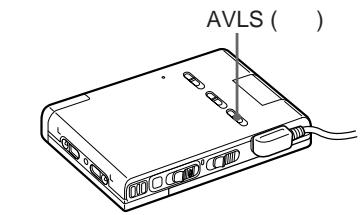
1 AVLS LIMIT AVLS
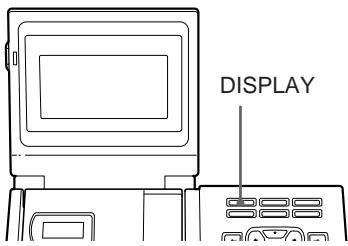
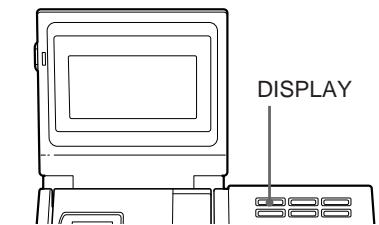
1 DISPLAY
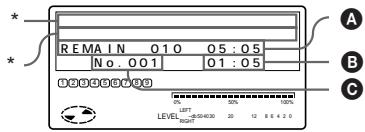
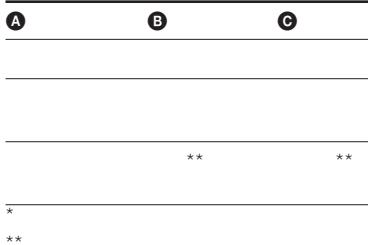
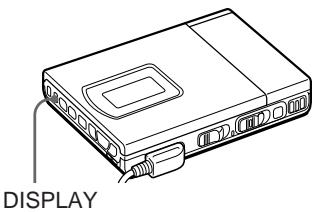
1 DISPLAY
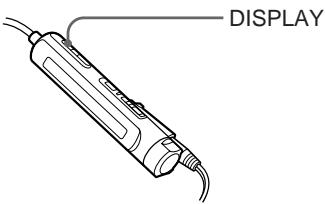
1 DISPLAY
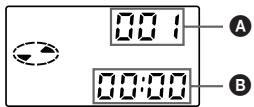
A B
A B
**
2
ENTRER
TITRE/
1
- ÉDITION DE LA TABLE DES MATIÈRES
30
EFFACER
1
1
EFFACER/
SUPPRIMER
1
Effacer OK ? Appuyez sur Entrée
1
EFFACER/SUPPRIMER ENREGISTREMENT
Entrée
Tout effacer OK ? Appuyez sur
2
TITRE/ENTRÉE
ÉDITION DE LA TABLE DES MATIÈRES
DISQUE VIERGE
2 TITRE/ENTRÉE Marque de piste activée
MARQUE DE PISTE ACTIVÉE
MARQUE T
1
MARQUE DE PISTE
MARQUE T
MARQUE DE PISTE
1
MARQUE T
REPÈRE DE PISTE
REPÈRE DE PISTE
Répétition du repère de piste ACTIVÉ
OK ? Appuyez sur Entrée
4
0.06
8
REPÈRE DE PISTE DÉSACTIVÉ
3
REPÈRE DE PISTE
Répétition du repère de piste
DÉSACTIVÉ OK ? Appuyez sur Entrée
4
2
00:00
4 TITRE/ENTRÉE
Repère de piste OFF

T
REPÈRE
T REPÈRE

2 1
DÉPLACER
:C 2
![graph TD A["A"] --> B["B"] B --> C["C"] C --> D["D"] C --> E["2"] E --> F["1"]](/content/2020/04/46999/images/38ace93691a593397ba309fc805afe3266b06ca7f09e44b1417c15bfa301e685.jpg)
1
DÉPLACER/INSÉRER
Déplacer
N°003 N°003 OK ? Appuyez sur Entrée
2
3
TITRE/ENTRÉE
TITLE
200 1 / 1700 800
1
2 TITLE/ENTER
3
SELECT
CAPS
INPUT
POSITION /
SELECT
MOVE/INSERT
ERASE/
DELETE
4
3
5
TITLE/ENTER
SELECT
•
A Z
•
0 9
•
1 2
TITLE/ENTER

UNDO
- REC MD • 5 • AC
1 UNDO
| 1 | Erase Undo OK? | |
| 1 | MD | All Erase Undo OK? |
| Track Mark ON Undo OK? | ||
| Track Mark OFF Undo OK? | ||
| Move Undo OK? | ||
| Disc Name Undo OK? | ||
| Track Name Undo OK? |
2 TITLE/ENTER
TOC EDIT
MD


UNDO
HOLD HOLD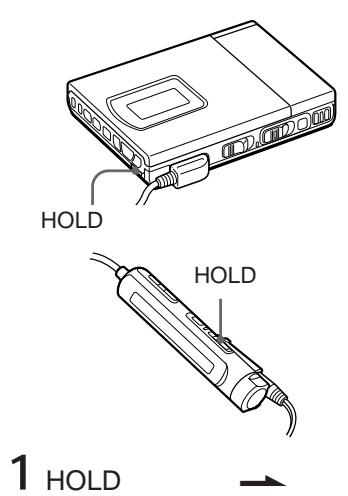

1 AC
2 3 TIMER PLAY REC PLAY
4
| 3 | ||
| MODE | 2 | |
| Stereo MODE | Monaural |
| TOC(TOC) | 52 | |
| ) | AC10 | |
| 1 | 1 |
CD
DAT
BS
INPUT
OPT2
OPT1
DAT
CD
CD
ENTRÉE NUMÉRIQUE OPT1 OPT2
ENTRÉE
ANALOGIQUE
(20)
ENTRÉE LIGNE (ANALOGIQUE)
![graph TD A["LINEARAL LOG"] --> B["OUT"] B --> C["OPTICAL OUT"] C --> D["MOD IN"] C --> E["MOD OUT"] D --> F["OUT1"] D --> G["OUT2"] E --> H["OPTICAL"] F --> I["CLOCK SET"] G --> J["DIGITAL OUT (OPTICAL)"] H --> K["POC-10A"] H --> L["POC-10AB"] K --> M["MD DAT"] L --> N["MD"]](/content/2020/04/46999/images/a3ec27730be34d9e1a71b624aa4d588e003f05dfad7933d4425749a5f50291a2.jpg)
![graph TD A["SRS-Z1000"] --> B["ACTIVE SP OUT"] B --> C["LINE (ANALOG) OUT"] C --> D["R( )"] C --> E["L( )"] C --> F["RK-C310GS"] D --> G["↓"] E --> G F --> G](/content/2020/04/46999/images/7f40064b73cfc51e84ebc898c09e363ec385afd0c57c84d297e2c7eb91090c8c.jpg)
LIP-8
LIP-8
...
3 2
BP-DM20
1
2
LIP-8
3![graph TD A["Input"] --> B["Display"] B --> C{Signal} C --> D["Output"] style A fill:#f9f,stroke:#333 style D fill:#bbf,stroke:#333](/content/2020/04/46999/images/fb8cc0b23d1f91ed063c433b803500efe4e16d75ce67bd3f972e48be995aedf9.jpg)
MARCHE ARRÊT
LIP-8 CHARGE
80%
LIP-8
1 OPEN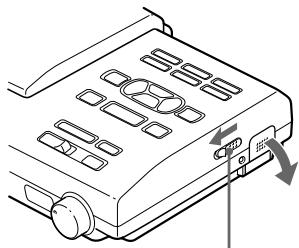
OPEN
| 3.5 | 5.5 | |
| LIP-8 | ||
| 4.5 | 9 | |
| LR6 (SG) 2 | ||
| 4.5 | 6.5 | |
| BP-DM20 | ||
| 8 | 16 | |
| LIP-8 | ||
| LR6 (SG) 2 | ||
| 8 | 13 | |
| LIP-8 | ||
| BP-DM20 | ||
| * | ||
| ** | ||
| Lo | ||
| BATT |
AC
AC
EIAJ
AC
•
)
•
•
•
| ( HOLD ) | HOLD (35) | |||
| (☐) | LoBATT | (39 40 41) | 2 | |
| + (41) | ||||
| OPEN | ||||
| ( ) | ( ) | (19) | ||
| Ω /REMOTE | ||||
| AVLS (27) | NORMAL | |||
| AC | DC IN 9V | |||
| ( ) | (10 11) | |||
| AC | (39) | |||
| (37 38) | ||||
| INPUT | INPUT 37 | |||
| ( ) | (20) | |||
| CD | CD | |||
| ( NO DIGITAL SIGNAL ) | ||||
| CD | CD | |||
| (ESP ) | ||||
| ( ) | ||||
| ( DISPLAY 2 ) | DISPLAY | 2 | ||
| ( ) | ||
| DISC ( BLANK ) | ||
| 12 303 | ||
| ( DISC ERR ) | DISC ERR | |
| MODE ( PLAY MODE) (26) | ||
| 1 | ( ) | |
1
(PROTECTED DISC SAVED)
(P/B ONLY)
(DISC FULL12 FULL)


VOL / (LEVEL)
(22)
--y--m--d
2
(23
)
DAT
| )TRACK FULL | |||||
| (60) | 74 | 254 | |||
| 1 | |||||
| 254 | 1 | ||||
| ( ) | ( ) | 12 | |||
| 12 | |||||
| 2 | |||||
| (60) | 74) | 2 | 2 | ||
| 2 | |||||
| 6 | |||||
| ( ) | ||
| BLANK DISC(BLANK) | ( ) | |
| CONNECTIONERROR ( ) | ||
| DISC ERROR(ERROR) | ( ) | DISC ERROR |
| DISC FULL(FULL) | ( ) | 12 |
| EDIT BUSY(BUSY) | 2 3 | |
| (LoBATT) | (39 41 ) | |
| MEMORYOVER (MEMORY) | ||
| NAME FULL ( ) | 200 | |
| 11700 | ||
| NO DIGITAL SIGNAL ( ) | ||
| NO DISC (NoDISC) | ||
| P/B ONLY (PbONLY) | ( ) | |
| PROTECTED DISC(SAVED) | ||
| PROTECTED TRACK (TrPROT) | ( ) | |
| SCMS NO COPY ( ) | (SCMS) | (LINE) (37 ) |
| SORRY (SORRY) | 1 | |
| TEMPERATURE OVER (TEMP) | ||
| TRACK FULL (TrFULL) | 254 | 254 |
1
8
( )
( )
GaAlAs = 780nm
148 (MDW-74)
74 (MDW-74)
400rpm 900rpm (CLV)
(ACIRC)
44.1kHz
(ATRAC)
EFM
2
1
20 20,000 Hz± 3dB
MIC (PLUG IN POWER)
0.22
0.78mV
Ω/REMOTE
5mW+5mW
16
5 20,000 Hz± 0.5dB
S/N (EIAJ*)
96dB
92dB
LINE (ANALOG) IN
500mV
DIGITAL IN OPT1, OPT2
660nm
LINE (ANALOG) OUT
500mV
10k
ACTIVE SP OUT
500mV
4.7k
DIGITAL OUT
-17dBm
660nm
ΩHEADPHONES
5mW+5mW
16
32kHz/44.1kHz/48kHz
44.1kHz
* EIAJ ( )
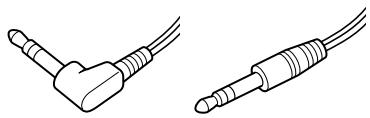
64mm
(MD)
(CD)
ATRAC (Adaptive TRansform Acoustic Coding) CD
(BS :32kHz, DAT:
48kHz )
MD
(44.1kHz)
TOC EDIT
TOC Table Of Contents
MD
CD
2
TOC
TOC EDIT
CD -0:03
0:00
MD
(SCMS)
![graph TD A["CD\nMD"] --> B["MD"] B --> C["MD"] style B stroke:#000,stroke-width:2px note right of B × end](/content/2020/04/46999/images/74c59495cd1fe02602383e288cb00656d05e1f4f04050952974de93b8e696a7f.jpg)
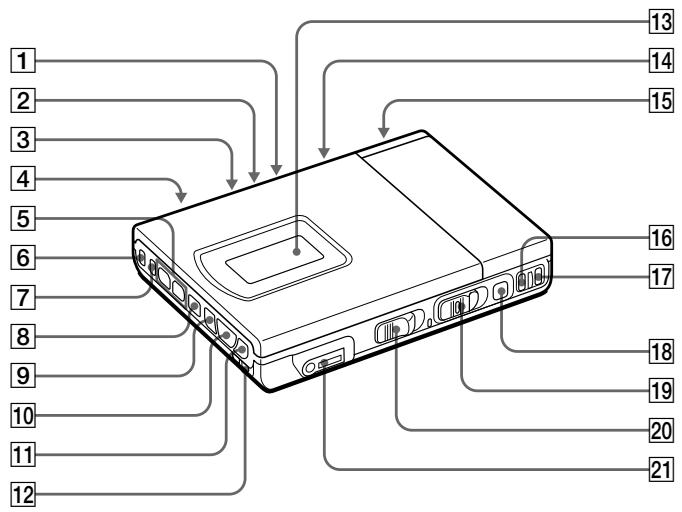
1 MIC SENS 19 2 DIGITAL MEGA BASS 26 3 AVLS 27 4 MIC (PLUG IN POWER) 19 5 VOL 15 6 MODE 18 26 7 DISPLAY 21 28 8 ■ 13 15 9 13 15 10 ▶ 13 15 11 13 15
12 HOLD 35 13 (21 28 55) 14 CLOCK SET 23 15 39 16 END SEARCH 13 17 T MARK 30 31 18 13 15 19 REC 13 19 20 OPEN 14 21 Ⓞ/REMOTE
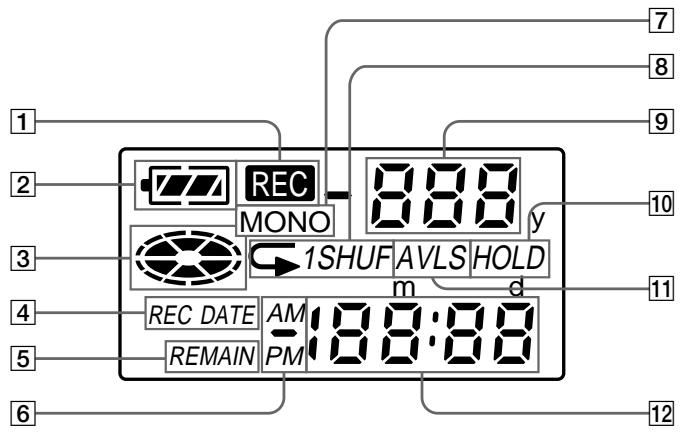
1
7 MONO (18)
2 (40 41)
8 26
3
9
4 REC DATE 21 28
10 HOLD 35
DATE
5 REMAIN 21 28
11 AVLS 27
6 21 28
12
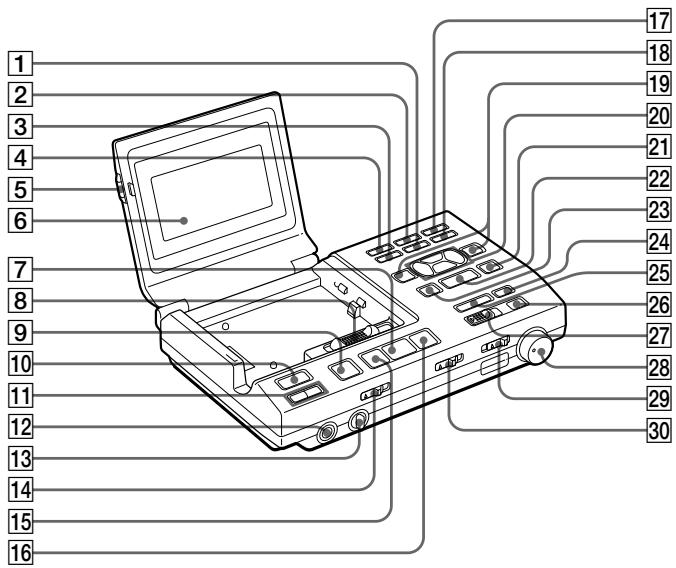
1 ERASE/DELETE 29 32
② MODE 18 26
3 MOVE/INSERT 32
4 DISPLAY 21 27
5 PUSH OPEN (10)
6 (21 27 58)
7 ▶ 13 24
8 OPEN•RELEASE 11 12
9 ■ ( ) 13 24
10 POWER
11 ACTIVE SP LEVEL / 24
12 HEADPHONES
13 LEVEL 24
14 TIMER (35)
15 13 24
16 13 24
17 TRACK MARK 30 31
18 UNDO (34)
19 INPUT POSITION / 32
20 32
21 TITLE/ENTER 32
22 SELECT 32
23 CAPS 32
24 FIN DE RECHERCHE 13
25 MACHINE À TEMPS ENREGISTREMENT (17)
26 13 24
27 ENREGISTREMENT 13
28 NIVEAU D'ENREGISTREMENT (ANALOGIQUE) 19
29 ENTRÉE 12 37
30 ENREGISTREMENT SYNCHRONE (16)
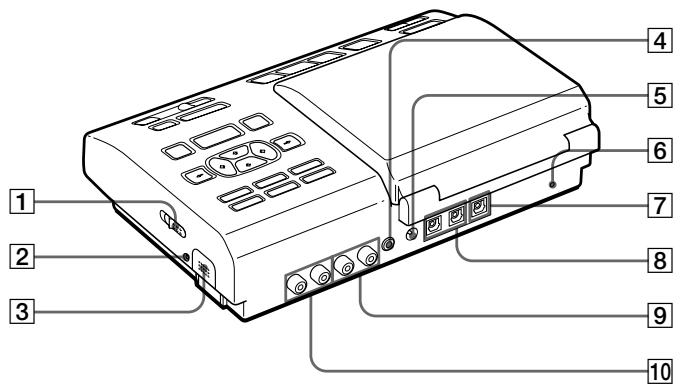
1 OUVERTURE (40) 2 CHARGE 40 3 40 4 SORTIE ACTIVE SP (38)
5 ENTRÉE DC 9V 39 6 RÉGLAGE DE L'HORLOGE 22 7 SORTIE NUMÉRIQUE (OPTIQUE) 38 8 ENTRÉE NUMÉRIQUE (OPT1 OPT2) 37 9 SORTIE LIGNE (ANALOGIQUE) 38 10 ENTRÉE LIGNE (ANALOGIQUE) 37
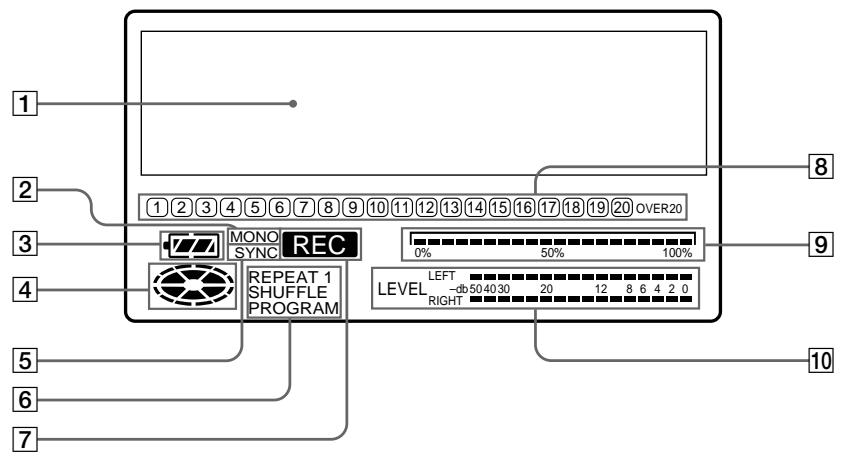
1 21 27 7
8
2 MONO (18)
9
3 40 41
4 0% 50% 100% 5 SYNC (16) 25 26 6
10
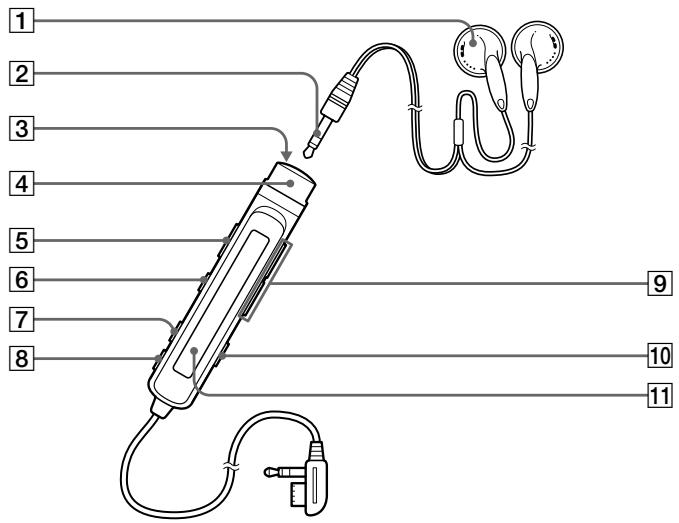
1 2 3 4
■() (15)
5
HOLD 35
6 15 7 PLAY MODE (26) 8 DISPLAY (22 28) 9 VOL 10 TRACK MARK (30) 11 (22 28 60)
1
22 28
4
2
5
40 41
3
6
26
1 (24) 2 ▶ ( ) (24) 3 ◀◀ ( ) (24) 4 ▶▶▶ ( ) (24) 5 Ⅱ ( ) (24) 6 ■ ( ) (24)
7
8 POWER (24) 9 PLAY MODE (26) 10 ACTIVE SP LEVEL / (24) 11 (61)
CR2025 ( )
5m
1
2
⊕
CR2025
⊕ ⊖
Mode d'emploi
Bienvenue !
Bienvenue dans le monde du MiniDisc ! Voici quelques-unes des capacités et fonctionnalités que vous découvrirez avec le nouvel enregistreur MiniDisc.
- Le système de station MiniDisc — Utilisez l'enregistreur seul ou fixé à la station d'accueil. Pour enregistrer numériquement ou modifier des étiquettes, utilisez l'enregistreur fixé à la station pour des fonctionnalités et une connectivité améliorées. Pour lire des MD ou enregistrer à partir du microphone, utilisez l'enregistreur détaché de la station pour plus de portabilité.
- Prise optique numérique IN/OUT — Comme le signal est transmis sous forme numérique, vous pouvez obtenir des enregistrements de haute qualité.
- Convertisseur de fréquence d'échantillonnage — Ce circuit vous permet d'enregistrer des programmes provenant d'équipements numériques utilisant d'autres fréquences d'échantillonnage, comme un tuner BS ou une platine DAT.
- Variété d'options d'enregistrement — Enregistrement long en monaural (jusqu'à 148 minutes). — L'enregistrement Time Machine vous permet d'enregistrer depuis le début d'une chanson même si vous avez appuyé sur le bouton après avoir entendu le début de la chanson. — Connectez un minuteur audio pour enregistrer en votre absence.
- Édition facile avec le grand panneau LCD et les boutons d'édition — Prend en charge les caractères "katakana". — Exemples de titres (42 mots et expressions). — La fonction UNDO permet d'annuler une opération d'édition.
- Lecture programmée — Lisez n'importe quel ensemble de plages dans l'ordre de votre choix.
- Télécommande à carte — Utilisez la station à distance. Sélection directe de plage disponible.
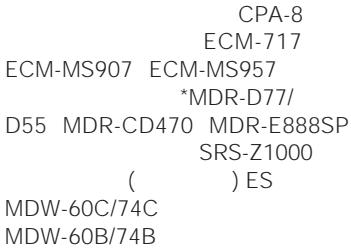
- Prise de sortie pour enceintes actives — Connectez les enceintes actives SRS-Z1000 (non fournies), etc. pour profiter d'une lecture MD puissante sur votre bureau.
Examen des commandes
Les numéros correspondent aux illustrations du texte japonais (pages 54 à 61).
L'enregistreur
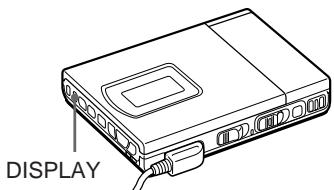
1 Interrupteur MIC SENS (sensibilité du micro) 2 Interrupteur DIGITAL MEGA BASS Sélectionnez pour accentuer les basses. 3 Interrupteur AVLS (système limiteur de volume automatique) Faites glisser sur LIMIT pour limiter le volume maximal. 4 Prise MIC (PLUG IN POWER) 5 Boutons VOL (volume) -/+ 6 Bouton MODE Chaque pression sur ce bouton pendant la lecture d'un MD change le mode de lecture : lecture normale, répétition de tous, répétition d'une plage, ou répétition aléatoire. Appuyez ici pendant l'enregistrement pour sélectionner l'enregistrement monaural. 7 Bouton DISPLAY Appuyez pour afficher le mode de lecture actuel, le temps restant de la plage en cours, le temps restant du disque, ou la date et l'heure d'enregistrement. 8 Bouton ■ (arrêt) 9 Bouton ◀◀◀ (retour rapide/AMS) 10 Bouton ▶ (lecture) 11 Bouton ▶▶▶ (avance rapide/AMS) 12 Interrupteur HOLD Faites glisser pour verrouiller les commandes de l'enregistreur. 13 Fenêtre d'affichage 14 Bouton CLOCK SET (en bas) 15 Compartiment à piles 16 Bouton END SEARCH 17 Bouton T MARK 18 Bouton II (pause) 19 Interrupteur REC 20 Interrupteur OPEN 21 Prise Ⓞ/REMOTE (casque/télécommande)
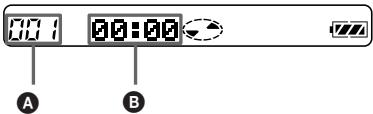
La fenêtre d'affichage de l'enregistreur
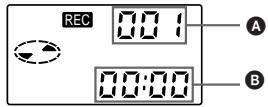
1 Indicateur REC
S'allume pendant l'enregistrement. En clignotant, l'enregistreur est en mode veille d'enregistrement.
2 Indicateur de batterie
Indique l'état de la batterie. S'allume lorsqu'une batterie rechargeable est insérée. Pendant la charge de la batterie rechargeable, cette indication montre l'état de charge.
3 Indication de disque
Indique que le disque tourne pour l'enregistrement, la lecture ou l'édition d'un MD.
4 Indication REC DATE (date enregistrée/actuelle)
S'allume avec la date et l'heure d'enregistrement du MD. Lorsque seul "DATE" est allumé, la date et l'heure actuelles sont affichées.
5 Indication REMAIN (temps/pistes restants)
S'allume avec le nombre de pistes restantes, le temps restant de la piste ou le temps restant du MD.
6 Indication AM/PM
S'allume avec l'indication de l'heure au format 12 heures.
7 Indication MONO (monophonique)
8 Indication du mode de lecture
Affiche le mode de lecture du MD.
(répétition de tout) : toutes les pistes sont lues en boucle. 1 (répétition d'une seule) : une piste est lue en boucle. SHUF (répétition aléatoire) : les pistes sont répétées dans un ordre aléatoire.
9 Indication du numéro de piste
Affiche le numéro de la piste en cours de lecture.
10 Indication HOLD
S'allume lorsque l'interrupteur HOLD est activé.
11 Indication AVLS
S'allume lorsque l'interrupteur AVLS est activé.
12 Affichage de l'heure
Affiche le temps enregistré, l'heure actuelle, le temps écoulé de la piste en cours de lecture et le temps restant de la piste ou du disque.
Panneau avant de la station
1 Bouton ERASE/DELETE
2 Bouton MODE
3 Bouton MOVE/INSERT
4 Bouton DISPLAY
5 Bouton PUSH OPEN
6 Fenêtre d'affichage
7 Bouton ▶ (lecture)
8 Interrupteur OPEN•RELEASE
9 ■ (bouton stop)
10 Interrupteur POWER
11 Boutons ACTIVE SP LEVEL -/+
12 Prise Ⓞ HEADPHONES pour fiche stéréo
13 Molette LEVEL
Règle le volume du casque connecté à la prise ⓄHEADPHONES de la station, pas celui de l'enregistreur.
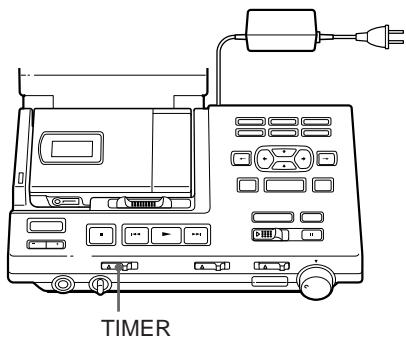
14 Interrupteur TIMER
15 Bouton ◀◀ (retour rapide/AMS)
16 Bouton ▶▶▶ (avance rapide/AMS)
17 Bouton TRACK MARK
18 Bouton UNDO
19 Boutons INPUT POSITION / (position)
20 Boutons curseur
21 Bouton TITLE/ENTER
22 Bouton SELECT
23 Bouton CAPS
24 Bouton FIN DE RECHERCHE
25 Bouton ENREGISTREMENT TIME MACHINE
26 Bouton II (pause)
27 Interrupteur REC
28 Commande NIVEAU D'ENREGISTREMENT (ANALOGIQUE)
29 Interrupteur d'entrée
30 Interrupteur d'enregistrement synchrone
Panneau arrière de la station
1 Interrupteur OPEN (ouverture du couvercle)
2 Voyant CHARGE
S'allume pendant la charge de la batterie rechargeable sur la station.
3 Compartiment de la batterie rechargeable
4 Prise ACTIVE SP OUT
5 Prise DC IN 9V
6 Bouton CLOCK SET
7 Prise DIGITAL OUT (OPTICAL)
8 Prise DIGITAL IN (OPT1, OPT2)
9 Prise LINE (ANALOG) OUT
10 Prise LINE (ANALOG) IN
La fenêtre d'affichage de la station
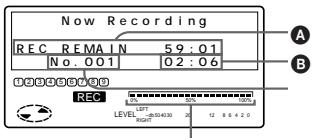
1 Affichage des informations de caractères Affiche les noms des disques et des pistes, les dates, les messages d'erreur, les numéros de pistes, etc. Les noms des disques et des pistes n'apparaissent que sur les MD qui ont été étiquetés électroniquement.
2 Indication MONO (monophonique)
3 Indication de la batterie Indique l'état de la batterie. S'allume lorsqu'une batterie rechargeable est insérée. Pendant la charge de la batterie rechargeable, cette indication montre l'état de charge.
4 Indication du disque Indique que le disque tourne pour l'enregistrement, la lecture ou l'édition d'un MD.
5 Indication SYNC (enregistrement synchronisé) S'allume pendant l'enregistrement synchronisé.
6 Indication du mode de lecture Affiche le mode de lecture du MD. REPEAT (répétition de tous) : Toutes les pistes sont lues en boucle.
REPEAT 1 (répétition d'une seule) : Une piste est lue en boucle.
REPEAT SHUFFLE (répétition aléatoire) : Les pistes sont répétées dans un ordre aléatoire.
PROGRAM (lecture programmée) : S'allume lors de la programmation ou de l'exécution d'une lecture programmée.
7 REC (record) indication S'allume pendant l'enregistrement. En clignotant, l'enregistreur est en mode veille d'enregistrement.
8 Calendrier musical Affiche le nombre de plages enregistrées sur le MD, et les plages restantes pendant la lecture aléatoire.
9 Pointeur de position Indique la position actuelle sur le MD. Le point sous l'enregistrement ou la lecture clignote. La position enregistrée s'allume.
10 Vumètre de crête Indique le volume du MD en lecture ou en enregistrement.
Le casque avec télécommande
1 Casque Peut être remplacé par un casque en option. 2 Prise mini-stéréo 3 Bouton ■ (arrêt) 4 Commande Pour la lecture, tournez vers ▶▶▶▶ en mode arrêt. Tournez vers ▶▶▶▶ pendant la lecture pour rechercher le début de la plage suivante ; maintenez cette position pour avance rapide. Tournez vers ◀◀ pendant la lecture pour rechercher le début de la plage précédente ; maintenez cette position pour retour rapide. 5 Interrupteur HOLD Faites glisser pour verrouiller les commandes de la télécommande. 6 Bouton Ⅱ (pause) 7 Bouton PLAY MODE 8 Bouton DISPLAY 9 Boutons VOL (volume) -/+ 10 Bouton TRACK MARK 11 Fenêtre d'affichage
La fenêtre d'affichage de la télécommande
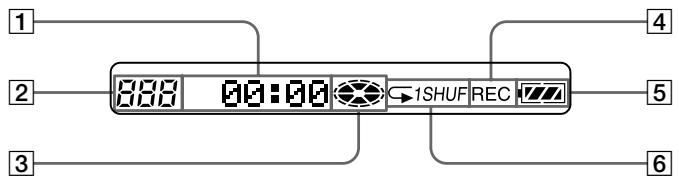
1 Affichage des informations de caractères Affiche les noms du disque et des plages, la date, le temps écoulé, etc. 2 Indication du numéro de plage Affiche le numéro de la plage en cours d'enregistrement ou de lecture. 3 Indication du disque Indique que le disque tourne pour l'enregistrement, la lecture ou l'édition d'un MD. 4 Indication REC (enregistrement) S'allume pendant l'enregistrement. En clignotant, l'enregistreur est en mode veille d'enregistrement. 5 Indication de batterie Indique l'état de la batterie. Pendant la charge de la batterie rechargeable, cette indication montre l'état de charge. 6 Indication du mode de lecture Affiche le mode de lecture du MD.
Télécommande à carte
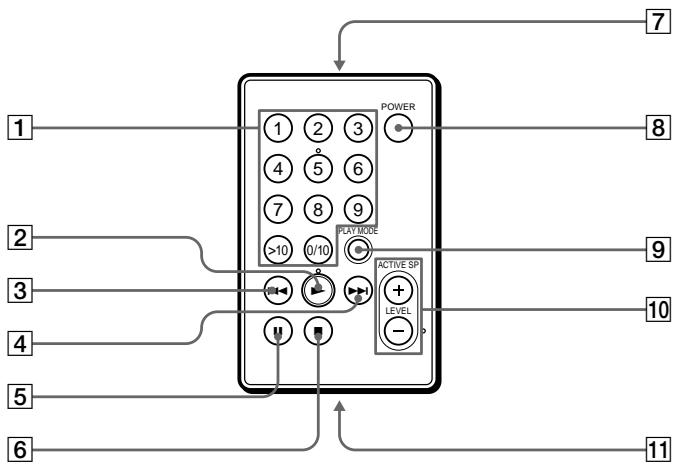
1 Touches numériques 2 Bouton ▶ (lecture) 3 Bouton ◀◀◀ (retour/AMS) 4 Bouton ▶▶▶ (avance rapide/AMS) 5 Bouton II (pause) 6 Bouton ■ (arrêt) 7 Émetteur
Dirigez-le vers le récepteur sur la station.
8 Interrupteur POWER 9 Bouton PLAY MODE 10 Boutons ACTIVE SP (haut-parleur actif) LEVEL +/- 11 Compartiment à piles
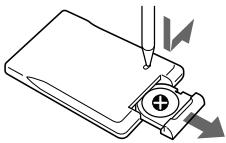
Remplacement de la pile au lithium-ion Lorsque la pile devient faible, la distance de fonctionnement de la télécommande diminue. Remplacez la pile par une pile au lithium-ion CR2025 neuve (non fournie).
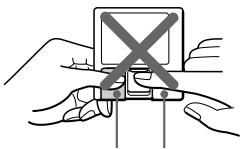
① Insérez un objet pointu dans la fente. Faites glisser et maintenez comme indiqué sur l'illustration, puis retirez le tiroir à pile. ② Insérez une pile au lithium-ion CR2025 (non fournie) avec le côté (+) vers le haut.
Insérez avec la bonne polarité, sinon la télécommande ne fonctionnera pas.
Enregistrement MD
Configuration du système de la station
Voir les illustrations dans le texte japonais (pages 10 et 11).
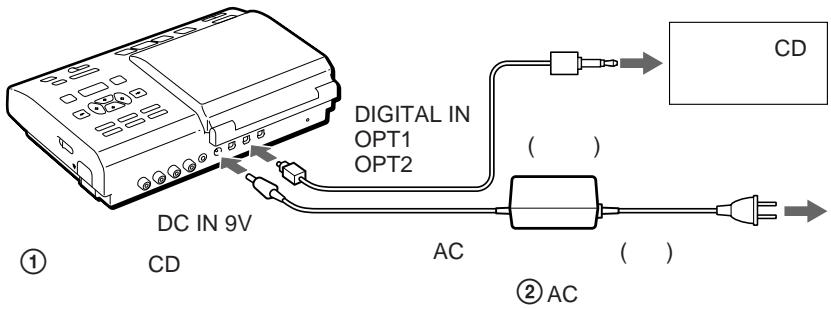
Connectez d'autres équipements à la station, puis branchez le cordon d'alimentation secteur. L'explication ici concerne l'enregistrement à partir d'un lecteur CD portable via l'entrée numérique. Pour d'autres méthodes d'enregistrement, voir "Raccordement" (page 75).
1 Connectez.
① Connectez le lecteur CD portable à la station MD. ② Connectez l'adaptateur secteur à la station MD.
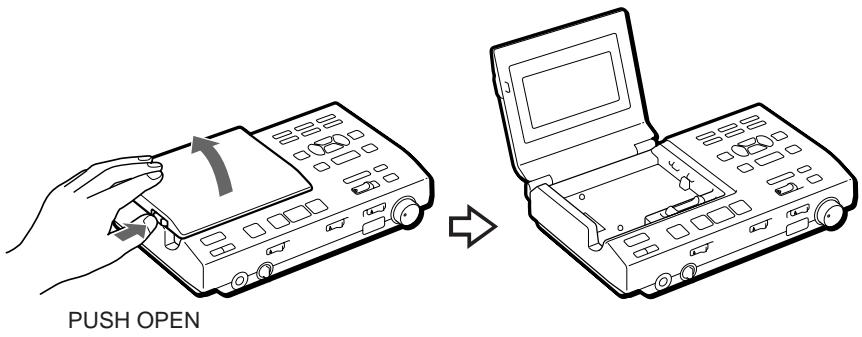
2 Ouvrez le couvercle.
① Appuyez sur PUSH OPEN et ouvrez le couvercle.
3 Fixez l'enregistreur à la station.
① Placez d'abord le côté droit de l'enregistreur. ② Poussez le côté gauche vers le bas jusqu'à ce qu'il s'enclenche.
L'affichage s'allume sur la station si l'enregistreur est correctement fixé.
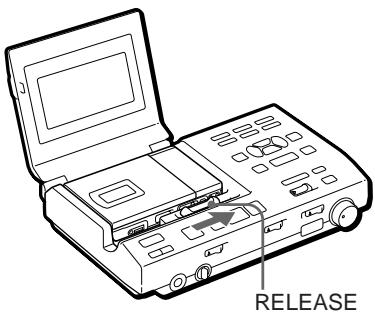
Pour détacher l'enregistreur de la station
Faites glisser RELEASE complètement vers la droite en mode arrêt.
Remarque
- Réglez l'horloge pour enregistrer la date et l'heure (voir page 69).
- Lisez le lecteur de CD portable sur secteur.
- Assurez-vous que la fonction anti-saut (telle que ESP) est désactivée sur le lecteur de CD portable.
Enregistrez immédiatement un MD !
Voir les illustrations dans le texte japonais (pages 12 et 13).
L'explication ici concerne l'enregistrement par entrée numérique. Si vous souhaitez enregistrer par entrée analogique, voir « Enregistrement par entrée analogique », (page 69).
Si vous souhaitez enregistrer des programmes à partir de la prise MIC (PLUG IN POWER) de l'enregistreur, voir « Enregistrement à partir d'un microphone » (page 68).
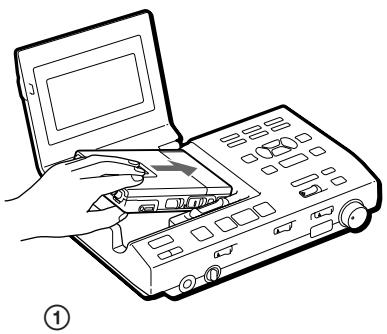
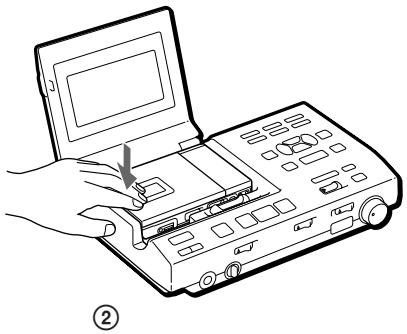
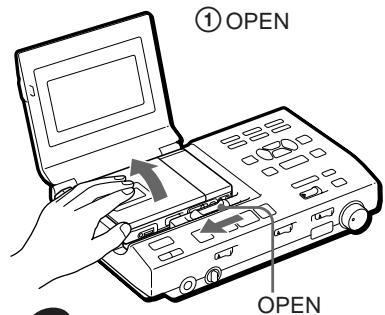
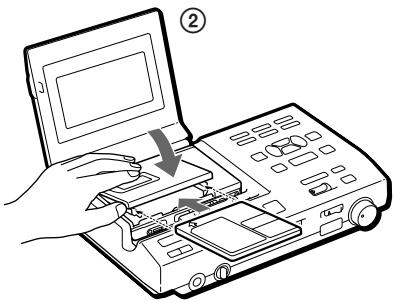
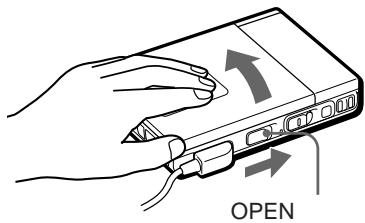
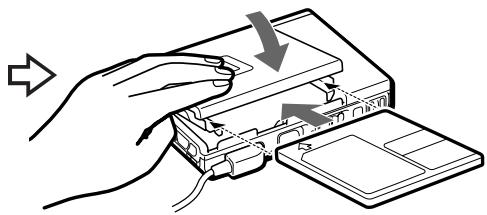
1 Insérez un MD enregistrable.
① Faites glisser l'interrupteur OPEN et ouvrez le couvercle. ② Insérez un MD enregistrable avec le côté étiquette vers le haut et appuyez sur le couvercle pour le fermer.
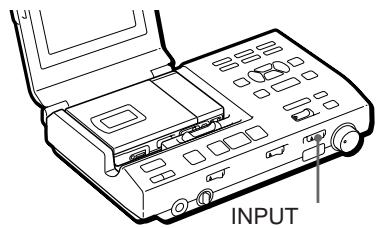
2 Sélectionnez la source d'entrée.
Réglez l'interrupteur INPUT sur l'entrée connectée ; OPT1 ou OPT2.
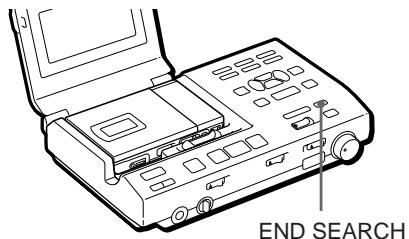
3 Sélectionnez le point de départ de l'enregistrement.
Si vous souhaitez enregistrer à partir de la fin de l'enregistrement précédent, appuyez sur END SEARCH. (Si vous souhaitez commencer l'enregistrement depuis le début, ignorez cette étape).
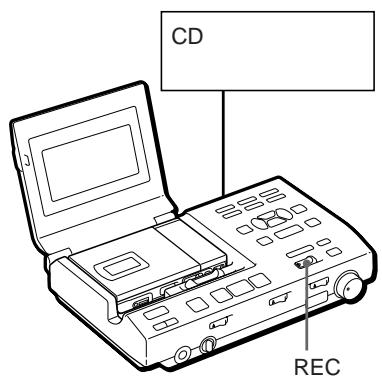
4 Commencez l'enregistrement.
① Appuyez et faites glisser l'interrupteur REC vers la droite. « REC » s'allume et l'enregistrement commence. ② Lisez la source sonore.
Pour arrêter l'enregistrement, appuyez sur ■.
Ne déplacez pas ou ne secouez pas l'enregistreur et ne débranchez pas la source d'alimentation pendant que l'indication « TOC EDIT » clignote à l'écran.
| To | Press |
| Pause | II1) Press II again to resume recording. |
| Record partway through the previous recording 2) | ▶, ▶▶ or ◀◀ to find the start point of recording and press ■ to stop. Then slide the REC switch. |
| Remove the MD | ■, then slide the OPEN switch and open the lid. 3) |
| Turn power off | POWER |
1) Une marque de piste est ajoutée à l'endroit où vous appuyez sur ■ ; ainsi, le reste de la piste sera compté comme une nouvelle piste. 2) Si vous commencez un nouvel enregistrement au milieu d'un enregistrement précédent, l'enregistrement précédent sera écrasé (effacé) par le nouveau.
3) Une fois que vous ouvrez le couvercle, le point de départ de l'enregistrement changera pour le début de la première piste. Vérifiez le point de départ de l'enregistrement sur l'écran.
Si l'enregistrement ne démarre pas
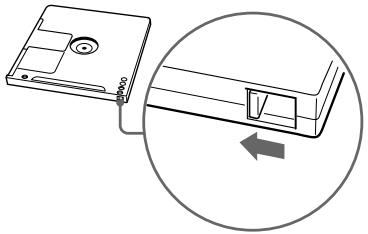
- Assurez-vous que le MD n'est pas protégé en écriture. Si la languette sur le côté du MD est ouverte, faites-la glisser en arrière pour que la languette soit visible.
- Vous ne pouvez pas enregistrer sur un MD prémasterisé.
▶Lecture du MD
Lecture du MD immédiatement !
Voir les illustrations dans le texte japonais (pages 14 et 15).
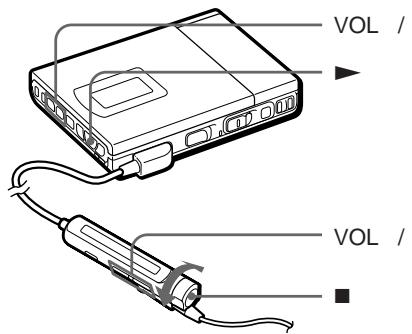
L'explication ici concerne la lecture des MD sur l'enregistreur lorsqu'il est détaché de la station.
Avant la lecture, assurez-vous que la batterie rechargeable est complètement chargée. Pour charger la batterie ou pour faire fonctionner l'enregistreur avec d'autres sources d'alimentation, voir « Sources d'alimentation », (page 77).
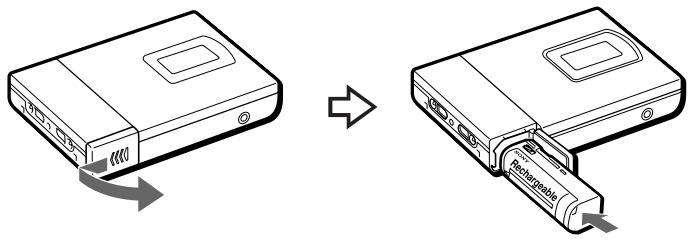
1 Insérez la batterie rechargeable. 2 Insérez un MD.
① Faites glisser l'interrupteur OPEN et ouvrez le couvercle.
② Insérez un MD avec le côté étiquette vers le haut, et appuyez sur le couvercle pour le fermer.
3 Commencez la lecture.
① Appuyez sur ▶ (tournez la commande sur ▶•▶▶ sur la télécommande). Un bip court retentit dans le casque.
② Appuyez sur les boutons VOL (volume) -/+ pour régler le volume. Le volume s'affiche à l'écran.
Pour arrêter la lecture, appuyez sur ■.
Un bip long retentit dans le casque.
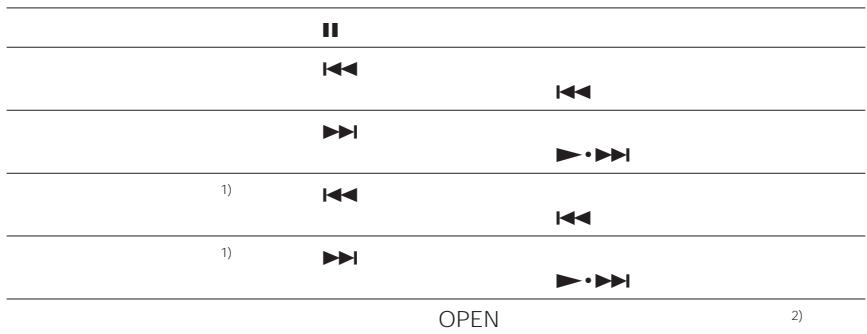
| To | Press (Beeps in the headphones) |
| Pause | ■ (Continuous short beeps)Press ■ again to resume play. |
| Find the beginning of the current track | ◀◀ once (Turn the control to ◀◀◀ on the remote control)(Three short beeps) |
| Find the beginning of the next track | ▶◀▶ once (Turn the control to ▶▶●▶▶▶▶▶▶▶▶▶▶▶▶▶▶▶▶▶▶▶▶▶▶▶▶▶▶▶▶▶▶▶▶▶▶▶▶▶▶▶▶▶▶▶▶▶▶▶▶▶▶▶▶▶▶▶▶▶▶▶▶▶▶▶▶▶▶▶▶▶▶▶▶▶▶▶▶▶▶▶▶▶▶▶▶▶▶▶▶▶▶▶▶▶▶▶▶▶▶▶▶▲▶▶▶▶▶▶▶▶▶▶▶▶▶▶▶▶▶▶▶▶▶▶▶▶▶▶▶▶▶▶▶▶▶▶▶▶▶▶▶▶▶▶▶▶▶▶▶▶▶▶▶▶▶▶▶▶▶▶▶▶▶▶▶▶▶▶▶▶▶▶▶▶▶▶▶▶▶▶▶▶▶▶▶▶▶▶▶▶▶▶▶▶▶▶▶▶▶▶▶> |
| Go backwards while playing1) | keep pressing ◀◀◀(Turn and hold the control to ◀◀◀ on the remote control) |
| Go forward while playing1) | keep pressing ▶▶▶▶(Turn and hold the control to ▶▶●▶▶▶▶▶▶▶▶▶▶▶▶▶▶▶▶▶▶▶▶▶▶▶▶▶▶▶▶▶▶▶▶▶▶▶▶▶▶▶▶▶▶▶▶▶▶▶▶▶▶▶▶▶▶▶▶▶▶▶▶▶▶▶▶▶▶▶▶▶▶▶▶▶▶▶▶▶▶▶▶▶▶▶▶▶▶▶▶▶▶▶▶> |
| Remove the MD | ■, then slide the OPEN switch and open the lid.2) |
1) Pour reculer ou avancer rapidement sans écouter, maintenez enfoncé ou ▶▶.
2) Une fois le couvercle ouvert, le point de départ de la lecture revient au début de la première plage.
Si la lecture ne démarre pas
Assurez-vous que l'enregistreur n'est pas verrouillé. S'il est verrouillé, faites glisser l'interrupteur HOLD dans le sens opposé à la flèche.
Pour lire avec l'enregistreur fixé sur la station
Voir « Lecture d'un MD sur la station » (page 70).
Lors de l'utilisation d'un casque en option
Utilisez uniquement un casque avec une mini prise stéréo. Vous ne pouvez pas utiliser un casque avec une micro prise.
▶ Différentes méthodes d'enregistrement
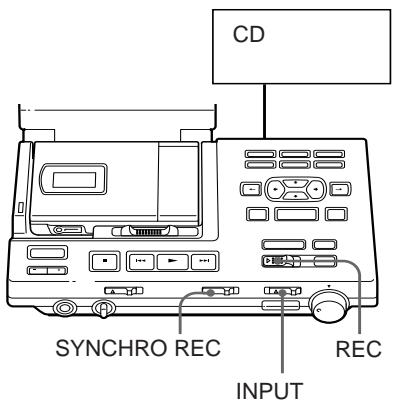
Pour démarrer/arrêter l'enregistrement en synchronisation avec la source (enregistrement synchronisé)
Voir les illustrations dans le texte japonais (page 16).
Vous pouvez facilement réaliser des enregistrements numériques d'une source numérique sur un MD.
Avant l'enregistrement synchronisé, effectuez les connexions à la source numérique avec un câble numérique et insérez un MD enregistrable.
1 Réglez le commutateur INPUT sur "OPT1" ou "OPT2". Réglez-le en fonction de la prise d'entrée connectée à la source. 2 Faites glisser SYNCHRO REC sur ON. "SYNC" apparaît à l'écran. 3 Appuyez sur REC et faites-le glisser vers la droite. L'enregistreur se met en attente d'enregistrement. 4 Lancez la lecture de la source. L'enregistreur commence l'enregistrement lorsqu'il reçoit le son de lecture.
Pour arrêter l'enregistrement, appuyez sur ■.
Conseils
- Vous ne pouvez pas mettre en pause manuellement pendant l'enregistrement synchronisé.
- Lorsqu'il n'y a pas de son provenant du lecteur pendant plus de 3 secondes pendant l'enregistrement synchronisé, l'enregistreur passe automatiquement en mode veille. Lorsque le son provient à nouveau du lecteur, l'enregistreur reprend l'enregistrement synchronisé. Si l'enregistreur reste en mode veille pendant 5 minutes ou plus, il s'arrête automatiquement.
Remarque
- Ne changez pas SYNCHRO REC après l'étape 2. L'enregistrement pourrait ne pas se faire correctement.
Commencer l'enregistrement en revenant 2 secondes en arrière (enregistrement Time Machine)
Voir les illustrations dans le texte japonais (page 17).
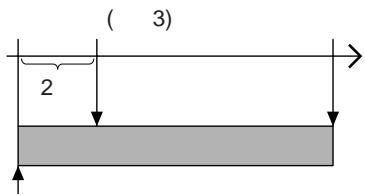
L'enregistreur stocke l'entrée sonore dans sa mémoire pendant l'attente d'enregistrement. Lorsque vous démarrez l'enregistrement Time Machine, le son est rappelé depuis la mémoire et l'enregistreur commence l'enregistrement du son à partir de 2 secondes avant.
C'est pratique, par exemple, si vous ne voulez pas manquer le début d'un morceau lors de l'enregistrement d'un programme BS ou FM.
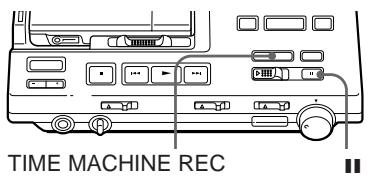
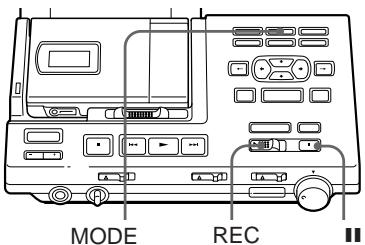
1 Tout en maintenant Ⅲ enfoncé, appuyez sur REC et faites-le glisser vers la droite. L'enregistreur se met en attente d'enregistrement. 2 Lancez la lecture de la source sonore. L'enregistreur commencera à stocker l'entrée sonore. 3 Si vous souhaitez enregistrer via une entrée analogique, réglez le niveau d'enregistrement (suivez l'étape 6 dans "Enregistrement via une entrée analogique", page 69). 4 Appuyez sur TIME MACHINE REC pour démarrer l'enregistrement. L'enregistreur reviendra 2 secondes en arrière et commencera l'enregistrement.
Pour arrêter l'enregistrement, appuyez sur ■.
Note
Si vous avez mis moins de 2 secondes entre les étapes 2 et 3, le temps de retour en arrière de l'enregistreur sera également inférieur à 2 secondes.
Enregistrement en monaural pour doubler la durée d'enregistrement normale
Voir les illustrations dans le texte japonais (page 18).
Avant l'enregistrement, effectuez les connexions à la source sonore et à l'alimentation, et insérez un MD enregistrable. Vous pouvez opérer de la même manière sur la station que sur l'enregistreur.
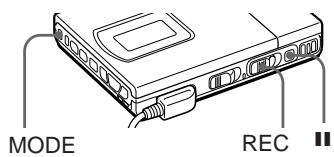
1 Tout en maintenant Ⅲ enfoncé, appuyez et faites glisser l'interrupteur REC vers la droite. L'enregistreur se met en attente d'enregistrement. 2 Appuyez sur le bouton MODE. "MONO" ou "Monaural REC" apparaît à l'écran, et l'enregistreur passe en enregistrement monaural. 3 Si vous souhaitez enregistrer via l'entrée analogique de la station, réglez le niveau d'enregistrement (lisez la source et suivez l'étape 6 de "Enregistrement via l'entrée analogique", page 69). 4 Appuyez à nouveau sur Ⅱ pour démarrer l'enregistrement. 5 Lancez la lecture de la source sonore.
Conseils
- L'enregistreur revient en enregistrement stéréo lorsque vous appuyez sur ■ pour arrêter l'enregistrement.
- Si vous enregistrez une source stéréo en monaural, les sons gauche et droit seront mélangés. • Les MD enregistrés en monaural ne peuvent être lus qu'avec un lecteur/enregistreur MD doté de la fonction de lecture monaurale.
Enregistrement à partir d'un microphone
Voir l'illustration dans le texte japonais (page 19).
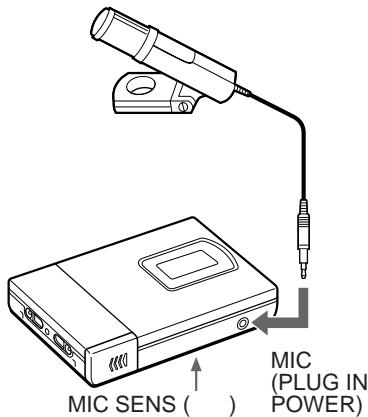
Connectez un microphone à la prise MIC (PLUG IN POWER). Utilisez un microphone stéréo ECM-717, ECM-MS907 ou ECM-MS957, etc. (non fourni). Le niveau d'enregistrement est réglé automatiquement, mais vous pouvez également le régler manuellement.
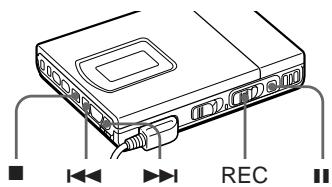
1 Sélectionnez le niveau d'entrée avec l'interrupteur MIC SENS (sensibilité du micro). En général, réglez-le sur HIGH. Lorsque vous enregistrez un son fort comme un concert en direct, réglez-le sur LOW. 2 Insérez un MD enregistrable. Faites glisser l'interrupteur OPEN pour ouvrir le couvercle, insérez un MD enregistrable, puis fermez le couvercle. 3 Appuyez et faites glisser l'interrupteur REC vers la droite. "REC" s'allume et l'enregistrement démarre.
Remarque
Vous ne pouvez pas enregistrer à partir d'un microphone lorsque l'enregistreur est fixé à la station.
Pour régler manuellement le niveau d'enregistrement
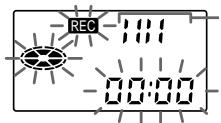
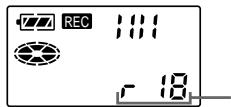
1 Tout en maintenant Ⅲ enfoncé, appuyez sur REC et maintenez-le enfoncé vers la droite pendant plus de 2 secondes. L'enregistreur se met en veille d'enregistrement. 2 Lancez la source. 3 Observez le vumètre à l'écran et réglez le niveau d'enregistrement en appuyant sur ▶▶▶ (+) ou ◀◀◀ (-). Réglez le niveau de sorte que le vumètre affiche 4 segments au niveau d'entrée moyen. 4 Appuyez à nouveau sur Ⅱ pour démarrer l'enregistrement.
Astuce
L'enregistreur revient en mode de contrôle automatique lorsque vous appuyez sur ■ pour arrêter l'enregistrement.
Remarque
Réglez le niveau d'enregistrement pendant que l'enregistreur est en mode veille. Vous ne pouvez pas le régler pendant l'enregistrement.
Enregistrement via l'entrée analogique (enregistrement analogique)
Voir les illustrations dans le texte japonais (page 20).
Lors de l'enregistrement à partir d'une radio ou d'un disque, connectez en analogique (page 75) et enregistrez comme suit. Assurez-vous de régler manuellement le niveau d'enregistrement.
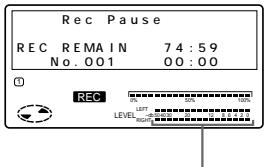
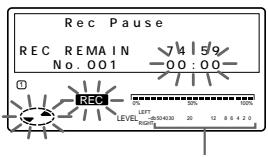
1 Insérez un MD enregistrable. 2 Réglez INPUT sur ANALOG. 3 Sélectionnez le point de départ de l'enregistrement. Si vous souhaitez enregistrer à partir de la fin de l'enregistrement précédent, appuyez sur END SEARCH. 4 Tout en maintenant Ⅲ enfoncé, appuyez sur REC et faites-le glisser vers la droite. 5 Lancez la source. 6 Observez le vumètre à l'écran et réglez le niveau d'enregistrement avec REC LEVEL. Réglez le niveau autour de 12 (-12 dB) au niveau d'entrée moyen. 7 Appuyez à nouveau sur Ⅱ pour démarrer l'enregistrement.
Remarque
Notez que REC LEVEL est effectif même pendant l'enregistrement ; le régler modifiera le niveau d'enregistrement.
Réglage de l'horloge pour horodater l'enregistrement
Voir les illustrations dans le texte japonais (page 22).
Pour horodater la date et l'heure sur le MD lors de l'enregistrement, vous devez régler l'horloge. Vous pouvez régler l'horloge soit à partir de l'enregistreur détaché, soit à partir de la station lorsque l'enregistreur est fixé.
1 Appuyez sur le bouton CLOCK SET à l'arrière de la station avec un objet pointu. Les chiffres de l'année clignotent. 2 Saisissez l'année en cours en appuyant sur ↑ ou ↓. Pour changer les chiffres rapidement, maintenez enfoncé ↑ ou ↓. 3 Appuyez sur → pour valider. Le chiffre du mois clignote. 4 Répétez les étapes 2 et 3 pour saisir le mois, la date, l'heure et les minutes actuels. Après avoir appuyé sur TITLE/ENTER pour régler les minutes, l'horloge démarre.
Si vous avez fait une erreur lors du réglage de l'horloge
Appuyez sur le bouton ■ et répétez les étapes ci-dessus. Appuyez sur → pour localiser les chiffres à modifier.
Pour régler l'horloge sur l'enregistreur
La procédure est la même que pour régler l'horloge sur la station. Appuyez sur CLOCK SET en bas de l'enregistreur pour que le chiffre de l'année clignote. Modifiez le nombre avec ◄◀◀ ou ▶▶▶, puis validez avec ▶. Lorsque vous appuyez sur ▶ pour valider les minutes, l'horloge démarre. Si vous fixez l'enregistreur à la station après avoir réglé l'horloge sur l'enregistreur, l'horloge de la station se synchronisera automatiquement.
Pour afficher l'heure au format 24 heures
Appuyez sur le bouton DISPLAY pendant le réglage de l'horloge. Pour passer au format 12 heures, appuyez à nouveau sur DISPLAY.
Chargement de la batterie interne de l'horloge
Lorsque vous utilisez l'enregistreur pour la première fois ou après une longue période d'inutilisation, chargez la batterie interne de l'horloge.
Après avoir réglé l'horloge, laissez l'enregistreur fixé à la station pendant environ 2 heures pour charger la batterie interne. Une fois chargée, la batterie interne durera environ un mois sans être connectée à aucune source d'alimentation. L'enregistreur chargera automatiquement la batterie interne lorsqu'il fonctionne sur la station, une batterie rechargeable ou des piles sèches.
▶ Différentes façons de lire
Lecture d'un MD sur la station
Voir les illustrations dans le texte japonais (page 24).
| To | Operation |
| Play | Press ▶ |
| Adjust the volume of the headphones connected to the station | Turn LEVEL on the station |
| Pause | Press ||Press || again to resume play. |
| Find the beginning of the current track | Press ◀◀ once |
| Find the beginning of the next track | Press ▶▶ once |
| Go backwards while playing1) | Keep pressing ◀◀ |
| Go forward while playing1) | Keep pressing ▶▶ |
| To | Operation |
| Remove the MD | Press ■ and open the lid.2) |
| Turn power off | Press POWER |
1) Pour reculer ou avancer rapidement sans écouter, appuyez sur ▪ et maintenez enfoncé ◀◀ ou ▶▶. 2) Une fois le couvercle ouvert, le point de départ de la lecture reviendra au début de la première piste.
Remarque
L'alimentation se coupe automatiquement lorsque vous quittez la station pendant 5 minutes en mode arrêt. Appuyez sur POWER ou ▶ pour rallumer l'appareil.
Lecture avec des enceintes actives
Vous pouvez profiter de la lecture MD sur des enceintes actives telles que le SRS-Z1000 (non fourni) en les connectant à la station (page 76).
Utilisez les boutons de la station ou la télécommande carte.
Pour régler le volume
Appuyez sur ACTIVE SP LEVEL -/+ sur la station ou la télécommande carte.
Sélection d'une plage à partir de la télécommande (sélection directe)
Voir l'illustration dans le texte japonais, (page 24).
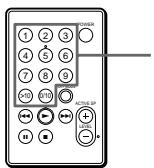
Vous pouvez sélectionner directement une plage en appuyant sur le numéro de plage sur la télécommande carte.
1 Appuyez sur le numéro de la plage de votre choix.
L'enregistreur lira la plage sélectionnée.
Conseils
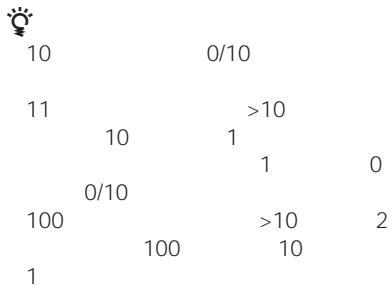
- Pour sélectionner la plage numéro 10, appuyez sur 0/10.
- Pour sélectionner un numéro de plage supérieur à 10, appuyez d'abord sur >10, puis sur le chiffre des dizaines, puis sur le chiffre des unités. Appuyez sur 0/10 si le chiffre des unités est zéro.
- Pour sélectionner un numéro de plage supérieur à 100, appuyez d'abord sur >10 deux fois, puis sur le chiffre des centaines, des dizaines et des unités.
Lecture des plages sélectionnées dans l'ordre de votre choix (lecture programmée)
Voir les illustrations dans le texte japonais, (page 25).
Sélectionnez jusqu'à 20 plages et lisez-les dans l'ordre de votre choix.
1 Appuyez plusieurs fois sur PLAY MODE jusqu'à ce que « PROGRAM » s'allume dans l'afficheur. 2 Appuyez sur la touche numérique correspondant au numéro de la plage de votre choix, dans l'ordre de lecture souhaité.
Les plages sont programmées en séquence. Vous pouvez programmer jusqu'à 20 plages.
Pour annuler une plage, appuyez sur ERASE/DELETE sur l'appareil.
3 Appuyez sur ▶.
L'enregistreur lira les plages dans l'ordre programmé.
Pour afficher l'ordre des plages
Appuyez sur SELECT sur l'appareil avant la lecture. À chaque pression, le numéro de plage s'affiche dans l'ordre programmé.
Pour modifier le programme
Appuyez sur ERASE/DELETE sur l'appareil avant la lecture pour annuler la dernière plage, ou appuyez sur ■ pour annuler toutes les plages. Puis répétez à partir de l'étape 2.
Pour programmer à partir de l'appareil
1 Appuyez plusieurs fois sur MODE jusqu'à ce que « PROGRAM » s'allume dans l'afficheur. 2 Sélectionnez le numéro de plage de votre choix avec les touches curseur et appuyez sur SELECT. 3 Répétez l'étape 2 et sélectionnez les plages dans l'ordre de lecture souhaité. 4 Appuyez sur ▶.
Remarque
Le programme sera effacé si vous appuyez sur ■, retirez le disque, détachez l'enregistreur de la station, enregistrez ou modifiez.
Lecture répétée de plages
Voir les illustrations dans le texte japonais (page 26).
Appuyez plusieurs fois sur MODE (PLAY MODE sur la télécommande) pendant la lecture jusqu'à ce que l'indication du mode de lecture de votre choix apparaisse à l'écran.
| Recorder/Remote control | Station | Play mode |
| “ ” | REPEAT | All the tracks are played repeatedly.(all repeat) |
| “ 1” | REPEAT 1 | A single track is played repeatedly.(single repeat) |
| “ SHUF” | REPEAT SHUFFLE | All the tracks are played repeatedly in random order.(shuffle repeat) |
▶ Modification des plages enregistrées
Vous pouvez modifier vos enregistrements. Les MD prémasterisés ne peuvent pas être modifiés.
Remarques
- Lorsque vous appuyez sur ■ après avoir effacé des marques de plage, "TOC EDIT" clignote pendant environ une seconde. Ne déplacez pas l'enregistreur, ne le secouez pas et ne coupez pas l'alimentation pendant que l'indication clignote.
- Vous ne pouvez pas effacer les marques de plage sur un MD dont la languette de protection est ouverte. Avant d'effacer les marques de plage, fermez la languette sur le côté du MD.
Effacement d'une plage (ERASE)
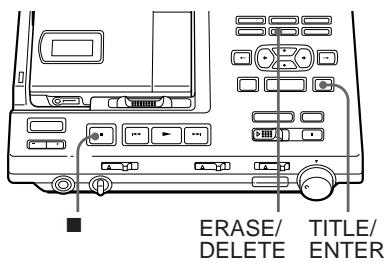
Voir l'illustration dans le texte japonais (page 29).
Vous pouvez effacer une plage enregistrée. Assurez-vous de la plage que vous effacez.
1 Lisez la plage que vous voulez effacer. 2 Appuyez sur le bouton ERASE/DELETE pendant la lecture de la plage. "Erase OK?" et "Push Enter" apparaissent à l'écran, et l'enregistreur lit la plage sélectionnée en boucle. Vérifiez le numéro de plage à l'écran. Pour annuler l'effacement, appuyez sur ■. 3 Appuyez à nouveau sur le bouton TITLE/ENTER pour effacer la plage. La plage est effacée du MD et les plages restantes sont renumérotées. L'enregistreur commence à lire la plage suivante.
Pour effacer une partie d'une plage
Ajoutez des marques de plage au début et à la fin de la partie que vous voulez effacer, puis effacez la partie.
Effacement d'un disque entier
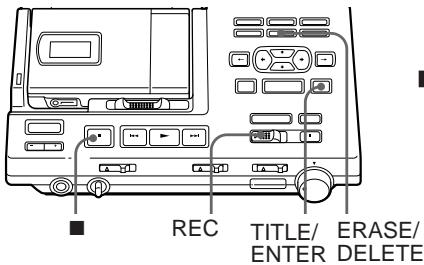
Voir l'illustration dans le texte japonais (page 29).
Vous pouvez effacer toutes les pistes d'un disque en une seule fois. Assurez-vous de vérifier le contenu du disque que vous souhaitez effacer.
1 Appuyez sur ■ pour arrêter. 2 Tout en maintenant enfoncé le bouton ERASE/DELETE, faites glisser l'interrupteur REC vers la droite. « All Erase OK? » et « Push Enter » apparaissent à l'écran. Assurez-vous que c'est le bon disque à effacer. Pour annuler l'effacement, appuyez sur ■.
3 Appuyez sur le bouton TITLE/ENTER. « TOC EDIT » clignote à l'écran. Lorsque l'effacement est terminé, « BLANK DISC » apparaît.
Insertion d'un repère de piste (TRACK MARK ON)
Voir les illustrations dans le texte japonais (page 30).
Vous pouvez insérer un repère de piste dans une piste.
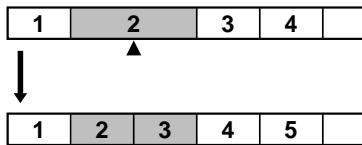
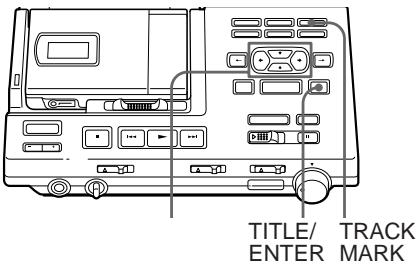
1 Pendant la lecture ou la pause d'un MD, appuyez sur TRACK MARK sur la station au point où vous souhaitez ajouter un repère. « Rehearsal » s'allume et « Track Mark ON OK? » et « Push Enter » apparaissent. Un segment de quatre secondes est joué en boucle. Utilisez les boutons curseur pour ajuster le point à marquer. Il peut être déplacé vers l'avant ou l'arrière jusqu'à huit secondes, par pas de 0,06 seconde. Pour annuler l'effacement, appuyez sur ■.
2 Appuyez sur TITLE/ENTER.
« Track Mark ON » s'affiche. Un repère de piste est ajouté et la partie après le repère est comptée comme une nouvelle piste.
Pour insérer un repère de piste sur l'enregistreur
Appuyez sur T MARK pendant la lecture ou la pause au point où vous souhaitez ajouter un repère. Le repère de piste sera ajouté à l'endroit où vous avez appuyé sur le bouton.
Vous pouvez insérer le numéro de piste pendant l'enregistrement.
Appuyez sur le bouton TRACK MARK pendant l'enregistrement.
Effacement d'un repère de piste (TRACK MARK OFF)
Voir les illustrations dans le texte japonais (page 31).
Lorsque vous enregistrez avec une entrée analogique (ligne), des repères de piste inutiles peuvent être enregistrés lorsque le niveau d'enregistrement est faible. Vous pouvez effacer un repère de piste pour combiner les pistes avant et après le repère.
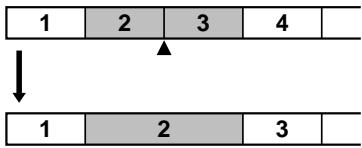
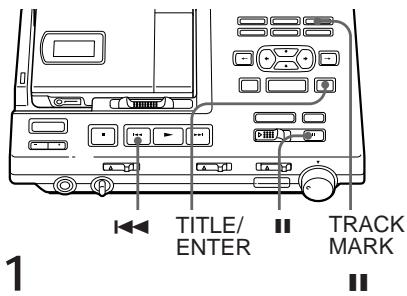
1 Pendant la lecture de la piste contenant le repère à effacer, appuyez sur Ⅱ pour mettre en pause. 2 Trouvez le repère à effacer en appuyant légèrement sur ◀◀. "00:00" clignote à l'écran. 3 Appuyez sur le bouton TRACK MARK. "Rehearsal" s'allume et "Track Mark OFF OK?" et "Push Enter" apparaissent. Un segment de quatre secondes est lu en boucle. Pour annuler l'effacement, appuyez sur ■. 4 Appuyez sur TITLE/ENTER. "Track Mark OFF" s'affiche. Le repère est effacé et les deux pistes sont combinées. Le numéro de la nouvelle piste combinée est celui de la première piste. Les pistes suivantes sont renumérotées.
Pour effacer un repère de piste sur l'enregistreur
Appuyez légèrement sur ◀◀◀ ou ▶▶◀ pendant la pause pour trouver le repère à effacer, puis appuyez sur T MARK.
Déplacement de pistes enregistrées (MOVE)
Voir l'illustration dans le texte japonais (page 32).
Vous pouvez changer l'ordre des pistes enregistrées.
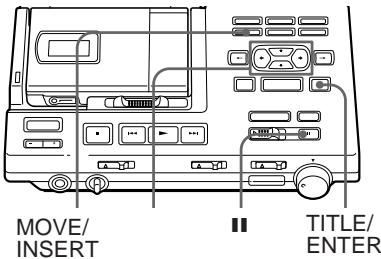
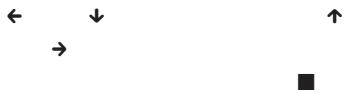
1 Pendant la lecture ou la pause de la piste à déplacer, appuyez sur MOVE/INSERT. Pour l'exemple ci-dessus, "Move No.003 → No.003" et "OK? Push Enter" apparaissent à l'écran. 2 Utilisez les boutons curseur pour sélectionner la nouvelle position de la piste. ← ou ↓ diminue le numéro de piste. ↑ ou → augmente le numéro de piste. Pour annuler le déplacement, appuyez sur ■. 3 Appuyez sur TITLE/ENTER. La piste se déplace à la position avant la piste désignée.
Étiquetage des enregistrements (TITLE)
Voir l'illustration dans le texte japonais (page 32).
Vous pouvez étiqueter les MD et les pistes que vous avez enregistrés avec des lettres, des chiffres et des symboles. Chaque étiquette peut contenir jusqu'à 200 caractères, et chaque MD peut contenir environ 1700 caractères.
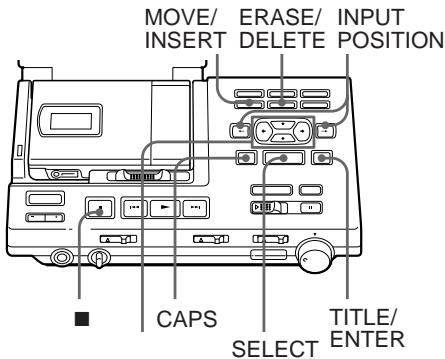
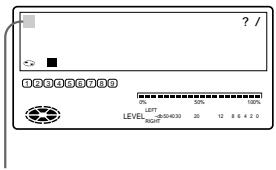
1 Pour étiqueter une piste, lisez la piste à étiqueter. Pour étiqueter un MD, insérez le MD enregistrable à étiqueter. Si un MD est déjà inséré, appuyez sur ■ pour arrêter. 2 Appuyez sur le bouton TITLE/ENTER de l'enregistreur. Un ensemble de caractères apparaît à l'écran. Pour sélectionner un autre ensemble, appuyez sur le bouton CAPS pour changer l'affichage. Chaque pression sur ce bouton change l'affichage dans l'ordre : caractères katakana, lettres anglaises, symboles et chiffres, et exemples de titres.
3 Utilisez les boutons curseur pour sélectionner un caractère.
Les boutons de curseur déplacent le curseur vers le haut/bas ou vers la droite/gauche.
Le bouton INPUT POSITION déplace le curseur vers la droite ou vers la gauche.
Appuyez sur le bouton SELECT pour valider votre sélection.
Appuyez sur le bouton MOVE/INSERT pour insérer un espace.
Appuyez sur le bouton ERASE/DELETE pour supprimer un caractère.
Appuyez sur ■ pour arrêter l'étiquetage.
* Lorsque vous utilisez le katakana, appuyez sur
↑/↓ pour modifier l'affichage comme suit :

4 Répétez l'étape 3 jusqu'à ce que vous ayez saisi tous les caractères de l'étiquette. 5 Appuyez sur le bouton TITLE/ENTER pour terminer l'étiquetage.
Pour annuler l'étiquetage
Appuyez sur ■.
Pour utiliser les exemples de titres
Il y a 42 exemples disponibles pour le nom du disque ou le message.
Appuyez sur ←/→ pour changer de page.
Appuyez sur ↑/↓ pour déplacer le curseur (>) vers le haut ou vers le bas.
Appuyez sur SELECT pour entrer dans les échantillons de titres.
Annulation de la dernière opération d'édition (UNDO)
Voir l'illustration dans le texte japonais (page 34).
Vous pouvez annuler la dernière opération d'édition effectuée et revenir à l'état précédent. Cependant, vous ne pouvez pas annuler une opération d'édition si vous avez effectué l'une des actions suivantes après coup :
- faites glisser l'interrupteur REC • éteignez l'appareil ou retirez le MD
- retirez l'enregistreur de la station
- laissez l'enregistreur et la station sans aucune opération pendant plus de 5 minutes
- retirez l'adaptateur secteur de la prise murale
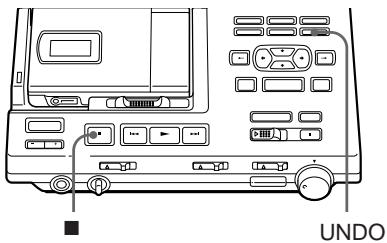
1 Appuyez sur UNDO en mode arrêt.
Les messages suivants apparaîtront en fonction de la dernière opération d'édition effectuée.
| Editing operation | Message |
| Erase a track | "Erase Undo OK?" |
| Erase all tracks | "All Erase Undo OK?" |
| Insert a track mark | "Track Mark ON Undo OK?" |
| Erase a track mark | "Track Mark OFF Undo OK?" |
| Move a track | "Move Undo OK?" |
| Name a disc | "Disc Name Undo OK?" |
| Name a track | "Track Name Undo OK?" |
2 Appuyez sur TITLE/ENTER.
"TOC EDIT" apparaîtra pendant quelques secondes et le MD reviendra à l'état précédent.
Pour annuler UNDO
Appuyez sur ■.
Remarque
Une fois que vous avez annulé une opération d'édition, vous ne pouvez pas annuler cette annulation elle-même pour restaurer l'opération d'édition d'origine.
Enregistrement/lecture avec une minuterie
Voir l'illustration dans le texte japonais (page 35).
Vous pouvez démarrer l'enregistrement ou la lecture à une heure prédéfinie à l'aide d'une minuterie audio (en option).
1 Branchez l'adaptateur secteur de la station à la minuterie audio (en option). 2 Réglez manuellement le niveau d'enregistrement et appuyez sur ■ si vous enregistrez via une entrée analogique (étapes 4 à 6 de « Enregistrement via une entrée analogique », page 69). 3 Réglez TIMER sur « REC » ou « PLAY ».
Pour démarrer l'enregistrement à l'heure prédéfinie : sélectionnez « REC »
L'enregistrement démarrera automatiquement après la partie déjà enregistrée sur le MD.
Pour démarrer la lecture à l'heure prédéfinie : sélectionnez « PLAY »
4 Réglez l'heure sur la minuterie audio et éteignez l'appareil.
L'alimentation de la minuterie audio s'allumera automatiquement à l'heure prédéfinie, ce qui allumera ensuite la station.
Remarques
- Pour enregistrer en monaural à l'aide d'une minuterie audio, appuyez sur MODE pendant 2 secondes ou plus après l'étape 3. Les préférences d'enregistrement avec minuterie s'afficheront. Si le mode d'enregistrement est en « Stéréo », appuyez sur MODE pour qu'il passe en « Monaural ».
- Si vous utilisez la station pour la première fois ou après une longue période d'inutilisation, veillez à charger la batterie de secours intégrée de la station. L'enregistreur utilise cette batterie de secours lorsqu'il écrit les informations TOC après la fin de l'enregistrement programmé et que l'alimentation est coupée. Pour charger la batterie intégrée, branchez l'adaptateur secteur à la station. La charge complète prend environ 10 heures. La batterie dure environ une semaine ; ne réglez pas la minuterie pour démarrer l'enregistrement dans plus d'une semaine.
▶Raccordement
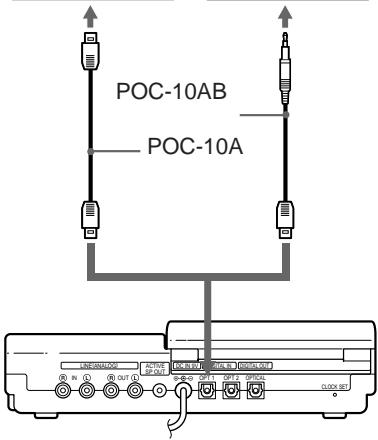
Configuration pour l'enregistrement numérique sur la station
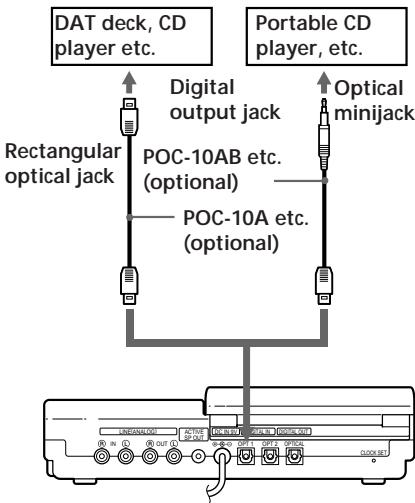
Prise OPT1 ou OPT2 (entrée optique numérique)
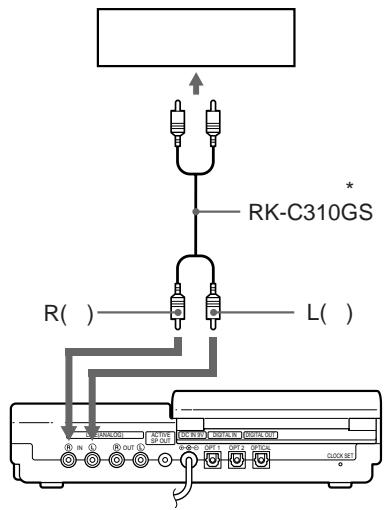
Configuration pour l'enregistrement analogique sur la station
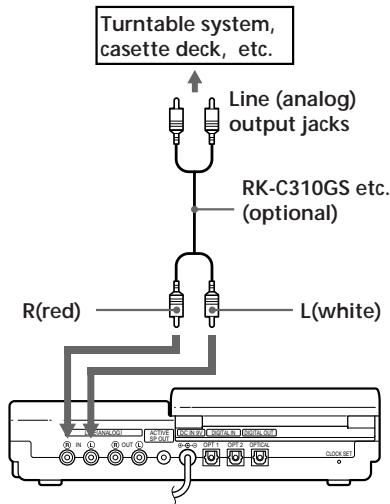
Prises LINE (ANALOG) IN
Configuration pour la sortie numérique de la station![graph TD A["Device"] --> B["Digital OUT (OPTICAL) jack"] B --> C["Rectangular optical jack"] B --> D["POC-10A etc. (optional)"] B --> E["POC-10AB etc. (optional)"] B --> F["Optical minijack"] C --> G["MD deck, DAT deck, Digital amplifier, etc."] D --> H["Portable MD recorder"] E --> H F --> H](/content/2020/04/46999/images/72ddda566b8faca5c4742ad755206080529ac4dd614062690ba1744dcef80573.jpg)
Configuration pour la sortie analogique de la station![graph TD A["Active speaker etc. (optional)"] --> B["ACTIVE SP OUT jack"] B --> C["LING(ANALOG) OUT jacks"] C --> D["R(red)"] C --> E["L(white)"] C --> F["RK-C310GS etc. (optional)"] F --> G["LINE IN jacks"] G --> H["Casette deck, amplifier, etc."]](/content/2020/04/46999/images/a4bddeeea59eb66b9151424c82c1bd08141e2c1bba03651a78782e6f6112c182.jpg)
Utilisation de la station sur le secteur
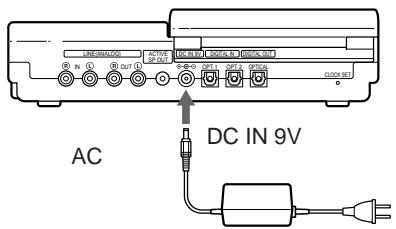
Voir l'illustration dans le texte japonais (page 39).
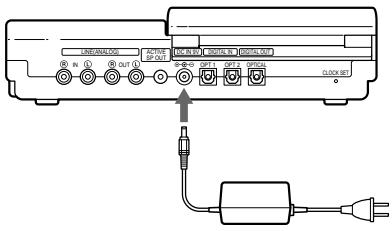
Branchez l'adaptateur secteur fourni à la prise DC IN 9V de la station et à la prise murale.
Utilisation de l'enregistreur avec une batterie rechargeable au lithium-ion
Voir les illustrations dans le texte japonais (page 39).
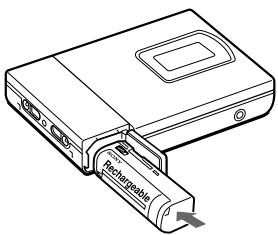
Vous pouvez charger la batterie rechargeable au lithium-ion LIP-8 (fournie) sur l'enregistreur.
1 Raccordez la station à une prise électrique. 2 Insérez la LIP-8 dans l'enregistreur et fermez le couvercle. 3 Fixez l'enregistreur sur la station. La batterie se charge que l'appareil soit allumé ou éteint. La charge complète prend environ 3 heures.
Pour charger la batterie avec l'enregistreur détaché
1 Faites glisser l'interrupteur OPEN sur le côté de la station pour ouvrir le couvercle. 2 Insérez la batterie et fermez le couvercle. Lorsque la charge est terminée, le témoin CHARGE s'éteint.
Utilisation de l'enregistreur avec des piles sèches/batterie rechargeable nickel-hydrure métallique
Voir les illustrations dans le texte japonais (page 41).
Avant d'utiliser une batterie rechargeable nickel-hydrure métallique, vous devez la charger.
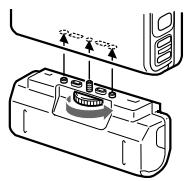
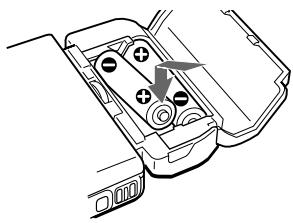
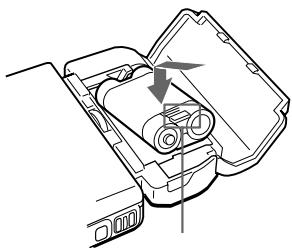
1 Fixez le boîtier de piles fourni. 2 Insérez deux piles sèches LR6 (format AA) ou une batterie rechargeable nickel-hydrure métallique.
Remarque
Vous ne pouvez pas charger la batterie rechargeable nickel-hydrure métallique sur cet enregistreur. Utilisez uniquement le chargeur de batterie recommandé (non fourni).
Durée de vie des piles
| Batteries | Recording | Playback |
| LIP-8 lithium ion rechargeable battery | Approx. 3.5 hours | Approx. 5.5 hours |
| R6(size AA) Sony alkaline dry batteries LR6(SG) x 2 | Approx. 4.5 hours | Approx. 9 hours |
| BP-DM20 nickel metal hydride rechargeable battery | Approx. 4.5 hours | Approx. 6.5 hours |
| LIP-8 +LR6(SG) x 2 | Approx. 8 hours | Approx. 16 hours |
| LIP-8 +BP-DM20 | Approx. 8 hours | Approx. 13 hours |
Quand remplacer les piles
Lorsque les piles sèches ou la batterie rechargeable sont faibles, ☐ clignote à l'écran de l'enregistreur et "LoBATT" apparaît à l'écran de la télécommande. Remplacez les piles sèches ou chargez la batterie rechargeable.
▶Informations complémentaires
Messages d'erreur
Si l'enregistreur ne peut pas effectuer une opération, des messages d'erreur peuvent clignoter dans la fenêtre d'affichage comme suit. Les mots entre parenthèses sont les messages qui apparaissent sur l'écran de la télécommande du casque.
BLANK DISC (BLANK) :
Vous avez essayé de lire ou de modifier un MD sans enregistrement.
CONNECTION ERROR (−) :
L'enregistreur n'est pas correctement fixé à la station.
ERREUR DISQUE (ERROR) :
L'enregistreur ne peut pas lire le MD (il est rayé ou sale). Réinsérez le MD. Si le même message apparaît encore, remplacez le MD.
DISQUE PLEIN (FULL) :
Il n'y a plus d'espace sur le MD (moins de 12 secondes disponibles).
ÉDITION OCCUPÉE (BUSY) :
Vous avez essayé d'utiliser l'enregistreur pendant qu'il accédait aux données enregistrées. Attendez que le message disparaisse (dans de rares cas, cela peut prendre 2 à 3 minutes).
- (LoBATT) :
La batterie rechargeable ou les piles sèches sont faibles. Chargez la batterie rechargeable ou remplacez les piles sèches.
MÉMOIRE PLEINE (MEMORY) :
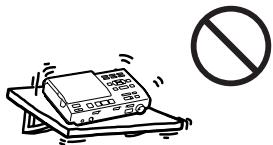
Vous avez essayé d'enregistrer alors qu'il n'y a aucune indication à l'écran, avec l'enregistreur placé dans un endroit soumis à des vibrations continues. Placez l'enregistreur sur une surface stable et recommencez l'enregistrement.
NOM PLEIN (-)
Vous avez essayé de saisir plus de 200 caractères pour un nom de plage ou de disque, ou le nombre total de caractères saisis dans le MD a dépassé la limite (environ 1700). Saisissez les caractères dans la limite.
AUCUN SIGNAL NUMÉRIQUE (-) :
L'enregistreur n'a pas pu détecter les signaux d'entrée numériques. Assurez-vous que la source est connectée fermement.
AUCUN DISQUE (NoDISC) :
Vous avez essayé de lire ou d'enregistrer alors qu'aucun disque n'est dans l'enregistreur.
LECTURE SEULE (PbONLY) :
Vous avez essayé d'enregistrer ou de modifier un MD prémasterisé (P/B signifie lecture).
DISQUE PROTÉGÉ (SAVED) :
Vous avez essayé d'enregistrer ou de modifier un MD dont la languette est en position de protection contre l'écriture.
PLAGE PROTÉGÉE (TrPROT) :
Vous avez essayé d'enregistrer par-dessus ou de modifier une plage qui a été protégée contre l'enregistrement. 1)
SCMS PAS DE COPIE (-) :
Vous avez essayé de faire une copie à partir d'un disque protégé par le système de gestion de copie en série. Vous ne pouvez pas faire de copies à partir d'une source connectée numériquement qui a elle-même été enregistrée via une connexion numérique. Utilisez plutôt la connexion analogique.
DÉSOLÉ (SORRY) :
Vous avez essayé d'effacer un repère de plage pendant la lecture du MD ou au début de la première plage.
Vous avez essayé d'effacer un repère de plage pour combiner des plages que l'enregistreur ne peut pas combiner. 2)
SURCHAUFFE (TEMP) :
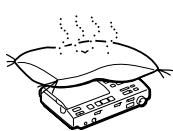
La chaleur s'est accumulée dans l'enregistreur. Attendez que l'enregistreur refroidisse.
PLAGES PLEINES (TrFULL) :
Il n'y a plus d'espace pour de nouvelles données sur le MD que vous êtes en train d'éditer. Effacez les pistes inutiles.
1) MiniDiscs protégés par piste — Certains enregistreurs MD vous permettent de protéger des pistes individuelles contre l'enregistrement par-dessus. Cependant, cet enregistreur n'offre pas cette fonctionnalité.
2) Si vous avez enregistré ou effacé de nombreuses fois sur le même MD, les données d'une seule piste peuvent être dispersées sur tout le MD.
Lorsque les données sont dispersées en groupes de moins de 12 secondes, l'enregistreur ne pourra pas combiner les pistes.
- MODE D'EMPLOI
- TRACK MARK OFF
- MOVE
- TITRE
- (ANNULER)
- CD
- NOTICE D'UTILISATION
- REC
- INPUT
- SYNCHRO REC
- MIC SENS
- DIGITAL MEGA BASS
- AVLS
- ENTRER
- EFFACER
- SUPPRIMER
- EFFACER/SUPPRIMER ENREGISTREMENT
- TITRE/ENTRÉE
- TITRE/ENTRÉE MARQUE DE PISTE ACTIVÉE
- MARQUE DE PISTE ACTIVÉE
- REPÈRE DE PISTE
- REPÈRE DE PISTE DÉSACTIVÉ
- DÉPLACER
- DÉPLACER/INSÉRER
- TITLE
- SELECT
- UNDO
- TITLE/ENTER
- AC
- TOC EDIT
- MD
- BIENVENUE
- EXAMEN DES COMMANDES
- L'ENREGISTREUR
- LA FENÊTRE D'AFFICHAGE DE L'ENREGISTREUR
- PANNEAU AVANT DE LA STATION
- PANNEAU ARRIÈRE DE LA STATION
- LA FENÊTRE D'AFFICHAGE DE LA STATION
- LE CASQUE AVEC TÉLÉCOMMANDE
- LA FENÊTRE D'AFFICHAGE DE LA TÉLÉCOMMANDE
- TÉLÉCOMMANDE À CARTE
- ENREGISTREMENT MD
- CONFIGURATION DU SYSTÈME DE LA STATION
- POUR DÉTACHER L'ENREGISTREUR DE LA STATION
- REMARQUE
- ENREGISTREZ IMMÉDIATEMENT UN MD
- POUR ARRÊTER L'ENREGISTREMENT, APPUYEZ SUR
- SI L'ENREGISTREMENT NE DÉMARRE PAS
- LECTURE DU MD
- LECTURE DU MD IMMÉDIATEMENT
- POUR ARRÊTER LA LECTURE, APPUYEZ SUR
- SI LA LECTURE NE DÉMARRE PAS
- POUR LIRE AVEC L'ENREGISTREUR FIXÉ SUR LA STATION
- LORS DE L'UTILISATION D'UN CASQUE EN OPTION
- DIFFÉRENTES MÉTHODES D'ENREGISTREMENT
- POUR DÉMARRER/ARRÊTER L'ENREGISTREMENT EN SYNCHRONISATION AVEC LA SOURCE (ENREGISTREMENT SYNCHRONISÉ)
- CONSEILS
- COMMENCER L'ENREGISTREMENT EN REVENANT 2 SECONDES EN ARRIÈRE (ENREGISTREMENT TIME MACHINE)
- NOTE
- ENREGISTREMENT EN MONAURAL POUR DOUBLER LA DURÉE D'ENREGISTREMENT NORMALE
- ENREGISTREMENT À PARTIR D'UN MICROPHONE
- POUR RÉGLER MANUELLEMENT LE NIVEAU D'ENREGISTREMENT
- ASTUCE
- ENREGISTREMENT VIA L'ENTRÉE ANALOGIQUE (ENREGISTREMENT ANALOGIQUE)
- RÉGLAGE DE L'HORLOGE POUR HORODATER L'ENREGISTREMENT
- SI VOUS AVEZ FAIT UNE ERREUR LORS DU RÉGLAGE DE L'HORLOGE
- POUR RÉGLER L'HORLOGE SUR L'ENREGISTREUR
- POUR AFFICHER L'HEURE AU FORMAT 24 HEURES
- CHARGEMENT DE LA BATTERIE INTERNE DE L'HORLOGE
- DIFFÉRENTES FAÇONS DE LIRE
- LECTURE D'UN MD SUR LA STATION
- LECTURE AVEC DES ENCEINTES ACTIVES
- POUR RÉGLER LE VOLUME
- SÉLECTION D'UNE PLAGE À PARTIR DE LA TÉLÉCOMMANDE (SÉLECTION DIRECTE)
- LECTURE DES PLAGES SÉLECTIONNÉES DANS L'ORDRE DE VOTRE CHOIX (LECTURE PROGRAMMÉE)
- POUR AFFICHER L'ORDRE DES PLAGES
- POUR MODIFIER LE PROGRAMME
- POUR PROGRAMMER À PARTIR DE L'APPAREIL
- LECTURE RÉPÉTÉE DE PLAGES
- MODIFICATION DES PLAGES ENREGISTRÉES
- REMARQUES
- EFFACEMENT D'UNE PLAGE (ERASE)
- POUR EFFACER UNE PARTIE D'UNE PLAGE
- EFFACEMENT D'UN DISQUE ENTIER
- INSERTION D'UN REPÈRE DE PISTE (TRACK MARK ON)
- POUR INSÉRER UN REPÈRE DE PISTE SUR L'ENREGISTREUR
- EFFACEMENT D'UN REPÈRE DE PISTE (TRACK MARK OFF)
- POUR EFFACER UN REPÈRE DE PISTE SUR L'ENREGISTREUR
- DÉPLACEMENT DE PISTES ENREGISTRÉES (MOVE)
- ÉTIQUETAGE DES ENREGISTREMENTS (TITLE)
- POUR UTILISER LES EXEMPLES DE TITRES
- ANNULATION DE LA DERNIÈRE OPÉRATION D'ÉDITION (UNDO)
- ENREGISTREMENT/LECTURE AVEC UNE MINUTERIE
- RACCORDEMENT
- CONFIGURATION POUR L'ENREGISTREMENT NUMÉRIQUE SUR LA STATION
- CONFIGURATION POUR L'ENREGISTREMENT ANALOGIQUE SUR LA STATION
- UTILISATION DE LA STATION SUR LE SECTEUR
- UTILISATION DE L'ENREGISTREUR AVEC UNE BATTERIE RECHARGEABLE AU LITHIUM-ION
- POUR CHARGER LA BATTERIE AVEC L'ENREGISTREUR DÉTACHÉ
- UTILISATION DE L'ENREGISTREUR AVEC DES PILES SÈCHES/BATTERIE RECHARGEABLE NICKEL-HYDRURE MÉTALLIQUE
- QUAND REMPLACER LES PILES
- INFORMATIONS COMPLÉMENTAIRES
- MESSAGES D'ERREUR
- BLANK DISC (BLANK)
- CONNECTION ERROR (−)
- ERREUR DISQUE (ERROR)
- DISQUE PLEIN (FULL)
- ÉDITION OCCUPÉE (BUSY)
- (LOBATT)
- MÉMOIRE PLEINE (MEMORY)
- NOM PLEIN (-)
- AUCUN SIGNAL NUMÉRIQUE (-)
- AUCUN DISQUE (NODISC)
- LECTURE SEULE (PBONLY)
- DISQUE PROTÉGÉ (SAVED)
- PLAGE PROTÉGÉE (TRPROT)
- SCMS PAS DE COPIE (-)
- DÉSOLÉ (SORRY)
- SURCHAUFFE (TEMP)
- PLAGES PLEINES (TRFULL)
Marque : SONY
Modèle : MZ-R5ST
Catégorie : Lecteur MiniDisc