
Q63320/15 - Tondeuse électrique PHILIPS - Notice d'utilisation et mode d'emploi gratuit
Retrouvez gratuitement la notice de l'appareil Q63320/15 PHILIPS au format PDF.
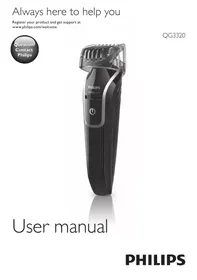


| Marque | PHILIPS |
| Modèle | Q63320/15 |
| Type de produit | Tondeuse électrique (coupe-barbe, nez et oreilles) |
| Alimentation | Adaptateur secteur (charge uniquement), batterie rechargeable intégrée |
| Tension adaptateur | Correspond à la tension secteur locale (vérifier avant usage) |
| Temps de charge standard | Environ 10 heures |
| Temps de charge optimisé | 16 heures pour 45 minutes d'utilisation sans fil |
| Autonomie | Jusqu'à 35 minutes (charge standard), 45 minutes (charge 16h) |
| Accessoires inclus | Peigne à barbe (1-18 mm), tondeuse nez/oreilles, brosse de nettoyage, adaptateur |
| Réglages de coupe | 1 à 18 mm par incréments de 1 mm (via peigne coulissant) |
| Utilisation sans fil | Oui, après charge complète |
| Étanchéité | Appareil waterproof : nettoyable sous le robinet (appareil éteint et débranché) |
| Entretien | Nettoyer après chaque usage à l'eau tiède et/ou brosse. Ne pas utiliser de produits abrasifs. |
| Sécurité | Adaptateur à ne pas couper ; ne pas utiliser dans le bain ou la douche ; hors de portée des enfants |
| Température d'utilisation | Entre 5°C et 35°C |
| Niveau sonore | Lc = 75 dB(A) |
| Conformité CEM | Conforme aux normes d'exposition aux champs électromagnétiques |
| Garantie | Garantie internationale (sauf pièces d'usure : unités de coupe) |
| Recyclage | Ne pas jeter avec les ordures ménagères ; batterie rechargeable à retirer avant mise au rebut |
FOIRE AUX QUESTIONS - Q63320/15 PHILIPS
Questions des utilisateurs sur Q63320/15 PHILIPS
0 question sur cet appareil. Repondez a celles que vous connaissez ou posez la votre.
Poser une nouvelle question sur cet appareil
Téléchargez la notice de votre Tondeuse électrique au format PDF gratuitement ! Retrouvez votre notice Q63320/15 - PHILIPS et reprennez votre appareil électronique en main. Sur cette page sont publiés tous les documents nécessaires à l'utilisation de votre appareil Q63320/15 de la marque PHILIPS.
MODE D'EMPLOI Q63320/15 PHILIPS
Enregistrez votre produit et obtenez de l'aide sur
www.philips.com/welcome
QG3320
Manuel d'utilisation
PHILIPS
Introduction
Félicitations pour votre achat et bienvenue chez Philips ! Pour profiter pleinement de l'assistance offerte par Philips, enregistrez votre produit sur www.philips.com/welcome.
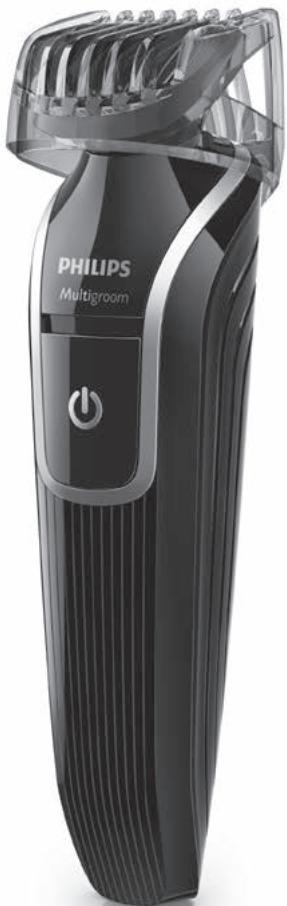
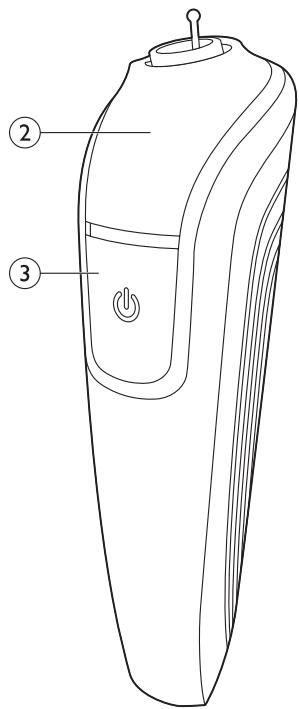
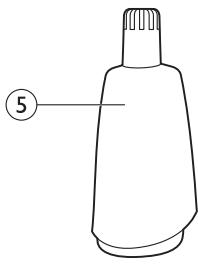
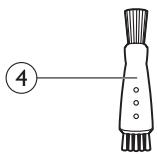
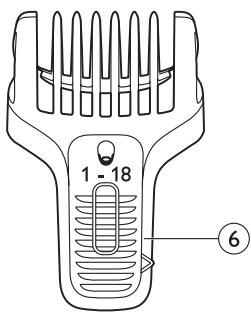
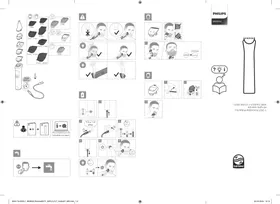
Description générale (Fig. 1)
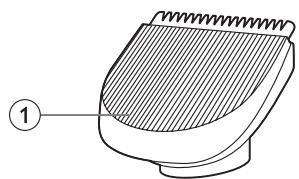
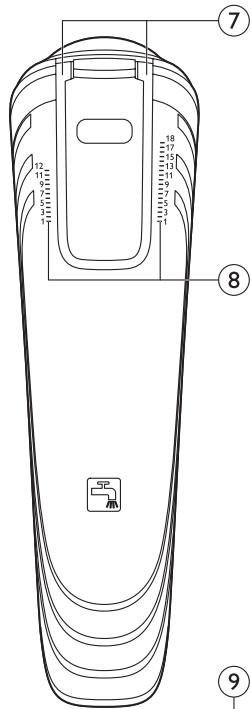
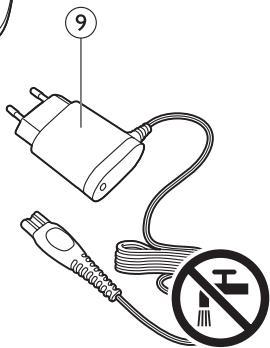
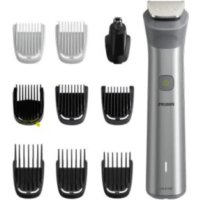
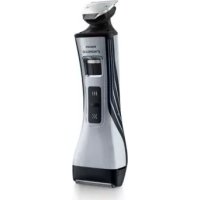
1 Tondeuse à barbe 2 Poignée 3 Interrupteur coulissant 4 Brosse de nettoyage 5 Tondeuse nez/oreilles 6 Peigne à barbe 7 Rainures de guidage 8 Indicateur de réglage 9 Adaptateur
Important
Lisez attentivement ce manuel d'utilisation avant d'utiliser l'appareil et conservez-le pour référence future.
Danger
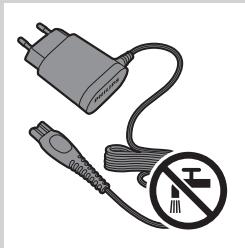
- Gardez l'adaptateur au sec.
Avertissement
- Avant de brancher l'appareil, vérifiez que la tension indiquée sur l'adaptateur correspond à la tension du secteur local.
- L'adaptateur contient un transformateur. Ne coupez pas l'adaptateur pour le remplacer par une autre fiche, car cela créerait une situation dangereuse.
- Cet appareil n'est pas destiné à être utilisé par des personnes (y compris les enfants) dont les capacités physiques, sensorielles ou mentales sont réduites, ou qui manquent d'expérience et de connaissances, sauf si elles ont été encadrées ou instruites quant à l'utilisation de l'appareil par une personne responsable de leur sécurité.
- Tenez l'appareil et son cordon hors de portée des enfants.
- Vérifiez toujours l'appareil avant de l'utiliser. N'utilisez pas l'appareil s'il est endommagé, car cela pourrait causer des blessures.
- N'utilisez pas l'appareil dans le bain ou sous la douche.
Attention
- Utilisez uniquement l'adaptateur fourni.
- Utilisez, chargez et rangez l'appareil à une température comprise entre 5 °C et 35 °C.
- Assurez-vous que l'appareil est éteint et débranché avant de le nettoyer sous le robinet.
- Si l'adaptateur est endommagé, faites-le toujours remplacer par un adaptateur de type d'origine afin d'éviter tout danger.
- Si l'appareil est soumis à un changement important de température, de pression ou d'humidité, laissez-le s'acclimater pendant 30 minutes avant de l'utiliser.
- N'utilisez pas l'appareil si l'une de ses pièces est endommagée ou cassée, car cela pourrait causer des blessures.
- N'utilisez jamais d'air comprimé, de tampons à récurer, de nettoyants abrasifs ou de liquides agressifs tels que l'essence ou l'acétone pour nettoyer l'appareil.
- Niveau de bruit : Lc = 75 dB(A)
Conformité aux normes
- Cet appareil Philips est conforme à toutes les normes et réglementations applicables concernant l'exposition aux champs électromagnétiques (CEM).
Charge
La charge standard prend environ 10 heures. Lorsque l'appareil est complètement chargé, il a une autonomie de fonctionnement allant jusqu'à 35 minutes.
Remarque : Vous pouvez obtenir 45 minutes d'autonomie sans fil si vous chargez l'appareil pendant la nuit pendant 16 heures.
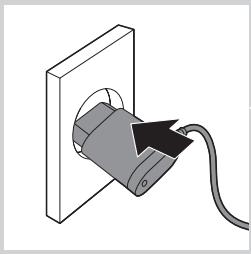
1 Éteignez l'appareil avant de le charger. 2 Insérez la fiche de l'appareil dans l'appareil. 3 Branchez l'adaptateur dans la prise murale. Le voyant de charge sur l'adaptateur s'allume pour indiquer que l'appareil est en charge.
Remarque : Le voyant de charge ne change pas de couleur et ne s'éteint pas lorsque l'appareil est complètement chargé.
Utilisation de l'appareil
Tonte de la barbe

Lorsque vous tondez votre barbe pour la première fois, soyez prudent.
Ne déplacez pas la tondeuse trop rapidement. Effectuez des mouvements lents et réguliers.
Tonte de la barbe avec le peigne à barbe
1 Placez la tondeuse à barbe sur le manche (1). Tournez la tondeuse dans le sens des aiguilles d'une montre pour la fixer (2).
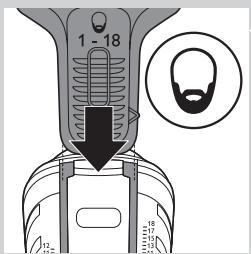
2 Faites glisser le peigne à barbe dans les rainures de guidage des deux côtés du manche.
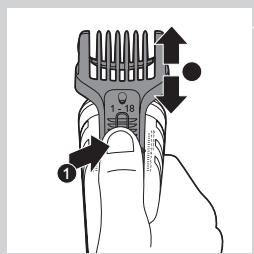
3 Appuyez sur le sélecteur de réglage (1) et faites glisser le peigne jusqu'au réglage de longueur de poils souhaité (2).
Vous pouvez choisir n'importe quel réglage entre 1 et 18 mm.
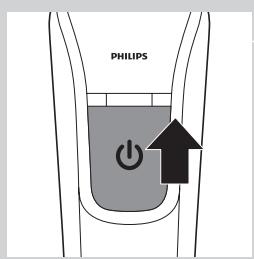
4 Allumez l'appareil.
5 Déplacez lentement la tondeuse contre le sens de la pousse des cheveux. Appuyez légèrement et assurez-vous toujours que la surface du peigne est en contact complet avec la peau.
Remarque : Lors de la première utilisation, commencez par le réglage le plus haut (18 mm) pour vous familiariser avec l'appareil.
Tonte des poils du nez et des oreilles
Tonte des poils du nez
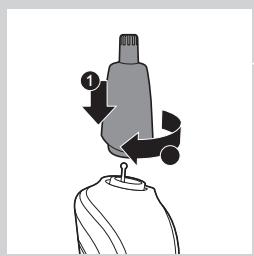
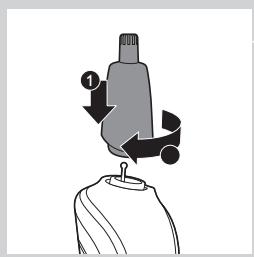
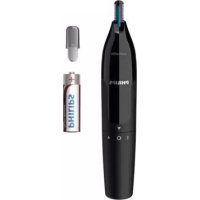
1 Placez la tondeuse nez/oreilles sur le manche (1). Tournez la tondeuse nez/oreilles dans le sens des aiguilles d'une montre pour la fixer (2).
2 Assurez-vous que vos narines sont propres.
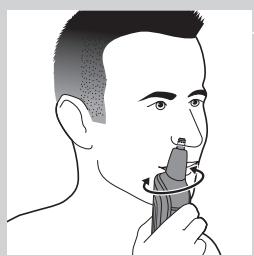
3 Allumez l'appareil et insérez l'embout de la tondeuse dans une de vos narines.
N'insérez pas l'embout à plus de 0,5 cm dans votre narine.
4 Déplacez lentement l'embout de haut en bas tout en le tournant pour éliminer les poils indésirables.
Pour réduire l'effet de chatouillement, assurez-vous d'appuyer fermement le côté de l'embout contre la peau.
Tonte des poils des oreilles
1 Fixez la tondeuse nez/oreilles sur le manche.
2 Nettoyez le conduit auditif externe. Assurez-vous qu'il est exempt de cérumen.
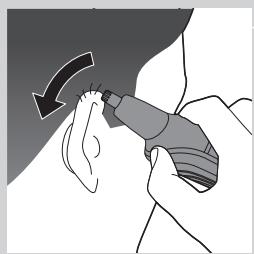
3 Allumez l'appareil et déplacez doucement l'embout autour de l'oreille pour retirer les poils qui dépassent du bord de l'oreille.
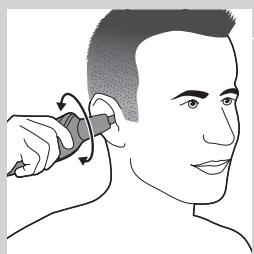
4 Insérez délicatement l'embout dans le conduit auditif externe.
N'insérez pas l'embout à plus de 0,5 cm dans le conduit auditif, car cela pourrait endommager le tympan.
Nettoyage
N'utilisez jamais d'air comprimé, de tampons à récurer, de nettoyants abrasifs ou de liquides agressifs tels que l'essence ou l'acétone pour nettoyer l'appareil.
Gardez toujours l'adaptateur au sec.
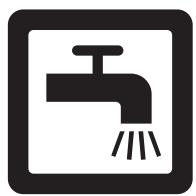
Nettoyez l'appareil après chaque utilisation. L'appareil est étanche, vous pouvez donc facilement nettoyer le manche et les accessoires sous le robinet.
1 Assurez-vous que l'appareil est éteint et débranché. 2 Retirez tout accessoire de l'appareil. 3 Soufflez et/ou secouez pour éliminer les poils accumulés dans les accessoires, ou utilisez la brosse de nettoyage. 4 Nettoyez les accessoires sous un robinet d'eau tiède et/ou avec la brosse de nettoyage. 5 Nettoyez le manche sous un robinet d'eau tiède et/ou avec la brosse de nettoyage.
Commande d'accessoires
Pour acheter des accessoires pour cet appareil, veuillez visiter notre boutique en ligne à l'adresse www.shop.philips.com/service. Si la boutique en ligne n'est pas disponible dans votre pays, adressez-vous à votre revendeur Philips ou à un centre de service Philips. Si vous rencontrez des difficultés pour obtenir des accessoires pour votre appareil, veuillez contacter le Centre de Service Consommateurs Philips de votre pays. Vous trouverez ses coordonnées dans le dépliant de garantie internationale.
Si l'adaptateur est endommagé, faites-le toujours remplacer par un adaptateur de type d'origine afin d'éviter tout danger.
Remplacez uniquement les accessoires endommagés ou usés par des accessoires de remplacement d'origine Philips.
Environnement
- Ne jetez pas l'appareil avec les déchets ménagers normaux en fin de vie, mais déposez-le dans un point de collecte officiel pour recyclage. En agissant ainsi, vous contribuez à la protection de l'environnement.
- La batterie rechargeable intégrée contient des substances qui peuvent polluer l'environnement. Retirez toujours la batterie avant de jeter l'appareil et déposez-le dans un point de collecte officiel. Éliminez la batterie dans un point de collecte officiel pour batteries. Si vous avez du mal à retirer la batterie, vous pouvez également apporter l'appareil à un centre de service Philips. Le personnel de ce centre retirera la batterie pour vous et l'éliminera de manière respectueuse de l'environnement.
Retrait de la batterie rechargeable
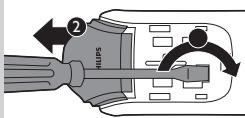
Ne retirez la batterie rechargeable que lorsque vous jetez l'appareil. Assurez-vous que la batterie est complètement vide avant de la retirer.
Attention, les bandes de la batterie et les pièces du boîtier sont très tranchantes.
1 Assurez-vous que l'appareil est débranché du secteur. 2 Retirez tout accessoire. 3 Retirez le curseur marche/arrêt avec un tournevis plat. 4 Retirez le panneau avant de l'appareil avec un tournevis plat. 5 Pour libérer la partie intérieure de la poignée, insérez un tournevis plat dans le trou (1). Inclinez le tournevis vers le haut pour pousser la partie intérieure hors de la poignée (2). 6 Tirez la partie intérieure hors de la poignée. 7 Retirez le disque rond blanc.
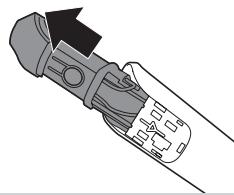
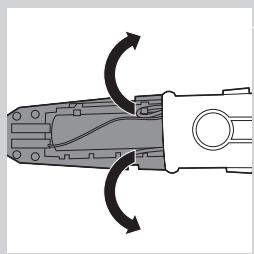
8 Décrochez et retirez le couvercle de la batterie pour exposer la batterie rechargeable. 9 Coupez les fils pour séparer la batterie rechargeable de la partie intérieure.
Garantie et assistance
Si vous avez besoin d'informations ou d'assistance, veuillez consulter
www.philips.com/support ou lire le dépliant séparé
sur la garantie mondiale.
Restrictions de garantie
Les unités de coupe ne sont pas couvertes par les termes de la garantie internationale car elles sont sujettes à l'usure.
Dépannage
Ce chapitre résume les problèmes les plus courants que vous pourriez rencontrer avec l'appareil. Si vous ne parvenez pas à résoudre le problème avec les informations ci-dessous, consultez www.philips.com/support pour une liste des questions fréquemment posées ou contactez le Centre de Service Consommateurs de votre pays.
| Problem | Possible cause | Solution |
| The beard comb does not stay attached to the handle. | You do not attach the beard comb correctly. | Slide the beard comb into the guiding grooves on both sides of the handle until you hear a click. |
| The guiding grooves are dirty. | Clean the appliance and the guiding grooves thoroughly. | |
| The comb is broken. | Go to your Philips dealer or contact a Philips service centre to purchase a new comb. | |
| The appliance does not work anymore. | The rechargeable battery is empty. | Charge the appliance (see chapter ‘Charging’). Make sure you switch off the appliance before you charge it. During charging, the charging light on the adapter lights up continuously. If the charging light does not light up, check whether there is a power failure or if the wall socket is live. If there is no power failure and the wall socket is live but the charging light still does not light up, take the appliance to your dealer or a Philips service centre. |
| The appliance does not work when it is connected to the mains. | The appliance is not designed to work from the mains. | Switch off the appliance and charge it for 10 hours (see chapter ‘Charging’). |
| The appliance does not charge when it is connected to the mains. | The appliance has to be switched off when you charge it. | Switch off the appliance. |
| The appliance does not trim as well as it used to. | The cutting element of the attachment you are using is dirty. | Remove the attachment from the appliance.Clean the attachment under a lukewarm tap. |
| The appliance becomes hot. | The cutting element of the attachment you are using is dirty. | Remove the attachment from the appliance.Clean the attachment under a lukewarm tap. |
- MANUEL D'UTILISATION
- PHILIPS
- INTRODUCTION
- DESCRIPTION GÉNÉRALE (FIG. 1)
- IMPORTANT
- DANGER
- AVERTISSEMENT
- ATTENTION
- CONFORMITÉ AUX NORMES
- CHARGE
- UTILISATION DE L'APPAREIL
- TONTE DE LA BARBE
- TONTE DE LA BARBE AVEC LE PEIGNE À BARBE
- TONTE DES POILS DU NEZ ET DES OREILLES
- TONTE DES POILS DU NEZ
- TONTE DES POILS DES OREILLES
- NETTOYAGE
- GARDEZ TOUJOURS L'ADAPTATEUR AU SEC
- COMMANDE D'ACCESSOIRES
- ENVIRONNEMENT
- RETRAIT DE LA BATTERIE RECHARGEABLE
- GARANTIE ET ASSISTANCE
- RESTRICTIONS DE GARANTIE
- DÉPANNAGE
Marque : PHILIPS
Modèle : Q63320/15
Catégorie : Tondeuse électrique