MODE D'EMPLOI P 110 - P-110S KENWOOD
KENWOOD
TURNTABLE
P-110
INSTRUCTION MANUAL
KENWOOD CORPORATION
Your choice of this product indicates that you are a devotee to excellence in sound reproduction. We appreciate your patronage and take pride in the long tradition of quality components that our company represents. So that you can get the most out of your unit, we suggest that you take the time to read through this manual before you hook up and operate your system. This will acquaint you with operating features and system-connection considerations so that your listening pleasure will be enhanced right from the start. You will notice that in all aspects of planning, engineering, styling, operating convenience and adaptability we have sought to anticipate your needs and desires.
Keep this manual handy for future reference.
Unpacking
Unpack the unit carefully and make sure that all accessories are put aside so they will not be lost.
Examine the unit for any possibility of shipping damage. If your unit is damaged or fails to operate, notify your dealer immediately. If your unit was shipped to you directly, notify the shipping company without delay. Only the consignee (the person or company receiving the unit) can file a claim against the carrier for shipping damage. We recommend that you retain the original carton and packing materials for use should you transport or ship the unit in the future.
For the supplied accessories check them referring to the "Parts nomenclature and assembly" on page 6.
Contents
Introduction 2
Before applying power 3
Safety precautions 3
IMPORTANT SAFEGUARDS 4
Parts nomenclature and assembly 6
Connections 6
Caution: Read the pages marked carefully to ensure safe operation.
Using the stylus cover. 7
Replacing the stylus 7
Operating instructions 7
In case of difficulty 8
Specifications 8
Units are designed for operation as follows.
U.S.A. and Canada AC 120 V only
Europe and U.K. AC 230 V only
Australia AC 240 V only
*Other countrues AC 110-120/220-240 V switchable
For the United Kingdom
Factory fitted molded mains plug
- The mains plug contains a fuse. For replacement, use only a 5-Amp ASTA-approved (BS1362) fuse.
- The fuse cover must be refitted when replacing the fuse in the molded plug.
- Do not cut off the mains plug from this equipment. If the plug fitted is not suitable for the power points in your home or the cable is too short to reach a power outlet, then obtain an appropriate safety approved extension lead or adapter, or consult your dealer.
If nonetheless the mains plug is cut off, remove the fuse and dispose of the plug immediately, to avoid a possible shock hazard by inadvertent connection to the mains supply.
IMPORTANT:
The wires in the mains lead are coloured in accordance with the following code:
Blue : Neutral
Brown : Live
Do not connect those leads to the earth terminal of a three-pin plug.
- Trademark.
- Model number.
- The double square symbol.
- Rated supply voltage.
- Rated mains frequency.
- Nature of supply.
For other countries
AC voltage selection
This unit operates on 110-120 or 220-240 volts AC. The AC voltage selector switch under the motor pulley cover is set to the voltage that prevails in the area to which the unit is shipped. Before connecting the power cord to your AC outlet, make sure that the setting position of this switch matches your line voltage. If not, it must be set to your voltage in accordance with the following direction.
Note:
Our warranty does not cover damage caused by excessive line voltage due to improper setting of the AC voltage selector switch.
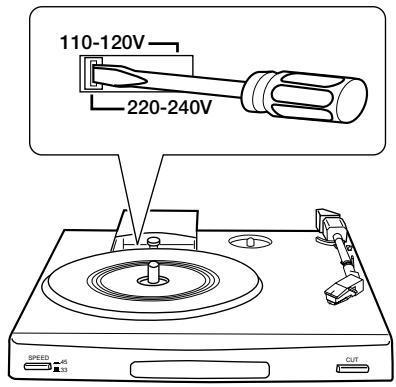
AC voltage selector switch
Move switch lever to match your line voltage with a small screwdriver or other pointed tool.
Safety precautions
WARNING: TO PREVENT FIRE OR ELECTRIC SHOCK, DO NOT EXPOSE THIS APPLIANCE TO RAIN OR MOISTURE.
| CAUTION
RISK OF ELECTRIC SHOCK
DO NOT OPEN | CAUTION: TO REDUCE THE RISK OF ELECTRIC SHOCK, DO NOT REMOVE THE COVER (OR BACK). NO USER-SERVICEABLE PARTS INSIDE, REFER SERVICING TO QUALIFIED SERVICE PERSONNEL. |
| THE LIGHTNING FLASH WITH ARROWHEAD SYMBOL, WITHIN AN EQUILATERAL TRIANGLE, IS INTENDED TO ALERT THE USER OF THE PRESENCE OF UNINSULATED "DANGEROUS VOLTAGE" WITHIN THE PRODUCT'S ENCLOSURE THAT MAY BE OF SUFFICIENT MAGNITUDE TO CONSTITUTE A RISK OF ELECTRIC SHOCK TO PERSONS. |
| THE EXCLAMATION MARK WITHIN AN EQUILATERAL TRIANGLE IS INTENDED TO ALERT THE USER OF THE PRESENCE OF IMPORTANT OPERATING AND MAINTENANCE (SERVICING) INSTRUCTIONS IN THE LITERA-TURE ACCOMPANYING THE APPLIANCE. |
P-110 (En)
Please read all of the safety and operating instructions before operating this appliance. Adhere to all warnings on the appliance and in the instruction manual. Follow all the safety and operating instructions. These safety and operating instructions should be retained for future reference.
- Power sources - The appliance should be connected to a power supply only of the type described in the instruction manual or as marked on the appliance. If you are not sure of the type of power supply to your home, consult your appliance dealer or local power company. For appliances intended to operate from battery power, or other sources, refer to the instruction manual.
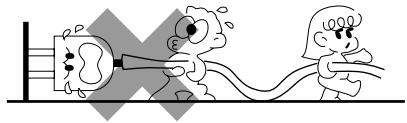
- Power-cord protection - Power-supply cords (AC adaptor) should be routed so that they are not likely to be walked on or pinched by items placed upon or against them, pay particular attention to cords at plugs, wall outlets, and the point where they exit from the appliance.
Never pull or stretch
the cord.
- CAUTION - Polarization - This appliance may be equipped with a polarized alternating-current line plug (a plug having one blade wider than the other). This plug will fit into the power outlet only one way. This is a safety future. If you are unable to insert the plug fully into the outlet, try reversing the plug. If the plug should still fail to fit, contact your electrician to replace your obsolete outlet. Do not defeat the safety purpose of the polarized plug.
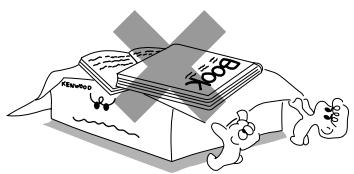
- Ventilation - Slots and openings in the cabinet are provided for ventilation and to ensure reliable operation of the appliance and to protect it from overheating, and these openings must not be blocked or covered. The appliance should be situated so that its location or position does not interfere with its proper ventilation. To maintain good ventilation, do not put records or a table-cloth on the appliance. Place the appliance at least 10cm away from the walls. Do not use the appliance on a bed, sofa, rug or similar surface that may block the ventilation openings. This appliance should not be placed in a built-in installation such as a bookcase or rack unless proper ventilation is provided or the manufacturer's instructions have been adhered to.
- Water and moisture - The appliance should not be used near water - for example, near a bathtub, washbowl, kitchen sink, laundry tub, in a wet basement, or near a swimming pool, etc.
- Temperature - The appliance may not function properly if used at extremely low, or freezing temperatures. The ideal ambient temperature is above +5Â (41UV).
-
Heat -The appliance should be situated away from heat sources such as radiators, heat registers, stoves, or other appliances (including amplifiers) that produce heat.
-
Electric shock - Care should be taken so that objects do not fall and liquid is not spilled into the enclosure through openings. If a metal object, such as a hair pin or a needle, comes into contact with the inside of this appliance, a dangerous electric shock may result. For families with children, never permit children to put anything, especially metal, inside this appliance.
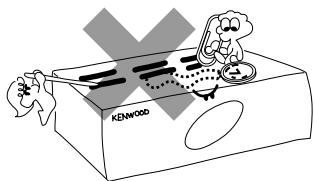
- Enclosure removal - Never remove the enclosure. If the internal parts are touched accidentally, a serious electric shock might occur.
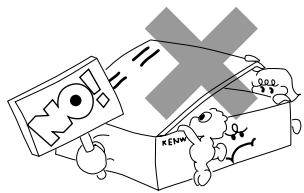
- Magnetic fields - Keep the appliance away from sources of magnetic fields such as TV sets, speaker systems, radios, motorized toys or magnetized objects.
- Cleaning - Unplug this appliance from the wall outlet before cleaning. Do not use volatile solvents such as alcohol, paint thinner, gasoline, or benzine, etc. to clean the cabinet. Use a clean dry cloth.
- Accessories - Do not place this appliance on an unstable cart, stand, tripod, bracket, or table. The appliance may fall, causing serious injury to a child or an adult, and serious damage to the appliance. Use only with a cart, stand, tripod, bracket, or table recommended by the manufacturer, or sold with the appliance. Any mounting of the appliance should follow the manufacturer's instructions, and should use a mounting accessory recommended by the manufacturer. An appliance and cart combination should be moved with care. Quick stops, excessive force, and uneven surfaces may cause the appliance and cart combination to overturn.

- Lightning - For added protection for this appliance during a lightning storm, or when it is left unattended and unused for long periods of time, unplug it from the wall outlet and disconnect the antenna or cable system. This will prevent damage to the appliance due to lightning and power-line surges.
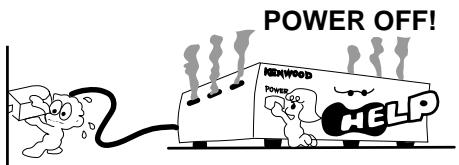
- Abnormal smell - If an abnormal smell or smoke is detected, immediately turn the power OFF and unplug the appliance from the wall outlet. Contact your dealer or nearest service center.
- Damage requiring service - The appliance should be serviced by qualified service personnel when:
A. The power-supply cord or the plug has been damaged.
B. Objects have fallen, or liquid has been spilled into the appliance.
C. The appliance has been exposed to rain or water.
D. The appliance does not appear to operate normally by following the instruction manual. Adjust only those controls that are covered by the instruction manual as an improper adjustment of other controls may result in damage and will often require extensive work by a qualified technician to restore the appliance to its normal operation.
E. The appliance has been dropped, or the enclosure damaged.
F. The appliance exhibits a marked change in performance.
- Servicing - The user should not attempt to service the appliance beyond that described in the instruction manual. All other servicing should be referred to qualified service personnel.
- Outdoor antenna grounding - If an outside antenna is connected to the appliance, be sure the antenna system is grounded so as to provide some protection against voltage surges and built up static charges. Article 810 of the National Electrical Code ANSI/ NFPA 70, provides information with respect to proper grounding of the mast and supporting structure, grounding of the lead-in wire to an antenna discharge unit, size of grounding conductors, location of antenna discharge unit, connection to grounding electrodes, and requirements for the grounding electrode. See Figure.
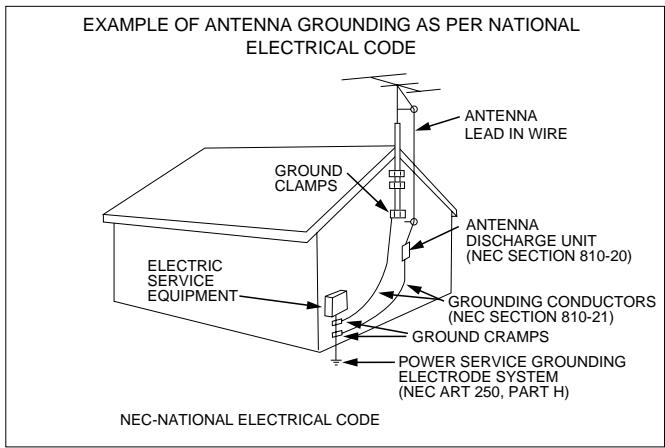
- Power lines - An outside antenna system should not be located in the vicinity of overhead power lines or other electric light or power circuits, or where it can fall into such power lines or circuits. When installing an outside antenna system, extreme care should be taken to keep from touching such power lines or circuits as contact with them might be fatal.
- Overloading - Do not overload wall outlets, extension cords, or integral convenience receptacles as this can result in a risk of fire or electric shock.
- Attachment - Do not use attachments not recommended by the appliance manufacturer as they may cause hazards.
- Replacement parts -When replacement parts are required, be sure the service technician has used replacement parts specified by the manufacturer or have the same characteristics as the original parts. Unauthorized substitutions may result in fire, electric shock, or other hazards.
- Safety check - Upon completion of any service or repairs to this appliance, ask the service technician to perform safety checks to determine that the appliance is in proper operating condition.
Notes:
- Item 3 is not required except for grounded or polarized equipment.
- Item 17 and 18 are not required except for units provided with antenna terminals.
- Item 17 complies with UL in the U.S.A.
Parts nomenclature and assembly
P-110 (En)
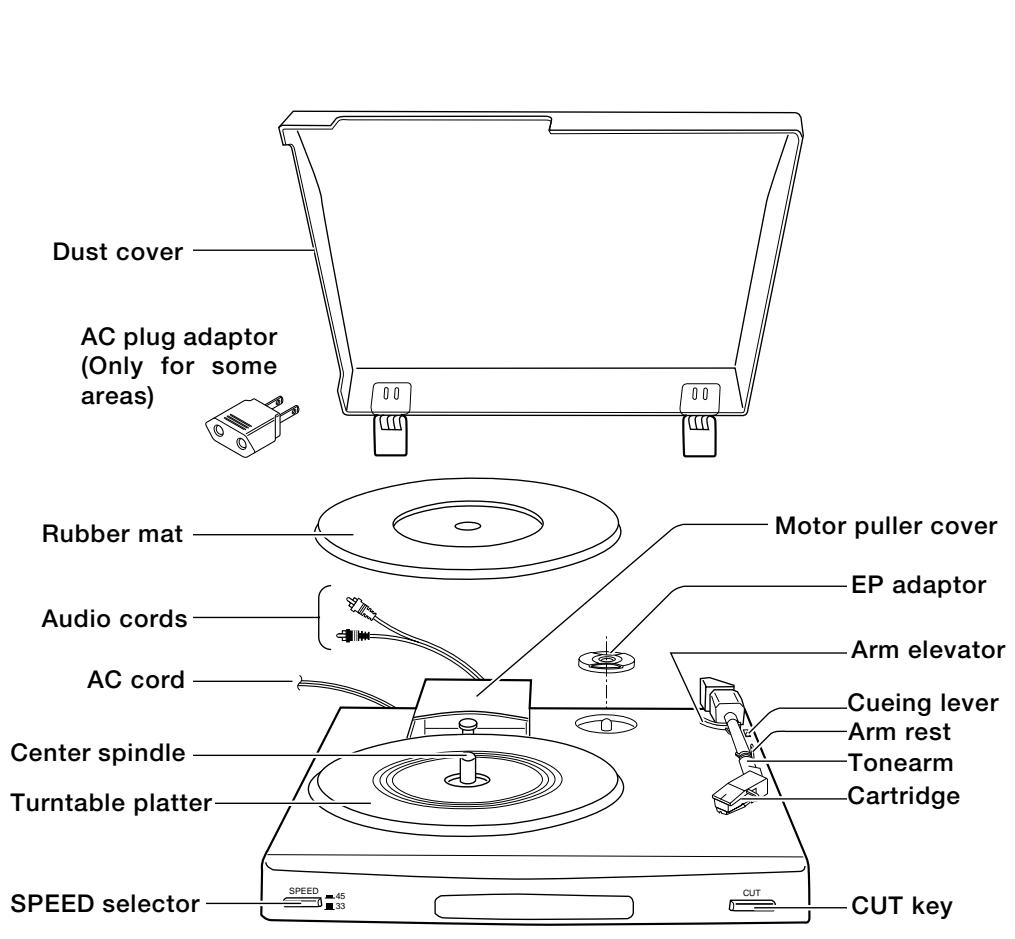
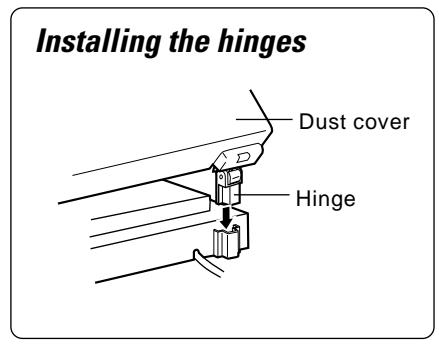
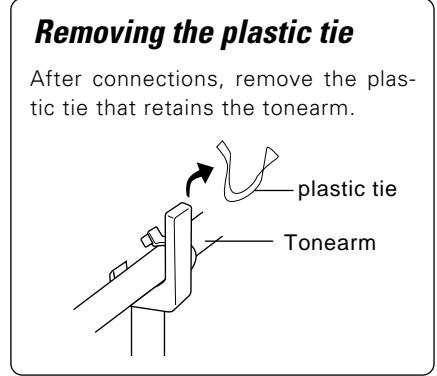
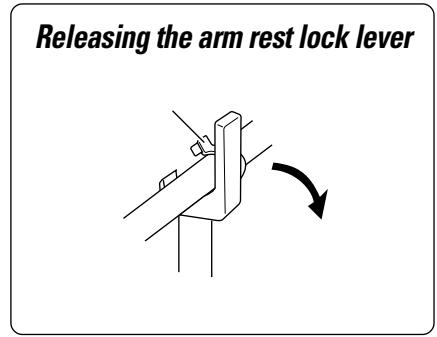
Verify that all of the following parts are present before carrying out the assembly procedures.
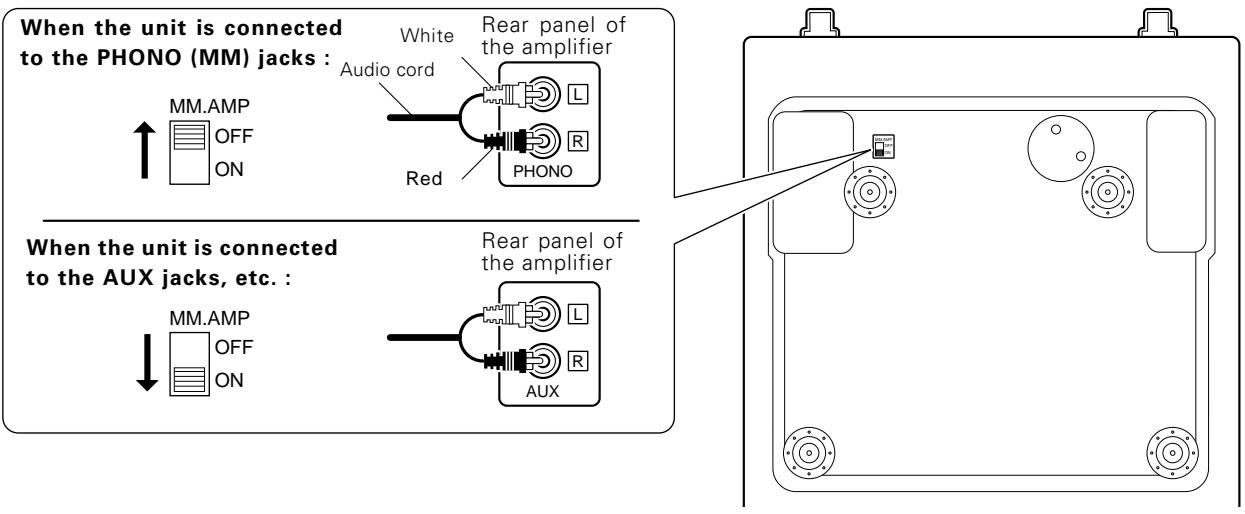
First, set the MM. AMP switch on the bottom according to the type of your amplifier. (Refer to "Connections" below.)
Connections
This until has a built-in RIAA equalizer amplifier, so it can be connected to an amplifier without PHONO (turntable) input jacks. According to the amplifier, set the MM.AMP switch on the bottom cover.
Caution:
Do not apply oil or lubrication to the motor, tonearm, or any of the turntable's mechanisms.
Do not plug in the power cord until all connections are completed.
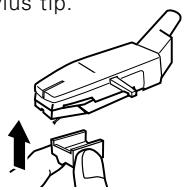
Using the stylus cover
Before operation, remove the stylus cover in the direction of the arrow
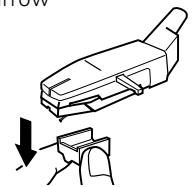
After record play, always put on the stylus cover to protect stylus tip.
Replacing the stylus
- Use an N-69 replacement stylus.
- Remove this unit's power cord from the AC outlet before replacing the stylus.
- One stylus is good for playing an LP record approximately 500 times.
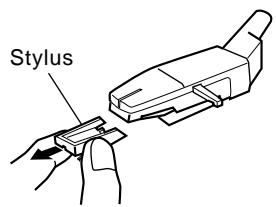
Remove the existing stylus as shown.
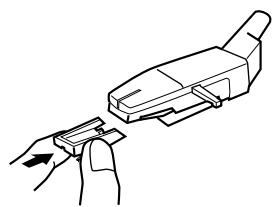
Install the new stylus as shown.
Operating instructions
Placing a record on the platter.

With an LP record
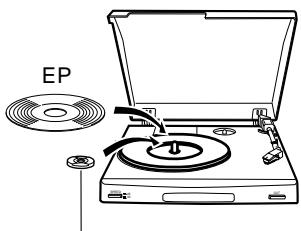
With an EP (single) record
EP adaptor
2 Select 33 or 45.
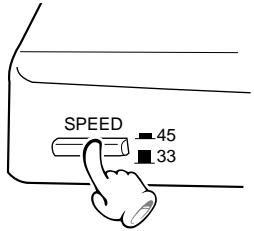

When playing 33 rpm record.

When playing 45 rpm record.
3 Tilt the cueing lever to the rear.
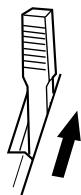
The arm elevator rises.
4 Playing the record.
(1) Pick up and move the tonearm to the position where you wish to begin listening.
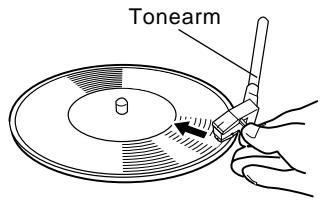
- The turntable platter begins rotating when the tonearm is moved over the record.
- It may happen that tonearm returns automatically to the arm rest before play start. If this occurs, repeat steps (1) and (2) again.
The tonearm is lowered on the record surface and playback starts.
To pause record playback
Tilt the cueing lever to the rear.
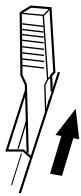
- To resume playback, set the cueing lever to front side.
(2) Tilt the cueing lever to the front.
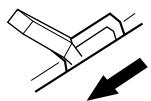
To stop record playback
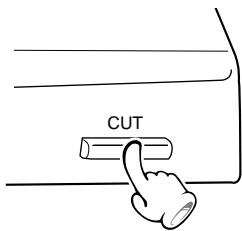
The tonearm automatically returns to the arm rest when playback is finished.
What appears to be a malfunction may not always be serious. If your unit should not perform as expected, consult the table below to see if the problem can be corrected before seeking help from your dealer or service representative.
| Symptom | Cause | Remedy |
| No sound from both left and right channels or one channel. | ·Turntable audio cable are not connected correctly. | ·Check connections to amplifier. |
| Loud hum, no music. | ·Poor connection of turntable audio cables. | ·Make solid connections to amplifier. |
| Howling drowns out music when volume is increased. | ·Speaker vibration picked up by turntable. | ·Separate turntable from speakers. |
| Turntable platter does not turn. | ·Poor AC plug contact.
·Turntable belt does not engage with the motor pulley. | ·Check connection. Make sure AC outlet is active.
·Engage the turntable belt with the motor pulley. |
| Poor tracking | ·Excessive dust on record or stylus.
·Stylus tip wear. | ·Remove dust from stylus or record.
·Replace the stylus. (Refer to “Replacing the stylus” on page 7.) |
| Sound is too low or distorted. | ·The MM.AMP ON/OFF switch under the turntable platter is not set correctly. | ·Set the switch correctly referring to “Connections”. |
Note:
Do not use contact cleaner because it could cause a malfunction. Be specially careful against contact cleaners containing oil, for they may deform the plastic components.
Specifications
Motor and turntable
Drive system Belt-drive system
Motor DC motor
Turntable platter 18.5 cm diameter
Speeds 2 speeds; 33-1/3 and 45 rpm.
Wow & flutter. 0.1% (WRMS)
S/N (rumble) 65 dB (DIN B)
Tonearm
Type Static balanced straight tonearm
Effective arm length 203 mm (8")
Cartridge
Type MM type
Stylus. N-69 with 0.6 mill diamond
Frequency response 20 Hz to 20 kHz
Output voltage 2.5 mV (1kHz, 3.54 cm/sec.)
Equalizer amplifier
Output voltage (MM. AMP ON) 250 mV (1kHz, 3.54 cm/sec.)
General
Power consumption 5 W
Dimensions. 280 mm (11")
H: 87 mm (3-7/16")
D:325mm(12-13/16")
Weight (net) 2.0 kg (4.4lb)
Note:
KENWOOD follows a policy of continuous advancements. For this reason specifications may be changed without notice.
KENWOOD
For your records
Record the serial number, found on the back panel of the unit, in the spaces designated on the warranty card, and in the space provided below. Refer to the model and serial numbers whenever you call upon your dealer for information or service on this product.
Model Serial Number