
NSPIRE CX CAS - Calculatrice graphique TEXAS INSTRUMENTS - Notice d'utilisation et mode d'emploi gratuit
Retrouvez gratuitement la notice de l'appareil NSPIRE CX CAS TEXAS INSTRUMENTS au format PDF.

| Type de produit | Calculatrice graphique |
| Marque | Texas Instruments |
| Modèle | Nspire CX CAS |
| Dimensions (L x l x H) | 200 x 83 x 26 mm |
| Poids (avec piles) | 368 g |
| Alimentation | 4 piles AAA ou batterie rechargeable Li-ion (optionnelle) |
| Écran | Écran couleur rétroéclairé, résolution 320x240 pixels |
| Processeur | ARM 150 MHz |
| Mémoire | 64 Mo RAM, 128 Mo de stockage flash |
| Système d'exploitation | TI-Nspire OS |
| Fonctions principales | Calcul formel (CAS), graphiques 2D/3D, tableur, géométrie dynamique, programmation Lua, suites statistiques |
| Connectivité | Port mini USB, port série (pour connexion entre calculatrices) |
| Applications intégrées | Notes, classeur, calculatrice, graphiques, géométrie, tableur, statistiques, sondes Vernier (compatibles) |
| Entretien et nettoyage | Utiliser un chiffon doux et sec. Ne pas utiliser de solvants ni de produits abrasifs. |
| Sécurité | Conserver à l'abri de l'humidité et des températures extrêmes. Ne pas démonter l'appareil. |
| Pièces détachées et réparabilité | Piles AAA, câble USB, logiciel TI-Nspire Computer Software (téléchargement gratuit). La batterie est non remplaçable par l'utilisateur (sur modèles avec batterie Li-ion). |
| Informations générales | Fabriqué en Chine. Garantie constructeur 1 an. Homologué pour les examens (SAT, ACT, IB, etc.). |
| Contenu de la boîte | Calculatrice, câble USB, guide de démarrage rapide, 4 piles AAA |
FOIRE AUX QUESTIONS - NSPIRE CX CAS TEXAS INSTRUMENTS
Questions des utilisateurs sur NSPIRE CX CAS TEXAS INSTRUMENTS
0 question sur cet appareil. Repondez a celles que vous connaissez ou posez la votre.
Poser une nouvelle question sur cet appareil
Téléchargez la notice de votre Calculatrice graphique au format PDF gratuitement ! Retrouvez votre notice NSPIRE CX CAS - TEXAS INSTRUMENTS et reprennez votre appareil électronique en main. Sur cette page sont publiés tous les documents nécessaires à l'utilisation de votre appareil NSPIRE CX CAS de la marque TEXAS INSTRUMENTS.
MODE D'EMPLOI NSPIRE CX CAS TEXAS INSTRUMENTS
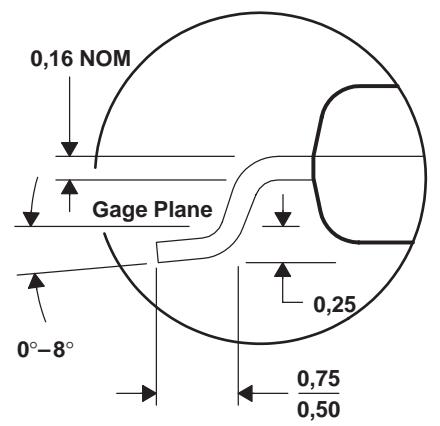
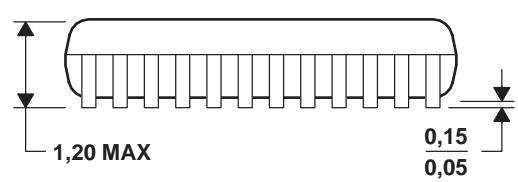
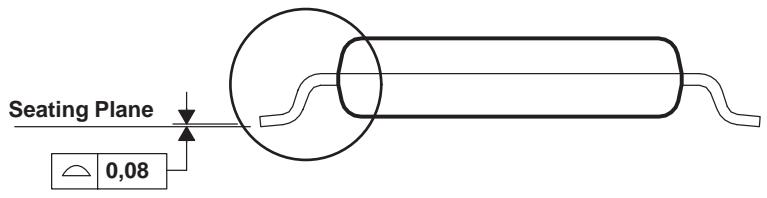
DGV (R-PDSO-G**)
24 PINS SHOWN
PLASTIC SMALL-OUTLINE
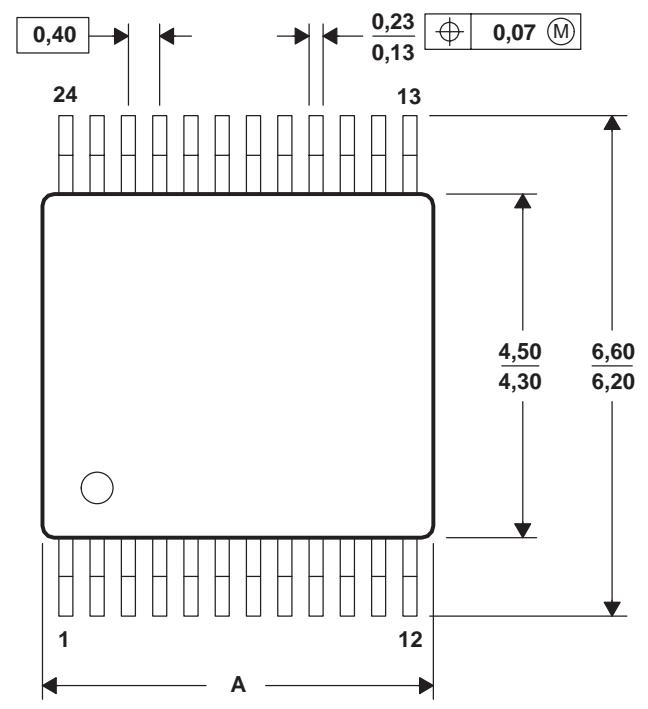
| PINS ** DIM | 14 | 16 | 20 | 24 | 38 | 48 | 56 |
| A MAX | 3,70 | 3,70 | 5,10 | 5,10 | 7,90 | 9,80 | 11,40 |
| A MIN | 3,50 | 3,50 | 4,90 | 4,90 | 7,70 | 9,60 | 11,20 |
4073251/E 08/00
NOTES: A. All linear dimensions are in millimeters.
B. This drawing is subject to change without notice.
C. Body dimensions do not include mold flash or protrusion, not to exceed 0,15 per side.
D. Falls within JEDEC: 24/48 Pins - MO-153
14/16/20/56 Pins - MO-194
IMPORTANT NOTICE
Texas Instruments and its subsidiaries (TI) reserve the right to make changes to their products or to discontinue any product or service without notice, and advise customers to obtain the latest version of relevant information to verify, before placing orders, that information being relied on is current and complete. All products are sold subject to the terms and conditions of sale supplied at the time of order acknowledgment, including those pertaining to warranty, patent infringement, and limitation of liability.
TI warrants performance of its semiconductor products to the specifications applicable at the time of sale in accordance with TI's standard warranty. Testing and other quality control techniques are utilized to the extent TI deems necessary to support this warranty. Specific testing of all parameters of each device is not necessarily performed, except those mandated by government requirements.
Customers are responsible for their applications using TI components.
In order to minimize risks associated with the customer's applications, adequate design and operating safeguards must be provided by the customer to minimize inherent or procedural hazards.
TI assumes no liability for applications assistance or customer product design. TI does not warrant or represent that any license, either express or implied, is granted under any patent right, copyright, mask work right, or other intellectual property right of TI covering or relating to any combination, machine, or process in which such semiconductor products or services might be or are used. TI's publication of information regarding any third party's products or services does not constitute TI's approval, warranty or endorsement thereof.
Copyright © 2000, Texas Instruments Incorporated