MP221 - Haut-parleurs EDIFIER - Notice d'utilisation et mode d'emploi gratuit
Retrouvez gratuitement la notice de l'appareil MP221 EDIFIER au format PDF.



| Type de produit | Haut-parleurs |
| Marque | Edifier |
| Modèle | MP221 |
| Dimensions (L x H x P) | 200 x 72 x 25 mm (sans support) |
| Poids | Env. 0,4 kg |
| Alimentation | DC 5V via port USB ou adaptateur secteur (optionnel) |
| Puissance de sortie | RMS 0,8 W x 2 (THD=10%, f=1 kHz) |
| Rapport signal/bruit (amplificateur) | ≥ 80 dBA |
| Distorsion (amplificateur) | THD+N < 0,5% |
| Impédance d'entrée | 10 kΩ |
| Sensibilité d'entrée | 250 ± 50 mV |
| Haut-parleur | 1,5 pouce (40 mm), blindé magnétiquement, 8 Ω |
| Type de contrôle du volume | Potentiomètre |
| Contenu de l'emballage | 1 haut-parleur (avec support), 1 câble USB-DC, 1 câble audio 3,5 mm, 1 manuel d'utilisation |
| Alimentation de secours | 4 piles AAA (non incluses) |
FOIRE AUX QUESTIONS - MP221 EDIFIER
Questions des utilisateurs sur MP221 EDIFIER
0 question sur cet appareil. Repondez a celles que vous connaissez ou posez la votre.
Poser une nouvelle question sur cet appareil
Téléchargez la notice de votre Haut-parleurs au format PDF gratuitement ! Retrouvez votre notice MP221 - EDIFIER et reprennez votre appareil électronique en main. Sur cette page sont publiés tous les documents nécessaires à l'utilisation de votre appareil MP221 de la marque EDIFIER.
MODE D'EMPLOI MP221 EDIFIER
Edifier
THE AUDIO ARTIST

MP221
Multimedia Speaker
User's Manual
Please read this manual carefully before operating the speaker system
Edifier
Introduction
Congratulations on the purchase of the Edifier MP221 speaker system. With the right care and attention, you can enjoy many years of high-quality stereo and audio performance.
Before operating the system, please read this manual fully to obtain the best results from your new product. The lightning flash with arrowhead inside the triangle, is intended to alert the user to the presence of un-insulated dangerous voltage within the product's enclosure that may be of a sufficient magnitude to constitute a risk of electric shock to persons.

CAUTION
RISK OF ELECTRIC SHOCK DO NOT OPEN

CAUTION TO PREVENT THE RISK OF ELECTRIC SHOCK,DO NOT REMOVE COVER (OR BACK).NO USER-SERVICEABLE PARTS INSIDE.REFER SERVICING TO QUALIFIED SERVICE PERSONNEL ONLY.
The exclamation point inside the triangle is intended to alert the user to the presence of important operating and maintenance (servicing) instructions in the literature accompanying the product.
SAFETY INSTRUCTIONS
Please read all the instructions herein. Please retain this manual safely for future reference. Please heed all safety warnings. Please install in accordance with the manufacturer's instructions. Please adjust the volume control to a comfortable level to avoid damaging your hearing and the system.
WARNING:
TO REDUCE THE RISK OF ELECTRIC SHOCK:
- Do not expose this apparatus to rain or moisture.
- Do not use the speakers near water, and do not immerse them in any liquid or pour any liquid on them.
- Do not block the openings in the speaker cabinets, never push objects into speaker vents or slots because of fire or electric shock hazards, and provide sufficient space around the speakers for proper ventilation.
- Do not install near any heat sources such as radiators, heaters, stoves, or other apparatus (including amplifiers) that produce heat.
- Do not defeat the safety purpose of the polarized plug. A polarized plug has two blades with one wider than the other. The wider blade is provided for your safety. If the provided plug does not fit into your outlet, consult an electrician for replacement of the obsolete outlet. Protect the power cord from being walked on or pinched particularly at plugs, convenience receptacles, and the point where they exit from the apparatus.
- Unplug this apparatus when unused for long periods of time.
- Place the speakers in a stable location so that it will not fall causing damage to the speakers or bodily harm.
- Unplug the speakers from the computer and from the electrical outlet before cleaning them with a damp cloth.
- For added protection during lightning storms, unplug the speakers from the electrical outlet and turn off the computer.
- Servicing is required when the apparatus has been damaged in any way, such as the power-supply cord or plug is damaged, liquid has been spilled or objects have fallen into the apparatus, the apparatus has been exposed to rain or moisture, does not operate normally, or has been dropped. Refer all servicing to qualified service personnel only.
Editor
Unpacking the Contents
Please check the model number marked on the gift box. Please contact the seller as soon as possible if you find the speaker to be the incorrect model or has sustained shipping damage.
MP221 packing list:
- 1 x Speaker (With stand)
- 1 x USB-DC converter cable
- 1 x Audio Cable with 3.5mm Stereo headphone plugs on each end
- 1 x User's Manual

USB-DC converter cable.

Audio Connecting Cable

Editor
Parts and function description
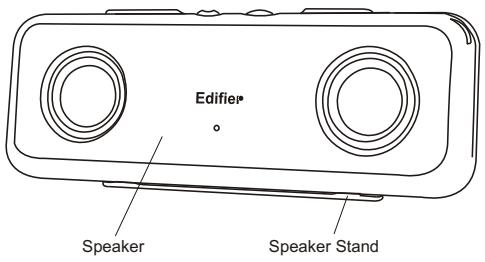
- Front and rear view of the speaker (figure a, b):
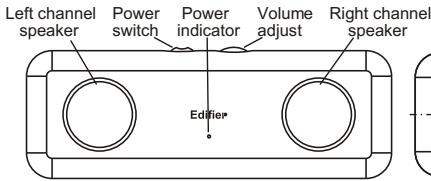
Figure a: Front View
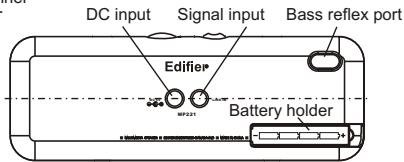
Figure b: Rear View
- Battery installation:
Follow the arrow mark to slide off the cover of battery holder and install four AAA batteries into the compartment. Make sure the polarity of batteries is correct, and then slide the cover back in place.
-
Stand installation:
-
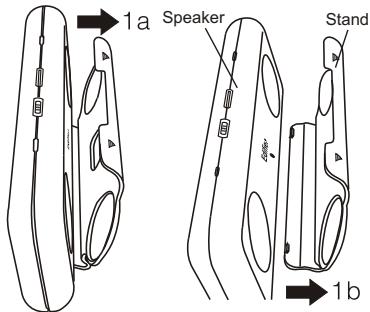
Remove the stand as shown in figure 1a and 1b;
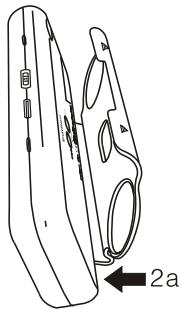
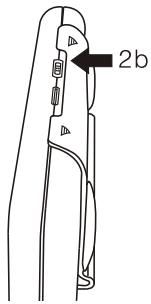
- Install the stand as shown in figure 2a and 2b.
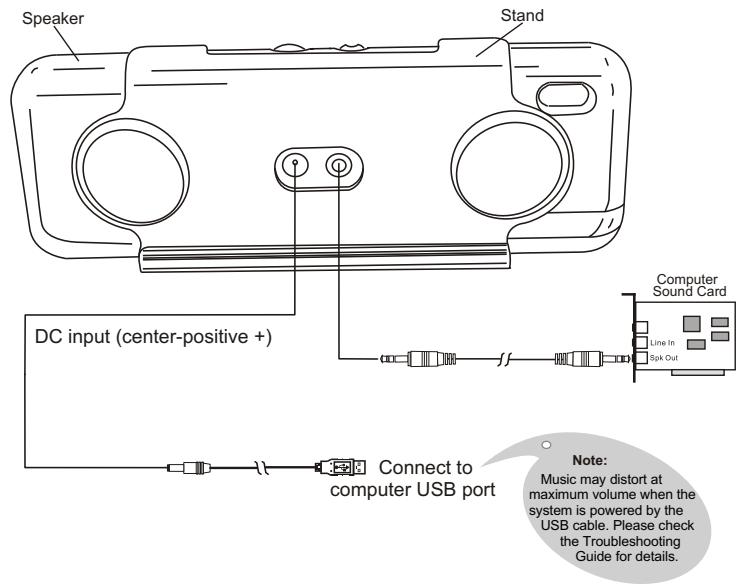
Speaker Connection Instructions
Operation illustration:
Editier
Specifications
Specifications:
Power output: RMS 0.8Wx2 (THD=10%, fo=1KHz)
Signal to noise ratio (Amplifier): ≥ 80dBA
Amplifier distortion: THD + N < 0.5%
Input impedance: 10K Ohm
Input sensitivity: 250 ± 50mV
Speaker driver: 1.5 inch (40mm), magnetically shielded, 8 Ohm.
Volume control type: Potentiometer
Power Input: DC 5V
Dimensions: 200(W)x72(H)x25(D) mm (not including speaker stand)
Weight: approx. 0.4kg
Edifier One Year Limited Warranty
Edfier warrants to the end user that all of its computer speaker systems are free from defects in materials and workmanship in the course of normal and reasonable use for a term of one year from the date of purchase.
This warranty is the exclusive and only warranty in effect relative to Edifier multimedia speaker systems and any other warranties, either expressed or implied, are invalid. Neither Edifier nor any authorized Edifier reseller is responsible for any incidental or consequential damages incurred in the use of the speakers. (This limitation of incidental or consequential damage is not applicable where prohibited.)
Edifier's obligation under this warranty does not apply to any defect, malfunction or failure as a result of misuse, abuse, improper installation, use with faulty or improper equipment, or the use of the speaker systems with any equipment for which they were not intended.
The terms of this warranty apply only to speaker systems when such speakers are returned to the respective authorized Edifier reseller where they were purchased.
Under the terms of this warranty, the original consumer purchaser has certain legal rights and may have other rights, which vary worldwide.
Notice
Edifier and the Edifier logo are owned by Edifier Enterprises Canada Inc. and may be registered. Other Brand names and trademarks are the property of their owners. Edifier assumes no responsibility for any errors that may appear in this manual. Information contained herein is subject to change without notice.
Editor
Troubleshooting Guide
- System does not function at all:
Check if the AC power adapter is plugged into a power outlet, which has been switched on. (AC power adapter is optional in some world markets).
Check if all speaker cable connections are correct.
Check if your external sound source equipment is working correctly.
Sound from only one driver:
- Check if all speaker cable connections are correct.
- Try an alternate sound source such as a CD player or an MP3 player, in case the original sound source is at fault.
-
Check if the computer soundcard is installed correctly.
-
When playing an audio CD from a computer, only one driver has sound:
This generally occurs with a new computer when only one driver works when playing an audio CD, but both speakers function correctly when running a WAV file or playing a game. The reason for this is that the CD-ROM does not match the soundcard, or one channel of the signal maybe shorted to a ground wire. Please refer to your computer's operational manual to adjust the CD-ROM connections.
- Music is distorted at maximum volume when the system is powered by the USB port of the computer:
This tends to happen as the USB port is unable to supply sufficient power for the speaker system. Please adjust the volume to a reasonable level, or please use a center-positive AC adapter with 5V D.C. output.
- Excessive noise from Speakers:
Edifier's speakers feature a very low noise circuit design. Your external sound source equipment may have a poor signal-to-noise ratio. Unplug the input audio cable, and check if the noise is from the CD/DVD player or the computer soundcard, etc.
- Magnetically Shielded Speakers:
Subwoofoers and satellites speakers of Edifier's product are magnetically shielded. You can place the speakers near a TV or monitor. Allow a 0.2-1 meter distance between the speakers and monitor to avoid possible magnetic field interference.
- If you have any further questions or concerns regarding Edifier Products:
Please visit our website at: www.edifier.com, or email Edifier Support for further assistance at: main@edifier.com
If you prefer, you may contact us via Toll Free: 1-877-EDIFIER (334-3437).
Copyright © 2006
All Rights Reserved.
Manual Edition 1.0, Mar. 2006
Printed in China
Editor
www.edifier.com
EDIFIER ENTERPRISES CANADA INC.
Made in China