
DOTORY - Thermomètre médical IBP - Notice d'utilisation et mode d'emploi gratuit
Retrouvez gratuitement la notice de l'appareil DOTORY IBP au format PDF.


| Marque | IBP |
| Modèle | DOTORY |
| Type de produit | Thermomètre médical infrarouge frontal |
| Méthode de mesure | Infrarouge sans contact |
| Plage de température | 20 °C à 42,2 °C (68,4 °F à 108,0 °F) |
| Précision | ± 0,2 °C (± 0,4 °F) entre 20 °C et 42,2 °C |
| Type d'affichage | LCD (affichage à cristaux liquides) |
| Économie d'énergie | Arrêt automatique après 1 minute d'inactivité |
| Alimentation | 1 pile lithium CR2032 (environ 6 000 mesures) |
| Dimensions (L x P x H) | 36 mm x 32 mm x 116 mm |
| Température de fonctionnement | 10 °C à 40 °C (50 °F à 104 °F) |
| Fonctions principales | Mesure de température frontale ou derrière le lobe de l'oreille, conversion °C/°F, mémorisation de la dernière mesure |
| Entretien et nettoyage | Nettoyer le capteur avec un coton-tige imbibé d'alcool ; l'extérieur avec un chiffon doux imbibé d'alcool ou d'eau ; ne pas immerger |
| Sécurité | Ne pas utiliser sur du tissu cicatriciel ou des plaies ouvertes ; tenir hors de portée des enfants ; retirer la pile en cas d'inutilisation prolongée |
| Pièces détachées et réparabilité | Pile CR2032 remplaçable ; en cas de panne, contacter le service après-vente |
| Garantie | 24 mois à compter de la date d'achat (hors piles) |
| Informations générales | Conforme à la directive européenne 93/42/CEE (MDD) |
FOIRE AUX QUESTIONS - DOTORY IBP
Questions des utilisateurs sur DOTORY IBP
0 question sur cet appareil. Repondez a celles que vous connaissez ou posez la votre.
Poser une nouvelle question sur cet appareil
Téléchargez la notice de votre Thermomètre médical au format PDF gratuitement ! Retrouvez votre notice DOTORY - IBP et reprennez votre appareil électronique en main. Sur cette page sont publiés tous les documents nécessaires à l'utilisation de votre appareil DOTORY de la marque IBP.
MODE D'EMPLOI DOTORY IBP
DOTORY
Digital Infrared Forehead Thermometer
Instruction manual
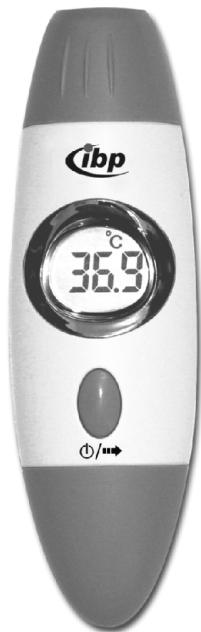
C
0120


- Use this product only for its intended purpose as described in this manual and read through the manual before initial use.
- The measurement by this product does not represent doctor's medical examination.
- Consult with doctors if any abnormality of found.
- Don't take temperature over scar tissue or opened sores.
- Must follow the safety instructions when used on an infant or neonate.
- Follow the cleaning instructions as described in this manual.
- Do not use this product if it is not working properly and ask to your service personnel.
- If this product will not be used regularly, remove the battery to prevent chemical leakage. If the battery leaks, never let bare skin touch leaking fluid and remove carefully.
- Dispose of used battery properly. Do not wrap it in metal or aluminum foil. Wrap it in newspaper before disposing it. Do not burn it. Battery may explode if overheated.
-
Examine the product periodically.
-
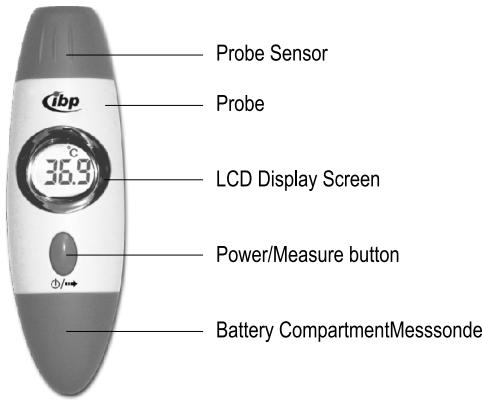
Press the Power/Measure button.
- The LCD is activated showing all symbols. Then latest measurement value is displayed for a second.
- When the ready symbol is displayed, thermometer is ready to measure.
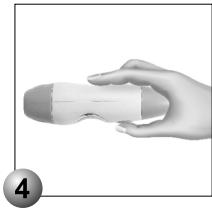
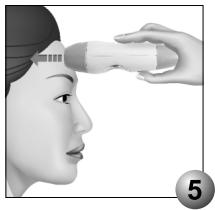
- Place the probe on the forehead and flat to the skin firmly. Depress the measure button throughout measurement.
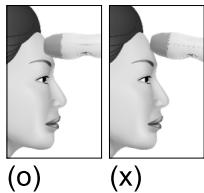
- Slowly slide the probe midline across the forehead to the hairline keeping the instrument flat and contact with skin. You should scan the forehead slowly, just like wiping the skin for 3~5 seconds. Measurement should be started from center of the forehead, paralleling probe to the eyebrows, to temporal side, not down the side of the face. The probe and the forehead should be at right angle to each other.
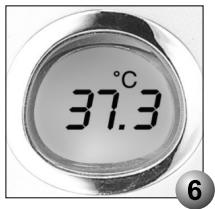
- You will hear beep sounds per 0.5 second throughout the measurement. The total measurement time takes 3 5 seconds. Then read the temperature on display.
Note:
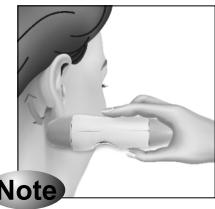
If there is perspiration on the forehead, take the temperature behind the ear lobe. Normally the artery behind the ear lobe does not provide a sufficiently accurate reading. However, in case of the falling of the temperature of skin due to sweating, taking the temperature behind the ear lobe may give a better result. Brush hair aside if covering the ear and waits about 30 seconds for more accurate measurement. Then gently nestle the DOTORY on neck directly behind ear lobe and scan through the arrow direction about 1 2cm (0.4 0.8 inch) as illustrated for 3-5 seconds.
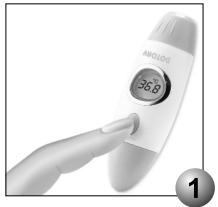
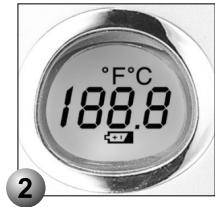
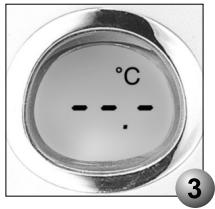
- Sensor in front of the probe is extremely sensitive part. For accurate measurement, always keep it clean and not damaged.
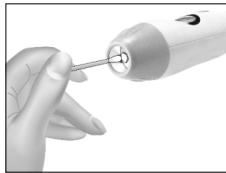
- Place the sensor facing the below to prevent any liquid dropped on the sensor. Carefully clean the sensor using cotton-stick with alcohol. After cleaning, allow at least one hour drying time for measurement.
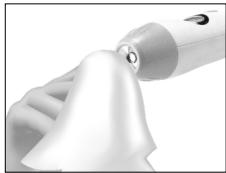
- The outside and probe of product should be cleaned with a soft cloth moistened in alcohol or water.
- Do not give excessive power upon the probe.
- Do not immerse the product in water or any other liquid.
- Keep the product away from straight sunlight, dust and contaminating substance.
- Keep the product in normal room temperature. The operating ambient temperature range for this thermometer is 10^ ( 50^ ) to 40^ ( 104^ )
- When placing the product out of the normal room temperature, use the product after keeping the product in normal room temperature for 30 minutes.
Q. Outside temperature is below 10i (50 ) or above 40^(104^)
A. Place the product where temperature is between 10^(50^) and 40^(104^)
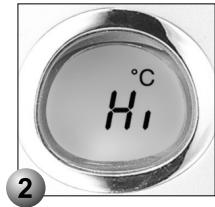
Q. Measured object is above 42.2^ (108.0^)
A. Recheck the measured object before measuring. (Extremely hot object cannot be measured)
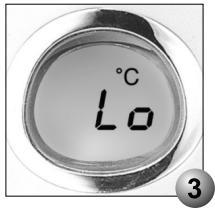
Q. Measured object is below 20^ (68.4^)
A. Recheck the measured object before measuring. (Extremely cold object cannot be measured)
Q. System Error
A1. Turn on after 1 minute of turn off.
A2. Take out the battery and place it again.
A3. Consult the nearest authorized dealer.
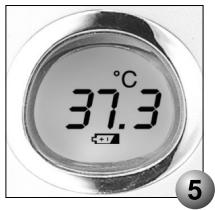
Q. Informing battery replacement time
A. Replace the battery.
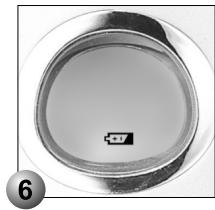
Q. Informing inactivity due to low battery
A. Replace the battery.
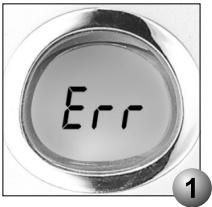

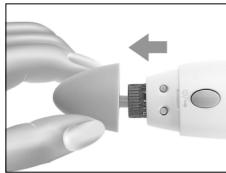
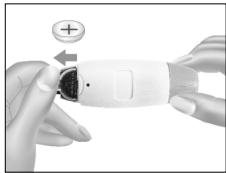
One lithium battery is installed in a product when produced. When 1 is displayed on LCD, replace the battery through following steps. Pull the battery compartment and pull the pin holding the battery in arrow direction. Place the new battery in shown " ^+ " mark. Close the battery compartment. Recycle the used battery to prevent pollution.
DISPOSAL AND ENVIRONMENTAL PROTECTION
Battery disposal / battery safety instructions
Do not dispose of used batteries in domestic waste, but instead in hazardous waste or take them to a battery collection site available at your retailer.
Battery safety instructions:

- Do not short-circuit battery
- Do not throw battery into fire—Explosion Hazard
Your retailer will answer additional questions regarding disposal
What does the designation on your product mean?
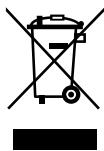
At the end of its life cycle, this product must not be disposed of in regular domestic waste, but must be taken to a collection site for recycling electric and electronic devices (disposal of used appliances).
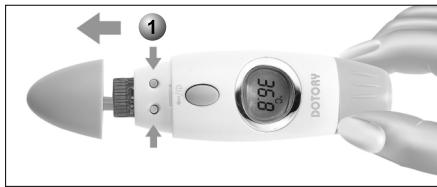
① TEMPERATURE UNIT CONVERSION (°C ↔ °F)
Push away the battery compartment and press the indicated button for a second. Then temperature unit will be converted.
PRODUCT SPECIFICATION
Items
Measurement method:
Temperature range:
Accuracy:
Display type:
Power save mode:
Battery:
Dimensions (WxDxH):
Operating temperature:
Standards:
Descriptions
Infrared measurement
20 (68.4) 42.2^108.0^
± 0.2^(± 0.4^):20 42.2^
(68.4~108.0°F)
LCD(Liquid Crystal Display)
Automatic shutdown after 1 minute
CR2032(1EA) about 6,000 readings
36mm x 32mm x 116mm
10 (50) 40^(104^)
EC directive 93/42/EEC(MDD)
Service Addresses
England:
International Business Products Limited
6 Newfield Court
West Houghton
Bolton BL5 3 SA England
Phone: +44 (0) 19 42 8196 95
India:
sano health care products pvt. Ltd. ibp -Group
Corporate Office: 28 Landsdown Terrace 1st Floor
Kolkata 700 026
Phone: +91 33 2465 0383-85
Warranty and Compensation for Damages
Starting with the purchase date (date on proof of purchase or receipt) we will perform repairs free of charge for 24 months, should your device be non-operational due to manufacturing or material defects. The warranty excludes damage resulting from non-compliance or only partial compliance with these instructions for use. Farther-reaching claims such as compensation for damages are likewise excluded. Please send your device in question as well as the proof of purchase or receipt and the description of the complaint to our service address. Please also attach the warranty documents if you would like to file a warranty claim. Batteries are excluded from the warranty.
- DOTORY
- Note:
- DISPOSAL AND ENVIRONMENTAL PROTECTION
- Battery disposal / battery safety instructions
- Battery safety instructions:
- What does the designation on your product mean?
- ① TEMPERATURE UNIT CONVERSION (°C ↔ °F)
- PRODUCT SPECIFICATION
- Items
- Descriptions
- Service Addresses
- Warranty and Compensation for Damages
Marque : IBP
Modèle : DOTORY
Catégorie : Thermomètre médical