
D800 - Montre CITIZEN WATCH - Notice d'utilisation et mode d'emploi gratuit
Retrouvez gratuitement la notice de l'appareil D800 CITIZEN WATCH au format PDF.

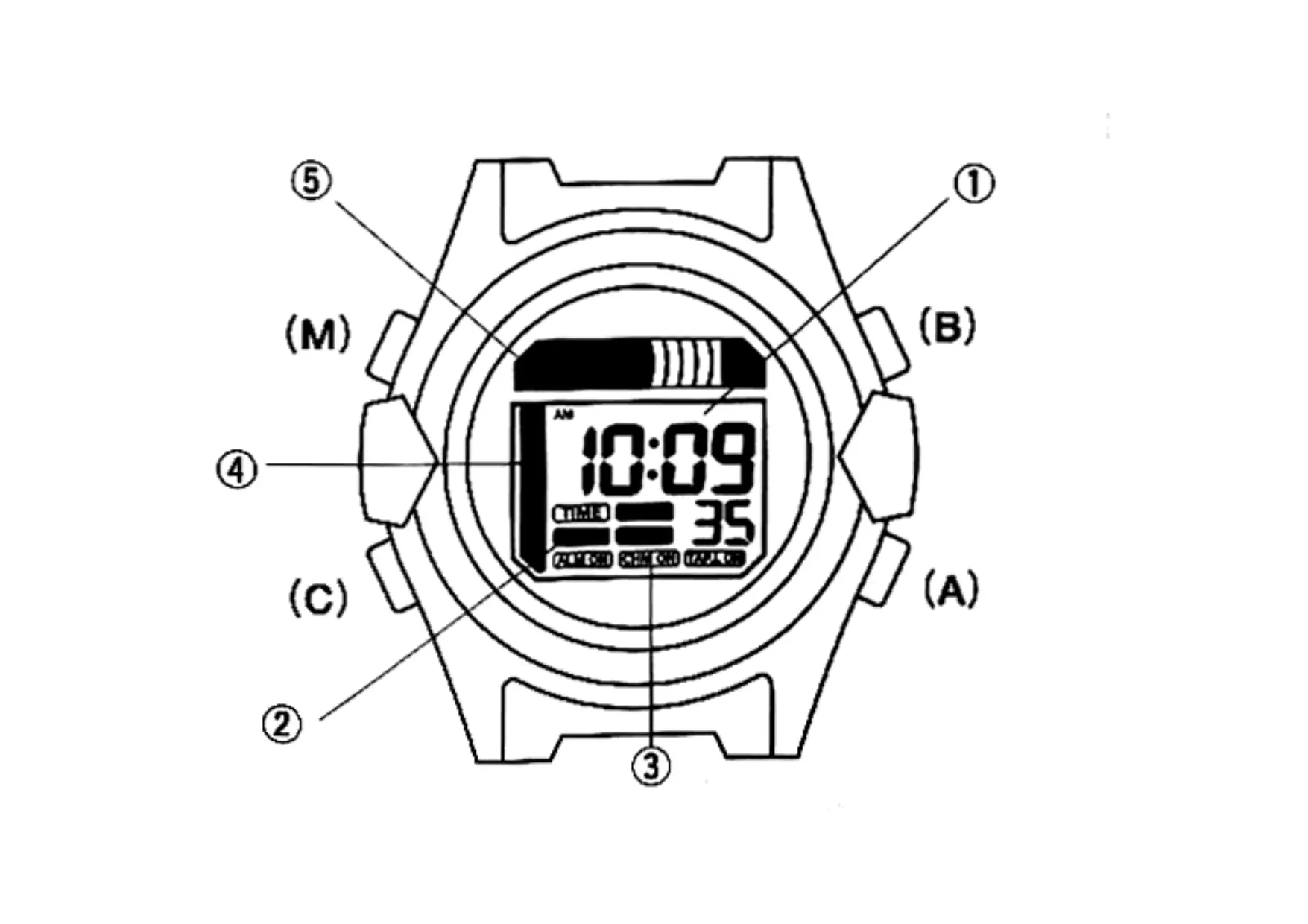
| Type de produit | Montre analogique |
|---|---|
| Caractéristiques techniques principales | Mouvement à quartz, affichage analogique, verre minéral |
| Alimentation électrique | Batterie au lithium |
| Dimensions approximatives | Largeur du boîtier : 40 mm, Épaisseur : 10 mm |
| Poids | Environ 100 g |
| Compatibilités | Bracelets de montre standard de 20 mm |
| Type de batterie | Type SR626SW |
| Tension | 1.55 V |
| Fonctions principales | Heure, minute, seconde, date |
| Entretien et nettoyage | Essuyer avec un chiffon doux, éviter les produits chimiques |
| Pièces détachées et réparabilité | Disponibilité de pièces de rechange pour la batterie et le bracelet |
| Sécurité | Résistance à l'eau jusqu'à 100 mètres |
| Informations générales utiles | Garantie de 2 ans, service après-vente disponible |
FOIRE AUX QUESTIONS - D800 CITIZEN WATCH
Questions des utilisateurs sur D800 CITIZEN WATCH
0 question sur cet appareil. Repondez a celles que vous connaissez ou posez la votre.
Poser une nouvelle question sur cet appareil
Téléchargez la notice de votre Montre au format PDF gratuitement ! Retrouvez votre notice D800 - CITIZEN WATCH et reprennez votre appareil électronique en main. Sur cette page sont publiés tous les documents nécessaires à l'utilisation de votre appareil D800 de la marque CITIZEN WATCH.
MODE D'EMPLOI D800 CITIZEN WATCH
CONTENTS
- Features 3
- Names and Functions of Components 4
- EL Internal Illumination Function 6
- Switching Functions (Modes) 8
- Setting the Time and Date 9
6.Using the Alarm 12 - Using the Chronograph 15
- Using the Body Board Timer 17
- All-Reset Procedure 21
- Precautions 22
- Specifications 28
1. Features
This watch is a digital quartz watch equipped with a body board timer function for use during body board competition in addition to time, calendar, alarm and chronograph modes.
In addition, it is equipped with a "tap light function" that illuminates an electroluminescence (EL) light when the watch is subjected to a gentle shock.
2. Names and Functions
of Components
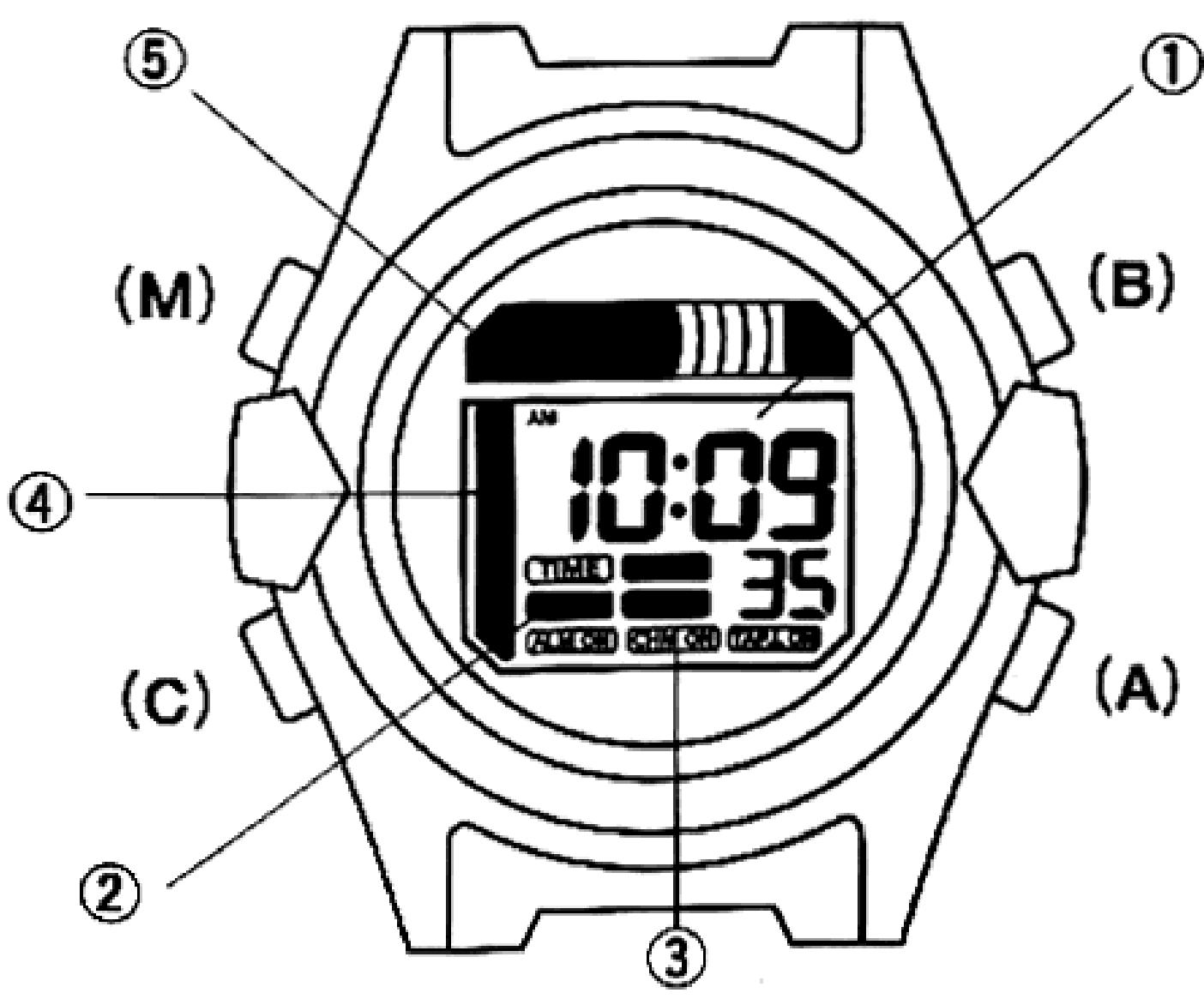
| Name | Time/Date | Alarm | |
| ①Mode display | Hours, minutes, seconds,AM/PM, month, date, day | Hours, minutes, AM/PM,OFF | |
| ②Mode mark display | TIME | ALARM | |
| ③Mode ON/OFF display | Displayed when alarm, chime or tap light is ON | ||
| ④Graphic display 1 | Graphic seconds (in 0.5 second increments) | —— | |
| ⑤Graphic display 2 | Graphic seconds (in 1 second increments) | —— | |
| AButton(A) | Normal state | Switching between time and date | Switching ON and OFF |
| Correction mode | Correcting time and date | Alarm time correction | |
| BButton(B) | When pressed for at least 1 second | To time/date correction state | —— |
| When pressed once | Changing location to be corrected | Changing location to be corrected | |
| CButton(C) | When pressed | EL illumination | EL illumination |
| MButton(M) | When pressed | To alarm mode | To chronograph mode |
| Chronograph | Body Board |
| Measured time | Remaining time display, set time |
| CHR | BB.TMR |
| Displayed when alarm, chime or tap light is ON | |
| Chronograph graphic seconds (in 0.5 second increments) | Graphic display of remaining amount of safe competition time |
| Chronograph graphic seconds (in 1 second increments) | Graphic display of remaining amount of precautionary competition time |
| Split time, reset | Timer setting, flyback |
| —— | —— |
| —— | —— |
| Start, stop | Start, stop |
| EL illumination | Switching between safe competition timer and precautionary competition timer |
| To body board mode | To time/date mode |
3. EL Internal Illumination Function
Electroluminescence, abbreviated as EL, refers to a phenomenon in which light is emitted by applying a voltage. This watch employs an EL substance in the panel as a means of emitting light.
[EL Illumination Method]
(1) Illumination method using the tap light switch (illuminating by applying a gentle shock to the watch)
*When the top (upper surface of the glass, etc.) of the watch is given a gentle tap with your fingernail when the tap light switch is ON, the EL light is illuminated for about 4 seconds. Refer to "5. Setting the Time and Date" for information on the procedure for switching the tap light switch on and off.
Notes:
*Do not tap the watch with metal objects or sharp objects. This can scratch or damage the glass.
*The tap light switch may have difficulty in being activated if the watch is worn too tightly on the wrist. Wear the watch on your wrist while allowing a little space between your wrist and the watch.
(2) Illumination method by pressing button(C)
*The EL light is illuminated by pressing button(C) regardless of whether the tap light switch is ON or OFF.
4. Switching Functions (Modes)
5. Setting the Time and Date
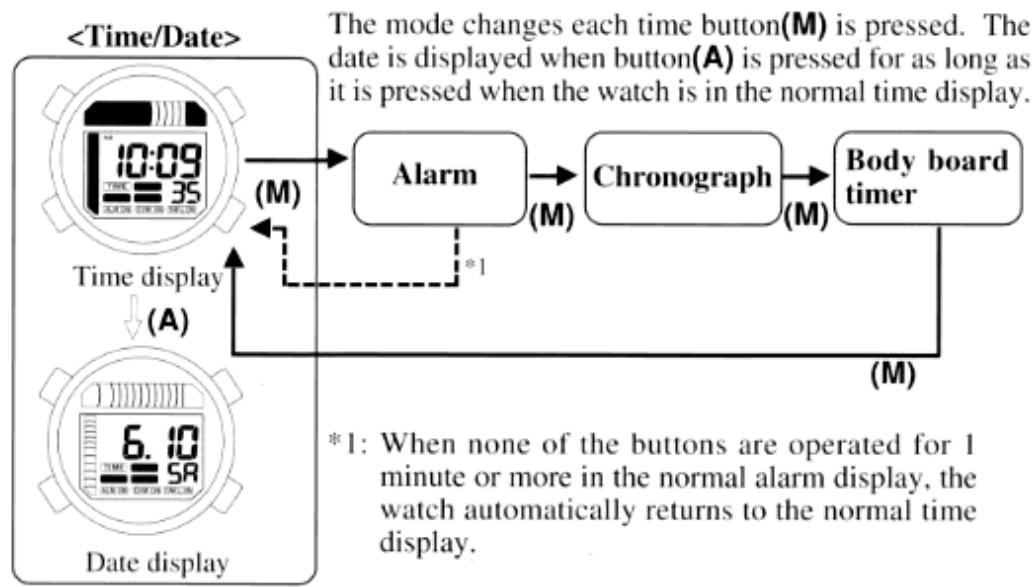
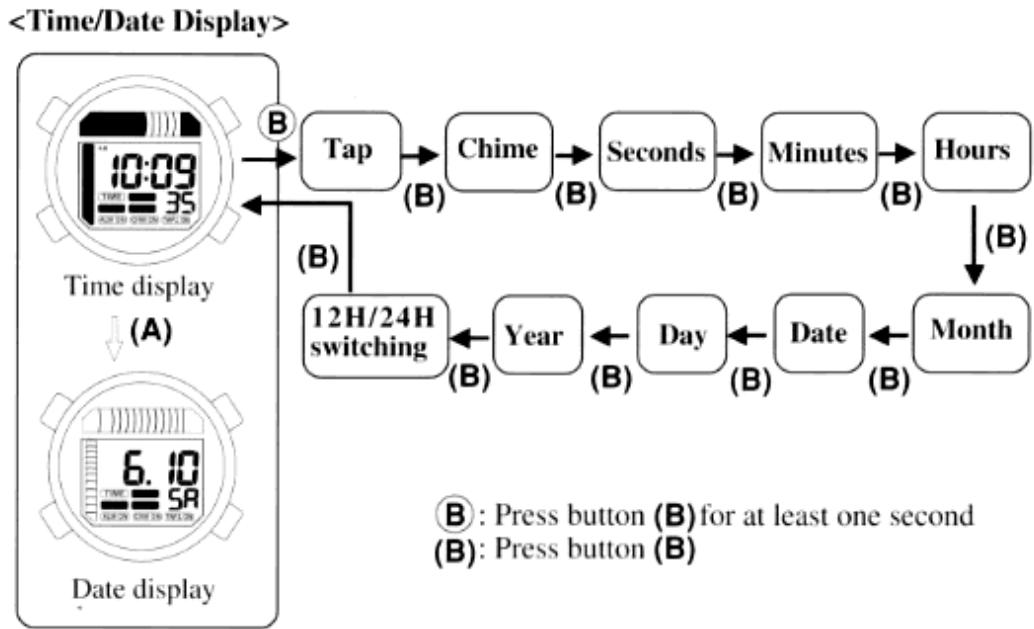
(1)Press button(M) to switch the watch to the time/date mode.
(2) When button(B) is pressed continuously for at least one second, the watch switches to the tap light switch ON/OFF correction state.
(3) When button(B) is pressed, the location to be corrected changes each time it is pressed, and that location begins to flash. Display the location to be corrected by pressing button(B).
*ON or OFF is displayed when the watch is in the tap light switch correction state, and the tap light switch mark "TA" begins to flash. When the tap light switch is set to ON, the tap light switch is turned on and the EL light is illuminated when a gentle shock is applied to the watch.
*ON or OFF is displayed when the watch is in the chime correction state, and the chime mark "CH" begins to flash. When the chime is set to ON, the chime sounds on the hour.
(4)Press button(A) to correct the location on the display that is flashing.
*When correcting seconds, pressing button(A) returns the seconds to zero. If button(A) is pressed between 30 and 59 seconds, the minutes advance by one minute.
*Pressing button(A) continuously in the minute, hour, month, date, day and year correction states causes the display to advance rapidly.
(5) When correcting 12H / 24H time, pressing button(B) returns the watch to the time/date display.
Pressing button(M) in any of the correction states forcibly returns the watch to the time/date display.
When none of the buttons are operated for one minute or more in any of the correction states, the watch automatically returns to the normal time display.
Notes:
When 12 hour time is displayed, pay attention to AM and PM when setting the time.
When the date is set to a date that does not exist during date correction (for example, February 30), the date will automatically be corrected to the first day of the next month when the watch is returned to the normal time display.
*The year can be corrected from 2000 to 2099.
6. Using the Alarm
[Switching the Alarm ON and OFF]
(1)Press button(M) to switch the watch to the alarm mode.
(2) When button(A) is pressed, a confirmation tone sounds each time it is pressed, and the alarm switches between ON (set time is displayed) and OFF.
*When the alarm is set to ON, the alarm will sound at the same time everyday until the alarm is canceled (set to OFF).
[Setting the Alarm]
(1)Press button(M) to switch the watch to the alarm mode.
(2) When button(B) is pressed, the watch is switched to the correction state, and the location to be corrected on the display switches between hours and minutes each time button(B) is pressed.
(3)Press button(A) to correct the hours or minutes.
*Pressing button(A) continuously causes the display to advance rapidly.
(4)After correcting the minutes, press button(B) to return the watch to the normal alarm state.
*Pressing button(M) in the correction state forcibly returns the watch to the normal alarm display (ON).
![CITIZEN WATCH D800 - [Setting the Alarm] - 1](/content/2025/01/176735/images/79a8a0fe058d96027e6ee857a528d4a3f3ea199fceef43502bb31f8b778be1f7.jpg)
Notes:
The watch automatically returns to the normal alarm display when none of the buttons are operated for at least one minute in either of the correction states.
Since the alarm time is also displayed in 12-hour time when the time display is displayed in 12-hour time, pay attention to AM and PM when setting the alarm time.
【Duration of Alarm Tone】
The alarm tone sounds for about 20 seconds when the watch reaches the set time.
【Stopping the Alarm Tone】
The alarm tone can be turned off when it is sounding by pressing any button.
【Alarm Tone Monitor】
Pressing button(A) for at least one second during the normal alarm display causes the alarm tone to sound for as long as it is pressed.
7. Using the Chronograph
The chronograph is able to measure time up to a maximum of 47 hours, 59 minutes, 59 seconds in 1/100th second units. After 48 hours have elapsed, the chronograph automatically returns to 00 seconds. When the duration of measured time is less than 60 minutes, the chronograph displays chronograph minutes, chronograph seconds and chronograph 1/100th seconds, and after measuring for 60 minutes, the display changes to display of chronograph hours, chronograph minutes and chronograph seconds.
【Chronograph Measuring Procedure】
(1)Press button(M) to switch the watch to the chronograph mode.
(2)The chronograph starts when button(B) is pressed.
*The chronograph is repeatedly started and stopped each time button(B) is pressed.
*Graphics are displayed during measurement.
(3)The chronograph switches to split time display when button(A) is pressed during measurement.
(4) Pressing button(A) while the chronograph is stopped returns the display to 00 seconds.
*A confirmation tone is sounded whenever button(A) or (B) is pressed.

*1: Automatically returns to 00 seconds after 48 hours.
18. Using the Body Board Timers
The body board timer allows setting of a competition time and precautionary time. This timer can be set from 99 minutes to 1 minute in 1 minute units.
The remaining time of safe competition is displayed on graphic display 1 (blue), while the remaining time of precautionary competition time is displayed on graphic display 2 (yellow).
[Body Board Competition Time Management and Flag Color]
![CITIZEN WATCH D800 - [Body Board Competition Time Management and Flag Color] - 1](/content/2025/01/176735/images/682a4ae39bcf9c1f93d975a086076d59db030aea4a5ca48e54a81cbc29961676.jpg)
[Setting the Body Board Timer]
Set the total competition time on the competition time timer, and the precautionary competition time on the precautionary time timer.
(1)Press button(M) to switch the watch to the body board timer mode.
- The set time and BU (Blue: flag color of safe competition time) flash.
(2) Pressing button(A) corrects the time in the negative direction in 1 minute increments each time it is pressed. Press button(A) to set the competition time.
*The competition time timer can be set from 99 minutes to 1 minute.
*Pressing button(A) continuously causes the display to advance rapidly.
(3) Pressing button (C) causes a confirmation tone to sound and the watch to switch to the precautionary time timer.
*The set time and YE (Yellow: flag color of precautionary competition time) is a flash.
(4) Pressing button(A) corrects the time in the negative direction in 1 minute increments each time it is pressed. Press button(A) to set the precautionary competition time.
*The precautionary time timer can be set from 20 minutes to 0 minutes. However, it must be set to at least one minute less than the set time of the competition time timer. If the precautionary time timer is set to 0 minutes, this means that the time on the competition time timer equals the safe competition time.
*Pressing button(A) continuously causes the display to advance rapidly.
[Body Board Timer Measurement Procedure]
(1) Pressing button(B) starts the timer from the set time (and the timer starts to count down).
Simultaneous to the timer starting, the set competition time and set precautionary time alternately flash on the watch.
While the time is still within the safe competition time, the time is displayed on a graphic display 1 (blue).
When the time reaches the precautionary competition time, the time is displayed on graphic display 2 (yellow).
A warning tone sounds when the remaining time of the competition time timer reaches 5, 3 and 1 minute as well as 30, 20, 10, 5, 4, 3, 2 and 1 second before the time set for the precautionary competition time.
*A warning tone does not sound when the time set for the precautionary competition time reaches 0 minutes.
(2) Pressing button(B) during timing stops the timer. Pressing button(B) again causes the timer to resume timing.
(3) Pressing button(A) while the timer is stopped causes the timer to return to the initial set time.
(4) Pressing button (A) during timing forces the timer to return to the initial set time (flyback) and resume timing from that point.
![CITIZEN WATCH D800 - [Body Board Timer Measurement Procedure] - 1](/content/2025/01/176735/images/e2f16023c9f9f6e517a701fb535ceafe4ede812f69d6f70c593012631010fd52.jpg)
9. All-Reset Procedure
Perform the all-reset procedure described below after replacing the battery or when the display or operation of the watch has become abnormal (such as the display not being shown or the alarm continuing to sound) as a result of the watch having been subjected to a strong impact. (1) When all four buttons(A), (B), (C) and (M) are pressed simultaneously for at least 2 seconds, the entire liquid crystal display goes out. (2)When any of the buttons are released, the entire display is shown. (3) When any of the buttons are pressed again, the all-reset procedure is performed and a confirmation tone sounds. (4)After competing the all-reset procedure, correctly reset the time, date and each mode before using the watch.10. Precautions
CAUTION: Water-resistance performance
There are several types of water-resistant watches, as shown in the following table. For correct use within the design limits of the watch, confirm the level of water-resistance of your watch, as indicated on the dial and case, and consult the table. * (The unit "bar" is roughly equal to 1 atmosphere.)| Indication | Specification | |
| Dial | Case back | |
| WATER RESIST or no indication | WATER RESIST (ANT) | Water-resistant to 3 atmospheres |
| WR 50 or WATER RESISTANT 50 | WATER RESIST (ANT) 5 bar or WATER RESIST (ANT) | Water-resistant to 5 atmospheres |
| WR 100/200 or WATER RESISTANT 100/200 | WATER RESIST (ANT) 10 bar/20 bar or WATER RESIST (ANT) | Water-resistant to 10/ 20 atmospheres |
| NO | NO | NO | NO |
| OK | NO | NO | NO |
| OK | OK | NO | NO |