
EMERGENCYLINK - Système de sécurité et de contrôle d'accès ASCOM - Notice d'utilisation et mode d'emploi gratuit
Retrouvez gratuitement la notice de l'appareil EMERGENCYLINK ASCOM au format PDF.


| Marque | ASCOM |
| Modèle | EMERGENCYLINK |
| Type de produit | Système de mobilisation d'urgence et de sécurité |
| Plateforme | Ascom openTAS (basée sur le web) |
| Fonctions principales | Activation d'alarmes via téléphone fixe, mobile (voix/SMS), pager et radio; plans de réponse personnalisables; gestion centralisée des données (MSTweb); conférence; identification sécurisée des abonnés; interface avec centres de commandement |
| Modes d'installation | Locale chez le client, en solution privée, en portail web, ou comme serveur d'alarme piloté par un tiers |
| Gestion des données | MSTweb : acquisition et gestion des données de mobilisation via Internet |
| Postes opérateur | Web clients dans le LAN/WAN |
| Niveaux d'alarme | Différenciation jour/nuit, jours ouvrables/jours fériés, alarme secondaire graduée |
| Modularité | Construction modulaire et évolutive |
| Sécurité | Identification sécurisée des abonnés par code; contrôle d'accès aux postes; journalisation des processus |
| Interfaces | ISDN, GSM (voix/SMS), pager, radio; interfaces supplémentaires sur demande |
| Suivi des alarmes | Surveillance continue du déploiement; confirmation de réception par code pour les abonnés ISDN et GSM |
| Entretien et nettoyage | Maintenance logicielle via mises à jour; nettoyage des postes opérateur selon les recommandations du fabricant |
| Pièces détachées et réparabilité | Évolutivité par modules; support technique ASCOM |
FOIRE AUX QUESTIONS - EMERGENCYLINK ASCOM
Questions des utilisateurs sur EMERGENCYLINK ASCOM
0 question sur cet appareil. Repondez a celles que vous connaissez ou posez la votre.
Poser une nouvelle question sur cet appareil
Téléchargez la notice de votre Système de sécurité et de contrôle d'accès au format PDF gratuitement ! Retrouvez votre notice EMERGENCYLINK - ASCOM et reprennez votre appareil électronique en main. Sur cette page sont publiés tous les documents nécessaires à l'utilisation de votre appareil EMERGENCYLINK de la marque ASCOM.
MODE D'EMPLOI EMERGENCYLINK ASCOM
EmergencyLink
THE RIGHT PEOPLE AT THE RIGHT TIME AND IN THE RIGHT PLACE, WHEREVER THAT HAPPENS TO BE.

^ 念 Image: Berufseuerwehr Bern
As a rule, catastrophes result from a chain of unfortunate circumstances. The aim here is to penetrate this series of events and it should come as no surprise that time is the essence. It is also clear that for certain events experts and special equipment have to be mobilised, the authorities have to be informed and the population warned.
The EmergencyLink based on Ascom openTAS mobilisation system is just the system to handle complex situations of this nature and break them down into transparent processes.

As the head of an emergency organisation you really appreciate it if, when an emergency occurs, the right people turn up at the right time and in the right place.
As safety officer you decide yourself the level of intervention that is needed – choosing between the enhanced alerting techniques: analog, ISDN, paging GSM and radio.
In the hectic command center you, as operator, appreciate the high level of user-friendliness provided by EmergencyLink: Quick choice of response plans, access security, access controls and logging guide you easily and safely through all the alarm processes.
As technical manager you appreciate the modular construction of EmergencyLink: innovations come into their own and the system can always be upgraded to take advantage of the latest technologies.
"If the worst comes to the worst – in critical and extreme situations – EmergencyLink will serve you well."

What is EmergencyLink?
EmergencyLink is a mobilisation system that utilises the latest web-based Ascom openTAS platform.
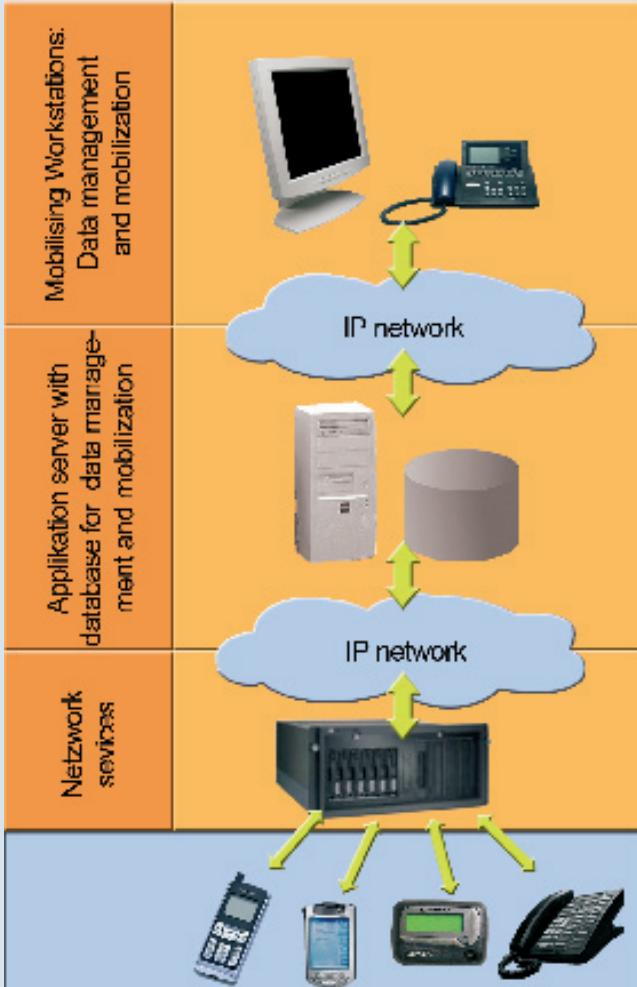
The Ascom openTAS platform architecture comprises 3 levels (see figure). The first level incorporates the operator workplaces for data management and mobilisation. The middle level comprises the application server with the oracle database for data management and mobilisation. The third level consists of the network entry points to the different communication networks.
Alarms are activated via the mobilising workstations which are installed in the LAN/WAN as web clients.
Data management is undertaken on the Data-management centre MSTweb. This Ascom application allows data acquisition via the internet directly at the individual organisations. The central MSTweb receives these updates, approves them and sends them to the higher-ranking organisation.

EmergencyLink uses response plans to trigger an alarm. These and the appropriate keywords are also recorded by the data management centre.
Should an incident occur, a few clicks of the mouse opens the correct response plan and just one more click alarms all the units that have to be deployed in parallel via the configured resources such as fixed network telephone, mobile phone (voice and/or SMS) plus pager and radio.
The dispatcher can see how many parties have been contacted and, if necessary, summon additional assistance.
"Thanks to increased availability, the potential of the response system can be better exploited and teams and on-call planning can be optimised."

EmergencyLink CAN BE INSTALLED IN THE FOLLOWING VARIANTS:
Installed locally with the customer
The servers for application, database and network services are installed on the customer's premises. The operator workstations are linked via LAN / WAN. This system can also be integrated in a command centre.
As a private portal solution:
The customer obtains the complete mobilisation solution as a service from Ascom. In this way, flexible service and financing models can be agreed with Ascom. The hardware and the sensitive data are installed in the customer's private IT environment.
Installed as a service in a web portal
Application server, database and network services can be installed in a web portal so that the operator of the portal can sell the services exclusively. The user must install an operator workplace with web access. Speech is transmitted using Voice over IP.
As an alarm server controlled by a third system
Only the lowest level (network services) is installed for this option. The alarm server provides an interface for third systems (e.g. command centres). Alarms can be activated via telephone, SMS and pager.

DATA ACQUISITION
MSTweb is used for the acquisition of the mobilisation data via the internet directly at the individual organisations. This can be done using Swisscom's public portal or via the customer's local installation.
ALARM FACILITIES
ISDN
GSM mobile phone
SMS short message service
Pager
Radio receiver
Additional interfaces if required by the customer
FEATURES
- Fixed and mobile activation units
- A click of the mouse alerts various alarm facilities simultaneously
- Subscribers, groups or companies (response procedures) can be alerted simultaneously
Conferencing - Secure subscriber identification using a code
Interface to the command centre systems
Web-based data management

YOUR ADDED VALUE AT A GLANCE
System modularity
- You only pay for the services you really need
The functional scope can be adapted to take account of requirements
Reducing operating costs
Efficient data capture / management system without media disruption
Multiple user server infrastructure
Intuitive operation - short instruction
Minimum initial costs
Flexible financing models
- Scalable construction
Flexible operation thanks to alarm response plans
Various rescue services
Different alarm levels
- Differentiation between day / night, workdays / public holidays
- Graded secondary alarm
Continuous deployment monitoring
- ISDN and GSM subscribers confirm they have received the alarm by means of a code
Easy to use
All processes are superimposed
- EmergencyLink
- What is EmergencyLink?
- Installed locally with the customer
- As a private portal solution:
- Installed as a service in a web portal
- As an alarm server controlled by a third system
- DATA ACQUISITION
- ALARM FACILITIES
- FEATURES
- YOUR ADDED VALUE AT A GLANCE
- System modularity
- Reducing operating costs
- Minimum initial costs
- Flexible operation thanks to alarm response plans
- Continuous deployment monitoring
Marque : ASCOM
Modèle : EMERGENCYLINK
Catégorie : Système de sécurité et de contrôle d'accès