
EMERGENCYLINK - Security and Access Control System ASCOM - Free user manual and instructions
Find the device manual for free EMERGENCYLINK ASCOM in PDF.


| Brand | ASCOM |
| Model | EMERGENCYLINK |
| Product Type | Emergency and Security Mobilization System |
| Platform | Ascom openTAS (web-based) |
| Main Functions | Alarm activation via landline, mobile (voice/SMS), pager and radio; customizable response plans; centralized data management (MSTweb); conferencing; secure subscriber identification; interface with command centers |
| Installation Modes | On-site at the customer, as a private solution, as a web portal, or as an alarm server operated by a third party |
| Data Management | MSTweb: acquisition and management of mobilization data via Internet |
| Operator Stations | Web clients in LAN/WAN |
| Alarm Levels | Day/night differentiation, working days/holidays, graduated secondary alarm |
| Modularity | Modular and scalable construction |
| Security | Secure subscriber identification by code; access control to stations; process logging |
| Interfaces | ISDN, GSM (voice/SMS), pager, radio; additional interfaces on request |
| Alarm Monitoring | Continuous monitoring of deployment; confirmation of receipt by code for ISDN and GSM subscribers |
| Maintenance and Cleaning | Software maintenance via updates; cleaning of operator stations according to manufacturer's recommendations |
| Spare Parts and Repairability | Scalability through modules; ASCOM technical support |
Frequently Asked Questions - EMERGENCYLINK ASCOM
User questions about EMERGENCYLINK ASCOM
0 question about this device. Answer the ones you know or ask your own.
Ask a new question about this device
Download the instructions for your Security and Access Control System in PDF format for free! Find your manual EMERGENCYLINK - ASCOM and take your electronic device back in hand. On this page are published all the documents necessary for the use of your device. EMERGENCYLINK by ASCOM.
USER MANUAL EMERGENCYLINK ASCOM
As a rule, catastrophes result from a chain of unfortunate circumstances. The aim here is to penetrate this series of events and it should come as no surprise that time is the essence. It is also clear that for certain events experts and special equipment have to be mobilised, the authorities have to be informed and the population warned.
The EmergencyLink based on Ascom openTAS mobilisation system is just the system to handle complex situations of this nature and break them down into transparent processes.

As the head of an emergency organisation you really appreciate it if, when an emergency occurs, the right people turn up at the right time and in the right place.
As safety officer you decide yourself the level of intervention that is needed – choosing between the enhanced alerting techniques: analog, ISDN, paging GSM and radio.
In the hectic command center you, as operator, appreciate the high level of user-friendliness provided by EmergencyLink: Quick choice of response plans, access security, access controls and logging guide you easily and safely through all the alarm processes.
As technical manager you appreciate the modular construction of EmergencyLink: innovations come into their own and the system can always be upgraded to take advantage of the latest technologies.
"If the worst comes to the worst – in critical and extreme situations – EmergencyLink will serve you well."

What is EmergencyLink?
EmergencyLink is a mobilisation system that utilises the latest web-based Ascom openTAS platform.
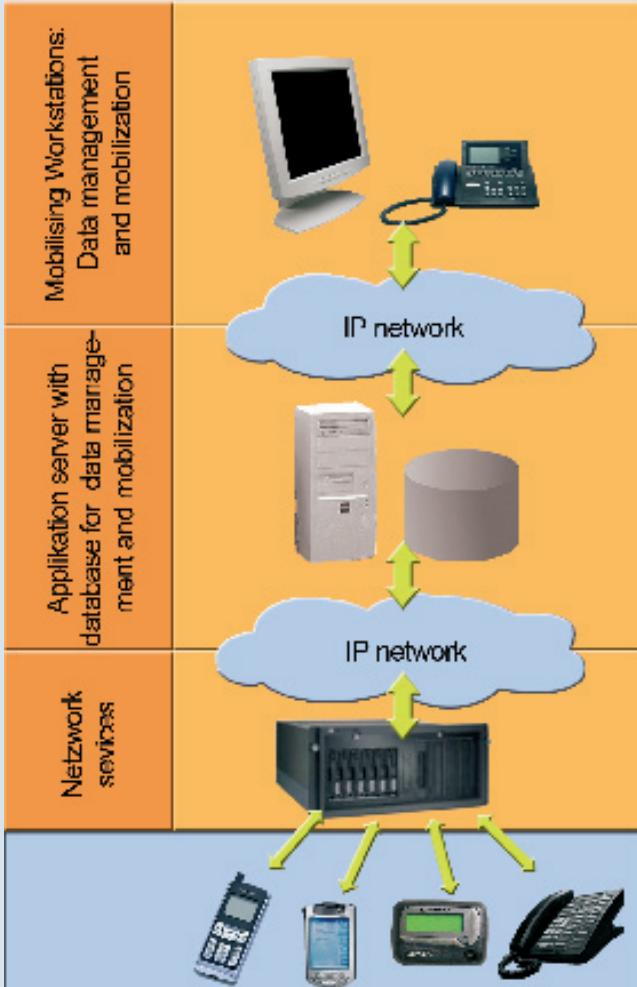
The Ascom openTAS platform architecture comprises 3 levels (see figure). The first level incorporates the operator workplaces for data management and mobilisation. The middle level comprises the application server with the oracle database for data management and mobilisation. The third level consists of the network entry points to the different communication networks.
Alarms are activated via the mobilising workstations which are installed in the LAN/WAN as web clients.
Data management is undertaken on the Data-management centre MSTweb. This Ascom application allows data acquisition via the internet directly at the individual organisations. The central MSTweb receives these updates, approves them and sends them to the higher-ranking organisation.

EmergencyLink uses response plans to trigger an alarm. These and the appropriate keywords are also recorded by the data management centre.
Should an incident occur, a few clicks of the mouse opens the correct response plan and just one more click alarms all the units that have to be deployed in parallel via the configured resources such as fixed network telephone, mobile phone (voice and/or SMS) plus pager and radio.
The dispatcher can see how many parties have been contacted and, if necessary, summon additional assistance.
"Thanks to increased availability, the potential of the response system can be better exploited and teams and on-call planning can be optimised."

EmergencyLink CAN BE INSTALLED IN THE FOLLOWING VARIANTS:
Installed locally with the customer
The servers for application, database and network services are installed on the customer's premises. The operator workstations are linked via LAN / WAN. This system can also be integrated in a command centre.
As a private portal solution:
The customer obtains the complete mobilisation solution as a service from Ascom. In this way, flexible service and financing models can be agreed with Ascom. The hardware and the sensitive data are installed in the customer's private IT environment.
Installed as a service in a web portal
Application server, database and network services can be installed in a web portal so that the operator of the portal can sell the services exclusively. The user must install an operator workplace with web access. Speech is transmitted using Voice over IP.
As an alarm server controlled by a third system
Only the lowest level (network services) is installed for this option. The alarm server provides an interface for third systems (e.g. command centres). Alarms can be activated via telephone, SMS and pager.

DATA ACQUISITION
MSTweb is used for the acquisition of the mobilisation data via the internet directly at the individual organisations. This can be done using Swisscom's public portal or via the customer's local installation.
ALARM FACILITIES
ISDN
GSM mobile phone
SMS short message service
Pager
Radio receiver
Additional interfaces if required by the customer
FEATURES
- Fixed and mobile activation units
- A click of the mouse alerts various alarm facilities simultaneously
- Subscribers, groups or companies (response procedures) can be alerted simultaneously
Conferencing - Secure subscriber identification using a code
Interface to the command centre systems
Web-based data management

YOUR ADDED VALUE AT A GLANCE
System modularity
- You only pay for the services you really need
The functional scope can be adapted to take account of requirements
Reducing operating costs
Efficient data capture / management system without media disruption
Multiple user server infrastructure
Intuitive operation - short instruction
Minimum initial costs
Flexible financing models
- Scalable construction
Flexible operation thanks to alarm response plans
Various rescue services
Different alarm levels
- Differentiation between day / night, workdays / public holidays
- Graded secondary alarm
Continuous deployment monitoring
- ISDN and GSM subscribers confirm they have received the alarm by means of a code
Easy to use
All processes are superimposed
- What is EmergencyLink?
- Installed locally with the customer
- As a private portal solution:
- Installed as a service in a web portal
- As an alarm server controlled by a third system
- DATA ACQUISITION
- ALARM FACILITIES
- FEATURES
- YOUR ADDED VALUE AT A GLANCE
- System modularity
- Reducing operating costs
- Minimum initial costs
- Flexible operation thanks to alarm response plans
- Continuous deployment monitoring
Brand : ASCOM
Model : EMERGENCYLINK
Category : Security and Access Control System