
ECS SAFETY - ASCOM - Free user manual and instructions
Find the device manual for free ECS SAFETY ASCOM in PDF.


| Brand | ASCOM |
| Model | ECS SAFETY |
| Product type | Emergency call management system |
| Technology | VoIP (Voice over IP) |
| Server | HP standard server with RAID 1 SCSI, redundant power supply, redundant hard drive |
| Operating system | Linux |
| Database | Oracle or MySQL |
| Operator stations (SOT) | IP Client and HTML Client, available in all-in-one PC with touch screen or standard PC with mouse and keyboard |
| Telephony interfaces | Analog, ISDN (BRI/PRI, DSS1/QSIG), GSM, PBX, VoIP |
| Radio interfaces | Analog radio (70cm/2m/4m), Polycom CH (in preparation), TETRA BOS 5.3/6.0 (in preparation) |
| Additional interfaces | Digital inputs/outputs (option), data interface to command system (option), external voice recording (PCM 30), webcam integration |
| Main functions | Emergency call management, queue with prioritization, call forwarding, hold, conference, speed dial, call list, caller identification (CLIP), group connections, automatic forwarding, call prioritization, voice recording, system electronic directory (local or online) |
| Radio dispatching functions | Push-to-talk, functional addressing, integrated radio dispatching station |
| Call recording | Integrated short-term recording, interface for external long-term recording |
| Call logging | Recording and archiving of all call data (CDR) |
| Configuration | Web-based configuration manager for additions and adjustments |
| Security | Hardware redundancy (power supply, hard drive), emergency call prioritization, interruption of lower priority calls |
| Maintenance and cleaning | Clean external surfaces with a soft, dry cloth. Internal maintenance must be carried out by qualified personnel. |
| Spare parts and repairability | Standard HP spare parts available. Modular and scalable system. |
| General information | Manufacturer: Ascom (Switzerland) Ltd, Belpstrasse 37, CH-3000 Bern 14, Switzerland. Scalable from small systems to national systems. Integrable into higher-level systems. |
Frequently Asked Questions - ECS SAFETY ASCOM
User questions about ECS SAFETY ASCOM
0 question about this device. Answer the ones you know or ask your own.
Ask a new question about this device
Download the instructions for your in PDF format for free! Find your manual ECS SAFETY - ASCOM and take your electronic device back in hand. On this page are published all the documents necessary for the use of your device. ECS SAFETY by ASCOM.
USER MANUAL ECS SAFETY ASCOM
ECS safety is the solution against the confusion of different devices.
The ECS safety emergency call management system combines all voice systems on a single platform and allows a user-friendly handling with an uniform graphical user interface.
The ECS safety emergency call management system connects incoming emergency calls (such as emergency call numbers from the public network, emergency call stations, radio systems, in-house telephone systems, intercom system and other communication systems) with the workstations operated by the relevant security organisation.
With the clear, uncluttered user interface of the ECS safety workstations the operator has complete control of even exceptional emergency situations.
ECS safety is based on modern Voice over IP (VoIP) technology and provider connections to analogue, digital (ISDN, GSM) communication networks and radio systems.
This allows you to handle voice and data services on new or existing installations with one and the same VoIP communication network.
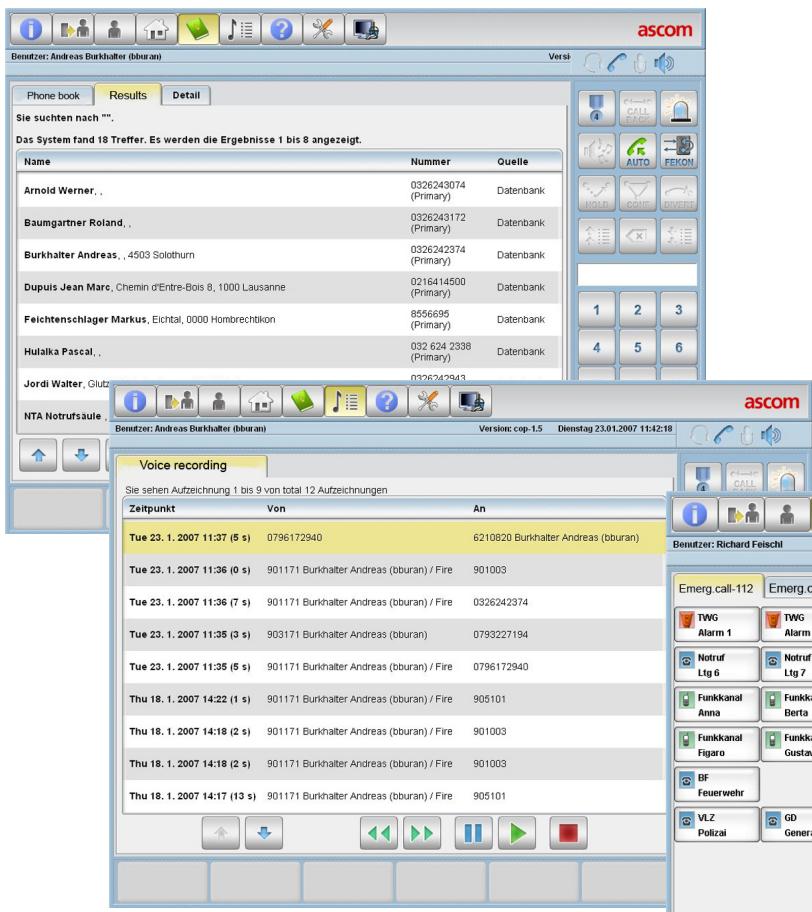
GUI examples:
Bottom right: Interface with call connections and incoming call
Middle: Short-term recording
Top left: Phone book
Safeguarded Investments
The system's cost-effectiveness is maximised by the consistent use of standards such as the choice of components and protocols.
ECS safety allows systems to be adapted at any time to changes in requirements, in keeping with users' specific needs.
The system can be expanded step by step. With its multitude of connection and integration possibilities ECS safety protects the original investments made in the previous installations and peripherals.
Integrated into Command and Control System
Clients of ECS safety can be integrated into a command and control system.
Standard System Services
ECS safety supports a multitude of telephony services such as call forwarding, hold and brokering, conference connections, radial, call list management, abbreviated dis- alling keys, caller identification (CLIP), group connections, automatic forwarding, call prioritisation, voice recording, to mention but a few.


Key advantages at a glance
- Increased efficiency and reduced stress through intuitive, user-friendly operation
- Compatibility with all conventional telecommunication networks
- Prompt integration of innovations
- Safeguarded investment through the use of forward-looking technology with interfaces to conventional, existing solutions
- Scalable, from small systems to nationwide systems
- Integratable into higher-order systems
- Cost-effective to implement thanks to the use of standard components and protocols
Dispatcher Station
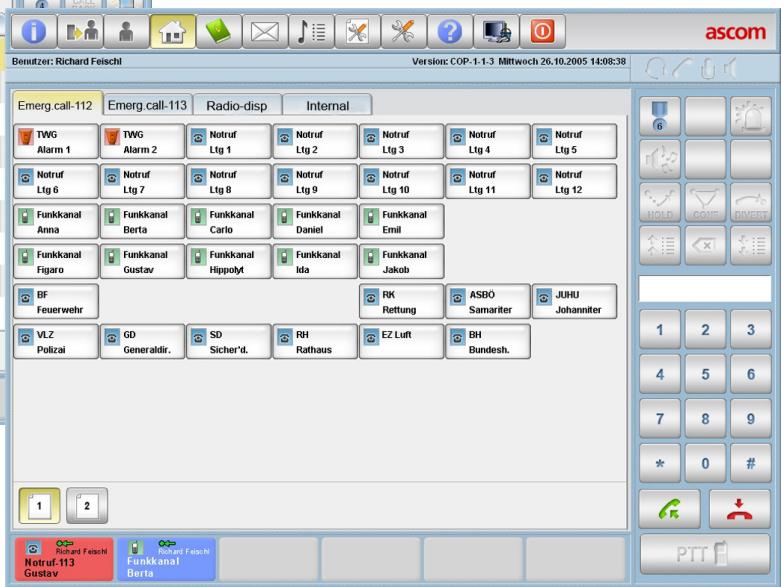
ECS safety provides a versatile user interface adapted to the user's need. Whatever the situation, the optimum GUI is generated by assigning user rights and predefined roles.
With the web-based Configuration Manager, add-ons and adjustments can be made at any time.
Radio Dispatching
An ECS safety workstation can be expanded into an adequate radio dispatcher workstation. Each telephone or radio set connected is able to communicate with any other communication set.
ECS safety implements relevant media-specific properties such as push-to-talk criterion and functional addressing.
The Operator Terminal
The operator terminal corresponds to an IP phone terminal with enhanced functions. It provides clear, uncluttered and intuitive handling of incoming calls, with GUI representation of queues and call priorities.
The terminal supports a various number of call and dial functions. The user interface displays a wide array of information such as text, tables, graphics and symbols. Each important status is visualised. Voice connections to call stations are established by clicking the station symbols.
Provision is made for automated speaker announcements, for internal and external calls, patching in information via FM radio, and selecting different displays of key areas.
Priority Queuing for Incoming Calls
ECS safety places incoming calls in a queue. Calls with a high priority are placed at the front of the queue. Incoming emergency calls are prioritised and can, if required, be made to interrupt lower-priority calls.
Call Data Logging
ECS safety records and archives all call data (Call Detail Records).
Call Recording
ECS safety provides a fully integrated short-term recording feature for workstation recording.
For long-term recording an interface is available for external voice recording systems.
Electronic Phone Book
A system-wide electronic phone book (local or online) provides operator support with search functions and direct dial options.

As an OPERATOR of an emergency call centre, you will certainly appreciate the fact that ECS safety is able to safeguard the investments you have made in the past in installations and peripherals with its flexibility of connection and integration possibilities.
The user interface tailored specifically to your requirements and the GUI display of queues and call priorities will help you, as the operator, to process each case efficiently and intuitively.
Technical Data
Server
An HP server with SCSI RAID 1 is used as the standard server. A different model can also be used if required.
- OS: Linux
- DB: Oracle or MySQL
- Redundant power supply
Redundant hard disk
Operator workstations (SOT):
- IP Client and HTML Client
Available as an all-in-one PC with touchscreen - or on a standard PC with mouse and keyboard
Interfaces:
Telephony (analogue, ISDN, GSM, PBX)
- ISDN telephony via BRI/PRI (DSS1 / QSIG protocol)
Voice-over-IP (VoIP)
- Analogue radio (70cm / 2m / 4m band)
- Polycom CH (in preparation)
- TETRA BOS 5.3 / 6.0 (in preparation)
- Digital I/Os (optional)
- Data interface to Command and Control system (optional)
Voice recording for external equipment (PCM 30)
Video: webcam integration
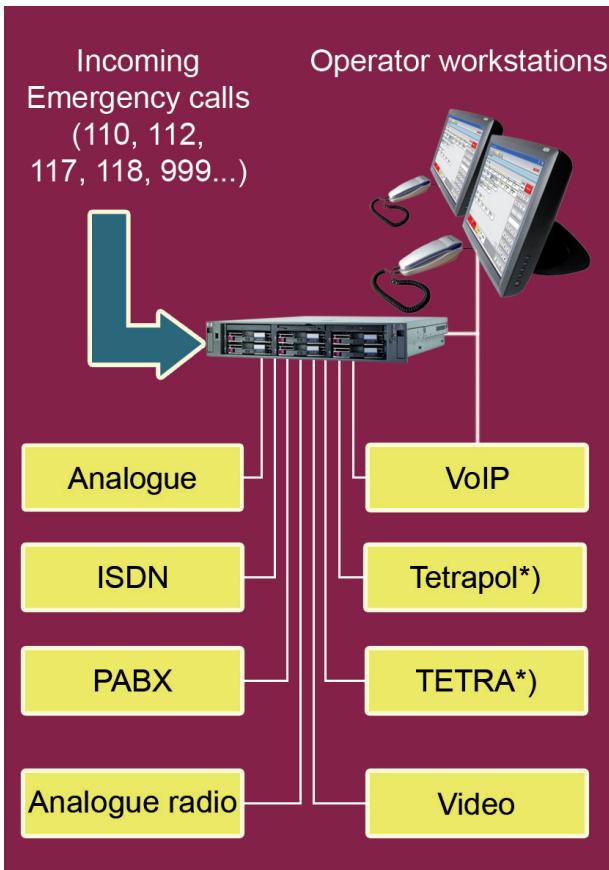
*) In preparation
Ascom (Switzerland) Ltd.
Belpstrasse 37
CH-3000 Bern 14 | Switzerland
Phone +41 31 999 21 11 | Fax +41 31 999 16 82
teleaction@ascom.ch
Ascom Austria Ges.mbH
Lemböckgasse 49
A-1230 Wien | Austria
Phone +43 1 811 77-0 | Fax +43 1 811 77-10
info@ascom.at
D-60388 Frankfurt am Main | Germany
Phone +49 6109 738 584 | Fax +49 6109 738 333
info@ascom.de
Ascom (Finland) Oy
Ensimmäinen Sayu
FIN-01510 Vantaa | Finland
Phone +358 9 825 901 | Fax +358 9 8259 0209
Ascom (CZ) s.r.o.
Zemské pravo 1199/5
CZ-102 00 Praha 10 | Czech Republic
Phone +420 267 219 518 | Fax +420 267 219 511
info@ascom.cz
Ascom Poland SP.z o.o.
ul. Farbiarska 71 A
PL-02-862 Warszawa | Poland
Phone +48 22 54 42 200 | Fax +48 22 54 42 205
ascom@ascom.com.pl
- Safeguarded Investments
- Integrated into Command and Control System
- Standard System Services
- Key advantages at a glance
- Dispatcher Station
- Radio Dispatching
- The Operator Terminal
- Priority Queuing for Incoming Calls
- Call Data Logging
- Call Recording
- Electronic Phone Book
- Technical Data
- Server
- Operator workstations (SOT):
- Interfaces:
Brand : ASCOM
Model : ECS SAFETY