
G12PS - Manette de jeu vidéo GENIUS - Notice d'utilisation et mode d'emploi gratuit
Retrouvez gratuitement la notice de l'appareil G12PS GENIUS au format PDF.


| Type d'appareil | Manette de jeu vidéo |
| Compatibilité | PlayStation 2 et PlayStation |
| Boutons directionnels | Oui |
| Nombre de boutons | 10 boutons de fonction |
| Boutons de réglage | 3 (SELECT / A / D / START) |
| Joystick analogique | Gauche et droit |
| Connecteur | Connecteur PlayStation standard |
| Mode analogique | Oui, avec boutons et sticks analogiques |
| Mode digital | Oui, tous les boutons fonctionnent numériquement |
| Fonction vibration | Oui, activable ou désactivable |
| Installation | Connexion directe au port console PlayStation |
| Matériau | Plastique robuste |
| Alimentation | Alimentation via la console |
| Dimensions | Non précisé |
| Poids | Non précisé |
| Couleur | Non précisé |
FOIRE AUX QUESTIONS - G12PS GENIUS
Questions des utilisateurs sur G12PS GENIUS
0 question sur cet appareil. Repondez a celles que vous connaissez ou posez la votre.
Poser une nouvelle question sur cet appareil
Téléchargez la notice de votre Manette de jeu vidéo au format PDF gratuitement ! Retrouvez votre notice G12PS - GENIUS et reprennez votre appareil électronique en main. Sur cette page sont publiés tous les documents nécessaires à l'utilisation de votre appareil G12PS de la marque GENIUS.
MODE D'EMPLOI G12PS GENIUS
Game Controller Introduction
Thank you for choosing the game controller. The game controller is compatible with PlayStation®2 and PlayStation®. You can use it with PlayStation®2 and PlayStation® format software. The game controller is a full ergonomic design and equipped with the function buttons in convenient positions to ensure you comfort when playing your favorite games.
Game Controller Features
- Directional Button
- 10 Function Buttons ANOXTM /L1/L2/L3/R1/R2/R3
- 3 Setting Buttons (SELECT/ A/D / START)
- Left / Right Analog Stick
- PlayStation® Standard connector
Game Controller Installation
- Plug-in your game controller's connector to the PlayStation2® or PlayStation® console port and make sure it is firmly connected.
- The game controller can be used with PlayStation®2 and PlayStation® format software.
- The game controller's function is according to the game software you are using. For details, refer to the game software manual.
Important
- Analog Mode: When the controller is in analog mode, the following buttons and sticks may be operated in analog fashion depending on the features supported by the software title. Refer to the game software manual for details.
PlayStation®2 format software
Directional buttons / ANOx buttons / left analog stick / right analog stick / L1, R1, L2, R2, L3, R3 buttons
PlayStation® format software
Left analog stick / right analog stick / L3, R3 buttons
- Digital Mode: When the controller is in digital mode, all function buttons are operated digitally, but the analog sticks will not work.
- Vibration function: The game controller features a vibration function when the function is available in the game software title. The vibration function can be set to ON or OFF on the game software option screen.
- You can switch to the appropriate mode for use. But some software makes this adjustment automatically. In such cases, the software overrides the A/D mode button. For details, refer to the game software manual.
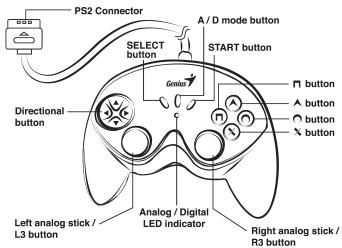
Top view
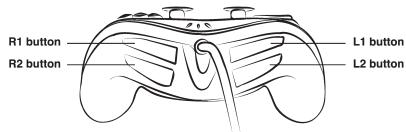
Front view