
G08XU - Manette de jeu vidéo GENIUS - Notice d'utilisation et mode d'emploi gratuit
Retrouvez gratuitement la notice de l'appareil G08XU GENIUS au format PDF.


| Type d'appareil | Manette de jeu vidéo |
| Nombre de boutons | 8 (y compris les gâchettes) |
| Type de croix directionnelle | 8 directions |
| Déclencheurs | 4 déclencheurs à réponse rapide |
| Interface de connexion | USB (Universal Serial Bus) |
| Compatibilité système | Windows XP/Me/2000/98 |
| Installation | Installation automatique via USB |
| Calibration | Calibration recommandée avant utilisation |
| Test de la manette | Possible via l'écran "Options de jeu" |
| Alimentation | Alimentation via USB |
| Dimensions | Non précisé |
| Poids | Non précisé |
| Matériau | Plastique durable |
| Couleur | Non précisé |
| Garantie | Non précisé |
| Utilisation recommandée | Jeux vidéo sur PC |
FOIRE AUX QUESTIONS - G08XU GENIUS
Questions des utilisateurs sur G08XU GENIUS
0 question sur cet appareil. Repondez a celles que vous connaissez ou posez la votre.
Poser une nouvelle question sur cet appareil
Téléchargez la notice de votre Manette de jeu vidéo au format PDF gratuitement ! Retrouvez votre notice G08XU - GENIUS et reprennez votre appareil électronique en main. Sur cette page sont publiés tous les documents nécessaires à l'utilisation de votre appareil G08XU de la marque GENIUS.
MODE D'EMPLOI G08XU GENIUS
Game Device Features
- Eight function buttons (including triggers)
- Eight-way D-pad
- Four quick-response action triggers
- USB (Universal Serial Bus) interface
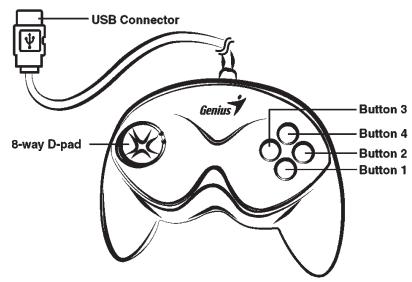
Top View
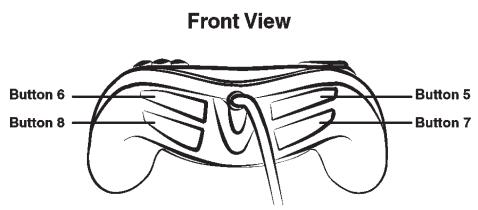
Game Device Installation
- Make sure your computer is on. Plug the game controller's USB connector into a USB port on the PC.
- Once you plug in the USB device, Windows XP/Me/2000 will detect it and install the driver automatically. (If you are using Windows 98, just follow the instructions on the screen to finish the installation).
- Click Start/Settings/Control Panel and double click on the "Game Controllers" or "Gaming Options" icon.
- In the "Game Controllers" or "Gaming Options" screen, you can calibrate and test your game controller before you play any game.
- When you finish the calibration and test, you can now play any game.
Important: In order to get the best effects when playing, we recommend you calibrate and test your game controller first. Especially if you reboot your PC or you re-plug in the game controller to your computer; we strongly suggest you calibrate and test your game controller again.
For more information or if you have any questions, please visit us through this Internet link
Website: http://www.geniusnet.com.tw
E-mail: csd02@email/geniusnet.com.tw