
IC-305 - Imprimante multifonction KONICA - Notice d'utilisation et mode d'emploi gratuit
Retrouvez gratuitement la notice de l'appareil IC-305 KONICA au format PDF.


| Type de produit | Contrôleur d'image externe pour imprimantes multifonctions |
| Processeur | Intel Core 2 Duo à 2,13 GHz |
| Mémoire RAM | 1 Go haute vitesse |
| Disque dur | 160 Go SATA |
| Lecteur optique | CD/DVD R/W |
| Système d'exploitation | Windows XP Embedded SP2 |
| Logiciel intégré | Fiery System 8 Release 2 |
| Ports USB | 2 ports USB |
| Formats de fichiers pris en charge | Adobe PostScript Level 1-3, Adobe PDF 1.4-1.7, PDF/X, EPS, TIFF, TIFF/IT, JPEG, PPML, Fiery FreeForm, VPS |
| Environnements clients | Windows 2000/XP/Vista, Mac OS X ou supérieur |
| Gestion des couleurs | Fiery ColorWise Pro Tools, Color Editor, Profile Manager, Spot-On |
| Interface utilisateur | Fiery Command WorkStation (WYSIWYG) |
| Fonctions avancées de gestion des travaux | Impression rapide, planification, suspension sur non-correspondance, réorganisation des travaux, Quick Doc Merge |
| Options disponibles | Fiery Graphic Arts Package Premium Edition, EFI Color Profiler Suite, EFI Compose, EFI Impose |
| Entretien et nettoyage | Nettoyer l'extérieur avec un chiffon non pelucheux. Débrancher avant nettoyage. |
| Sécurité | Équipement conçu pour une utilisation en intérieur. Respecter les consignes électriques. |
| Pièces détachées et réparabilité | Contactez un revendeur agréé pour les réparations. |
| Informations générales | Contrôleur d'image externe pour les modèles bizhub PRO C5501, C6501, C6501e/eP et C65hc. |
FOIRE AUX QUESTIONS - IC-305 KONICA
Questions des utilisateurs sur IC-305 KONICA
0 question sur cet appareil. Repondez a celles que vous connaissez ou posez la votre.
Poser une nouvelle question sur cet appareil
Téléchargez la notice de votre Imprimante multifonction au format PDF gratuitement ! Retrouvez votre notice IC-305 - KONICA et reprennez votre appareil électronique en main. Sur cette page sont publiés tous les documents nécessaires à l'utilisation de votre appareil IC-305 de la marque KONICA.
MODE D'EMPLOI IC-305 KONICA

IC-305 – Designed for productive performance
Powerful printing performance, innovative features and flexible operations: The EFI IC-305 external image controller and Konica Minolta's colour and finishing artistebizhub PRO C5501,bizhub PRO C6501,bizhub PRO C6501e/eP andbizhub PRO C65hc form an unrivalled combination of state-of-the-art technologies designed to meet the performance-driven requirements of reprographic departments and print-for-pay shops. Their quality, flexibility, reliability and ease of operation make them an ideal choice for demanding users in professional production environments.

Basics
By combining the IC-305 controller with the bizhub PRO C5501, bizhub PRO C6501, bizhub PRO C6501e/eP and bizhub PRO C65hc you can take full advantage of the brilliant results and optimised workflow solutions offered by enhanced full-colour digital printing. Outstanding print quality, media flexibility, various in-line finishing options are only some of the features you will benefit from.
The intuitive user interface is simple to operate
The powerful software optimises workflow control
Superior colours with the ColorWise management system
Accurate spot colour reproduction with Spot-On
Exceptionally fast Variable Data Printing support

Highlights
Simplifies Complex Tasks
The intuitive WYSIWYG interface from the EFI Command WorkStation, simplifies complex jobs, regardless of the operator's skill level. It automates workflow and centralizes the management of all print jobs. Users can monitor, control and troubleshoot from Fiery servers locally or from multiple desktops simultaneously in Windows and Macintosh environments.
Precise Colour
Achieving high-quality colour is critical in many businesses. EFI Fiery ColorWise produces precise, consistent colour for any document. For extreme colour requirements, the optional Fiery Graphic Arts Packages group together expert tools for managing colour, proofing, and controlling workflow. The optional EFI Colour Profiler Suite successfully creates, visualizes, tests and edits color profiles with a single profiling solution.

Features
Fiery Command WorkStation for total workflow control in a local or remote clients
Fiery ColorWise Pro Tools enable in-RIP total colour management
Colour Editor and Profile Manager enable you to download and manage ICC profiles, simulations, and device profiles and customize ICC profiles and colour curves
The Fiery Print Calibrator provides a simple interface to basic and advanced calibration methods
Fiery Spot-On to automatically match PANTONE, RGB, CMYK, lab, and spot colour, even when they are mixed on the same page
Advanced Job Management includes production automation features such as Rush Printing, Schedule Print, Suspend on Mismatch, and Job Reorder Quick Doc Merge
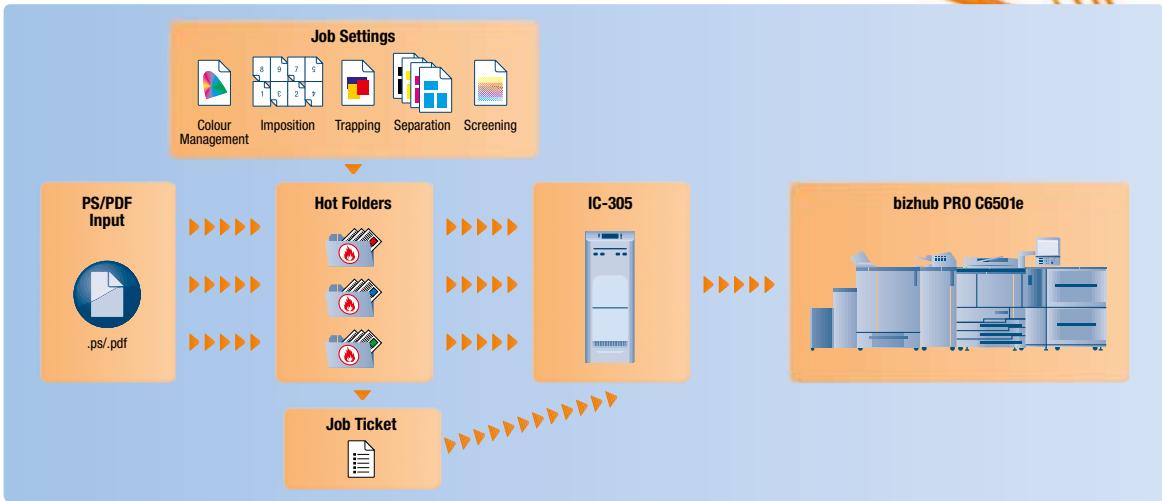
Hot folders for PC include Microsoft Office Filters which allow for an automated job submission for all users

Features (options)
EFI Fiery Graphic Arts Package, Premium Edition, groups together expert tools for managing colour, achieving power proofing, and controlling colour workflow
EFI Color Profiler Suite successfully creates, visualizes, tests and edits colour profiles with a single profiling solution
EFI Compose provides make-ready tools and advanced Visual Workflow for complex document composition
EFI Impose offers unlimited imposition capabilities and includes raster preview, sample proof printing and Control Strip for minimized waste

Hot Folder Application

Specifications
Hardware
Intel Core 2 Duo @ 2.13 GHz
160 GB SATA Hard drive
1.0 GB high-speed memory
CD-DVD R/W
WindowsXPeOSSP2
Fierfy System 8 Release 2 software
2 USB ports
File Formats
AdobePostScript Level 1, 2, 3
Adobe PDF 1.4, 1.5, 1.6, 1.7, PDFX
EPS
TIFF, TIFF/IT, JPEG
PPML
Fiery FreeForm/Fiery FreeForm 2.1
VPS
Client Environments
Windows 2000/XP/Vista
Macintosh OSX or higher