
IC-304 PLUS - Imprimante multifonction KONICA - Notice d'utilisation et mode d'emploi gratuit
Retrouvez gratuitement la notice de l'appareil IC-304 PLUS KONICA au format PDF.


| Type de produit | Contrôleur d'impression externe pour imprimante multifonction |
| Marque | KONICA |
| Modèle | IC-304 PLUS |
| Processeur | Intel Core 2 Duo @ 3,0 GHz |
| Mémoire système | 1 Go |
| Mémoire image | 1 Go |
| Disque système et utilisateur | 250 Go SATA |
| Espace disque image | 2 × 250 Go SATA |
| Lecteur optique | DVD R/W |
| Spectrophotomètre | EyeOne |
| Moniteur | 17" TFT LCD |
| Formats de fichiers pris en charge | Adobe PostScript 3, PDF natif, EPS, TIFF, TIFF/IT, JPEG, CT/LW, Creo VPS, PPML |
| Environnements clients | Windows 2000/XP/NT 4.0/Server 2003, Mac OS 9.x et 10.x |
| Fonctions principales | Gestion des couleurs, impression de données variables (VDP), imposition, connectivité offset |
| Interface utilisateur | Interface graphique intuitive |
| Automation | Dossiers virtuels, imprimantes virtuelles, hot folders |
| Connectivité réseau | Ethernet 10/100/1000 |
| Langues de l'interface | Multilingue |
| Compatibilité JDF | Oui (Job Definition Format) |
| Compatibilité Adobe Acrobat | Adobe Acrobat 7.0 Standard (PDF 1.6) |
FOIRE AUX QUESTIONS - IC-304 PLUS KONICA
Questions des utilisateurs sur IC-304 PLUS KONICA
0 question sur cet appareil. Repondez a celles que vous connaissez ou posez la votre.
Poser une nouvelle question sur cet appareil
Téléchargez la notice de votre Imprimante multifonction au format PDF gratuitement ! Retrouvez votre notice IC-304 PLUS - KONICA et reprennez votre appareil électronique en main. Sur cette page sont publiés tous les documents nécessaires à l'utilisation de votre appareil IC-304 PLUS de la marque KONICA.
MODE D'EMPLOI IC-304 PLUS KONICA

IC-304 Plus - Colour, productivity, performance
In close cooperation Creo and Konica Minolta created the IC-304 Plus external print controller. Based on the Creo Color Servers technology the print controller was developed exclusively for Konica Minolta's digital colour production devices. Out-of-the-box colour and outstanding image quality, amazing ease of operation, an innovative feature set and powerful printing performance – with these characteristics the IC-304 Plus print controller is perfectly suited to the complex demands and varied requirements of any professional production environment.

Basics
Equipped with the IC-304 Plus print controller the bizhub PRO C5501, bizhub PRO C6501, bizhub PRO C6501e/eP and bizhub PRO C65hc provide outstanding print quality, impressive media flexibility, comprehensive in-line finishing capabilities – meeting the challenges of professional high-speed digital colour printing with optimised workflow solutions and simply brilliant results. Supported by the IC-304 Plus Konica Minolta's digital colour production devices offer these key benefits and much more:
Intuitive, easy-to-operate graphical user interface (GUI)
Optimised workflow control with state-of-the-art software
Market-leading colour and image quality
- Spot colour editor for full colour control and easy customisation
Powerful Variable Data Printing (VDP) capabilities

Highlights
Built-in VDP connectivity
The IC-304 Plus supports popular VDP applications and all leading industry formats. This facilitates and accelerates the flexible creation of fully individualised documents in superior colour quality. Element-based ripping in the IC-304 Plus means that each image, text or graphic element is individually ripped just once for repeated use as required. This speeds up the creation process and increases throughput.
Seamless offset connectivity
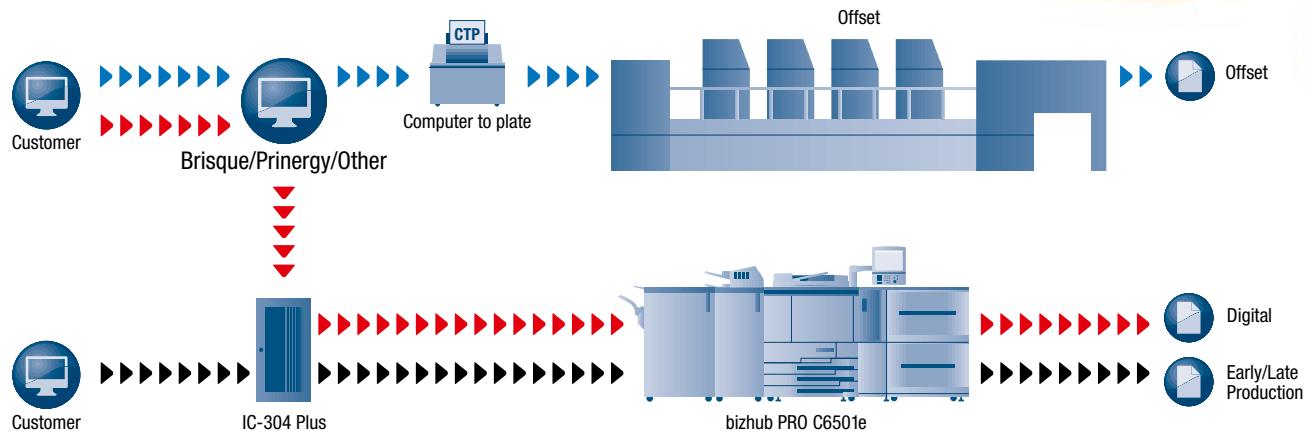
Supporting the CT/LW format as well as TiFF/TiFF-IT, the IC-304 Plus print controller fully integrates with workflow systems like Kodak Brisque and provides seamless connectivity to Kodak Prinergy, as well. Thanks to its complete integration with these high performance workflow systems the IC-304 Plus bridges the gap between the digital printing and offset machines.

Features
High productivity with powerful hardware and software
Automation through virtual printers and hot folders
Save processing time through ready-to-print (RTP) format
APR/OPI workflow - work with low-resolution images and apply the high resolution while printing
Creo PODS's extensive set of postprocess features
Easy setting of automated workflow for repeated processes and parameters
Out-of-the-box colour and image quality
Tailor-made to use the printer's maximum color gamut
Built-in, customized, professional color management tools
- Trapping, image quality and smooth scale, text and line-art quality, GCR, color management tools
Powerful VDP capabilities
Simple to learn and operate
Easy programming and defining of job parameters through the Creo PODS Print Driver from your client workstation - saves time and resources
Multilanguage interface
- Hundreds of imposition templates that can be applied to different selected jobs
Predefined set of default values for novice users
Supports all finishers for bizhub PRO C5501,bizhub PRO C6501,bizhub PRO C6501e/eP andbizhub PRO C65hc printer
- Operates in both Windows and Macintosh environments
Supports JDF (job definition format), enabling an automatic, error-free workflow; reduced operating costs; and improved quality.
Supports Adobe Acrobat 7.0 Standard (PDF 1.6)
Remote tools - graphic driver extension

Offset connectivity workflow

Specifications
Hardware
Intel Core 2 Duo @ 3,0 GHz
1 GB system memory
1GB image memory
250 GB SATA system and user disk
2 × 250 GB SATA image disk space
10/100/1000 Ethernet network adapter
DVD R/W
EyeOne Spectrophotometer
Keyboard and mouse
17" TFT LCD monitor
File Formats
Adobe PostScript 3
Native PDF
EPS
TIFF, TIFF/IT
JPEG:CT/LW
Creo Variable Print Specification (VPS)
PPML
Client Environments
Windows 2000/XP/NT 4.0/Server 2003
Macintosh OS 9.x and 10.x