
BIZHUB C451 - Imprimante multifonction KONICA - Notice d'utilisation et mode d'emploi gratuit
Retrouvez gratuitement la notice de l'appareil BIZHUB C451 KONICA au format PDF.


| Type | Imprimante multifonction couleur (impression, copie, numérisation, fax en option) |
| Marque | KONICA |
| Modèle | BIZHUB C451 |
| Processus d'impression | Toners secs tandem |
| Toner | Simitri® HD Toner polymérisé couleur |
| Vitesse d'impression | Couleur : 45 ppm (lettre) ; Noir et blanc : 45 ppm (lettre) |
| Résolution d'impression | 1800 dpi équivalent × 600 dpi |
| Numérisation | Vitesse : jusqu'à 70 images/min (300 dpi) ; Résolution : 600 dpi max |
| Formats de numérisation | TIFF, PDF, JPEG, XPS, Compact PDF, Compact XPS |
| Mémoire et stockage | 1024 Mo RAM (partagée) ; Disque dur 60 Go |
| Cycle mensuel | 150 000 pages |
| Formats de papier | De 5,5 × 8,5 pouces à 12 × 18 pouces (bac bypass) |
| Capacité papier standard | 3650 feuilles (2 × 500, 1000, 1500 + bypass 150) |
| Capacité papier maximale | 6650 feuilles avec options |
| Chargeur automatique | Recto-verso, 100 feuilles (DF-611) |
| Impression recto verso | Automatique (standard) |
| Dimensions (L × P × H) | 25,5 × 30,5 (sans panneau) / 36 (avec) × 45,5 pouces (648 × 775 / 914 × 1156 mm) |
| Poids | Environ 190 kg (418,5 lb) |
| Alimentation électrique | 120 V, 60 Hz, < 1920 W |
| Écran | Grand écran tactile couleur pour prévisualisation |
| Sécurité | Authentification biométrique optionnelle (AU-101) ; Chiffrement HDD (SC-503) |
| Connectivité réseau | Ethernet 10/100/1000, USB 1.1/2.0 ; Protocoles : TCP/IP, IPX/SPX, AppleTalk, etc. |
| Systèmes d'exploitation supportés | Windows (2000 à Vista), Mac OS 9.2/OS X 10.2-10.4, Linux/Unix |
| Logiciels inclus | PageScope Web Connection, Direct Print, Box Operator, Print Status Notifier, etc. |
| Options | Finisseur, agrafe, plieuse, perforation, bac supplémentaire, fax, etc. |
FOIRE AUX QUESTIONS - BIZHUB C451 KONICA
Questions des utilisateurs sur BIZHUB C451 KONICA
0 question sur cet appareil. Repondez a celles que vous connaissez ou posez la votre.
Poser une nouvelle question sur cet appareil
Téléchargez la notice de votre Imprimante multifonction au format PDF gratuitement ! Retrouvez votre notice BIZHUB C451 - KONICA et reprennez votre appareil électronique en main. Sur cette page sont publiés tous les documents nécessaires à l'utilisation de votre appareil BIZHUB C451 de la marque KONICA.
MODE D'EMPLOI BIZHUB C451 KONICA
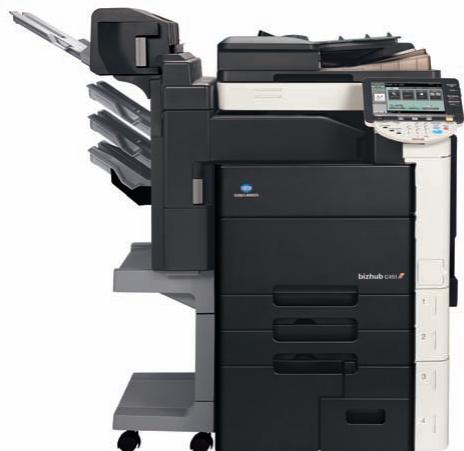
bizhub C451 FULL COLOR_PRINTER_COPIER_SCANNER_FAX_
SUDDENLY BUSINESS LOOKS EVEN BETTER. Your business runs on information — so why keep it hidden in copy rooms? The new bizhub® C451 looks great anywhere, prints in spectacular high-speed color, and stores and shares documents with center-office simplicity and security. The InfoLine design lets everyone know what's happening, input to output. The advanced Emperor® Print System is built-in for superior print/scan performance. A large-screen control panel previews documents before you print. And powerful fax and finishing options let you build an all-in-one document delivery solution with right-size cost-efficiency. So replace your old B&W or color printer/copier with the new bizhub C451 — and get up to speed on a whole new look in business information.
natural_image
Exterior view of a modern office typewriter with open lid and control panel (no visible text or symbols)
natural_image
Close-up of a computer mouse with a curved black handle and mesh pattern (no visible text or symbols)
natural_image
Close-up of a modern office building with visible signage and a close-up of a white electronic device (no readable text or symbols)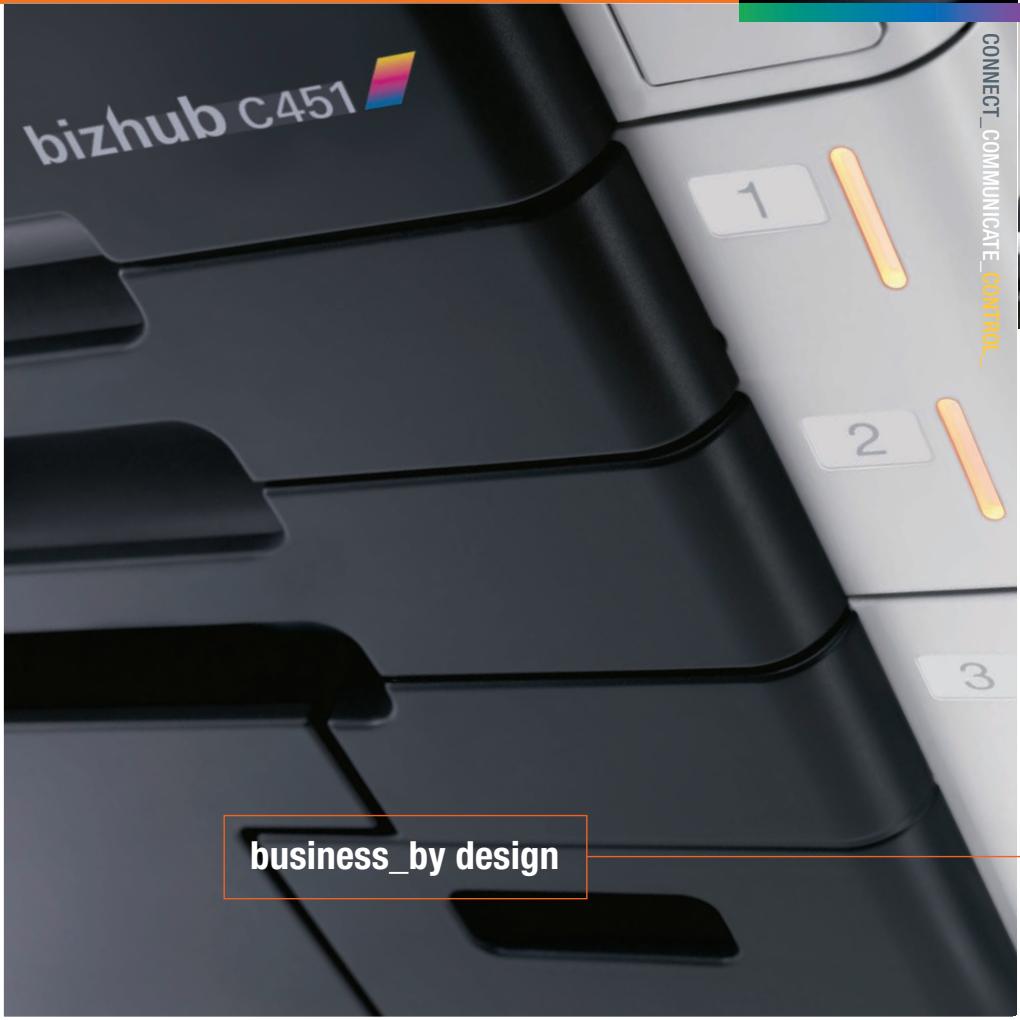
text_image
bizhub C451 1 2 3 business_by design CONNECT_COMMUNICATE_CONTROL_
natural_image
Office desk setup with dual monitors and keyboard (no visible text or symbols)INNOVATIVE DESIGN, 360° STYLING, EASY ACCESS
45 PPM OUTPUT IN BOTH COLOR AND B&W
EMPERON® PRINT SYSTEM, PCL/PS/XPS FUNCTIONALITY
INFOLINE DESIGN SHOWS STATUS AT A GLANCE
SPECTACULAR COLOR WITH NEW SIMITRI® HD TONER
LARGE TOUCH-SCREEN TO PREVIEW DOCUMENTS
ULTRA-SECURE BIOMETRIC AUTHENTICATION OPTION
6,650-SHEET MAXIMUM PAPER CAPACITY FOR LONG RUNS
HIGH-VOLUME SUPER G3 FAX AND
DUAL-LINE OPTIONS
IMPROVED CONNECTIVITY AND EASIER INSTALLATION WITH MICROSOFT VISTA PROTOCOL
PAGESCOPE® SOFTWARE, PAGESCOPE ENTERPRISE SUITE*
ADVANCED i-OPTION™ WITH WEB BROWSER, IMAGE PANEL DISPLAY AND ENHANCED PDF ENCRYPTION
bizhub C451
FULL COLOR \_PRINTER \_COPIER\_SCANNER \_FAX\_
CONNECT\_COMMUNICATE\_CONTROL
General Specifications
| TYPE: | Full-Color Printer/Copier/Scanner with Stationary Platen |
| PRINT/COPY PROCESS: | Tandem Process |
| TONER TYPE: | Simitri® HD Color Polymerized Toner |
| MONTHLY DUTY CYCLE: | 150,000 pages |
| PRINT/COPY SPEED: | Full Color: 45 ppm (letter, portrait), B&W: 45 ppm (letter, portrait) |
| PRINT/COPY RESOLUTION: | 1800 dpi (equivalent) x 600 dpi |
| SCAN SPEED / SCAN RESOLUTION: | Full Color: 70 opm (@300 dpi, letter), 50 opm (@600 dpi, letter), B&W: 70 opm (@300 dpi, letter), 55 opm (@600 dpi, letter) / 200 dpi, 300 dpi, 400 dpi, 600 dpi |
| SCAN FILE FORMATS: | TIFF, PDF, Compact PDF, JPEG, XPS, Compact XPS |
| MEMORY/HARD DISK DRIVE: | 1,024 MB (shared print, copy, scan and fax memory)/60 GB HDD (shared print, copy, scan and fax) |
| GRADATION: | 256 color shades per pixel |
| ORIGINAL SIZE: | Up to 11x17 (scanning/copying), Up to 11x17 full bleed on 12" x 18" paper (printing) |
| COPY SIZE: | Tray 1 (universal cassette): 5.5" x 8.5" to 12" x 18", Tray 2 (universal cassette): 5.5" x 8.5" to 12" x 18", Tray 3 (fixed cassette): 8.5" x 11"** or 8.5" x 5.5", Tray 4 (fixed cassette): 8.5" x 11"** or 8.5" x 5.5", Bypass Tray 4" x 6" to 12" x 18" |
| WARM-UP TIME / FIRST COPY TIME: | Less than 30 seconds / Full Color: Less than 6.5 seconds (letter), B&W: Less than 4.8 seconds (letter) |
| COPY QUANTITY: | 1 - 9,999 |
| MAGNIFICATION: | Zoom range: 25% - 400%, 0.1% increments, Preset reduction: 79%, 73%, 65%, 50%, Preset enlargement: 121%, 129%, 155%, 200% |
| COLOR MODES: | Auto Color, Full Color, Black & White, 2-Color, Single Color |
| COPY EXPOSURE MODES: | Text (legible text), Text/Photo (clear text and halftones), Photo (optimized for gradations), Map (fine edges and legible text), Dot Matrix (dot matrix or pencil originals), Copied Paper |
| FAXING (optional): | Super G3 compatibility, MH, MR, MMR, JBIG data compression, 33.6 Kbps modem speed, F-Code support |
| FAX TRANSMISSION SPEED: | Less than 3 seconds/page (JBIG, standard resolution) |
| FAX MEMORY: | 1,024 MB (shared copier memory) |
| FAX EXPOSURE MODES: | Text, Text/Photo, Photo, Dot Matrix |
| STANDARD PAPER CAPACITY: | 500-sheet universal cassette (17 lb. bond to 140 lb. index), 500-sheet universal cassette (17 lb. bond to 140 lb. index), 1,000-sheet cassette (17 lb. bond to 140 lb. index), 1,500-sheet cassette (17 lb. bond to 140 lb. index), 150-sheet bypass (17 lb. bond to 100 lb. cover or up to 300 gsm) |
| MAXIMUM PAPER CAPACITY: | 6,650 sheets (total, with options) |
| DOCUMENT FEEDER (standard): | DF-611 Reversing Automatic Document Feeder, Speed: Full Color: 70 opm, B&W: 70 opm, Paper Capacity: 100 sheets, Paper Size: 5.5" x 8.5" to 11" x 17", Paper Weight: Single-sided: 9.25 lb. bond to 55.75 lb. bond, Double-sided or mixed: 13.25 lb. bond to 34 lb. bond |
| POWER REQUIREMENTS/CONSUMPTION: | 120V, 60Hz/Less than 1,920W |
| DIMENSIONS (W x D x H) / WEIGHT: | 25.5" x 30.5" (without control panel)/36" (with control panel) x 45.5" / 418.5 lb. |
| OPTIONS: | AU-101 Biometric Authentication Unit, AU-201H HID Card Authentication Unit*, EK-603 USB Host Board (Local I/F Kit), FK-502 Fax Board, FS-517 (50) Sheet Staple Finisher, FS-519 Built-In Base Finisher, FS-608 Saddle Finisher, JS-504 Job Separator, LK-101 i-Option, LK-102 i-Option, LU-301 Large Capacity Unit, ML-501 Multi-Line Kit, MT-502 Mailbin Kit for FS-519, OT-503 Output Tray Unit (Exit Tray), OT-602 Output Tray, PK-512 Punch Kit for FS-517/608 (2/3 Holes), PK-515 Punch Kit (for FS-519 A01G0Y2), SA-501 Scan Accelerator Kit, SC-503 HDD Encryption Kit, SD-505 Saddle Stitcher Kit for FS-519, Spare TX Marker Stamp 2, SP-501 Fax Stamp Unit, UK-201 Upgrade Kit, WT-502 Working Table, IC-409 Image Controller (EFI Fiery Controller), VI-504 Video Interface Kit for IC-409 |
| AVAILABLE PRINT/COPY FUNCTIONS: | Account Track (1,000 accounts), Administration Mode, Auto Duplex, Auto Tray Switching, Banner Printing (with FS-519), Bi-Directional Communication, Color Modes & Functions (Auto Color/Full Color, Black & White Mode, Single Color Mode, 2-Color Mode, Color Adjustments - Brightness, Contrast, Saturation, Sharpness, Red, Green, Blue, Portrait, Hue, Density, Color Balance, Copy Density, Sample Copy), Copy Modes (Simplex/Duplex, 2-in-1, 4-in-1, 8-in-1, Book, Booklet, Booklet + Bind), Cover Mode, Creative Functions (Mirror Image, XY Zoom, Image Center, Base Color, Neg./Pos. Reverse, Image Repeat), Encrypted Network Password Printing, Energy Save Mode, Enlarge Display, Erase (Border, Frame, Edge) Mode, Finishing (Group, Sort, Staple, Punch, Half-Fold, Center Staple and Fold and Tri-Fold), Form Overlay, Glossy Mode, HDD Random Erase, Image Adjustments (Color Matching, Pure Black Auto ON/OFF, Color Balance, Screen Settings, Image Smoothing ON/OFF), Image Preview (Job Finishing Image Display, Engine Configuration Display), Interrupt, Job List, Job Erase, Job Reserve, LDAP, OHP Interleaving, Mixplex, Mix-Media, Program/Recall Jobs, Paper Type Selection (Normal, Thick 1/1+, Thick 2, Thick 3, Thick 4), Print Modes (Simplex/Duplex, 2-in-1, 4-in-1, 6-in-1, 9-in-1, 16-in-1, Booklet, Booklet + Bind), Print from USB, Proof Copy, Secure Printing, Separate Scan, Text Enhancement, User Authentication (Up to 20 Authentication Servers) (Synchronize w/Account Track), User Box Function, Utility (Meter Count, Environment Setting, Default Setting, One-Touch Setting, Check Consumables Life), Watermarks, Zoom Selection |
| AVAILABLE SCAN FUNCTIONS: | Scan-to-Email, Scan-to-FTP, Scan-to-WebDAV, Scan-to-SMB (Scan-to-Desktop), Scan-to-HDD (Scan-to-User Box), Scan-to-USB, Network TWAIN, WS-Scan |
| AVAILABLE FAX FUNCTIONS: | Autodialing (2,000 one-touches), Auto Memory Reception, Auto Reduction Printing, Broadcasting (maximum 605 locations), Bulletin Board, Duplex Transmission/Reception, Exposure Mode, Group Dialing (up to 500 one-touches per group), Image Rotation Transmission/Reception, Mailbox Transmission/Reception, Memory/Quick Dial, Overseas Transmission, Password Transmission/Reception, PC-Fax, Polling Transmission/Reception, Priority Transmission, Print Setting or Overnight Reception, Program Dialing (400 programs), Redial, Relay Broadcasting, Relay Transmission, Remote Reception, Timer Transmission |
| APPLICATIONS: | Network & Device Management: PageScope NDPS Gateway, PageScope EMS Plug-Ins, PageScope Net Care Device Manager, PageScope Network Setup, PageScope Data Administrator, Driver Packaging Utility, HDD Back-Up Utility, Download Manager (ICC Color Profile Utility), Log Management Utility, User Tools: PageScope Web Connection, PageScope Direct Print, PageScope Box Operator, PageScope Print Status Notifier, Web Print Assistant, Font Management Utility, Copy Protect Utility, Print Utility for Unix |
| MANAGEMENT TOOLS: | bizhub vCare support |
| OPTIONAL SOFTWARE: | PageScope Workware, PageScope Enterprise Suite*: PageScope Account Manager*, PageScope Authentication Manager*, PageScope MyPanel Manager* |
Emperor Print System (standard):
| PROCESSOR: | 867 MHz (MC7447A) | PROCESSOR: | Intel Celeron 2.8 GHz FSB 533 MHz |
| MEMORY/HARD DISK DRIVE: | 1,024 MB (shared copier memory)/60 GB (shared copier HDD) | OPERATING SYSTEM: | Linux |
| PAGE DESCRIPTION LANGUAGE: | PCL5e/c, PCL6 (XL v.3.0) Emulation, PS3 (v.3016) Emulation, XPS (XML Paper Specification) | MEMORY/HARD DISK DRIVE: | 512 MB (standard/max)/80 GB HDD |
| FONTS: | PCL: 80 fonts, PostScript 3 Emulation: 137 fonts | PAGE DESCRIPTION LANGUAGE: | PCL6, Adobe PostScript 3 (version 3017) |
| PRINT DRIVERS: | PCL6: Windows 2000, Windows XP (Home/Professional), Windows Server 2003, Windows XP Professional x64, Windows Server 2003 x64, Windows NT 4.0, Windows Vista (x32, x64), PS3: Windows 2000, Windows XP (Home/Professional), Windows Server 2003, Windows XP Professional x64, Windows Server 2003 x64, Windows Vista (x32, x64), XPS: Windows Vista (x32, x64), Mac OS 9.2 (PPD file), Mac OSX 10.2, 10.3, 10.4, Intel-based 10.4 (print driver) | FONTS: | PCL: 80 fonts, Adobe PS3: 136 fonts |
| INTERFACE: | 10 BASE-T/100 BASE-TX/1000 BASE-T, USB 1.1, USB 2.0 | PRINT DRIVERS: | PCL6: Windows 2000, Windows XP, Windows Server 2003, Windows Vista (x32, x64)* PS3: Windows 2000, Windows XP, Windows Server 2003, Windows XP Professional x64*, Windows Server 2003 x64, Windows Vista (x32, x64)*, Mac OSX 10.3.9, 10.4, Intel-based 10.4 (PPD), Unix/Linux |
| PROTOCOLS: | TCP/IP, IPX/SPX, AppleTalk (EtherTalk), LPR, SMB, LPD, Netware (4.x, 5, 6), Pserver, Nprinter, NDPS, IPP 1.1, SMTP, POP3, LDAP, SSL/TLS, SNMP, HTTP/HTTPS, IPv6, DPWS (WSD) |

KONICA MINOLTA
KONICA MINOLTA
BUSINESS SOLUTIONS U.S.A., INC.
100 Williams Drive
Ramsey, NJ 07446
www.kmbs.konicaminolta.us


bizhub OP


Fiery IC-409 Embedded Image Controller (optional):
| PROCESSOR: | Intel Celeron 2.8 GHz FSB 533 MHz |
| OPERATING SYSTEM: | Linux |
| MEMORY/HARD DISK DRIVE: | 512 MB (standard/max)/80 GB HDD |
| PAGE DESCRIPTION LANGUAGE: | PCL6, Adobe PostScript 3 (version 3017) |
| FONTS: | PCL: 80 fonts, Adobe PS3: 136 fonts |
| PRINT DRIVERS: | PCL6: Windows 2000, Windows XP, Windows Server 2003, Windows Vista (x32, x64)* PS3: Windows 2000, Windows XP, Windows Server 2003, Windows XP Professional x64*, Windows Server 2003 x64, Windows Vista (x32, x64)*, Mac OSX 10.3.9, 10.4, Intel-based 10.4 (PPD), Unix/Linux |
| INTERFACE: | 10 BASE-T/100 BASE-TX/1000 BASE-T, RJ45 |
| PROTOCOLS: | TCP/IP, IPX/SPX, AppleTalk (EtherTalk), LPR, SMB, NDPS Gateway on Netware 5.0 or later, IPP, LDAP, SSL/TLS, SNMP, HTTP/HTTPS, IPv6 |
| OPTIONAL SOFTWARE: | EFI Color Profiler Suite, ED-100 Densitometer, EFI Secure Erase, Hot Folders, Auto Trap, EFI Impose |
* Spring 2008 Availability
© 2008 KONICA MINOLTA BUSINESS SOLUTIONS U.S.A., INC. All rights reserved. Reproduction in whole or in part without written permission is prohibited. Konica Minolta and The essentials of imaging are trademarks of KONICA MINOLTA HOLDINGS, INC. i-Option is a trademark and bizhub, Emperor and PageScope are registered trademarks of KONICA MINOLTA BUSINESS TECHNOLOGIES, INC. Simitri is a registered trademark of KONICA MINOLTA BUSINESS SOLUTIONS. All other brands and product names are registered trademarks or trademarks of their respective owners.
**This setting must be changed by an authorized Konica Minolta Service Technician.
Design and specifications are subject to change without notice.