
PU211 - Carte d'extension informatique SWEEX - Notice d'utilisation et mode d'emploi gratuit
Retrouvez gratuitement la notice de l'appareil PU211 SWEEX au format PDF.

| Type de produit | Adaptateur USB vers Ethernet |
|---|---|
| Caractéristiques techniques principales | USB 2.0, vitesse de transfert jusqu'à 480 Mbps, prise en charge de la norme 10/100 Mbps Ethernet |
| Alimentation électrique | Alimentation par le port USB, aucune alimentation externe requise |
| Dimensions approximatives | 10 x 3 x 2 cm |
| Poids | 50 g |
| Compatibilités | Compatible avec Windows, macOS, et Linux |
| Type de batterie | Aucune batterie, fonctionne via USB |
| Tension | 5 V (via USB) |
| Puissance | Max 2.5 W |
| Fonctions principales | Connexion réseau via USB, prise en charge de la technologie Plug and Play |
| Entretien et nettoyage | Essuyer avec un chiffon doux, éviter l'exposition à l'humidité |
| Pièces détachées et réparabilité | Pas de pièces détachées disponibles, produit non réparable |
| Informations générales utiles | Idéal pour les ordinateurs portables sans port Ethernet, compact et facile à transporter |
FOIRE AUX QUESTIONS - PU211 SWEEX
Questions des utilisateurs sur PU211 SWEEX
0 question sur cet appareil. Repondez a celles que vous connaissez ou posez la votre.
Poser une nouvelle question sur cet appareil
Téléchargez la notice de votre Carte d'extension informatique au format PDF gratuitement ! Retrouvez votre notice PU211 - SWEEX et reprennez votre appareil électronique en main. Sur cette page sont publiés tous les documents nécessaires à l'utilisation de votre appareil PU211 de la marque SWEEX.
MODE D'EMPLOI PU211 SWEEX
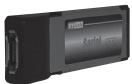
PU211 Sweex one port external SATA II ExpressCard
- Do not expose the Sweex ExpressCard to extreme temperatures. Do not place the device in direct sun light or close to heating elements.
- Do not use the Sweex ExpressCard in extremely dusty or moist environments.
- Prevent hard shocks or impacts of the device, as this can cause damage to the internal electronics.
- Never try to open the device yourself, this voids the warranty.
Installation Windows 2000 and XP
- Place the Sweex ExpressCard in the laptop.
- Place the SweeX CD-ROM in the computer. The installation screen will start automatically. Press "Driver 2000, XP and Vista".
- Follow the steps to complete the installation.
- If needed, restart the computer.
The ExpressCard is ready for use.
LED status.
On: A hard disk is connected with the Swee x ExpressCard. Blinking: There is a data transmission.
Warranty
For all Sweex products a warranty period of 3 years applies. We do not give support or warranty on supplied software, rechargeable batteries and batteries. Transaction of warranty only takes place at the sales point where the product is bought.
All brand names and associated rights mentioned in this manual are and stay property of the rightful owner.