
PP061 - Onduleur SWEEX - Notice d'utilisation et mode d'emploi gratuit
Retrouvez gratuitement la notice de l'appareil PP061 SWEEX au format PDF.

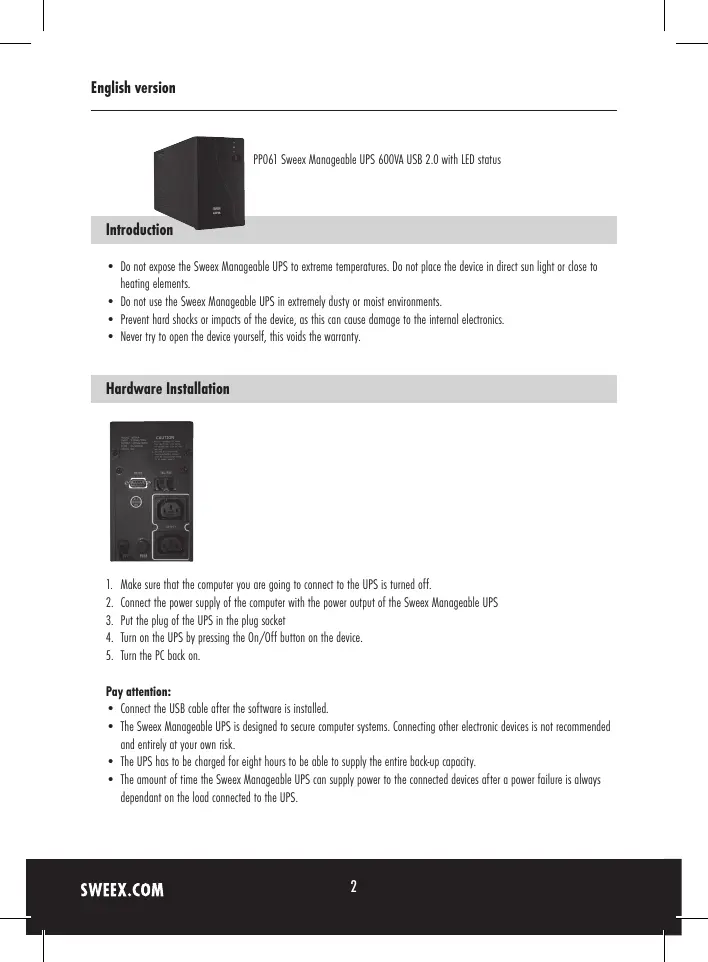

| Type de produit | Onduleur (UPS) manageable |
| Marque | SWEEX |
| Modèle | PP061 |
| Puissance apparente | 600 VA |
| Tension d'entrée | 230 V AC |
| Tension de sortie | 230 V AC (batterie) |
| Interface de communication | USB 2.0 |
| Logiciel de gestion | PowerManagerLite |
| Voyants LED | Bleu (secteur OK), Orange (charge), Rouge (panne secteur) |
| Bouton | Marche/Arrêt |
| Autonomie typique | Variable selon la charge connectée |
| Temps de charge initial | 8 heures |
| Dimensions approximatives | 300 x 150 x 100 mm |
| Poids approximatif | 5 kg |
| Température de fonctionnement | 0°C à 40°C |
| Humidité de fonctionnement | 20% à 80% (sans condensation) |
| Protection | Parasurtenseur, protection des surcharges |
| Type de batterie | Plomb-acide scellée (non spécifiée) |
| Entretien | Recharger 8h avant première utilisation, nettoyer avec un chiffon sec |
| Garantie | 3 ans (sauf carte graphique et électronique grand public : 2 ans) |
FOIRE AUX QUESTIONS - PP061 SWEEX
Questions des utilisateurs sur PP061 SWEEX
0 question sur cet appareil. Repondez a celles que vous connaissez ou posez la votre.
Poser une nouvelle question sur cet appareil
Téléchargez la notice de votre Onduleur au format PDF gratuitement ! Retrouvez votre notice PP061 - SWEEX et reprennez votre appareil électronique en main. Sur cette page sont publiés tous les documents nécessaires à l'utilisation de votre appareil PP061 de la marque SWEEX.
MODE D'EMPLOI PP061 SWEEX
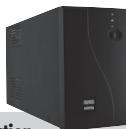
PP061 Sweex Manageable UPS 600VA USB 2.0 with LED status
Introduction
- Do not expose the Sweex Manageable UPS to extreme temperatures. Do not place the device in direct sun light or close to heating elements.
- Do not use the Sweex Manageable UPS in extremely dusty or moist environments.
- Prevent hard shocks or impacts of the device, as this can cause damage to the internal electronics.
- Never try to open the device yourself, this voids the warranty.
Hardware Installation
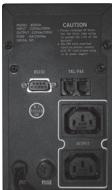
- Make sure that the computer you are going to connect to the UPS is turned off.
- Connect the power supply of the computer with the power output of the Sweex Manageable UPS
- Put the plug of the UPS in the plug socket
- Turn on the UPS by pressing the On/Off button on the device.
- Turn the PC back on.
Pay attention:
- Connect the USB cable after the software is installed.
- The Sweeex Manageable UPS is designed to secure computer systems. Connecting other electronic devices is not recommended and entirely at your own risk.
- The UPS has to be charged for eight hours to be able to supply the entire back-up capacity.
- The amount of time the Sweex Manageable UPS can supply power to the connected devices after a power failure is always dependant on the load connected to the UPS.
LED's and Buttons
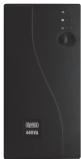
There are 3 LED's on the front side of the Sweeex Manageable UPS and one button.
- Blue LED indicates that the mains voltage is OK.
- Orange LED indicates that the UPS is charging.
- Red LED indicates that there is a power failure. The UPS will now supply power to all connected devices.
- On/Off button.
Software installation
- Place the Sweex CD-ROM in the CD-ROM tray. A menu will appear automatically. Click "Drivers and Software".

Drivers and Software
The installation procedure will be started.
- In the first window click "Next".
- Enter your details:
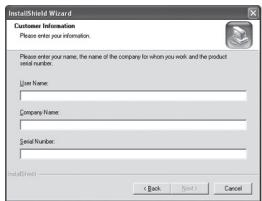
- Enter your name or computer name. At "Company Name" enter any name. You must not leave this empty.
- At "Serial Number" enter the code found on the case of the Sweex CD-ROM. Use capitals and stripes when needed as indicated.
- Click "Next" and follow the steps to complete the installation.
- After installing the software connect the USB cable from the computer to the Sweex Manageable UPS. Windows will automatically install the UPS.
Charging the Sweex Manageable UPS
The UPS is being charged from the moment it is plugged in the plug socket. The orange LED will light up. The UPS is also charging up when it is turned on with the button.
Configuring the Sweex Manageable UPS
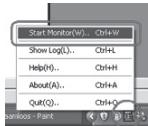
By using the PowerManagerLite you can configure the UPS. At the bottom right of your screen you will find the PowerManagerLite icon, use this to start the manager..

Double click the icon with your left mouse button or right click it and choose "Start Monitor(W)...".
The main screen of the PowerManagerLite appears.
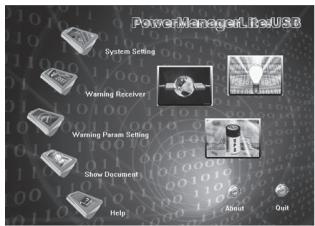
Click the icons to configure the UPS.
Additional tips and further information about the remaining functions of the PowerManagerLite can be found in the English manual on the CD-ROM.
Warranty
For most Sweeex products a warranty period of 3 years applies. On Graphics Cards and Consumer Electronics Sweeex offers 2 years of warranty. We do not give support or warranty on supplied software, rechargeable batteries and batteries. Transaction of warranty only takes place at the sales point where the product is bought.
All brand names and associated rights mentioned in this manual are and stay property of the rightful owner.