
LC002 - Adaptateur réseau SWEEX - Notice d'utilisation et mode d'emploi gratuit
Retrouvez gratuitement la notice de l'appareil LC002 SWEEX au format PDF.


| Type d'appareil | Carte réseau LAN |
| Vitesse de connexion maximale | 10/100 Mbps |
| Chipset | Realtek RTL8139 |
| Négociation automatique | Oui, avec option page suivante |
| Support IEEE | 802.3 et 802.3u |
| Mode duplex | Full Duplex Flow Control IEEE802.3x |
| Gestion alimentation | Supporte gestion alimentation APM et Carbus |
| Type de bus | Carbus Type II, 32-bit, 3.3V |
| Support Wake on LAN | Oui |
| Connecteur | 1 x RJ45 |
| LEDs de diagnostic | Oui, pour état du lien et transfert de données |
| Systèmes d'exploitation supportés | Windows 98SE, 2000, XP |
| Contenu de la boîte | Carte réseau LAN 10/100 Mbps, CD-ROM avec manuel et pilote |
| Compatibilité | PC avec port Carbus |
FOIRE AUX QUESTIONS - LC002 SWEEX
Questions des utilisateurs sur LC002 SWEEX
0 question sur cet appareil. Repondez a celles que vous connaissez ou posez la votre.
Poser une nouvelle question sur cet appareil
Téléchargez la notice de votre Adaptateur réseau au format PDF gratuitement ! Retrouvez votre notice LC002 - SWEEX et reprennez votre appareil électronique en main. Sur cette page sont publiés tous les documents nécessaires à l'utilisation de votre appareil LC002 de la marque SWEEX.
MODE D'EMPLOI LC002 SWEEX
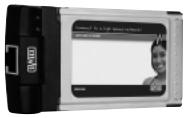
LC002 Sweex LAN PC Card 10/100 Mbps
Introduction
First of all, many thanks for purchasing this Sweex LAN PC Card 10/100. This PC Card easily connects your laptop to a network.
To ensure this product operates correctly, we advise you to carefully read this manual first. If despite this manual you still experience problems during installation or operation of this product, go to www.sweex.com and look under the heading service & support.
Contents of the box
Prior to installation, check if all required parts are present. The following parts must be present in the box:
LAN PC card 10/100 Mbps
- CD-ROM with manual and driver
If one of the above parts is missing, please contact the supplier.
Specifications
- Chipset: Realtek RTL8139
Maximum connection speed: 10/100 Mbps - Auto-Negotiation and next page option
Supports: IEEE 802.3 and 802.3u
Supports: Full Duplex Flow Control IEEE802.3x
Supports ACPI and Cardbus power management
CardBus Type II, 32-bit, 3.3V
Supports Wake on LAN - Connector: 1 x UTP RJ-45
- Diagnosis LEDs for link status and data transfer
Supports:Windows 98SE,2000 and XP
Installation of Windows 98SE
We advise you to ensure the operating system is up-to-date before starting the installation. This can be easily checked by starting up Internet Explorer and selecting the option "Windows Update" in the "Extra" menu.
Insert the LAN PC card 10/100 Mbps in the laptop. Windows will automatically detect the card.
The following screen appears:
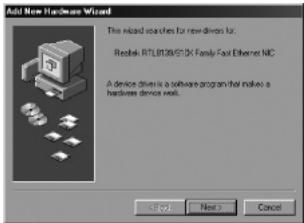
Here, click "Next" (Next).
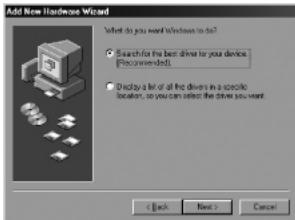
Here, select the option "Search for the best driver for your device" (Search for the best driver for your device) and click "Next" (Next).

In the next screen, tick "Specify a location (Specify a location). Go to the enclosed Sweeex CD-ROM via "Browse" (Browse), and select the folder "Drivers\WIN98". In the example, "X" stands for our CD-ROM station. Then click "Next" (Next).
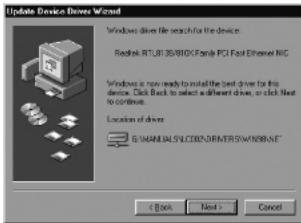
Click "Next" (Next).
During completion of the installation, you will be prompted for the Windows CD-ROM. Insert this to complete installation. We advise you to restart the PC following installation. Now the hardware has been installed successfully.
Installation under Windows 2000/XP
Insert the LAN PC card 10/100 Mbps in the laptop. Windows will automatically detect the card. No drivers are required for installation under Windows 2000 and Windows XP; they are all present within the operating system, provided it is up-to-date.
If Windows nevertheless indicates that the hardware must be installed, follow the installation procedure as described under Windows 98SE. In that case however, select the folder "WinXP" if you are asked for a location on the CD-ROM.
LED indicators
The LAN PC card 10/100 Mbps has 2 LEDs:
| LED indicators | Colour | Status | Meaning |
| L | Green | On | Connection |
| F | Green | Blinking | Sending/Receiving Data |
Warranty
All products under the Sweex brand are warranted for a period of three years. We do not grant support or warranties for any software and/or (rechargeable) batteries included. Warranty claims are only settled via the dealer where the product concerned was purchased.
The rightful owner has and retains title to all brand names and related rights mentioned in this manual.