
HM404 - Carte d'extension informatique SWEEX - Notice d'utilisation et mode d'emploi gratuit
Retrouvez gratuitement la notice de l'appareil HM404 SWEEX au format PDF.

| Type de produit | Carte d'extension FireWire PCI Express |
| Marque | SWEEX |
| Modèle | HM404 |
| Nombre de ports | 3 ports FireWire (IEEE 1394) |
| Interface | PCI Express |
| Dimensions approximatives | 120 x 60 x 20 mm |
| Poids approximatif | 50 g |
| Alimentation | Via le slot PCI Express (bus) |
| Systèmes d'exploitation supportés | Windows 2000, XP, Vista (aucun pilote requis) |
| Installation | Plug and Play, insertion dans un slot PCIe libre |
| Entretien et nettoyage | Dépoussiérer avec un chiffon doux et sec ; éviter l'humidité |
| Précautions de sécurité | Ne pas exposer à des températures extrêmes, à la lumière directe du soleil, à la poussière excessive ou à l'humidité ; éviter les chocs |
| Garantie | 3 ans (2 ans pour les cartes graphiques et l'électronique grand public) |
| Pièces détachées et réparabilité | Non réparable par l'utilisateur ; contacter le point de vente pour les réclamations sous garantie |
| Informations générales | Carte d'extension permettant d'ajouter 3 ports FireWire à un ordinateur équipé d'un slot PCI Express |
FOIRE AUX QUESTIONS - HM404 SWEEX
Questions des utilisateurs sur HM404 SWEEX
0 question sur cet appareil. Repondez a celles que vous connaissez ou posez la votre.
Poser une nouvelle question sur cet appareil
Téléchargez la notice de votre Carte d'extension informatique au format PDF gratuitement ! Retrouvez votre notice HM404 - SWEEX et reprennez votre appareil électronique en main. Sur cette page sont publiés tous les documents nécessaires à l'utilisation de votre appareil HM404 de la marque SWEEX.
MODE D'EMPLOI HM404 SWEEX
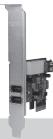
FW021 Sweex 3 Port Firewire PCI Express Card
Introduction
- Do not expose the Sweex Firewire PCI Express Card to extreme temperatures. Do not place the device in direct sun light or close to heating elements.
- Do not use the Sweex Firewire PCI Express Card in extremely dusty or moist environments.
- Prevent hard shocks or impacts of the device, as this can cause damage to the internal electronics.
Hardware Installation
- Make sure the computer is turned off and that there is no power connected.
- Also remove the printer and monitor cable, because these have their own power supply.
- Now unscrew the computer casing.
- Make sure that you undo yourself of possible static electricity. This can be done by grabbing a (naked) central heating pipe or an unpainted water pipe. Pay attention not to use a magnetic screwdriver. Briefly touch the iron frame of the PC casing. Avoid direct contact with the contact points of the PCIe slot and contact points on the graphics card.
- Locate a free PCIe slot and remove the metal protection plate that is in the computer casing for the intended slot. Consult the manual of your computer to find the PCIe slot.
- When possible fasten the card with screws so it can not move.
- When the card is mounted successfully, check if the other cards are still fitted properly in their expansion slot. It can happen that when a new card is added the other cards rise a little with as result that the card, or even the entire computer, may not work.
- Close the computer casing and reconnect all cables properly.
- Turn on the computer.
Installation Windows 2000 and XP
No drivers are needed for Windows 2000, XP and Vista, the Sweex Firewire PCI Card Express will automatically be installed after the start up.
Warranty
For most Sweex products a warranty period of 3 years applies. On Graphics Cards and Consumer Electronics Sweex offers 2 years of warranty. We do not give support or warranty on supplied software, rechargeable batteries and batteries. Transaction of warranty only takes place at the sales point where the product is bought.
All brand names and associated rights mentioned in this manual are and stay property of the rightful owner.