
LED5000 CXI - Projecteur LED LEICA - Notice d'utilisation et mode d'emploi gratuit
Retrouvez gratuitement la notice de l'appareil LED5000 CXI LEICA au format PDF.


| Type de produit | Projecteur LED coaxial pour microscopes stéréoscopiques |
| Modèle | Leica LED5000 CXI |
| Marque | Leica Microsystems |
| Technologie d'éclairage | LED à lumière blanche, température de couleur constante (lumière du jour) |
| Durée de vie des LED | Jusqu'à 50 000 heures, sans entretien |
| Intensité lumineuse | Réglable en 10 incréments |
| Contrôle | Clavier intégré, logiciel Leica Application Suite (LAS) ou panneau Leica SmartTouch |
| Alimentation | Via colonne de mise au point électronique (CTL2) ou bloc d'alimentation externe (10 450 266) pour colonne manuelle |
| Compatibilité microscopes | Tous les microscopes stéréoscopiques Leica série M (avec porte-objectif AX pour M205 C/A) |
| Applications | Éclairage coaxial pour échantillons plats, réfléchissants ou polis |
| Grossissement | Augmentation du grossissement de 1,5× |
| Vignettage | Possible à faible grossissement selon les composants utilisés (phénomène normal) |
| Entretien | Nettoyer avec des produits adaptés, éviter les produits chimiques sur les surfaces colorées ou caoutchoutées |
| Réparations | Uniquement par le service technique Leica Microsystems, pièces d'origine obligatoires |
| Sécurité | Allumer l'éclairage avant de regarder dans les oculaires ; ne pas regarder directement les LED |
| Température de couleur | Constante (lumière du jour) sur toute la durée de vie |
| Consommation électrique | Extrêmement faible pour une efficacité lumineuse élevée |
FOIRE AUX QUESTIONS - LED5000 CXI LEICA
Questions des utilisateurs sur LED5000 CXI LEICA
0 question sur cet appareil. Repondez a celles que vous connaissez ou posez la votre.
Poser une nouvelle question sur cet appareil
Téléchargez la notice de votre Projecteur LED au format PDF gratuitement ! Retrouvez votre notice LED5000 CXI - LEICA et reprennez votre appareil électronique en main. Sur cette page sont publiés tous les documents nécessaires à l'utilisation de votre appareil LED5000 CXI de la marque LEICA.
MODE D'EMPLOI LED5000 CXI LEICA
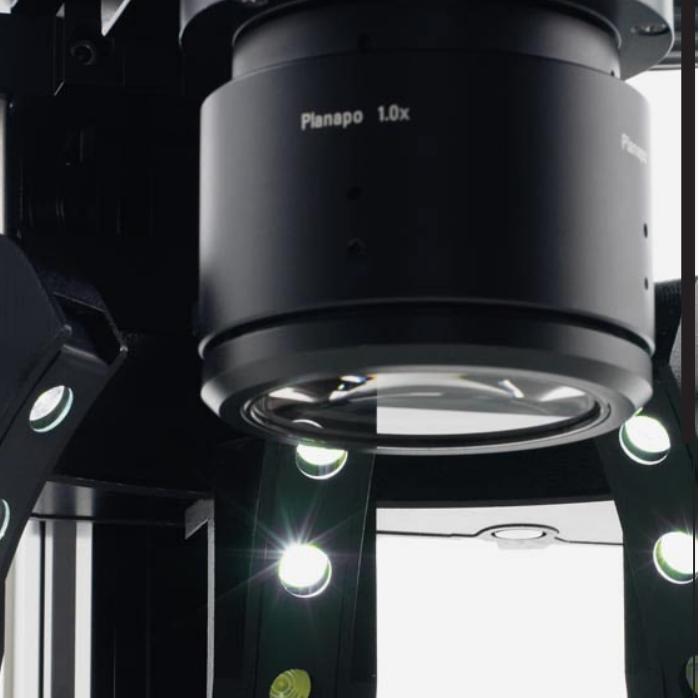
Leica LED
Manuel d'illuminateur
LED3000 RL, LED3000 NVI, LED5000 RL, LED5000 MCI, LED5000 CXI, LED5000 HDI™
Instructions générales
Concept de sécurité
Avant la première utilisation de votre microscope, veuillez lire la brochure « Concept de sécurité » fournie avec votre instrument. Elle contient des informations supplémentaires sur la manipulation et l'entretien.
Utilisation en salle blanche

Les illuminateurs LED Leica peuvent être utilisés en salle blanche sans aucun problème.
Nettoyage
- N'utilisez pas de produits de nettoyage, de produits chimiques ou de techniques inappropriés pour le nettoyage.
- N'utilisez jamais de produits chimiques pour nettoyer les surfaces colorées ou les accessoires comportant des pièces en caoutchouc. Cela pourrait endommager les surfaces et les échantillons pourraient être contaminés par des particules abrasées. Dans la plupart des cas, nous pouvons fournir des solutions spéciales sur demande. Certains produits peuvent être modifiés et nous pouvons proposer d'autres accessoires pour une utilisation en salle blanche.
Entretien
- Les réparations ne doivent être effectuées que par des techniciens de service formés par Leica Microsystems. Seules des pièces de rechange d'origine Leica Microsystems peuvent être utilisées.
Responsabilités de la personne responsable de l'instrument
- Veiller à ce que l'illuminateur LED Leica soit utilisé, entretenu et réparé uniquement par du personnel autorisé et formé.
Symboles utilisés
Avertissement de danger
Ce symbole indique des informations particulièrement importantes qui doivent être lues et respectées. Le non-respect de ces instructions peut présenter des risques pour le personnel, nuire aux performances du système ou endommager l'instrument.
Informations importantes
Ce symbole indique des informations ou des explications supplémentaires destinées à apporter des éclaircissements.
Notes explicatives
Ce symbole dans le texte représente des informations et des explications supplémentaires.
Table des matières
À propos des illuminateurs LED Leica
LED : une source de lumière d'avenir 6
Contrôle via LAS et Leica SmartTouch® 7
Leica LED3000 RL
À propos du Leica LED3000 RL 9
Leica LED3000 RL : assemblage 10
Leica LED3000 RL : utilisation 12
Commande de l'éclairage annulaire Leica LED5000 3000 13
Leica LED3000 RL : dessins dimensionnels 14
Leica LED3000 NVI™
À propos du Leica LED3000 NVI™ 16
Leica LED3000 NVI™ : assemblage 17
Leica LED3000 NVI™ : utilisation 19
Leica LED3000 NVI™ et Leica SmartTouch® 20
Leica LED3000 NVI™ : dessins dimensionnels 21
Leica LED5000 RL
À propos du Leica LED5000 RL 23
Leica LED5000 RL : assemblage 24
Leica LED5000 RL : utilisation 25
Leica LED5000 RL et Leica SmartTouch 26
Leica LED5000 RL : dessins dimensionnels 27
Leica LED5000 MCI
À propos du Leica LED5000 MCI 29
Leica LED5000 MCI : assemblage 30
Leica LED5000 MCI : assemblage alternatif 31
Leica LED5000 MCI™ : utilisation 32
Leica LED5000 MCI et Leica SmartTouch 34
Leica LED5000 MCI : dessins dimensionnels 35
Leica LED5000 CXI
À propos du Leica LED5000 CXI 37
Leica LED5000 CXI : assemblage 38
Leica LED5000 CXI : utilisation 40
Leica LED5000 CXI et Leica SmartTouch 41
Leica LED5000 CXI : dessins dimensionnels 42
Leica LED5000 HDI™
À propos du Leica LED5000 HDI™
Leica LED5000 HDI™ : assemblage
Leica LED5000 HDI™ : scénarios d'éclairage
Leica LED5000 HDI™ et Leica SmartTouch®
Leica LED5000 HDI™ : dessins dimensionnels
À propos des illuminateurs LED Leica
LED : un illuminateur d'avenir
Félicitations pour l'achat de votre illuminateur LED Leica Microsystems. Vous avez fait un excellent choix : vous apprécierez longtemps la haute qualité et la conception bien pensée de cet appareil, qui vous offrira le meilleur éclairage possible pour votre travail, quel que soit le type de spécimen que vous souhaitez examiner.
Tous les illuminateurs LED Leica offrent un grand nombre d'avantages dont vous ne voudrez plus vous passer :
- Température de couleur constante (lumière du jour) pendant toute la durée de vie ; durée de vie extrêmement longue, jusqu'à 50 000 heures.
- Absolument sans entretien ; aucun remplacement de lampe requis.
Selon l'illuminateur, des segments individuels peuvent être activés ou désactivés indépendamment les uns des autres, ce qui permet différents scénarios d'éclairage. Le contrôle s'effectue soit sur l'instrument, via le panneau Leica SmartTouch® ou via le logiciel Leica Application Suite. Consommation électrique extrêmement faible pour une efficacité lumineuse élevée.
Les illuminateurs LED Leica fonctionnent parfaitement avec tous les stéréomicroscopes de la série M de Leica.
Grâce au logiciel Leica Application Suite (LAS), les utilisateurs peuvent contrôler, enregistrer et rappeler ultérieurement des scénarios avec différents réglages du microscope et de l'éclairage en appuyant sur un bouton.
Nous vous souhaitons beaucoup de joie et de succès avec votre nouvel illuminateur LED Leica Microsystems !
Contrôle via LAS et Leica SmartTouch®
Chaque illuminateur LED Leica peut également être contrôlé via le logiciel Leica Application Suite (LAS) ou l'unité de contrôle Leica SmartTouch®.
Leica Application Suite (LAS)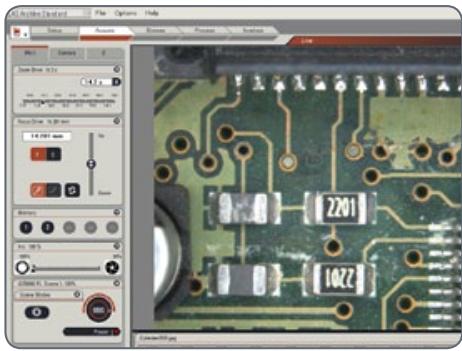
Le logiciel LAS sur PC permet aux utilisateurs d'intégrer chaque illuminateur LED Leica dans leur flux de travail. Contrôlez l'intensité de l'éclairage et le scénario d'éclairage souhaité depuis votre ordinateur. Les scénarios enregistrés peuvent être rappelés à tout moment en appuyant sur un bouton, afin de garantir des conditions constantes pour vos expériences.
Pour plus d'informations sur le contrôle de l'illuminateur LED via LAS, consultez le manuel d'utilisation du logiciel LAS.
Pour des informations sur la façon de contrôler l'illuminateur LED via LAS, reportez-vous au manuel d'utilisation du logiciel LAS.
Tous les illuminateurs LED Leica peuvent également être utilisés avec l'unité de contrôle Leica SmartTouch®. Comme avec LAS, l'illuminateur peut être allumé ou éteint, et la luminosité peut être ajustée. De plus, vous pouvez accéder à l'un des scénarios d'éclairage prédéfinis en un seul toucher. Tous les réglages peuvent être enregistrés et rappelés ultérieurement en appuyant sur un bouton.
Les instructions pour contrôler l'illuminateur à l'aide de Leica SmartTouch® se trouvent dans ce manuel d'utilisation.
Les instructions pour contrôler l'illuminateur à l'aide de Leica SmartTouch® se trouvent dans ce manuel d'utilisation.
Leica LED3000 RL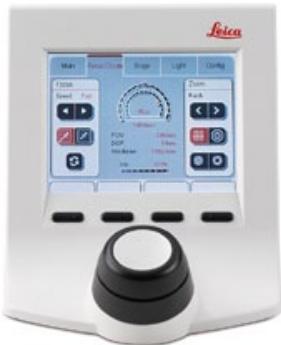
À propos du Leica LED3000 RL
Le Leica LED3000 RL ("Ring Light") génère une lumière incidente très brillante et homogène. L'illuminateur annulaire éclaire l'échantillon avec 24 LED qui peuvent être allumées ou éteintes ensemble ou dans diverses combinaisons.
Le Leica LED 3000 RL peut être utilisé avec tous les objectifs ayant un diamètre extérieur de 58 mm. La distance de travail prise en charge est comprise entre 65 mm et 150 mm.

La Leica LED 3000 RL peut être utilisée avec tous les objectifs ayant un diamètre extérieur de
diamètre de 58 mm. La distance de travail prise en charge est comprise entre 65 mm et 150 mm.
Commandes
L'appareil est commandé soit à l'aide du clavier intégré, soit via le logiciel Leica Application Suite (LAS) ou Leica SmartTouch.
LAS et Leica SmartTouch® vous permettent de créer des scénarios d'éclairage entièrement reproductibles et de basculer automatiquement entre eux. Pour plus d'informations sur le contrôle de l'illuminateur via LAS, veuillez consulter l'aide en ligne de LAS.
Leica LED3000 RL : Montage
Outils requis
Aucun
Installation du Leica LED3000 RL
- Placez le Leica LED3000 RL sur l'objectif par le dessous et serrez la vis de blocage.
Connexion et alimentation électrique
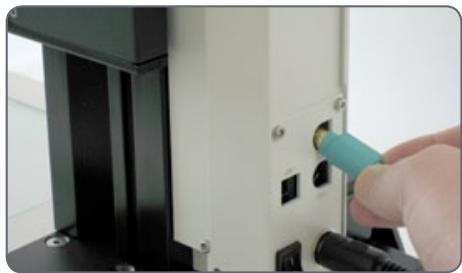
Le Leica LED3000 RL peut être utilisé directement avec la colonne de mise au point électronique. L'alimentation est alors fournie via la connexion CTL2. De plus, la communication entre LAS ou Leica SmartTouch® est transférée via la même connexion.
Si vous travaillez avec la colonne de mise au point manuelle, le Leica LED3000 RL doit être alimenté via le bloc d'alimentation externe fourni. De plus, dans ce cas, l'illuminateur ne peut pas être contrôlé via Leica Application Suite.
Connexion à la colonne de mise au point électronique
colonne
- Connectez le Leica LED3000 RL à la colonne de mise au point via le port CTL2.
Leica LED3000 RL : Montage (suite)
Alimentation électrique lors de l'utilisation de la colonne de mise au point manuelle
- Connectez l'unité d'alimentation externe (10 450 266) au Leica LED3000 RL.
Installation des accessoires en option
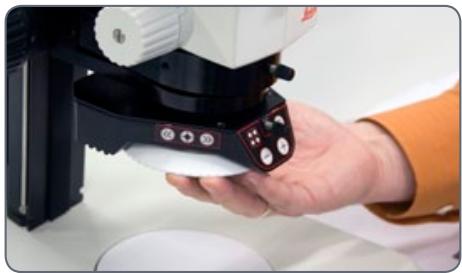
- Le diffuseur en option se fixe et se visse sous l'éclairage annulaire.
- Le jeu de polarisation en option (polariseur et analyseur) se fixe et se visse sous l'éclairage annulaire.
Leica LED3000 RL : Utilisation
La lumière du Leica LED3000 RL peut être très vive. Par conséquent, allumez toujours l'éclairage avant de regarder dans les oculaires ! Évitez de regarder directement les LED.
Utilisation du clavier
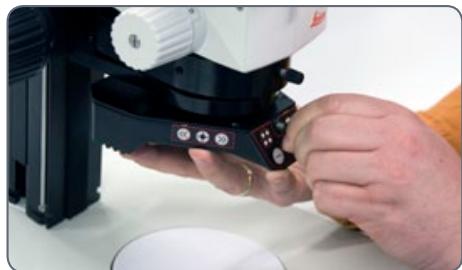
Utilisez le bouton pour allumer ou éteindre l'éclairage Leica LED3000 RL. Utilisez les boutons et pour régler la luminosité par incréments de 10. - Touchez l'un des deux boutons pour ajuster la quantité de lumière par petits incréments. Maintenez le bouton enfoncé pour changer la quantité de lumière plus rapidement.
Les scénarios d'éclairage
Vous pouvez basculer entre différents scénarios d'éclairage (anneau complet, demi-anneau, quarts d'anneau, quarts d'anneau opposés) à l'aide du bouton . Les segments actifs de l'éclairage sont affichés sur le panneau de commande avant au moyen de LED.
Utilisez les boutons et pour faire pivoter les segments actifs dans le sens horaire ou antihoraire.
Contrôle de l'éclairage annulaire Leica LED5000 3000
Grâce au Leica SmartTouch™, vous pouvez contrôler à la fois la luminosité et différents scénarios d'éclairage pour le Leica LED3000 RL ("Ring Light").
Réglage de l'éclairage
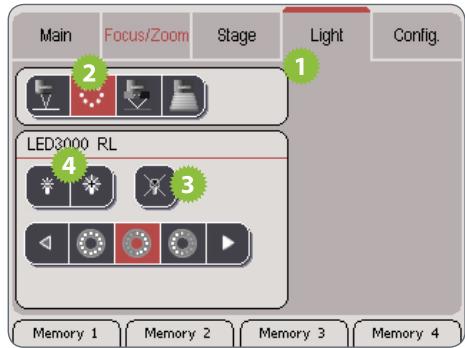
- Touchez les symboles de lampe pour régler l'intensité de la lumière.
- Touchez l'un des symboles des scénarios d'éclairage pour adapter l'éclairage à vos besoins.

Vous ne pouvez pas modifier les scénarios d'éclairage par défaut.
- Touchez l'onglet "Lumière".
- Dans la zone supérieure, touchez le symbole du Leica LED3000 RL.
- Allumez l'illuminateur.
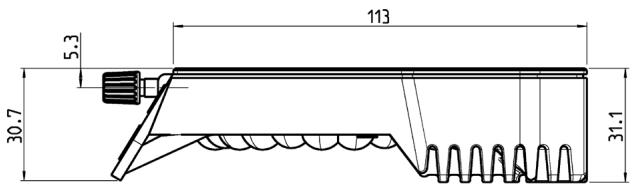
Leica LED3000 RL : Dessins dimensionnels
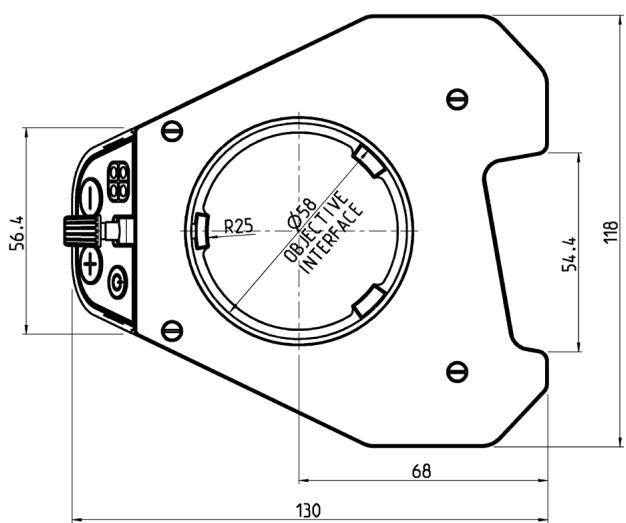
Leica LED3000 RL (dimensions en mm)
Leica LED3000 NVI™
À propos du Leica LED3000 NVI™
Leica LED3000 NVI™ -
La solution d'éclairage LED vertical
Contrairement à l'éclairage coaxial, le LED3000 NVI™ fonctionne également avec des échantillons irréguliers et des échantillons à faible réflexion. Il est idéal pour l'observation de cavités et de perçages et atteint un éclairage nettement plus lumineux que les lampes halogènes comparables de 150 watts. Les ombres minimisées causées par les outils contribuent également à une expérience de travail plus facile et plus agréable avec le microscope.
Leica LED3000 NVI™ : assemblage
Outils requis
Aucun
La Leica LED3000 NVI™ peut être utilisée avec tous les objectifs ayant un diamètre extérieur de 58 mm.

La distance de travail prise en charge est comprise entre 50 mm et 150 mm.
Installation de la Leica LED3000 NVI™
- Connectez la Leica LED3000 NVI™ à la colonne de mise au point via la connexion CTL2 si la colonne est équipée d'une électronique intégrée.
Installation alternative pour colonnes manuelles
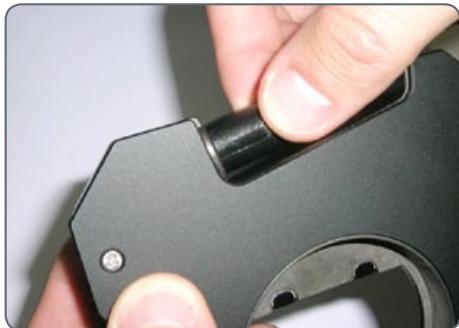
- Connectez l'alimentation externe (10 450 266) à la Leica LED3000 NVI™.
- Placez la Leica LED3000 NVI™ sur le porte-optique par le dessous et serrez la vis de blocage.
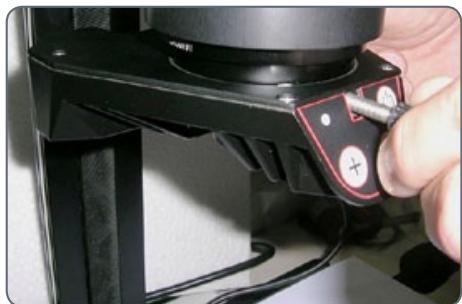
Leica LED3000 NVI™ : assemblage (suite)
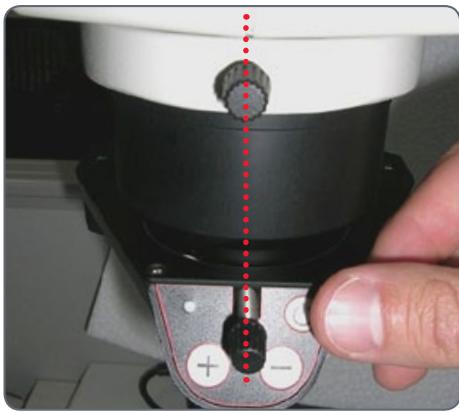
Assurez-vous que la vis de blocage de l'illuminateur et celle du porte-optique sont alignées, sinon un ombrage de l'image peut se produire.
Leica LED3000 NVI™ : utilisation
L'intensité de l'illuminateur peut être réglée par incréments de 10. La Leica LED3000 NVI™ peut également être contrôlée via Leica Application Suite (LAS) ou Leica SmartTouch. La distance de travail prise en charge est comprise entre 50 mm et 150 mm. Lorsque vous appuyez sur les boutons, tenez le clavier entre le pouce et l'index. Évitez de taper sur le clavier avec un seul doigt si possible.
Utilisation
La lumière du Leica LED3000 NVI™ peut être très vive. Par conséquent, allumez toujours l'illuminateur avant de regarder à travers les oculaires !
- Allumez l'illuminateur en appuyant brièvement sur le bouton (ON/OFF).
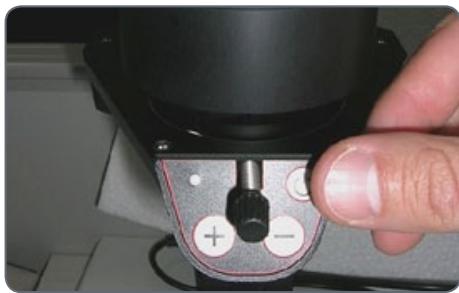
La LED verte dans le coin supérieur gauche s'allume alors.
- Réglez la luminosité en appuyant brièvement sur les boutons ou .
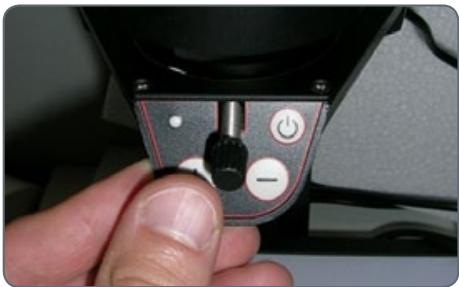
- Éteignez l'illuminateur en appuyant brièvement sur le bouton .
Leica LED3000 NVI™ et Leica SmartTouch®
Réglage de l'éclairage
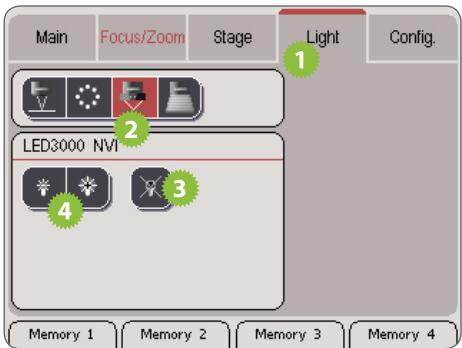
- Touchez l'onglet "Light".
- Dans la zone supérieure, touchez le symbole du Leica LED3000 NVI.
- Allumez l'illuminateur.
- Touchez les symboles de lampe pour régler l'intensité de la lumière.
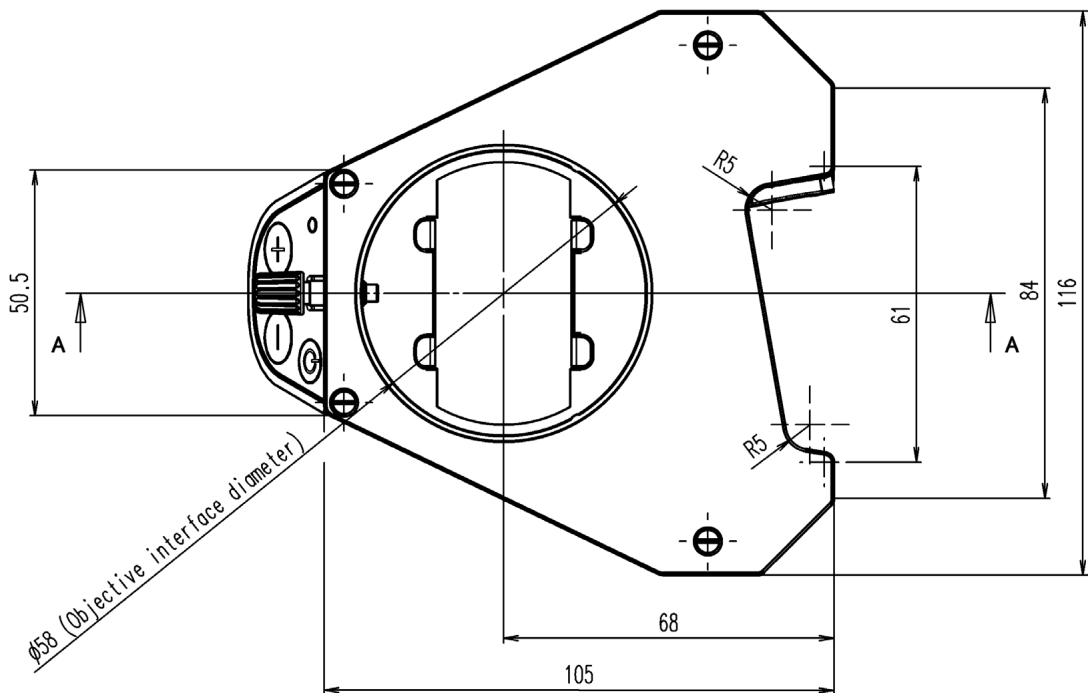
Leica LED3000 NVI™ : Dessins dimensionnels
Leica LED3000 NVI™ (dimensions en mm)
Leica LED5000 RL
À propos du Leica LED5000 RL
Utilisation
La Leica LED5000 RL ("Ring Light") génère une lumière incidente très vive et homogène. Elle a un diamètre de 80 mm et éclaire l'échantillon avec 48 LED qui peuvent être allumées et éteintes complètement ou dans diverses combinaisons. Elle est contrôlée soit à l'aide du clavier intégré, soit via la Leica Application Suite (LAS).
LAS vous permet de créer des scénarios d'éclairage entièrement reproductibles et de basculer automatiquement entre eux. Pour plus d'informations, reportez-vous à l'aide en ligne de LAS.

Leica LED5000 RL : Montage
L'anneau d'éclairage, la Leica LED5000 RL ("Ring Light"), est installé sur l'objectif à l'aide d'une seule vis. Il a été optimisé pour une distance de travail comprise entre 60 et 70 mm.
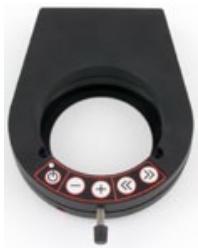
Contraintes
La Leica LED5000 RL peut être utilisée avec les objectifs planapochromat 1× et planapochromat 0,63×. Avec tous les autres objectifs, la distance de travail est trop faible pour un éclairage adéquat.
L'anneau d'éclairage ne peut pas être utilisé avec la tourelle porte-objectifs.
Montage
- Connectez le câble CAN-bus à l'anneau d'éclairage. La partie plate de la fiche doit être orientée vers le haut.
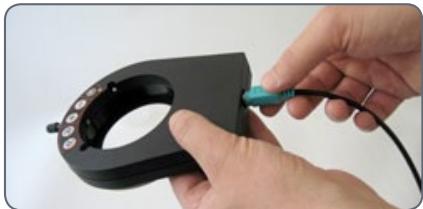
- Poussez l'anneau d'éclairage sur l'objectif jusqu'à la butée et vissez-le en place.
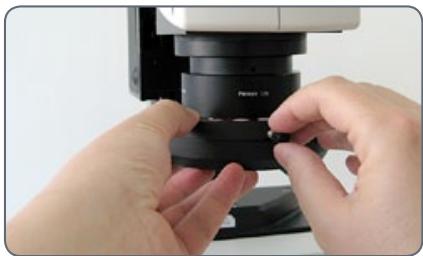
- Branchez l'autre extrémité du câble dans l'une des deux prises "CTL2" sur la colonne.
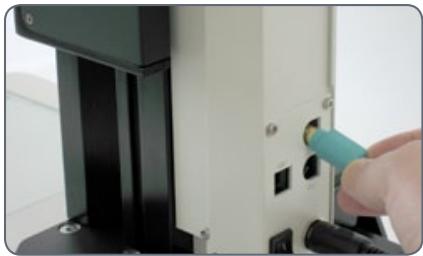
Pour un accès optimal à l'échantillon, l'anneau d'éclairage doit être installé avec le câble orienté vers l'arrière. Cependant, il est également possible de tourner l'anneau d'éclairage sur le côté, par exemple si vous utilisez simultanément l'éclairage du système Leica LED5000 MCI™. Dans ce cas, l'anneau d'éclairage ne peut pas être connecté directement au Leica LED5000 MCI™.
Leica LED5000 RL : Utilisation
La lumière de la Leica LED5000 RL peut être très vive. Par conséquent, allumez toujours l'éclairage avant de regarder à travers les oculaires ! Évitez de regarder directement les LED.
Utilisation du clavier
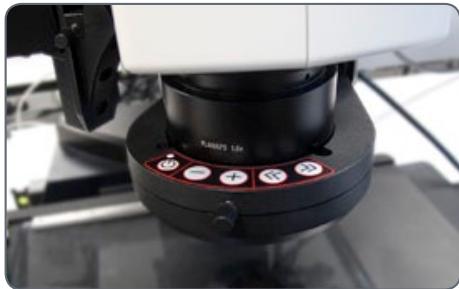
Utilisez la touche pour allumer ou éteindre l'éclairage. Utilisez les touches ou pour régler la luminosité par incréments de 10. Touchez l'une ou l'autre de ces touches pour ajuster l'intensité par petits incréments. Maintenez une touche enfoncée pour modifier l'intensité plus rapidement.
Les scénarios d'éclairage
Utilisez les touches et pour basculer entre les différents scénarios d'éclairage.
Contrainte
Le Leica LED5000 RL a été conçu pour être utilisé avec les objectifs 1.0 × et 0.63 ×. Pour les objectifs 1.6 × et 2.0 ×, des anneaux lumineux conventionnels de la gamme de produits d'éclairage Leica sont disponibles.
Leica LED5000 RL et Leica SmartTouch®
Avec Leica SmartTouch™, vous pouvez contrôler à la fois la luminosité et différents scénarios d'éclairage pour le Leica LED3000 RL ("Ring Light").
Réglage de l'éclairage
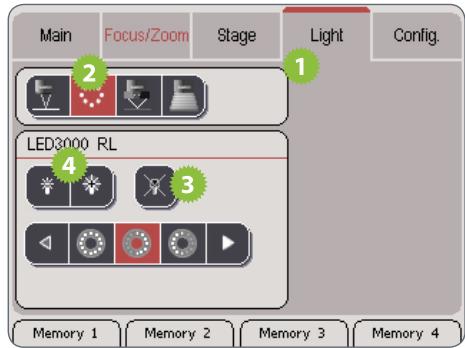
- Touchez les symboles de lampe pour ajuster l'intensité de la lumière.
- Touchez l'un des symboles des scénarios d'éclairage pour adapter l'éclairage à vos besoins.

Vous ne pouvez pas modifier les scénarios d'éclairage par défaut.
- Touchez l'onglet "Light".
- Dans la zone supérieure, touchez le symbole du Leica LED3000 RL.
- Allumez l'illuminateur.
Leica LED5000 RL : dessins dimensionnels
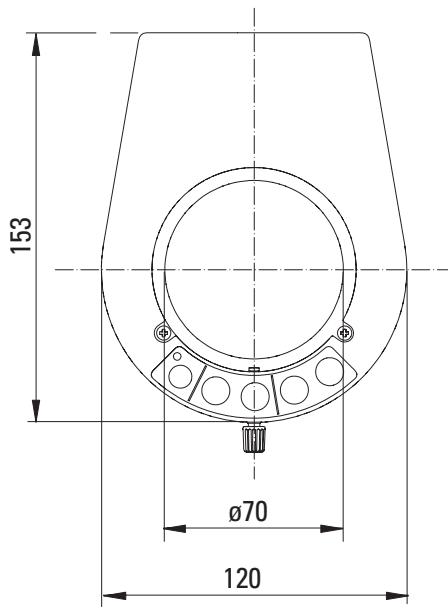
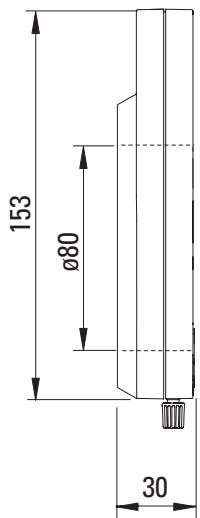
Leica LED5000 RL (dimensions en mm)
Leica LED5000 MCI
À propos du Leica LED5000 MCI
Leica LED5000 MCI™ -
L'expert en éclairage oblique
Le Leica LED5000 MCI™ (Multi Contrast Illumination) est une solution d'éclairage unique en son genre pour les applications où, jusqu'à présent, des illuminateurs à col de cygne étaient utilisés. L'angle plat de la lumière incidente oblique crée un contraste particulièrement élevé pour l'observation de l'échantillon, permettant à l'utilisateur de détecter des irrégularités et des défauts minimes, par exemple des rayures et des particules de poussière. Contrairement à l'illuminateur à col de cygne, les réglages du LED5000 MCI™ sont entièrement reproductibles.
Avantages
- Neuf LED haute performance provenant de différents angles et directions. Un contraste élevé permet aux utilisateurs de découvrir des structures fines sur l'échantillon.
- Angle d'éclairage de 15° à 40°. Réglages d'éclairage reproductibles. Accès optimal à l'échantillon.
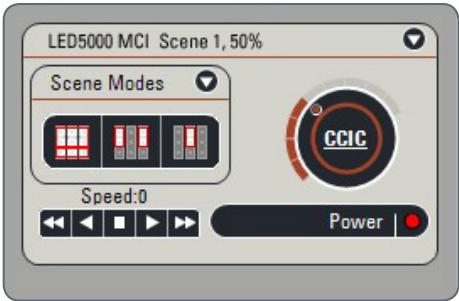
Bien sûr, le Leica LED5000 MCI™ peut également être contrôlé par le logiciel LAS (Leica Application Suite).
Leica LED5000 MCI : assemblage
Le Leica LED5000 MCI™ (pour "Multi Contrast Illumination") s'installe à l'aide de deux vis. Pour une accessibilité optimale, le porte-optique doit être retiré lors de l'installation.
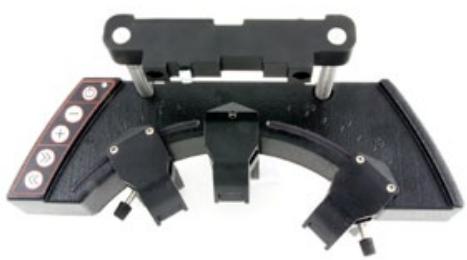
Contraintes
Le Leica LED5000 MCI™ ne peut pas être utilisé avec la tourelle porte-objectifs.
Assemblage
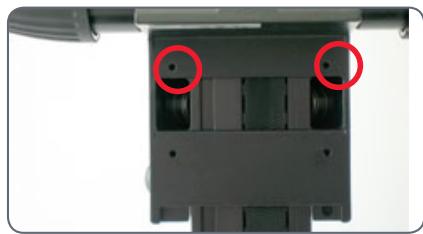
- Tenez le LED5000 MCI™ d'une main et vissez fermement les étriers de retenue sur les deux trous supérieurs du boîtier d'entraînement.
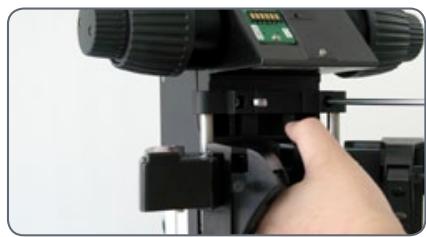
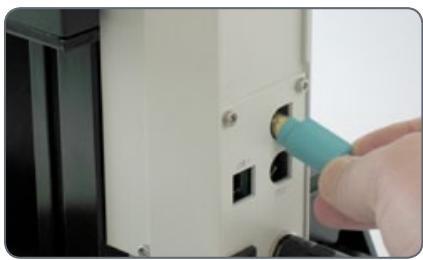
- Connectez le câble CAN-bus à l'une des deux prises. (La partie plate de la fiche doit être orientée vers le bas.)
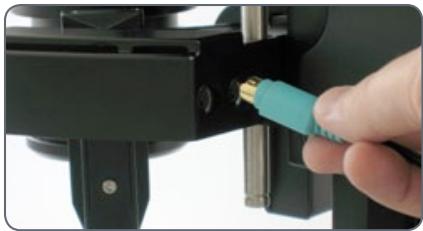
- Branchez l'autre extrémité du câble dans l'une des deux prises "CTL2" sur la colonne.
Leica LED5000 MCI : Assemblage alternatif
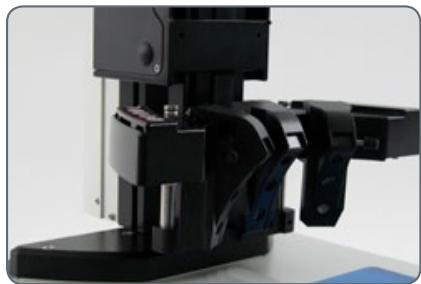
Dans certaines circonstances, la source de lumière ne doit pas être déplacée avec le porte-optique. Un exemple typique est celui des images multifocales où la pile Z change tandis que l'angle d'incidence de la lumière doit rester le même. À ces fins, le Leica LED5000 MCI™ est fixé directement sur la colonne.
Installation sur la colonne
- Retirez l'étrier de retenue du Leica LED5000 MCI™.
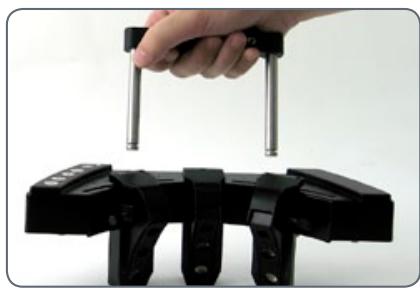
Si vous utilisez le porte-échantillon AX, utilisez la position d'engagement supérieure de l'étrier de retenue.
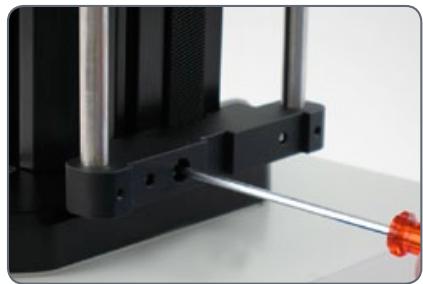
- Vissez l'étrier de retenue dans la colonne à l'encoche à l'aide de la vis unique. Si vous serrez la vis, l'étrier de retenue se déplace automatiquement dans la bonne position.
- Poussez le Leica LED5000 MCI™ sur l'étrier de retenue.
Leica LED5000 MCI™ : Utilisation
Utilisation
Le Leica LED5000 MCI™ (pour "Multi Contrast Illumination") est un illuminateur universel à haute puissance. Trois groupes de 3 LED chacun peuvent être disposés comme souhaité autour de l'échantillon. Le contrôle ciblé des LED permet de mettre en œuvre divers scénarios d'éclairage.
Préparation
Tenez le MCI à deux mains et tirez-le vers le bas jusqu'à ce que l'illuminateur s'enclenche en place à l'extrémité inférieure des tiges de guidage.
Dans cette position, vous obtenez toujours le même contraste avec une illumination identique. Cela garantit la reproductibilité d'une expérience.
Installé trop haut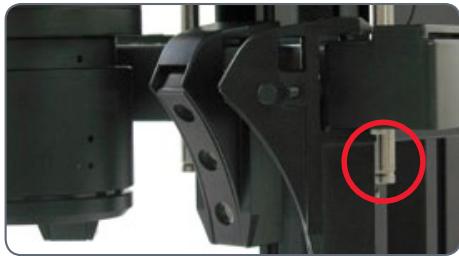
Hauteur optimale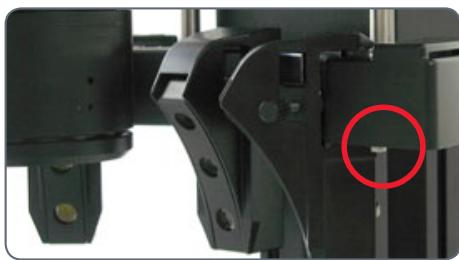
Contact avec la base
Si les supports optiques sont accidentellement abaissés trop bas, un contact entre la base et le MCI peut se produire. Un mécanisme de sécurité dans la liaison garantit que, dans ce cas, le MCI est automatiquement poussé vers le haut pour éviter tout risque de dommage.
- Veillez à ne placer aucun spécimen directement sous le MCI. Après avoir soulevé le support optique, remettez le MCI dans sa position d'origine.
Leica LED5000 MCI™ : Utilisation (suite)
Utilisation du clavier
Utilisez la touche pour allumer ou éteindre l'illumination. - Utilisez les touches "+" et "-" pour régler la luminosité par incréments de 10. Touchez l'un des deux boutons pour ajuster l'intensité par petits incréments. Maintenez une touche enfoncée pour changer l'intensité plus rapidement.
Les scénarios d'illumination
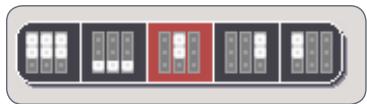
Utilisez les touches "<<" et ">>" pour basculer entre les scénarios d'illumination illustrés ci-dessous.
Luminosité maximale
Pour des raisons de température, il n'est pas possible d'allumer les neuf LED simultanément. Par conséquent, pour fournir une illumination globale lumineuse, les deux rangées supérieures sont activées. La rangée inférieure fournit principalement le contraste.
Le Leica LED5000 MCI™ peut également être contrôlé par le logiciel LAS (Leica Application Suite).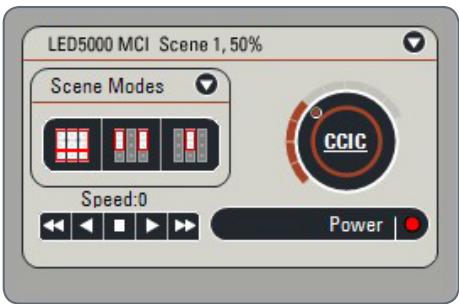
Luminosité maximale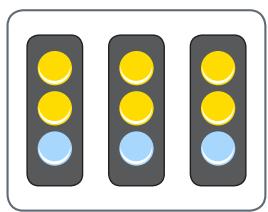
Contraste maximal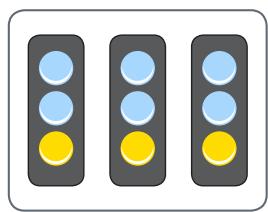
Éclairage ponctuel depuis l'arrière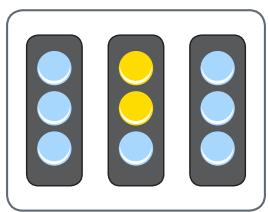
Éclairage ponctuel depuis la gauche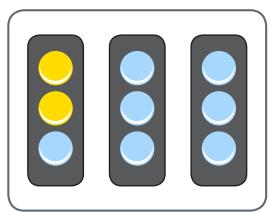
Éclairage ponctuel depuis la droite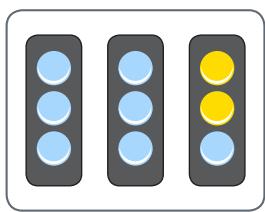
Leica LED5000 MCI et Leica SmartTouch®
Grâce à la Leica SmartTouch™, vous pouvez contrôler à la fois la luminosité et différents scénarios d'éclairage pour la Leica LED5000 MCI ("Multi Contrast Illumination").
Réglage de l'éclairage
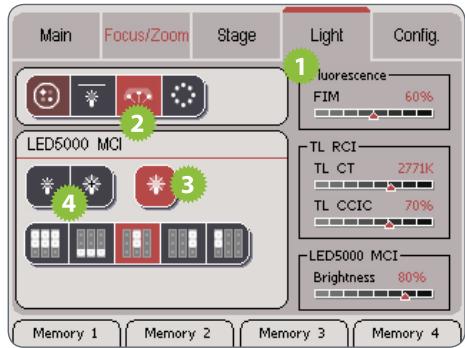
- Touchez l'onglet "Lumière".
- Dans la zone supérieure, touchez le symbole de la Leica LED5000 MCI.
- Allumez l'illuminateur.
- Touchez les symboles de lampe pour régler l'intensité de la lumière.
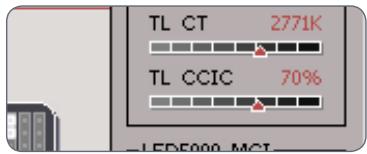
La luminosité sélectionnée est affichée sur le côté droit de l'écran.
- Touchez l'un des symboles de scénarios d'éclairage pour adapter l'éclairage à vos besoins.
Vous ne pouvez pas modifier les scénarios d'éclairage par défaut.
Leica LED5000 MCI : dessins dimensionnels
Leica LED5000 MCI (dimensions en mm)

Leica LED5000 CXI
À propos du Leica LED5000 CXI
Leica LED5000 CXI™ -
La solution d'éclairage coaxial à LED
Le Leica LED5000 CXI™ est un illuminateur coaxial qui combine les avantages de la technologie LED dans un espace minimal : longue durée de vie, éclairage lumineux avec une qualité de lumière naturelle, intégration dans le logiciel Leica LAS et réglages d'éclairage entièrement reproductibles.
Le Leica LED5000 CXI™ est idéal pour éclairer des échantillons plats, réfléchissants ou polis. Il offre un éclairage nettement plus lumineux que les lampes halogènes comparables de 150 watts.
Utilisation avec le support de microscope AX
Si le support de microscope AX est utilisé en position verticale, une lame quart d'onde est nécessaire :
- Fixez la lame quart d'onde à l'objectif à l'aide de la vis de serrage.
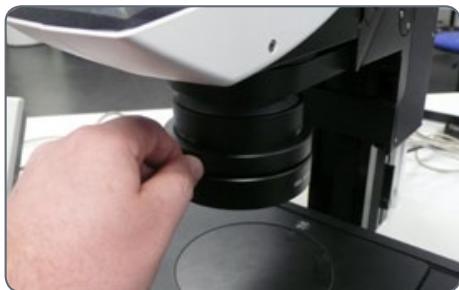
- Faites pivoter la lame quart d'onde vers le haut à l'aide de la bague moletée jusqu'à obtenir l'effet souhaité.
Utilisation avec les stéréomicroscopes Leica M205 C / M205 A
Si l'illuminateur Leica LED5000 CXI est utilisé avec le Leica M205 C ou le Leica M205 A, gardez à l'esprit qu'un support de microscope AX est utilisé. Le support doit être en position (M205) lors de l'assemblage.
Afin d'obtenir un éclairage uniforme en « vision stéréo », le support AX doit être déplacé vers la droite jusqu'à sa butée. Cette position diffère de la position stéréo par défaut de 2 mm.
Leica LED5000 CXI : assemblage
Outils requis
Aucun
Installation du Leica LED5000 CXI
- Connectez le Leica LED5000 CXI à la colonne de mise au point via la connexion CTL2 si la colonne de mise au point est équipée d'une électronique intégrée.
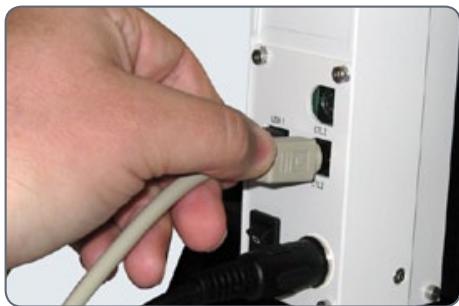
Installation alternative pour colonnes manuelles
- Connectez l'alimentation externe (10 450 266) au Leica LED5000 CXI.
- Dévissez la vis de positionnement et retirez le capot de protection.
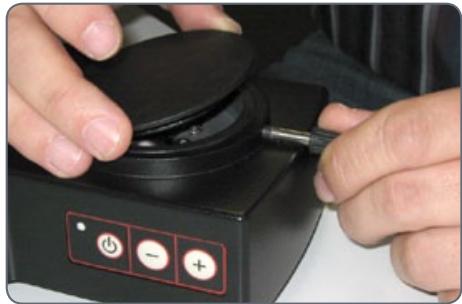
Leica LED5000 CXI (suite)
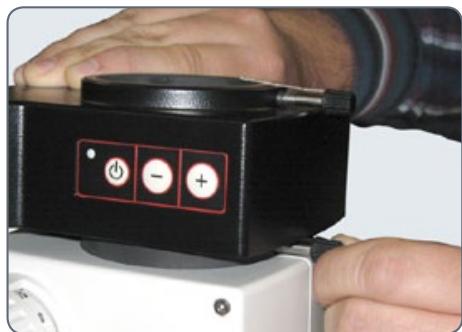
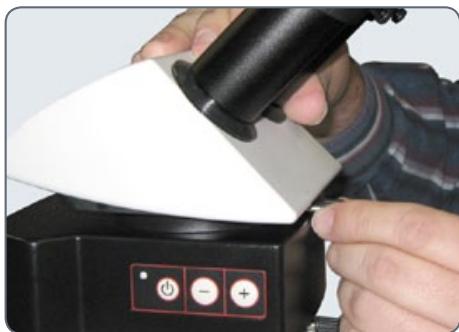
- Placez le Leica LED5000 CXI sur le porte-optique et serrez la vis de positionnement.
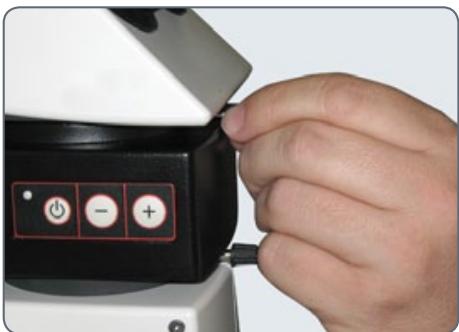
- Poussez la tube (par exemple, la tube binoculaire inclinée) dans la bague à queue d'aronde et faites-la pivoter légèrement dans les deux sens jusqu'à ce que la vis de positionnement s'engage dans la rainure de guidage.
- En tenant le tube uniquement légèrement, serrez soigneusement la vis de positionnement. Il est automatiquement amené à la bonne position.
Leica LED5000 CXI : Utilisation
L'intensité de l'illuminateur peut être réglée par incréments de 10. Le Leica LED3000 NVI™ peut également être contrôlé via le logiciel Leica Application Suite (LAS) ou Leica SmartTouch. L'utilisation du Leica LED5000 CXI entraîne un niveau de grossissement accru de 1,5×. Selon les composants utilisés, différentes intensités de vignettage peuvent apparaître à faible grossissement. Le vignettage est normal et n'est pas un dysfonctionnement.
Utilisation
La lumière du Leica LED5000 CXI peut être très vive. Par conséquent, allumez toujours l'illuminateur avant de regarder à travers les oculaires !
- Allumez l'illuminateur en appuyant brièvement sur le bouton (ON/OFF).
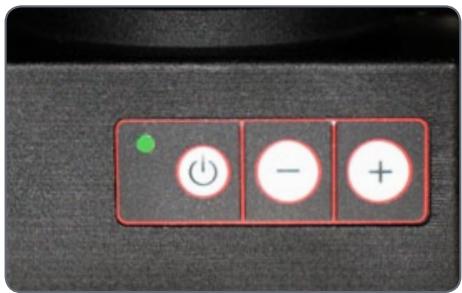
La LED verte dans le coin supérieur gauche s'allume alors.
- Réglez la luminosité en appuyant brièvement sur les boutons ⊕ ou ⊖.
- Éteignez l'illuminateur en appuyant brièvement sur le bouton.
Leica LED5000 CXI et Leica SmartTouch®
Réglage de l'éclairage
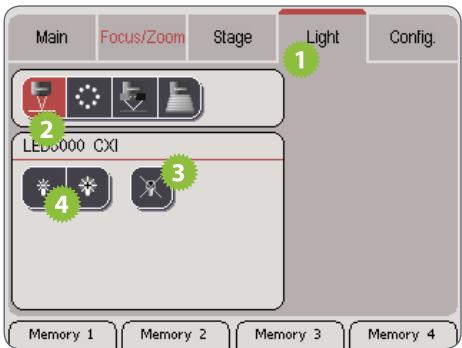
- Touchez l'onglet "Lumière".
- Dans la zone supérieure, touchez le symbole du Leica LED5000 CXI.
- Allumez l'illuminateur.
- Touchez les symboles de la lampe pour régler l'intensité de la lumière.
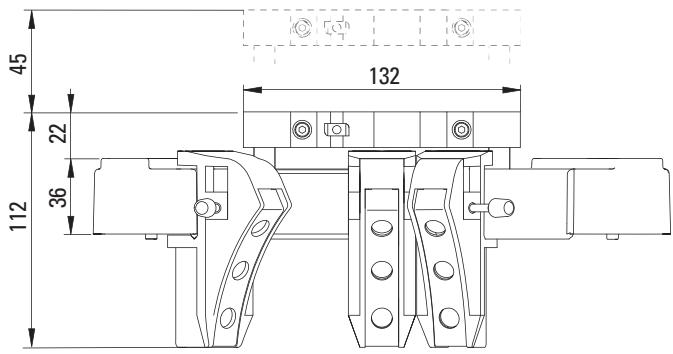
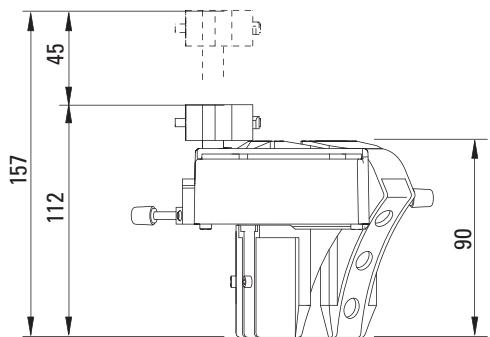
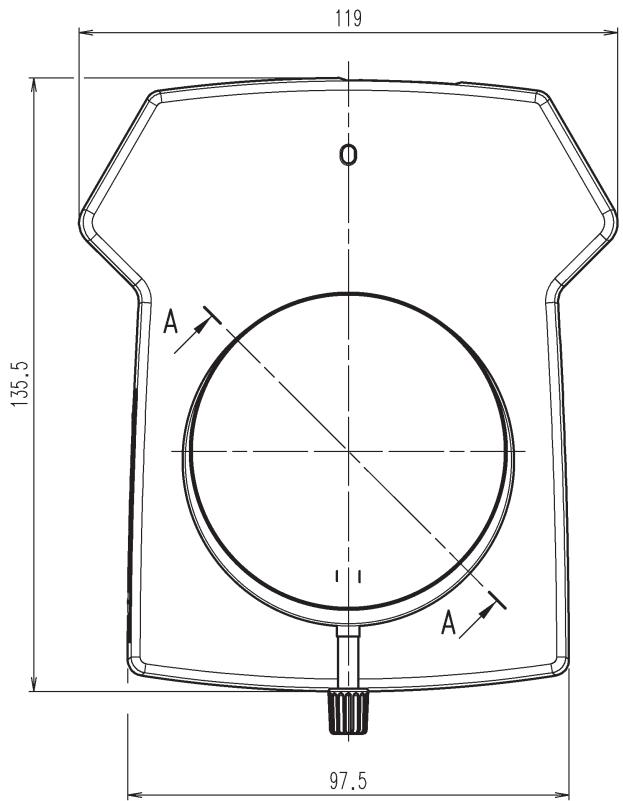
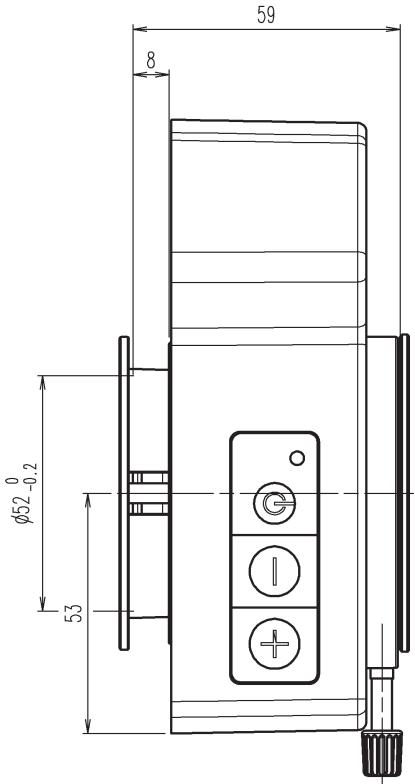
Leica LED5000 CXI : Dessins dimensionnels
Leica LED5000 CXI (dimensions en mm)
Leica LED5000 HDI™
À propos du Leica LED5000 HDI™
Le Leica LED5000 HDI™ (pour « High Diffuse Illumination ») est un illuminateur haute puissance innovant de conception nouvelle. Sa lumière douce réduit les reflets sur les échantillons très réfléchissants et évite la lumière parasite.
Le Leica LED5000 HDI™ se compose d'un dôme en plastique flexible. Il abrite deux anneaux de LED indépendants qui peuvent être contrôlés individuellement.
Il est contrôlé soit à l'aide du clavier intégré, soit via le Leica Application Suite (LAS) ou le Leica SmartTouch.
Le Leica LED5000 HDI™ est installé sur l'objectif à l'aide d'une seule vis. La distance de travail a été optimisée pour une hauteur comprise entre 60 et 70 mm.
Contraintes
Le Leica LED5000 HDI™ ne peut être utilisé qu'avec des objectifs ayant un diamètre extérieur de 80 mm.
Le Leica LED5000 HDI™ a été optimisé pour les objectifs planapochromat 1× et planapochromat 0,63×.
Contrôle via Leica Application Suite
L'illuminateur Leica LED5000 HDI™ sera pris en charge par LAS version 3.6 et ultérieure (été 2010).
LAS vous permet de créer des scénarios d'éclairage entièrement reproductibles et de basculer automatiquement entre eux. Pour plus d'informations, reportez-vous à l'aide en ligne de LAS.
Leica LED5000 HDI™ : assemblage
Connexion
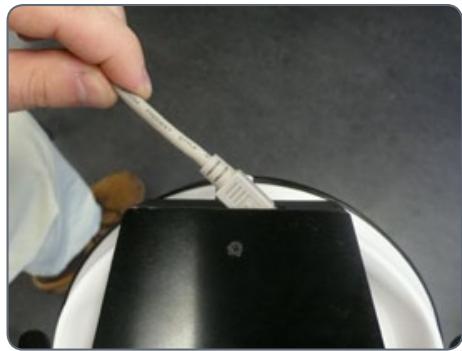
- Connectez le câble CAN-bus à l'illuminateur. La partie plate de la fiche doit être orientée vers le haut.
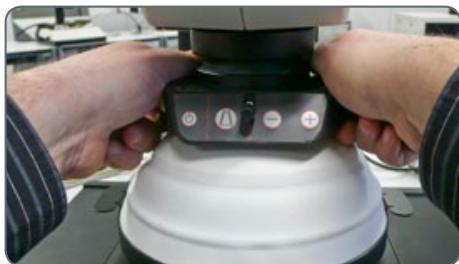
- Lorsque l'image est nette, faites glisser l'illuminateur sur l'objectif jusqu'à ce qu'il ne touche plus la plaque de base lorsqu'il est rabattu, puis vissez-le en place. Ce faisant, le panneau de commande doit être orienté vers l'utilisateur.
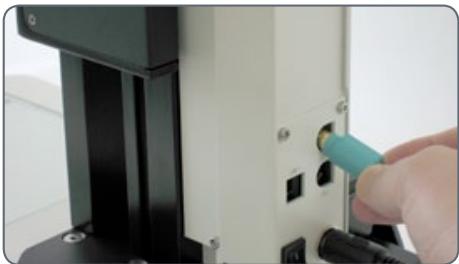
- Branchez l'autre extrémité du câble dans l'une des deux prises « CTL2 » situées à l'arrière de la colonne de mise au point.
Selon la hauteur de l'échantillon à examiner, le LED5000 HDI™ peut être installé un peu plus haut ou plus bas le long de l'objectif.
Leica LED5000 HDI™ : scénarios d'éclairage
Utilisation du clavier
Utilisez le bouton pour allumer ou éteindre l'éclairage.
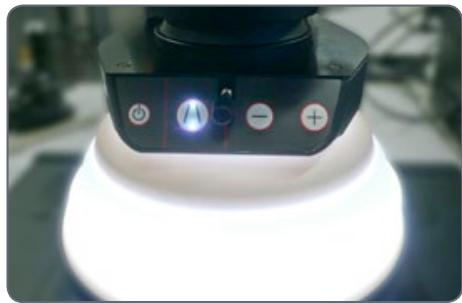
- Utilisez le bouton pour basculer entre les trois modes d'éclairage : les deux anneaux de LED actifs > anneau de LED supérieur actif > anneau de LED inférieur actif
- Si les deux anneaux de LED sont actifs, seule la luminosité de l'anneau supérieur peut être modifiée. Selon l'échantillon et les exigences, il est ainsi possible d'obtenir des conditions de luminosité équilibrées pour les deux anneaux.
Utilisez les boutons ou pour régler la luminosité par incréments de 10. Touchez l'un des deux boutons pour ajuster l'intensité par petits incréments. Maintenez le bouton enfoncé pour modifier l'intensité plus rapidement.
Les scénarios d'éclairage
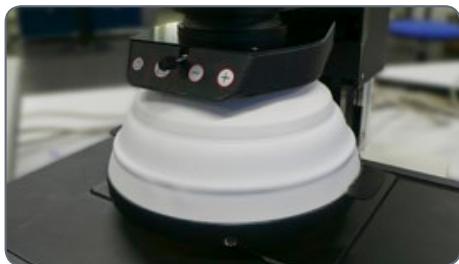
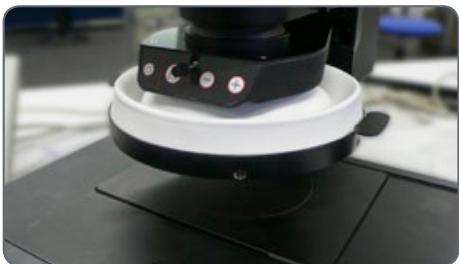
Le dôme en plastique flexible est l'élément central du Leica LED5000 HDI™. Il permet deux modes de fonctionnement de l'illuminateur.
Vous pouvez basculer entre les deux modes en déplaçant le dôme vers le haut ou vers le bas à l'aide des deux languettes situées à gauche et à droite de l'anneau métallique.
Grâce à sa grande flexibilité, il est également possible de ne replier qu'un seul côté vers le haut ou vers le bas.
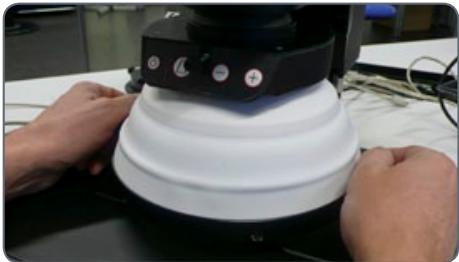
Leica LED5000 HDI™ : Scénarios d'éclairage (suite)
L'utilisation de plastique flexible évite en grande partie les "collisions dures" avec les spécimens. Cependant, pour les spécimens très sensibles, même le poids de l'illuminateur lui-même peut causer des dommages.
1. Dôme replié vers le bas
Dans ce mode, le Leica LED5000 HDI™ est particulièrement puissant. L'homogénéité est au plus haut niveau et la lumière parasite extérieure est bloquée.
2. Dôme replié vers le haut
Ce mode permet un accès continu au spécimen pour une configuration supplémentaire. Ce mode assure également un éclairage avec des réflexions minimales.
Leica LED5000 HDI™ et Leica SmartTouch®
En utilisant le Leica SmartTouch™, vous pouvez contrôler à la fois la luminosité et les différents scénarios d'éclairage pour le Leica LED5000 RL ("Ring Light").
Réglage de l'éclairage
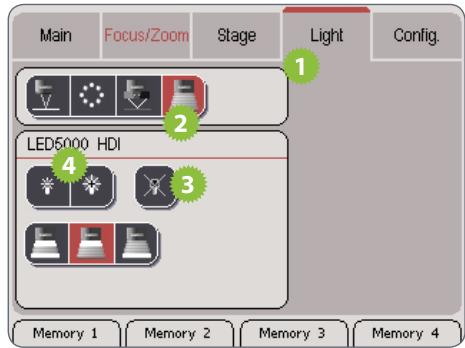
- Touchez l'onglet "Light".
- Dans la zone supérieure, touchez le symbole du Leica LED5000 HDI.
- Allumez l'illuminateur.
- Touchez les symboles de la lampe pour régler l'intensité de la lumière.
- Touchez l'un des symboles des réglages de lumière pour ajuster l'éclairage selon vos besoins.

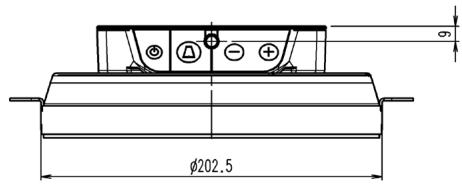
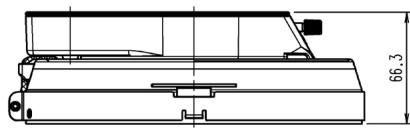
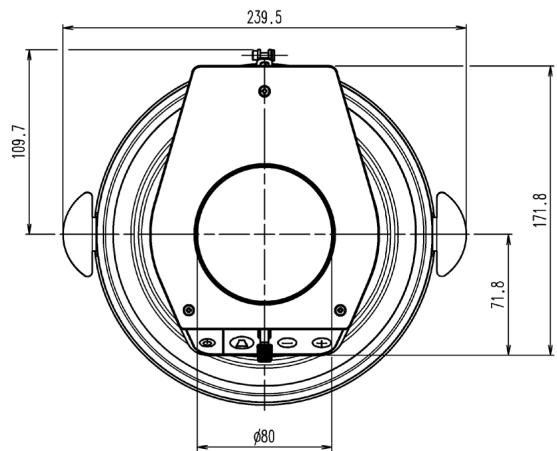
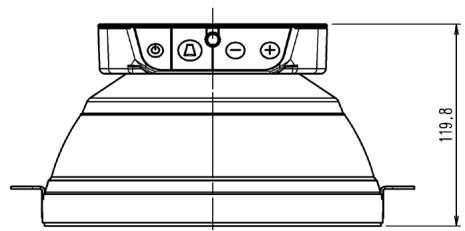
Leica LED5000 HDI™ : Dessins dimensionnels
Leica LED5000 HDI™ (dimensions en mm)
Dôme plié
Dôme déplié


- LEICA LED
- MANUEL D'ILLUMINATEUR
- INSTRUCTIONS GÉNÉRALES
- CONCEPT DE SÉCURITÉ
- UTILISATION EN SALLE BLANCHE
- NETTOYAGE
- ENTRETIEN
- RESPONSABILITÉS DE LA PERSONNE RESPONSABLE DE L'INSTRUMENT
- SYMBOLES UTILISÉS
- AVERTISSEMENT DE DANGER
- INFORMATIONS IMPORTANTES
- NOTES EXPLICATIVES
- TABLE DES MATIÈRES
- À PROPOS DES ILLUMINATEURS LED LEICA
- LEICA LED3000 RL
- LEICA LED3000 NVI™
- LEICA LED5000 RL
- LEICA LED5000 MCI
- LEICA LED5000 CXI
- LEICA LED5000 HDI™
- LED : UN ILLUMINATEUR D'AVENIR
- CONTRÔLE VIA LAS ET LEICA SMARTTOUCH®
- TOUS LES ILLUMINATEURS LED LEICA PEUVENT ÉGALEMENT ÊTRE UTILISÉS AVEC L'UNITÉ DE CONTRÔLE LEICA SMARTTOUCH®. COMME AVEC LAS, L'ILLUMINATEUR PEUT ÊTRE ALLUMÉ OU ÉTEINT, ET LA LUMINOSITÉ PEUT ÊTRE AJUSTÉE. DE PLUS, VOUS POUVEZ ACCÉDER À L'UN DES SCÉNARIOS D'ÉCLAIRAGE PRÉDÉFINIS EN UN SEUL TOUCHER. TOUS LES RÉGLAGES PEUVENT ÊTRE ENREGISTRÉS ET RAPPELÉS ULTÉRIEUREMENT EN APPUYANT SUR UN BOUTON
- À PROPOS DU LEICA LED3000 RL
- LE LEICA LED3000 RL ("RING LIGHT") GÉNÈRE UNE LUMIÈRE INCIDENTE TRÈS BRILLANTE ET HOMOGÈNE. L'ILLUMINATEUR ANNULAIRE ÉCLAIRE L'ÉCHANTILLON AVEC 24 LED QUI PEUVENT ÊTRE ALLUMÉES OU ÉTEINTES ENSEMBLE OU DANS DIVERSES COMBINAISONS
- COMMANDES
- LEICA LED3000 RL : MONTAGE
- OUTILS REQUIS
- INSTALLATION DU LEICA LED3000 RL
- CONNEXION ET ALIMENTATION ÉLECTRIQUE
- CONNEXION À LA COLONNE DE MISE AU POINT ÉLECTRONIQUE
- COLONNE
- LEICA LED3000 RL : MONTAGE (SUITE)
- ALIMENTATION ÉLECTRIQUE LORS DE L'UTILISATION DE LA COLONNE DE MISE AU POINT MANUELLE
- INSTALLATION DES ACCESSOIRES EN OPTION
- LEICA LED3000 RL : UTILISATION
- UTILISATION DU CLAVIER
- LES SCÉNARIOS D'ÉCLAIRAGE
- CONTRÔLE DE L'ÉCLAIRAGE ANNULAIRE LEICA LED
- RÉGLAGE DE L'ÉCLAIRAGE
- LEICA LED3000 RL : DESSINS DIMENSIONNELS
- À PROPOS DU LEICA LED3000 NVI™
- LEICA LED3000 NVI™ : ASSEMBLAGE
- INSTALLATION DE LA LEICA LED3000 NVI™
- INSTALLATION ALTERNATIVE POUR COLONNES MANUELLES
- LEICA LED3000 NVI™ : ASSEMBLAGE (SUITE)
- LEICA LED3000 NVI™ : UTILISATION
- UTILISATION
- LEICA LED3000 NVI™ ET LEICA SMARTTOUCH®
- LEICA LED3000 NVI™ : DESSINS DIMENSIONNELS
- À PROPOS DU LEICA LED5000 RL
- LEICA LED5000 RL : MONTAGE
- CONTRAINTES
- MONTAGE
- LEICA LED5000 RL : UTILISATION
- CONTRAINTE
- LEICA LED5000 RL ET LEICA SMARTTOUCH®
- LEICA LED5000 RL : DESSINS DIMENSIONNELS
- À PROPOS DU LEICA LED5000 MCI
- LEICA LED5000 MCI™
- L'EXPERT EN ÉCLAIRAGE OBLIQUE
- AVANTAGES
- LEICA LED5000 MCI : ASSEMBLAGE
- ASSEMBLAGE
- LEICA LED5000 MCI : ASSEMBLAGE ALTERNATIF
- INSTALLATION SUR LA COLONNE
- LEICA LED5000 MCI™ : UTILISATION
- PRÉPARATION
- CONTACT AVEC LA BASE
- LEICA LED5000 MCI™ : UTILISATION (SUITE)
- LES SCÉNARIOS D'ILLUMINATION
- LUMINOSITÉ MAXIMALE
- LEICA LED5000 MCI ET LEICA SMARTTOUCH®
- LEICA LED5000 MCI : DESSINS DIMENSIONNELS
- À PROPOS DU LEICA LED5000 CXI
- LEICA LED5000 CXI™
- LA SOLUTION D'ÉCLAIRAGE COAXIAL À LED
- UTILISATION AVEC LE SUPPORT DE MICROSCOPE AX
- UTILISATION AVEC LES STÉRÉOMICROSCOPES LEICA M205 C / M205 A
- LEICA LED5000 CXI : ASSEMBLAGE
- INSTALLATION DU LEICA LED5000 CXI
- LEICA LED5000 CXI (SUITE)
- LEICA LED5000 CXI : UTILISATION
- LEICA LED5000 CXI ET LEICA SMARTTOUCH®
- LEICA LED5000 CXI : DESSINS DIMENSIONNELS
- À PROPOS DU LEICA LED5000 HDI™
- CONTRÔLE VIA LEICA APPLICATION SUITE
- LEICA LED5000 HDI™ : ASSEMBLAGE
- CONNEXION
- LEICA LED5000 HDI™ : SCÉNARIOS D'ÉCLAIRAGE
- LEICA LED5000 HDI™ : SCÉNARIOS D'ÉCLAIRAGE (SUITE)
- DÔME REPLIÉ VERS LE BAS
- DÔME REPLIÉ VERS LE HAUT
- LEICA LED5000 HDI™ ET LEICA SMARTTOUCH®
- LEICA LED5000 HDI™ : DESSINS DIMENSIONNELS
Marque : LEICA
Modèle : LED5000 CXI
Catégorie : Projecteur LED