
IPS - Imprimante LEICA - Notice d'utilisation et mode d'emploi gratuit
Retrouvez gratuitement la notice de l'appareil IPS LEICA au format PDF.


| Type de produit | Imprimante pour lames de microscope |
| Marque | LEICA |
| Modèle | IPS |
| Technologie d'impression | Jet d'encre |
| Vitesse d'impression | Environ 4 secondes par lame (mode série) |
| Capacité maximale | Jusqu'à 110 lames avec station de déchargement optionnelle |
| Résistance de l'encre | Résistante aux produits chimiques et à l'usure physique |
| Connectivité | Intégration LIS, connexion PC (standalone ou multi-utilisateur) |
| Options | Station de déchargement automatisée, support de chargeur externe de cassettes |
| Dimensions (L x l x h) | Environ 400 x 300 x 200 mm |
| Poids | Environ 8 kg |
| Alimentation | Secteur 100-240 V AC, 50/60 Hz |
| Consommation électrique | Environ 60 W |
| Sécurité | Conforme aux normes CE |
| Entretien | Nettoyage régulier des têtes d'impression recommandé |
| Pièces détachées | Têtes d'impression, cartouches d'encre disponibles |
| Réparabilité | Réparable par technicien agréé Leica |
FOIRE AUX QUESTIONS - IPS LEICA
Questions des utilisateurs sur IPS LEICA
0 question sur cet appareil. Repondez a celles que vous connaissez ou posez la votre.
Poser une nouvelle question sur cet appareil
Téléchargez la notice de votre Imprimante au format PDF gratuitement ! Retrouvez votre notice IPS - LEICA et reprennez votre appareil électronique en main. Sur cette page sont publiés tous les documents nécessaires à l'utilisation de votre appareil IPS de la marque LEICA.
MODE D'EMPLOI IPS LEICA
Les alternatives polyvalentes
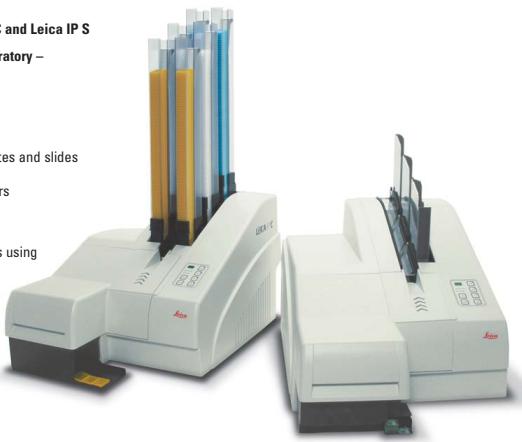
Imaginez les nouvelles imprimantes à jet d'encre Leica IP C et Leica IP S
dans votre laboratoire -
et voyez les avantages :
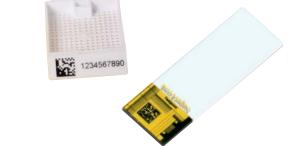
Impression permanente et lisible - Impression directe sur cassettes et lames Réduction des erreurs humaines grâce à l'automatisation Traçabilité des échantillons grâce à la technologie des codes-barres
"Avec l'utilisateur, pour l'utilisateur"
Leica Microsystems
Leica Microsystems opère à l'échelle mondiale dans quatre divisions, où nous figurons parmi les leaders du marché.
Division Sciences de la vie
La division Sciences de la vie de Leica Microsystems soutient les besoins en imagerie de la communauté scientifique grâce à une innovation avancée et à une expertise technique pour la visualisation, la mesure et l'analyse des microstructures. Notre fort accent sur la compréhension des applications scientifiques place les clients de Leica Microsystems à la pointe de la science.
Division Industrie
La division Industrie de Leica Microsystems a pour objectif de soutenir les clients dans leur quête du meilleur résultat final. Leica Microsystems fournit les systèmes d'imagerie les plus performants et les plus innovants pour voir, mesurer et analyser les microstructures dans les applications industrielles de routine et de recherche, la science des matériaux, le contrôle qualité, les enquêtes de science forensique et les applications éducatives.
- Division Biosystèmes
La division Biosystèmes de Leica Microsystems offre aux laboratoires d'histopathologie et aux chercheurs la gamme de produits la plus complète et de la plus haute qualité. Du patient au pathologiste, la gamme comprend le produit idéal pour chaque étape histologique et des solutions de flux de travail à haute productivité pour l'ensemble du laboratoire. Avec des systèmes d'histologie complets dotés d'une automatisation innovante et des réactifs Novocastra™, Leica Microsystems crée de meilleurs soins aux patients grâce à des délais d'exécution rapides, une confiance diagnostique et une collaboration étroite avec les clients.
Division Chirurgicale
La division chirurgicale de Leica Microsystems a pour objectif de s'associer aux chirurgiens et de les soutenir dans les soins apportés à leurs patients, en leur offrant la technologie de microscope chirurgical la plus innovante et de la plus haute qualité, aujourd'hui et à l'avenir.
La déclaration d'Ernst Leitz en 1907, « avec l'utilisateur, pour l'utilisateur », décrit la collaboration fructueuse avec les utilisateurs finaux et la force motrice de l'innovation chez Leica Microsystems. Nous avons développé cinq valeurs de marque pour être à la hauteur de cette tradition : pionnier, qualité haut de gamme, esprit d'équipe, dévouement à la science et amélioration continue. Pour nous, être à la hauteur de ces valeurs signifie : être à la hauteur de la vie.
Actif dans le monde entier
| Australia: | North Ryde | Tel. +61 2 8870 3500 | Fax +61 2 9878 1055 |
| Austria: | Vienna | Tel. +43 1 486 80 50 0 | Fax +43 1 486 80 50 30 |
| Belgium: | Groot Bijngaarden | Tel. +32 2 790 98 50 | Fax +32 2 790 98 68 |
| Canada: | Richmond Hill/Ontario | Tel. +1 905 762 2000 | Fax +1 905 762 8937 |
| Denmark: | Herlev | Tel. +45 4454 0101 | Fax +45 4454 0111 |
| France: | Nanterre Cedex | Tel. +33 811 000 664 | Fax +33 1 56 05 23 23 |
| Germany: | Wetzlar | Tel. +49 64 41 29 40 00 | Fax +49 64 41 29 41 45 55 |
| Italy: | Milan | Tel. +39 02 574 861 | Fax +39 02 574 03392 |
| Japan: | Tokyo | Tel. +81 3 5421 2800 | Fax +81 3 5421 2896 |
| Korea: | Seoul | Tel. +82 2 514 65 43 | Fax +82 2 514 65 48 |
| Netherlands: | Rijswijk | Tel. +31 70 4132 100 | Fax +31 70 4132 109 |
| People's Rep. of China: | Hong Kong | Tel. +852 2564 6699 | Fax +852 2564 4163 |
| Portugal: | Lisbon | Tel. +351 21 388 9112 | Fax +351 21 385 4668 |
| Singapore | Tel. +65 6779 7823 | Fax +65 6773 0628 | |
| Spain: | Barcelona | Tel. +34 93 494 95 30 | Fax +34 93 494 95 32 |
| Sweden: | Kista | Tel. +46 8 625 45 45 | Fax +46 8 625 45 10 |
| Switzerland: | Heerbrugg | Tel. +41 71 726 34 34 | Fax +41 71 726 34 44 |
| United Kingdom: | Milton Keynes | Tel. +44 1908 246 246 | Fax +44 1908 609 992 |
| USA: | Bannockburn/llinois | Tel. +1 847 405 0123 | Fax +1 847 405 0164 |
et des représentants dans plus de 100 pays
www.leica-microsystems.com
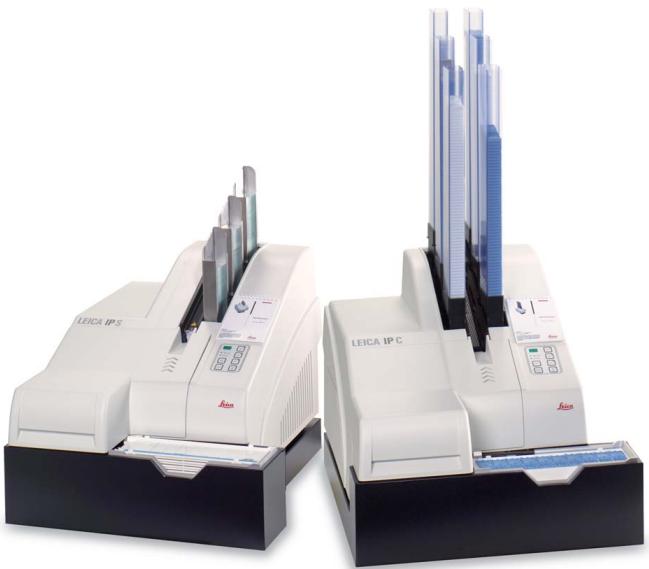
Leica IPC et Leica IPS
Systèmes d'impression automatisés polyvalents
pour cassettes de tissus et lames de microscope
Imprimantes à jet d'encre Leica IPC et Leica IPS –
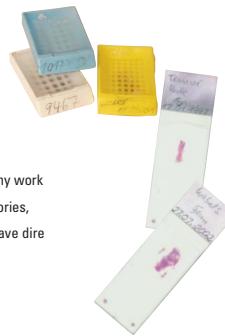
Les erreurs dans les processus manuels ne sont jamais totalement évitables, en particulier pour des tâches telles que l'étiquetage des cassettes de tissus et des lames de microscope. Des imprécisions peuvent survenir de différentes manières :
Mauvaise lisibilité des données manuscrites
- Mélange d'étiquettes
- Chiffres inversés
Perte potentielle de données importantes
Ces problèmes peuvent avoir de graves répercussions dans tout environnement de travail, mais dans des domaines sensibles comme les laboratoires, des cassettes et des lames mal ou insuffisamment étiquetées ont des conséquences désastreuses.
En automatisant ces processus avec les nouvelles imprimantes à jet d'encre Leica IP C pour cassettes et IP S pour lames, Leica apporte une contribution cruciale à la résolution de ces problèmes.
Impression polyvalente
lisible et permanente
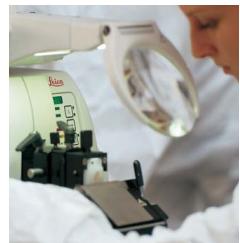
Imprimante de cassettes Leica IP C
Imprimante de lames Leica IP S
Vos cassettes et lames
seront plus lisibles que jamais
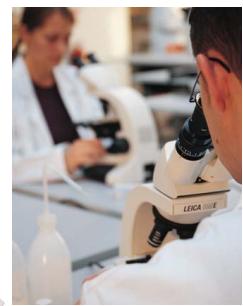
Les imprimantes Leica IP C et IP S sont parfaitement adaptées aux laboratoires où de grands volumes de cassettes à tissus et/ou de lames de microscope doivent être étiquetés de manière permanente.
La Leica IP C a été conçue pour l'impression polyvalente de cassettes à tissus, y compris les cassettes avec couvercles et différents angles d'impression. La Leica IP S imprime sur la plupart des lames de microscope standard, ne prenant que quatre secondes par impression en mode série. L'encre brevetée, spécialement conçue pour Leica, résiste à la plupart des expositions chimiques et à l'usure physique qui surviennent généralement lors du traitement des échantillons et de la coloration. Qu'il s'agisse de caractères alphanumériques, de codes-barres (par exemple, des codes Data Matrix) ou de logos, la résolution d'impression est toujours excellente avec une bonne lisibilité. L'archivage fiable, qui permet une identification rapide, est un avantage spécifique des impressions de codes-barres. Les Leica IP C et IP S peuvent être équipées d'une station de déchargement automatisée à plusieurs niveaux en option pour un flux de travail optimisé. Avec la station de déchargement, les cassettes ou lames imprimées sont placées sur des plateaux les unes à côté des autres et dans le bon ordre. De cette manière, jusqu'à 100 cassettes ou 110 lames de microscope peuvent être collectées sans intervention de l'utilisateur. Le plateau entier peut être retiré de l'instrument à tout moment.
Les deux instruments ont été conçus pour l'intégration au LIS, mais peuvent également être installés dans votre laboratoire en tant que postes de travail autonomes, connectés à un PC, mono-utilisateur ou multi-utilisateurs, où plusieurs imprimantes peuvent être connectées à un seul PC.
Pour toute information relative aux logiciels et toute question concernant l'équipement PC approprié ou le LIS, veuillez contacter votre représentant commercial Leica local. Les pilotes d'imprimante et la documentation imprimée/les instructions sont inclus dans la livraison standard des imprimantes.
Flexible :
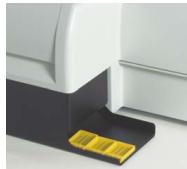
La station de déchargement manuelle
Le Leica IP C est livré en standard avec un poste de déchargement manuel des cassettes, où les cassettes imprimées peuvent être retirées une à une.
Pratique :
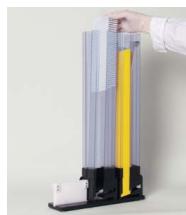
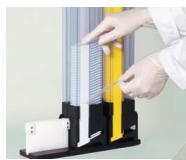
Le support de magasin de cassettes externe
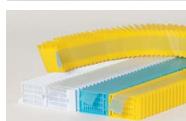
Pour un chargement sûr et pratique des magasins de cassettes de tissus, un support de magasin externe est disponible en option pour l'imprimante. Il peut contenir jusqu'à six magasins de cassettes simultanément. De plus, Leica propose une autre fonction brevetée qui fait gagner du temps pour le chargement des cassettes : des piles de 40 cassettes, maintenues ensemble par un ruban facilement détachable ! Il suffit de placer la pile entière dans un magasin de cassettes et de retirer le ruban. Les nouvelles piles de cassettes sont disponibles dans de nombreux styles et couleurs.
a
1
a
1
a
1
a
Leica
a
1
a
1
a
1
a
1
a
1
a
1
a
1
a
1
a
1
a
38
1
38
图 1
图 1
图 1
图 1
图 1


- LES ALTERNATIVES POLYVALENTES
- AVEC L'UTILISATEUR, POUR L'UTILISATEUR
- LEICA MICROSYSTEMS
- DIVISION SCIENCES DE LA VIE
- DIVISION INDUSTRIE
- DIVISION BIOSYSTÈMES
- DIVISION CHIRURGICALE
- LEICA IPC ET LEICA IPS
- IMPRIMANTES À JET D'ENCRE LEICA IPC ET LEICA IPS
- IMPRESSION POLYVALENTE
- LISIBLE ET PERMANENTE
- IMPRIMANTE DE CASSETTES LEICA IP C
- IMPRIMANTE DE LAMES LEICA IP S
- VOS CASSETTES ET LAMES
- SERONT PLUS LISIBLES QUE JAMAIS
- FLEXIBLE
- LA STATION DE DÉCHARGEMENT MANUELLE
- PRATIQUE
- LE SUPPORT DE MAGASIN DE CASSETTES EXTERNE
Marque : LEICA
Modèle : IPS
Catégorie : Imprimante