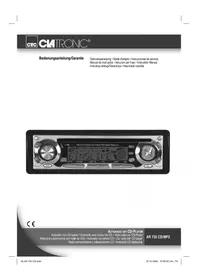
AR 600 CD - Autoradio CLATRONIC - Notice d'utilisation et mode d'emploi gratuit
Retrouvez gratuitement la notice de l'appareil AR 600 CD CLATRONIC au format PDF.


| Type de produit | Autoradio avec lecteur CD |
| Marque | CLATRONIC |
| Modèle | AR 600 CD |
| Dimensions (L × H × P) | 178 × 50 × 165 mm |
| Alimentation | DC 13,8 V, consommation max. 7 A |
| Puissance de sortie | 4 × 7 W |
| Gammes de fréquences radio | FM : 87,6 – 108,0 MHz ; MW (AM) : 522 – 1620 kHz |
| Formats CD compatibles | CD, CD-R, CD-RW |
| Nombre de canaux | 2 canaux stéréo |
| Rapport signal/bruit | 60 dB (1 kHz) |
| Sortie CD max. | 1200 mV |
| Fonctions RDS | AF, REG, PTY, TA, EON, TP |
| Fonctions de recherche | SEEK 1/2, SCAN, AP (mémorisation automatique) |
| Fonctions de lecture CD | TOP (pause), INT (amorce), RPT (répétition), RDM (aléatoire) |
| Égaliseur préréglé | POP, ROCK, CLASS, FLAT |
| Entretien et nettoyage | Nettoyer le CD avec un chiffon doux sans solvant ; éviter les nettoyants antistatiques |
| Sécurité | Laser classe 1 ; ne pas ouvrir le boîtier ; débrancher en cas d'inutilisation prolongée |
| Garantie | 24 mois à compter de la date d'achat |
| Service après-vente | Hotline : 02152/2006-666 (Allemagne) ; email : hotline@clatronic.de |
FOIRE AUX QUESTIONS - AR 600 CD CLATRONIC
Questions des utilisateurs sur AR 600 CD CLATRONIC
0 question sur cet appareil. Repondez a celles que vous connaissez ou posez la votre.
Poser une nouvelle question sur cet appareil
Téléchargez la notice de votre Autoradio au format PDF gratuitement ! Retrouvez votre notice AR 600 CD - CLATRONIC et reprennez votre appareil électronique en main. Sur cette page sont publiés tous les documents nécessaires à l'utilisation de votre appareil AR 600 CD de la marque CLATRONIC.
MODE D'EMPLOI AR 600 CD CLATRONIC
CTC
C4TRONIC
Bedienungsanleitung/Garantie
Istruzioni per l'uso/Garanzia Instruction Manual/Guarantee Instrukcja obsfugi/Gwarancja
Autoradio mit CD-Player
Autoradio con letlore CD
Car radio with CD player
Radio samochodowe z odtwarzaczem CD
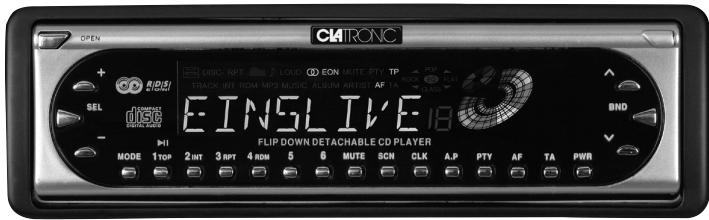
AR 600 CD
C E
Inhalt
Indice · Contents · Spis tresci
D Übersicht Bedienelemente .Seite 3
Bedienungsanleitung .Seite 4
Garantie . 18
Descrizione dei singoli pezzi .3
Istruzioni per l'uso . 20
Garanzia .36
GB Control element overview..Page 3
Instruction Manual .Page 37
Guarantee 51
PL Przeglad elementów obsługi Strona 3
Instrukcja obslugi .Strona 52
Gwarancja . Strona 68
Bedienelemente
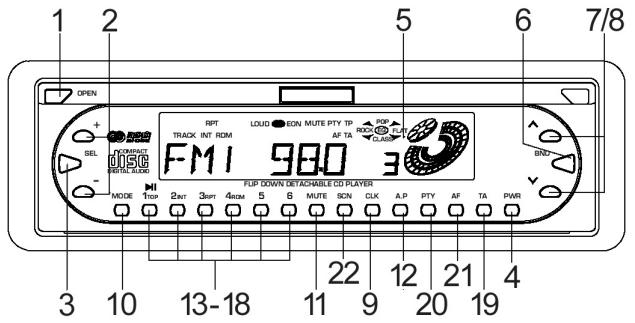
Abb.1: Bedienfeld
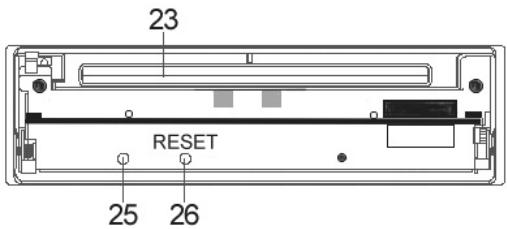
Abb. 2: Frontseite des Gerätes mit entnommenem Bedienfeld
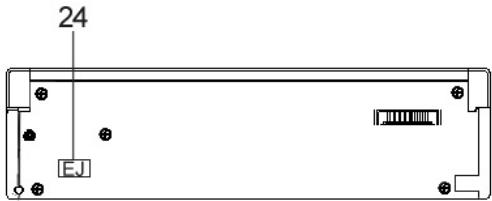
Abb. 3: Rückseite des Bedienfeldes
D
Allgemeine Sicherheitshinweise
Um das Risiko von Feuer oder einem elektrischen Schlag zu vermeiden, sollen den Sie das Gerät nicht Regen oder Feuchtigkeit aussetzen. Das Gerät nicht in unmittelbarer Höhe von Wasser betreiben (z.B. Badezimmer, Schwimmbecken, feuchte Keller).
Verwenden Sie das Gerät nur für den vorgesehenen Zweck.
Das Gerät ausschließlich an eine vorschriftsmäßig installierte Steckdose anschließen. Achten Sie darauf, dass die angegebene Spannung mit der Spannung der Steckdose übereinsimtt.
Bei Verwendung von externen Netzeiten auf die richtige Polarität und Spannung achten, Batterien stets richtigherum einlagen.
Das Gerä so aufstellen, dass vorhandene Lüftungsöffnungen nicht verdeckt werden.
Niemals das Gehäuse des Gerätes öffnen. Durch unsachgemäße Reparaturen konnen erhebliche Gefahren für den Benutzer entstehen. Bei Beschäftigung des Gerätes, insbesondere des Netzkabels, das Gerät nicht mehr in Betrieb besteht, sondern von einem Fachmann reparieren让他们. Netzkabel regelmäßig auf Beschäftigungen prüfen.
Ein defektes Netzkabelarf nur vom Hersteller, unserem Kundendienst oder einerähnlich qualifizierten Person durch ein gleichwertiges Kabel ersetzt werden, umGefährungen zu vermeiden.
Benutzen Sie das Gerät langere Zeit nicht,ziehen Sie den Netzstecker aus der Steckdose, bzw. entnahmen Sie die Batterien.
These Symbole können sich ggfs. auf dem Gerät befinden und sollen Sie auf folgenden hinweisen:

Das Blitz-Symbol soll den Benutzer auf Teile im Inneren des Gerätes hinweisen, die gefährlich hohe Spannungen führen.

Das Symbol mit Ausrufezeichen soll den Benutzer auf wichtige Bedienungs- oder Wartungs-Hinweise in den Begleitpapieren hinweisen.

Geräte mit dieser Symbol arbeiten mit einem „Klasse 1-Laser“ zur Abtastung der CD. Die eingebauten Sicherheitsschalter sollen verhindern, dass der Benutzer gefährlich, für das menschliche Auge nicht sightbarrem Laserlicht ausgesetzt wird, wenn das CD-Fach geöffnet ist.
These Sicherheitsschafter sollen auf keine Fall überbrukt oder manipuliert werden, sonst besteht die Gefahr, dass Sie sich dem Laser-Licht aussetzen.
Installation
Montieren Sie das Radiogerät gemäß folgender Darstellungen
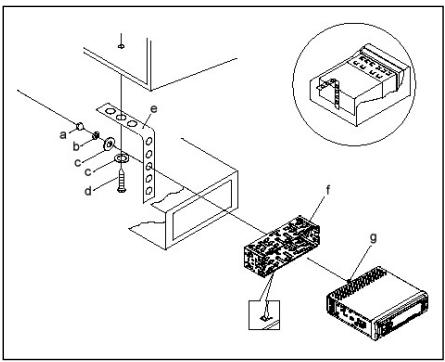
a Mutter
b Federscheibe
c Unterlegscheibe
d Schraube
e Montagewinkel
f Einschubgehause
g Gewindebolzen
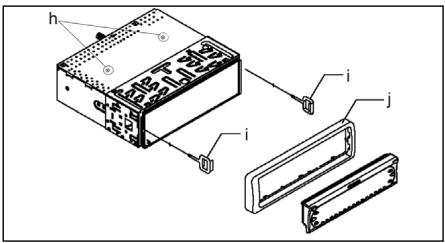
Achtung!
h Schrauben der Transportsicherung (Bitte vor der Montage entnehmer)
i Ausziehwerkzeug (Schlussel für die Demontage)
j Blendrahmen
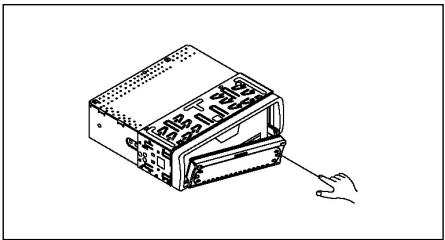
Setzen Sie die Bedienblende erst an der linken Seite an und rasten Sie, sie dann auf der rechten Seite ein.

Anschluss
Stellen Sie die Anschlüsse gemäß des Schaubildes her.
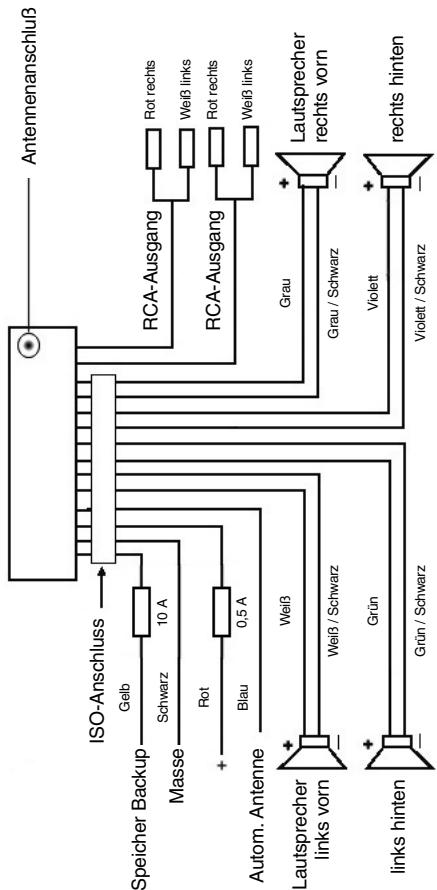
Achtung
D
- Setzen Sie das abnehmbare Bedienfeld erst nach dem Anschluss der Kabel auf.
- Verwenden Sie Laufsprecher mit einer Impedanz von 4 Ohm.
Wichtige Zusammenformation zum Einbau Ihr's Autoradios!
- Bitte beachten Sie beim Einbau/Anschluss Ihres Gerätes, dass Ihr Auto über einen originalen "ISO ANSCHLUSS" verfügt. Dieser ist das Gegenstück zu dem am Geräteausgang verhandensten Stecker (ISO ANSCHLUSS).
Bei der Belegung des "DAUER +" (Backup) kann es je nach Fahrzeugtyp zu Abweichungenkommen.
Wenden Sie sich in diesen Fälleitte an eine autorisierte KFZ Werkstatt, da eine permanente/dauerhafte Stromversorgung Ihres Radios sonst nicht gewährleistet ist. (Diese ist jeder für die Speicherung der Senderstationen notwendig). - Je nach Fahrzeugtyp konnen in Ausnahmefällen Störgeräische im Radio/CD Betrieb aufreten. Diese lessen sich mit einem zusätzlichen Entstörfilter entsprechend beseitigen. Ihr Gerät AR 600 CD ist bereits serienmäßig mit einem Entstörfilter ausgerüstet. Trotzdem kann es fahrzeugbedingt zu Beeinträchtigungenkommen.
Entstörfilter erhalten Sie im Autozubehörhandel und/oder bei ihrer KFZ-Werkstatt.
Bei technische Fragen wenden Sie sichitte an unsere Hotline.
Vorsichtsmaßnahmen und Wartung
- Die Schrauben der Transportsicherungitte vor der Montage entfernen, da sonst die CD nicht eingezogen werden kann.
- Das Gerät ist für den Minuspol der Batterie ausgelegt, der an die Fahrzeugkarosserie angeschlossen sein muss. Diesitte vor Installation überprüfen.
- Wenn die vordere Bedientafel während des Radio- oder CD-Betriebs abgenommen wird, wird das Gerät automatisch ausgeschaltt.
- Wenn nach dem Wiedereinsetzen der vorderen Bedientafel an der LCD-Anzeige eine Fehlermeldung erscheidt (ERROR), kann die LCD-Bedientafel mit Hilfe eines analog in Bedienelement gesteckten Drahtes wieder zurückgestellt werden.
- Wenn das Fahrzeuginnere extrem heißt ist, z. B. nach einer längeren Parkdauer in praller Sonne, den Player nicht eingehalten, bis das Fahrzeug nach einer kurzen Fahrzeit im Inneren etwas abgekuhl ist.
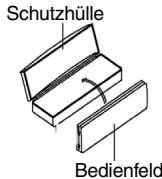
- Um das abnehmbare Bedienteil sicher aufzubewahren, stets die dafür vorgesehene Schutzhülle verwenden.
D
-
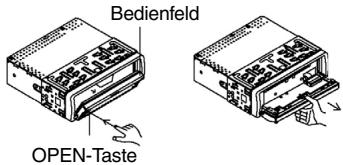
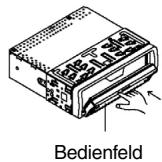
Zum Herausnehmen/Entfern/Einbauen und Aufbewahren des vorderen Bedienteils beachten Sieitte folgende Abbildungen.
-
Bedienfeld Öffnen
-
Bedienfeld entnahmen
-
Bedienfeld transportieren
-
Bedienfeld anbringen
Bedienung
1 OPEN-Taste
Drücken Sie die OPEN-Taste zum Herunterklappen des vorderen Bedienfeldes. Eine CD kann dann in den CD-Schlitz eingeschobenzw. durch Drücken der EJECT-Taste ausgeworfen werden.
2 +/-Tasten
Im normalen Spielbetrieb davon die Tasten zur Einstellung der Lautstärke. In Verbindung mit der zuvor gestrückten SEL-Taste konnen Änderungen in Menus z. B. dem Schallmodus vorgenommen werden.
3 SEL-TASTE (AUSWAHL)
a) Drücken Sie die SEL-Taste kurz, um in das Auswahlen des Schallmodus zu gelangen. Im Display erscheidt „VOL“ zur Einstellung der Lautstärke. Durch wiederholtes Drücken der SEL-Taste konnen Sie nun die einzelnen Menüpunkte wie VOLUME, TREBLE, BASS, BALANCE und FADER anwahlen. Sieändern die Einstellungen der einzelnen Menüpunkte mit Hilfe der „+“- oder „-“-Taste.
Hinweis: Sind unter DSP Equalizeinstellungen wie z. B. POP, ROCK gewählt, können BASS und TREBLE nicht eingestellt werden.
b) Drücken Sie die SEL-Taste lang, um in das Auswahlmenü TA SEEK/TA ALARM, MASK DPI/MASK ALL, DSP OFF, LOUD ON/OFF, BEEP ON/OFF, SEEK1/2, STEREO/MONO; LOCAL/DX; VOL LAST/ADJ zu gelangen. Im Display erscheidt „TA SEEK“. Durch wiederholtes Drücken der SEL-Taste konnen Sie nun die einzelnen Menüpunkte anwahlen. Sie ändern die Einstellungen der einzelnen Menüpunkte mit Hilfe der „+“- oder „-“-Taste.
-
TA SEEK-Menu (Verkehrsfunk-Sendersuche) Wahlen Sie TA SEEK, wenn bei der Wahl der TA- Funktion automatisch ein Verkehrsfunksender gesucht werden soll. Wahlen Sie TA ALARM, erhalten Sie eine Warnmeldung im Display, sobald Sie unter der TA Funktion einen Sender eingestellt haben, der keine Verkehrsfunkinformationen übermittelt.
-
MASK DPI/ALL
Verbergen von Alternativfrequenzen (AF) während deruche nach einer ProgrammKennung (PI).
MASK DPI: Sucht das Gerät nach der Programmmenkennung (PI) eines Senders bleiben die Alternativfrequenzen mit anderer Programmkmennung im Verborgenen.
MASK ALL: Be derSuche nach einer Programmkennung (PI) bleiben Alternativfrequenzen mit anderer Programmkennung und Sender mit starkem Signalpegel ohne RDS Signal im Verborgenen.
DSP
Im DSP können Sie die Equalizereinstellungen POP M; ROCK M, CLASS M und FLAT M wahlen. Wahlen sie DSP OFF um eigene Einstellungen vorzunehmen. Siehe auch Pkt. 3a.
- LOUD ON/LOUD OFF
Sie können die Verständung des Basses (LOUDNESS) ein- oder ausschalten.
BEEP ON/OFF Bestätigungston
Den Bestätigungsston beim Tastendruck können Sie in zwei Arten wahren. BEEP ON: Der Bestätigungston erfolgt bei jedem Tastendruck.
BEEP OFF: der Bestätigungston ist abgeschalte.
SEEK 1, SEEK 2 (Nur im Radiobetrieb wahlbar)
Suchfunktion mit den - -Tasten im Radiobetrieb.
SEEK 1: Halten Sie die Tasten gedrück und das Radio wird bei der nachsten erreichbaren Sendestation stoppen.
SEEK 2: Solange Sie die Tasten gedrückt halten wird der Suchlauf im Frenzband weiter geführt.
STEREO/MONO Umschaltung (Nur im Radiobetrieb wahlbar)
- LOCAL/DX (Nur im Radiobetrieb wahlbar)
Ihr Radio kann RDS EON Daten empfangen. Unter EON verstehen man die Übermittlung von zusätzlichen Senderinformationen innerhalb einer Senderkette z. b. des WDR. Im Falle einer Verkehrs durchsage (TA) wird innerhalb einer Senderkette von einem Nicht-Verkehrsfunkender auf den entsprichenden Verkehrsfunkender der Senderkette umgeschaltet. Der Empfang dieser Sendedaten wird durch das EON Zeichen im Display angezeigt. Sie konnen zwischen dem EONTA LOCAL bzw. EONTA DISTANCE-Modus für den lokalen oder den Fernverkehrsfunkempfang wahren. Der Zweck dieser Funktion besteht darin, ein unerwünschtes Umschalten auf eine EON-TA-Verkehrsansage zu unterträcken. Liegt ein EON Sender sehrweit enternet, so konnen z. T. trotz dem EON TA-Information von dieser Station empfangen werden. Das Radio schaltete zu dieser EON-Verbindungsstation um und versucht die Verkehrsinformationen
D
zu empfangen. Der Signalpegel ist aber zu schwach und der Empfang ist schlecht, da diese EON-Verbindungsstation zuweit außerhalb lag. Deshalb schaltet das Radio dann auf den zuvor eingestelltten Sender zureck. Bei der oben beschriebenben Betriebsart hört der Anwender für eine kurze Zeitspanne ein falsches Programm oder überhaupt nichts.
EONTA LOCAL:
Durch diese Funktion wird ein Umschalten zu einer EON-Verbindung mit zuschwachem Signalpegel vermieden. Das Radio schaltet nicht auf diesen Sender um und der Hörer nimmt kaum Störungen wahr.
EON TA-DISTANCE-Modus:
In this modus versucht die EON TA Schaltung die EON TA
Informationen von einem erreichbaren Sender zu erhalten und so die Empfangsqualität zu verbessern.
VOL LAST/VOL ADJ
VOL LAST: Das Radio schaltet sich mit der zuletzt tatsächlich eingestellen Lautstärke ein.
VOL ADJ: Mit Hilfe der +- und -Tasten wahlen Sie eine gleichbleibende Einschaltlautstärke vor.
4 POWER-Knopf
Zum Ein- bzw. Ausschalten des Gerätes diese Taste drucken.
5 LCD-Display (Flüssigkristallanzeige)
6 BAND-Tasten
Drücken Sie kurz die BAND-Taste um Ihr gewünschten Freqenzbandes zu wahlen. Die Bezeichnung des entsprechend Bandes FI,F2, F3, MW1, MW2 wird in der LCD-Anzeige angezeigt.
7/8 ▲-▼-Tasten TUNE, SEEK, TRACK, SKIP UP/DOWN
a) Im Radiomodus:
Drücken Sie kurz die - oder -Taste, um manuell einen gewünschten Radiosender einzustellen.
Halten Sie die -oder -Taste gedrückt, um dieSuche nach einem Radiosender zu starten.
Siehe auch die Funktion SEEK 1 / SEEK 2.
b) Im CD-Modus:
Zum Vor- bzw. Rückwartsspringen die Taste bzw. kurz drucken. Zum Spulen von Titeln die Pfeiltaste bzw. gedrückt halten.
9 CLK-Taste
Durch kurzes Drücken dieser Taste werden verschiedene Informationen im LCD-Display dargestellt.
Beim Empfang eines RDS-Senders erhalten Sie:
Im Radio-Modus:
Sendernamen Frequenz Uhrzeit Programmtyp
- Im CD-Player-Modus: → Titelnummer/Laufzeit → Sendernamen → Frequenz → Uhrzeit → Programmtyp → Hinweis: Wenn keine Uhrzeit- oder Programmtyp -Information empfangen werden, zeigt das Display „NO CLOCK“ bzw. „NO PTY“ an.
Strahlt der empfangene Sender keine zusätzlichen RDS-Informationen aus erhaltene Sie:
- im Radio-Modus: NO CLOCK Frequenz NO PTY
- im CD-Player-Modus: → Titelnummer/Laufzeit → Uhrzeit → Frequenz → NO PTY →
10 Modus-Taste
Drucken Sie diese Taste zur Auswahl des CD-Player-bzw. Radio-Modus.
11 MUTE-Taste
Drücken Sie die MUTE-Taste, um die Lautsprecher für kurze Zeit stumm zu schalten. Drücken Sie diese Taste erneut, um diese Funktion wieder aufzugeben.
12 AP-Taste (Automatische Senderspeicherung) Im Radio-Modus:
a) Speicherfunktion: Drücken Sie die AP-Taste länger als eine Sekunde um die automatische Senderspeicherung zu aktivieren. Das Gerat sicht innerhalb des aktuellen Freqenzbandes z. B. FM 1 nach den größten Signalstärkepegel bis der Suchzyklus abgeschlüssen wird. Die sechs stärksten Sonder werden den entsprechenden Speicherplätzen zugeordnet. Die nun gespeicherten Sender werden jeweils ca. 5 sek. lang angespielt und danach wird der Sonder des ersten Speicherplatzes eingestellt. Mocht den Sie noch weitere Sonder im FM-Band suchen drucken Sie die BAND-Taste, um auf das FM 2 bzw. FM 3 Band zu wechseln. Drücken Sie die AP-Taste erneut länger als eine Sekunde, um die weitere Sueche zu starten.
b) Anspielfung: Nach kurzem Drücken der AP-Taste spiel das Radio alle voreingestalten. Sender des aktuellen Frenzbandes (FM, MW)an. Hinweis: Die Anspielfung endet automatisch wieder bei dem Speicherplatz von dem aus sie gestartet wurde.
13-8 Stationstasten (1-6) vorgewähler Sender und als 1TOP-, 2INT-, 3 RPT-, 4 RDM-Tasten im CD Betrieb
a) Radio-Betrieb Durch kurzes Drücken wird über diese Tasten ein voreingestellter Radiosender direkt angewählt. Werden diese Tasten länger als eine Sekunden gedrückt, wird der aktuell eingestellte Sender unter der gewählten Stationstaste gespeichert.
D
b) CD-Betrieb
- Drücken Sie die 1TOP-Taste, um das Abspielen der CD zu unterbrenchen (Pausenfunktion). Drücken Sie diese Taste erneut, um diese Funktion wieder aufzehben.
- Drücken Sie die 2INT-Taste. Jeder Titel der CD wird jeweils 10 Sekunden lang angespieldt. Drücken Sie diese Taste erneut, um die Sueche abzubrechen. Der aktuell angewählte Titel wird abgespielt.
- Drücken Sie die 3RPT-Taste. Der aktuelle gespiefte Titel wird wiederholt. Drücken Sie diese Taste erneut, um diese Funktion wieder aufzuheiten.
- Drücken Sie die 4RDM-Taste. Die CD Titel werden in zufälliger Reihenfolge abgeschpielt. Drucken Sie diese Taste erneut, um diese Funktion wieder aufzubehen.
19 TA Traffic Announcement (Vorrangschaftung für Verkehrsfunk)
Die TA-Funktion wird durch kurz des Rücken der TA-Taste aktiviert und durch ein TA-Zeichen im Display angezeigt. Beim Radiobetrieb in einem FM Freuzband beginnnt automatisch die Suche nach einem Verkehrsfunksender (TA SEEK).
Wenn ein FM-Sender empfangen wird, der periodisch die neuesten Verkehrsfunkinformationen ausstrahlt, leuchtet die TP-Anzeige im Display auf. Bei eingeschalteter TA-Funktion unterbrechen die FM
Verkehrsfuninformationen automatisch den CD Betrieb. Der Lautstärkepegel wird auf den Mindestswert für die Übertragung von Verkehrsnahrichten angehoben. Nach Beendigung der Verkehrsfuninformationen setzt das vorhereingestellte Programm wieder ein.
Unterberebung der TA-Funktion:
Möchten Sie die aktuelle Verkehrsnachricht unterbrechen, drücken Sie kurz die TA-Taste. Der TA-Modus wird hierdurch nicht ausgeschaltet.
20 PTY-Taste Wahl des Programmtypes
Neben dem Sendername übermitteln eine FM-Sender auch Informationen über den Programmtyp hises Programms. Diese Informationen konnen von Ihr Automotoradio angezeigt werden.
Solche Programmtypen können z.B. sein:
SPORT
NEWS
POP
CLASSICS
Mit der PTY-Funktion konnen Sie gezielt Sender eines bestimmen Programmtypes auswahlen. Drücken Sie die PTY-Taste 1X um in die PTY Musikgruppe zu gelangen. Im Display erscheidt das Zeichen „PTY". Mit Hilfe der Stationstaten 1-6 konnen Sie nun wie folgt eine Auswahlreffen.
| 1X drucken | 2X drucken | |
| Stationstaste 1 | POP M | ROCK M |
| Stationstaste 2 | EASY M | LIGHT M |
| Stationstaste 3 | CLASSICS | OTHER M |
| Stationstaste 4 | JAZZ | COUNTRY |
| Stationstaste 5 | NATION M | OLDIES |
| Stationstaste 6 | FOLK M |
Drücken Sie die PTY-Taste 2X um in die PTY Sprachgruppe zu gelangen. Mit Hilfe der Stationstasten 1-6 können Sie nun wie folgt eine Auswahr treffen.
| 1X drücken | 2X drücken | 3X drücken | |
| Stationstaste 1 | NEWS | AFFAIRS | INFO |
| Stationstaste 2 | SPORT | EDUCATE | DRAMA |
| Stationstaste 3 | CULTURE | SCIENCE | VARIED |
| Stationstaste 4 | WEATHER | FINANCE | CHILDREN |
| Stationstaste 5 | SOCIAL | RELIGION | PHONEIN |
| Stationstaste 6 | TRAVEL | LEISURE | DOCUMENT |
Drücken Sie die PTY-Taste 3X um in die Funktion wieder auszuschalten.
Wenn PTY angewählt wird, startet das Radiogerät dieSuche nach entspr- chenden PTY-Informationen und stoppt, wenn die gesuchte PTY-Information gefunden wurde.
Wird der gesuchte Programtyp nicht gefunden erscheid im Display „NONE PTY".
Wenn die gesuchte PTY-Information nicht mehr besteht, schaltet sich die PTY-Funktion automatisch auf normalen Modus um.
21 AF (Alternative Frenzen) REG-Funktion
a) AF ist eine Funktion die mit Hilfe des RDS (Radio Data System)/arbeitet und nur bei FM Sendern genutzt werden kann. Das Gerät sicht im Hintergrund die am besten zu empfangene Frequenz des eingeseltenten Senders.
Wenn die AF-Funktion angewählt wird, prüft das Radio laufend die Signalstärke der AF-Frequency. Das Prüfintervall für jeder AF-Frequency hängt von der Signalstärke des aktuellen Senders ab und variiert von ein paar Minuten im Fall eines starken Senders bis zu ein paar Sekunden bei schwachen Sendern. Jedes Mal, wenn die neue AF-Frequency stärker ist, als die aktuell eingestellte Station, schaltet das Gerät für kurze Zeit auf diese Freqencym und es wird ein bis zwei Sekunden lang die Meldung „NEW FREQUENCY" angezeigt. Da die Stummzeit beim Freqenzwechsel bzw. der Prüzeit sehr kurz ist, ist dies während des normalen Programms fast nicht hörbar.
Die AF Funktion wird durch kurzes Drücken der AF-Taste aktiviert und der Status der AF Funktion wird durch ein AF-Zeichen im Display angezeigt.
- Erscheint das AF Zeichen im Display ist die AF-Funktion eingeschelt und es werden RDS-Sendedaten empfangen.
D
- Blinkt das AF Zeichen im Display, ist die AF-Funktionzar angewählt, es kann jedergerade kein RDS-Sendesignal empfangen werden.
- Betätigten Sie die AF-Taste erneut, um diese Funktion wieder auszuschalten. Das AF Zeichen im Display erlischt.
b) REG-Funktion
Einige Sender teilen zu bestimmten Zeiten ihr Programm in Regionalprogramme mit entsprechlichem Inhalt auf.
- REG ON: Durch langes Drücken der AF-Taste wird der regionale Modus eingeschelt. Im Display erscheint weniger Sekunden lang die Meldung "REG ON".
Hinweis: Die Anzeigekapazität des Displays ist begrenzt. Es ist möglich, dass im doppelten Anzeigemodus einzelnse Segmente des DisplaysGISGelöscht sind.
Mit der Funktion REG ON wird verhindert, dass das Radio zu Alternativfrequzenen wechselt, die einen anderen regionalen Programmhalt haben.
- REG OFF: Durch erneutes langes Drücken der AF-Taste wird der regio-nale Modus ausgeschaltet. Im Display erscheint weniger Sekunden lang die Meldung „REG OFF".
Die ProgrammKennung (PI) des Regionalsendeprogramms wird bei der Suche nach einer Alternativfrequenz (AF) oder einer ProgrammKennung (PI) ignorant.
22 SCAN-Taste
Sendersuchlauf im Radiobetrieb
Drucken Sie kurz die SCAN-Taste. jeder erreichbare Sender im eingestallen Frequenzband (z. B. FM1) wird automatisch gesucht.
Wird ein Sender gefunden, blinkt für ca. 5 sek. die eingestellte Frequenz im Display und der Ton wird eingespielt. Danach wird der Suchlauf weitergebung.
Drucken Sie erneut die SCAN-Taste, wenn Sie den gerade eingeseltten Sender weiter horen möchten oder drucken Sie auf eine der Stationstasten, um den Suchlauf abzubrechen.
23 CD-Schlitz
24 Auswurfaste (EJECT)
Zum Auswerfen der CD diese Taste drucken.
25 Blinkende LED-Anzeige
Beim Abnehmer der vorderen Bedientafel blinkt diese Anzeige.
26 RESET-Taste
Zum Wiederherstellen des gestörten Programms diese Taste drucken.
Technische Daten
D
Allgemeines
Netzspannung
DC 13.8 V
Stromverbrauch
7A Max.
Leistung
4 × 7 ~W
FM-Bereich
Frequenzbereich
87,6 MHz bis 108,0 MHz
Nutzbare Empfindlichkeit
3 V
I.F. Freqenz
10,7 MHz
MW (AM)-Bereich
Frequenzbereich
522 KHz - 1620 KHz
I.F. Freqenz
450 KHz
Ausgangsleistung
Ausgang
bei CD max. 1200mV
CD-Player
System
CD-Gerat
Verwendbare CDs
CD/CDR/CDRW Disks
Signalformat
Anzahl der Quantizierungsbits 1 bit.
Frequenzcharakteristika
Musterfrequenz 44,1 KHz
Signal-Rausch-Verhältnis
20-100Hz<5dB
Anzahl der Kanäle
10K-20KHz<5dB
Gehäuseabmessungen
60 dB (1KHz)
2 Stereo-Kanäle
178 B x 50 H x 165 T
D
Störungsbehebung
Bevor Sie die Checkliste durchgehen,itte zunachst den Anschluss fertig stellen. Wenn nach erfolgtem Durchprüfen der Checkliste immer noch Fragen offen sind, wenden Sie sichitte an ihre nachstgelegene Kundendienstelle.
| Fehlersymptom | Grund | Lösung |
| Nach Einlagen in das Gerät lauft die CD oder Kassette nicht. | Der Lautstärkeregler ist zu leise eingestellt. Die Anschlüsse sind nicht korrekt ausgeführrt. | Den Lautstärkeregler höher einstellen. Den +12V- sowie den Masseanschluss überprüfen. |
| Der Ton des CD-Players hupft. | Die Straβenoberfläche ist rauh. Das Gerät ist nicht fest eingebaut. | Zum Abspielen der CD warten, bis die Straße glatter wird. Das Gerät fest einbauern. Sicherstellen, dass die hin-tere Befestigung verwen-det wird, wenn das Fahrzeug keine geeignete Aufnahme für den hinteren Gerästeil bietet. |
| Die CD ist defekt. | Eine andere CD auspro-bieren. Wenn diese korrekt lauft, ist die erste CD wahrscheinlich beschädigt. | |
| Die CD ist verschmutzt. | Die CD reinigen. | |
| Kein Strom. | Die Zündung ist ausgeschaltet. Die Sicherung ist durchgebrannt. | Den Zündschlüssel auf „ON“ oder „ACC“ drehen. Die Sicherung durch eine andere 10A-Sicherung ersetzen. |
| Das Gerät faktioniert nicht richtig (EJECT, LOAD, PLAY). | Der Microcomputer wurde durch elektrisches Rau-schen in Mitleidenschaft gezogen. | Die CD oder Kassette her-ausnahmen und wieder einlagen. Das Gerät aus- und dann wieder einschalten. |
| Kein Radioempfang. | Das Antennenkabel ist nicht angeschlossen. | Das Antennenkabel fest in die Antennenbuchse des Gerätes stecken. |
| Im automatischen Such-modus stoppt das Radio bei keiner Sondestation. | Die Sendesignale sind zu schwach. | Manuell eine Sondestation einstellen. |
| CD's werden nur bis zur Hälfte in den CD Schacht eingezogen. | Die Schrauben der Transportsicherung sind nicht entfrert worden. | Entfernen Sie die Schrauben der Transportsicherung. |
AbspieleneinerCD
Reinigen der CD
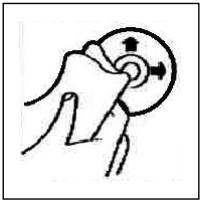
Vor dem Abspielen, die CD mit einem sauberen, staubfreien Reinigungstuch abwischen. Die CD in Pfeilrichtung abziehen.
Hinweis: Keine Lösungsmittel wie Benzin oder Verdünner verwenden. Die allgemein erhältliche Reinigungsmittel oder Anti-Statiksprays beschädig das Gerät.
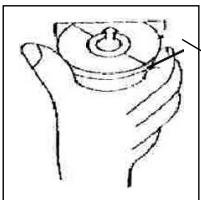
Wenn die CD mit dem Aufdruck nach unten eingelegt wird, kann das Gerät beschädigt werden.
CD immermit demLabelnachobereinlagen
Hinweis: Wenn sich bereits eine CD im CD-Schlitz befindet, nicht versuchen, eine weitere CD einzulegen. Dies kann zu Schäden am Gerät führen. Die CD stets am Rand anfassen. Um die CD sauber zu halten, nicht an der Oberfläche anfassen.
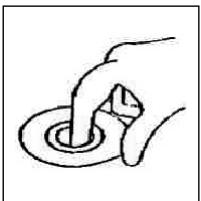
Keine Aufkleber oder Klebeband auf die CD kleben.
Die CD nicht direkter Sonneneinstrahlung oder Warmequellen wie Heizungsrohren aussetzen und sie auch nicht im Auto laden, wenn diese in praller Sonne geparkt wird, da dies zu einem betrachtlichen Temperaturanstieg führt.
Dieses Gerät wurde nach allen zuteffenden, aktuellen CE-Richtlinien geprüft, wie z.B. elektromagnetische Verträglichkeit und Niederspannungsdirective und wurde nach den neuesten Sicherheitstechnischen Vorschriften gebaut.
Technische Änderungen vorbehalten!
D
Garantie
Wir übernehmen für das von uns vertriebene Gerät eine Garantie von 24 Monaten ab Kaufdatum (Kassenbon).
Innerhalb der Garantiezeit beseitigen wir unentgeltlich die Mängel des Gerätes oder des Zubehörns ^4 , die auf Material- oder Herstellungsehler beruhen, durch Reparatur oder, nach unseren Ermessen, durch Umtausch. Garantieleistungen bewirken:weder eine Veränderung der Garantiefrist, noch beginnt dadurch ein Anspruch auf eine neue Garantie!
Als Garantienachweis gilt der Kaufbeleg. Ohne diesen Nachweis kann ein kosten-loser Austausch oder eine kostenlose Reparatur nicht erfolgen.
Im Garantiefall geben Sieitte das Grundgerät in der Originalverpackung zusammen mit dem Kassenbon an ihren Handler.
*) Schäden an Zubehörteilen führen nicht automatisch zum kostenlosen Umtausch des kompletten Gerätes. Wenden Sie sich in dem Fall bereits an unsere Hotline! Glasbruchschäden bzw. Brüche von Kunststoffeilen sind grundsätzlich kostenpflichtig!
Sowohl Defekte an Verbrauchszubehr bzw. Verschleißeiten (z.B. Motorkohlen, Knethaken, Antreibsriemen, Ersatzfernbediierung, Ersatzzahnbürsten, Sägeblättern usw.), als auch Reinigung, Wartung oder der Austausch von Verschleißeiten, fallen nicht unter die Garantie und sind deshalb kostenpflichtig!
Die Garantie erlischt bei Fremdeingriff.
Nach der Garantie
Nach Ablauf der Garantiezeit können Reparaturen kostenpflichtig vom entsprechenden Fachhandel oder Reparaturservice ausgeführrt werden.
Service für unsere Haushaltsartikel
Verschleibeile für Haushaltsartikel (soweit diese nicht vom Fachmann ausgewechselt werden müssen), Ersatzkannen, Staubsaugerfilterbeutel usw. können Sie mit Angabe des Geräteps unter folgender Telefon-Hotline bestellen:
02152/2006-888
Service für unsere Unterhaltungselektronik
D
Verschleibeile und Ersatzteile für unsere Unterhaltungsleukotronik (soweit diese nicht vom Fachmann ausgewechselt werden müssen) wie z. B. Fernbedierungen, Bedienteilklappen, Lautspricherblenden usw. konnen Sie mit Angabe des Geräteypes unter folgender Telefon-Hotline bestellen:
02152/2006-666
Für technische Fragen haben wir für Sie folgende e-mail-Adresse eingerichtet:
hotline@clatronic.de
Interessieren Sie sich für weitere Clatronic-Produkte? Besuchen Sie noch einmal unsere Homepage unter
www.clatronic.de oder www.clatronic.com

Avvertenze generali per la sicurezza
Per evitare il rischio di incendio o di scosse, non si deve mai tenere l'apparecchio sulla pioggia o in ambienti umidi. Quindi non usare l'apparecchio nelle immediate vicinanze di acqua, per esempio in prossimità di una vasca, di una piscina o in una cantina umida.
Utilizzato l'apparecchio solo per l'uso previsto.
Collegare l'apparecchio esclusivamente ad una presa installata a norma. Fare attenzione a che la tensione indica corrisponda alla tensione della presa. Se si impiegano alimentatori esterni, fare attenzione all'esattezza di polarità e di tensione, inseire le batterie sempre correttamente.
Collocare l'apparecchio in modo che le aperture per l'asperazione esistenti non ven-gano coperte.
Non togliere mai la protezione dell'apparecchio. Riparazioni non a regola d'arte possono causare notevoli pericoli per l'utente. Se l'apparecchio presenta danni, soprattutto nella zona del cavo di collegamento, non metterlo più in funzione, ma farlo riparare prima da un esperto. Esaminare regolarmente il cavo di collegamento alla rete per verificare che non ci siano danni.
Un cavo di collegamento difettoso può essere sostituito con un cavo equivalente solo dal produttore, dal quello servizio assistenza o da persona similmente qualificata, al fine di evitare pericoli.
Se l'apparecchio non viene usato per un periodo di tempo prolongato, togliere il blocchetto alimentatore alla presa ovvero estrarre le batterie.
Questi symboli possono trovarsi eventualmente sull'apparecchio e rimandano ai seguenti elementi:

Il simbolo del lampo fa presente all'utente la presenza di pezzi all'interno dell'apparecchio che sono produrre alte tensioni pericolose.

Il simbolo con il punto esclamativo fa presente all'utente la presenza di importanti averventenze per l'uso e la manutenzione nei fogli di accompagnamento dell'apparechio.

Gli apparecchi dotati di quello symbolo lavorano con un „Laser classe 1" per produrre i CD. Gli interrotturi di sicurezza integrati hanno lo scopo di impedire che l'utente venga esposto alla luce non visible del laser, pericolosa per l'occhio umano, aggiunto lo scomparto per i CD.
Questi interrupturi di sicurezza non devono mai essere cavallottati né manipolati perché altrimenti sussiste il rischio di esposizione alla luce del laser.
Installazione
Montare la radio operando conformamente alle illustrazioni seguenti
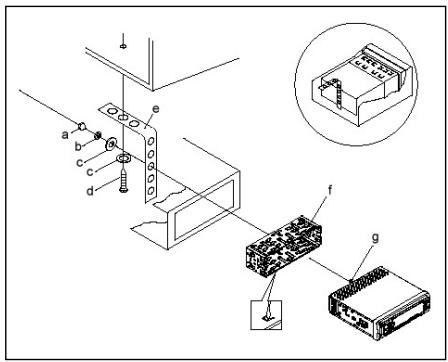
a Dado
b Rosetta elastica
c Rondella
d Vite
e Squadra di montaggio
f Alloggiamo di inserimento
g Tirante filettato
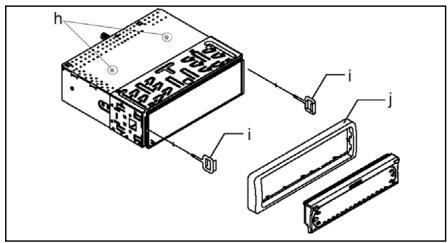
Attenzione!
h Viti del sistema di sicurezza per il trasporto (da rimuovere prima del montaggio)
Dispositivo di estrazione (chiave per le opera- razioni di smontaggio)
j Fissaggio
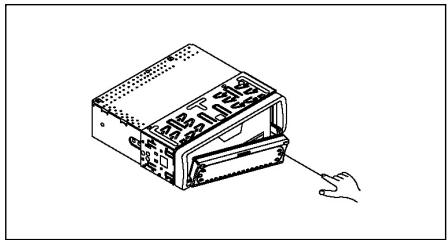
Appicare il frontalino solo sul lato sinistro e poi inserirlo fino al punto di incastro sul lato destro.

Allacciamento
Realizzare l'allcianto conformmente a quanto indicato dal grafico.
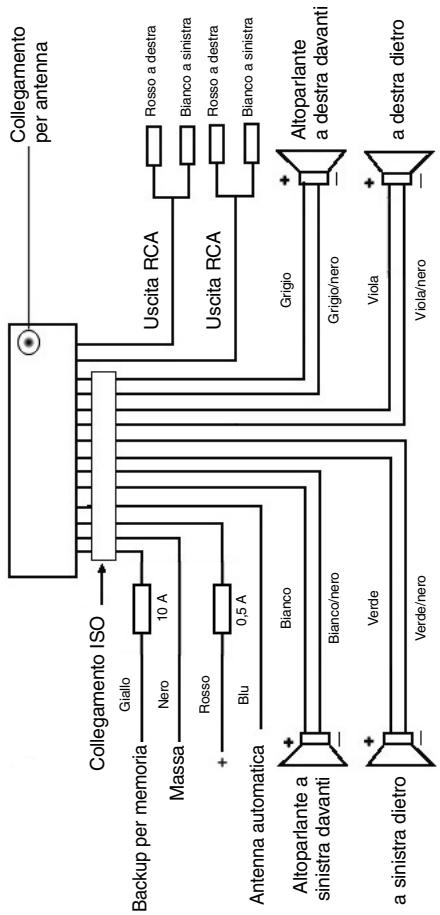
Attenzione
- Il pannello di lavoro rimovibile deve essere montato soltanto dopo aver effettuito l'allacciamento del cavo.
- Si consiglia di utilizzato altoparlanti con un'impedenza pari a 4 ohm.
Informazioni importanti per il montaggio della vostra autoradio!
- Tenete presente che durante nella fase di montaggio/smontaggio del vosto apparecchio la vostra machina delve disparre di un „ISO ANSCHLUSS" origine. Questa è la contraparte alla spina presente all'uscita dell'apparecchio (ISO ANSCHLUSS).
Nel caso di backup „DAUER+“, a seconda del tipo di veicolo possono esserci differenze.
In questo caso rivolgetevi ad un'officina autorizzata perché un'alimentazione permanente della vostra radio altrimenti non è garantita. (Questo è necessario per memorizzare le stazioni emittenti).
- A seconda del tipo di veicolo in casi eccezionali possono presentarsi disturbi nel funzionamento Radio/CD. Questi si possono eliminare con un filtro anti-disturbo supplementare. Malgrado il vostro apparecchio AR 600 CD sua ricerca do tato in series di un filtro antidisturbo, possono esserci uqualmente limiti dovuti alla vettura.
Potete ave甚么过滤nei nego di accessori auto e/o presso la vostra offici- na di fiducia.
Misure di prevenzione e manutenzione
- Le viti della sicura di trasporto devono essere rimosse prima del montaggio altrimenti il CD non entra.
- L'apparecchio è configurato per il polo negativo della batteria, il quale deve essere collegato alla carrozza per le velocolo. Accertarsene prima di procedere all'installazione.
- Nel caso in cui il quadro comandi anteriore venga rimioso durante il funzionamento della radio o dellettore CD, l'apparecchio si disattiva automaticamente.
- Qualora il display LCD visualizzi un messaggio di erre (ERROR) après che il quadro comandi anteriore è stato nuovamente installato, è possible azzerare nuovamente il quadro comandi LCD mediante un apposto filo metallico collegato analogicamente all'attuatore.
- Nel caso in cui la temperatura all'interno dell'abitacolo del veicolo sia particular-lmente elevata, per esempio quando il veicolo sua rimasto parcheggiatto a lungo al sole, si consiglia di non attivare illettore finché la temperatura dell'abitacolo non sua diminuita in seguito a un breve periodo di marcia.
- Affinché il pannello di dato rimoavigile possa essere conservato in condizioni di sicurezza, si consiglia di utilizzare a tale scopo l'involucro protettivo appositamente previsto allo scopo.

-
In riferimento all'estrazione, rimozione, al montaggio e alla conservazione del quadro comandi anteriore, si raccomanda di prestare attenzione a quando indico nelle seguenti illustrazioni.
-
Apririle campodi comando
-
Estrarre il campodi comando
-
Trasportare la tastatura di lavoro Involucro di protezione
-
Montare la tastatura di lavoro
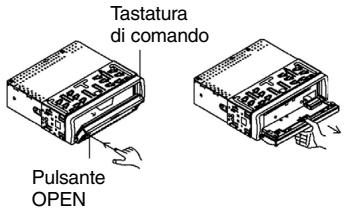
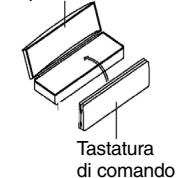
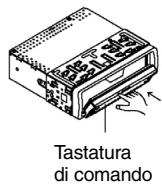
Funzionamento
1 Pulsante OPEN
Azionare i pulsante OPEN per aprire il pannello di lavoro anteriore. Sarà quando ora possibile inseire un CD nell'apposa fessura oppure estrarlo pre-mendo i pulsante EJECT.
2 Pulsanti +/-
Durante il funzionamento dell'appareccchio, questi pulsanti servono ai fini della regolazione del volume. Azionati in abbinamento al pulsante SEL, a sua volta premuto, è possibile effettuire modifiche nei menu, per esempio per quanto concerne la modalità acustica.
3 Pulsante SEL (selezione)
a) Premere brevemente il pulsante SEL per apree il menu di selezione della modalità acustica. Sul display viene visualizzato "VOL" ai fini dell'impostazione del volume. Azionando ripetutamente il pulsante SEL, è quindi possibile selezioneare the singole opzioni di menu quali, per esempio, VOLUME, TREBLE, BASS, BALANCE e FADER. Per poter modificare le impostazioni delle varie opzioni di menu, è sufficiente servisi dei pulsanti "+" oppure "-". Nota: se sono state selezionate impostazioni dell'equalizzatore in DSP, p.e. POP, ROCK, non si sono impostare BASS e TREBLE.
b) Tenere premuto a lungo il pulsante SEL per aprire il menu di selezione TA SEEK/TA ALARM, MASK DPI/MASK ALL, DSP OFF, LOUD ON/OFF, BEEP ON/OFF, SEEK1/2, STEREO/MONO; LOCAL/DX; VOL LAST/ADJ. Sul display viene visualizzato il messaggio "TA SEEK". Azionando ripetuatamente il pulsante SEL, è quindi possibile selezioneare le varie opzioni di menu. Per poter modificare the impostazioni delle varie opzioni di menu, è sufficiente servirsi dei pulsanti "+" oppure "-".
- Menu TA SEEK (ricerca dell'emittente di notiziari sulle condizioni del traffico) Qualora si desideri che durante la funzione TA venga ricercata automaticamente un'emittente di notiziari sulle condizioni del traffico, è necessario selezionare TA SEEK.
Nel caso in cui se selezioni TA ALARM, il display visualizzza un messaggio di avventenza non appena sua stato impostata, durante la funzione TA, una stazione radio che non trasmette informazioni in materia di traffico.
- MASK DPI/ALL
Oscuramento delle frequenze alternative (AF) durante la ricerca di un codice identificativo di programma (PI).
MASK DPI: quando l'apparecchio ricerca il codice identificativo di programma (PI) relativo a una data emittente, le frequence alternative caratterizzate da un codice identificativo di programma differente non vengono visualizzate.
MASK ALL: durante la ricerca del codice identificativo di programma (PI), le frequence alternative caratterizzate da un codice identificativo di programma differente e le emittenti aventi un forte livello del segnale alla segnale RDS non vengono visualità.
DSP
In DSP si possono selezionare le impostazioni dell'equalizzatore POP M; ROCK M, CLASS M e FLAT M. Per insertire impostazioni personali selezionare DSP OFF. V.anche il punto 3a
- LOUD ON/LOUD OFF
Si cui accendere o spegnere l'intensificazione dei toni bassi (LOUDNESS).
- BEEP ON/OFF segnale acustico di conferma
Si cui selezionare il segnale di conferma in due modi premendo i tasti.
BEEP ON: il segnale acustico di conferma viene genrato igniqualvolta si azioni un pulsante.
BEEP OFF: il segnale acustico di confirma è disattivato.
- SEEK 1, SEEK 2 (selezionabile solo nella modalità radio)
Funzione di ricerca con i tasti nella modalità radio.
SEEK 1: tenendo premuti i tasti e la radio, si raggiunge la prima stazione emittente raggiungibile.
SEEK 2: finché si tengono premuti i tasti ▼, la ricerca nella banda di fre-quenza continua.
STEREO/MONO commutazione
(seLECTIONABILE solo nel funzionamento radio)
- LOCAL/DX (seLECTIONABILE solo nel funzionamento radio)
La radio puis receives dati RDS EON. Con l'espressione "EON" si intende la trasmissione di ulteriori informazioni in merito all'emittente nell'ambito di una catena di stazioni radio, come nel caso di WDR. Nel caso specifico di un

annunci sul traffico (TA) nell'ambito di una catena di stazioni radio, si passa da una emittente che non trasmette notiziari radiofonici sul traffico alla corrispondente stazione radio con trasmissione di notiziari sul traffico della catena di stazioni radio stesse.
La ricezione di quosti dati è segnalata sul display atraverso il symbolo EON. Per la ricezione delle informazioni sul traffico urbano o interurbano si più scegliere tra la modalità EONTA LOCAL overo EONTA DISTANCE . Scopo di esta funzione è coprimere una commutazione indesiderata a un'informazione sul traffico EON-TA indesiderata.
Nel caso in cui un'emittente EON si trovi molto distante, resta ciononostante in parte possible ricevere informazioni EON TA da parte di esta stazione. La radio si sintonizza su这对于a stazione di trasmissione EON e tenta di ricevere le informazioni sul traffico. Tuttavia, il livello del segnale è troppo debole e la qualità della ricerca cattiva, in quanto这对于a stazione di trasmissione EON è troppo distante.
Di seguenza, la radio si sintonizza nuovamente sull'emittente precedenze impostata.
Nel caso della modalità sopra descrietta, l'utente sente per un certo intervallo di tempo un programma sbagliato oppure non ode nulla.
EONTA LOCAL:
Attraverso esta funzione si evita la sintonizzazione su un collegamento EON caratterizzato da un livello di segnale troppo debole.
La radio non si sintonizza su Questa emittente e l'utente non averte alcun disturbo.
Modalità EON TA-DISTANCE:
in esta modalità, la commutazione di tipo EON TA tenta di ricevere le informazioni EON TA da un'emittente raggiungibile e di ottimizzare, inosto modo, la qualità della riscezione.
VOL LAST/VOL ADJ
VOL LAST: la radio si accende con il volume impostato per ultimo.
VOL ADJ: con l'aiuto dei tasti +/- e - si selezione un volume d'accensione permanente.
4 Pulsante POWER
Premere quello pulsante per attivare e disattivare l'apparecchio.
5 Display LCD (display a cristalli liquidi)
6 Pulsanti BAND
Premiere brevemente il pulsante BAND per selezionare la banda di frequenza desiderata. La denominazione della banda in oggetto (FI,F2, F3, MW1, MW2) viene visualizzata sul display LCD.
7/8 Pulsanti ▲▼ TUNE, SEEK, TRACK, SKIP UP/DOWN
a) Nella modalità radio:
Premere per un attimo tasti o▼ per impostare manualmente una stazione emittente a scelta.
Tenere premuto il tasting o▼ per dare avvio alla ricerca di un'emittente radio.
V.anche la funzione SEEK 1/SEEK2.
b) Nella modalità CD: per avanzare o tornare indietro, premere brevamente il pulsante ▲ oppure▼. Per poter scorrere i titoli, tenere premuto il tasto direzionale ▲ oppure▼.
9 Pulsante CLK
Azionando brevamente quello pulsante, è possible visualizzare diverse informazioni sul display LCD.
Allorché si riceve un'emittente RDS, si ottengono le seguenti informazioni:
- Nella modalità radio:
nome dell'emittente frequenza ora tipo di programma
- Nella modalità conlettore CD:
→ numero del titolo/durata della riproduzione → nome dell'emittente
frequenza ora tipo di programma
Avventenza: nel caso in cui non si riceva alcuna informazione in merito all'ora o al tipo di programma, il display visualità rispettovamente i messaggi "NO CLOCK" e "NO PTY".
Nel caso in cui l'emittente radiofonica non trasmetta alcuna ulteriori informazione RDS, si ottengono i seguenti dati:
- Nella modalità radio:
NO CLOCK frequenza NO PTY
- Nella modalità conlettore CD:
numero del titolo/durata della riproduzione ora frequenza
→NOPTY→
10 Pulsante Modus
Premere Anything pulsante per selezionare illettore CD o la modalità radio.
11 Tasto MUTE
Premere il tasto MUTE per disattivare il volume per un breve lasso di tempo.
Premere di nuovo dato tasto per ripristinare il volume.
12 Pulsante AP (memorizzazione automatica dell'emittente)
Nella modalità radio:
a) Funzione di memoria:
Per attivare la funzione di memorizzazione automatica dell'emittente, è necessario premere il pulsante AP per più di un secondo.
L'apparecchio ricerca il livello di segnale con maggiore intensità all'interno della banda di frequenza corrente, per esempio FM 1, sino alla conclusione del ciclo di ricerca stesso. Le sei emittenti caratterizzate da segnale a intensità più elevata vengono abbinate alle correspondenti positioni di memoria.
Le emittenti ora memorizzate vengono avviate per ca. 5 secondi e poi viene impostata l'emittente della prima posizione di memoria.
Se si desidera cercare ancora altre emittenti nella banda FM, premere il tasto BAND per passare a FM 2 o FM 3. Tenere di nuovo premuto per più di un secondo il tasto AP per dare avvio alla successiva ricerca.

b) Funzione Intro-Scan:
Dopo aver premuto per un attimo il tasto AP, la radio d'avvio a tutte le emittenti pre-impostate della banda di frequenza attuale (FM, MW).
Nota: la funzione Intro-Scan termina automaticamente alla posizione di memoria da cui si è partiti.
13-18 Tasti di stazione (1-6). Emittente preselezionata e pulsanti 1top, 2int, 3 RPT, 4 rdm in modalità conlettore CD
a) Modalità radio
Azionando brevamente questi pulsanti è possibile selezionare direttamente una stazione radio precedentemente impostata. Qualora questi pulsanti vengano premuti per più di un secondo, l'emittente currentamente impostata viene memorizzata in corrispondenza del tasto di stazione selezionato.
b) Modalità CD
- Premere il pulsante 1TOP allo scopo di interrompere la riproduzione del CD (funzione di pausa). Per avviare nuovamente la riproduzione del CD, aziona re nuovamente questo pulsante.
- Premere il pulsante 2lNT. Ognuno dei brani del CD viene riprodotto per 10 secondi. Per interrimpere la ricerca, azionare nuovamente quello pulsante. Viene in questo modo riprodotto il brano corrispondente al titolo corrente mente selezionato.
- Premere il pulsante 3RPT. Il brano corrispondente al titolo presente viene ripetuTo. Per annullare esta funzione, premere nuovamente quello pulsante.
- Premere il pulsante 4RDM. I brani corrispondenti ai titoli del CD vengono riprodotti in una sequenza casuale. Per annullare esta funzione, premere nuovamente quello pulsante.
19 TA Traffic Announcement (commutazione prioritaria per le informazioni radiofoniche sul traffico)
La funzione TA viene attivata premendo brevemente il pulsante TA ed è segnalata sul display atraverso il simbolo TA corrispondente. Nel caso della modality radio in una banda di frequenza FM, ha inizio automaticamente la ricerca di un'emittente di notiziari sulle condizioni del traffico (TA SEEK).
Quando si riceve un'emittente FM che trasmette periodicamente informazioni aggiornate sulle condizioni del traffico, il symbolo TP si illumina sul display. Nel caso in cui la funzione TA sa attivata, la trasmissione delle informazioni sul traffico FM interrompe automaticamente la modalità CD. Il livello del volume viene incrementato sino al valore minimo necessario ai fini della trasmissione dei notiziari sul traffico. Una volta terminata la diffusione delle informazioni sul traffico, viene ripreso il programma impostato in precedenza.
Interruzione della funzione TA:
Qualora si desideri interrompere l'ascolto delle informazioni attuali sulle condizioni del traffico, azionare brevamente il pulsante TA. La modalità TA restsa tutta via attiva.
20 Pulsante PTY - Selezione del tipo di programma
Oltre al nome dell'emittente alcune emittenti FM trasmettono anche informazioni in merito al tipo di programma in oggetto. Queste informazioni sono essere visualizzate alla proprio autoradio.
Questi tipi di programma possono essere, per esempio, i seguenti:
SPORT NEWS POP CLASSICS
Mediating la funzione PTY è possible selezionare in modo mirato delle emittenti relative a un determinato tipo di programma.
Premere il pulsante PTY 1X per visualizzare il gruppo musicale PTY. Nel display appara il carattere "PTY". Servendosi dei tasti di stazione 1-6, è possible effettuire una selezione conformmente a quanto indicate di seguito.
| Premere 1X | Premere 2X | |
| Tasto di stazione 1 | POP M | ROCK M |
| Tasto di stazione 2 | EASY M | LIGHT M |
| Tasto di stazione 3 | CLASSICS | OTHER M |
| Tasto di stazione 4 | JAZZ | COUNTRY |
| Tasto di stazione 5 | NATION M | OLDIES |
| Tasto di stazione 6 | FOLK M |
Premere il pulsante PTY 2X per apree il gruppo linguistico PTY. Servendosi dei tasti di stazione 1-6, è possibile effettuare una selezione conformmente a quanto indica di seguito.
| Premere 1X | Premere 2X | Premere 3X | |
| Tasto di stazione 1 | NEWS | AFFAIRS | INFO |
| Tasto di stazione 2 | SPORT | EDUCATE | DRAMA |
| Tasto di stazione 3 | CULTURE | SCIENCE | VARIED |
| Tasto di stazione 4 | WEATHER | FINANCE | CHILDREN |
| Tasto di stazione 5 | SOCIAL | RELIGION | PHONEIN |
| Tasto di stazione 6 | TRAVEL | LEISURE | DOCUMENT |
Premere il pulsante PTY 3X per disattivare nuovamente la funzione.
Quando si selezione PTY, la radio avvia la ricerca delle corrispondenti informazioni PTY. Questa operazioni continua finché suddette informazioni PTY non vengano effettivement trovate.
Nel caso in cui il tipo di programma ricercato non venga trovato, il display visua- lizzza il messaggio "NONE PTY".
Qualora l'informazione PTY ricercata non sia più disponibile, la funzione PTY passa automaticamente alla modalità normale.
21 AF (frequenze alternative) - Funzione REG
a) AF è una funzione che opera con l'ausilio del sistema RDS (Radio Data System) ePTH è essere utilizzata esclusivamente per le emittenti FM. L'apparecchio ricerca in background la frequenza dell'emittente impostanza chePTH è essere ricevuta nel modo migliorie.

Quando si sleziona la funzione AF, la radio controllinga costamente l'intensità del segnale della frequenza AF. L'intervalle di prova per agli frequenza AF dipende dall'intensità del segnale stesso dell'emittente corrente e più variate tra i due minuti rilevabili nel caso di emittenti con segnale intenso e i due secondi nel caso di emittenti dal segnale debole. Ognialvolta la nuova frequenza AF abbia un segnale più forté rispetto a quello della stazione impostata, l'apparecchio si sintonizza per un breve intervallo di tempo su esta frequenza, e sul display viene visualizzato il messaggio "NEW FREQUENCY" per uno o due secondi. Poiché il tempo della commutazione silenziosa durante ilchio di frequenza e il tempo di controllo sono molto brevi, questa operazione non viene pressché percepità durante il normale programmà.
La funzione AF viene attivata premendo brevamente il pulsante AF, nelle istato della funzione AF è visualizzato sul displayattraverso un symbolo AF.
- Se il symbolo AF viene visualizzato sul display, la funzione AF è attiva e vengono ricevuti dati RDS.
- Se il symbolo AF lampeggia sul display, la funzione AF è selezionata, ma non è possibile ricevere alcun segnale RDS.
- Per disattivare nuovamente questa funzione, azionare più una volta il pulsante AF. Il simbolo AF presente sul display si spagne.
b) Funzione REG
In determinati momenti alcune emittenti ripartiscono il programma in programmi regionali con diverso contento.
- REG ON: premendo a lungo il pulsante AF, si attiva la modalità regionala. Per alcuni secondi nel display appara la segnalazione „REG ON".
Avverenza: il display ha una capacité limitata. Puo pertanto accadere che nella modalità di visualizzazione doppia singoli segmenti del display siano cancellati.
Attraverso la funzione REG ON si impedisce la radio si sintonizzi su frequenza alternative che abbiano un altro contento di programma regionale.
- REG OFF: premendo nuvamente a lungo il pulsante AF, si disattiva la modalità regionale. Per alcuni secondi nel display appeare la segnalazione „REG OFF".
Il codice identificativo di programma (PI) del programma regionale viene ignorato durante la ricerca di una frequenza alternatively (AF) o di un codice identificativo di programma (PI).
22 Pulsante SCAN
Ricerca emittente nel funzionamento radio
Premere per un attimo il tasting SCAN. Viene cercata automaticamente agli emittente raggiungibile nella banda di frequenza impostata (p.e. FM1).
Quando è stata trovata un'emittente, la frequenza impostata lampeggia per ca. 5 secondi nel display e si avvia l'audio. Poi la ricerca continua.
Premere di nuovo il tasto SCAN se si desidera continuare l'ascolto dell'emittente appena impostata oppure premere uno dei tasti per interrompere la ricerca.
23 Apertura per CD
24 Pulsante di espulsione (EJECT)
Premere Anything pulsante per estrarre il CD.
25 Display luminoso (LED) lampeggiante
Allorché si rimuove il quadro comandi anteriore, quello display lampeggia.
26 Pulsante RESET
Premere quello pulsante per ripristinare il programma disturbato.

1
Dati tecnici
Generalità
Tensione di rete
DC 13,8 V
Consumo di corrente
7A Max.
Potenza
4 × 7 ~W
Ambito FM
Ambito di frequenza
87,6 MHz - 108,0 MHz
Sensibilità utile
3 V.
Frequenza I.F.
10,7 MHz
Ambito OM (AM)
Ambito di frequenza
522 KHz - 1620 KHz
Frequenza I.F.
450 KHz
Potenza d'uscita
Uscita
per CD max. 1200mV
Lettore CD
Sistema
Apparecchio CD
CDutilizzabili
CD/CDR/CDRW Disk
Numero di biti quantificazione
1 bit.
Formato del segnale
Frequenza modello 44,1 KHz
Caratteristica di frequenza
20 - 100Hz < 5 dB
10K-20KHz<5dB
Rapporto segnale-disturbo
60 dB (1KHz)
Numero di canali
2 canali stereo
Dimensioni dell'alloggiamento
178 L x 50 H x 165 P
Eliminazione delle anomalie
Prima di esaminare la lista di risconto, completare in primo luogo l'allacciamento. Nel caso in cui vi siano più fornando in seguito alla verificata sulla base della lista di risconto, si consiglia di rivolgersi al centro di assistenza tecnica più vicino.
| Anomalie | Causa | Soluzione |
| In seguito all'inserimento nell'apparecchio, il CD o la cassetta non funziona. | Il regolatore del volume è impostato su un valore troppo basso. Gli allacciamenti non sono stati effettuati in modo corretto. Controllare l'allacciamento. | Impostare un valore più elevato per il regolatore del volume.Controllare il collegamento da +12V e il collegamento di massa. |
| Il tono dellettore CD tremola. | La superficie della strada aspra.L'apparecchio non è stato montato in modo saldo. | Prima di mettere in funzione il CD attendere che la strada diventi piana.Montare l'apparecchio saldamente.Acertarsi che venga utilizzato il systemadi fis-saggio posteriori nel caso in cui il veicolo non dis-ponga di supporti appro-priati per la parte posterio-re dell'apparecchio.Provare con un'alto CD.Qualora quest'ultimo non presenti anomalie, il CD precedente è probabilit-mente danneggiato.Pulire il CD. |
| Il CD è difettoso. | ||
| Il CD è sporco. | ||
| Assenza di corrente. | Il sistemi adcessione è disattivato. | Ruotare la chiave diccessione su "ON" oppu-re "ACC". |
| Il dispositorio di sicurezza è bruciato. | Sostituire il dispositorio di sicurezza con un'alto da 10A. | |
| L'apparecchio non funzio-na correttamente (EJECT, LOAD, PLAY). | Il rumore elettrico coinvolgeanche il microcompu-ter. | Estrarre il CD o la cassetta in oggetto, quando effetuare nuovamente l'inseri-mento.Disattivare l'apparecchio e riattivarlo nuovamente. |
| I | Anomalie | Causa | Soluizione |
| Non vi è alcuna ricezione radio. | Il cavo dell'antenna non è collegato. | Inserire correttamente il cavo dell'antenna nella presa correspondente dell'-apparecchio. | |
| Nella modalità di ricerca automatica la radio non si arrresta su alcuna stazione radiofonica. | I segnali di emissione sono troppo deboli. | Impostare una stazione radiofonica manualmente. | |
| I CD's vengono insertiti solo fino a metà nel vano CD. | Le viti e la sicura per il trasporto non sono stati rimossi. | Rimuovere le viti e la sicura per il trasporto. |
Riproduzione di un CD
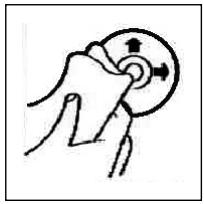
Pulizia dei CD
Prima di attivare illettore CD, pulire il CD con un panno pulito e privo di polvere. Tirare il CD nel senso indicate alla freccia.
Avvertenza: non utilizzato solventi quali la benzina o diluenti. I comuni detergenti o gli spray antistatici danneggiano l'apprecchio.
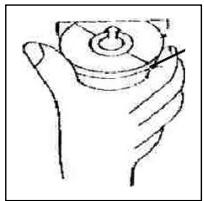
Se si inserisce il CD con le scritte rivolte verso il basso, l'apparecchio più essere danneggiato.
Inserire sempre i CD con l'etichetta rivolta verso l'alto.
Avvertenza: nel caso in cui nell'apposita aperture per CD sua giornatae un CD, si raccomanda di non tentare di essere inerire un ulteriore CD. In caso contrario, si potrebbe danneggiare l'apparecchio.
I CD devono essere afferrati sempre sul bordo. Affinché i CD possano mantenersi puliti, non afferrarli sulla superficie.
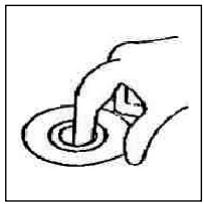
Non incollare etichette o nastri adesivi sui CD.
Non esporre i CD ai raggi solari o a fonti di calore quali, per esempio, i tubi di riscaldamento. Non lasciarli inoltre in auto, quando quest'ultima è parcheggiata al sole, poiché si potrebbe verificare un considerevole aumento della temperatura.

Questo appearecchio è stato controllato sulla base di tutte le direttive CE attuali in vigore in quello settore, quali per esempio la normativa in materia di compatibilità elettromagnetica e la direttiva in materia di bassa tensione, ed è stato costruito conformamente alle norme di sicurezza più moderne.
Con riserva di apportare modifiche tecniche.
Garanzia
Per l'apparecchio da=no messo in commercio ci assumiamo una garanzia di 24 mesi dalla data di acquisto (scontrino).
Durante la garanzia noi ci impegniamo ad eliminare Gratisamente i quasti dell'apparecchio o degli accessori*, dovuti a difetti di materiale o di fabbricazione, riparandoli o, a nostra discrezione, sostuendoli. Le prestazioni in garanzia danno luogo a una prerogha della garanzia né danno diritto ad una nuova garanzia!
Per la garanzia è sufficiente lo scontrino di acquireo. Senza quello scontrino non sussiste il diritto né ad una sostituzione né ad una riparazione gratuite.
In caso di garanzia consignare al vostro rivenditore l'apparecchio base nell'imbal-laggio originale unitamente allo scontrino.
*) Danniagliaccessori non giustificano automaticamente lo scambio Gratisoto dell'apparechio completo. Si prega di mettersi in contatto con la nostra centrale Telefonica.Dannie alle parti del vetro oppure fratture ai pezzi di materia plastica sono obligatoriamente a spese del cliente.
La riparazione di pezzi d'uso overo soggetti a logorama (cursori, ganci impastatori, cinghie di trasmissione, telecomandi di ricambio, spazzolini di ricambio, lame di seghe ecc.) come andere operazioni di pulizia e manutenzione o la sostituzione di pezzi soggetti a logorama non rientano nella garanzia e quindi sono a pagamento!
La garanzia si annulla nel caso di intervento da parte di terzi.
Dopo la garanzia
Al termine della garanzia le riparazioni possono essere eseguite dietro lavoro dal corrispettivo negotio specializzato o servizio riparazioni.
General safety instructions
GB
To avoid the risk of fire or an electric shock, you should not expose the device to rain or moisture. Consequently, do not use the device in the immediate vicinity of water - for example near a bath tub, a swimming pool or in a damp cellar.
Use the device only for the intended purpose.
Only connect the device at a properly installed plug socket. Pay attention that the specified voltage corresponds to the voltage of the plug socket.
When using external mains supply, pay attention to the correct polarity and voltage. Always place the batteries in the correct direction.
Assemble the device in such a way that the available ventilation openings are not covered.
Never open the housing of the device. Incorrect repairs can constitute a considerable risk for the user. Should the device become damaged, in particular the mains supply cable, do not operate the device any longer, but rather have it repaired by an expert. Check the mains supply cable regularly for damage.
For safety reasons a broken or damaged mains lead may only be replaced by an equivalent lead from the manufacturer, our customer service department or a similar qualified person.
If the device is not used for a longer period, remove the plug connector from the plug socket or take out the batteries.
These symbols may be found on the machine and are intended to indicate the following:

The lightning symbol should advise the user of parts in the inside of the device which carry dangerously high voltage levels.

The symbol with an exclamation mark should advise the user of important operation or maintenance instructions in the accompanying documentation.

Devices bearing this symbol work with a „class 1 laser“ for tracing the CD. The built-in safety switches should prevent the user being exposed to dangerous laser light, which is invisible to the human eye, when the CD compartment is opened.
Under no circumstances should these safety switches be bypassed or manipulated, as this could result in a danger of exposure to the laser light.
GB
Installation
Please install the car radio as shown below
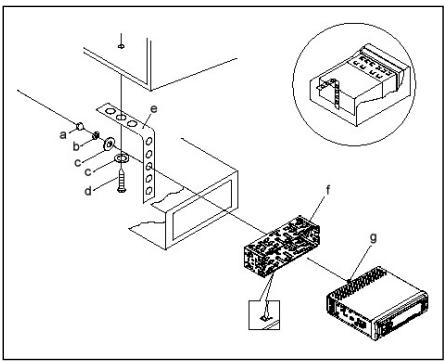
a Nut
b Spring washer
c Plain washer
d Screw
e Mounting bracket
f Slide-in housing
g Threaded bolt

Note:
h Retaining screws during transport (please remove before installation)
1 Extraction tool (spanner for dismantling)
j Frame
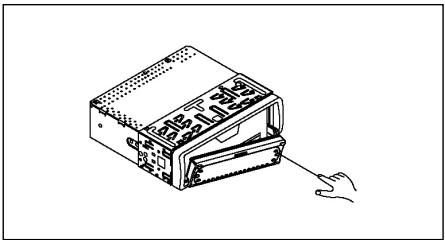
First insert the operating panel on the left-hand side and then lock it into place on the right.
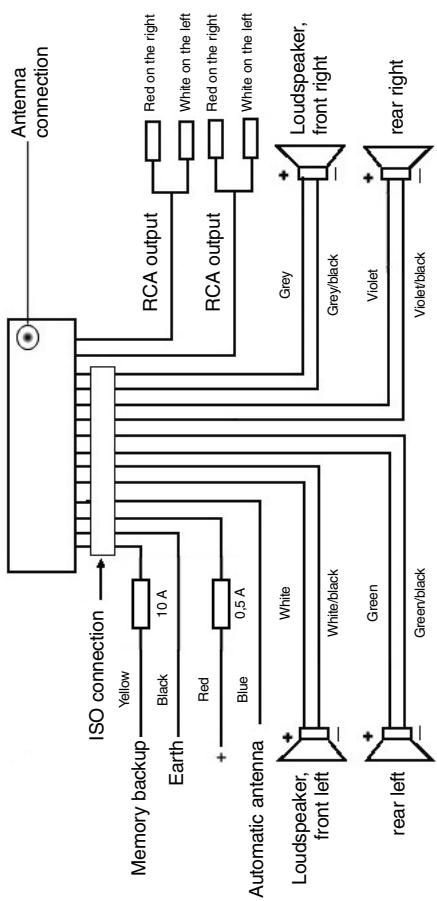
Connection
Connect the device as shown in the diagram.
GB
GB
Note:
- Do not attach the removable control panel until after connection of the cables.
- Please use loudspeakers with an impedance of 4 ohm.
Important Information for installing your CARRADIO!
- For proper instalment of your car radio, please make sure that your car provides an original "ISO JACKET". This is prepared as the counter part of the "ISO JACKET" of your car radio.
Depending on the specific car type, different wiring connection of the Backup wire are available.
In these case please contact your authorized car dealer. (However, this is necessary for storing the radio stations).
- Depending on the specific car type, interferences can be possibly arise during radio/CD operation. These interferences can avoided easily with an additional Interferences filter. (Your car radio AR 600 CD is originally prepared with an Interference Filter already).
In these case, please contact your authorized car dealer.
Precautionary Measures and Maintenance
- The screws of the transport locking device should be removed before installation, as otherwise the CD cannot be inserted.
- The device is designed for the minus pole of the battery, which must be connected to the body of the vehicle. Please check this before installation.
- If the front control panel is removed while the radio or CD is on, the device is automatically switched off.
- If an error message (ERROR) appears in the LCD after the front control panel has been replaced, the LCD control panel can be reset using a piece of wire inserted into the control panel at the same time.
- If the interior of the vehicle becomes very hot, for example after standing in direct sunlight for a prolonged period, do not switch on the player until the inside of the vehicle has cooled down a little after you have been driving for a few minutes.
-
In order to keep the removable control panel in a safe place you should always use the protective case provided.
-
Please see the following diagrams on how to remove, insert and store the front control panel.
- Open the control panel
- Remove the control panel
- Transporting the control panel
- Attaching the control panel
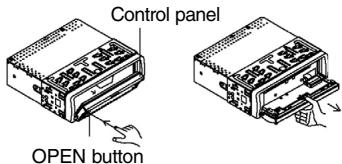
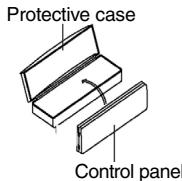
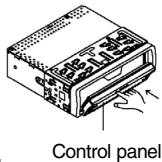
Operation
1 OPEN Button
Press the OPEN button to fold down the front control panel. A CD can then be inserted into the CD slit or ejected by pressing the EJECT button.
2 +/- Button
During normal playback these buttons are used to set the volume. If the SEL button has been pressed beforehand these buttons can be used to make changes to the menus, for example the sound mode.
3 SEL Button (Select)
a) Press the SEL button briefly to access the selection menu of the sound mode. The letters "VOL" appear in the display for setting the volume. By repeatedly pressing the SEL button you can now select the individual menu items such as VOLUME, TREBLE, BASS, BALANCE and FADER. The settings of the individual menu items are changed using the "+" or "-" button. Note: If equaliser settings such as POP and ROCK have been selected under DSP it is not possible to adjust the BASS and TREBLE.
b) Press the SEL button for a longer time to access the selection menu TA SEEK/TA ALARM, MASK DPI/MASK ALL, DSP OFF, LOUD ON/OFF, BEEP ON/OFF, SEEK1/2, STEREO/MONO; LOCAL/DX; VOL LAST/ADJ. The letters "TA SEEK" appear in the display. Repeatedly pressing of the SEL button now brings up the individual menu items. The settings of the individual menu items are changed using the "+" or "-" button.
- TA SEEK Menu (Traffic Announcement Station Search)
- Select TA SEEK if you would like the radio to automatically search for a traffic announcement station when you select the TA function.
- Select TA ALARM to bring up a warning message in the display as soon as you have set a station under the TA function which does not transmit traffic announcements.
GB
- MASK DPI/ALL
This hides alternative frequencies (AF) during the search for a programme identification (PI).
MASK DPI: When the device is searching for the programme identification (PI) of a station the alternative frequencies with a different programme identification remain hidden.
MASK ALL: In the search for a programme identification (PI) alternative frequencies with a different programme identification and stations with a strong signal level without an RDS signal remain hidden.
DSP
In DSP mode you can select the equaliser settings POP M, ROCK M, CLASS M and FLAT M. Select DSP OFF to carry out your own adjustments. See also section 3a.
- LOUD ON/LOUD OFF
You can switch the bass amplification (LOUDNESS) on or off.
- BEEP ON/OFF Confirmation Beep
You can select two types of confirmation beep when a button is pressed. BEEP ON: The confirmation beep is heard whenever a button is pressed. BEEP OFF: The confirmation beep is switched off.
- SEEK 1, SEEK 2 (only available during radio operation)
Seek function with the - buttons during radio operation.
SEEK 1: Keep the buttons pressed down and the radio will stop at the next station that is reached.
SEEK 2: As long as the buttons are pressed down the search function will continue in the frequency band.
STEREO/MONO switching (only possible during radio operation)
- LOCAL/DX (only available during radio operation)
Your radio can receive RDS EON data. The term "EON" signifies the transmission of additional station information within a station chain, e.g. WDR. If a traffic announcement (TA) is made within a station chain, the radio switches from a station which does not transmit traffic announcements to one that does within the same station chain. Reception of this station data is shown in the display by the EON symbol. You can choose between the EONTA LOCAL and EONTA DISTANCE mode for local or long-distance traffic news. The purpose of this function is to prevent the radio switching unnecessarily to an EON-TA traffic news item. If an EON station is a long distance away, it may be that in some cases EON TA information can still be received from the station. The radio then switches to this EON station and tries to receive the traffic announcements. The signal is too weak, however, and reception is poor as this EON station is too far away. Therefore the radio switches back to the station that was set previously.
During the type of operation described above the listener hears the wrong programme for a short time or nothing at all.
EONTA LOCAL:
This function prevents switching to an EON station whose signal is too weak. The radio does not switch to this station and the listener does not hear any interference.
EONTA DISTANCE Mode:
In this mode the EONTA circuitry tries to receive the EONTA information from any available transmitter and thus improve reception quality.
VOL LAST/VOL ADJ
VOL LAST: The radio switches on at the actual volume it had when it was last switched off.
VOL ADJ: Using the + and - buttons you can pre-select a constant switch-on volume.
4 POWER Button
Press this button to switch the device on and off.
5 LCD (liquid crystal display)
6 BAND button
Press the BAND button briefly to select the frequency band you would like to hear. The designation of the corresponding band F1, F2, F3, MW1, MW2 is shown in the LCD.
7/8 ▲▼ Buttons TUNING, SEEK, TRACK, SKIP UP/DOWN
a) In radio mode:
Press the or button briefly to tune into a radio station manually.
Keep the or button pressed down in order to start searching for a radio station.
See also the function SEEK 1 / SEEK 2.
b) In CD mode: Press the or button briefly to jump forwards or backwards. If you would like to scroll the titles of the tracks keep the or arrow button pressed.
9 CLK Button
When this button is pressed briefly, various information appears in the LCD. During reception of an RDS station you see:
In radio mode:
station name frequency time program type
In CD player mode:
track number/running time station name frequency time
→program type→
Note: If no time or program type information is being received, the display shows "NO CLOCK" and "NO PTY".
GB
If the station being received does not transmit any additional RDS information you see:
In radio mode: NO CLOCK frequency NO PTY
- In CD player mode: track number/running time time frequency NO PTY
10 Mode Button
Press this button to select the CD player or radio mode.
11 MUTE Button
Press the MUTE button to switch off the loudspeakers for a short time. Press this button again to cancel this function.
12 AP Button (Autostore - Automatic Station Storage) In radio mode:
a) Memory function :
Press the AP button for longer than one second to activate automatic station storage. The radio searches within the current frequency band, e.g. FM 1, for the strongest signal level until the search cycle has finished. The six strongest stations are then allocated to the corresponding storage locations.
The stations that have now been stored are played for approximately 5 seconds each and then the station of the first storage location is set. If you would like to search for more stations in the FM band, press the BAND button in order to change to the FM 2 or FM 3 band. Press the AP button again for more than one second in order to start the continued search.
b) Scan Function:
After the AP button has been pressed briefly the radio plays all the pre-set stations in the current frequency band (FM, MW) for a short time.
Note: The scan function ends automatically when it reaches the storage location from which it started.
13-18 Station buttons (1-6) of preselected stations and as 1 TOP, 2INT, 3RPT and 4RDM buttons during CD operation
a) Radio Operation
Pressing these buttons briefly directly selects a preset radio station. If these buttons are pressed for more than one second, the station currently being listened to is stored under the selected station button.
b) CD Operation
- Press the 1TOP button to interrupt playback of the CD (pause function). Press this button again to continue listening to the CD.
-
Press the 2INT button. Each track on the CD is played for 10 seconds. Press this button again to stop searching. The currently selected track is played.
-
Press the 3RPT button. The track currently being played is repeated. Press this button again to cancel this function.
- Press the 4RDM button. The CD tracks are played at random. Press this button again to cancel this function.
19 TA Traffic Announcement (Priority for Traffic Information)
The TA function is activated by pressing the TA button briefly. The TA symbol appears in the display. During radio operation in one FM frequency band the search for a traffic announcement station is started automatically (TA SEEK). If an FM station is being received which transmits the latest traffic announcements from time to time, the TP display lights up.
When the TA function is switched on, the FM traffic announcements automatically interrupt CD operation. The volume level is increased to the minimum value for the transmission of traffic announcements. After the traffic announcement has finished, the programme that was previously running is resumed.
Interruption of the TA Function:
If you would like to interrupt the current traffic announcement, press the TA button briefly. This does not switch off the TA mode.
20 PTY Button - Selection of the Programme Type
Besides the station name, some FM stations also transmit information on the type of programme. This information can be displayed by your car radio. Examples of such types of programme are:
SPORT
NEWS
POP
CLASSICS
With the PTY function you can specifically select stations transmitting a particular type of programme.
Press the PTY button once to access the PTY music group. The symbol "PTY" appears in the display. Using the station buttons 1-6 you can now make a selection as follows:
| Press once | Press twice | |
| Station button 1 | POP M | ROCK M |
| Station button 2 | EASY M | LIGHT M |
| Station button 3 | CLASSICS | OTHER M |
| Station button 4 | JAZZ | COUNTRY |
| Station button 5 | NATION M | OLDIES |
| Station button 6 | FOLK M |
Press the PTY button twice to access the PTY language group. Using the station buttons 1-6 you can now make a selection as follows:
GB
| Press once | Press twice | Press four times | |
| Station button 1 | NEWS | AFFAIRS | INFO |
| Station button 2 | SPORT | EDUCATE | DRAMA |
| Station button 3 | CULTURE | SCIENCE | VARIED |
| Station button 4 | WEATHER | FINANCE | CHILDREN |
| Station button 5 | SOCIAL | RELIGION | PHONEIN |
| Station button 6 | TRAVEL | LEISURE | DOCUMENT |
Press the PTY button three times to switch this function off again.
When PTY has been selected the radio starts searching for corresponding PTY information and stops when the PTY information has been found.
If the programme type being searched for is not found, "NONE PTY" appears in the display.
If the PTY information being searched for no longer exists, the PTY function automatically switches to normal mode.
21 AF (Alternative Frequencies) REG Function
a) AF is a function that works with the help of RDS (Radio Data System) and can only be used with FM stations. The radio searches in the background for the best frequency reception of the station that has been tuned into. If the AF function has been switched on, the radio continuously tests the signal strength of the AF frequency. The test interval for each AF frequency depends on the signal strength of the current station and varies from a few minutes in the case of a strong signal to a few seconds in the case of weak signals. Whenever the new AF frequency is stronger than the station that is currently tuned in, the radio switches to this frequency for a short time and the message "NEW FREQUENCY" is displayed for one to two seconds. As the mute time during the frequency change and the test time is very short, this is almost inaudible during the normal programme.
The AF function is activated by briefly pressing the AF button and the status of the AF function is shown in the display by an AF symbol.
- If the AF symbol appears in the display, the AF function is switched on and RDS transmission data is being received.
- If the AF symbol flashes in the display, the AF function is selected but no RDS signal can be received at the moment.
- Press the AF button again to switch off this function. The AF symbol in the display goes off.
b) REG Function
At certain times some stations divide up their programmes into regional programmes with varying content.
- REG ON: If the AF button is pressed for a longer time the regional mode is switched on. The message "REG ON" appears in the display for a few seconds.
Note: The display capacity is limited. It is possible that in the double display mode some segments of the display are deleted.
The function REG ON prevents the radio from switching to alternative frequencies which have a different regional programme content.
- REG OFF: Pressing the AF button again for a longer time switches off the regional mode. The message "REG OFF" appears in the display for a few seconds.
The programme identification (PI) of the regional programme is ignored during the search for an alternative frequency (AF) or a programme identification (PI).
22 SCANT Button
Station Search during Radio Operation
Briefly press the SCAN button. Every available station in the frequency band (e.g. FM1) is searched for automatically. When a station is found, the frequency flashes for approximately 5 seconds in the display and the station is heard. The search function is then continued.
Press the SCAN button a second time if you would like to continue listening to the station you have just stored or press one of the station buttons to discontinue searching.
23 CD Slit
24 Eject Button (EJECT)
Press this button to eject the CD.
25 Flashing LED
When the front control panel is removed this display flashes.
26 RESET Button
Press this button to reset the programme on which there is interference.
GB
Technical data
General
Supply voltage DC 13.8 V
Power consumption max. 7 A
Power 4x7W
FM band
Frequency range 87.6 MHz to 108.0 MHz
3 uV.
I.F. frequency 10.7 MHz
MW (AM) band
Frequency range 522 KHz - 1620 KHz
I.F. frequency 450 KHz
Output Power
Output at CD max. 1200mV
CD player
System CD device
Suitable CDs CD/CDR/CDRW disks
number of quantising bits - 1 bit
Sampling frequency 44.1 KHz
20-100Hz<5dB
10K-20KHz<5dB
Frequency characteristics 20 - 100Hz < 5 dB
Signal-to-noise ratio 60 dB (1 KHz)
Number of channels 2 stereo channels
Housing dimensions 178 x 50 x 165 (B x H x T)
Troubleshooting
GB
Before going through the checklist please make all the connections first. If you still have questions after going through the checklist, please consult your local customer service representative.
| Fault Symptoms | Cause | Solution |
| After being inserted into the device the CD or cassette does not turn. | The volume control is set too low. The device has not been correctly connected. Check the connections. | Turn up the volume. Check the +12V and earth connection. |
| The sound of the CD player "jumps". | The surface of the road is uneven. The device is not firmly installed. | Wait until the road becomes smoother before playing the CD. Install the device firmly. Ensure that the rear attachment is used if the vehicle does not have any suitable retainer for the rear section of the device. Try another CD. If this works correctly, the first CD is probably damaged. Clean the CD. |
| The CD is damaged. | ||
| The CD is dirty. | ||
| There is no power. | The ignition is switched off. The fuse has blown. | Turn the ignition key to "ON" or "ACC". Replace the fuse by another 10A fuse. |
| The device does not work correctly (EJECT, LOAD, PLAY). | The microcomputer has been affected by electrical interference. | Remove the CD or cassette and reinsert it. Switch the device off and on again. |
| No radio reception. | The antenna cable is not connected. | Insert the antenna cable firmly into the antenna socket of the device. |
| In automatic search mode the radio does not stop at a transmitting station. | The transmission signals are too weak. | Tune in to a radio station manually. |
| CDs are drawn only half way into the CD tray. | The transport screws have not been removed. | Remove the transport screws. |
GB
Cleaning the CD
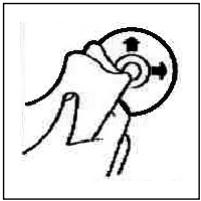
Playing a CD
Before playing a CD, wipe it off with a clean, dust-free cleaning cloth. Pull out the CD in the direction of the arrow.
Note: Do not use any solvents such as petrol or thinning agents. Commercially available cleaning substances or antistatic sprays will damage the device.
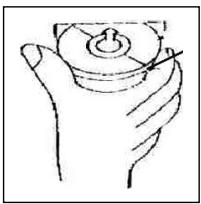
If the CD is inserted with the printed side facing downwards, the device may be damaged.
Always insert the CD with the label facing upwards.
Note: If there is already a CD in the CD slit, do not try to insert a second CD. This may damage the device.
Always hold CDs by the edge. In order to keep the CD clean do not touch the surface.
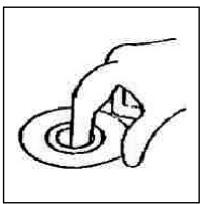
Do not attach any stickers or adhesive tape to the CD.
Do not expose the CD to direct sunlight or sources of heat such as heating pipes. Do not leave CDs in the car if it is parked in direct sunlight as this will lead to a considerable rise in the temperature inside the car.
This device has been tested according to all relevant current CE guidelines, such as electromagnetic compatibility and low voltage directives, and has been constructed in accordance with the latest safety regulations.
Subject to technical changes without prior notice!
Guarantee
GB
The device supplied by our Company is covered by a 24 month guarantee starting on the date of purchase (receipt).
During the life of the guarantee any fault of the device or its accessories *) ascribable to material or manufacturing defects will be eliminated free of charge by repairing or, at our discretion, by replacing it. The guarantee services do not entail an extension of the life of the guarantee nor do they give rise to any right to a new guarantee!
Proof of the guarantee is provided by the proof of purchase. Without proof of purchase no free replacement or repair will be carried out.
For repairs or replacement during the life of the guarantee return the device in its original packing together with the proof of purchase to your dealer.
*) Damage to accessories does not mean automatic free replacement of the whole machine. In such cases please contact our hotline. Broken glass or breakage of plastic parts are always subject to a charge.
Defects to consumables or parts subject to wearing (e.g. motor pistons, kneading blades, drive shafts, spare remote control, spare toothbrushes, saw blades, etc.) as well as cleaning, maintenance or the replacement of said parts are not covered by the guarantee and hence are to be paid!
The guarantee lapses in case of unauthorized tampering.
After the expiry of the guarantee
After the expiry of the guarantee repairs can be carried by the competent dealer or repair service against the payment of the ensuing costs.
PL
Ogólne wskazówki związane z bezpiecznych obstugy
Urzadzenie chronić nalezy przy deszczem i wilgocía, aby zapobiec grozbie pozaru lub porazeniu pradem. Nie nalezy goagic uzywac w povlizu wody, aWiec przykładowo w povlizu wanny, basenu lub w zawilgoconej piwnicy.
Urzadzenie nalezy uzywac tylko zgodnie z seinen przyznaczenia.
Urzadzenie nalezy podączyc tylko i wyłącznie do przysepiso zamontowanego gniazdka.
Prosze zworciuc uwage na to, zeby podane napięcie zgadzało są z napiȩciem w gniażdku.
W przypadku uzywania oddzielnych zasilaczyNSEZWROcUwage na biegunowo s i napiece, baterie musz zostac wfozone do urzadzenia zgodnie z oznaczoa biegunowość.
Urzadzenia naleź w taki sposob ustawic, zȩby istniejeść otwory wentylacyjne nie zostaru przykryte.
Nigdy nie wolno owtierać obudowy urzadzenia. Niefachowo przejrowadzone naprawy moga byc grożne w skutkach dl a uzytkownika. Przy uszkodzeniu urzadzenia, w szczególnosci kabla siediociego, urzadzenia nie要去byc uzywane dopóki ne zostanie naprawione przy osobě z wymaganymi uprawnieniama. Przewód zasilajczy naleź regularnie sprawdzać, czy nie jest uszkodzony.
W razie awarii prosze nie naprawiać urzadzenia samenu lecz skorzystac z pomocy autoryzowanego spezialisty. Jeźeli przywód zasilajczy niedráczalny ulegnie uszkodzeniu, to powinien on byc wymieniony u wytwórcy lub w spezialnym zakadzie naprawczym albo przyze wykwalifikowaną osobé welu niukięcia zagrozenia.
Ježeli urzadzenie nie bedzie przydruźsy czas uzywane, naleź wyciagnoć wyczke z gniazdka lub wyjac baterie.
Ponieszne symbole moga znajdowac sie na urzadzeniu i majorzwraca Państwa uwage na:

Symbol błyskawy mac zworci owage uzytkownika naznajdujace sie we wétrtu urzadzenia;cęsci, kóte są nocbezmie wysokim napieciem.

Symbol z wyrkzyknikiem ma Zwrocić uwage uzytkownika na znajdujace sie w zańczonych dokumentach wagne wskazówki zwiazane z obstęg i konserwacja uradzzenia.

Urzadzenia z tym symbolism uzywaj do odczytywania dzwieku z płyty kompaktowej „Lasera klasy A". Wbudowany wyłącznik bezpiecznychsta ma zapobiec temu, zȩby uzytkownik w czasie owieriania kieszeni odtwarzacza płyt kompaktowych zostawi poddany niebepiecznych dla ludzkich oczu oddziatwyaniu niewidocznero swiatka lasera.
Wyćęcznika—togo nie sąwy wźadnym wypadku zmostkować lub teź przy nim manipurolowć, poniewaź grozi to siebezpieczneśtwen, ze uzytkownik poddany zostanie oddzymiwaniuNiebezpiecznégo dla ludzkich oczu niewidocznego swiatka lasera.
Instalacja
Radioodbiornik nalezy zamontowac zgodnie z ponizsza ilustracja
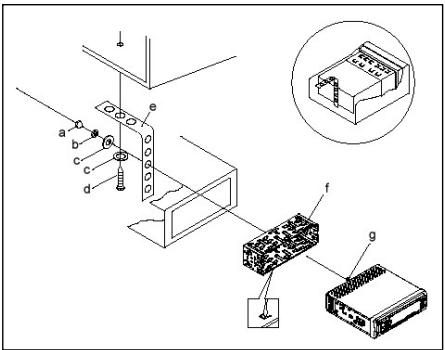
a nakretka
b podkstadka sprezysta
c podkfadka
d sruba
e kątownik montaźowy
f wsuwana obudowa
g kofti gwintowane
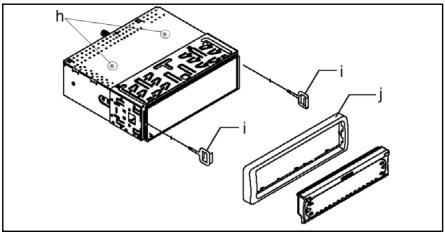
Uwaga!
h s Ruby zabepzpieczajace na czas transportu (przed montazech usunać)
i naręźdie do wysuwania sprzȩtu (klucz do demontazu)
j Ramka przesfony
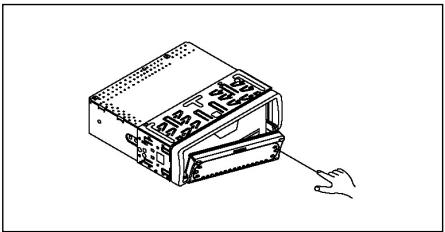
Prosze przesfone elementu sterowania przytozyć najpiern po lewej stronie a nastepnie docisnac ja po stronie prawej, az zaskoczy.
PL
Podłaczenia
Wykonac połaczenia zgodnie ze schematem.
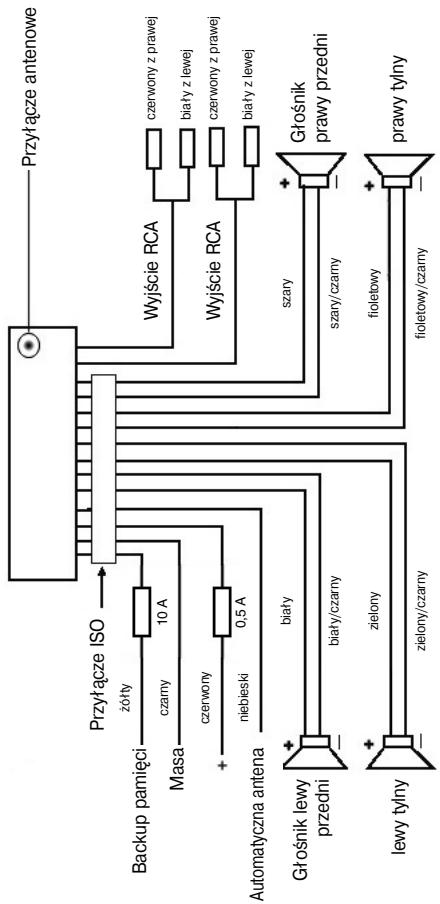
Uwaga
- Zdejmowany panel obstugi nalezy załoźcy dopiero po pod.§czeniu kabli.
- Nalezy stosować gólsniki o impedancji 4 ohm.
Wañne informações dodatkowe, dotyczé instalacji Waszego radioodbiornika samochodowego!
- Podczas instalacji / przyłączenia urzadzenia prosze zworćic uwage na to, zęby Wasz samochód dysponowa ryginalnym połącenien „ISO PODŁACZENIE". jest on odpowiednikiem wtyczki znejdujȩce są na wyjsciu aparatu (ISO PODŁACZENIE).
Przy zajeci „DAUER +“ (Backup), w zależnosci od typu pojazdu, moź dojsć do odchylen.
W tych prerypadkach proszie zwraca do autoryzowanego warsztatu samochodowo, gdy inacej nie jest zagwarantowane ciagte/ statezasilanie pradem Waszego radia (Potrzebne jakn do zapisywania staci nadawczych do pamięci). - Wazoleński od typo pojazdu w wyjatkowych sytuacjach moga wystapić szymi zakućajce w trybie RADIO/CD. Mnjo je opodwiednio usuṇć przyż dodatkowy filtr przyciewczakóciowy. Mimo togo,ź Wasz aparat AR 600 CD jusz seryjie wyposzaźony jest w filtr przyciewczakóciowy, to wazoleński od pojazduMZ dojsć do gozerni odbiur.
Otrzymaję je Państwo w handlu z akcesoriami samochodowych i/lub w Waszym warsztacie samochdowym.
Środki ostrożnosci i konserwacja
- Šruby zabepezćajace w transporcie prosze usançać przyd naźem, gdyż inaczej CD nie bedzie wciagana.
- Urzadzenie dostosowane jest do podtaczenia do ujemnego bieguna akumuladora, ktory musi byc podtaczony do karoseri pojazdu. Prosimy o sprawdzenie tego przy instalacja.
- Ježeli podczas przy w trybie radia lub CD zestanie zdjęty panel przydni, nastapi automatyczne wyłaczenia urzadzenia.
- Ježeli po ponownym zařozeniu panela przyȩwietlacu LCD pojawi sie zgóloszenia będu (ERROR), to wówczas panel LCDMZna zresettoć za pomocă drutu analogowo wetykniętego w panel obslugi.
- Ježeli wętrzte pojadź jestBSD, np. na skutek dżuSZego parko-wania w moć nastzoneczonym miȩscu, to nie nały wówczas wączać odtwarczac CD, do momentu ochtodzenia są wętrzwa w trackiej jazdy.
- W celu bezpiecznego przechowywnia panela przydniego, nalezy stosowac przyznaczone do tego celu etui.
PL
-
Przy wyjmowaniu/demontazu/zabudowywniu oraz przechowywniu panela przygodnia sązystosowaść do poniieszych rysunkowy.
-
Otworzycz panel sterowania
-
Odjac panel sterowania
-
Przenoszenie panelu\ przedniego
-
Zaktadanie panelu przydziego
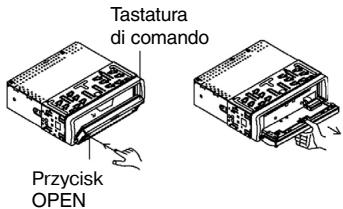
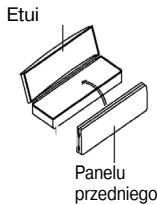
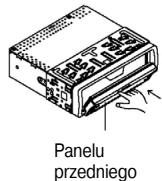
Obstuga
1. Przycisk OPEN
Nacisnac przyczisk OPEN w celu opuszczenia panela przyednia. Phyte CDUNCT WOZyC tlyko w szczelne na CD wzgl. wysnuc ja po nacisiuci przyczisku EJECT.
2. Przyciski +/-
Podczas normalnoe trybu odztwarzania przyciski te sfuza do ustawiania gfośnosci. W połaczeniu w cwiśnietym przymciiskiem SELdoğan wropyramidźmiy menu np. w zakresie charakterystyki dzwieku.
3. Przycisk SEL (wybor):
a) Aby otworzyc menu charakterystyki dzwieku, nalezy krótko nacisnac przycisk SEL. Kiedy na wyswietlaczu LCD pojawi sie „VOL" mozym ustawic głosność. Poinowe naciśniece przycisku SEL pozwala nam na wybranie sądzego z punktowy menu, jak: VOLUME, TREBLE, BASS, BALANCE i FADER. Ustawienie posczególnych punktowy menu zmiezenia sie za pomocza przycisku „+“ lub „-". Wskazowka: Jeźeli pod DSP wybrane zostymiustawianie korektora czestot-lwość, takie jak np.: POP, ROCK, to nie myznja ustawic BASS i TREBLE.
b) Poprzej naciść i przytrzymanie przycisku SEL otwieramy menu wyboru TA SEEK/TA ALARM, MASK DPI/MASK ALL, DSP OFF, LOUD ON/OFF, BEEP ON/OFF, SEEK1/2, STEREO/MONO; LOCAL/DX; VOL LAST/ADJ. Na wyświetlaczu pojawia są „TA SEEK". Po ponownym naciśćnicy przycisku SEL możymi wyjbierac poszcęgólne punktymi menu. Zmiany w zakresie poszcȩgólnych punktów menu wpradowzamy za pomoczą przycisku „+“ lub „-”.
- Menu TA SEEK (wyszukwanie informaci o ruchu)
Ježeli wybor fungcjti TA ma spowodować automatyczne wyszukanie staci nadajacej informacja o ruchu,NSEK.
Jezeli wyibierzemy fungkje TA ALARM, to woczas, w przypadku ustawienia staci ni nedajacej informaci o ruchu, na wyswietlaczu pojawi sie odpopiewdie ostrzezenia.
- MASK DPI/ALL
Ukrywanie czestretoliwocki alternatywnych (AF) podczas wyszukiwania identifikacji programu (PI).
MASK DPI/ALL: jezeli odbiornik wyszukije wg identyifikacji programu (PI) danej staci, to woczvas czestotliwość alternatywne o inniej identyifikacja programu pozostajă ukryte.
MASK ALL: podczas wyszukiwania identifikacji programu (PI) czestotliwosci alternatwyne z innaj identifikacja programu oraz nadajniki o silnym sygnale bez RDS-u pozostaja ukrye.
DSP
W DSP moga. Państwo wybrać ustawienia korektora czestotiwość: POP M; ROCK M; CLASS M i FLAT M. Prosz wybrać DSP OFF, by dokonac wąsnych ustawien. Patrz równej Pkt. 3a.
- LOUD ON/LOUD OFF
Moga Pański wączać lub wączać wzmocnienie basów (LOUDNESS).
- BEEP ON/OFF doit potwierdenia.
Ton potwierdzajczy przy wciśnocycki klawiszama myza wybrać w dwóch rodzajach:
BEEP ON: dzwiek potwierdenia pojawia sie przy kaźdym naciśću przyciscu.
BEEP OFF: dzwiek potwierdenia jest wyłaczony.
SEEK 1, SEEK 2 (do wyboru tylko w trybie „radio")
Funkcja szukania przyciskami - -wtrybie „radio".
SEEK1: Prosze trzymac wcińskipty przycisk - - , a radio zatrzyma sie na najbliszzej odbieranj staci.
SEEK2: Póki trzymaja Państwo wciȩne przyciski - - , odbywa są dalsze szukanie staci w danym paśmie czestotliwość.
-
Przełuczanie STEREO/MONO (do wyboru tylko w trybie „radio")
-
LOCAL/DX (do wyboru tylko w trybie „radio")
Wasze radio要去odbieracdaneRDS EON.PodpojciemEONrozumiemy mozliwośc odbioru dodatkowych informaciwramachdanej sieci staci np.WDR.Wzwoprudkocomunikatuoruchu(TA)wramachdanej sieci staci radiowychnastapi automatyczne prętaczzenia zestaci niedadajacej informaci o ruchu na odpowiednia staje nadajacaktie informacja wanej sieci staci. O odborze tego typu danych informujmeznac
PL
zek EON na wyświetlaczu odiornika. Moga Państwo wyjberać miedźty tryblem EONTA LOACAL lub EONTA DISTANCE celem odlioru lokalynych komunikatów drogowych lub meldunkowy radios dla ruchu dalekobieznego. Sens tej funkcj polega na zatrzymaniu niedozanego przyȩczania na meldunki drogowe EON-TA. Jeźeli stacja EON jest bardzo daleko, to czeciowo i tak moga byc odzbierane informacja EON TA z tej staci. Radio przyȩczysz są na te stacje EON i spróbuje odebrac informacja o ruchu. Jednak poziom sygnatu jest słaby a obiorz yzy, poniewaz Dana stacja EON pożozona jest zbyt daleko. Dlatego radio ponownie przyȩczza są na uprzejné wybranystę.
Przy powyyszym trybie pracy uzytkownik ustownszy przy czwie inny program niz wybrany lub nastapi chwilowa cisza.
EONTA LOCAL:
Dzieki tej funkcjuni unikamy przyȩczania na stacje EON o sąbymi sygnale.
Radio nie przyłącza są na te stacja a stuchacz nie zauwaź jakichkol-wiek zaktóceń.
Tryb EON TA DISTANCE
W tym trybie fungcka EON TA probuje uzyskac informacja EON TA z osiagalnej staci i w ten sposob poprawić jakość odbioru.
VOL LAST/VOL ADJ
VOL LAST: Radio węcza są z ostatnio ustawioną faktycznych gośnosćia.
VOL ADJ: Przy pomocy klawiszyni"ustawiaja Państwo gólosność niedziemna, przy wączaniu.
4 Przycisk POWER
Do węłuczania/wyȩczania odiornika.
5 Wyswietlacz LCD (wyswietlacz cieklokrystaliczny)
6 Przyciski BAND
Aby wybrać wymagany zakres fal naleź yracnność przycisc BAND (pasmo). Rodzaj danego zakresu F1, F2, F3, MW1, MW2 prezentowy jest na wyświetlaczu.
7/8 Przyciski ▲/▼ TUNE, SEEK, TRACK, SKIP UP/DOWN
a) Wtrybie „radio":
Prosze wcisnac krótko przycisk ▲- lub▼-, by ustawic ręcznie poźadana, stacje radiowa.
Prosze trzymać wcińskiropy przycisk lub -, by Rozpoczamy szukanie staci radiowych.
Patrz tez fungoja SEEK1/SEEK2.
b) W trybie CD: w celu przeskoczenia do przyd u1 lo do tyfu nalezy nacisnac przyczys k s lub t. W celu przewijania utworow nalezy nacisnac i przytrzymac przyczysk ze strzałka: s lub t.
9 Przycisk CLK
Krotkie naciśćte goźycisku pozwala na prezentacja na wyświetlaczu rożnych informaggi.
W przypadku odbioru ze stacji RDS uzyskamy:
- w trybie radia:
nazwa staci czestotliwośc godzina typ programu
- w trybie odtwarzacza CD
numer utworu/czas odtwarzania nazwa staci czestotliwośc
godzina typ programu
Uwaga: jezeli nie moga byc odzierane informace dotyczne godziny lub typu programu, to woczcas na wyswietlaczu pojawia sie „NO CLOCK" lub „NO PTY".
Ježeli odbierana stacja nie wysyta zadnych dodatkowych informaci RSS, to吞噬zas pojawia sie nastepujuce zgloszenia
- w trybie radia:
NO CLOCK czestotliwość NO PTY - w trybie odtwarzacza CD
→numer utworu/czas odtwarzania → godzina → czestotliwość → NO PTY →
10 Przycisk Modus (tryb)
Nacisnac w celu dokonania wyboru pracy w trybie radia lub CD.
11 Przycisk MUTE
Prosę wcisnć przycisk MUTE, by wyciszć na krótko gólⁿni. Prosȩ ponownie wcisnć ten przycisk, by powyźsa funkȩ z powrotem skasowej.
12 Przycisk AP (automatyczne zapamietywanie staci)
Wtrybie radia:
a) Funkcja pamięci:
aby aktywować automatyczny tryb zapamietywania staci, naleź ynesc)— i przytrzymać przycisk AP przyd'użej nied第一条 sekunde... Odbiornik - w ramach aktualnégo pasma czestotliwość np. FM 1 -wyszuka staje o najwyśzym poziomie sygnatu. Szesć staci o najsilniejszym sygnale zostanie zapamietyanych w kolejność rosnących czestotliwość i zostano im przypisane kolejne numery.'
Teraz kazda zapisana do pamieci stacja wącza są na ok. 5 sekund, a nastepnie wybrana dostaje stacja utrwalona na pierwszej poźycji w pamieci.
Ježeli chá Państwo szukać dalszych staci w zakresie FM, to proszewcisnac przycisc BAND, by przyzejć do FM2 lub FM3. Proszé ponowniewcisnac przycisc AP na dźuzej niz sekunde, by Rozpoczć dalsze szukanie.
b) Funkcja krótkiego węczania staci:
Po krótkim wciȩnięciu przycisku AP radio wąćza na krótko wszystkie ustawione stacjeactualnégo pasma czestotliwość (FM, MW).
Wskazówka: Funkcja krótkiego włączania staci konczy sie automatyczne zchwila do pozycji wAMIci, z ktorej została wystartowana.
PL
13-18 Przyciski (1-6) zapisanych staci oraz jako przyzyciski 1TOP, 2INT, 3RPT, 4RDM w trybie CD.
a) Tryb radia
Krótkie naciśćcie tych przycisków spowoduje bezpośredni wybor wczesnej zapisanej stachi radiowej. Jeźeli dany przycisk zostanie przytrzymany dźȩzej nz 1 szekunde, to wówczas do danego przycisku zostanie przypzisana aktuarnie ustawiona staacja.
b) Tryb CD
- W celu przerwania odtwarzania CD nacinacja przycisk 1TOP (pauza). Ponowne nacinśćkiego przycisku wznowy odtwarzanie płyty.
Nacisnac przycisk 2INT. Kazydy tytuł bedzie odztwarzany przyze 10 sekund. Ponowne naciśmie przyciscy oznaca przyerwanie procesu wyszukiwania i odworzony zostanieactualnie wybramy utwor. - Nacisnac przyczisk 3RPT. Aktualnie odtdwarzany utwor zostanie powtorzony. Ponowne naciśćtego przyczisku spowoduje uniewaźniência tej funkcj.
- Nacisnac przycisk 4RDM. Utwory besteht odwartzane w przypadkowej kolejnosci. Ponowne naciśćtie tego przycisku spowoduje uniewazność jej funkcj.
19 TA (Traffic Announcement) (PierwszeINSTwo dla informaci o ruchu)
FunkcjE TA zaçamy poprzej krötkie nacișnieiie przycisku TA, a o jej uak-tywnieniu informuje znaczek TA na wyswietlaczu. W trybie radia w danym zakresie czestotliwocci FM Rozpoczniie sie automatyczne wyszukwanie staci nadajacej informaje o ruchu (TA SEEK).
Ježeli odbierana besteht stacja, która co pewien czas{nadej najświeźsze informacja o ruchu, to wówczas na wyswietlaczu zapali są wskaznik TP. Przy załocznej funkcjta informacja o ruchu nadawane na FM spowoduja automatyczne przerwanie odwartzenia ptyt CD. Głosnosć automatycznie zȩkszy są do minimalné poziomu wąsciwogo dla transmisji informacja o ruchu. Po zakońceniu informcjio o ruchu nastapi powró do wczesnej ustawionego programu.
Przerwanie funkcjTA:
Ježeli chcemy przerwać aktualnie nadawanie informaci简易 ruchu, naleź na krótko nacisnól przyczysk TA. Nie spowoduje to wy)—czenia trybu TA.
20 Przycisk PTY - wybor rodzaju programu
Niekto'resté FM oprócz nazwy przekazujá również informacja na temat typu emitowych przyż nie programów. Wasz odbiornik samochodowy要去 potakywać te informacja na swoim wyswietylaczu.
Moga to byc nastepujace typy programow np.:
SPORT
NEWS
POP
CLASSIC
Za pomocę faktcji PTY sązy wybrać stȩje nadajność przy bez nas�� programu. Aby wejsć do grupy rodzajów muzyki w trybie PTY daneź
1X nacisnac przycisk PTY. W wyswietlaczu pojawia sie znak „PTY". Za pomocą przycisków staci 1-6 możemy dokonać nastepujućego wyboru.
PL
| 1 X nacisnć | 2 X nacisnć | |
| przycisk staci 1 | POP M | ROCK M |
| przycisk staci 2 | EASY M | LIGHT M |
| przycisk staci 3 | CLASSICS | OTHER M |
| przycisk staci 4 | JAZZ | COUNTRY |
| przycisk staci 5 | NATION M | OLDIES |
| przycisk staci 6 | FOLK M |
W celu woescia do groupy rodzajow audycji mowionych nalezy 2X nacsnac przycisk PTY. Za pomocaj przyciskow staci 1-6 mozyme dokonać nastepuja-cego wyboru.
| 1 X nacisné | 2 X nacisné | 3 X nacisné | |
| przycisk staci 1 | NEWS | AFFAIRS | INFO |
| przycisk staci 2 | SPORT | EDUCATE | DRAMA |
| przycisk staci 3 | CULTURE | SCIENCE | VARIED |
| przycisk staci 4 | WEATHER | FINANCE | CHILDREN |
| przycisk staci 5 | SOCIAL | RELIGION | PHONEIN |
| przycisk staci 6 | TRAVEL | LEISURE | DOCUMENT |
W celu ponownego wyłaczenia tej funkcjni naleź 3X nacinź przycisk PTY.
Jezeli wybrny jest tryb PTY radioodbiornik Rozpoczyna wyszukwanie odpo-wiednich informacji PTY i zatrzymuje sie, jezeli znajdie poźadne przy nas informacie PTY.
Jeżeli poszukiwany typ programu nie zestanie znaleziony, to wówczas na wyświetlaczu pojawi sie informacja „NONE PTY".
Ježeli poszukiwana informacja PTY juices nie istnieje, to fungcja PTY automatyczne przyłączy są w zwykły tryb odboru.
21 AF (czestotliwość alternatywne) fungkcja REG
a) AF jest Funktiona wykorztystuacja RDS (Radio Data System) i wykorztystwa na jest tylko przyszost bezem FM. Uradzemenie wyszukuje w tle najeltsza czestotliwość nastawioneji staci (sledzenia sieci).
Ježeli wyjbierzemy funkcję AF to radioodbiornik besteht na bieźco kontrłowac sǐte sygnatu danej czestotliwość AF. Czestotliwość przy preprowadzania tych kontrōli zaleyś od sīty sygnatu z aktualnej staci i miȩci są w zakresie od kilić minut przy przypadku silnégo sygnatu do kilku sekund przy sławem nadajniku. Za kázdom razem, gdy nowa czestotliwość AF jest silniejsza, nied atruktnej nastawiona staća, to wówczes odi-biornik na króltek przyłącza są na te czestotliwość i przy 1 do 2 sekund na wyswielmetlaczu pojawia są informacja „NEW FREQUENCY". Poniewaz
PL
czas wycsisenia przy zmieanie czestotliwosci wzgl. czas kontroli jest bardzo krótki, to w trakcie odbioru programu jest to sprawie niesłyszalne.
Funkcja AF aktywowana jest poprzej krótkie naciśmieść przyziscu AF, a o jej wyborze informuje znaczek AF na wyswietlaczu radia.
- Ježeli na wyświetlacz uznajduje są znaczek AF oznacza to, ze załęczona jest fungkcja AF i odzierane są dane emitowane w systemie RDS.
- Ježeli na wyświetlacz uznaczek AF miga, to funkcjä AF jest wprawdzie wybrana, ale w danyl momencie nie moga byc odzierane sygnady nadawane w systemie RDS.
- Ponowne naciniecie przycisku AF spowoduje wyłaczenia funkcj. Na wyświetlaczu gasnie znaczek AF.
b) Funkcja REG
Niekótre stace o okreslonych godzinach Dzielá swój program na programy regionalne o zróznicowanej tresci.
- REG ON: naciśćcie i dźusze przytrzymanie przycisku AF spowo-duje wączenia trybu Regionalno. W wyświetlaczu pojawia są na kilka seekond meldunek „REG ON".
Uwaga: mözliwość wskazań na wyświetlaczu jest ograniczone.
Mozliwe, ze w podwojnym trybie wskazań poszczególne segmenty wyswietlacza zostana wygaszone.
Funkcja REG ON zapobiega przyęaczaniu są rojczyk nadawane są programy regionalne o inney tresci.
- REG OFF: Ponowne naciść i dhuźspe przytrzymanie przycisku AF wyłączta tryb regionalny. W wyświetlaczu pojawia są na kilka sekund meldunek „REG OFF".
Podczas wyszukiwania czestotliwosci alternatywnych (AF) lub identifikaci programów (PI) ignorowana jest identifikacja programów (PI) z programu nadawanego przy sązej regionaalna.
22 Przycisk SCAN
Szukanie staci w trybie,radio"
Prosze wcisnac krtok przycisk SCAN. Kaczda odbierana stacja w wybrnym pasmie czestotliwosci (np. FM1) szukana jest automatycznie. Jezieli znaleziona zostanie jakas stacja, to ustawiona czestotliwość miga w wyswietlaczu przyż ok. 5 sekund i wącza są dzwiek jej staci. NatestPNie kontynuowane jest szukanie dalszych staci.
Prosze ponownie wcisnac przycisk SCAN, jejeli ustawioniej wstawne staci radiowej chca Państwo stuchać dalej, lub prosze wcisnac jeder z przyciskówboru staci,by przerwać przyszukiwanie skali odbiornika.
23 Otwor na pty CD
24 Przycisk wysuwania (EJECT)
Aby wysunac pfyte CD nalezy nacisnac ten przycisk.
25 Migajca dioda LED
Dioda ta miga przy zdejmowaniu panela przydniego.
25 Przycisk RESET
W celu przywrocenia zaktoconego programu nalezy nacisnac ten przycisk.
PL
PL
Dane techniczne
Ogólne
napiécie zasilania
DC 13,8 V
pobór pradu
7 A max.
moc
4 × 7 ~W
Zakres FM
zakres czestotliwość
87,6 MHz do 108,0 MHz
czuftyć uzywalna
3 uV
czestotliwość posrednia
10,7 MHz
Zakres MW(AM)
zakres czestotliwość
522 KHz - 1620 KHz
czestotliwość posrednia
450 KHz
Moc na wyjsciu
wyjscie
W przypadku CD maks. 1200mV
Odtwaracz CD
system
odtwaracz CD
czytane formaty
phty CD/CDR/CDRW
format sygnatu
ilosc bitow kwantowania 1 bit.
44,1 KHz
stosunek sygnafu do szumów
20-100Hz<5dB
ilosc kanałow
10K-20KHz<5dB
wymiaru obudowy
60 dB (1 KHz)
2 kanafty stereo
178 szer. x 50 wys. x 165 g谈起b.
Usuwanie usterek
PL
Przed skorzystaniem z listy kontrlnej sązy najpirow sprawdzić,czy urzadzenia jest wąsuciwo podłaczone. Jeźeli po sprawdzeniu calęj listy kontrlnej usterka nie zostanie w peńi usunieta, sązy skonsultowa są z najbliszym punktem serwisowym.
| Oznaki usterki | Powód | Sposob usuniecia usterki |
| Brak odztwarzania po wędeniu do odztwarzacza płyty CD lub kasety. | Za mały poziom głowosnosci ustawionej na regulatorze. Nieprawidówо wykona- ne przyłącza. Sprawdzic podźaczenia. | Zwięszyść poziom głowosnosci. Sprawdzic przyłącze +12V i masé. |
| Dzwiek odztwarzacza CD przeskakuje. | Powierzchnia drogi jest nierówna. Urzadzenia nie jest zamontowane na state. | W celu odztworzenia CD zaczekaćźdroga stanie są bardziej równa. Zabadowej urzadzenia na state. Upewnić są,źw przy padku, gdy pojadź nie oferujcie odpowiedniego podparcia dla tylnej czȩsci urzadzenia, zasto-sowano tylne mocowa-nie. |
| Uszkodzona płyta CD. | Sprawdzic inna płyte CD. Jeźeli;będzie ona dzȩłość prawnówto, to byćMZe poprźednia CD jest uz-kodzona. | |
| Brudna płyta CD. | WyczySciC CD. | |
| Brak zasilania. | Wączony zapłon. | Obrócić kluczysk zapłonu w poźycie „ON" lub „ACC". |
| Spalony bezpiecznik. | Wymienić bezpiecznik na inny bezpiecznik 10A. | |
| Urzadzenia nie dwiała prawidówto (EJECT, LOAD, PLAY). | Na skutek szumów elektrycznych zostaw zaatarkowy mikrokomputer. | Wyplać i ponownie wȩżyć CD lub kasety. Wyȩciecyć i ponownie wȩciecyć odbiornik. |
PL
| Oznaki usterki | Powód | Sposob usunięcia usterki |
| Brak odbioru radiowego. | Niepodȩczony kabel antenowy. | Mocno wetakné kabel antenowy w zȩść ante-nowe na urzemzeniu. |
| W trybie wyszukiwania automatycznych radio-odbiornik nie zatrzymuju sie przyźadnej staci. | Nadawane sygnaty są zbyt szabe. | Wybrać stȩje w trybie ręcznym. |
| Płyty kompaktowe wymi-gane są do otworu na CD tycho do połowy. | Śruby zabeepieczajace w transporcie nie zostaść usuniȩte. | Prosze usunuć szuby zabeepieczajace w transporcie. |
Odtwarzanie CD
PL
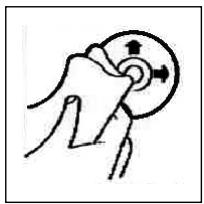
Czyszczenie CD
Przed odtworzeniem, płyte CD nalezy przytrześć zysta, niedzakurzoną chusteczka do czyszczenia.
Uwaga: nie stosowac zadnych rozpuszczalników jak benzyn lyb lub substancje rozcieńczajce. Powszechnie dostepne srodki czyszczace lub spraye antystatyczne powoduja uszkodzenia urzadzenia.
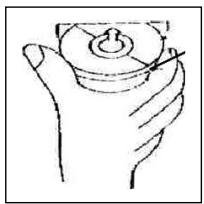
Wtozenie pfly CD zadrukowan stronq do do tuo moze spowodowauc uszkodzenia urzadzenia.
CD nalezy zawsze wiktadać etykieta zwrocona do góry.
Uwaga: jezeli w kieszeni CD znajduse sie juz pfyta, nie nalezy usiwtawc wkładac tam kolejnej pfyt, poniewa zo to spowodawc uszkodzenia urzadzenia. Pfyt CD nalezy zawsze chwyta za krawedzie. Aby zapewnic czystość pfyt, nie nalezy dotykać jej powierzchni.
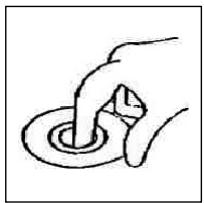
Nie naklejac na pwytach CD zadnych nakdlejek, ani taśm klejacych.
Nie wystawiać płt CD na bezposrednie danejanie promieni stonecznych lub zródeł ciepła raky grzewcze oraz nie pozostawiać ich w samchodzie, jeźeli pijoz jest parkowy w myjscu naslonecznionym, ponieważ powoduje to znaczny wrozst temperatury.
Niniejsze urzadzenie odomwiada wymaganiom normy bezpieczentwa uzytkowania oraz spełnia wymagania dyrektywy niskonapięciowej i kompatybilnosci elektromagnetycznej.
Zastrzega sie prawo dozmian technicznych!
PL
WARUNKI GWARANCJI
Przyznajemy 24 mieszecy gwarancji na produkt liczac oddating zakupu.
W tym okresie bedziemy bezpłatnie uswuć w terminie 14 dni oddating dostarczenia wadiwego sprętę z karta gwarancyina dojejscza zakupu wszystkie uzzkodzenia powstaře w tym urzadzeniu na skutek wady materiafów lub wadiwego wykonania, naprawiaźć oraz wymieniajć wadliwe czȩci lub (jesli uznama za stosowne) wymieniajć căte urzadzenia na nowe.
Sprzet do naprawy powinien byc dostarczony w komplecie wraz z dowodem zakupu oraz z ważna karta gwarancjna do spredawcy w miaręMZIWi sociw ongorynlm opakowani lub innym odpowiednim dla zabezmieczenia przyszkodzieniem. W razine braku kompletné opakowania fabrzczego, ryzyko uszkodzenia sprzetu podczas transporte do i zjejca zakupu ponsi recklamujuci.
Naprawa gwarancjna nie doyczy czynosci przywidzianych w instrukcji obstugi, do wykonania ktorych zobrowazny jest uzytkownik we wlasnym zakresie i na wlasny koszt.
Gwarancja nie obejmuye:
- mechanicznych, termicznych, chemicznych uzkodzen sprzegtui wywołyanch nimi wad,
- uszkodzen powstałych w wyniku dziatania sǐt zewétrznych takich jak wyładowania atmosferyczne,zmiana napiecia zasilania i innych zdarzeń losowych,
- nieprawidówego ustawenia wartosci napiecia elektrycznégo, zasilanie z niedopowieciegniazda zasilania,
sznurów połaczeniowych, sieciowych, zarowek, baterii, akumulatorów, - uzkodzen wyrobu powstałych wDyniku niedrasciwo go lub niedzgodnego z instruktacja为其 uzytkowania, przechowywnia, konserwacja, samowolné zrywnania plomb oraz wszelkich prezerobek izmian konstrukcyjnych dokonanych przyez uzytkownika lub osoby niedwpoławne,
roszczén z tytułu parametrów technicznych wyrobu, o ile są one zgodne z podanymi przyez produkta, - sprawidowego zuzycia i uszkodzeń, króre majorneistotny wþywa wartość lub dziaranje tego urzadzenia.
Karta gwarancyjna bez pieczatki sklearnpu, daty sprezedazy, nie wyptniona, zle wyptniona, ze sladami popraweik, nicczytelna wskutek zniszczenia, bez moziwo-sc iustalenia.), sprzedazy oraz dozaczonego dowodu zakupu jest niewazna. Korzystanie z uslug gwarancyjnch sie jest moziwe po upthywie daty waznosci gwarancji. Gwarancja na czeci lub cate urzadzionie, kto're sa wymieniane kończy sie, wraz z koncem gwarancjna zu urzadzionie.
Wszystkie innate roszczenia, wiczajc w to odszkodowania są wykluczone chyba, ze prawo prezewiduje inaczej. Roszczenia wykraczajce poza ta umowej sie są uwzględniane przy tą gwarancje.
Gwarancja oraz zawarte w nied warunki obowiazujna terenie Rzekzpospolitej Polskiej.
Bitte führen Sie das ausgediente Gerät einer umweltgerechten Entsorgung zu.

C4TRONIC NTERNATIONAL GMBH
D-47906 Kempen/Germany · Industriering Ost 40 Internet: http://www.clatronic.de · email: info@clatronic.de