
PCTV 100E - Carte TV PINNACLE - Notice d'utilisation et mode d'emploi gratuit
Retrouvez gratuitement la notice de l'appareil PCTV 100E PINNACLE au format PDF.


| Type de produit | Carte TV USB externe |
| Marque | PINNACLE |
| Modele | PCTV 100E |
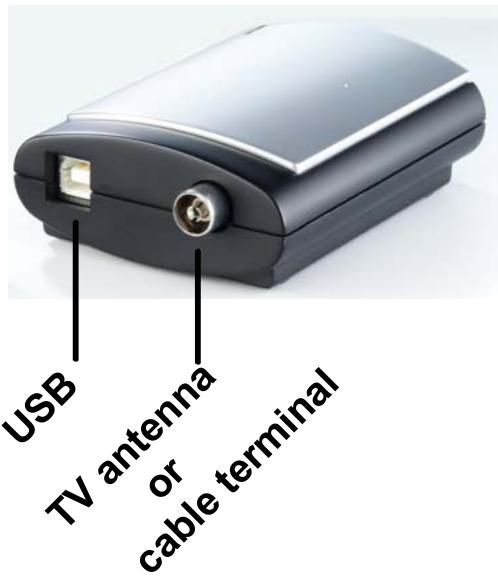
| Interface | USB 2.0 |
| Tuner TV | Microtune MT2050 |
| Normes TV supportees | PAL B/G/D/K/I/SECAM ou NTSC, PAL M/N (selon version) |
| Frequence de reception | 48,25 a 855,25 MHz |
| Entree antenne | 75 ohms, connecteur F ou IEC |
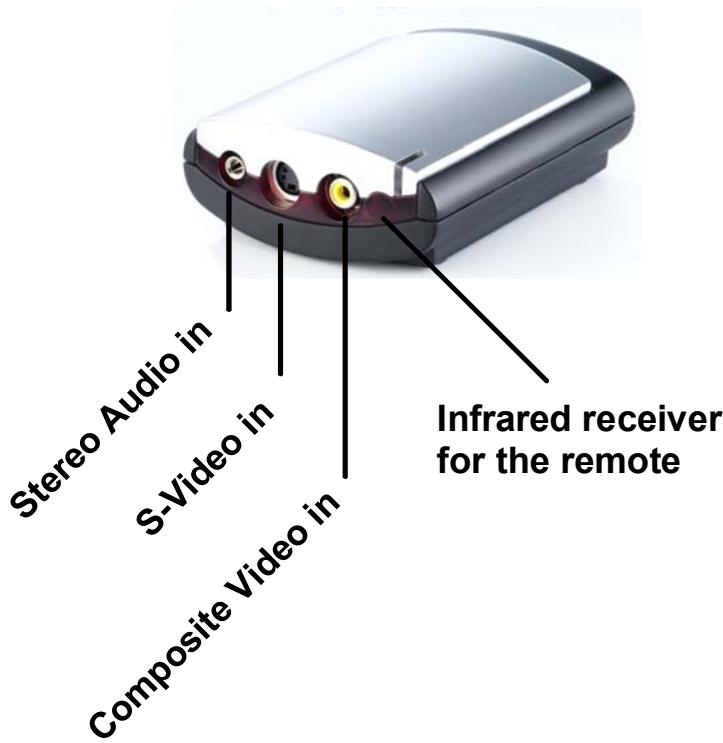
| Entree video | S-Video (mini-DIN) et composite (cinch) |
| Entree audio | Stereo (jack 3,5 mm) |
| Formats video supportes | PAL, NTSC, SECAM |
| Resolution video | Standard TV (non specifie) |
| Processeur minimum | Pentium IV 2,0 GHz ou equivalent |
| Memoire RAM minimale | 256 Mo |
| Espace disque minimum | 5 Go |
| Carte graphique requise | DirectX 8 compatible |
| Carte son requise | DirectX 9 compatible |
| Systeme d'exploitation | Windows XP (Home, Professional, Media Center 2005) |
| Alimentation | Via port USB (bus-powered) |
| Dimensions (estimation) | Environ 100 x 30 x 20 mm |
| Poids (estimation) | Environ 50 g |
| Accessoires inclus | Cable USB, notice d'utilisation |
| Certifications | CE, conformite EN |
| Entretien et nettoyage | Nettoyer avec un chiffon sec et doux. Eviter l'humidite et les solvants. |
| Securite | Ne pas ouvrir l'appareil. Eviter l'exposition a l'eau et aux chocs. |
| Pieces detachees et reparabilite | Aucune piece detachee disponible. Contacter le service apres-vente pour toute reparation. |
FOIRE AUX QUESTIONS - PCTV 100E PINNACLE
Questions des utilisateurs sur PCTV 100E PINNACLE
0 question sur cet appareil. Repondez a celles que vous connaissez ou posez la votre.
Poser une nouvelle question sur cet appareil
Téléchargez la notice de votre Carte TV au format PDF gratuitement ! Retrouvez votre notice PCTV 100E - PINNACLE et reprennez votre appareil électronique en main. Sur cette page sont publiés tous les documents nécessaires à l'utilisation de votre appareil PCTV 100E de la marque PINNACLE.
MODE D'EMPLOI PCTV 100E PINNACLE
PCTV 50e/100e Hardware
PCTV 50e/100e Hardware
GB January 2005
© Pinnacle Systems GmbH 2005
All rights reserved.
No part of this manual may be reproduced or transferred to other media without explicit written permission from Pinnacle Systems GmbH, Braunschweig, Germany.
All brand or product names are trademarks or registered trademarks of their respective holders.
This manual is printed on chlorine-free, bleached paper using solvent-free ink.
Pinnacle Systems GmbH has written this manual to the best of its knowledge, but does not guarantee that the programs/systems will fulfill the users' intended applications.
No warranty is made as to the specifications of features.
Pinnacle Systems GmbH retains the right to make alterations to the content of the manual without obligation to inform third parties.
All quotes, sales, supply and manufacturing contracts from Pinnacle Systems GmbH, including consulting, installation and other contractual services are subject exclusively to the General Sales and Delivery Terms of Pinnacle Systems GmbH.
Table of Contents
System requirements 1
Computer hardware 1
Computer software 1
Connections 2
Connections - Front side 2
Connections - Rear side 2
Antenna connection 3
PC connection 3
Video device connection 3
Sample configuration 4
Technical Data. 5
Bus system 5
Antenna input 5
Video input. 5
Audio input 5
TVtuner 5
Notes
Your system must satisfy the following requirements in order for PCTV 50e/100e to function without problems:
Computer hardware
Processor
Minimum: Pentium IV 2.0 GHz, Pentium M 1.3 GHz or equivalent AMD Athlon XP processor
Recommended: Pentium IV 2.5 GHz, Pentium M 1.5 GHz or equivalent AMD Athlon 64 processor
Memory
Minimum: 256 MB RAM
Recommended: 512 MB RAM
Hard disk
Minimum: IDE hard disk with master mode drivers and 5 GB free disk space
Recommended: U-DMA hard disk with 20 GB free disk space
Graphics card
Minimum: DirectX 8-compatible graphics card
Recommended: DirectX 9-compatible (or higher) graphics card
Sound card
Minimum: DirectX 9-compatible sound card
USB port
USB 2.0 port (high speed compatible)
CD-ROM / DVD-ROM drive or recorder
Minimum: CD-ROM or DVD-ROM drive
Recommended: CD or DVD recorder
Computer software
Windows XP (Home Edition, Professional Edition or Media Center Edition 2005) with the latest Service Pack
Connections – Front side
Connections – Rear side
Antenna connection
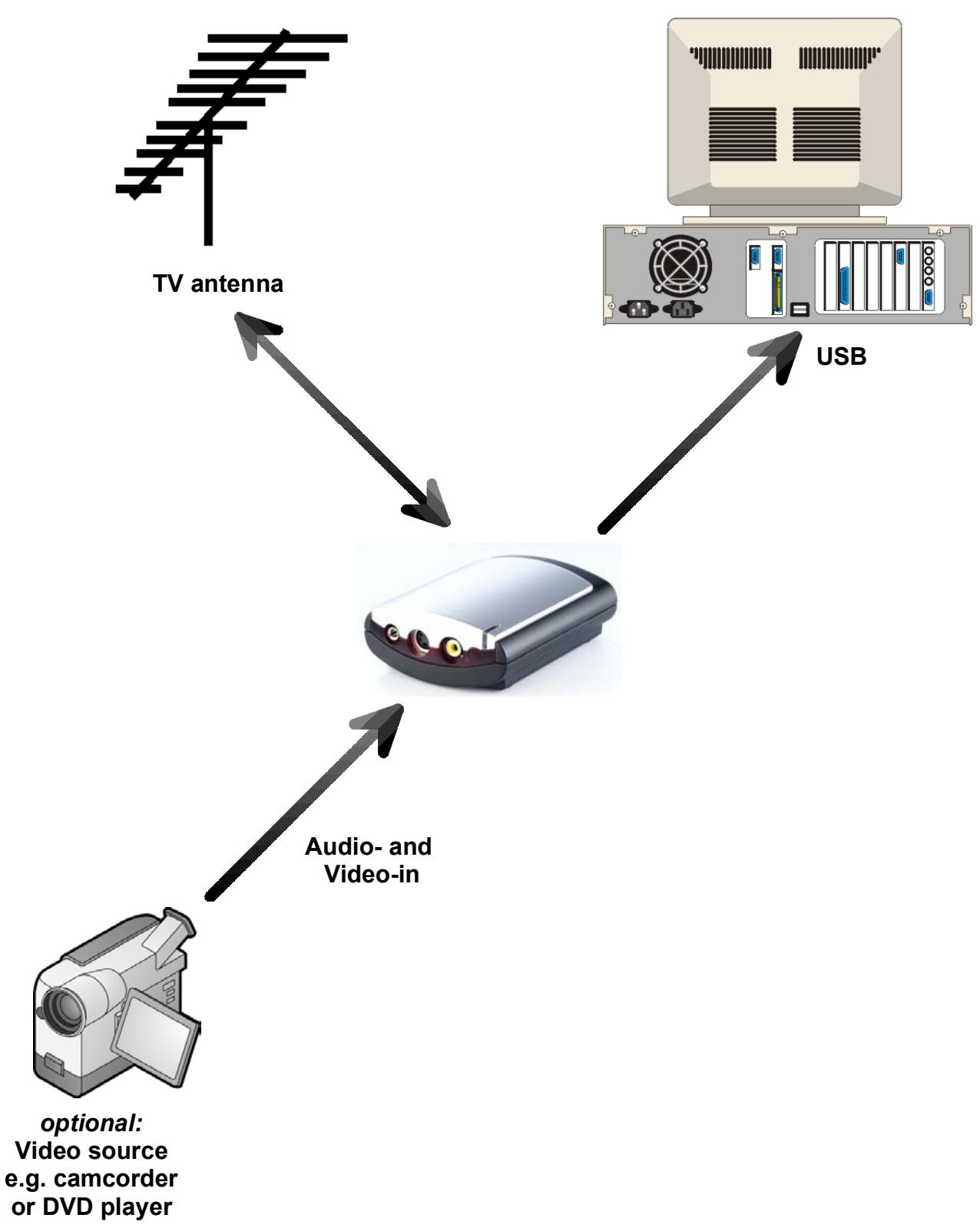
- Hook up the antenna input of PCTV 50e/100e to your house antenna (coaxial connection) or to your cable connection.

To connect the antenna, you need the corresponding cable. Note that the quality of the cable has a great influence on the quality of the reception.
PC connection
- Insert the USB connector of PCTV 50e/100e into your PC.

Use only the USB cable included in the delivery.
Video device connection
- Connect your video source (for example, a camcorder, video recorder or DVD player) to the audio input and to the corresponding video input of PCTV 50e/100e. You can use any video device that delivers an S-video signal or a composite video signal in PAL, NTSC or SECAM (for example, a video recorder, camcorder or DVD player). This is independent of the video system used (for example, VHS, S-VHS, Hi8 or Video 8).

Note that, depending on the product variant, not all video standards (PAL, NTSC or SECAM) are available.

If your video source has a S-video output, connect this and not the composite video output to ensure better output quality.
Sample configuration
Bus system
USB 2.0
Antenna input
75 Ohm, F-connector or IEC
Video input
S-video input (mini-DIN), composite video input (cinch)
Audio input
Stereo audio input (3.5 mm jack plug)
TV tuner
Microtune MT2050
The tuner supports the following depending on it circuitry:
PAL B/G/D/K/I/SECAM
or
NTSC, PAL M/N
The frequency range is 48.25 to 855.25MHz .
CE
Konformitätserklarung nach ISO/IEC Guide 22
Declaration of conformity in accordance with ISO/IEC Guide 22
Nr. / No 1.00
Anbieter / Supplier : Pinnacle Systems GmbH
Anschrift / Address : Frankfurter Strasse 3c, 38122 Braunschweig, Germany
Produkt / Product : PCTV USB2
Das oben beschriebene Produkt ist konform mit:
The product described above is in conformity with:
| Dokument-Nr. Document No. | Titel Title |
| EN 55022 : 1998 Class B | Grenzwerte und Messverfahren für Funkentstörungen von Einrichtungen der Informationstechnik Limits and methods of measurement of radio interference characteristics of information technology equipment |
| EN 55024 : 1999 | Störfestigkeitseigenschaften für Einrichtungen der Informationstechnik - Grenzwerte und Prüfverfahren Immunity characteristics for information technology equipment - limits and methods of measurement |
| EN 61000-4-2 : 2001 | Störfestigkeit gegen Entladung statischer Elektrizität Electrostatic discharge immunity test |
| EN 61000-4-3 : 2001 | Störfestigkeit gegen hochfrequente elektron magnetische Felder Radiated, radio-frequency, electromagnetic field immunity test |
| EN 61000-4-4 : 2002 | Störfestigkeit gegen schnelle transiente elektrische Stögrößen/BURST Electrical fast transient/burst immunity test |
| EN 61000-4-5 : 2001 | Störfestigkeit gegen Stößspannungen/SURGE Surge immunity test |
| EN 61000-4-6 : 2001 | Störfestigkeit gegen leitungsgeführte Stögrößen, induziert durch hochfrequente Felder Immunity to conducted disturbances, induced by radio-frequency fields |
| EN 61000-4-8 : 2001 | Störfestigkeit gegen Magnetfelder mit energietechnischen Freqenzen Power frequency magnetic field immunity test |
| EN 61000-4-11 : 2001 | Störfestigkeit gegen Spannungseinbrüche, Kurzzeitunterbrechungen und Spannungsschwankungen Voltage dips, short interruptions and voltage variations immunity tests |
| ENV 50204 : 1995 | Störfestigkeit gegen hochfrequente elektron magnetische Felder von digitalen Funktelefonen Radiated electromagnetic field from digital radio telephones - Immunity test |
| EN 61000-3-2 : 2001 | Grenzwerte für Oberschwingungsströme Limitations for harmonic currents |
| EN 61000-3-3 : 2001 | Grenzwerte für Spannungsschwankungen und Flicker Limitations of voltage fluctuations and flicker |
| EN 55013 : 1990 + A14:1999 | Funkstöreibengenschaften von Rundfunkempfängern und verwandten Geräten der Unterhaltungselektronik Limits and methods of measurement of radio disturbance characteristics of broadcast receivers and associated equipment |
| EN 55020 : 1994 + A14:1999 | Störfestigkeit von Rundfunkempfängern und verwandten Geräten der Unterhaltungselektronik Electromagnetic immunity of broadcast receivers and associated equipment |
| EN 60950 : 2000 | Sicherheit von Einrichtungen der Informationstechnik Safety of information technology equipment |
Dieser Erklärung liegt zugrunde: Prüfbericht(e) des EMV-Prüflabors
This certification is based on: Test report(s) generated by EMI-test laboratory
Braunschweig, 27. Februar 2004 / February 27th, 2004
Bernd Riemann
Direktor Hardwareentwicklung
Director Hardware Engineering

Finanzdirektor / Director Finance
(Rechtsverbindliche Unterschrift / Legally Binding)
BAUGLEICHHEITSBESCHEINIGUNG
STATEMENT OF TYPE-EQUALITY
Hiermit wird bestätig, daß die TV Tuner Karten With this is confirmed, that the TV Tuner Boards
PCTV USB2
PCTV 100e
PCTV 50e
baugeliche Produkte sind und sich somit auf die selbst Prüfberichte beziehen. are type equal products and that they refer to the same EMI test reports.
Braunschweig, 30. August 2005
Braunschweig, August 30th, 2005
Pinnacle Systems GmbH
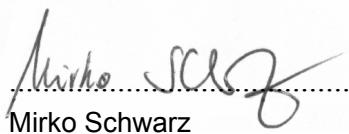
Hardware Engineering
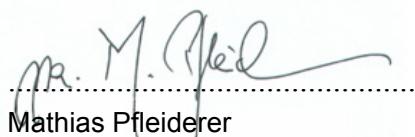
Director Material Management
(Rechtsverbindliche Unterschrift / Legally Binding)
- PCTV 50E/100E HARDWARE
- TABLE OF CONTENTS
- NOTES
- COMPUTER HARDWARE
- PROCESSOR
- MEMORY
- HARD DISK
- GRAPHICS CARD
- SOUND CARD
- USB PORT
- CD-ROM / DVD-ROM DRIVE OR RECORDER
- COMPUTER SOFTWARE
- CONNECTIONS – FRONT SIDE
- CONNECTIONS – REAR SIDE
- ANTENNA CONNECTION
- PC CONNECTION
- VIDEO DEVICE CONNECTION
- SAMPLE CONFIGURATION
- BUS SYSTEM
- ANTENNA INPUT
- VIDEO INPUT
- AUDIO INPUT
- TV TUNER
- CE
- KONFORMITÄTSERKLARUNG NACH ISO/IEC GUIDE 22
- DECLARATION OF CONFORMITY IN ACCORDANCE WITH ISO/IEC GUIDE 22
- BAUGLEICHHEITSBESCHEINIGUNG
- STATEMENT OF TYPE-EQUALITY
Marque : PINNACLE
Modèle : PCTV 100E
Catégorie : Carte TV